

TL;DR
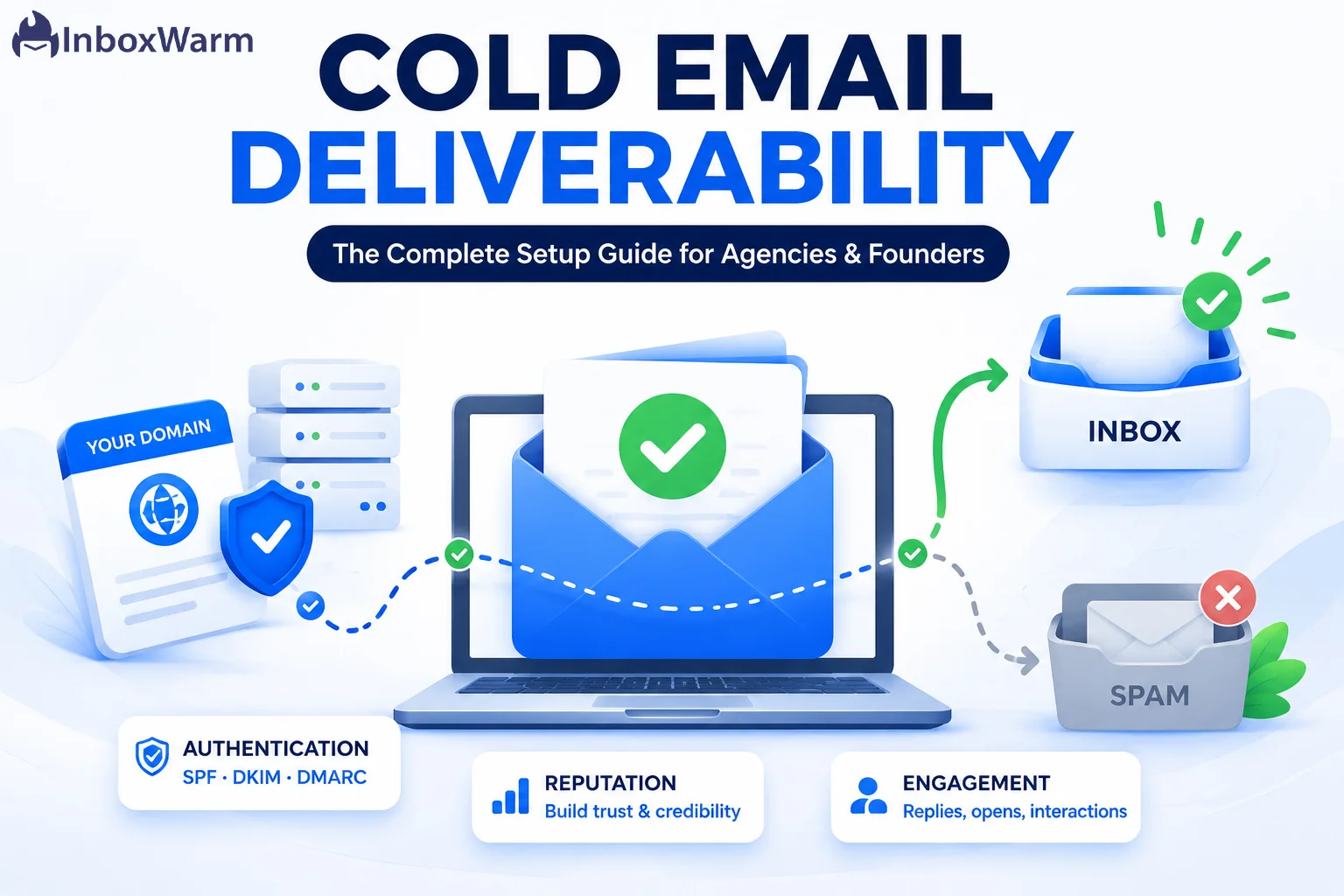
Cold email deliverability is the rate at which your outreach reaches recipient inboxes instead of spam folders or being blocked. You improve it by authenticating your domain with SPF, DKIM, and DMARC, warming up new mailboxes before you send, keeping volume low per inbox, maintaining clean lists, and monitoring sender reputation continuously.
- Deliverability is not delivery. A 99% delivery rate can still mean a third of your emails sit in spam.
- Authentication (SPF, DKIM, DMARC) is now mandatory for senders to Gmail, Yahoo, and Outlook, not optional.
- Cold outreach starts from zero trust, so domain and mailbox warm-up is the single biggest lever on inbox placement.
- Keep your spam complaint rate below 0.1%. Cross 0.3% and providers start filtering everything you send.
You can write the sharpest cold email in your category, with a hook that lands and an offer that converts, and still get nothing back. Not because the message was wrong, but because nobody saw it. It went to spam.
For agencies running outreach across dozens of client domains, and for founders chasing the first 50 demos, that silent failure is the most expensive problem in the pipeline. The stakes have climbed sharply. According to Validity’s 2025 Email Deliverability Benchmark Report, only about 83.5% of emails worldwide reach the inbox, which means roughly one in six never gets seen.
Cold outreach sits below that average because recipients did not ask to hear from you. On top of that, Gmail, Yahoo, and Outlook now enforce strict sender requirements that reject or filter mail from senders who skip authentication. Get the setup wrong and you do not just lose a campaign; you burn a domain reputation that can take months to rebuild.
In this guide, you’ll learn exactly how cold email deliverability works, why outreach lands in spam, and how to build sending infrastructure that holds up. We’ll cover domain and mailbox setup, SPF, DKIM, and DMARC authentication for cold outreach, email warmup, sender and domain reputation, a best-practices checklist, and how to keep cold emails out of spam for the long run.
The order matters, so work through it top to bottom.
Table of Contents
What Is Cold Email Deliverability?
Cold email deliverability is the percentage of your outbound cold emails that actually reach recipient inboxes, rather than being bounced, blocked, or filtered into spam. It is the metric that decides whether outreach has any chance to work at all. If the message never reaches the inbox, the subject line and the offer are irrelevant.
People mix up three terms here, so keep them separate:
- Email delivery measures whether the receiving server accepted your message.
- Email deliverability, also called inbox placement, measures whether it reached the inbox specifically.
- The gap between them is where most senders quietly lose pipeline. A campaign can show a 99% delivery rate and still have 30% of those messages sitting in spam, which your sending tool happily reports as delivered.
Three more terms run through this entire guide:
- Sender reputation is the trust score mailbox providers assign to your sending identity (your domain and IP) based on how recipients react to your mail.
- Domain reputation is the slice of that score tied specifically to your sending domain. For cold outreach, it is the one you protect hardest.
- Email sender score is an internal number providers compute from signals like complaint rate, bounce rate, and engagement. You cannot see Gmail’s exact figure, but you can read its direction in your email spam score and in Postmaster Tools.
Cold outreach is a special case because it begins from zero trust. With a newsletter, recipients opted in, so early engagement is positive. With cold email, the recipient never asked to hear from you, so a few spam complaints early on can sink a brand-new domain fast.
Why Do Cold Emails Land In Spam?
Cold emails land in spam when mailbox providers cannot verify who you are, do not trust your domain yet, or see signals that look like bulk unsolicited mail. It is rarely one thing. It is usually a stack of small problems that add up to a low sender score.
Here are the causes that matter most, roughly in order of impact.
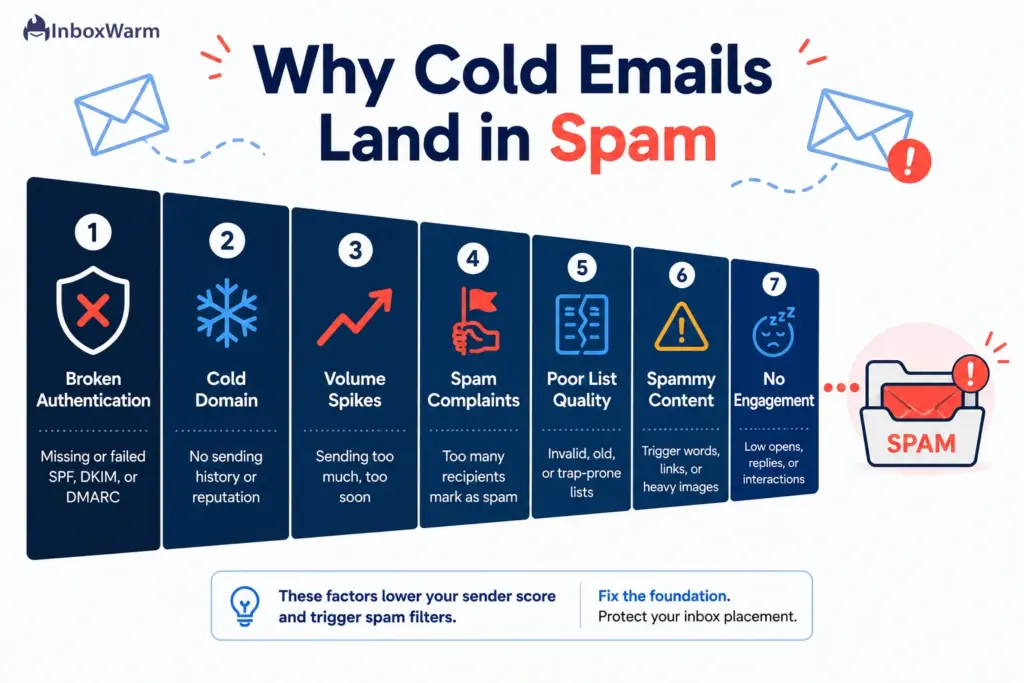
Missing or broken authentication
No SPF, DKIM, or DMARC, or records that fail alignment, is the fastest route to the spam folder. Providers treat unauthenticated cold mail as suspect by default.
A cold domain or cold mailbox
A brand-new domain has no sending history. Blasting it from day one looks exactly like a spammer who just registered a throwaway domain.
Volume spikes
Going from zero to hundreds of emails a day overnight is the clearest spam pattern there is. Real senders ramp gradually.
High spam complaint rates
When recipients hit ‘report spam,’ providers notice immediately. Cross the complaint thresholds and filtering hits everything from your domain.
Poor list quality
Sending to invalid, outdated, or scraped addresses drives bounces and spam-trap hits, both of which crush reputation.
Spammy content and links
Money words, ALL CAPS, link shorteners, a single giant image, or a mismatched tracking domain all raise filter scores.
No engagement
If nobody opens or replies, providers learn your mail is unwanted and route it to spam preemptively.
The fix is not a trick or a magic subject line. It is correct infrastructure plus patient reputation building, which is exactly what the rest of this guide walks through.
How Do You Set Up Cold Email Infrastructure The Right Way?
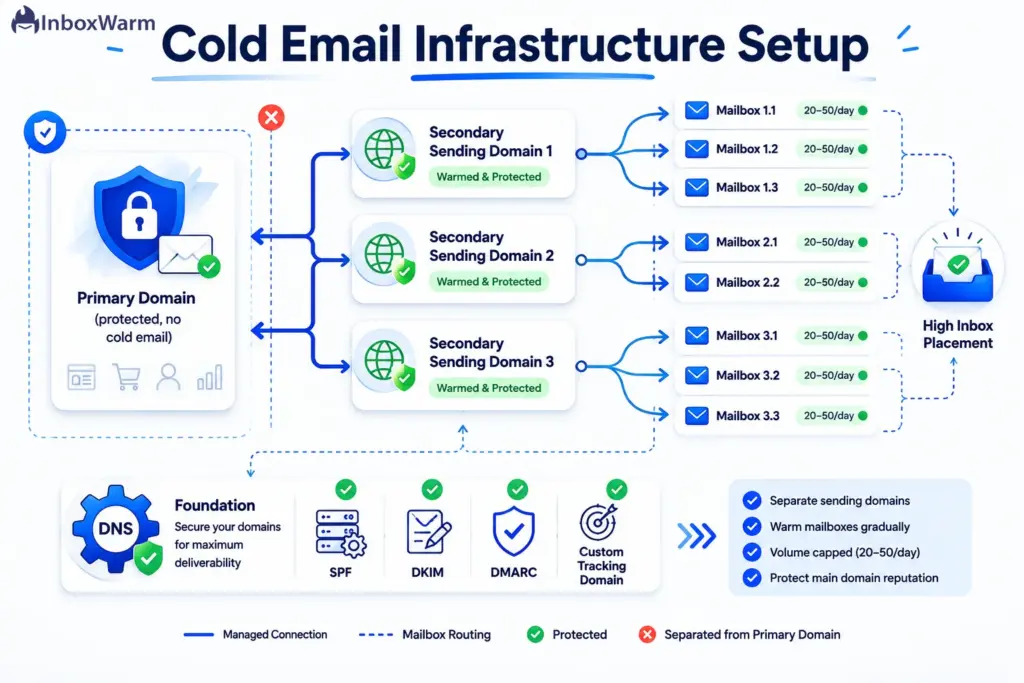
Set up cold email infrastructure by separating your outreach sending from your primary business domain, spreading volume across multiple secondary domains and mailboxes, and configuring DNS correctly before you send a single message. The goal is to isolate risk so that if one domain takes a reputation hit, your main brand domain and the rest of your sending stay clean.
Work through these steps in order.
Step 1: Protect Your Primary Domain
Never run cold outreach from your main business domain (the one your website and real email live on). If that domain gets flagged, your transactional and team email suffers too. Use dedicated sending domains for cold email, and keep the primary domain for warm, opted-in communication only. This single decision prevents the most painful failure mode in outreach.
Step 2: Register Secondary Sending Domains
Buy one or more secondary domains that closely match your brand, for example a .com variant or a ‘get’, ‘try’, or ‘mail’ prefix. Point each to your sending stack and treat each as its own reputation bucket.
Agencies running outreach at scale typically run several domains per client so that no single domain carries too much volume. Spreading sending lowers the per-domain risk and gives you room to rotate if one domain degrades.
Step 3: Create Mailboxes And Cap Volume Per Inbox
Create two or three mailboxes per sending domain rather than one mailbox doing all the work. Then cap daily volume per mailbox. Most deliverability practitioners keep cold sending in the range of 20 to 50 emails per mailbox per day, ramping up from a lower number during warm-up. Low per-inbox volume keeps your sending pattern looking human and gives complaints far less room to spike your rate.
Step 4: Configure DNS And A Custom Tracking Domain
Set your MX records to your mailbox provider, add the authentication records covered in the next section, and configure a custom tracking domain instead of using your sending platform’s shared tracking link. A shared tracking domain that other senders have already burned will drag down your own deliverability.
A branded tracking domain (a subdomain like link.yourdomain.com) keeps click tracking aligned with your sending identity and avoids inheriting someone else’s bad reputation.
How Do You Authenticate Cold Email With SPF, DKIM, And DMARC?
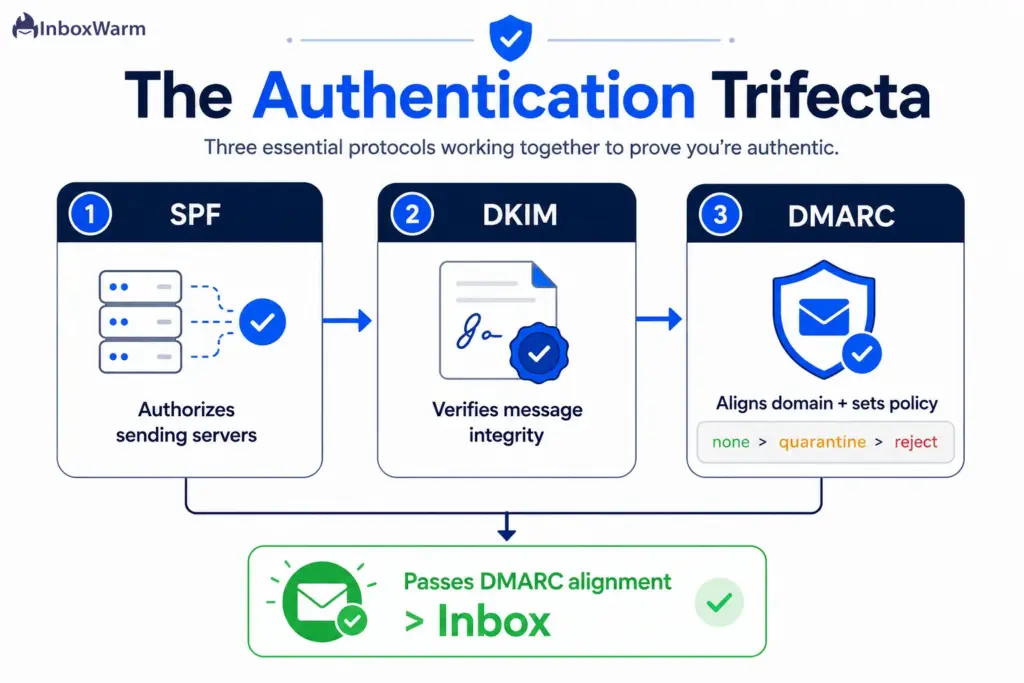
Authenticate cold email by publishing three DNS records, SPF, DKIM, and DMARC, on every sending domain, and making sure they pass DMARC alignment. This is no longer optional.
Since February 2024, Google and Yahoo have required bulk senders (more than 5,000 messages a day to their users) to authenticate with all three protocols. Microsoft began enforcing the same requirement for Outlook, Hotmail, and Live on May 5, 2025. Even below the bulk threshold, unauthenticated cold mail gets filtered.
Set Up SPF (Sender Policy Framework)
SPF is a DNS TXT record that lists which servers are allowed to send email on behalf of your domain. The receiving server checks whether the sending IP appears in your record. Add a single SPF record per domain that includes every service you send through, and keep it under the 10 DNS lookup limit, or it will fail. Build and validate yours with the InboxWarm.ai SPF generator, then confirm it resolves with the SPF checker.
Set Up DKIM (DomainKeys Identified Mail)
DKIM adds a cryptographic signature to every message, which the receiving server verifies against a public key published in your DNS. A valid signature proves the message was not altered in transit and genuinely came from your domain. Generate the key pair in your mailbox or sending platform, publish the public key as the provided DNS record, and verify it with the DKIM checker. Sign with your own sending domain, not your platform’s domain, so the signature aligns for DMARC.
Set Up DMARC (Domain-based Message Authentication)
DMARC tells receiving servers what to do when SPF or DKIM fails, and it requires that the visible From domain align with the authenticated domain. Start with a monitoring policy of p=none plus a reporting address so you can see what is sending as you. Once your legitimate mail passes cleanly, move to p=quarantine, and only then to p=reject. Create the record with the InboxWarm.ai DMARC generator and monitor enforcement with the DMARC checker.
The three protocols work as a system. SPF and DKIM prove the mail is authorized and intact. DMARC ties them to your visible domain and sets the policy. The underlying standards are RFC 7208 (SPF), RFC 6376 (DKIM), and RFC 7489 (DMARC), with one-click unsubscribe defined in RFC 8058.
What Is Email Warmup And Why Does Cold Outreach Need It?
Email warmup is the process of gradually increasing sending volume from a new domain or mailbox while generating positive engagement, so mailbox providers learn to trust you before real outreach begins. InboxWarm.ai is an AI-powered email warm-up tool that improves inbox placement and sender reputation.
Warm-up is the single biggest lever on cold email deliverability, because cold sending starts from zero trust and a new domain has no history to vouch for it. During warm-up, your mailboxes send and receive messages that get opened, replied to, and moved out of spam, which builds a record of healthy, wanted email.
You start with a handful of messages a day and ramp up over two to four weeks before sending real campaigns at volume. Skip this step and your first real send hits providers as an unknown domain pushing unsolicited mail, which is the textbook spam profile.
Manual warm-up (emailing colleagues and asking for replies) does not scale. Automated email warmup runs the engagement loop for you across a network of real inboxes, ramps volume on a schedule, and keeps mailboxes warm between campaigns.
Whether you send from Gmail, Outlook, or a custom SMTP provider, the principle is identical: prove healthy engagement before you scale. For server-level senders, the SMTP warm-up guide covers the ramp schedule in details.
How Do You Improve Sender Reputation And Domain Reputation?
Improve sender and domain reputation by keeping complaints low, engagement high, and your sending patterns consistent over time. Reputation is earned slowly and lost quickly, so the work is ongoing rather than a one-time setup.
Watch your spam complaint rate above all else. Google asks senders to keep it below 0.1% and treats 0.3% as the ceiling where enforcement begins. To put that in perspective, a mailbox sending 1,000 messages needs only one complaint to hit 0.1%.
Monitor the number directly in Google Postmaster Tools, which reports your domain and IP reputation, spam rate, and authentication results as Gmail sees them.
The table below maps each reputation signal to the action that protects it.
| Reputation Signal | What It Measures | How To Protect It |
|---|---|---|
| Spam complaint rate | How often recipients report you | Stay below 0.1%; tighten targeting and make opting out easy |
| Bounce rate | Invalid or dead addresses | Verify every list before sending; remove hard bounces immediately |
| Engagement | Opens, replies, positive actions | Send relevant, personalized mail to people likely to respond |
| Sending consistency | Steady volume over time | Ramp gradually; avoid spikes and long silent gaps |
| Authentication | SPF, DKIM, DMARC alignment | Keep all three passing on every sending domain |
Treat reputation as a balance you are always topping up. One bad campaign to a stale list can undo weeks of careful sending, so protect the asset deliberately.
What Are The Cold Email Deliverability Best Practices?
The cold email deliverability best practices come down to disciplined infrastructure, honest list quality, and restraint on volume. None of them are complicated. The hard part is doing all of them consistently across every domain and campaign.
Use this as a pre-send checklist.
- Separate domains. Run outreach from dedicated sending domains, never your primary business domain.
- Authenticate everything. SPF, DKIM, and DMARC passing and aligned on every sending domain, with a custom tracking domain.
- Warm up first. Ramp new domains and mailboxes for two to four weeks before real sending, and keep them warm between campaigns.
- Cap volume per inbox. Hold cold sending to roughly 20 to 50 emails per mailbox per day; add mailboxes instead of overloading one.
- Verify your list. Run every address through validation before sending to cut bounces and avoid spam traps.
- Personalize and stay relevant. Targeted, useful messages earn replies, and replies are the strongest positive signal you can send.
- Include a clear opt-out. Make it easy to unsubscribe and honor it within two days, per the one-click unsubscribe standard.
- Avoid spam triggers. Skip link shorteners, image-only emails, ALL CAPS, and money words; write like a human.
- Monitor continuously. Watch Postmaster Tools, run seed tests, and react to reputation dips before they become blocks.
How Do You Keep Cold Emails Out Of Spam Long-Term?
Keep cold emails out of spam long-term by monitoring placement continuously, keeping mailboxes warm, rotating domains before they degrade, and tightening targeting whenever complaints rise. Deliverability is not a setup you finish, it is a system you maintain. The senders who stay in the inbox are the ones who treat it as an ongoing operation.
Run regular seed inbox tests, where you send to a set of monitored test addresses across Gmail, Outlook, and Yahoo, to see exactly where your mail lands. Watch your Postmaster Tools dashboard for reputation and spam-rate trends, not just one-off numbers. When a domain’s placement starts to slip, pause it, let it recover, and shift volume to a healthy domain in your pool. Keep warm-up running in the background so mailboxes never go cold between campaigns.
Most importantly, listen to your complaint and reply data. Rising complaints mean your targeting or your offer is off, and no amount of technical tuning fixes a list that does not want to hear from you. Fix the input, and the deliverability follows.
Conclusion
Cold email deliverability is won before you send your first campaign. The agencies and founders who consistently reach the inbox are not using a secret subject line, they are running clean infrastructure: separate sending domains, full SPF, DKIM, and DMARC authentication, patient warm-up, capped volume, and verified lists. Everything in this guide builds on that foundation, in that order.
The environment has only gotten stricter. With Gmail, Yahoo, and Outlook all enforcing authentication and complaint thresholds, and with roughly one in six emails missing the inbox industry-wide, the margin for sloppy setup is gone. The upside is that most of your competitors still get this wrong, so doing it right is a durable advantage rather than a checkbox.
If you take one thing away, make it this: protect your domain reputation like the asset it is, and warm up before you scale. Do that, monitor honestly, and improve email deliverability to make it a steady operation instead of a recurring fire. The rest is consistency.
Frequently Asked Questions
Do I need SPF, DKIM, and DMARC for cold email if I send under 5,000 a day?
Yes. The 5,000-per-day rule is the bulk-sender threshold for mandatory enforcement, but mailbox providers still filter unauthenticated cold mail well below that volume. Authentication is the baseline for any sender who wants to reach the inbox, and there is no real downside to publishing all three records on every sending domain.
How many cold emails can I send per inbox per day?
Most deliverability practitioners keep cold sending to roughly 20 to 50 emails per mailbox per day, starting lower during warm-up. Rather than pushing one mailbox harder, add more mailboxes and domains to scale volume. Low per-inbox sending keeps your pattern looking human and limits how fast complaints can damage any single domain.
What is a good spam complaint rate for cold email?
Keep it below 0.1%. Google treats 0.3% as the ceiling where enforcement kicks in, but that is a danger line, not a target. Because cold recipients did not opt in, even a small spike in complaints can hurt a new domain quickly, so tight targeting and an easy opt-out matter more in cold outreach than anywhere else.
Why are my cold emails going to spam even with authentication set up?
Authentication is necessary but not sufficient. If SPF, DKIM, and DMARC all pass and you still land in spam, the usual culprits are a cold domain that has not been warmed up, volume ramped too fast, a stale or unverified list, low engagement, or spammy content and links. Work through those in order, starting with warm-up.
Should I use my main company domain for cold outreach?
No. Always send cold email from dedicated secondary domains and keep your primary business domain for warm, opted-in mail. If an outreach domain takes a reputation hit, you want that damage contained, not bleeding into the domain your team and customers rely on every day.
What is email warmup, and is it really necessary for cold email?
Email warmup gradually increases sending volume from a new domain or mailbox while generating positive engagement, so providers learn to trust you before outreach begins. For cold email, it is necessary, not optional, because you are starting from zero sending history. Skipping warm-up is the fastest way to get a new domain filtered.
Stop guessing where your cold emails land
Your cold email performance is determined long before you hit send. InboxWarm.ai helps you build sender reputation, warm up new domains, and improve inbox placement, so your outreach lands where it belongs..