

TL;DR
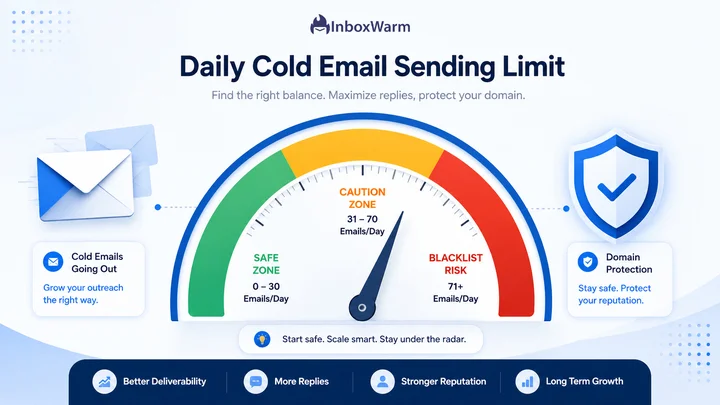
- New domains should send 5 to 10 emails per day per mailbox for the first two weeks, scaling up gradually.
- Warmed-up domains with 60+ days of history can typically send 30 to 50 emails per day per mailbox safely.
- Google and Yahoo enforce a 5,000 emails per day cap per sending domain as of their 2024 bulk sender requirements.
- Blacklist risk comes from sudden volume spikes, low engagement rates, and missing SPF, DKIM, and DMARC records, not just raw daily count.
- Email warm-up tools like InboxWarm.ai automate the ramp-up process so you do not have to manually track sending limits.
The safe daily sending limit for cold email depends on your domain age and warm-up status, not a single universal number. A brand new domain should stay between 5 and 10 emails per day per mailbox, while a properly warmed domain with 60 or more days of consistent sending history can often handle 30 to 50 emails per day without triggering spam filters or landing on a blacklist.
Mailbox providers like Google and Microsoft do not publish an exact daily limit because the real signal they track is reputation, not volume. A new domain sending 200 cold emails on day one looks identical to a spam operation, regardless of how relevant the message is.
This article breaks down the actual numbers by domain age, the technical limits Google and Yahoo enforce, and how to scale your sending volume without damaging your sender reputation.
Table of Contents
How Many Cold Emails Should You Send Per Day By Domain Age?
Domain age and sending history are the two biggest factors that mailbox providers use to decide how much trust your domain has earned.
The table below outlines safe starting points based on real warm-up benchmarks.
| Domain Age | Recommended Daily Volume | Per Mailbox |
|---|---|---|
| Brand new (0 to 14 days) | 5 to 10 emails | Per mailbox |
| Early warm-up (15 to 30 days) | 15 to 25 emails | Per mailbox |
| Established (31 to 60 days) | 25 to 40 emails | Per mailbox |
| Fully warmed (60+ days) | 40 to 50+ emails | Per mailbox |
These figures assume each mailbox is also running parallel warm-up traffic, meaning automated back-and-forth emails that simulate real engagement. Skipping warm-up and jumping straight to cold outreach at these volumes will not produce the same safety, since warm-up traffic and cold send volume serve different purposes in building reputation.
Why New Domains Need the Lowest Volume
A domain with no sending history has zero reputation data for Google, Microsoft, or Yahoo to reference. Their spam filters default to caution, which means even a small spike in volume can look suspicious. Staying at 5 to 10 emails per day for the first two weeks gives mailbox providers a clean, low-risk pattern to build trust around.
Why Multiple Mailboxes Change the Math
Agencies and SDR teams often run several mailboxes per domain or several domains per client. The daily limit applies per mailbox, not per domain, but providers also watch domain-level patterns. Running 10 mailboxes at 10 emails each on a brand new domain still produces 100 emails a day from one domain, which can trigger the same red flags as one mailbox sending 100 emails.
What Are Google and Yahoo’s Official Sending Limits?
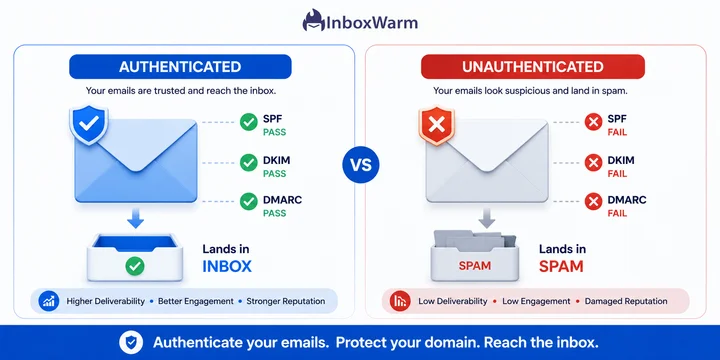
Since February 2024, Google’s bulk sender requirements and Yahoo’s sender requirements apply to anyone sending 5,000 or more emails per day to their addresses. This threshold mandates SPF, DKIM, and DMARC authentication; a one-click unsubscribe link for marketing email; and a spam complaint rate under 0.3 percent.
For most cold email senders, the 5,000 per day figure is far above realistic outbound volume. The practical takeaway is not the number itself; it is that authentication is no longer optional.
Missing DMARC records alone can cause inboxing failures even at low volumes, regardless of how careful your warm-up process is.
Do Smaller Senders Need to Worry About These Rules?
Yes, even at 50 emails per day, Google and Yahoo apply the same authentication checks to every sender, not just bulk senders above the 5,000 threshold.
SPF, DKIM, and DMARC affect deliverability at any volume because they confirm domain ownership and prevent spoofing, which is one of the top reasons legitimate cold emails get filtered as spam.
What Actually Gets a Domain Blacklisted?
Daily volume is one input among several. Blacklist providers like Spamhaus and SORBS rely on a combination of signals, and a sudden volume increase is usually the trigger that exposes an underlying problem rather than the root cause itself.
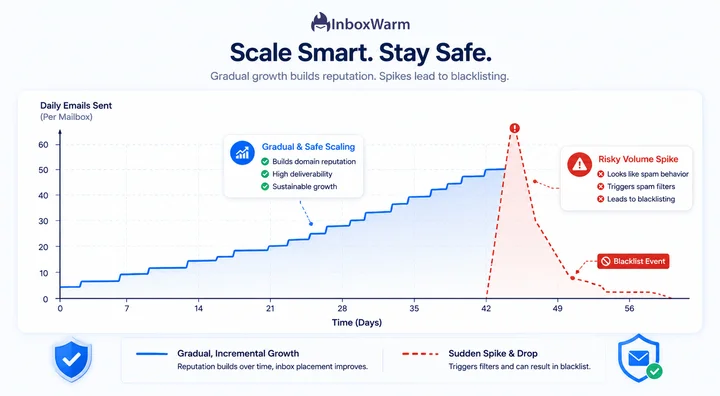
- Sudden spikes: Jumping from 10 to 100 emails per day in a single week looks like a compromised account or spam tool, even with a warmed domain.
- Low engagement: Sending to outdated or unverified lists results in high bounce rates and spam complaints, both of which damage sender reputation faster than volume alone.
- Missing authentication: No SPF, DKIM, or DMARC record makes a domain look unverified, which mailbox providers treat as a red flag regardless of send volume.
- Shared IP reputation: Sending from a shared SMTP relay means your domain inherits the reputation of every other sender on that IP, good or bad.
- Repetitive content: Sending the same template to hundreds of recipients without personalization increases spam trap hits and complaint rates.
How Long Does It Take to Recover From a Blacklist Hit?
Recovery timelines vary by blacklist provider, but most removals take anywhere from 24 hours to two weeks once the underlying issue is fixed and a delisting request is submitted through providers like Spamhaus or SORBS.
The higher cost is usually the pause in sending during recovery, which is why staying within safe daily limits in the first place is cheaper than fixing a blacklist incident. For a full walkthrough, see our guide on How to Check If Your Domain Is Blacklisted.
How Should You Scale Your Daily Sending Volume Safely?
Scaling sending volume works best as a gradual, rules-based process rather than a manual guess.
The goal is to increase volume only after engagement metrics confirm the domain is being trusted at the current level.
Step 1: Confirm Authentication Is Fully Set Up
Before increasing volume, verify that SPF, DKIM, and DMARC are correctly configured and passing. Tools like MXToolbox or Google Postmaster Tools can confirm this in minutes. For the full setup process, see our guide on How to Set Up SPF, DKIM, and DMARC Correctly.
Step 2: Run Warm-Up Traffic in Parallel
Automated warm-up emails that simulate real replies, opens, and inbox saves build reputation faster than cold sends alone. Most domains need 14 to 30 days of consistent warm-up activity before cold volume should increase past the starter range.
If you are new to the concept, our breakdown of What Is Email Warm Up and How Does It Work covers the mechanics in more depth.
Step 3: Increase Volume in Small Increments
Increase daily volume by no more than 20 to 25 percent every 3 to 4 days, and only if bounce rates stay under 2 percent and spam complaints stay near zero. Reversing course immediately if either metric spikes is more effective than pushing through and hoping reputation recovers on its own.
Step 4: Monitor Domain Health Continuously
Manual tracking of bounce rates, spam complaints, and blacklist status across multiple mailboxes becomes unmanageable past 5 to 10 mailboxes. This is the exact problem that InboxWarm.ai’s automated warm-up and domain health monitoring solves, since it tracks engagement signals and automatically adjusts sending pace instead of relying on manual spreadsheets.
Is your domain ready to scale past starter volume?
Run a free Domain Health Check with InboxWarm.ai to see your current sender reputation, authentication status, and a recommended daily sending volume before you increase outreach.
Frequently Asked Questions
2. Can You Send More Cold Emails Per Day If You Use Multiple Mailboxes?
Yes, multiple mailboxes can increase total outreach volume since limits apply per mailbox. However, all mailboxes on the same domain still contribute to that domain's overall reputation, so scaling mailbox count without a warm-up still carries risk.
3. Does Email Warm-Up Actually Increase How Many Emails You Can Send?
Yes. Consistent warm-up activity builds positive engagement history that mailbox providers use to extend trust, which directly increases the volume a domain can handle without triggering spam filters.
4. What Happens If You Exceed Your Domain's Safe Sending Limit?
Exceeding safe limits typically causes a drop in inbox placement first, with emails routing to spam or promotions folders. Continued overuse can escalate to blacklist listings on providers like Spamhaus or SORBS, which affects deliverability across all mailboxes on that domain.
5. How Often Should You Check Your Domain's Blacklist Status?
Checking weekly during active cold outreach is a reasonable baseline, with daily checks recommended during the first 30 days of a new domain or immediately after any noticeable drop in reply rates.
6. Do Warm-Up Tools Work For Both New And Established Domains?
Yes. New domains use a warm-up to build initial reputation, while established domains use ongoing warm-up activity to maintain reputation between cold outreach campaigns, especially during periods of lower sending volume.
Bottom Line
No fixed number applies to every domain. New domains should stay at 5 to 10 emails per day per mailbox, scaling gradually to 40 or 50 once 60 days of consistent warm-up history is established. Google’s and Yahoo’s 5,000 email bulk sender threshold matters less than authentication, since SPF, DKIM, and DMARC affect inbox placement at any volume.
The senders who avoid blacklists are not the ones sending the fewest emails; they are the ones scaling volume based on actual engagement data instead of guesswork. Automating that process with a tool built for warm-up and domain monitoring removes the manual tracking burden entirely.
Continue exploring these related guides: