

TL;DR
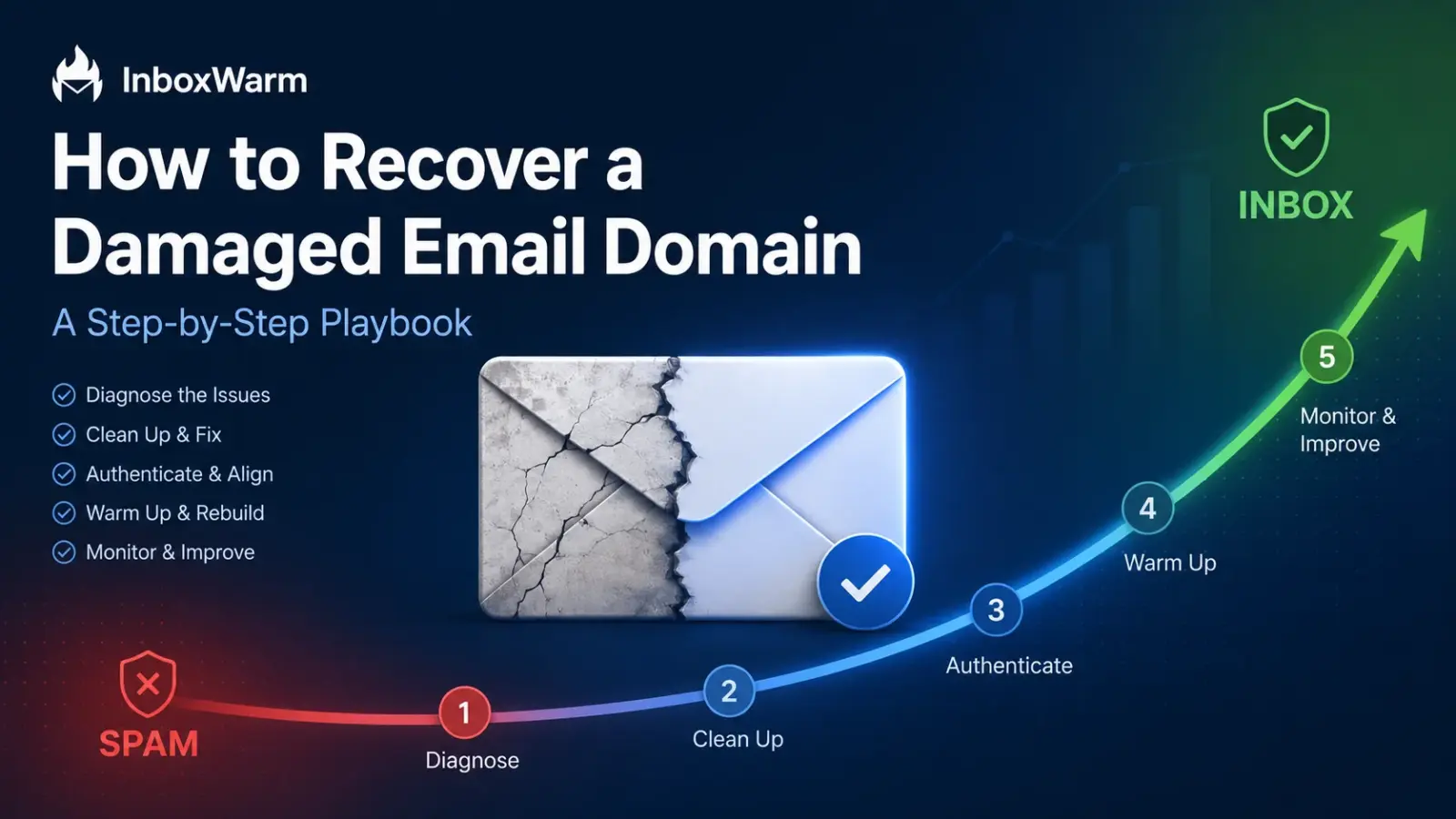
To recover a damaged email domain, stop all sending, find the root cause of the damage, then repair your SPF, DKIM, and DMARC records. Clean your contact list, request blacklist delisting, and warm the domain back up slowly before resuming campaigns. Most domains recover in 4 to 12 weeks of disciplined sending.
- Stop sending the moment reputation drops. More volume makes the damage worse, not better.
- Spam complaints at or above 0.3% are the fastest way to lose inbox placement at Gmail.
- Google retired its old domain reputation score in late 2025. Spam rate and compliance status are now your main Gmail signals.
- Recovery is real, but a truly burned domain is sometimes cheaper to replace than to repair.
A sending domain earns its reputation slowly and loses it quickly. When that reputation falls, the symptoms tend to arrive together: open rates drop, replies fade, and messages that once reached the inbox start landing in spam or bouncing outright. This is what a damaged email domain looks like, and it can throttle an entire outreach program before the cause is obvious.
The damage also compounds over time. Every message sent from a low-trust domain adds another negative signal to its sender reputation, and weak engagement teaches mailbox providers like Gmail and Outlook to expect more of the same. That loop is what makes domain damage so costly for cold email teams, where months of pipeline can erode before anyone traces the decline back to deliverability.
This guide breaks recovery into a clear sequence. It covers how to diagnose the damage, find its root cause, repair authentication, clean the list, and handle blacklists, then rebuild trust through a slow, deliberate email warm-up.
Table of Contents
What Is A Damaged Email Domain?
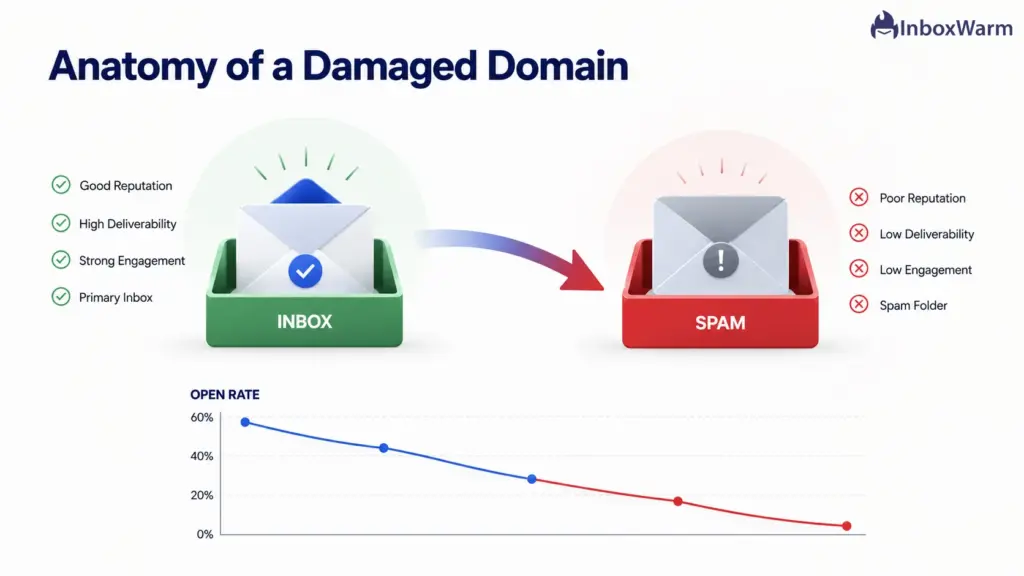
A damaged email domain is a sending domain that mailbox providers no longer trust, so its messages get filtered to spam, throttled, or rejected. The damage shows up as falling open rates, rising bounces, and spam complaints. It almost always follows bad sending habits, not bad luck.
Two terms matter here.
Domain reputation is the trust score a provider assigns to your sending domain based on its history.
Sender reputation is the broader trust signal that also factors in your IP, authentication, and engagement. Domain reputation is the harder one to fix. It follows you across IP changes and new mail servers.
Common signs your domain is damaged:
- Open rates dropped sharply over days or weeks, not gradually.
- More replies and bounces report your mail as undeliverable.
- Test sends land in spam or Promotions instead of the primary inbox.
- Recipients who used to engage suddenly go quiet.
Why Are Your Emails Going to Spam After Domain Damage?
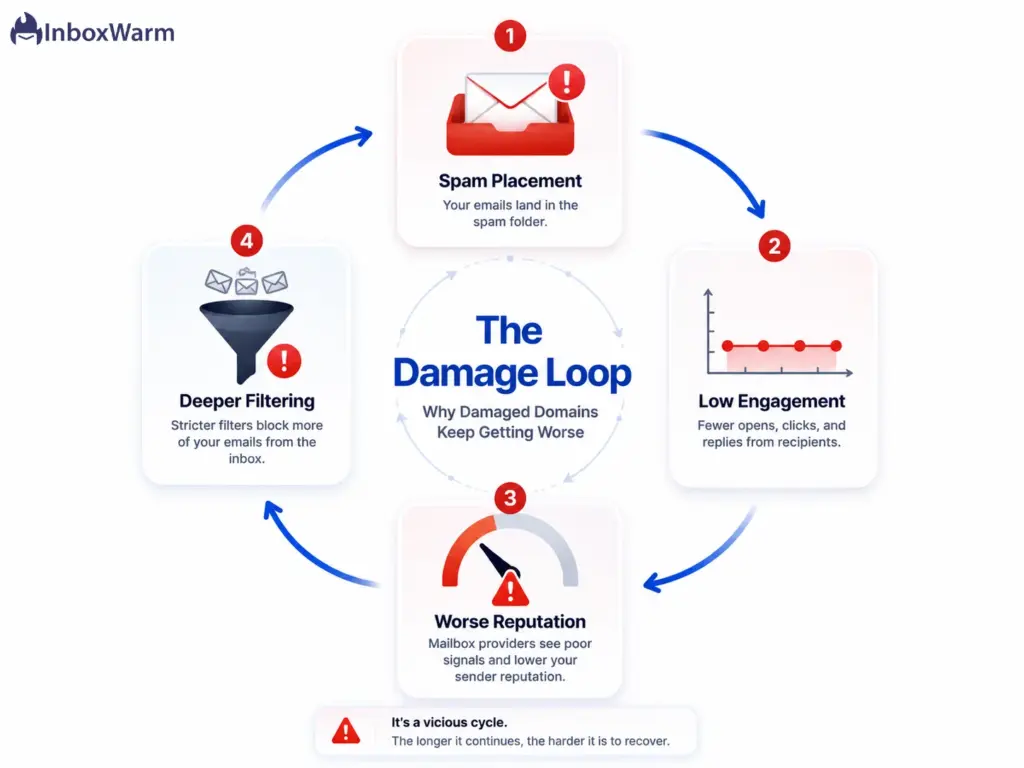
Your emails go to spam after domain damage because mailbox providers score every new message against your domain’s recent sending history. Once that history turns negative, filters route your mail to spam by default, even for recipients who would normally open it. The filter is protecting users based on what your domain did last week, not what it intends to do today.
That creates a feedback loop. Spam placement lowers engagement. Lower engagement signals lower quality. Lower quality deepens the spam placement. Breaking the loop is the whole job of recovery.
The usual root causes:
- Sending to a purchased or scraped list, which triggers complaints and spam traps.
- A sudden volume spike, such as jumping from 50 to 5,000 sends in a day.
- Launching cold campaigns from a brand-new domain with no warm-up.
- Broken or misaligned SPF checker results after switching sending tools, so authentication quietly fails.
- A high hard-bounce rate from invalid addresses. Keep hard bounces under 2 percent.
Spam complaints carry the most weight. Google’s sender guidelines tell bulk senders to keep the user-reported spam rate below 0.1 percent and to never reach 0.3 percent. At 0.3 percent, that is just 3 complaints per 1,000 delivered emails. Cross it and inbox placement drops fast.
How Do You Diagnose A Damaged Email Domain?
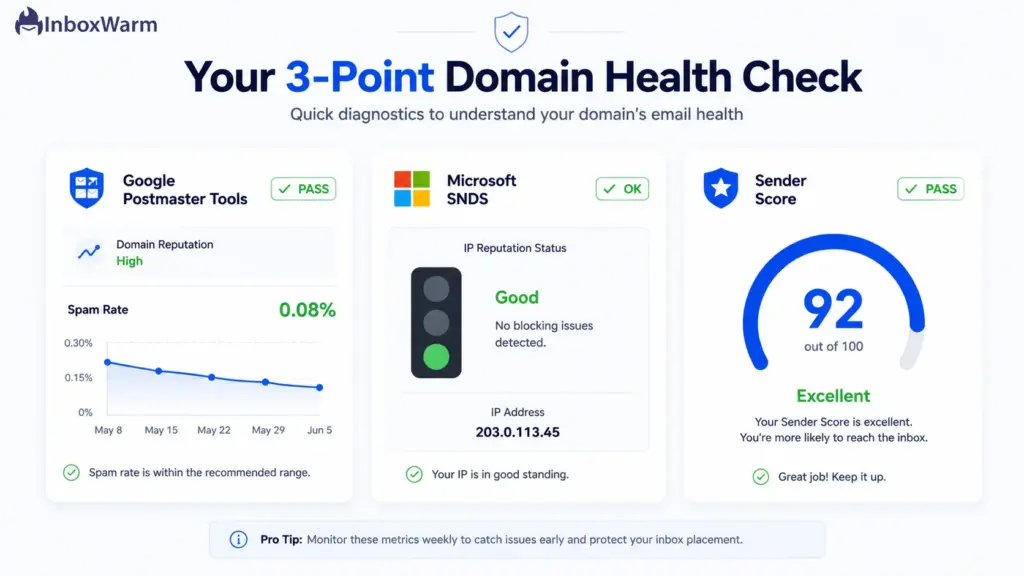
Diagnose a damaged email domain by checking three sources: your spam rate and compliance status in Google Postmaster Tools, your IP status in Microsoft SNDS, and your Sender Score. Together they show how Gmail, Outlook, and the wider ecosystem currently see you. Diagnose before you act, because the fix depends on the cause.
- Check Google Postmaster Tools
Open Google Postmaster Tools and review the data for your sending domain. Note the big 2025 change: Google retired the old High, Medium, Low, and Bad domain reputation dashboards. The new compliance status view now shows a simple Pass or Needs Work result, and the Spam Rate dashboard is your primary signal.
- Keep your spam rate below 0.1 percent. Treat 0.3 percent as a hard ceiling.
- Read the Compliance Status panel for authentication, alignment, and unsubscribe failures.
- Postmaster needs roughly 100 or more emails per day to unique Gmail users, with your domain in the DKIM signature, before it shows data.
- Check Microsoft SNDS
Microsoft Smart Network Data Services (SNDS) reports reputation at the IP level for Outlook, Hotmail, and Live recipients. It shows a Green, Yellow, or Red status for each sending IP, plus complaint and trap-hit data. Microsoft leans on IP reputation more heavily than Google does, so a shared IP with a bad neighbor can hurt you here even when your domain is clean.
- Check Your Sender Score And Blacklists
Validity’s Sender Score rates your sending IP on a 0 to 100 scale, where higher is better. Pair it with a blacklist lookup against major lists like Spamhaus and Barracuda. Then confirm your records are intact with a DKIM checker and a DMARC checker so you know authentication is not the hidden culprit.
The Step-By-Step Email Domain Recovery Playbook
Recovering a damaged email domain follows a fixed order: stop sending, find the root cause, fix authentication, clean your list, clear blacklists, warm the domain back up, then resume slowly.
Skip a step or rush the warm-up, and you restart the damage. Work through them in sequence.
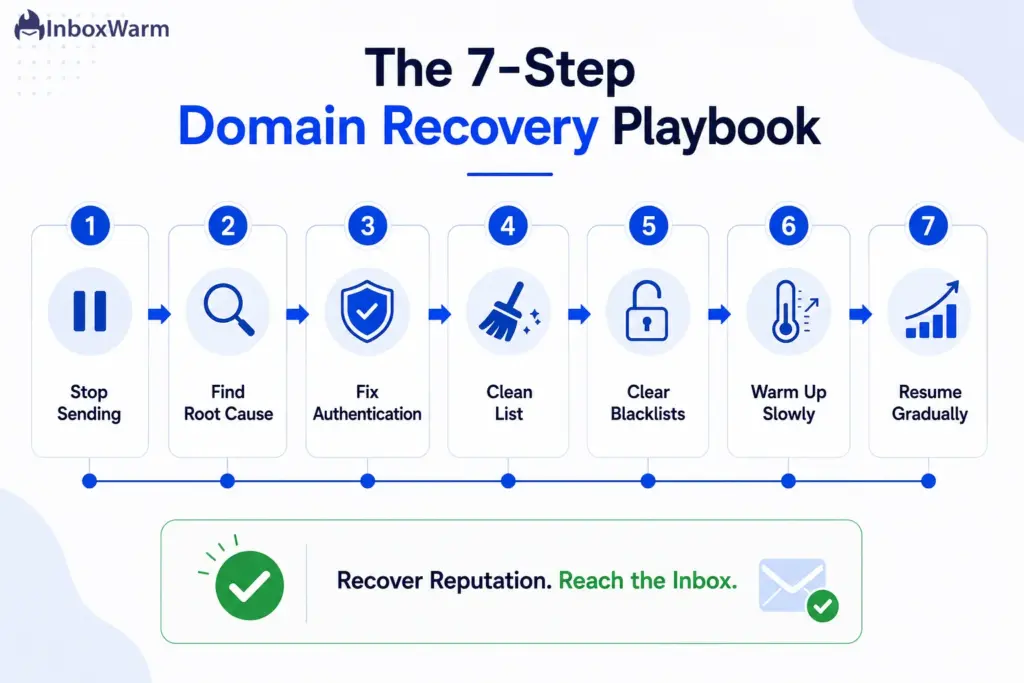
Step 1: Stop Sending Immediately
Pause every campaign from the damaged domain the moment you spot the drop. Each message you send while reputation is low adds another negative signal and digs the hole deeper. Stopping gives the domain room to rest while you investigate. Expect no improvement yet. This step prevents further harm, it does not reverse it.
Step 2: Find The Root Cause
Document what changed before the crash. Did you spike volume, swap sending tools, import a new list, or skip warm-up on a fresh domain? Recovery that ignores the cause will fail, because you will rebuild reputation for a few weeks and then burn it the same way. Write down the trigger before you move on.
Step 3: Fix Your Authentication (SPF, DKIM, DMARC)
Confirm all three authentication records are present, valid, and aligned with your From domain. A misconfigured record after adding a new tool is one of the most overlooked causes of damage. Generate a clean SPF record with fewer than 10 lookups, sign mail with 2048-bit DKIM, and publish a DMARC record. Start at p=none to monitor, then move to p=quarantine once reports look clean.
Authentication is non-negotiable in 2026. Microsoft now rejects unauthenticated bulk mail outright with a 550 5.7.15 error, and the DMARC standard (RFC 7489) defines exactly how alignment is judged. Get this layer right before you send another email.
Step 4: Clean Your Contact List
Remove every hard-bounced address, unverified contact, complainer, and unsubscribe from your list. Run the remaining addresses through a verification tool to catch invalids and spam traps before they ever reach a provider. A clean list cuts your bounce rate and complaint rate at the source. This is the single most controllable lever you have.
Step 5: Clear Any Blacklists
If your domain or IP sits on a blacklist, request delisting through that list’s own process. Spamhaus and Barracuda matter most for inbox placement. Delisting only sticks once the behavior that got you listed has stopped, so fix the cause first. Some lists clear in days, others take weeks of clean sending.
Step 6: Warm The Domain Back Up Slowly
Restart sending with automated warm-up, not campaigns. Begin at 5 to 10 warm-up emails per day from the damaged inbox, then add about 5 per day each week. Warm-up generates real engagement, opens, replies, and spam-to-inbox moves, which overwrites the negative history. If you send from Gmail or Outlook, warm each provider on its own schedule. Recovery warm-up runs slower than fresh-domain warm-up because you are repairing trust, not building it from neutral.
Step 7: Reintroduce Campaigns Gradually
Once warm-up inbox placement holds above 85 percent for several days, reintroduce real sending at very low volume. Start with 10 to 15 highly targeted emails per day to your most engaged contacts. Watch your spam rate daily. If it creeps up, slow down. Ramp only when the numbers stay healthy, never on a fixed calendar.
How Long Does It Take To Recover Domain Reputation?
Domain reputation recovery usually takes 4 to 12 weeks of consistent, low-volume, high-engagement sending. Mild damage can clear in two to four weeks. Severe damage or active blacklisting can take several months. Recovery overwrites negative history, so it always runs slower than warming a fresh domain. There is no button that speeds this up safely.
Rough timelines by severity:
- Mild dip (reputation softening, no blacklist): about two to four weeks.
- Moderate damage (clear spam placement, elevated complaints): about 4 to 8 weeks.
- Severe or burned domain (blacklisted, mostly spam): 8 to 16 weeks, sometimes longer.
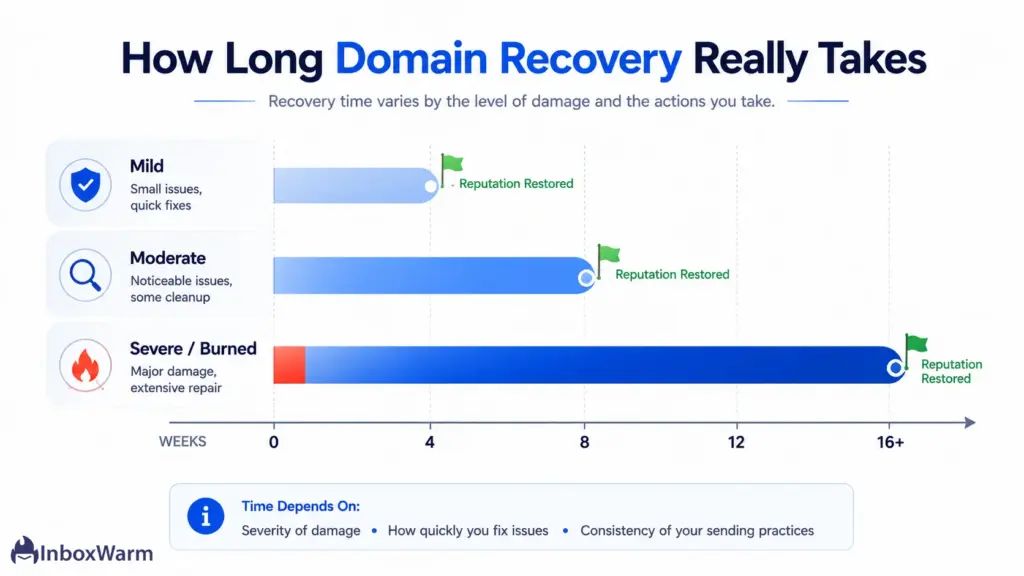
These ranges assume you actually fixed the root cause. Rushing the warm-up reactivates the same spam-detection patterns that caused the damage, which resets the clock. Patience is part of the method, not a nice-to-have.
How Do You Improve Sender Reputation for Cold Email Long-Term?
Improve sender reputation for cold email by keeping volume steady, sending only to verified contacts, personalizing every message, and running continuous warm-up in the background. Reputation is rebuilt and held through engagement, replies, and inbox saves, never through raw volume. The habits that prevent damage are the same ones that sustain recovery.
Ongoing habits that protect a recovered domain:
- Cap cold sending at fewer than 100 emails per day per inbox.
- Use one inbox per domain, and send cold outreach from a dedicated domain, not your main brand domain.
- Verify every list before sending, and suppress non-responders over time.
- Keep warm-up running quietly alongside live campaigns to maintain positive signals.
- Warm SMTP and provider mailboxes continuously, not just at launch.
This is where automated warm-up earns its place. InboxWarm.ai is an AI-powered email warm-up tool that improves inbox placement and sender reputation, sending and engaging with real conversations so providers keep seeing positive signals from your domain. Steady background warm-up turns recovery into a stable baseline.
When Should You Just Retire the Damaged Domain?
Retire a damaged domain when recovery stalls after 8 to 12 weeks of disciplined warm-up, when it sits on major blacklists that refuse delisting, or when the cost of waiting outweighs the cost of a fresh start. A clean restart is sometimes the faster path back to the pipeline. Knowing when to stop is part of the skill.
Signs it is time to move on:
- Spam rate will not drop below 0.3 percent despite weeks of clean sending.
- The domain is the brand domain you cannot afford to keep at risk.
- Blacklist delisting requests keep getting denied or re-listed.
- Warm-up inbox placement plateaus well below 85 percent.
If you do restart, protect the new domain from day one. Send cold outreach from a separate domain so your primary domain reputation stays insulated. Authenticate it fully, warm it before any campaign, and never repeat the volume spike or dirty list that caused the first failure.
Conclusion
A damaged email domain is recoverable, but only if you treat the cause instead of the symptom. The senders who get stuck are the ones who try to send their way out of the problem. The ones who recover fastest stop, diagnose honestly, fix the root issue, and then rebuild trust slowly. The order is the strategy.
Work the playbook in sequence. Stop sending; find what broke; repair authentication; clean your list; clear blacklists; then warm the domain back up before a single campaign goes out. Watch your spam rate and compliance status the whole way.
When you choose to recover a damaged email domain this way, you are not gaming a metric; you are giving providers a reason to trust you again.
Recovery rewards discipline and consistency. Keep volume sane, keep lists clean, and keep warm-up running in the background so the gains hold. Do that, and inbox placement stops being a crisis you fight and becomes a baseline you maintain.
Every day your domain stays in spam, you lose replies, leads, and revenue.
InboxWarm.ai helps rebuild your sender reputation with continuous email warm-up, authentic engagement, and steady trust signals that improve inbox placement over time.
Frequently Asked Questions
Can a blacklisted domain be recovered?
Yes, but it takes longer and starts with delisting. Each blacklist, such as Spamhaus or Barracuda, has its own removal process, and delisting only holds once you have stopped the behavior that caused the listing. After delisting, you still need to warm the domain back up slowly. If a major list repeatedly refuses to delist you, retiring the domain may be faster.
Does buying a new domain fix a damaged reputation?
A new domain gives you a clean slate, but it does not transfer your old reputation or fix bad sending habits. If you repeat the volume spikes or dirty lists that caused the damage, the new domain will burn the same way. A fresh domain is a valid restart only when paired with full authentication, careful warm-up, and clean lists. Treat it as a reset, not a shortcut.
Will Google Postmaster Tools still show my domain reputation score?
No. Google retired the old High, Medium, Low, and Bad domain reputation dashboards when it moved to Postmaster Tools v2 in late 2025. You now see a Compliance Status of Pass or Needs Work, plus a Spam Rate dashboard that is your primary signal. For a reputation-style proxy, many senders pair Postmaster with Sender Score or a blacklist lookup.
How many cold emails per day is safe during recovery?
Start far lower than normal. During the warm-up phase, send only warm-up emails, beginning at 5 to 10 per day from the damaged inbox. Once inbox placement holds above 85 percent, reintroduce real campaigns at 10 to 15 highly targeted emails per day. Even after full recovery, keep cold sending under 100 emails per day per inbox.
Is IP reputation or domain reputation more important?
Both matter, but domain reputation is harder to recover because it follows you across IP changes and new servers. IP reputation is tied to a specific sending IP and can reset when you move IPs. Google leans more on domain reputation, while Microsoft weighs IP reputation heavily. For cold email, protect your domain reputation first, since you cannot escape it by switching infrastructure.
Can email warm-up fix a damaged domain on its own?
Warm-up is essential, but it is not a standalone cure. It rebuilds positive engagement signals, yet it cannot offset broken authentication, a dirty list, or an unresolved blacklist. Warm-up works only after you have stopped sending, fixed the root cause, and cleaned your data. Used as the final rebuilding step, it is the engine of recovery.