

TL;DR
The 5.7.5 Permanent Error Evaluating DMARC Policy means a receiving mail server rejected your email because it could not evaluate your domain’s DMARC record. The fix is almost always a malformed DMARC TXT record: a missing p= tag, a stray character, a duplicate record, or SPF and DKIM that fail to align. Correct the record, and delivery resumes.
- It is a permanent (5.x.x) SMTP rejection, so the sending server will not retry. The message bounces for good.
- The most common root cause is a syntax error in your DMARC record at _dmarc.yourdomain.com.
- SPF or DKIM that fails, or does not align with your From domain, can trigger it even when the record looks fine.
- After you fix the record, DNS changes take effect in anywhere from a few minutes to 48 hours.
You hit send on an important email, and seconds later it boomerangs back. The bounce reads “554 5.7.5 Permanent Error Evaluating DMARC Policy.” No reply. No delivery. Just a cryptic SMTP string that looks like the recipient slammed the door on you. The frustrating part is that the problem is almost never on their end. It is sitting in your own DNS.
This is not a soft bounce you can shrug off. The leading 5 in 5.7.5 marks it as a permanent failure, which means the receiving server gives up at once and will not try again. Every message you send to that provider can fail the same way. For anyone running cold outreach, a sales sequence, or transactional email, that is silent revenue loss. Leads never hear from you, and you may not notice until your replies dry up.
The good news: this error is fixable and usually fast. It traces back to a short list of predictable causes, most of them tiny mistakes in a single line of DNS text.
Below we decode what the error actually means, the exact misconfigurations that trigger it, how SPF and DKIM feed into DMARC evaluation, and a step-by-step repair you can run today with the tools to confirm the fix holds.
Table of Contents
What Is DMARC Error 5.7.5?
The 5.7.5 Permanent Error Evaluating DMARC Policy is an SMTP rejection a receiving mail server returns when it finds your domain’s DMARC record but cannot evaluate it successfully. The full bounce usually reads “554 5.7.5 Permanent Error Evaluating DMARC Policy.” It signals that your email authentication setup, not the recipient, is blocking delivery.
DMARC stands for Domain-based Message Authentication, Reporting, and Conformance. It is an email authentication protocol that tells receiving servers how to handle messages that fail SPF and DKIM checks, and it is published as a TXT record at _dmarc.yourdomain.com.
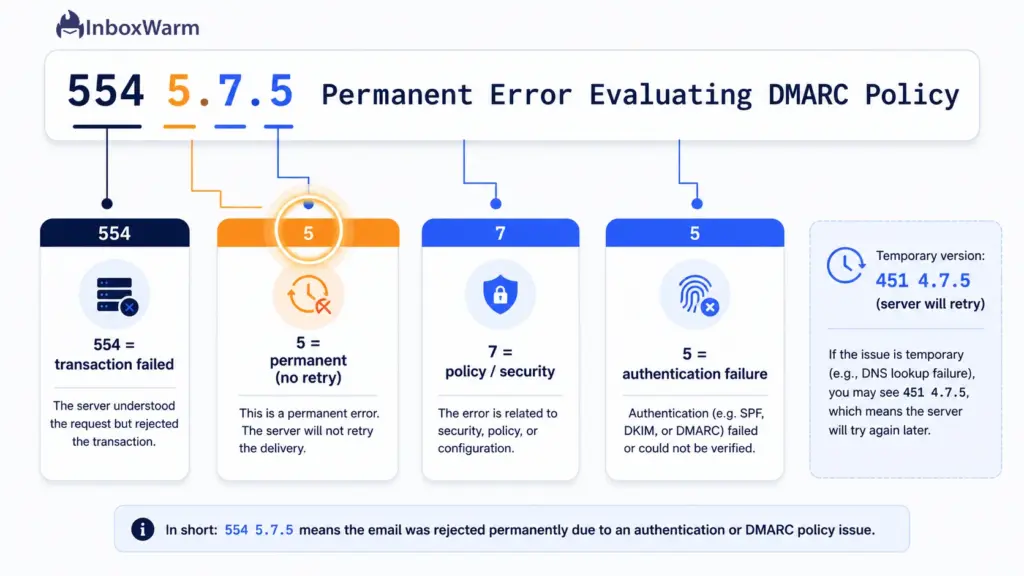
Read the error code itself, and it tells you most of the story:
- 554: the SMTP reply code, meaning the transaction failed and the message was refused.
- 5 (first digit): a permanent failure. The server will not retry the message.
- 7: a policy or security condition the category DMARC falls under.
- 5 (third digit): an authentication or cryptographic failure.
Some providers show a slightly different wrapper, such as 554 5.0.0 Error Code: 5.7.5 Permanent error evaluating DMARC policy, but the meaning is identical.
Permanent Error vs Temporary Error: What’s the Difference?
Not every DMARC bounce is permanent. The 4.x.x family is transient, and the server will try again. The 5.x.x family is final. Knowing which one you have tells you how urgent the fix is.
| Attribute | 554 5.7.5 (Permanent) | 451 4.7.5 (Temporary) |
|---|---|---|
| Severity | Final rejection | Transient, retried later |
| Server behavior | Stops, bounces immediately | Queues and retries for hours |
| Usual cause | Broken or invalid DMARC record | DNS timeout or lookup glitch |
| Your action | Fix the record now | Often clears on its own; check DNS health |
Related DMARC Rejection Messages You Might See
The 5.7.5 string is the most common, but the same underlying problem can surface under different wording depending on the receiving server:
- 550 5.7.1: “Unauthenticated email from your-domain.com is not accepted due to the domain’s DMARC policy.”
- 521 5.2.1: “This message failed DMARC evaluation and is being refused due to the provided DMARC policy.”
Note that not every 550 or 554 bounce is DMARC-related. Some point to spam filtering or blocklists, so always read the full string before you start editing DNS.
Common Causes of 5.7.5 Permanent Error Evaluating DMARC Policy
Nearly every 5.7.5 error comes from a malformed or unreadable DMARC record. The receiving server finds your record but chokes on a syntax problem, a missing required tag, or a conflict, and returns a permanent error rather than guessing what you meant.
Here are the usual suspects, ranked by how often they bite.
Missing or Invalid p= Tag
The policy tag is mandatory, and it only accepts three values: none, quarantine, or reject. A record with no p= value will not evaluate at all, and a record with an invalid value like p=monitor or p=block fails the same way. This single tag is the most common point of failure.
v=DMARC1 in the Wrong Position
The version tag must be the very first tag in the record, spelled exactly as v=DMARC1. Placed anywhere else, or mistyped, it triggers a permanent error because the receiving server cannot confirm it is reading a DMARC record at all.
Stray Characters and Smart Quotes
A trailing period, an extra space, or curly quotation marks pasted from a document can all break parsing. One widely reported fix was simply removing a single dot at the end of the record. Records copied out of email, docs, or chat are the usual source, so always paste into a plain-text editor first.
Malformed Tags and Report Addresses
Small syntax slips inside otherwise valid tags will fail the whole record. The frequent ones are a missing mailto: prefix (use rua=mailto:you@domain.com, not rua=you@domain.com), a wrong tag name like policy= instead of p=, a doubled separator like pct=100;;, and an out-of-range value such as pct=150 (the pct tag accepts only a whole number from 1 to 100).
Duplicate DMARC Records
More than one TXT record at _dmarc creates ambiguity, and receiving servers treat that as an error rather than picking a winner. You may publish only one DMARC record per domain, so delete any extras and keep the complete one.
SPF or DKIM Failure or Misalignment
Even a perfectly written record fails DMARC if neither SPF nor DKIM passes and aligns with your From domain. This includes SPF set to neutral (an SPF record ending in ?all), SPF that exceeds its limit of 10 DNS lookups, and a DKIM signature whose d= does not match your From domain.
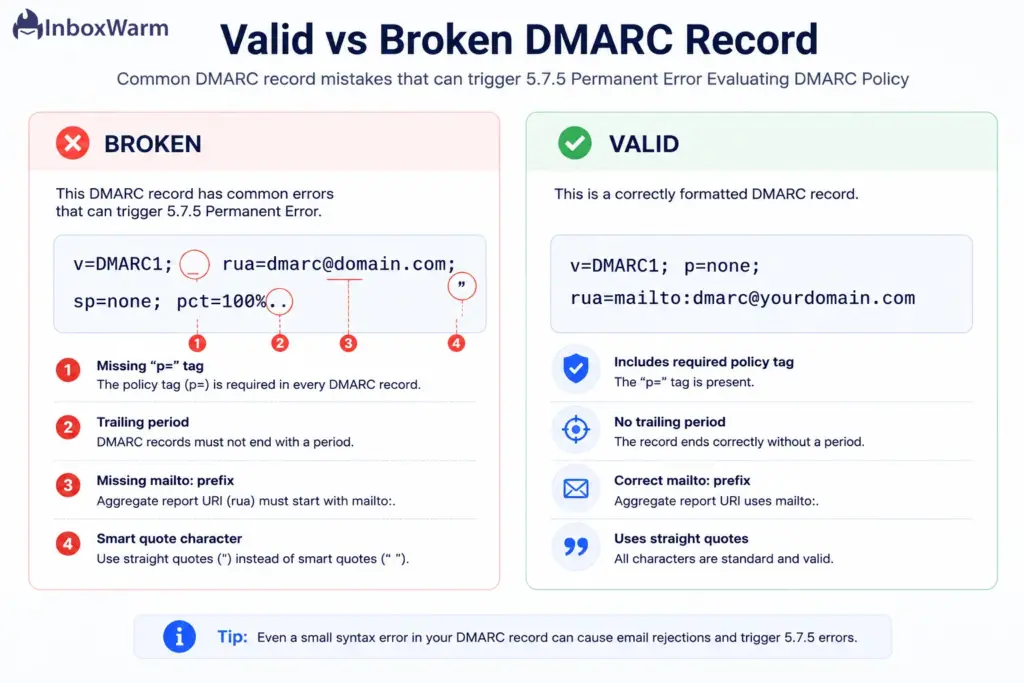
A quick note on the spec: a valid record needs only two tags, v and p. Everything else has a default. Worth knowing because the May 2026 DMARC revision (RFC 9989, which replaced the original RFC 7489) retired the pct, rf, and ri tags. Existing v=DMARC1 records still work, but if you are writing a record from scratch today, keep it lean.
How Do SPF and DKIM Affect DMARC Policy Evaluation?
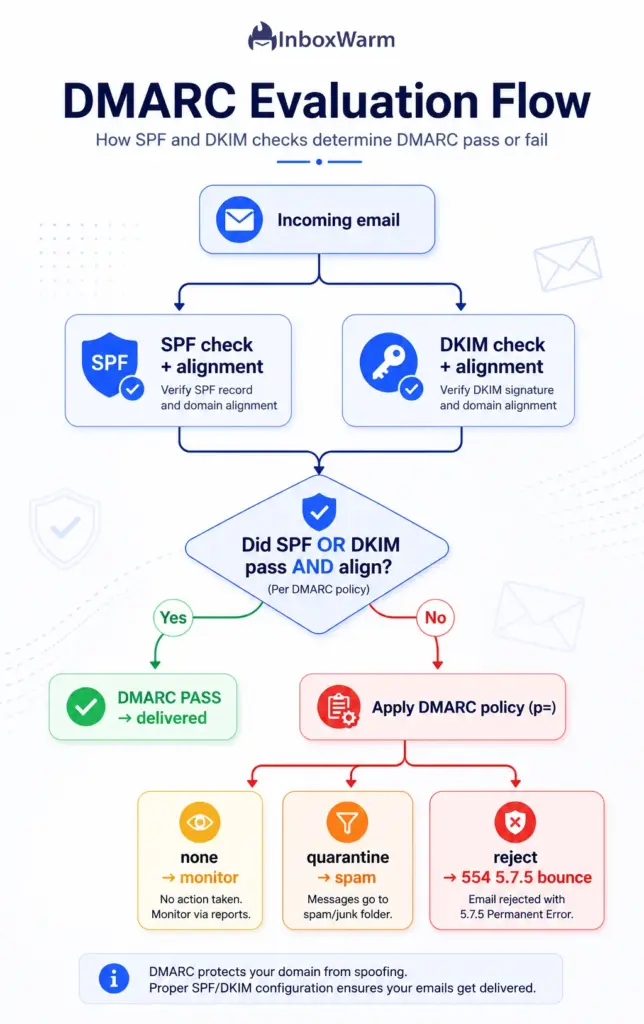
DMARC does not authenticate email on its own. It sits on top of SPF and DKIM, and a message passes DMARC only when at least one of them passes and aligns with the domain in your From address. If both fail, or neither aligns, the receiving server applies your DMARC policy, which can land as a 5.7.5 rejection.
Two definitions to anchor this:
- SPF (Sender Policy Framework): a DNS TXT record that lists the servers authorized to send mail for your domain.
- DKIM (DomainKeys Identified Mail): a cryptographic signature added to each message so the receiver can confirm it was not altered and came from your domain.
The piece people miss is alignment. DMARC does not just ask, “Did SPF or DKIM pass?” It asks whether the domain they authenticated matches the domain in your visible From address.
- SPF alignment: the Return-Path (envelope) domain matches your From domain.
- DKIM alignment: the d= value in the signature matches your From domain.
Alignment mode controls how strict that match must be. The adkim and aspf tags default to r (relaxed), where a subdomain counts as a match. Set them to s (strict) and the domains must match exactly. A common self-inflicted failure is setting strict alignment while a third-party sender, like a CRM or ESP, signs with its own subdomain.
One more trap lives in SPF. Per RFC 7208, an SPF check is capped at 10 DNS lookups. Stacking too many include statements and SPF returns a PermError, which can cascade into a DMARC failure even though your DMARC record is perfectly written. Run an SPF checker to count your lookups before you assume the DMARC record is at fault.
How Can DNS Issues Lead to DMARC Evaluation Errors?
Because your DMARC record lives in DNS, anything that stops a receiving server from cleanly reading that record can trigger a 5.7.5 error. Sometimes the record itself is fine, but the way it was published, edited, or cached is the real culprit.
- Wrong hostname: the record must sit at _dmarc.yourdomain.com. Published at the root domain or a mistyped host, servers will not find a usable policy.
- Edited the wrong record: TXT records are easy to mix up. You may have updated an SPF TXT record while the broken DMARC TXT stayed untouched.
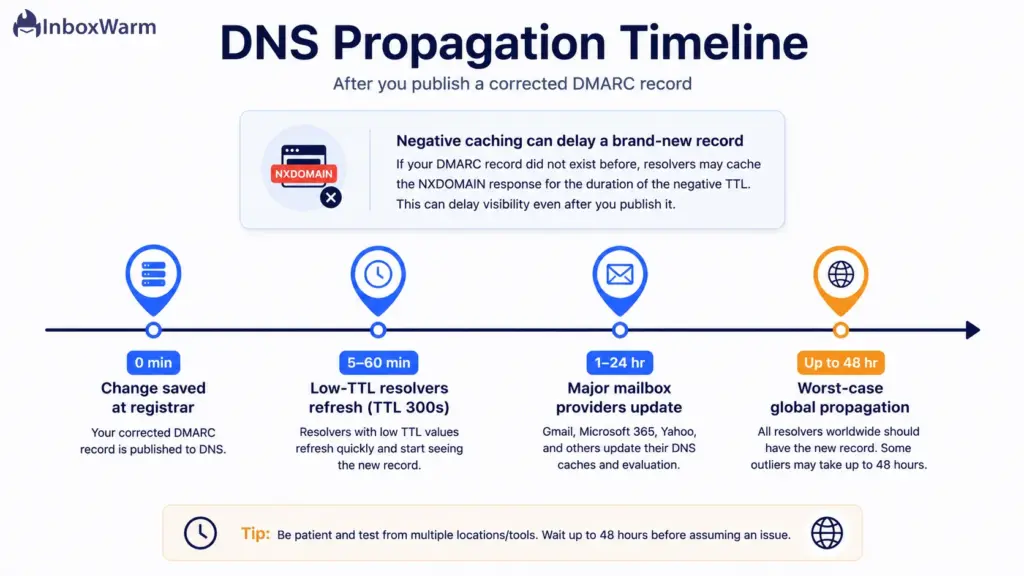
- Propagation delay: a new or edited record needs time to spread across the world’s DNS resolvers before every receiving server sees it.
- Negative caching: if no DMARC record existed before, some resolvers cache the “does not exist” answer (NXDOMAIN) for a while, which can delay visibility of your brand-new record longer than you expect.
- High TTL: a long “Time To Live” means servers keep serving the old, broken record until the cache expires.
This is why a fix that looks instant in your registrar dashboard can take hours to show up at the receiving end. Lowering your TTL before you make changes is the single best way to shrink that window, which we cover in the repair steps.
How to Fix the 5.7.5 Permanent Error Evaluating DMARC Policy
To fix the error, read the exact DMARC record your domain is publishing, correct the syntax or alignment problem, republish a single valid record, and confirm it resolves before you resend. Most fixes take minutes. DNS propagation is the only real wait.
Work through these steps in order.
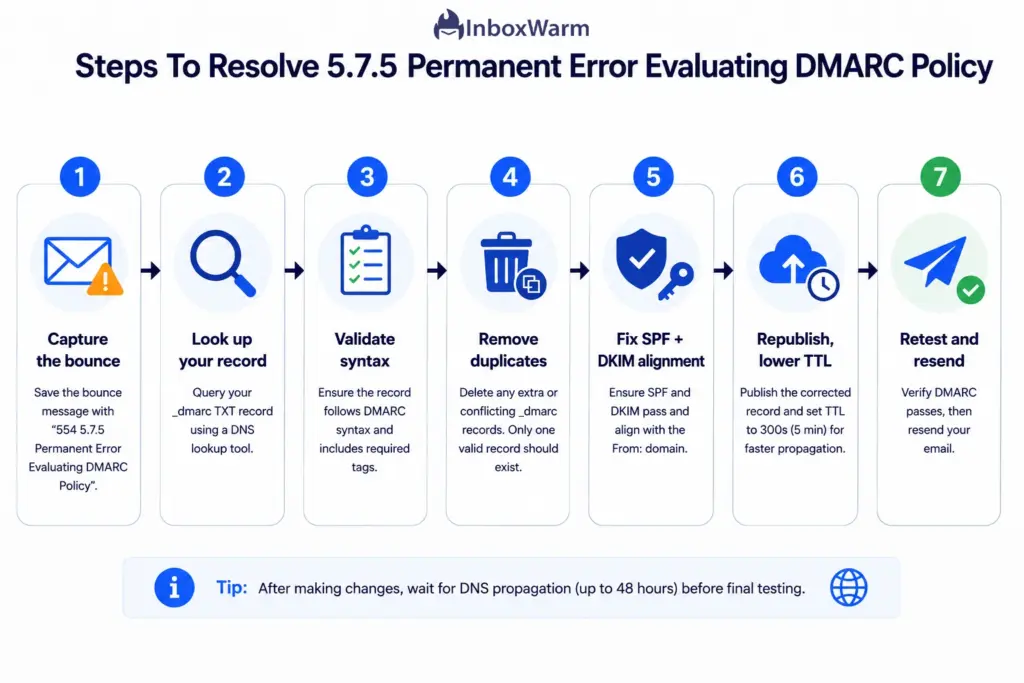
Step 1: Capture the Full Bounce Message
Open the bounce-back email and copy the complete error string plus the name of the receiving server. This confirms you are dealing with a 5.7.5 DMARC error and not a generic spam-filter rejection that happens to share a 554 code. Save the string; you will compare against it after the fix.
Step 2: Look Up Your Current DMARC Record
See exactly what receiving servers see, character for character. Use a DMARC checker, or query it from the command line:
# macOS / Linux
dig TXT _dmarc.yourdomain.com +short
# Windows
nslookup -type=TXT _dmarc.yourdomain.com
If two records come back, that is your problem right there. Note it for Step 4.
Step 3: Validate the Syntax
Compare your live record against a known-good baseline. The simplest valid record is:
v=DMARC1; p=none; rua=mailto:dmarc@yourdomain.com
Run down this checklist and fix whatever fails:
- v=DMARC1 is the first tag, spelled exactly.
- the p= value is none, quarantine, or reject.
- Tags are separated by semicolons, with no doubled or missing separators.
- The report addresses using the mailto: prefix.
- There is no trailing period and no curly (smart) quotes.
Step 4: Remove Duplicate Records
Confirm only one TXT record exists at _dmarc and delete any extras. If you have two, keep the complete one (the record with your correct policy and reporting address) and remove the other. Receiving servers treat multiple DMARC records as an error rather than picking a winner.
Step 5: Fix SPF and DKIM Alignment
Make sure at least one authentication method passes and aligns. Verify SPF passes and stays under 10 lookups with an SPF checker, confirm your DKIM checker shows a valid signature with a d= that matches your From domain, and do not set adkim or aspf to strict unless every one of your senders aligns exactly.
Step 6: Republish and Lower the TTL
Publish the corrected single record. If your DNS provider allows it, drop the TTL to 300 seconds before the change so the fix propagates in minutes rather than hours. Need a clean record fast? A DMARC generator builds a syntactically correct record from a short form so you avoid reintroducing a typo.
Step 7: Wait, Then Retest and Resend
Give the change time to propagate, usually minutes with a low TTL and up to 48 hours otherwise. Recheck the record, send a test message to the address that bounced, and confirm the 5.7.5 error is gone. Once it delivers, you can raise the TTL back to its normal value.
What Tools Can Help Troubleshoot DMARC Error 5.7.5?
A handful of free tools turn DMARC debugging from guesswork into a checklist. Validators flag the broken tag, lookup tools reveal what is actually published, and report analyzers show which senders are failing in the wild.
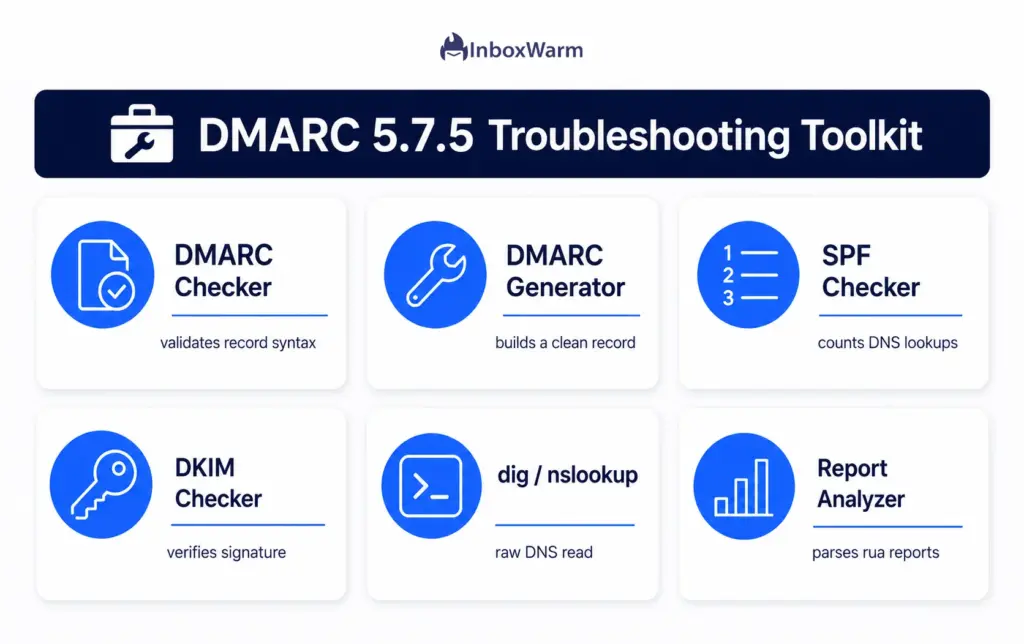
- DMARC checker / validator: confirms your record is syntactically valid and points to the offending tag.
- DMARC record generator: builds a correct record from a form so you never hand-type a typo.
- SPF checker: confirms SPF passes and counts your DNS lookups against the limit of 10.
- DKIM checker: confirms your DKIM key and signature are valid and aligned.
- dig/nslookup: a raw command-line read of exactly what is published, with no tool in between.
- DMARC report analyzers: parse the aggregate (RUA) XML reports so you can spot a failing source before it causes more bounces.
If you want the whole authentication stack in one place, InboxWarm.ai’s free DMARC checker, SPF checker, and DKIM checker let you validate all three records side by side without creating an account.
How Do You Test Whether Your DMARC Configuration Is Working Correctly?
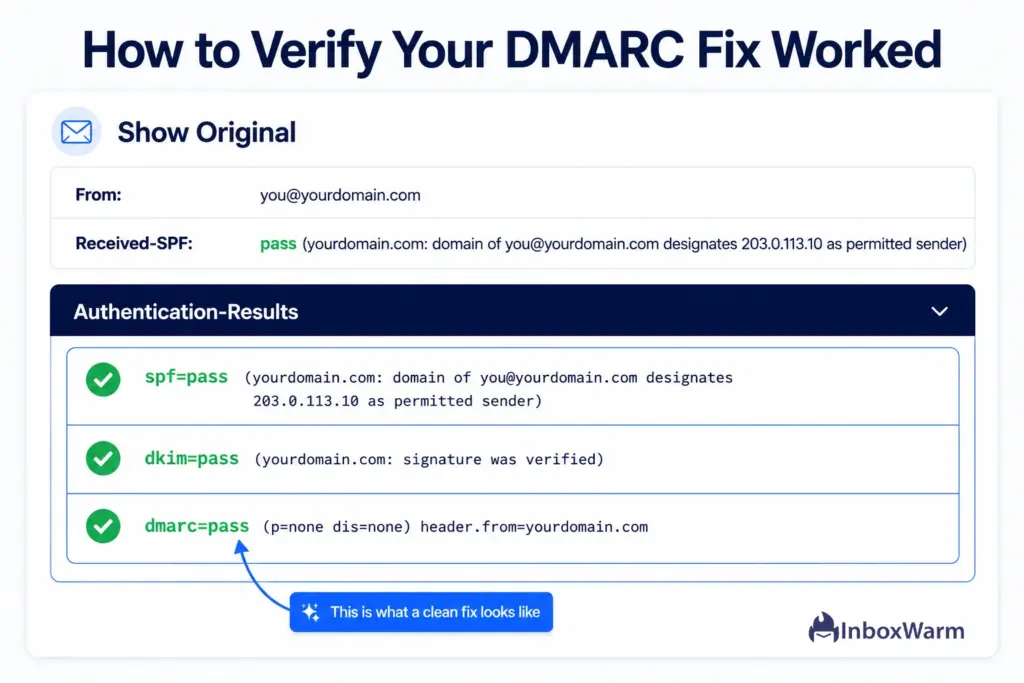
Test in two stages. First confirm the record is valid and resolving with a checker or dig. Then send a real message to a seed inbox and read the headers for dmarc=pass. A valid record plus a passing header on a live send confirms the fix end-to-end.
- Validate the record syntax with a DMARC checker and clear any flagged tag.
- Confirm it resolves from more than one resolver, for example, Google (8.8.8.8) and Cloudflare (1.1.1.1), so you are not just reading a stale local cache.
- Send a test to a Gmail address, open the message, choose Show Original, and check Authentication-Results for spf=pass, dkim=pass, and dmarc=pass.
- Review your first aggregate reports after 24 to 72 hours to catch any sending source that is still failing.
Here is the honest catch most guides skip. Passing DMARC stops your mail from being rejected, but it does not guarantee the inbox. A new or cold domain can pass every authentication check and still get filtered to spam because mailbox providers trust unfamiliar senders slowly.
What Are the Best Practices for Preventing DMARC Policy Errors?
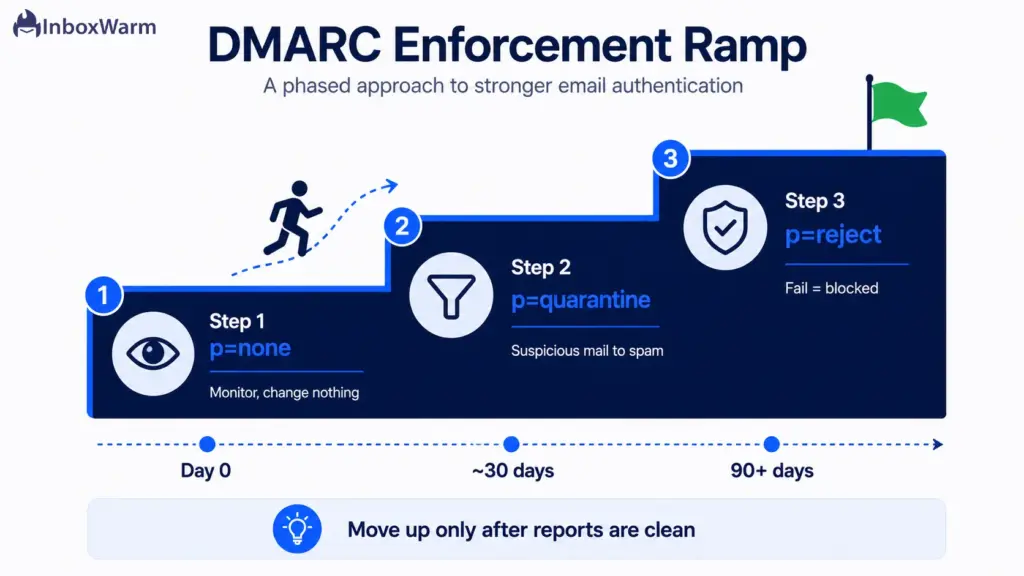
Prevent 5.7.5 errors by building authentication in the right order, validating every record before you publish it, and rolling out your DMARC policy gradually instead of jumping straight to reject.
Build SPF and DKIM First
Set up SPF and DKIM before you publish DMARC, and let them authenticate for at least 48 hours first. DMARC has nothing valid to evaluate until those two are passing and aligned, so adding it too early is a common way to create the very bounce you are trying to avoid.
Start Soft, Then Tighten
Begin at p=none to monitor without affecting delivery. Move to p=quarantine once your reports look clean, and only then advance to p=reject. Jumping straight to reject before you know which sources are failing is the fastest way to block your own legitimate mail.
Validate Before Publishing
Run the record through a checker every single time, even for a one-character edit. A quick validation catches a missing semicolon, a stray period, or a bad mailto: prefix before it reaches DNS, where it would otherwise sit and bounce your mail for hours.
Keep One Record Per Domain
Maintain exactly one DMARC TXT record at _dmarc, with no duplicates ever. If you need to change the policy, edit the existing record rather than adding a second one, since two records at the same host are treated as an error.
Manage Your TTL
Lower the TTL before you make edits and raise it back afterward. A low TTL such as 300 seconds means a fix propagates in minutes instead of hours, while a higher value the rest of the time keeps caches stable and reduces unnecessary lookups.
Monitor Your Reports
Read the aggregate (RUA) reports regularly so a newly added sender does not start failing without warning. These reports show you exactly which sources are passing and failing, which is how you safely decide when to move from monitoring to enforcement.
Document the Canonical Record
Keep the correct record somewhere your team can copy from so nobody pastes a broken version into DNS. A documented record also makes it obvious when an unauthorized change has crept in.
Conclusion
The 5.7.5 Permanent Error Evaluating DMARC Policy looks intimidating, but it is rarely a deep problem. In most cases it is one wrong character, a missing p= tag, or a duplicate record standing between your email and the inbox. Read your live record, fix the syntax, align SPF and DKIM, and republish a single clean version. Then wait out propagation and resend.
Clearing the rejection is only half the job, though. A valid DMARC record gets your mail accepted, but it does not build the sender reputation that decides whether you land in the inbox or the spam folder. A brand-new or cold domain can pass every authentication check and still get filtered, because providers extend trust to unknown senders one careful step at a time.
That is where warm-up earns its place. Fix the record today so your mail stops bouncing, then protect the gains by warming the domain so your reputation climbs alongside your clean authentication. Get both right, and your email does the one thing it is supposed to do: reach a human.
Authentication fixed, but still landing in spam?
InboxWarm.ai warms your domain with real inbox interactions to build the sender reputation mailbox providers trust. Start free for 10 days, no credit card required.
Frequently Asked Questions
What Causes a Permanent Error Evaluating DMARC Policy?
Most often it is a syntax problem in your DMARC record, like a missing p= tag, a trailing period, or a missing mailto: prefix. Duplicate records at _dmarc are another frequent trigger. It can also fire when SPF or DKIM fails or does not align.
How Do I Fix a DMARC Policy Evaluation Error?
Look up your live record and compare it against a valid baseline like v=DMARC1; p=none; rua=mailto:dmarc@yourdomain.com. Fix the broken tag, remove any duplicate records, and confirm SPF and DKIM pass and align. Republish one corrected record, then send a test to confirm the bounce is gone.
Can SPF and DKIM Failures Cause DMARC Errors?
Yes. DMARC passes only when SPF or DKIM passes and aligns with your From domain, so if both fail, DMARC fails too. SPF can break silently past 10 DNS lookups, and DKIM fails when its d= domain does not match your From domain.
How Do I Check if My DMARC Record Is Valid?
Run it through a DMARC checker, which flags syntax errors and shows what receiving servers see. You can also query it with dig TXT _dmarc.yourdomain.com on macOS or Linux, or nslookup -type=TXT _dmarc.yourdomain.com on Windows. Check from more than one resolver to rule out a stale local cache.
How Long Does It Take for DMARC Changes to Take Effect?
DNS changes usually take a few minutes to 48 hours, governed mainly by your record's TTL. With a low TTL like 300 seconds, most resolvers refresh within 5 to 60 minutes. A brand-new record can take longer if resolvers cached a previous "does not exist" answer.
What Tools Can I Use to Test DMARC Records?
A DMARC checker validates syntax, and a DMARC generator builds a clean record from a form. Pair them with an SPF checker to count your DNS lookups and a DKIM checker to confirm alignment. For raw reads, dig and nslookup show exactly what is published.