

TL;DR
Cold email best practices for 2026 start with one rule: protect deliverability before you scale. Warm up every sending domain first, authenticate with SPF, DKIM, and DMARC, verify your list, then send slow and personalized. Google and Yahoo now reject non-compliant mail outright, so inbox placement is earned, not assumed.
- Warm up new domains and mailboxes for two to eight weeks before any cold send.
- Authenticate every domain with SPF, DKIM, and DMARC, and keep spam complaints below 0.3%.
- Verify your list and hold bounce rate under 2% to protect sender reputation.
- Send 50 to 100 emails per mailbox per day, personalized, with one or two follow-ups.
Cold email still works in 2026, but the room for error has shrunk. Inboxes are crowded, filters are sharper, and a single careless send can damage a domain for weeks. The teams winning today treat deliverability as the foundation, not a finishing touch.
The rules changed in early 2024. Google and Yahoo made authentication, low spam rates, and easy unsubscribes mandatory for bulk senders. As of November 2025, Google enforces those rules with permanent rejections, not just spam folders (Gmail sender guidelines). Get the setup wrong and your emails never reach a human.
This guide covers the cold email best practices that actually move inbox placement in 2026. You will learn how to warm up a domain, set up email authentication, build a clean list, pace your sends, write copy that earns replies, and monitor sender reputation. We start where every healthy campaign starts, with the warm-up.
Table of Contents
What Is Cold Email Deliverability, and Why Does It Decide Everything?
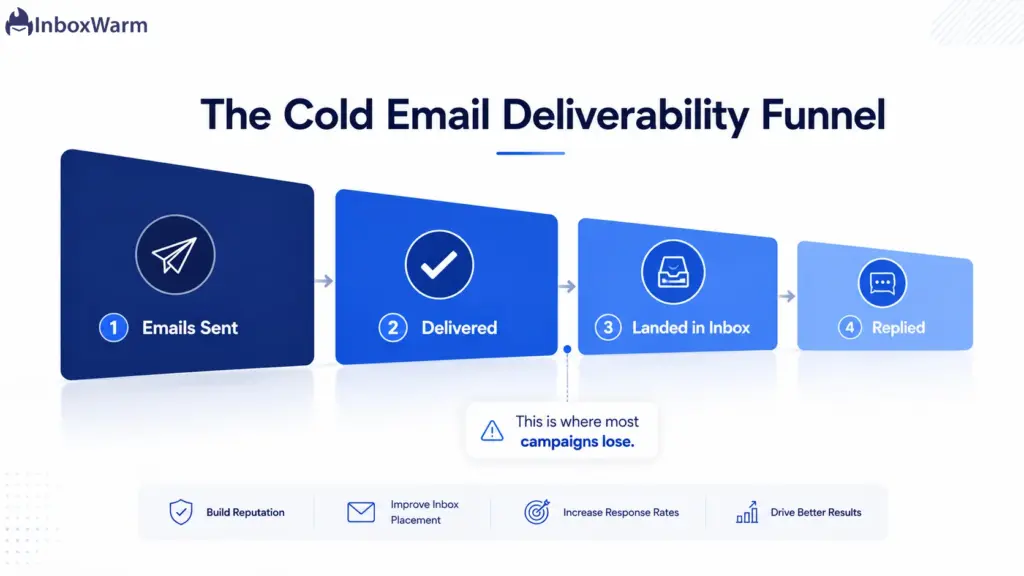
Cold email deliverability is the rate at which your emails reach the inbox instead of the spam folder or a blocked send. It decides everything because an email that never lands cannot be opened, read, or answered. In 2026, deliverability is the single biggest gap between top and bottom performers.
Two terms sit underneath it. Inbox placement is whether a delivered email reaches the primary inbox or gets filtered. Sender reputation is the trust score mailbox providers assign your domain and IP based on how recipients react to your mail.
- “Delivered” does not mean inbox. A delivered email can still sit in spam, unseen.
- Reputation compounds. Good sends build trust; bad sends erode it fast.
- Fix the pipe before the message. Clever copy cannot save a blocked domain.
How Do You Warm Up a Domain Before Sending Cold Email?
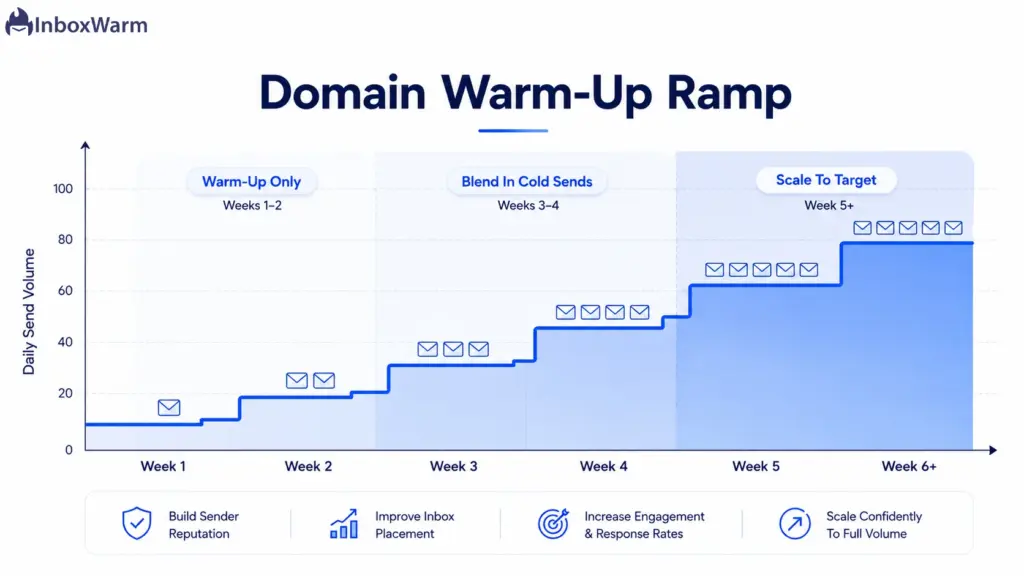
Warm-up is step one, always. Before any cold campaign, send a low and slowly growing volume of engaged email from each new domain and mailbox so mailbox providers learn to trust you. Start with a handful of emails a day and ramp over two to eight weeks. Skip this, and your first campaign teaches the filters to flag you.
Email warm-up is the process of building positive sending history before real outreach. Automated tools do this by exchanging seed emails that get opened, replied to, and pulled out of spam.
A Simple Warm-Up Ramp
- Weeks 1 to 2: Send a few warm emails per day per mailbox, focused on engaged recipients.
- Weeks 3 to 4: Increase volume steadily and start mixing in low-volume cold sends.
- Weeks 5 onward: Scale toward target volume while warm-up keeps running in the background.
- If bounces or spam complaints rise, pause scaling and hold volume until they settle.
Warm-up looks different on each platform. The path for a Gmail mailbox differs from an Outlook inbox or a raw SMTP setup, so match the warm-up to where you send from.
Keep warm-up running quietly even after launch. It protects the domain when volume climbs and cushions the impact of an occasional bad day.
How Do You Set Up Email Authentication (SPF, DKIM, DMARC)?
Email authentication proves your messages really come from you. Set up all three records on every sending domain: SPF lists who can send for you, DKIM signs your messages, and DMARC tells inbox providers what to do with fakes. Google and Yahoo require them, and missing records send you straight to spam.
- Set Up SPF
SPF (Sender Policy Framework) is a DNS record naming the servers allowed to send on your domain’s behalf. Add one record per domain and keep it under the lookup limit. Confirm it is valid with a free SPF record check before you send.
- Add DKIM
DKIM (DomainKeys Identified Mail) adds a cryptographic signature so providers can confirm the message was not altered in transit. Publish your public key in DNS and sign every send. Verify the signature with a DKIM lookup.
- Publish DMARC
DMARC (Domain-based Message Authentication, Reporting, and Conformance) tells receivers how to handle mail that fails SPF or DKIM and sends you reports. Start at p=none to monitor, move to p=quarantine, then p=reject once your legitimate mail passes cleanly. Generate a record with a DMARC tool.
If you send 5,000 or more emails a day to Gmail, DMARC is mandatory, not optional. The most common failure is not a missing record but alignment: SPF or DKIM passing for a different domain than the one in your visible From address. Fix alignment, and most authentication problems disappear.
How Do You Build and Verify a Cold Email List?
A clean, verified list is the highest-leverage deliverability fix you can make. Bounce rate is the strongest signal mailbox providers watch, so verify every address before sending and keep bounces under 2%. A bad list burns your domain faster than any subject line can save it.
- Verify with a real-time checker. Remove invalids, spam traps, and risky catch-all addresses.
- Target tightly. Relevance is the cheapest way to keep spam complaints low.
- Never buy lists. Purchased data is full of traps and stale addresses.
- Re-verify any list older than 30 days before you send to it again.
The payoff is real. Aggregated 2026 campaign data shows verified lists earn roughly double the reply rate of unverified ones, mostly because they keep bounces and complaints low. Clean data protects every future send, not just today’s.
What Sending Volume and Cadence Keep You Out of Spam?
Send like a human, not a machine. Cap each mailbox at roughly 50 to 100 emails per day, spread sends across business hours, and ramp new mailboxes slowly. Use a dedicated sending domain or subdomain so a reputation hit never touches your main domain.
- Use a separate subdomain such as outreach.yourcompany.com, not your primary domain.
- Spread volume across several mailboxes instead of overloading one heavy sender.
- Avoid robotic patterns. Stagger through the day rather than firing all at once.
- Watch bounce and complaint rates daily, and cut volume the moment they spike.
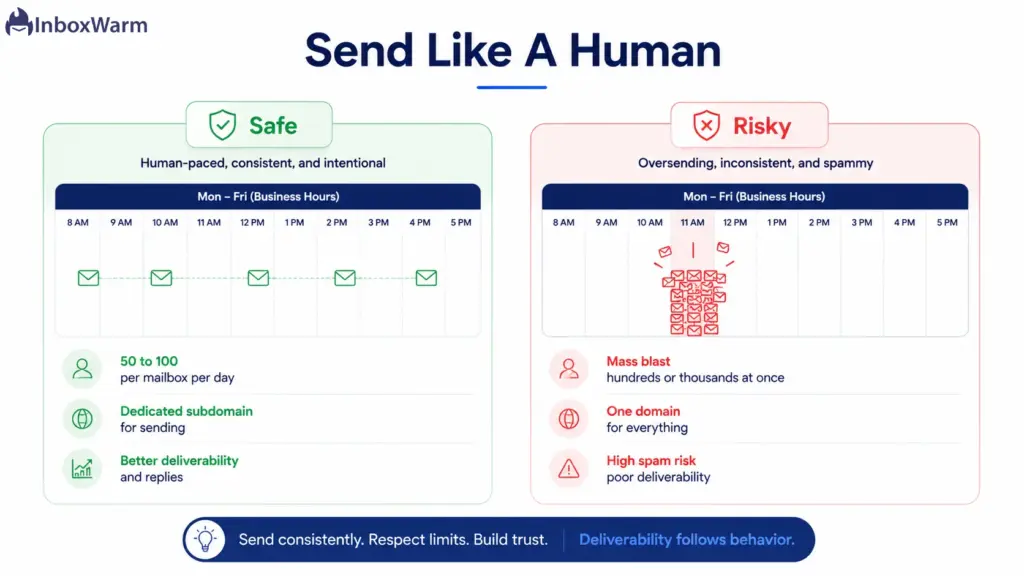
Pacing beats raw volume every time. A domain that sends 50 relevant, well-targeted emails a day will outlast one that blasts thousands and gets flagged. Slow and steady protects the asset you depend on.
How Do You Write Cold Emails That Get Replies Without Triggering Spam?
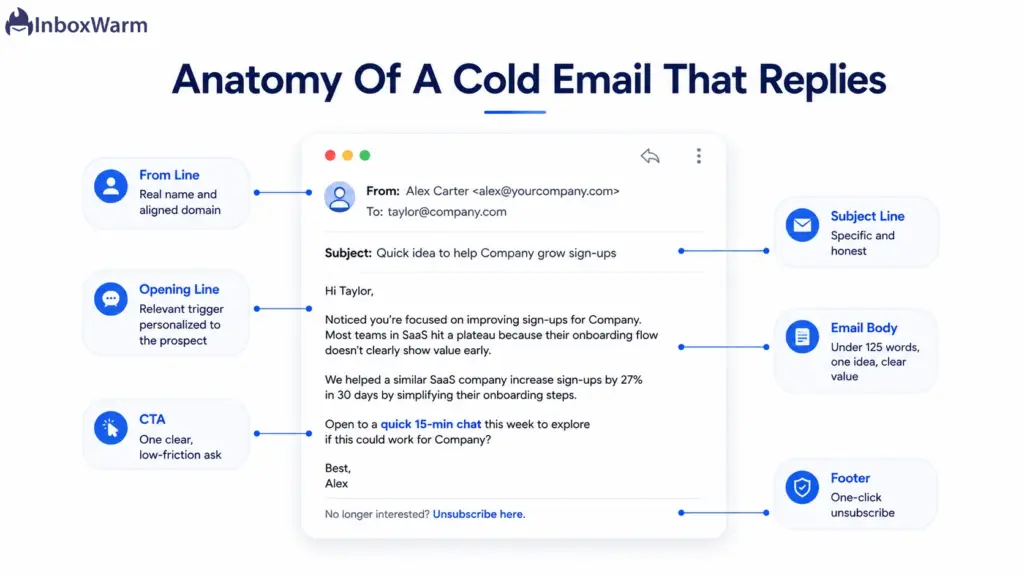
Short, specific, and honest wins. Keep cold emails under 125 words, lead with a real reason you are reaching out, and use one clear call to action. Avoid spammy formatting and misleading subject lines, and always give recipients an easy way to unsubscribe.
- One idea, one CTA, under 125 words. Respect the reader’s time.
- Personalize with a genuine trigger, such as a role, a hire, or a recent company event.
- Favor plain text over heavy HTML, big images, or lots of links.
- Write honest subject lines. Question formats can lift opens, but only if the email delivers.
- Include a one-click unsubscribe, now required for bulk commercial mail.
Follow-ups matter, but restraint matters more. Instantly’s 2026 data shows 58% of replies come from the first email, and returns drop sharply after the third send. Cap a sequence at three to four emails total, and make each one add new value. A message that just says you are bumping the thread is a reputation tax, not a touchpoint.
How Do You Monitor Deliverability and Sender Reputation?
You cannot fix what you do not measure. Watch your spam complaint rate, bounce rate, and inbox placement, and check Google Postmaster Tools regularly. Keep complaints below 0.3%, aim for under 0.1%, and react quickly when the numbers slip.
One important change most guides miss: in late 2025, Google retired the old Postmaster Tools reputation dashboard. The familiar High, Medium, Low, and Bad domain reputation labels are gone. The new Compliance Status view simply shows whether you pass or fail each requirement, which makes it easier to see exactly what to fix. Check it against the live Postmaster Tools interface.
- Spam complaint rate: keep it under 0.3%, and treat anything near 0.1% as a warning.
- Bounce rate: hold it under 2% by verifying lists and suppressing failures fast.
- Inbox placement: run seed tests across Gmail, Outlook, and Yahoo to confirm where mail lands.
- Compliance Status: Review it weekly so a failing signal never goes unnoticed. If terms like sender reputation are new to your team, a shared glossary keeps everyone aligned.
Microsoft applies similar pressure. Its requirements for senders of 5,000 or more emails a day to Outlook and Hotmail began enforcement in 2025, covering SPF, DKIM, and DMARC alignment. Treat Gmail, Yahoo, and Outlook as one shared standard, because they all reward the same behavior.
Your Cold Email Best Practices Checklist for 2026
Here is the full set of cold email best practices in order, from foundation to send. Work top to bottom and do not skip ahead.
| Practice | Why It Matters |
|---|---|
| 1. Warm up the domain | Builds trust before outreach so your first campaign does not get flagged. |
| 2. Authenticate (SPF, DKIM, DMARC) | Proves you are legitimate; required by Gmail, Yahoo, and Outlook. |
| 3. Verify the list | Keeps bounces under 2% and protects sender reputation. |
| 4. Use a dedicated subdomain | Isolates risk so a reputation hit never touches your main domain. |
| 5. Pace your sends | 50 to 100 per mailbox per day, spread out, looks human and avoids limits. |
| 6. Write short, honest copy | Under 125 words with one CTA earns replies and fewer complaints. |
| 7. Add one-click unsubscribe | Lowers spam complaints and meets bulk sender rules. |
| 8. Monitor and adjust | Track complaints, bounces, and compliance status weekly; react fast. |
Conclusion: Win the Inbox Before You Win the Reply
Cold email in 2026 rewards discipline over volume. The teams that land in the inbox are the ones that warm up first, authenticate fully, send to clean lists, and pace themselves. None of it is flashy, but all of it compounds into a domain that mailbox providers trust.
Build from the foundation up. Get your domain warmed, your SPF, DKIM, and DMARC records aligned, and your list verified before you fuss over subject lines. Strong cold email deliverability is simply the result of doing the unglamorous things consistently, in the right order.
If you do one thing today, warm your sending domain before you send a single cold email. It is the cheapest insurance against the spam folder, and it is where every reliable campaign begins.
Sending cold emails from a brand-new domain is the fastest way to land in spam.
InboxWarm.ai is an AI-powered email warm-up tool that improves inbox placement and sender reputation. Warm every mailbox automatically before you send, with a 10-day free trial and no credit card required.
Frequently Asked Questions
How do I send cold emails without going to spam?
Warm the domain first, then authenticate with SPF, DKIM, and DMARC on every sending domain. Verify your list to keep bounces under 2%, send 50 to 100 emails per mailbox per day, and write short, relevant copy with an easy unsubscribe. Most spam placement traces back to a skipped foundation, not the wording of the email.
Do I really need SPF, DKIM, and DMARC for cold email?
Yes. Gmail, Yahoo, and Outlook all expect SPF or DKIM at minimum, and DMARC is required once you send 5,000 or more emails a day. Without aligned authentication, your mail is far more likely to be filtered or rejected. These records are quick to set up and are the baseline for any serious sender.
How many cold emails can I send per day?
A safe range is 50 to 100 emails per mailbox per day for a warmed domain. Spread that volume across several mailboxes rather than overloading one, and ramp new mailboxes up slowly. If bounces or spam complaints rise, reduce volume immediately until the signals recover.
What is a good cold email reply rate in 2026?
The platform-wide average sits around 3% to 3.5%, based on Instantly's 2026 benchmark data. A reply rate above 5% is good, and above 10% is excellent and usually reflects tight targeting and strong personalization. Below 1% signals a problem with your list, deliverability, or messaging.
Why are my cold emails going to spam?
The usual causes are an unwarmed domain, missing or misaligned authentication, a dirty list with high bounces, or sending too much too fast. Misleading subject lines and heavy, link-stuffed copy add to the risk. Work through the foundation in order, starting with warm-up and authentication, and most spam issues resolve.
Are cold emails still allowed under the 2024 sender rules?
Yes, cold email is still permitted, but it must meet the same standards as other mail. That means authentication, low spam complaint rates, and an easy unsubscribe, with rules like CAN-SPAM in the US and GDPR in the EU still applying. Requirements vary by region, so confirm the laws for your audience. This is general guidance, not legal advice.