

TL;DR
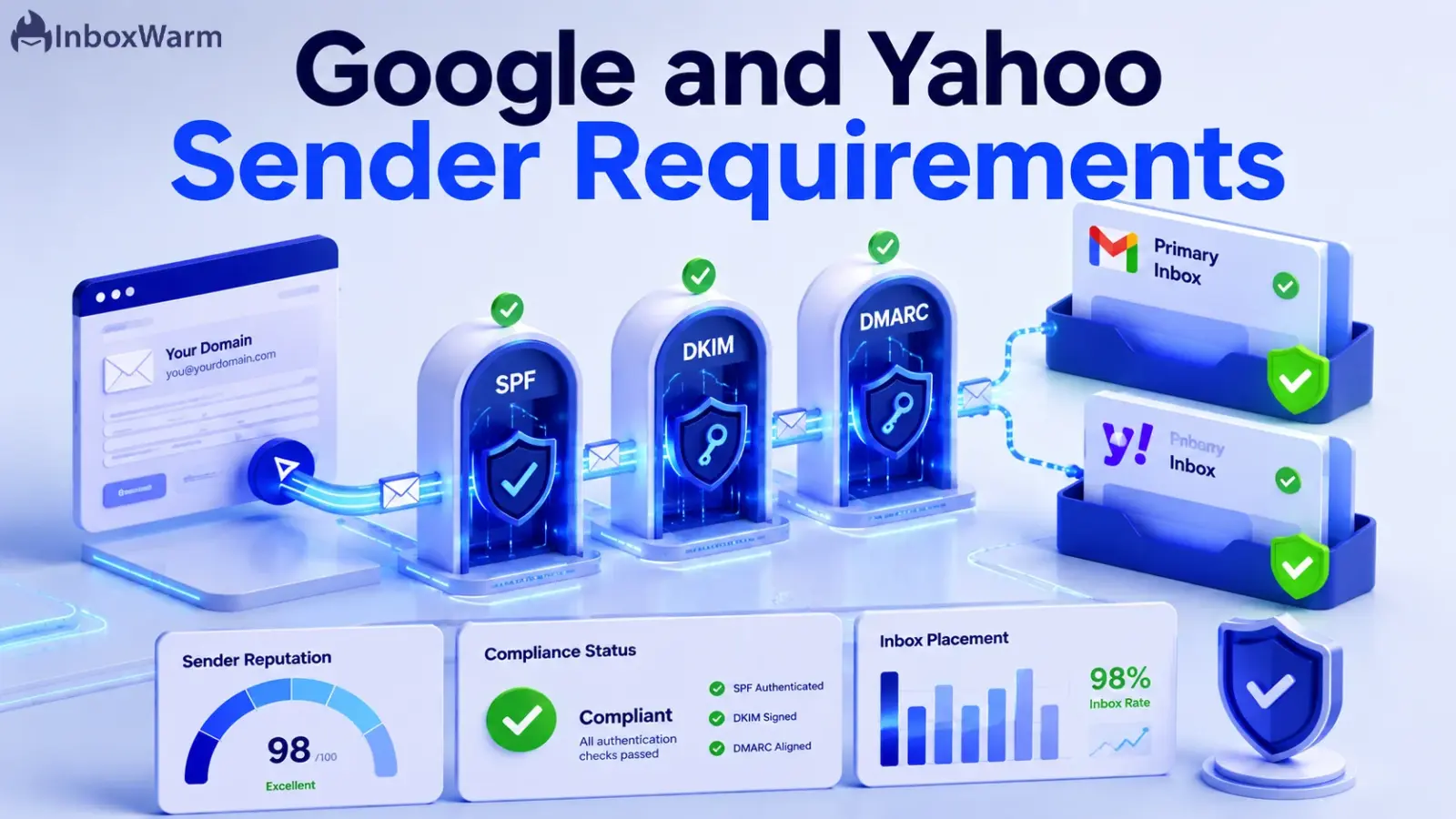
The Google and Yahoo sender requirements for 2026 require anyone sending 5,000 or more emails per day to a provider to authenticate with SPF, DKIM, and DMARC, support one-click unsubscribe, and keep their spam complaint rate below 0.30%. Since November 2025, non-compliant mail is rejected outright, not just sent to spam.
- Bulk sender threshold: 5,000+ messages a day to Gmail or Yahoo personal inboxes. Hit it once and the rules apply permanently.
- Authentication: SPF and DKIM for all senders, plus a DMARC policy (p=none minimum, with passing alignment for bulk senders.
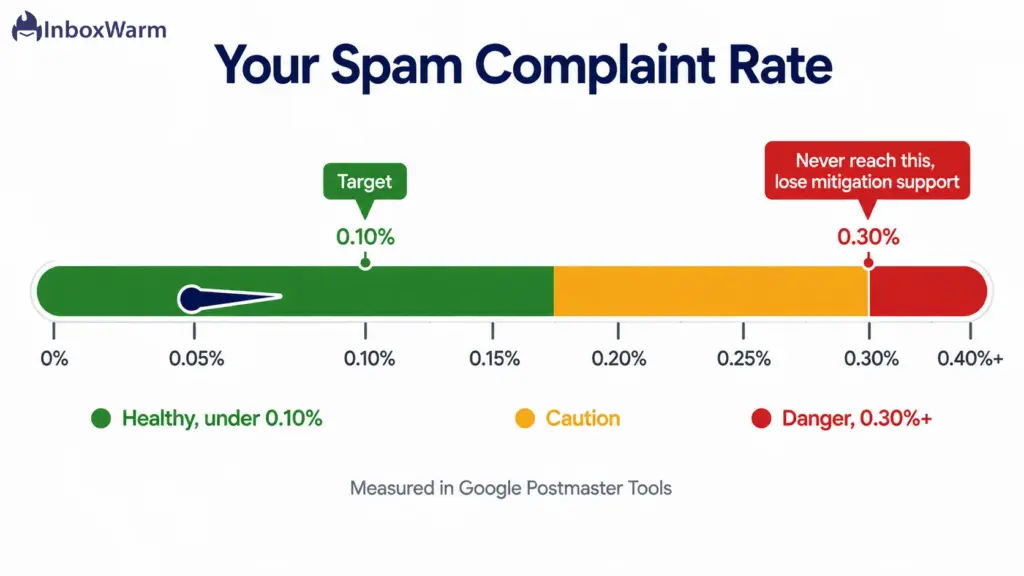
- Spam rate: stay under 0.10% in Google Postmaster Tools and never reach 0.30%.
- Unsubscribe: RFC 8058 one-click unsubscribe in marketing mail, processed within two days.
If you send email at any kind of scale, the inbox is no longer a courtesy. Gmail and Yahoo now treat inbox placement as something you earn by following a published rulebook, and they reject mail that breaks the rules. The Google and Yahoo sender requirements 2026 are the current version of that rulebook, and they decide whether your campaigns land in front of people or vanish before anyone sees them.
The cost of getting this wrong has changed. When Google and Yahoo first announced these rules in October 2023, early enforcement looked like soft warnings and the occasional delay. That grace period is over. Starting in November 2025, Google escalated to permanent rejection of non-compliant bulk mail at scale, which means your messages now bounce instead of quietly slipping into the spam folder. A single misconfigured DNS record or a creeping complaint rate can take an entire sending domain offline.
In this guide, you’ll learn exactly what the Google sender requirements and Yahoo sender requirements demand in 2026, who has to comply, and how to verify your own domain against every rule.
We’ll walk through the full compliance checklist, explain how email authentication with SPF, DKIM, and DMARC actually works, cover the spam complaint thresholds and one-click unsubscribe rules, and show you how to move past bare compliance into reliable inbox placement.
Table of Contents
What Are Google and Yahoo Sender Requirements?
Google and Yahoo sender requirements are a shared set of rules that mailbox providers use to decide whether incoming email is trustworthy enough to deliver. They cover three areas: proving who you are through email authentication, making it easy for recipients to opt out, and keeping spam complaints low. Google and Yahoo announced them together in October 2023, and enforcement began in February 2024.
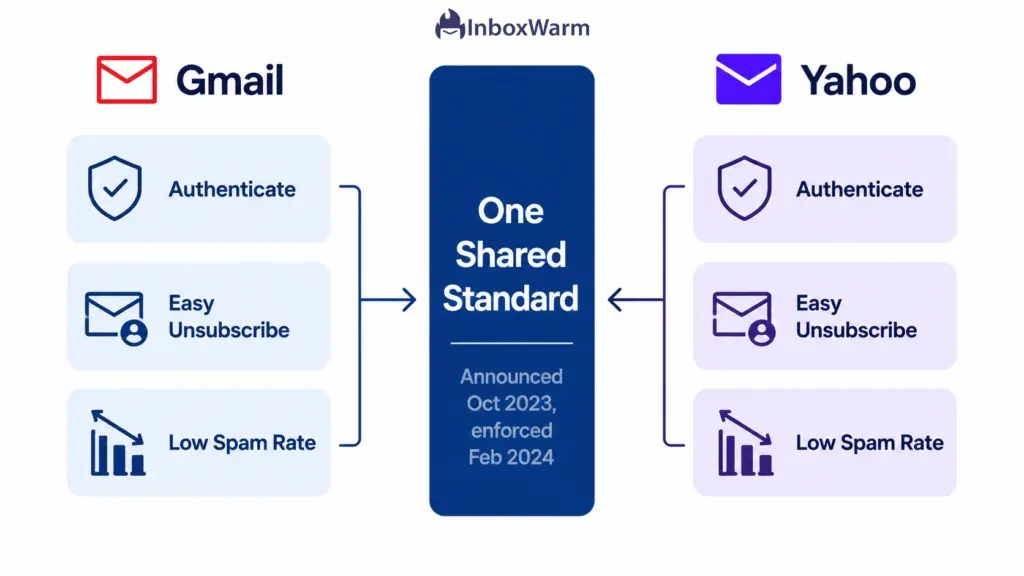
These are technically two overlapping rulebooks, not one. Google publishes its version as the email sender guidelines, and Yahoo maintains its own sender best practices. The two providers coordinated their announcements, and the core demands are nearly identical, which is why the industry treats them as a single standard.
Microsoft later adopted matching rules for Outlook, Hotmail, and Live.com addresses, with enforcement that began on May 5, 2025.
Why Gmail and Yahoo Introduced Stricter Rules
Both providers introduced these rules to cut down on spam, phishing, and domain spoofing. For years, a sender could fake the “From” address on an email, and most inbox providers had no reliable way to catch it. Authentication closes that gap by tying every message to a domain that can be cryptographically verified. The unsubscribe and spam-rate rules tackle a different problem: unwanted mail that recipients never asked for and cannot easily escape.
The shift reflects a simple change in philosophy. Inbox placement used to be a gray area decided by opaque filters. Now it is a published contract. Meet the terms and you stay eligible for delivery. Break them and you lose access to the inbox, often without warning.
Which Senders Are Affected
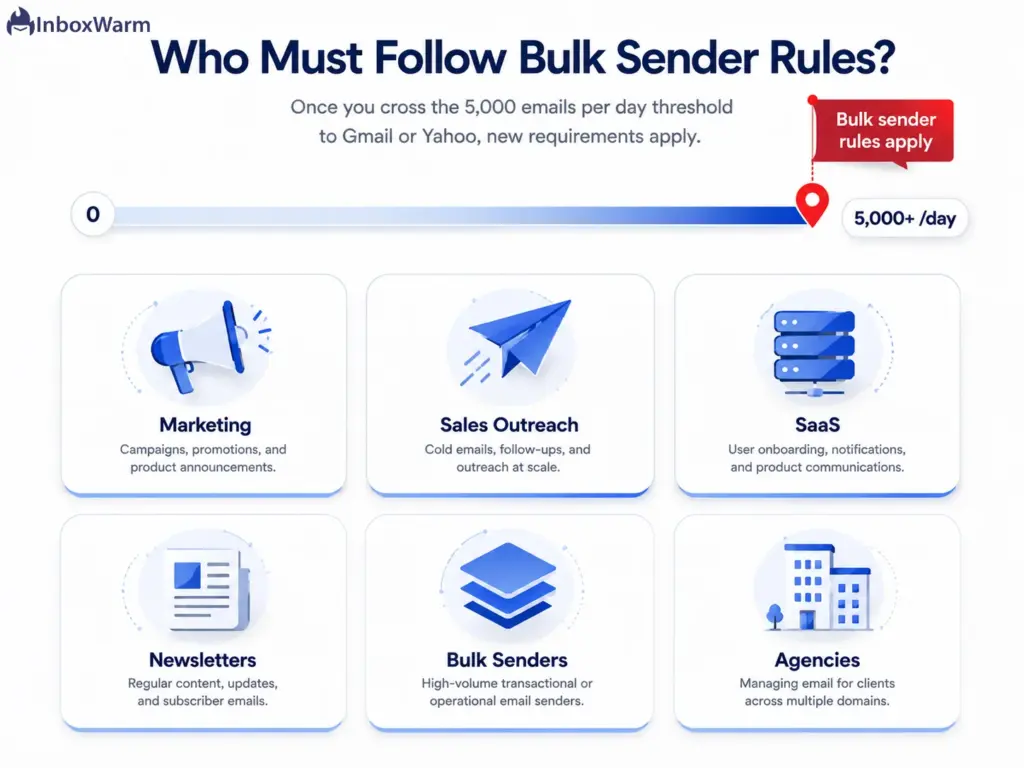
The strictest rules apply to bulk senders, which Google defines as anyone sending 5,000 or more messages in a single day to personal Gmail accounts. Yahoo uses a similar bar but has not published an exact number, so it applies its rules to any significant commercial sending operation. Once your volume crosses the bulk threshold even once, Google categorizes your domain as a bulk sender permanently, regardless of how much you send afterward.
A lighter set of rules applies to everyone else. Even if you send a handful of emails a day, Google and Yahoo still expect you to authenticate with at least SPF or DKIM, use a valid From address, and avoid spam-like behavior. Authentication is no longer optional for anyone who wants their mail delivered.
The Risks of Non-Compliance
The consequences of ignoring these rules escalated sharply in late 2025. Here is what non-compliance now triggers:
- Permanent rejection. Since November 2025, Gmail rejects non-compliant bulk mail with 5xx errors rather than routing it to spam. The message never arrives.
- Temporary rate limiting. Borderline senders see their mail throttled, with delivery delayed for hours or deferred entirely.
- Loss of mitigation support. If your spam rate hits 0.30%, you lose access to Google’s mitigation help until you stay below that line for seven consecutive days.
- Reputation damage. Failed authentication and high complaint rates erode your sender reputation, which is slow to rebuild even after you fix the underlying problem.
Who Must Follow These Requirements in 2026?
Any organization that sends 5,000 or more emails a day to Gmail or Yahoo personal inboxes must follow the full bulk sender requirements. That covers far more businesses than the word ‘bulk’ suggests, because the count includes everything from your primary domain, and subdomains roll up to the parent.
If you run marketing campaigns, sales outreach, or product notifications at volume, you are almost certainly in scope.
Bulk Email Senders
This is the headline category. If your domain sends 5,000+ messages a day to consumer Gmail or Yahoo addresses, you must meet every authentication, unsubscribe, and spam-rate rule. The threshold counts messages to personal inboxes, so mail between Google Workspace accounts inside the same organization does not count toward it.
Marketing Teams
Marketing teams almost always cross the threshold through newsletters, promotional blasts, and lifecycle campaigns. Marketing and promotional mail also carries the strictest unsubscribe obligation, because the one-click unsubscribe rule applies specifically to commercial messages rather than transactional ones.
Sales Outreach Teams
Cold outreach and SDR teams are in scope the moment their combined daily volume hits 5,000 messages, even when that volume is spread across many mailboxes on the same domain. Authentication and list hygiene matter even more here, because cold lists generate higher complaint rates than opt-in lists. Teams running outreach at scale should pair compliance with deliberate sender reputation management to avoid tripping the spam thresholds.
SaaS Businesses
SaaS companies send a constant mix of transactional mail (password resets, receipts, alerts) and marketing mail (product updates, onboarding sequences). Transactional messages are exempt from the one-click unsubscribe rule, but they still must be authenticated. The safest approach is to authenticate everything and apply one-click unsubscribe to every promotional send.
Newsletter Publishers
Publishers live and die by inbox placement, and their high-frequency sends put them squarely in the bulk category. Because newsletters depend on engagement, publishers feel complaint-rate problems faster than most senders. Strong list hygiene and a frictionless unsubscribe path are essential to staying under the 0.30% ceiling.
The full Google and Yahoo sender requirements for 2026 break down into eight concrete actions. Work through them in order. The first three are authentication, the next two govern unsubscribe behavior, and the last three protect your reputation. Here is the complete bulk sender requirements checklist.
THE 8-POINT COMPLIANCE CHECKLIST
- Publish a valid SPF record for your sending domain.
- Enable DKIM signing on all outbound mail.
- Publish a DMARC policy (p=none or stronger) with passing alignment.
- Send from a consistent, valid From address on an authenticated domain.
- Add RFC 8058 one-click unsubscribe to marketing mail.
- Process unsubscribe requests within two days.
- Keep your spam complaint rate below 0.10% and never reach 0.30%.
- Send over secure, properly configured infrastructure (TLS, valid PTR records).
Authenticate Your Domain With SPF
SPF (Sender Policy Framework, defined in RFC 7208) is a DNS record that lists the servers allowed to send mail for your domain. Publish a single SPF TXT record that names every legitimate sending source, and make sure the envelope sender domain passes SPF validation. Avoid having more than one SPF record per domain, which invalidates both. You can generate a correct record with an SPF generator if you are starting from scratch.
Enable DKIM Signing
DKIM (DomainKeys Identified Mail, defined in RFC 6376) adds a cryptographic signature to every message, letting the receiving server confirm the mail was not altered in transit and genuinely came from your domain. Publish your DKIM public key in DNS and sign all outbound mail. Yahoo recommends 2048-bit keys for stronger security, and Google treats DKIM alignment as the more reliable path to passing DMARC.
Implement DMARC Policies
DMARC (Domain-based Message Authentication, Reporting and Conformance, defined in RFC 7489) tells receivers what to do when a message fails SPF and DKIM, and it sends you reports on who is sending mail using your domain. Bulk senders must publish a DMARC record with a policy of at least p=none. Start at p=none to monitor, then tighten to p=quarantine and eventually p=reject once your legitimate mail is passing cleanly. A DMARC generator makes the initial record straightforward.
Use a Valid From Address
Your From header must use a real, consistent domain that you control and that aligns with your SPF or DKIM domain. This alignment is what makes DMARC pass. Google has also stated it will use a DMARC quarantine policy on its own domains, so never spoof a Gmail From address, which can break your delivery outright.
Support One-Click Unsubscribe
Marketing and promotional messages must include a working one-click unsubscribe that follows RFC 8058, implemented through the List-Unsubscribe and List-Unsubscribe-Post headers. A mailto link buried in the email body does not satisfy the rule on its own. You must also keep a clearly visible unsubscribe link inside the message body.
Process Unsubscribe Requests Promptly
Honoring an unsubscribe is not enough if it is slow. Google and Yahoo require you to process opt-out requests within two days. Build your system to suppress unsubscribed addresses automatically and immediately, rather than waiting for a manual list cleanup.
Maintain Low Spam Complaint Rates
Keep your user-reported spam rate, measured in Google Postmaster Tools, below 0.10% as a target and never let it reach 0.30%. Crossing 0.30% removes your eligibility for Google’s mitigation support until you stay under the line for seven straight days. Yahoo applies a comparable expectation through its own Insights dashboard.
Use Secure Sending Infrastructure
Send over TLS, maintain valid forward and reverse DNS (PTR) records for your sending IPs, and format messages to the RFC 5322 standard. These infrastructure basics signal a legitimate operation and prevent technical rejections that have nothing to do with your content.
Understanding SPF, DKIM, and DMARC
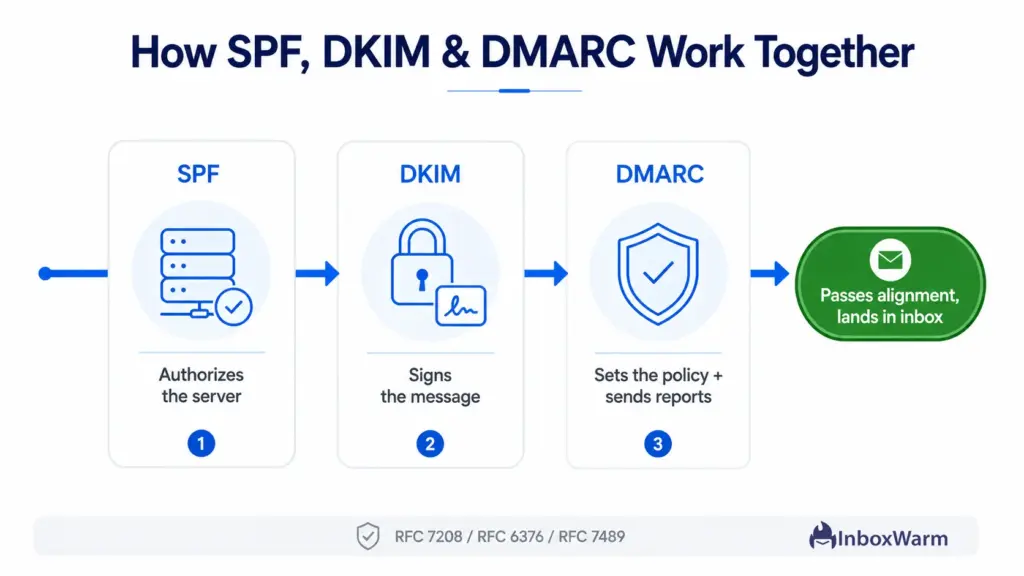
SPF, DKIM, and DMARC are the three email authentication protocols at the heart of the Google and Yahoo email authentication requirements. SPF authorizes your sending servers, DKIM signs your messages, and DMARC ties the two together and tells receivers how to handle failures.
Together they answer one question for the inbox provider: is this email really from who it claims to be?
| Protocol | What It Proves | Where It Lives |
|---|---|---|
| SPF (RFC 7208) | This server is allowed to send for the domain | DNS TXT record |
| DKIM (RFC 6376) | The message was not altered and came from the domain | DNS key + message signature |
| DMARC (RFC 7489) | What to do on failure, plus reporting | DNS TXT record |
What SPF Does
SPF publishes a list of approved sending servers in your DNS. When a receiving server gets your mail, it checks whether the sending IP appears on that list. If it does, SPF passes. If a spammer tries to send from an unlisted server using your domain, SPF fails, and the message is flagged.
What DKIM Does
DKIM attaches an encrypted signature to each message using a private key only you hold. The receiver looks up your matching public key in DNS and verifies the signature. A valid signature proves two things: the message genuinely came from your domain, and nobody tampered with it on the way.
What DMARC Does
DMARC sits on top of SPF and DKIM. It checks that the domain is visible to you. If the from address aligns with the domain that passed SPF or DKIM, then apply the policy you set: none, quarantine, or reject. It also emails you aggregate reports showing every source sending mail under your domain, which is how you catch both spoofers and your own misconfigured systems.
How These Protocols Work Together
No single protocol is sufficient on its own. SPF can be bypassed by forwarding, and DKIM alone does not tell a receiver what to do when a check fails. DMARC alignment is the glue: it requires that the authenticated domain match the “From” domain the recipient actually sees. Pass all three with alignment, and you satisfy the SPF, DKIM, and DMARC requirements for Gmail and Yahoo in one move.
Spam Complaint Thresholds Explained
The spam complaint threshold is the share of your delivered mail that recipients mark as spam. Google wants this number below 0.10% and treats 0.30% as a hard ceiling you must never reach. At a complaint rate of 0.30%, just three recipients out of every 1,000 reporting your mail is enough to put your deliverability at serious risk.
Google’s Recommended Complaint Limits
Google’s sender guidelines set a clear two-tier standard. Keep your user-reported spam rate below 0.10% to stay healthy, and never allow it to reach 0.30%. If you cross 0.30%, you become ineligible for Google’s mitigation support until your rate stays below that figure for seven consecutive days. You monitor all of this in Google Postmaster Tools, which now includes a Compliance Status dashboard.
Why Complaint Rates Matter
Complaint rate is one of the strongest signals a mailbox provider has about whether people want your mail. A single spam complaint carries far more weight than a delivered message, because it is an explicit rejection from a real person. High complaint rates pull down your sender reputation across an entire domain, which is why one bad campaign can hurt the deliverability of every send that follows.
Common Causes of Spam Complaints
- Sending to people who never opted in, including purchased or scraped lists.
- Burying or hiding the unsubscribe option so recipients hit ‘Report Spam’ instead.
- Mismatched expectations, where the subject line promises something the email does not deliver.
- Sending too often, too fast, especially to a list that has gone cold.
One-Click Unsubscribe Requirements
One-click unsubscribe is a requirement that lets recipients opt out of your marketing mail with a single action, no landing page, and no login. It is built on RFC 8058, which defines the List-Unsubscribe and List-Unsubscribe-Post headers.
The deadline for bulk senders to implement it was June 1, 2024, and it now applies to all commercial and promotional messages.
What One-Click Unsubscribe Means
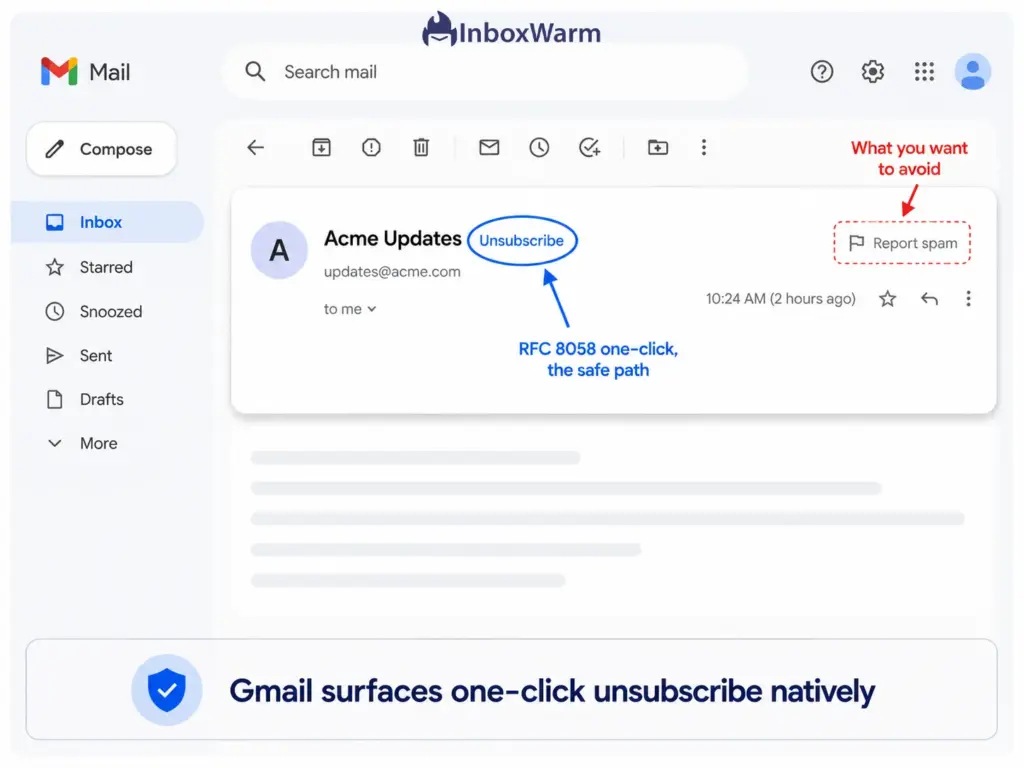
One-click unsubscribe means the recipient can leave your list in a single click directly from the inbox interface, without extra steps. Gmail surfaces this as a native unsubscribe button near the sender name. The goal is to give people an easy alternative to the ‘Report Spam’ button, because automated unsubscribes protect your reputation while spam complaints damage it.
Gmail Requirements
Gmail requires marketing and subscribed messages to support one-click unsubscribing through the correct List-Unsubscribe-Post header and to include a clearly visible unsubscribe link in the message body. A mailto link alone does not meet the requirement. Transactional messages such as password resets and order confirmations are excluded.
Yahoo Requirements
Yahoo’s requirement mirrors Gmail’s. Bulk senders must offer a functional one-click unsubscribe on commercial mail and honor opt-outs promptly. Yahoo evaluates these signals through its own systems, including the Insights dashboard it launched to give senders visibility into delivery and complaint performance.
How to Implement It Correctly
Add both the List-Unsubscribe and List-Unsubscribe-Post headers to your marketing mail, keep a visible unsubscribe link in the body, and make sure your system removes opt-outs within two days. Most reputable email platforms add the headers automatically, but you should always send a test message and confirm the native unsubscribe button appears in Gmail before you rely on it.
Common Compliance Mistakes That Hurt Deliverability
Most deliverability failures come from a short list of avoidable mistakes. These are the email deliverability requirements that senders most often miss, and any one of them can be the reason your messages bounce or land in spam.
Missing SPF Records
A domain with no SPF record, or with multiple conflicting SPF records, fails authentication immediately. Multiple SPF records are a common and silent error because each one looks valid on its own, but together they invalidate the check. Maintain exactly one SPF record that includes every legitimate sending source.
Misconfigured DKIM
DKIM breaks when the published public key does not match the private key signing your mail or when a key is rotated without updating DNS. A failing DKIM signature undermines DMARC alignment even when SPF passes. Test your DKIM signature on a live message after any change to your sending setup.
No DMARC Policy
Plenty of domains publish SPF and DKIM but skip DMARC entirely, which leaves them non-compliant as bulk senders and blind to who is spoofing them. Without a DMARC record, you also receive none of the reports that reveal authentication problems. Publishing even a p=none policy is far better than having no DMARC at all.
Sending to Outdated Lists
Old lists are full of addresses that have gone dead, changed hands, or turned into spam traps. Mailing them drives up bounces and complaints at the same time, which is the fastest way to wreck a sender reputation. Re-permission or sunset any segment that has not engaged in 90 to 120 days.
Poor List Hygiene
List hygiene is the ongoing practice of removing invalid, unengaged, and complaining addresses. Skipping it lets dead weight accumulate until your engagement metrics drop and providers start routing your mail to spam. Validate new signups and prune inactive contacts on a regular schedule.
High Bounce Rates
A high bounce rate tells mailbox providers you are not maintaining your list, and it correlates strongly with spam-trap hits. Keep hard bounces well under control by validating addresses at capture and removing them the moment they bounce. Persistent high bounce rates can suppress delivery for your entire domain.
You can verify compliance in under an hour using free tools and DNS lookups. Run through these five checks to confirm your domain meets the Google bulk sender requirements checklist before your next campaign.
Each one isolates a specific requirement so you know precisely what to fix.
How to Check If Your Domain Meets Google & Yahoo Requirements
- Verify SPF Records
Look up your domain’s TXT records and confirm there is exactly one SPF record that includes every service you send from. Check that it ends in an appropriate enforcement mechanism and stays under the 10 DNS-lookup limit. An SPF checker will flag both missing records and the multiple-record error in seconds.
- Test DKIM Signatures
Send a test message to an account you control and inspect the headers, or use a DKIM checker to confirm your signature validates against the published public key. A passing DKIM check on live mail is the only proof that matters, since the DNS record alone does not confirm your mail is actually being signed.
- Validate DMARC Configuration
Confirm you have a DMARC record published, check that its policy is at least p=none, and verify that your legitimate mail is passing alignment in your DMARC reports. A DMARC checker tells you whether the record exists and is well formed. Reading your aggregate reports tells you whether real mail is actually aligning.
Set up Google Postmaster Tools for every sending domain and watch the spam rate and compliance status dashboards. This is the only place you see your complaint rate the way Google measures it. Yahoo senders should enroll in the Yahoo Insights dashboard for the equivalent view.
- Review Sender Reputation
Beyond the individual checks, look at the overall reputation signals: domain and IP reputation in Postmaster Tools, blocklist status, and engagement trends. A domain can pass every authentication check and still struggle if its reputation has been damaged by past behavior. Reputation is the cumulative score that determines how forgiving providers are when something goes wrong.
Beyond Compliance: How to Improve Inbox Placement
Compliance gets your emails through the door. Whether they reach the primary inbox instead of spam often depends on the reputation and engagement signals associated with your sending domain. InboxWarm.ai helps strengthen those signals and improve long-term deliverability.
Warm Up New Domains
A brand-new domain has no sending history, and providers treat unknown senders with suspicion. Warming up means gradually increasing your sending volume while generating positive engagement, so providers learn to trust your domain before you send at full scale.
Build Sender Reputation
Reputation is earned through consistent, wanted mail over time. Send on a steady schedule, keep your volume predictable, and prioritize engaged recipients. Sudden spikes in volume or a flood of complaints both signal risk, so the goal is steady, trustworthy behavior that compounds into a strong reputation.
Maintain Engagement Signals
Opens, clicks, replies, and folder moves all tell providers that people value your mail. Mail that gets engagement lands in the inbox. Mail that gets ignored slowly drifts to spam. Segment your list, send relevant content, and remove chronically unengaged contacts so your engagement rates stay high.
Reduce Bounce Rates
Validate email addresses at the point of capture and remove bounces immediately. A clean list keeps your bounce rate low, which protects both your reputation and your standing against the provider requirements. Lower bounces also mean your engagement metrics reflect real recipients rather than dead addresses.
Monitor Deliverability Metrics
Track inbox placement, spam rate, authentication pass rates, and reputation on an ongoing basis rather than reacting after a campaign fails. The senders who maintain the best deliverability treat it as a continuous discipline, catching small problems before they grow into domain-wide rejections.
How InboxWarm.ai Helps You Stay Compliant and Improve Deliverability
InboxWarm.ai is an AI-powered email warm-up tool that improves inbox placement and sender reputation. Compliance with the Google sender requirements and Yahoo sender requirements gets you eligible to be delivered. InboxWarm.ai works on the next layer, building the reputation and engagement signals that decide whether you actually reach the inbox.
To help senders move beyond basic compliance and achieve consistent inbox placement, InboxWarm.ai focuses on the following deliverability pillars:
Automated Email Warmup
InboxWarm.ai gradually ramps your sending volume and generates realistic positive engagement across a network of inboxes, so new and recovering domains build trust without manual effort. This is the practical way to establish a sender reputation before a real campaign ever goes out. It supports Gmail, Amazon SES, SendGrid, and standard SMTP setups.
Reputation Monitoring
The platform tracks how mailbox providers see your domain over time, so you can spot a slipping reputation before it turns into rejected mail. Continuous monitoring turns deliverability from a guessing game into something you can measure and act on.
Inbox Placement Improvements
By generating consistent positive engagement signals, InboxWarm.ai improves the share of your mail that lands in the primary inbox rather than spam or the promotions tab. The result is measurable lift in inbox placement, not a vague promise of better delivery.
Deliverability Optimization
Alongside warm-up, InboxWarm.ai surfaces the authentication and reputation issues that quietly suppress delivery, helping you keep SPF, DKIM, and DMARC aligned and your complaint rate low. It is the ongoing layer that keeps you both compliant and competitive in the inbox.
Tired of watching compliant mail still land in spam?
Meeting Google and Yahoo sender requirements is only part of the equation. InboxWarm.ai helps strengthen sender reputation and improve inbox placement over time. Start with a 10-day free trial, no credit card required.
Frequently Asked Questions
Is DMARC Mandatory in 2026?
Yes, for bulk senders. Anyone sending 5,000 or more messages a day to Gmail or Yahoo must publish a DMARC record with a policy of at least p=none and pass alignment. Smaller senders are not strictly required to publish DMARC, but it is strongly recommended because it protects your domain from spoofing and is increasingly treated as a baseline by all major providers.
What Is the Recommended Spam Complaint Rate?
Google recommends keeping your user-reported spam rate below 0.10% and warns that you should never reach 0.30%. Crossing 0.30% makes you ineligible for Google's mitigation support until you stay below that line for seven consecutive days. You measure this rate in Google Postmaster Tools, and Yahoo applies a comparable expectation through its Insights dashboard.
Do Small Businesses Need SPF, DKIM, and DMARC?
Every sender should have SPF and DKIM, regardless of size, because unauthenticated mail is increasingly filtered to spam by default. DMARC is mandatory only once you cross the bulk threshold, but small businesses still benefit from publishing at least a p=none policy. Setting up all three early means you never scramble to comply the day your volume grows.
How Can I Improve Gmail Deliverability?
Start by meeting every Gmail sender guideline: authenticate with SPF, DKIM, and DMARC; support one-click unsubscribe; and keep complaints low. Then build reputation through consistent sending, strong engagement, and clean lists. Warming up your domain with InboxWarm.ai establishes the trust signals Gmail relies on, which is what moves mail from the spam folder into the primary inbox.
Conclusion
The Google and Yahoo sender requirements are now a baseline for email deliverability. To remain compliant, senders must authenticate with SPF, DKIM, and DMARC; use a valid aligned From address; provide one-click unsubscribe; and maintain low spam complaint rates. These requirements are actively enforced, and failing to meet them can result in delivery issues or outright message rejection.
However, compliance alone does not guarantee inbox placement. Sender reputation, engagement signals, and ongoing deliverability management continue to influence whether emails reach the inbox or the spam folder. Before launching your next campaign, verify your authentication records, test unsubscribe functionality, and review your spam complaint metrics.
By combining compliance with strong reputation management, you can improve deliverability and maximize inbox placement.