

TL;DR
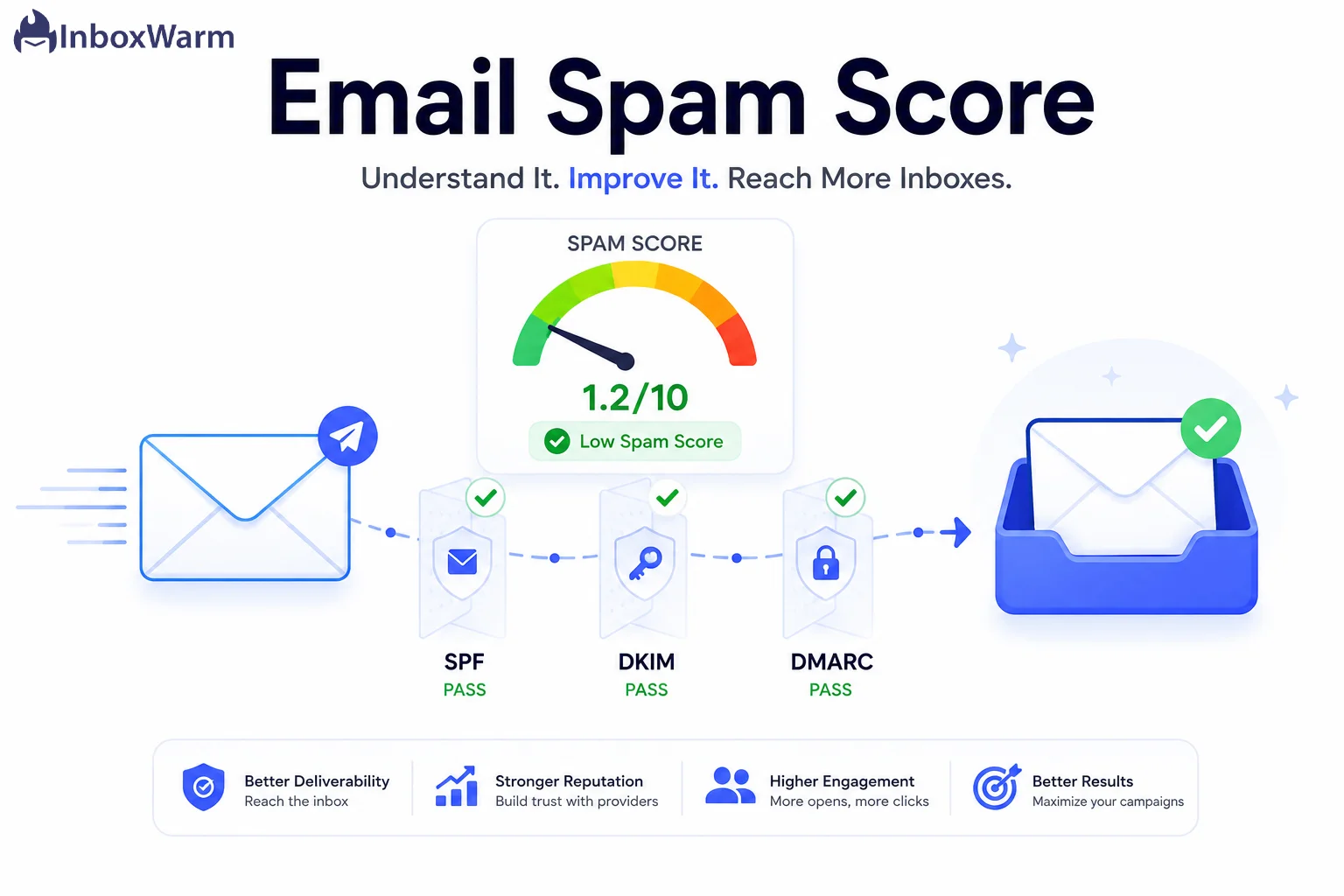
An email spam score is a numeric rating that predicts how likely your message is to be filtered as spam. Most testing tools use SpamAssassin, where a score of 5.0 or higher gets flagged. The lower your score, the better your inbox placement. You reduce it by fixing authentication, content, and sender reputation.
- Two things share the name “spam score”: a per-email content score (SpamAssassin) and your ongoing sender reputation.
- The SpamAssassin default spam threshold is 5.0. Aim for under 3.0, and treat 0 to 2 as ideal.
- Authentication (SPF, DKIM, DMARC), low spam complaints, and clean list hygiene matter more than “spam words.”
- Keep your spam complaint rate below 0.1% and never let it cross 0.3%, per Google and Yahoo sender guidelines.
You spend hours writing the perfect email, you hit send, and it lands in spam. No bounce, no error, no warning. The message just quietly disappears into a folder almost no one opens. Behind that silent failure is a number you probably never saw: your email spam score.
Most senders do not lose deliverability because of one bad subject line. They lose it because spam filters quietly add up dozens of small signals, from a missing DKIM signature to a spike in complaints, and decide your mail is not worth the inbox. A poor email spam score is the symptom. Lost replies, dead campaigns, and a damaged sender reputation are the cost. For anyone running cold outreach or email marketing, that cost compounds fast across every domain you send from.
This guide explains email spam score in plain terms. You’ll learn what the score actually measures, how spam filters evaluate your emails, what raises and lowers your score, why your messages go to spam in the first place, and a clear, step-by-step way to reduce your score and keep your emails out of the spam folder.
Table of Contents
What Is an Email Spam Score?
An email spam score is a numeric rating that estimates how likely a spam filter is to classify your message as junk. A higher number means a higher risk of the spam folder. A lower number means a stronger chance of inbox placement. Testing tools calculate it by checking your email against a long list of rules and adding up the points.
Your spam score is just one piece of email deliverability, the broader practice of getting your messages into the inbox.
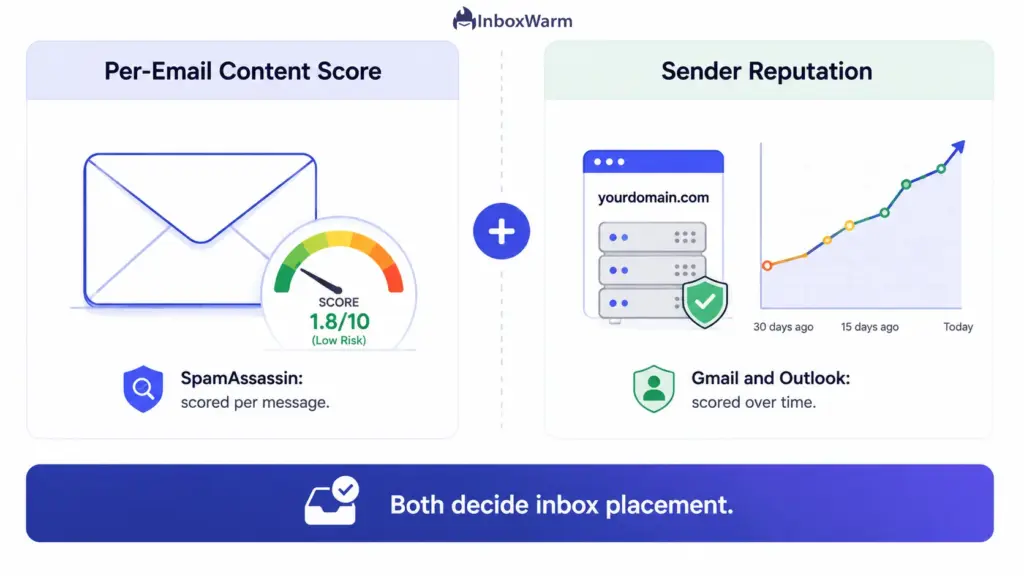
Here is the part most guides skip. The phrase “spam score” really points to two different things, and confusing them is why people fix the wrong problem.
The Per-Email Content Score
This is the score you get from spam filter testing tools like Mail-Tester, GlockApps, or MailerCheck. Most of them run your message through SpamAssassin, an open-source spam filtering engine used by many hosting providers and mail servers. It scores the individual email: its headers, content, formatting, links, and authentication results. This is a snapshot of one message.
Your Ongoing Sender Reputation
This is the bigger, slower signal. Mailbox providers like Gmail and Outlook keep a running email reputation for your domain and sending IP, built from how recipients react to your mail over time. People sometimes call this an email sender score. A clean per-email score will not save you if your sender reputation is already poor, and a strong reputation can carry a slightly imperfect email. You need both.
How Do Spam Filters Evaluate Your Emails?
Spam filters assign points to dozens of signals in every email, then add them into a single score. Signals that look spammy add positive points. Signals that look legitimate, like a valid DKIM signature, subtract points. If the total crosses the filter’s threshold, the message is sent to spam or rejected. SpamAssassin is the clearest example, so it is worth understanding how its scoring works.
SpamAssassin runs hundreds of rule-based tests against each message. Each rule that triggers adds or subtracts a set number of points, and the final spam score is the sum of all of them. The default spam threshold set by Apache SpamAssassin is 5.0, so any email scoring 5.0 or higher is typically flagged as spam.
A passing score is good, but a thin margin is risky, because mail administrators can lower the threshold to 3.0 or even less. Aim for under 3.0, and treat a score of 0 to 2 as ideal.
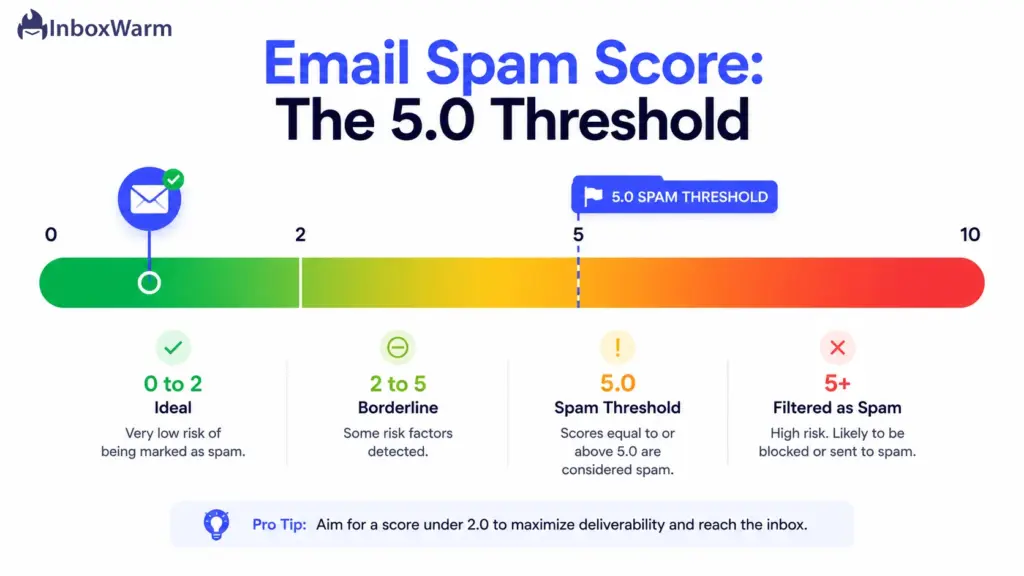
- 0.0 to 2.0: clean. Safe inbox placement across most servers.
- 2.0 to 5.0: borderline. You pass the default, but stricter filters may catch you.
- 5.0 and above: treated as spam on most servers.
- Negative scores: strong legitimacy signals. This is what you want.
Modern providers like Gmail, Yahoo, and Outlook use their own machine-learning filters on top of tools like SpamAssassin. Those proprietary systems weigh sender reputation and recipient engagement far more heavily than any single rule. So while a SpamAssassin test is a useful diagnostic, it is not the whole picture. It tells you what is wrong with the message, not how the world’s biggest mailbox providers feel about your domain.
What Affects Your Email Spam Score?
Your email spam score is shaped by five groups of factors: authentication, sender reputation, content and formatting, list quality, and recipient engagement. Filters read all five together. Fixing one while ignoring the rest rarely moves the number, which is why scattershot tweaks so often fail.
The table below maps each factor to its effect on your score.
| Factor | What It Covers | Effect on Score |
|---|---|---|
| Email authentication | SPF record, DKIM authentication, DMARC policy, and alignment | Missing or failing auth adds points fast. Valid signatures subtract points. |
| Sender reputation | Domain reputation, IP reputation, sending history, blacklist status | A poor reputation or an email blacklist listing raises risk on every send. |
| Content and formatting | Subject lines, spam trigger words, link quality, image-to-text ratio, HTML | Sloppy HTML, risky links, and aggressive sales words add points. |
| List quality | Bounce rate, invalid addresses, spam traps, list age | High bounce rate and spam traps signal a bought or stale list. |
| Engagement | Opens, replies, spam complaints, unsubscribe rate, deletions | Low engagement and spam complaints are the strongest negative signals. |
Email Authentication Is the Foundation
Authentication proves your mail actually comes from you. SPF (Sender Policy Framework) lists the servers allowed to send for your domain. DKIM (DomainKeys Identified Mail) adds a cryptographic signature that proves the message was not altered. DMARC ties them together and tells receivers what to do when a check fails.
Google and Yahoo now require bulk senders, defined as domains sending 5,000 or more messages per day to their users, to pass all three. Get this wrong and your score suffers before a recipient ever reads a word.
Reputation and Engagement Carry the Most Weight
Mailbox providers care most about how real people treat your mail. Strong email engagement, like opens and replies, tells Gmail your messages are wanted. Spam complaints tell it the opposite, and they hurt the most.
Google’s sender guidelines advise keeping your spam complaint rate below 0.1% and never letting it cross 0.3%. On a list of 10,000, just 30 complaints can push you over the line. A high unsubscribe rate and a rising bounce rate point the same way: this sender is not welcome.
Why Do Your Emails Go to Spam?
Emails go to spam when filters see more risk signals than trust signals. Usually it is not one big mistake but a stack of small ones that together push your score over the threshold.
These are the most common causes, roughly in order of how often they sink a sender.
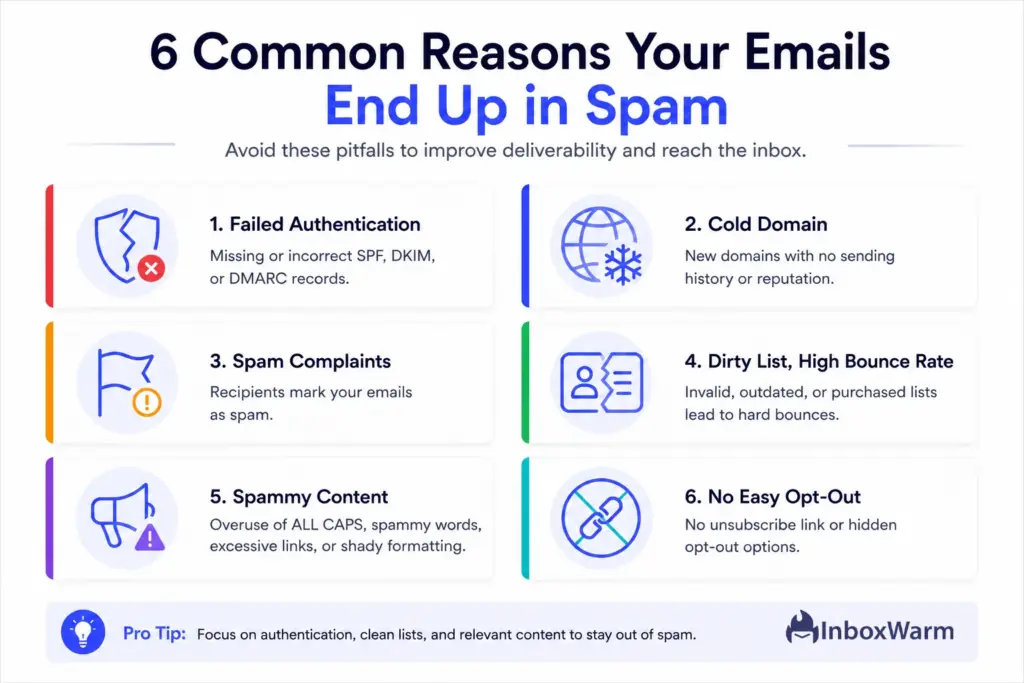
- Broken or missing authentication. No SPF record, an unsigned DKIM, or no DMARC policy. This is the fastest way to look like a spoofer.
- A cold or unwarmed domain. A brand-new domain that suddenly sends volume has no reputation to lean on, so filters stay suspicious.
- High spam complaints. Recipients hitting “Report spam” is the single strongest negative signal a provider tracks.
- Dirty lists and a high bounce rate. Invalid addresses and spam traps mark you as a careless bulk email sender.
- Spammy content. All-caps subject lines, “free money” phrasing, link shorteners, and image-only emails all add points.
- No easy way to unsubscribe. Missing one-click unsubscribe headers both breaks compliance and pushes annoyed readers to report you.
Notice that only one of these is about the words in your email. Most deliverability problems are infrastructure and reputation problems wearing a content costume.
How Do You Check Your Email Spam Score?
You check your email spam score with a spam filter testing tool that sends or scans a message and returns a SpamAssassin-style report. The best ones also show your authentication status and flag the exact rules you triggered.
Use these three layers together, because each one shows a different part of the picture.
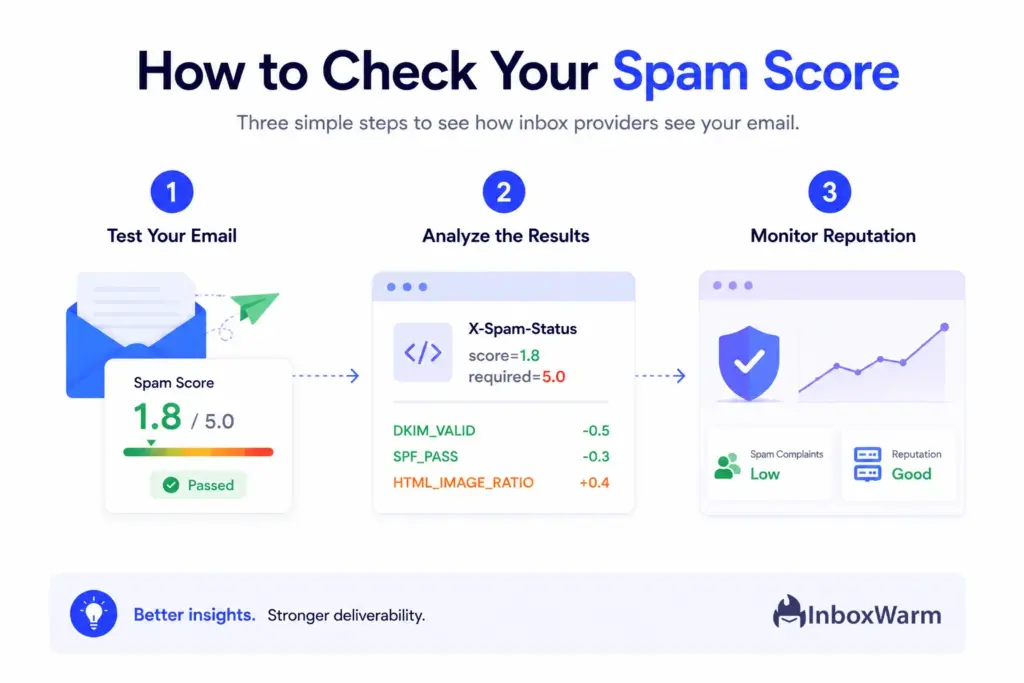
Run a Spam Filter Test
Send your real email to a testing service such as Mail-Tester, GlockApps, or MailerCheck. The tool returns a numeric spam score plus a breakdown of every rule that fired and how many points it added. Fix the highest-scoring rules first, since they move the number the most. Do not chase a lower number blindly. Understand which rule was hit and why.
Read the SpamAssassin Headers
If you have access to a received message’s raw headers, look for the X-Spam-Status line. It shows the score, the threshold (usually, required=5.0), and the list of tests that ran. A line like score=6.2 required=5.0 tells you the message was flagged and by how much. Negative point entries, such as a passing DKIM signature, are working in your favor.
Monitor Reputation With Postmaster Tools
A single test cannot show your domain reputation or IP reputation over time. For that, set up Google Postmaster Tools and Microsoft SNDS. They report your spam complaint rate, authentication results, and reputation trend straight from the source. This is the closest thing to seeing your email sender score the way the provider sees it. You can also confirm your records with a free SPF checker and DKIM checker before you send.
How Do You Reduce Your Email Spam Score?
You reduce your email spam score by fixing the filters’ signals weigh most in the right order: authenticate your domain, warm up your sending, clean your list, tighten your content, and then monitor your reputation.
Work through these six steps in sequence. Skipping straight to content edits is the most common mistake, because authentication and reputation move the number far more.
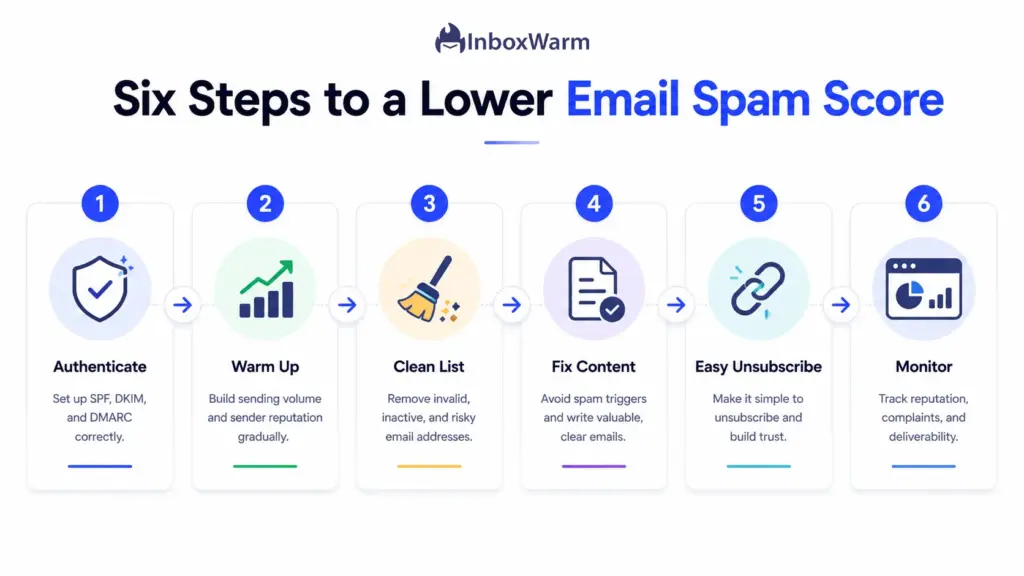
Step 1: Authenticate Your Domain
Set up all three authentication protocols before you do anything else. Publish an SPF record that lists every service allowed to send for your domain. Enable DKIM authentication so each message carries a signature, using a key of at least 1024 bits, with 2048 bits recommended.
Then publish a DMARC policy, starting at p=none monitoring and then moving to p=quarantine when your reports look clean. Confirm all three align with your From domain. This step alone can swing a SpamAssassin score by several points.
Step 2: Warm Up Your Domain and IP
A new or idle domain has no sending history, so filters distrust it. Domain and IP email warm-up fixes this by gradually increasing send volume while generating positive engagement, which builds the sender reputation filters look for. Start with a small daily volume and ramp up over two to four weeks.
Automated warm-up keeps this consistent and produces the opens and replies that teach Gmail your domain is trustworthy.
Step 3: Clean Your List and Cut Your Bounce Rate
Remove invalid, duplicate, and inactive addresses before every campaign. A high bounce rate tells providers you are mailing a stale or purchased list, which raises your score and your blacklist risk. Verify new addresses at signup, suppress hard bounces immediately, and re-engage or drop contacts who have not opened anything in 90 days. A smaller, engaged list beats a large, dead one on every deliverability metric that matters.
Step 4: Fix Your Content and Formatting
Now tune the message itself. Keep a healthy text-to-image ratio rather than sending one big image. Write plain, specific subject lines without all caps or strings of exclamation points. Avoid classic spam trigger phrases, link shorteners, and mismatched anchor text. Make sure your HTML is clean and that every email has a plain-text version. These edits rarely fix a reputation problem on their own, but they remove easy points from your content score.
Step 5: Make Unsubscribing Easy
Add one-click unsubscribe headers to every bulk send and honor opt-out requests within two days, as Google and Yahoo require. It feels backward, but a clear unsubscribe link lowers your spam complaints, because annoyed readers leave quietly instead of hitting “Report spam.” A lower complaint rate is one of the most powerful ways to protect your sender reputation and your inbox placement rate.
Step 6: Monitor Reputation and Complaint Rate
Deliverability is not set-and-forget. Watch your spam complaint rate in Google Postmaster Tools and keep it below 0.1%. Track your domain reputation trend, authentication pass rates, and any blacklist appearances week over week. Catching a rising complaint rate or a sudden reputation dip early lets you pause and fix the cause before it drags down every domain you send from.
The Complete Email Deliverability Checklist
Run this before every campaign to keep your email spam score low and your email marketing deliverability healthy. It’s grouped into four phases, so you can move top to bottom in the order filters actually weigh things.
If every box is checked, your message is in good shape for the inbox.
Authentication (do this first)
-
SPF record published and includes every sending service you use -
DKIM authentication enabled with a 1024-bit key or higher (2048-bit recommended) -
DMARC policy published and aligned with your From domain
Reputation and List Health
-
Sending domain warmed up with gradual volume and real engagement -
List cleaned, with hard bounces and inactive contacts removed -
Bounce rate under 2% and spam complaint rate below 0.1%
Content and Compliance
-
Plain, honest subject line with no all caps or spam trigger words -
Balanced text-to-image ratio, with a plain-text version included -
One-click unsubscribe header present and honored within two days
Test and Monitor (do this before you scale)
-
Spam filter test run, with the score under 3.0 and top rules fixed -
Google Postmaster Tools checked for reputation and complaint trends
What Are the Best Practices for a Low Email Spam Score?
The best practices for a low email spam score are to keep authentication current, warm every new domain, mail only engaged contacts, watch your complaint rate, test before scaling, and spread volume across domains. The one-time fixes get you into the inbox. These habits keep you there.
Build each one into your regular sending routine, not just your launch checklist.
Treat Authentication as Permanent
SPF, DKIM, and DMARC are not a launch task you finish and forget. Recheck all three whenever you add a new sending tool or platform, because a new service that isn’t in your SPF record will start failing silently. A quick monthly verification keeps your authentication aligned and your score low.
Warm Up Every New Domain and Mailbox
Every fresh domain and inbox starts with zero reputation, so warm each one before it sends real volume. Keep a low background warm-up running on active domains too, so idle ones stay trusted between campaigns. This is the cheapest insurance against a sudden reputation drop.
Send Only to People Who Want Your Mail
Engagement is the strongest trust signal a mailbox provider tracks, so protect it. Prune non-openers on a regular schedule and resist the urge to mail your whole list every time. A smaller, engaged audience beats a large, indifferent one on every deliverability metric that matters.
Watch Your Spam Complaints Closely
Your spam complaint rate is the fastest way to wreck a sender reputation, so treat below 0.1% as the target, not the 0.3% ceiling. Check it weekly in Postmaster Tools. If it starts climbing, pause and find the cause before it spreads across your other domains.
Test Before You Scale
Run spam filter testing on any new template before it goes to your full list. A single bad content score caught early is trivial to fix, while the same problem sent at scale can drag down a whole domain. Make the test a required step, not an optional one.
Spread Volume Across Warmed Domains
Overloading one domain raises risk fast, even with clean authentication. Spread sending across several properly warmed domains so no single one carries too much volume. This protects your overall email reputation and gives you room to pause a domain without stopping your campaigns.
Conclusion
Your email spam score is really two numbers working together: the per-email content score that tools like SpamAssassin produce, where 5.0 and above is treated as spam, and the slower sender reputation that Gmail, Yahoo, and Outlook assign your domain. A clean test on a poorly trusted domain still lands in spam, which is why chasing one number rarely works.
The fix is to work in order: authenticate, warm up, clean your list, tidy your content, make unsubscribing easy, and monitor your reputation. Keep your spam complaint rate below 0.1% and your list full of people who want your mail, and a low email spam score becomes the result rather than something you fight for before every send.
Start with the deliverability checklist above and fix your biggest point sources first.
Frequently Asked Questions
What causes a high email spam score?
The biggest causes are broken or missing email authentication, a poor sender reputation, and high spam complaints. Dirty lists with a high bounce rate, spammy content, and no one-click unsubscribe option also add points. Usually it is a stack of small issues rather than one error. Fix authentication and reputation first, since they carry the most weight.
How do I check my email spam score for free?
Send your email to a free spam filter testing tool such as Mail-Tester, which returns a SpamAssassin score and a list of triggered rules. You can also read the X-Spam-Status header on a received message to see the exact score and threshold. For reputation over time, use Google Postmaster Tools. Together these show both your per-email score and your sender reputation.
Do spam words really hurt my deliverability?
Spam trigger words can add points to your content score, but they are rarely the main reason emails go to spam. Authentication, sender reputation, and engagement matter far more to providers like Gmail. Cleaning up obvious offenders like all-caps subject lines and "free money" phrasing helps, but it will not rescue a domain with a bad reputation. Treat content as the last 10%, not the first fix.
How long does it take to improve a bad sender reputation?
Repairing a damaged sender reputation usually takes a few weeks of consistent, healthy sending, not days. You typically need to slow down, fix the root cause such as high complaints, and warm the domain back up gradually. Mailbox providers update reputation over time based on sustained behavior. There is no instant reset, so the faster you address the cause, the sooner the trend turns.
What spam complaint rate is too high?
Google advises keeping your spam complaint rate below 0.1% and never letting it cross 0.3%. Above the 0.3% threshold, deliverability degrades quickly across all your sending domains. On a list of 10,000 recipients, only 30 complaints reach 0.3%. Because the margin is so small, treat 0.1% as your working target rather than the ceiling.
Does email warm-up lower my spam score?
Yes, email warm-up indirectly lowers your spam score by building the sender reputation that mailbox providers trust. Gradually increasing volume while generating opens and replies teaches filters that your domain sends wanted mail. A warmed domain carries negative reputation signals that offset minor content issues. It is one of the most effective ways to improve inbox placement for new domains.
Why do my emails go to spam even with a good score?
A clean per-email score does not override a weak sender reputation. If your domain is new, lightly warmed, or has a history of complaints, providers can still filter you despite a low SpamAssassin number. Engagement and reputation are weighed more heavily than any single test. Check Postmaster Tools, confirm authentication, and keep warming the domain to close that gap.
Stuck Watching Good Emails Land in Spam?
InboxWarm.ai warms your domains and rebuilds the sender reputation that keeps your emails out of spam, automatically. Start free for 10 days, no credit card required.