
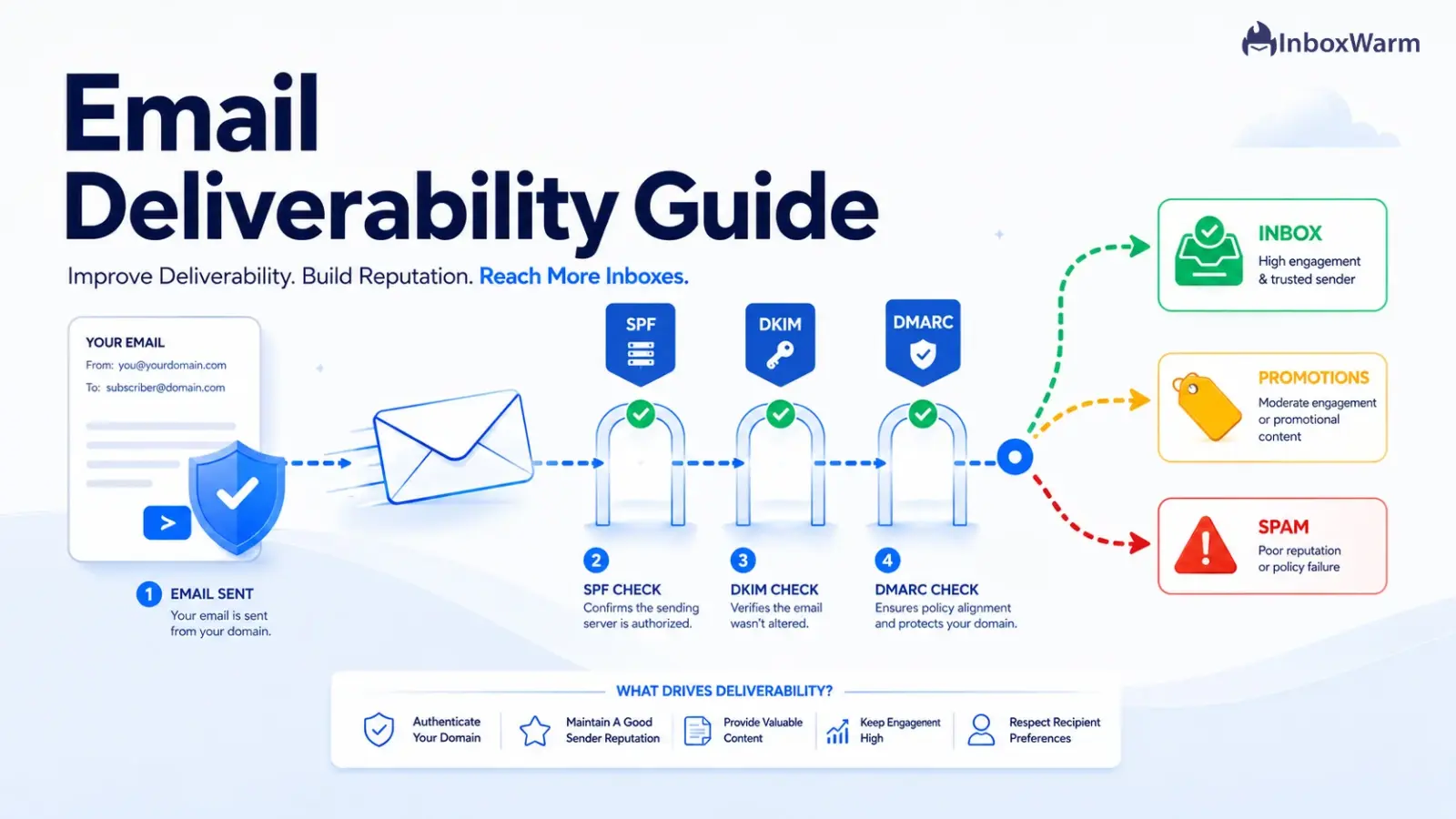

Email deliverability is the ability of your messages to reach the inbox instead of the spam folder or nowhere at all. In 2026 it rests on three pillars: authenticated email (SPF, DKIM, and DMARC), a strong sender reputation, and healthy sending habits. Get all three right, and inbox placement follows.
- Gmail, Yahoo, and Microsoft now require authenticated email, and bulk senders should implement SPF, DKIM, and DMARC.
- Keep your spam complaint rate under 0.3% (aim for 0.1%) and your email bounce rate under 2%.
- Sender reputation and domain reputation are scored continuously, and engagement is one of the strongest positive inbox placement signals in 2026.
- Warm up every new sending domain and IP before you send at volume.
You hit send on a campaign you spent a week building. The subject line is sharp. The offer is strong. Then the open rate flatlines. The dashboard says the emails were delivered, yet almost nobody saw them. They landed in spam, or in the gap between accepted and read. That gap is what email deliverability is about.
The cost of getting this wrong is real. A meaningful percentage of legitimate email never reaches the inbox or goes unread due to filtering and deliverability issues. For a sales team, that is lost pipeline. For a SaaS founder, that is onboarding emails and password resets that never arrive. The rules also tightened in late 2025. Google moved from temporary delays to permanent rejection for non-compliant bulk senders. Microsoft began rejecting unauthenticated bulk mail to Outlook, Hotmail, and Live outright.
This guide covers the full picture. You’ll learn what email deliverability is and how it differs from delivery rate. You’ll see why emails go to spam and how sender reputation and domain reputation are scored.
We’ll walk through the best email authentication methods and the 2026 bulk sender rules from Gmail, Yahoo, and Microsoft. Then you’ll get the metrics that decide inbox versus spam placement, plus a step-by-step plan to improve and maintain your inbox placement all year.
Table of Contents
What Is Email Deliverability?
Email deliverability is the ability of your email to land in the recipient’s inbox rather than the spam folder or the void. It is not the same as your delivery rate. Delivery rate only confirms that a receiving server accepted the message. Deliverability, and specifically inbox placement, measures whether that accepted message actually reached the primary inbox where someone will see it.
Inbox placement is the share of your delivered email that lands in the inbox instead of spam or a filtered tab. You can have a 99% delivery rate and a 60% inbox placement rate at the same time, which means a third of your accepted mail is sitting in spam. That gap between inbox versus spam placement is where most email marketing deliverability problems hide, because standard ESP dashboards report delivery, not placement.
Three forces decide where your email lands. The first is email authentication, which proves you are who you say you are. The second is sender reputation, which is the trust mailbox providers have built up about your sending over time. The third is engagement, which tells providers whether real people want your mail. Everything else in this guide ladders up to those three.
Why Do Emails Go to Spam Instead of the Inbox?
Emails go to spam when a mailbox provider does not trust the sender, cannot verify the sender, or sees signals that recipients do not want the mail. Modern spam filters at Gmail and Microsoft are machine learning systems that weigh dozens of signals in real time, and reputation plus engagement matter far more than any single keyword in your subject line.
Here are the most common reasons legitimate email gets filtered in 2026:
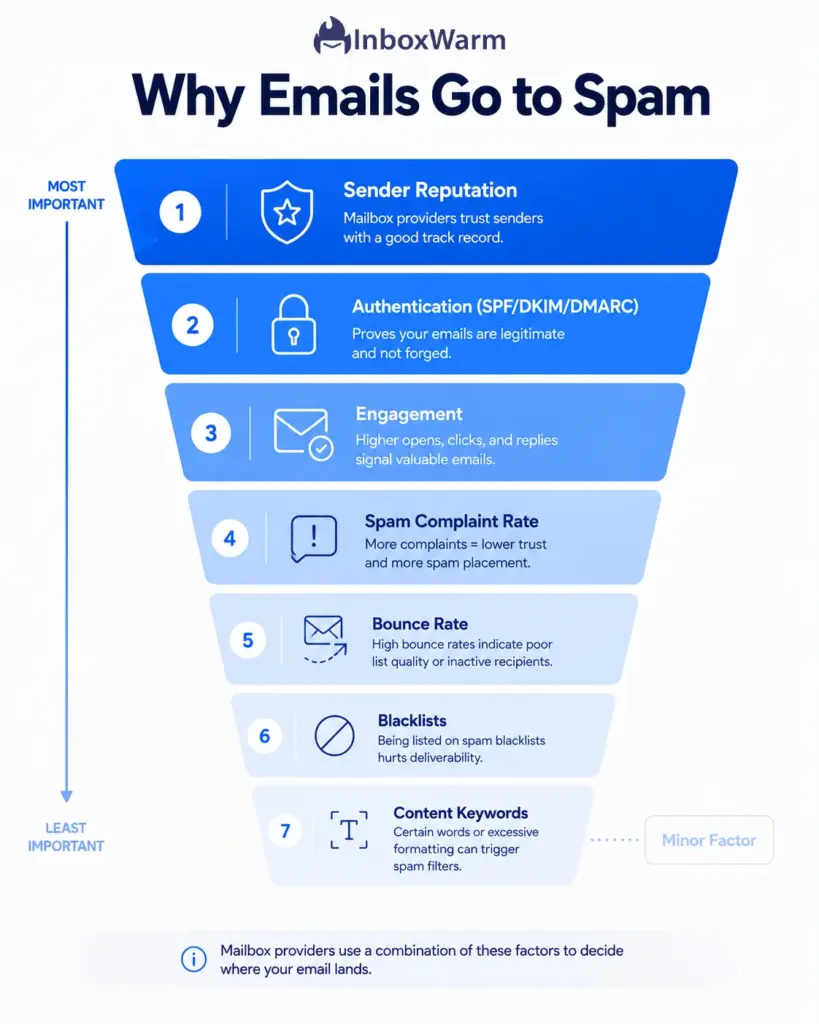
- Missing or failing authentication. No SPF, DKIM, or DMARC records that fail alignment. For bulk senders this now means outright rejection, not just a spam folder.
- Poor sender reputation. A sending domain or IP with a history of complaints, spam-trap hits, or erratic volume.
- High spam complaint rate. Too many recipients clicking ‘Report Spam.’ Above 0.3%, providers throttle or block you.
- High email bounce rate. Sending to invalid addresses signals poor list hygiene, which providers read as spammer behavior.
- Low engagement. Nobody opens, clicks, or replies. Providers learn the mail is unwanted and route future sends to spam.
- Blacklist listings. Your IP or domain appears on a blocklist such as Spamhaus, which many providers consult.
- Cold sending from a new domain. A brand new domain with no warm-up sent at volume gets treated as suspicious.
Notice what is not on that list: a single ‘spammy’ word. Content filters still exist, but in 2026 they are a minor factor next to reputation, authentication, and engagement. If your mail is going to spam, start with those three before you rewrite a subject line.
What Is Sender Reputation and How Is It Scored?
Sender reputation is the trust score that mailbox providers assign to your sending identity based on your history.
- A strong reputation means your mail gets the benefit of the doubt and lands in the inbox.
- A weak reputation means it gets filtered or rejected.
Providers calculate it continuously from spam complaints, bounce rates, spam-trap hits, sending consistency, authentication results, and how recipients engage.
One common public proxy is the email sender score, a 0 to 100 reputation rating from Validity that works like a credit score for sending. A score above 90 is healthy, while anything below 70 usually signals deliverability trouble. It is a useful gauge, but each mailbox provider keeps its own internal reputation that matters more for where your mail actually lands.
IP Reputation vs. Domain Reputation
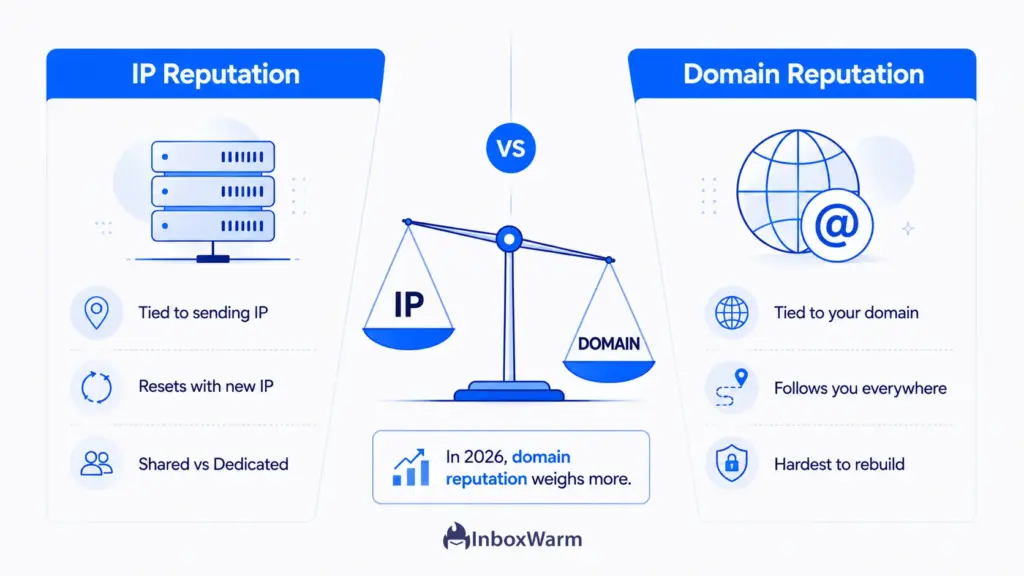
Reputation lives in two places. IP reputation is tied to the server address your mail sends from. Domain reputation is tied to your sending domain and follows you even if you change IPs. For most modern senders, domain reputation generally carries more weight than IP reputation.
If you send from a shared IP, your reputation is partly hostage to the other senders on it. A dedicated IP gives you full control of IP reputation but only makes sense at consistent high volume, because a dedicated IP with low, irregular traffic never builds enough signal to earn trust. Most small and mid-volume senders are better served by a well-managed shared pool plus a strong domain reputation.
How to Check Your Sender Reputation
You cannot improve what you do not measure. Use these free tools to see your reputation the way providers do:
- Google Postmaster Tools. Shows your domain and IP reputation, spam complaint rate, and authentication results for Gmail. This is the single most important dashboard for Gmail deliverability.
- Microsoft SNDS and Microsoft sender reputation tools. Smart Network Data Services reports your sending data and complaint rates for Outlook, Hotmail, and Live.
- Validity Sender Score. A free cross-provider reputation score to benchmark your sending identity over time.
- Blacklist checkers. Tools that scan whether your IP or domain appears on major blocklists like Spamhaus.
What Is Domain Reputation and Email Domain Health?
Email domain health is the overall condition of your sending domain: its reputation, its authentication setup, its blacklist status, and its sending history combined. A healthy domain authenticates cleanly, carries a strong domain reputation, sits on no blacklists, and sends at a steady, expected volume. An unhealthy domain does the opposite, and providers treat its mail with suspicion.
Email blacklists, also called blocklists, are databases of domains and IPs flagged for sending spam. Major ones like Spamhaus are consulted by mailbox providers and spam filters worldwide. Landing on one can tank your inbox placement overnight.
Common triggers are hitting spam traps, sudden volume spikes, and high complaint rates. You can check your status with a blacklist lookup and request delisting once you fix the root cause, though recovery takes time.
A practical domain health habit is to separate your sending streams. Keep transactional mail, marketing campaigns, and cold outreach on different subdomains or domains so a reputation hit on one does not drag down the others. Protecting the root domain that sends your password resets and receipts is worth the extra setup.
What Are the Best Email Authentication Methods for Deliverability?
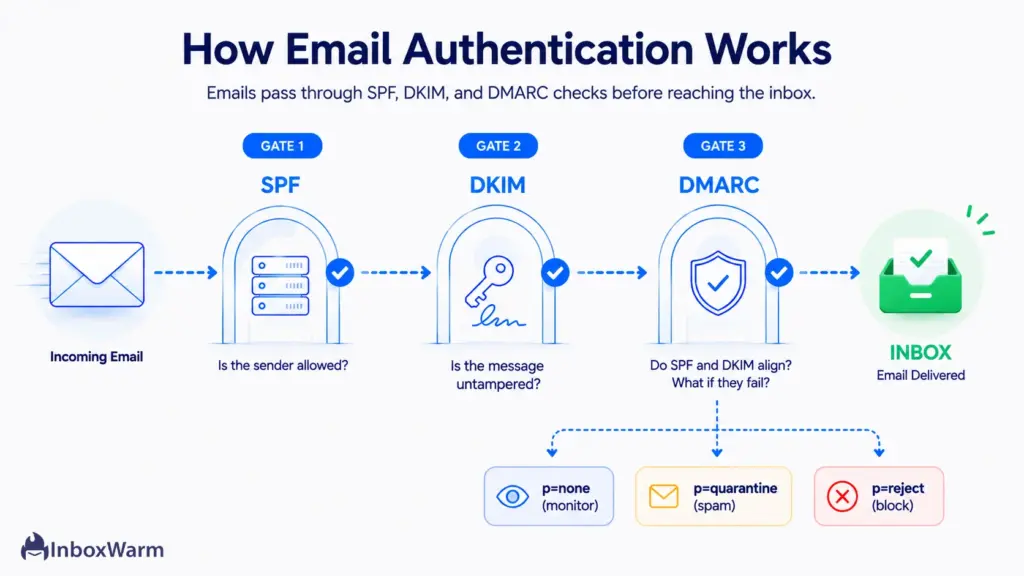
The three email authentication methods that matter are SPF, DKIM, and DMARC, and in 2026 you need all three. Together they prove your mail is genuinely from your domain and tell receivers what to do with anything that fails. Gmail, Yahoo, and Microsoft now require this trio from bulk senders, and every sender benefits because filters favor authenticated mail.
Set Up SPF (Sender Policy Framework)
SPF (Sender Policy Framework, defined in RFC 7208) is a DNS record that lists which servers are allowed to send mail for your domain. When a receiver gets your email, it checks the sending server against your SPF record. Publish one TXT record per domain, keep it under the 10 DNS-lookup limit, and make sure every legitimate sending service is included. You can build a record with an SPF generator and confirm it with an SPF checker.
Set Up DKIM (DomainKeys Identified Mail)
DKIM (DomainKeys Identified Mail, defined in RFC 6376) adds a cryptographic signature to every message using a private key, which receivers verify against a public key in your DNS. It proves the message was not altered in transit and genuinely came from your domain. Enable DKIM signing in your email platform, publish the public key as a DNS record, and verify it with a DKIM checker. Use a 2048-bit key where your provider supports it.
Set Up DMARC (Domain-Based Message Authentication)
DMARC (Domain-based Message Authentication, Reporting, and Conformance, defined in RFC 7489) ties SPF and DKIM together with alignment and tells receivers what to do when mail fails: do nothing (p=none), send to spam (p=quarantine), or block it (p=reject). Start at p=none to collect reports without affecting delivery, review the data, then move to p=quarantine and finally p=reject once you confirm all legitimate mail passes. Generate your record with a DMARC generator and monitor it with a DMARC checker.
Alignment is the part senders miss. It is not enough for SPF and DKIM to pass. The domain they authenticate must match (or align with) the domain in your visible From address. Misaligned authentication is a leading cause of DMARC failures, so check alignment, not just pass or fail status.
What Are the 2026 Bulk Sender Requirements?
If you send 5,000 or more emails per day to personal accounts, you are a bulk sender, and Gmail, Yahoo, and Microsoft all enforce a shared set of rules. The requirements first took effect for Google and Yahoo in February 2024, Microsoft in May 2025, and Google escalated enforcement in November 2025 from temporary delays to permanent rejection. Here is how the three providers compare:
| Requirement | Gmail | Yahoo | Microsoft |
|---|---|---|---|
| Bulk threshold | 5,000+/day | 5,000+/day | 5,000+/day |
| SPF | Required | Required | Required |
| DKIM | Required | Required | Required |
| DMARC | Required (min p=none) | Required (min p=none) | Required (min p=none) |
| Spam complaint rate | Under 0.3% (aim 0.1%) | Under 0.3% | Under 0.3% |
| One-click unsubscribe | Required (RFC 8058) | Required (RFC 8058) | Strongly recommended |
| Non-compliance | Rejection (since Nov 2025) | Spam or rejection | Rejection (550 5.7.515) |
A few details matter.
The one-click unsubscribe rule follows RFC 8058 and requires List-Unsubscribe and List-Unsubscribe-Post headers, and you must honor opt-outs within two days. Transactional mail like password resets and receipts is exempt. Microsoft rejects non-compliant mail with the error 550 5.7.515, and Google now permanently rejects it rather than just delaying. To regain Google’s good graces after a spam-rate spike, you must keep your rate under 0.3%.
Even if you send fewer than 5,000 emails a day, these are the bulk sender guidelines worth following. Filters favor authenticated, low-complaint mail for everyone, so building to the standard now protects you when a launch or seasonal spike pushes you over the line.
Which Metrics Determine Inbox Placement?
Four metrics drive inbox placement, and mailbox providers watch all of them. Keep each inside the healthy range below, and your sender reputation stays strong. Let anyone slip, and your inbox placement falls.
| Metric | What it measures | Healthy target |
|---|---|---|
| Spam complaint rate | Recipients clicking 'Report Spam' | Under 0.3% (aim 0.1%) |
| Email bounce rate | Mail rejected by the receiving server | Under 2% |
| Engagement rate | Opens, clicks, replies, and reads | As high as possible |
| Inbox placement rate | Delivered mail reaching the inbox | 90% or higher |
Spam complaint rate is the share of recipients who mark you as spam. The hard ceiling is 0.3%, which is three complaints per 1,000 delivered emails, and stable senders work to stay under 0.1%. Yahoo calculates its complaint rate against inbox-delivered mail only, which makes its threshold effectively stricter than Gmail’s.
Email bounce rate is the percentage of mail that cannot be delivered. The widely accepted benchmark is to keep total bounces under 2%, with hard bounces under 1%. Anything above 5% signals poor list hygiene and triggers throttling. Repeatedly sending to addresses that hard-bounce damages reputation faster than almost anything else.
Email engagement metrics are the strongest positive signal you control. Opens, clicks, replies, forwards, and time-in-inbox tell providers people want your mail. Negative engagement, like deleting without opening or moving mail to spam, does the reverse. This is why sending less mail to people who actually engage beats blasting your whole list.
How Do You Improve Email Deliverability in 2026?
To improve email deliverability in 2026, authenticate your domain, warm it up, keep your list clean, send mail people engage with, offer easy unsubscribes, and monitor your reputation continuously.
Work through these six steps in order, because each one builds on the last.
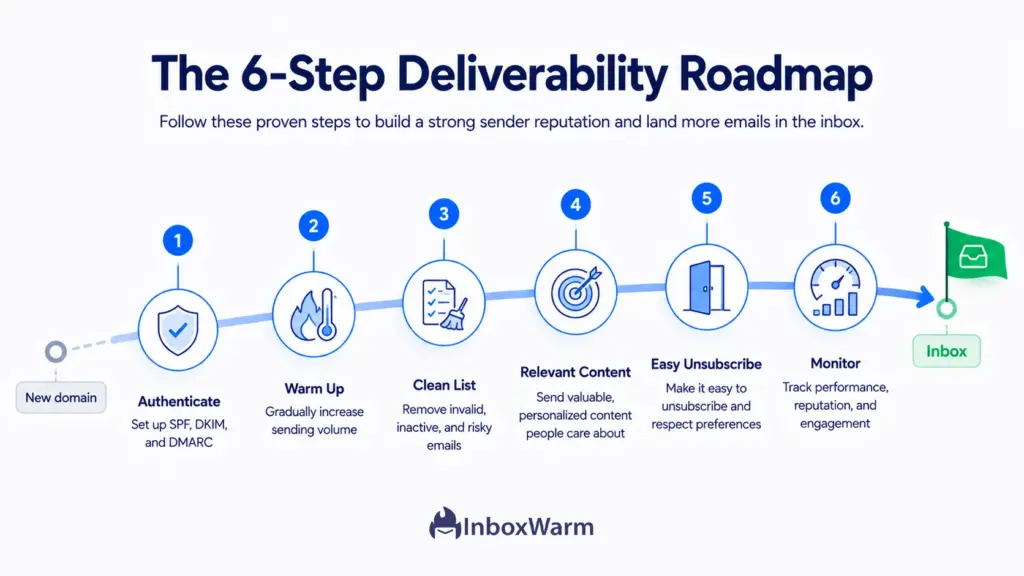
Step 1: Authenticate With SPF, DKIM, and DMARC
Publish all three records and confirm they pass with alignment. This is the foundation, and without it the other five steps will not save you. Start DMARC at p=none, review reports, then tighten to quarantine and reject. Authentication is non-negotiable for bulk senders and beneficial for everyone.
Step 2: Warm Up Your Domain and IP
A new sending domain has no reputation, so sending at volume on day one looks like spam. Warm-up means starting with a small number of sends and increasing gradually over several weeks while maintaining high engagement, which builds reputation safely. InboxWarm.ai is an AI-powered email warm-up tool that improves inbox placement and sender reputation by automating this ramp. If you send from Gmail or Outlook, warm up each mailbox before it joins a campaign.
Step 3: Clean Your List and Keep It Clean
Email list hygiene is the practice of removing invalid, inactive, and risky addresses before you send. Verify new addresses at signup with double opt-in, run your list through a validation service before big sends, and suppress hard bounces immediately. Set a sunset policy to stop mailing contacts who have not engaged in 90 or more days. Clean lists keep bounce and complaint rates low.
Step 4: Send Relevant Content People Engage With
Engagement is a ranking signal, so relevance is a deliverability tactic, not just a marketing one. Segment your list, personalize content, and match sending frequency to what each segment actually wants. Mail that earns opens, clicks, and replies trains providers to trust you. Mail that earns deletes and spam reports does the opposite.
Step 5: Add One-Click Unsubscribe and Honor It
Make leaving easy. Implement RFC 8058 one-click unsubscribe headers plus a visible unsubscribe link in the body, and process every opt-out within two days. Counterintuitively, an easy unsubscribe protects deliverability, because a recipient who unsubscribes does far less reputation damage than one who clicks ‘Report Spam.’
Step 6: Monitor Deliverability Continuously
Deliverability monitoring is the ongoing practice of watching your reputation and placement so you catch problems before they spread. Check Google Postmaster Tools and Microsoft SNDS weekly, run seed-inbox placement tests before major campaigns, watch your bounce and complaint trends, and set blacklist alerts. Reputation declines quietly, and the senders who recover fastest are the ones who notice first.
How Do You Maintain Sender Reputation Over Time?
To maintain sender reputation, send consistently, keep your metrics inside healthy ranges, and monitor continuously. Reputation is not a one-time setup. It is a balance you keep through steady habits, and a few weeks of sloppy sending can undo months of trust.
Build these habits into your routine to protect your reputation long-term:
- Send on a consistent cadence: Mailbox providers expect predictable volume, so avoid sudden spikes and long gaps, which both look suspicious.
- Scale up gradually: When you need more volume, increase it slowly the same way you would during warm-up, and ease a paused domain back in rather than resuming at full volume.
- Prune disengaged contacts on a schedule: Run a sunset policy so inactive addresses do not drag down your engagement and complaint rates.
- Keep authentication records current: Update SPF, DKIM, and DMARC every time you add a new sending tool so nothing falls out of alignment.
- Watch your dashboards weekly: Monitor Google Postmaster Tools and Microsoft Sender Reputation data for early dips, and act the moment a metric drifts.
- Stay compliant: Honor unsubscribes, include a physical address, and follow CAN-SPAM and GDPR, since these all feed the same trust signals providers reward.
Email Deliverability Best Practices Checklist
Use this as a quick audit. These are the email deliverability best practices that keep mail in the inbox in 2026:
- Authenticate everything. SPF, DKIM, and DMARC published, passing, and aligned on every sending domain.
- Move DMARC toward enforcement. Progress from p=none to p=quarantine to p=reject as your reports confirm clean mail.
- Warm up new domains and IPs. Never send at volume from a cold sending identity.
- Keep spam complaints under 0.3%. Aim for 0.1%, and watch Gmail, Yahoo, and Microsoft separately.
- Keep bounces under 2%. Verify addresses, suppress hard bounces, and run a sunset policy.
- Offer one-click unsubscribe. RFC 8058 headers plus a body link, opt-outs honored within two days.
- Send for engagement. Segment, personalize, and mail the people who actually open and click.
- Separate your sending streams. Keep transactional, marketing, and cold mail on different domains or subdomains.
- Monitor weekly. Google Postmaster Tools, Microsoft SNDS, sender score, blacklist status, and seed-inbox tests.
- Stay compliant. Follow CAN-SPAM and GDPR, and keep your sending infrastructure clean and consistent.
Conclusion
Email deliverability in 2026 is not a back-office detail. It is the gate every other email metric depends on, because open rates, clicks, and revenue mean nothing if the message never reaches the inbox. The providers have made their expectations explicit, and the senders who treat authentication, reputation, and engagement as ongoing work are the ones whose mail keeps landing where it should.
The good news is that the playbook is clear. Authenticate with SPF, DKIM, and DMARC. Warm up every new sending identity. Keep your list clean and your complaint and bounce rates low. Send mail people want, make leaving easy, and monitor your reputation before problems spread. None of these steps is exotic, and together they put you ahead of most senders who still treat deliverability as something that just happens.
Start with the foundation. Get your authentication right, build a steady sending reputation through proper warm-up, and watch your inbox placement climb. Do that consistently, and email deliverability stops being a mystery and becomes a system you control.
Frequently Asked Questions
Why Are My Emails Going to Spam?
The most common causes are missing or failing authentication, a weak sender reputation, high spam complaint or bounce rates, and low engagement. Start by confirming SPF, DKIM, and DMARC pass with alignment, then check your complaint and bounce rates in Google Postmaster Tools before you touch your copy.
What Is the Difference Between Delivery Rate and Inbox Placement?
Delivery rate measures whether a receiving server accepted your email at all, including mail that lands in spam. Inbox placement measures how much of that accepted mail actually reaches the primary inbox. You can have a high delivery rate and a low inbox placement rate at the same time, which is why placement is the metric that reflects real deliverability.
How Do SPF, DKIM, and DMARC Improve Deliverability?
SPF lists which servers may send for your domain, DKIM cryptographically signs your messages, and DMARC ties the two together and tells receivers what to do when mail fails. For bulk senders sending 5,000 or more emails a day, all three are now required by Gmail, Yahoo, and Microsoft.
What Is a Good Sender Reputation Score?
On the Validity Sender Score scale of 0 to 100, a score above 90 is healthy, and anything below 70 usually signals deliverability problems. Use Google Postmaster Tools and Microsoft SNDS to see how the major providers actually view you, since each keeps its own internal reputation that ultimately decides placement.
How Long Does It Take to Fix a Damaged Sender Reputation?
Recovery usually takes four to eight weeks of disciplined sending. You will need to stop campaigns, clean your list aggressively, fix the root cause, and then rebuild volume slowly the same way you would warm up a new domain. There is no instant fix, because reputation is rebuilt through a consistent track record, not a single change.
Do the Bulk Sender Rules Apply if I Send Fewer Than 5,000 Emails a Day?
The hard enforcement applies to bulk senders at 5,000 or more emails per day to personal accounts, but the underlying standards benefit everyone. Filters favor authenticated, low-complaint mail at every volume, so following the bulk sender guidelines now protects you when a launch or busy season spikes your volume.
What Is Email Warm-Up and Do I Still Need It in 2026?
Email warm-up is the practice of gradually increasing sending volume from a new domain or IP while maintaining high engagement, which builds reputation safely. It is more important than ever in 2026, because providers now reject mail from senders they do not trust. Warming up a new sending identity before you send at volume is the difference between landing in the inbox and getting blocked.
Put Your Deliverability on Autopilot
InboxWarm.ai is an AI-powered email warm-up tool that improves inbox placement and sender reputation automatically, so your campaigns reach real inboxes. Start free for 10 days, no credit card required.