

You wrote a solid cold email. The subject line is tight, the pitch is relevant, and the ask is clear. But it never gets read because it went straight to spam before your prospect even had a chance to see it. That is not a copywriting problem. That is a deliverability problem.
Spam filters do not care how good your email is. They care about where it came from, who sent it, and whether the sending domain has a reputation worth trusting. A brand-new domain, a missing authentication record, or one too many spam complaints can push even the most carefully written cold email into the folder nobody checks.
The good news is that every single reason on this list is fixable. Some take five minutes. Some take a few weeks of clean sending. All of them are worth addressing before your next campaign goes out, because the difference between spam and inbox is almost always technical, not creative.
Table of Contents
What Actually Decides Whether a Cold Email Lands in Spam?
- 3 things decide where your email ends up:
- Authentication: did the email genuinely come from who it claims?
- Sender reputation: does this domain or IP have a history of clean, engaged sending?
- Content and behavior signals: does the message look like something a real person sent to another real person?
Every reason on this list maps to one of those three. Fix the authentication first because nothing else matters until mail servers can verify your identity. Then work through reputation and content. The order matters. In the following, we discussed 15 main reasons why cold emails go to spam.
Reason 1: Your Domain Has No SPF Record
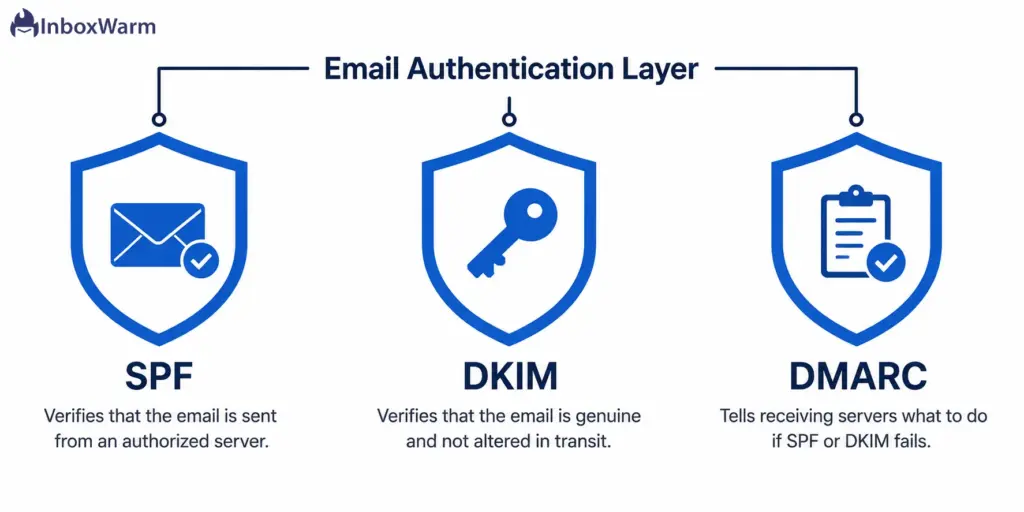
SPF (Sender Policy Framework) tells receiving mail servers which servers are authorized to send email on your domain’s behalf. Without an SPF record, there is no way for Gmail, Outlook, or Yahoo to verify that your email actually came from you. Most modern spam filters treat a missing SPF as a hard trust failure and route the message to spam immediately.
How to Fix it:
Log in to your DNS provider and add a TXT record. For Google Workspace, the record looks like: v=spf1 include:_spf.google.com ~all. Replace the include value with whatever your ESP provides. Use MXToolbox to check your current SPF status and confirm the new record has propagated within an hour of adding it. This is a one-time fix that takes about five minutes.
Reason 2: DKIM Is Missing or Misconfigured
DKIM (DomainKeys Identified Mail) attaches a cryptographic signature to every outgoing email. That signature proves the message was not altered in transit and that it genuinely originated from your domain. Without DKIM, you fail one of the three core authentication checks that Gmail, Outlook, and Yahoo now actively enforce for all senders.
How to Fix it:
Your email platform generates a DKIM public key from within its settings. Copy that key and add it as a TXT record under mail._domainkey.yourdomain.com in your DNS. Every major ESP, including Google Workspace, Microsoft 365, and Mailgun, has a step-by-step setup guide. After adding the record, verify it is live using Google Admin Toolbox or MXToolbox before sending anything.
Reason 3: You Have No DMARC Policy
DMARC tells receiving servers what to do when an email fails SPF or DKIM checks. Without a DMARC record, there is no enforcement layer. Since Google and Yahoo’s February 2024 bulk sender update, a DMARC record is no longer optional. Senders without one face delivery failures on high-volume sends, not just spam placement.
How to Fix it:
Start with a monitoring-only policy so you can observe what is happening before enforcing anything: v=DMARC1; p=none; rua=mailto:reports@yourdomain.com. Review the incoming reports for 3 to 4 weeks. Once your authentication is clean, move to p=quarantine, then p=reject. Never jump straight to p=reject on an active sending domain because you will block legitimate email while your records settle.
Reason 4: Your Sending Domain Is Brand New
New domains have zero sending history. Spam filters treat that as maximum suspicion, because most spam comes from freshly registered domains used for one-off blast campaigns before being abandoned. Sending 500 cold emails from a domain that was registered last week is nearly guaranteed to produce spam placement, no matter how clean the content is.
How to Fix it:
A proper email warm-up runs for 4 to 8 weeks before you send a single cold email. It means gradually increasing sends while building positive engagement signals: opens, replies, and emails being rescued from spam folders. InboxWarm.ai automates this entire process across your domain, simulating real human-like conversations that train spam filters to recognize your domain as a legitimate sender. Skipping this step is the single biggest reason new cold email campaigns fail.
Reason 5: Your Send Volume Spiked Overnight
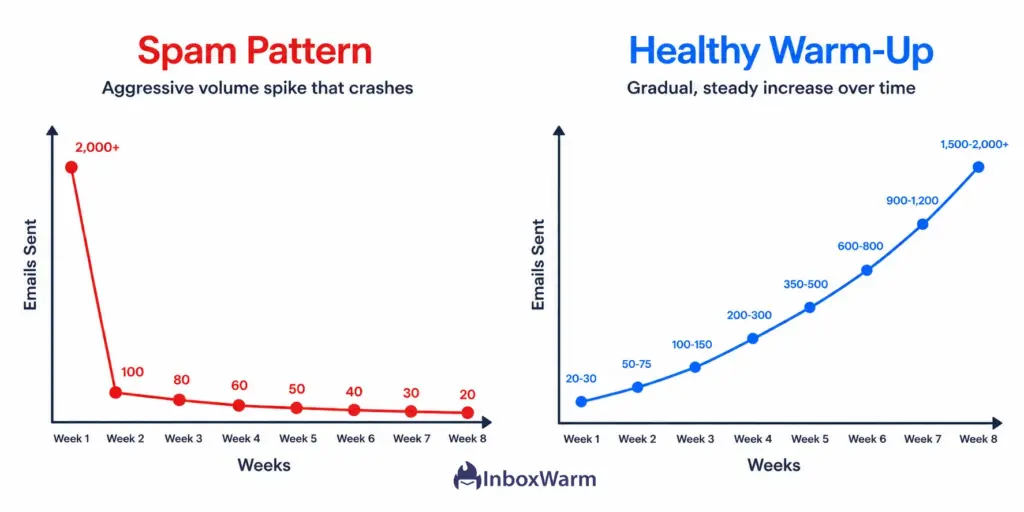
Sending 20 emails one day and 2,000 the next is a textbook spam flag. Volume curves are something spam filters watch closely. A sudden spike looks identical to what spammers do when they spin up fresh infrastructure for a blast campaign and then disappear. The filter has no way to tell the difference until you prove it over time.
How to Fix it:
Increase volume gradually. A safe ramp looks like: 20 to 30 per day in week one, 50 to 75 in week two, 100 to 150 in week three, then scale from there with no more than a 30% increase week over week. If you pause sending for more than 10 days for any reason, drop your volume back down and ramp again before resuming full scale.
Reason 6: Your Open Rates Are Too Low
Gmail’s spam algorithm is heavily engagement-based. When recipients consistently ignore your emails, the filter interprets that as a signal that your mail is unwanted and progressively pushes future sends deeper into spam. A domain sustaining below-20% open rates over time will see its spam placement worsen even if nothing else changes about the technical setup.
How to Fix it:
Clean your list aggressively. Remove anyone who has not opened in 60 or more days. Test your subject lines: personalized ones typically outperform generic lines by 30 to 50%. Send at times when your target segment is actually at their desk. A smaller, engaged list consistently protects sender reputation better than a large, cold one.
Reason 7: Spam Complaints Are Piling Up
Every time a recipient clicks ‘Report spam,’ that is a direct negative signal sent to their mail provider about your domain. Gmail’s acceptable complaint threshold is 0.10%. Above 0.30%, your domain gets actively suppressed across Gmail. One complaint per 300 emails puts you dangerously close to that line.
How to Fix it:
Make unsubscribing easier than complaining. Include a visible one-click unsubscribe link in every email and honor all removal requests within two business days. Set up Google Postmaster Tools and check it weekly: it shows your complaint rate in real time for Gmail recipients. If you are above 0.08%, stop sending immediately and identify which segment is generating the complaints.
Reason 8: Your Email Copy Triggers Spam Filters
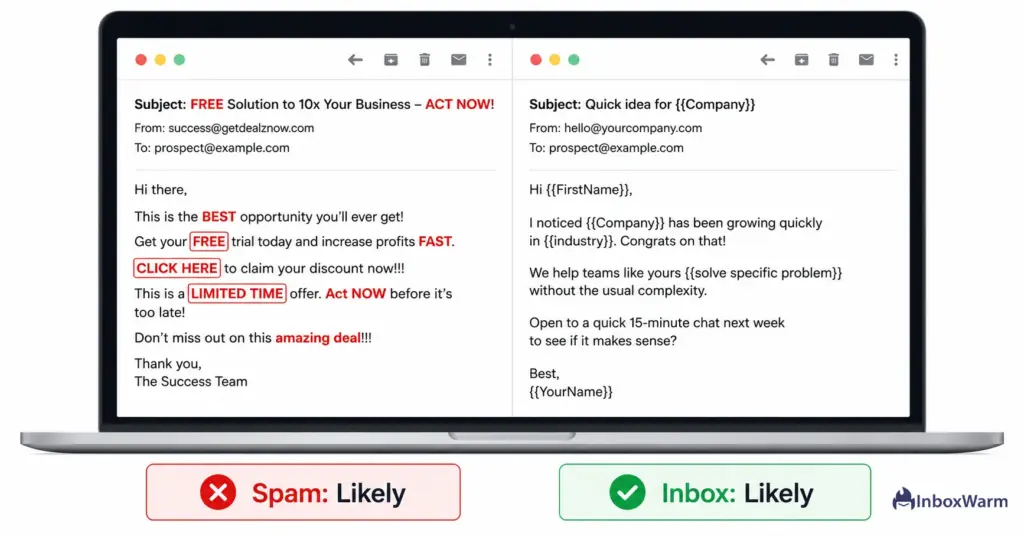
Modern spam filters use natural language processing to read the content of every email. Certain words and phrases are so heavily associated with spam that using them, even in a completely legitimate message, knocks your content score below inbox threshold. This catches a lot of well-meaning cold email senders off guard.
How to Fix it:
Avoid anything that sounds like a broadcast advertisement: ‘free money,’ ‘click here,’ ‘earn extra cash,’ ‘you have been selected,’ ‘risk-free,’ ‘limited time offer.’ Write the way a real colleague would write: short, direct, and personal. Run your draft through Mail Tester before sending to scan for trigger phrases. Cold email copy should read like a message, not a promotion.
Reason 9: You Are Sending from a Free Email Address
Gmail.com, Yahoo.com, and Outlook.com addresses in a cold outreach context are treated with extra suspicion by most spam filters. They also signal immediately to the recipient that this is not a professional business communication. Combined, those two factors tank deliverability and engagement before the email is even opened.
How to Fix it:
Use a dedicated custom domain for all cold outreach. Register a sending domain close to your primary brand, set up SPF, DKIM, and DMARC on it, and run it through a full warm-up with InboxWarm.ai before any campaigns go out. Never mix cold outreach traffic with your primary domain. If a cold campaign generates complaints or a blacklist hit, you want the damage isolated, not spreading to your main brand.
Reason 10: Your Sending IP Is on a Blacklist
Shared sending IPs carry the reputation of every sender who has ever used them. If a previous user ran a spam campaign from the same IP, you may be inheriting their blacklist entries without knowing it. Dedicated IPs are not automatically safer: if your own sending has been poor, you can land yourself on a blacklist without any help.
How to Fix it:
Check your sending IP against major blacklists using MXToolbox Blacklist Check. If you appear on Spamhaus, Barracuda, or SURBL, each one has its own delisting process and timeline. For shared IP problems, consider requesting a dedicated IP from your ESP or moving to a provider with better infrastructure hygiene. Blacklist removal combined with a proper domain warm-up typically restores inbox placement within 4 to 6 weeks.
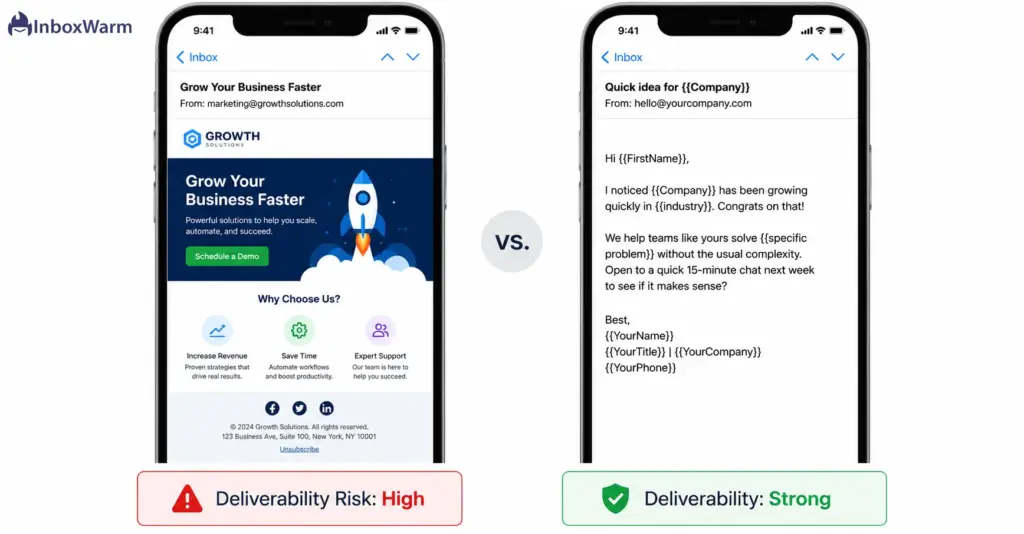
Reason 11: Your Emails Are Heavy on Images and Light on Text
Spam filters cannot read images. Email-heavy with little readable text was a classic spammer tactic used to hide content from keyword filters, and modern filters still treat it as a red flag. An email that is one large graphic with a single line of text underneath will fail content scoring on most major providers almost every time.
How to Fix it:
For cold outreach, aim for at least 60% readable text. Better yet, drop the HTML template entirely. Plain-text or near-plain-text cold emails consistently outperform designed templates in inbox placement tests because they look exactly like what they are supposed to be: a real message from one person to another. Save the branded templates for newsletters and product updates.
Reason 12: You Are Not Verifying Email Addresses Before Sending
Hard bounce rates above 2% are a strong negative signal to spam filters. High bounces tell providers you scraped or bought a list rather than building it from verified sources. Even a fully authenticated, beautifully written email campaign will get suppressed if it is landing in a graveyard of dead addresses that have not been active in years.
How to Fix it:
Verify every list before it touches your sending domain. Tools like ZeroBounce, NeverBounce, and Hunter’s email verifier can check addresses at scale in minutes. Target a hard bounce rate below 0.5%. If a purchased or scraped list comes back with more than 5% invalid addresses, do not import it until it is cleaned. One bad list can damage a warm domain in a single send.
Reason 13: Your Links Route Through Suspicious Redirects
URL shorteners like Bitly and TinyURL are heavily abused by spammers and are frequently flagged or blocklisted by spam filters. If any link in your email passes through an untrusted or flagged domain at any point in the redirect chain, it can penalize the entire email regardless of how clean the rest of the content is.
How to Fix it:
Use full destination URLs in every cold email. No shorteners. If your ESP uses click tracking, ensure the tracking domain is authenticated via CNAME to your own domain rather than a shared tracking subdomain. For cold outreach specifically, keep links to a minimum: one clear, direct call-to-action link is always better than three tracked redirect links.
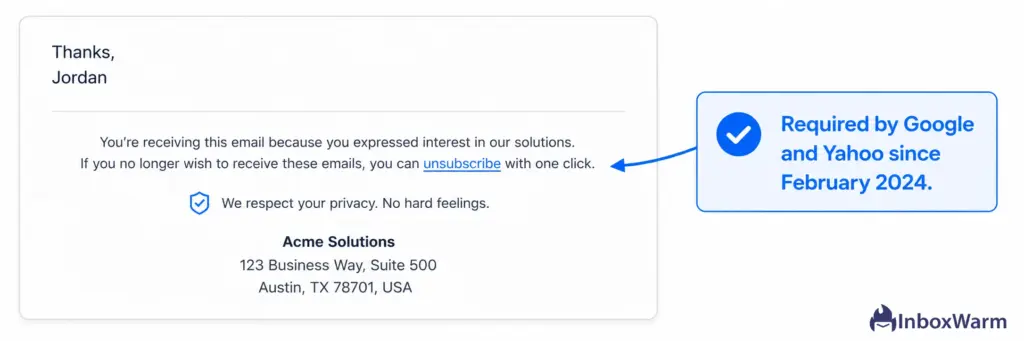
Reason 14: There Is No Way for Recipients to Unsubscribe
Since Google and Yahoo’s February 2024 sender requirement update, one-click unsubscribe is mandatory for bulk senders. Beyond compliance, not having an unsubscribe option leaves frustrated recipients with only one outlet: marking your email as spam. That complaint costs your sender reputation far more than a removed contact ever would.
How to Fix it:
Enable the List-Unsubscribe header in your ESP settings: most platforms have a simple toggle. Add a plain-text unsubscribe line at the bottom of every cold email. A simple ‘Reply REMOVE to unsubscribe’ is enough for low-volume sends. Process every removal request within two business days as required by Google’s current guidelines. Making it easy to leave protects the reputation of everyone who stays.
Reason 15: Your Domain Was Never Warmed Up
This is the most common reason and the most preventable one. A domain with no warm-up history has zero positive sending signals. When volume starts, spam filters have nothing to compare it against and default to treating the mail as suspicious. Most cold email campaigns that fail from day one failed because this step was skipped entirely.
How to Fix it:
A structured warm-up runs for 4 to 8 weeks before any cold campaign launches. It involves sending gradually increasing volumes with high engagement: real opens, replies, and emails being pulled out of spam to train filters positively.
InboxWarm.ai handles all of this automatically. It manages timing, varies content, and simulates human-like engagement patterns across your domain. If you are serious about cold email deliverability, a properly warmed domain is the foundation everything else is built on.
Launch Every Campaign Inbox-Ready
InboxWarm.ai automatically warms up your domain, strengthens sender reputation, and helps your emails reach the inbox instead of the spam folder.
How Do You Know If Your Emails Are Already Going to Spam?
The fastest check is to send test emails to seed accounts you control at Gmail, Outlook, and Yahoo and see where they land. For ongoing monitoring, Google Postmaster Tools is the most useful free tool available. It shows your domain reputation, IP reputation, and spam complaint rate updated daily for all Gmail traffic your domain touches.
Other tools worth having in your stack: Mail Tester scores your content and authentication before you send. MXToolbox checks DNS records and blacklist status. GlockApps runs inbox placement tests across 30-plus mail providers.
If you use InboxWarm.ai, your dashboard tracks all of these signals in one live health score updated daily. Understanding how to check your domain reputation before every campaign should be a standard part of your pre-send checklist.
What Is the Fastest Way to Recover from Spam Placement?
Fix authentication first. No other fix matters while your emails are failing SPF, DKIM, or DMARC checks. Once authentication is solid, run a full domain health audit: bounce rate, complaint rate, blacklist status, and a content scan. Then pause campaigns and run a warm-up cycle to rebuild reputation if your domain has taken recent damage.
A clean domain with no blacklist issues typically recovers meaningful inbox placement within 2 to 3 weeks of consistent, engaged sending. A domain with active blacklist entries can take 8 to 12 weeks. The one variable that matters most throughout recovery is sustained clean sending: every positive engagement signal your domain earns during that window shortens the timeline.
Frequently Asked Questions
How Long Does Email Warm-Up Take Before You Can Send Cold Campaigns?
Most domains need 4 to 6 weeks of active warm-up before they can sustain reliable cold campaign volume. Brand-new domains sending through Google Workspace may need closer to 8 weeks before scaling above 200 per day without spam placement risk. The key variable is not just time, it is the quality of engagement signals built during that window. Rushed warm-up produces fragile reputation that collapses under real campaign volume.
What Is the Google and Yahoo 2024 Sender Requirement That Keeps Getting Mentioned?
From February 2024, both Google and Yahoo require all senders to have SPF or DKIM authentication, a DMARC policy at minimum of p=none, a one-click List-Unsubscribe header for bulk senders, and a spam complaint rate below 0.10%. Senders who do not meet these requirements face delivery failures, not just spam folder placement. If you have not audited your setup against these requirements yet, do it before your next campaign launches.
Should You Send Cold Emails from Your Main Business Domain?
No. Your primary domain handles transactional email, marketing email, and your company's core communication. If a cold campaign generates complaints or a blacklist hit on your primary domain, the damage extends to every email your business sends. Register a dedicated sending domain close to your brand, set up authentication, warm it up, and keep all cold outreach traffic isolated from your main infrastructure.
My Emails Land in the Promotions Tab, Not Spam. Is That Still a Problem?
Yes, especially for cold outreach. Emails in the Promotions tab see 40 to 60% lower engagement than emails that land in the primary inbox. For cold email where you need a real reply from a real person, promotions tab placement is a significant hit to results. The fix is the same as for spam: plain-text format, strong personalization, a warmed sender domain, and no HTML templates that trigger Gmail's commercial content classifiers.
What Happens If You Ignore These Issues and Keep Sending?
Gradual suppression followed by hard blocks. Domains that accumulate spam complaints, high bounces, and blacklist entries get progressively deprioritized until virtually no email reaches the inbox. At the extreme end, a domain can be permanently flagged and take months of careful, disciplined sending to rehabilitate. The earlier problems are addressed, the faster and more complete the recovery.
Can You Warm Up Your Domain Manually Without a Tool?
You can, but it is difficult to do well at scale. Manual warm-up means sending small batches to contacts you know will engage, asking colleagues to open and reply, and increasing volume week by week. The challenge is maintaining consistent daily sending, varied content, and realistic engagement patterns over 6 to 8 weeks without gaps or spikes. InboxWarm.ai runs this process automatically in the background so your domain builds reputation without requiring daily manual management.
How Often Should You Check Your Domain Health and Sender Reputation?
At minimum, check Google Postmaster Tools weekly and run a full domain health audit before every new campaign launch. If you are actively running cold campaigns at scale, daily monitoring is worth building into your workflow. Reputation problems caught early are far easier to correct than ones discovered after a full campaign has run. InboxWarm.ai's live domain health score makes this a passive part of your routine rather than a separate audit task.
Bottom Line
Every reason cold emails go to spam is a technical problem with a technical fix. Authentication gaps take an afternoon. Content issues take a rewrite. Reputation damage takes a few weeks of clean, consistent sending to undo. None of it is complicated once you know which lever to pull.
The single highest-leverage step most cold email senders are skipping is warming up their sending domain properly before campaigns launch. Everything else, better copy, cleaner lists, sharper subject lines, compounds from that foundation. If your email warm-up strategy is not in place before your next campaign goes out, fix that first. InboxWarm.ai handles the entire process automatically so your domain is inbox-ready when your campaign is.