

TL;DR
An email bounce-back is an automated message telling you your email was not delivered. Bounces are either hard (permanent failures like invalid addresses) or soft (temporary issues like a full mailbox). You fix them by cleaning your list, suppressing failed addresses, authenticating your domain with SPF, DKIM, and DMARC, and protecting your sender reputation.
- Hard bounces are permanent. Suppress those addresses immediately to protect your sender reputation.
- Soft bounces are temporary. Retry, but treat repeat soft bounces as hard and remove them.
- Keep your bounce rate below 2%. Most mailbox providers read higher rates as a reputation problem.
- Authentication and a warmed-up domain prevent most avoidable email delivery failures.
Your sending tool says the message went out. Minutes later, a reply lands from a mail server you have never heard of, telling you the delivery failed. That is a bounce-back, the email system’s way of reporting that your message never reached its destination. One or two is routine. A repeating pattern is a problem you need to act on.
Bounces are not just a missed message. Every failed delivery is a signal to mailbox providers like Gmail and Outlook that your list or your setup is not in good shape, and that signal sticks to your domain. Validity’s 2025 Email Deliverability Benchmark Report found that only 83.5% of legitimate email reached the inbox worldwide in 2024, with the rest filtered to spam or lost entirely. High bounce rates are one of the fastest ways to end up on the wrong side of that number.
In this guide, you’ll learn what an email bounce-back actually is, the difference between a hard bounce and a soft bounce, the common reasons emails bounce back, and a step-by-step plan to fix and prevent them.
We’ll also cover how email authentication and inbox warming protect your delivery, so your messages keep landing where they belong.
Table of Contents
What Is an Email Bounce-Back?
An email bounce-back is an automated notification from a mail server telling you that your email could not be delivered to the recipient. Instead of reaching the inbox, the message is returned with a short reason for the failure. Bounce-backs are the email system’s built-in way of reporting delivery failures straight back to the sender.
What Happens When an Email Bounces?
When you hit send, your mail server hands the message to the recipient’s mail server and waits for an answer. That receiving server checks several things before it accepts anything: whether the address exists, whether your domain is authenticated, whether your sender reputation looks trustworthy, and whether the mailbox has room. If any check fails, the server refuses the message and returns a non-delivery report instead of letting it through.
A non-delivery report (NDR) is the email you receive back. It names the failed recipient and includes a status code explaining why the handoff did not complete. No NDR reaches you only when the receiving server accepts the message and then silently drops it, which is why a low bounce rate alone never guarantees inbox placement.
Understanding Email Bounce Messages
Every bounce message carries an SMTP status code, and the first digit tells you almost everything. Codes that start with 4 (for example, 452 4.2.2) are temporary failures that trigger a soft bounce, while codes that start with 5 (for example, 550 5.1.1 “user unknown”) are permanent failures that trigger a hard bounce. A 550 error is the most common permanent rejection you will see.
Each code maps to a specific failure reason, and our reference guide to email error codes and delivery failures decodes them in full. Reading the code is the fastest way to know whether you should remove an address, fix your configuration, or simply wait and retry.
Why Email Bounce-Backs Matter for Email Deliverability
Bounce-backs matter because mailbox providers treat your bounce rate as a direct measure of how well you manage your list. A high rate tells them you are mailing addresses you should not be, which lowers your sender reputation and pushes your future mail toward the spam folder or outright rejection. In short, bounces are both a symptom and a cause of poor email deliverability.
This is why the benchmark matters. Most deliverability studies treat a bounce rate under 2% as healthy, with the strongest programs staying below 1%. Once you climb past those thresholds, providers begin to throttle or block you, and the damage compounds: fewer messages land, engagement drops, and your reputation falls further. Keeping bounces low protects everything downstream of the send.
What Are the Types of Email Bounces?
Email bounces come in two main types: hard bounces and soft bounces. The difference is whether the failure is permanent or temporary, which decides what you do next.
The table below shows how they compare at a glance.
| Type | What It Means | Common Triggers | What To Do |
|---|---|---|---|
| Hard bounce | Permanent failure (5xx). The address will never accept your mail. | Invalid or non-existent address, dead domain, recipient server permanently blocks you. | Suppress the address immediately. Never resend. |
| Soft bounce | Temporary failure (4xx). The server could not accept the mail right now. | Full mailbox, server down, message too large, greylisting or throttling. | Let your ESP retry. Suppress if it keeps failing. |
Hard Bounce Emails
A hard bounce is a permanent delivery failure. The receiving server is telling you, with a 5xx code, that this message will never be accepted, usually because the address does not exist, the domain is invalid, or the server has permanently blocked your domain. Hard bounces are the most damaging type because each one proves you mailed an address you should have removed. Suppress every hard-bounced address the moment it fails.
Soft Bounce Emails
A soft bounce is a temporary delivery failure, returned with a 4xx code, that may succeed on a later attempt. Common reasons include a full recipient mailbox, a server that is briefly down, a message that exceeds the size limit, or greylisting, where the server deliberately defers a first-time sender. Most email platforms retry soft bounces automatically for a day or two before giving up.
Temporary vs. Permanent Delivery Failures
The temporary versus permanent line is not always clean, and that nuance trips up a lot of senders. An address that soft bounces on every send is effectively a hard bounce and should be suppressed, usually after three to five failed attempts.
Some 5xx rejections are reputation-based rather than address-based, which means the address is valid but the provider is blocking your domain, and that is recoverable by fixing reputation rather than deleting the contact. Read the code and the message text together before you decide.
What Are the Common Causes of Email Bounces?
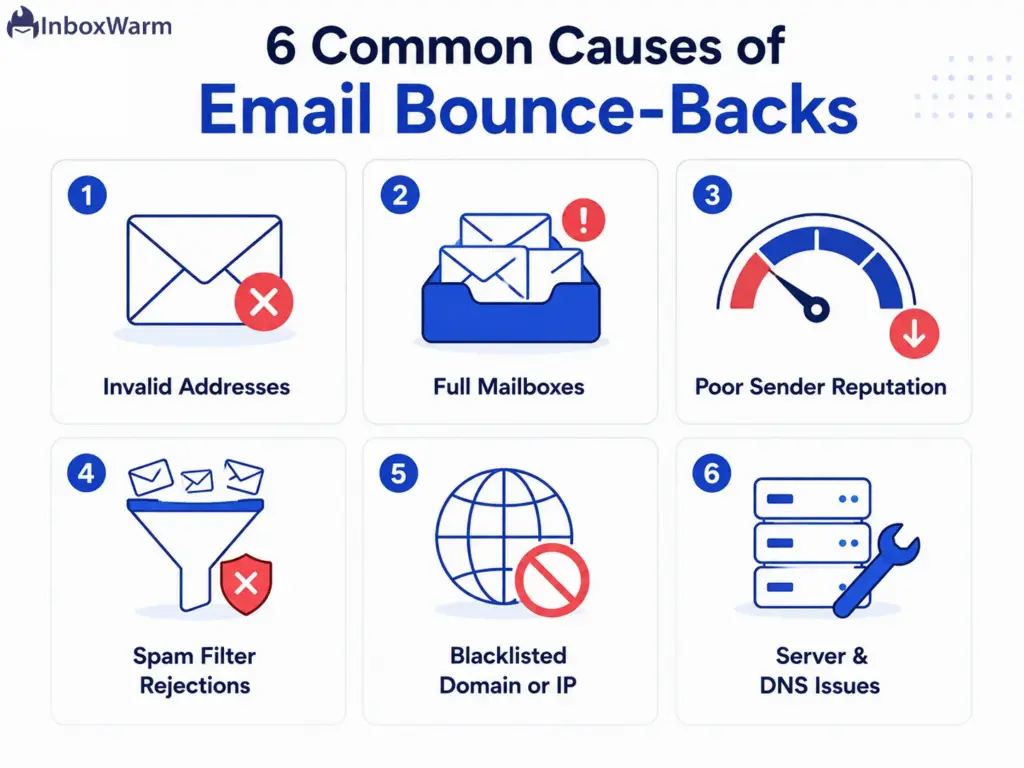
Emails bounce back for six common reasons: invalid addresses, full mailboxes, poor sender reputation, spam filter rejections, blacklisted domains or IPs, and server or DNS misconfiguration.
Most real-world bounces trace to one of these, and each one has a different fix.
1. Invalid or Non-Existent Email Addresses
Invalid addresses are the single biggest source of hard bounces. They come from typos at signup, addresses that were abandoned when someone changed jobs, fake details entered to grab a lead magnet, and lists that have simply decayed over time. Email databases go stale fast as people move and accounts close, so an address that worked last year may bounce today.
2. Full Recipient Mailboxes
When a recipient’s mailbox is over its storage quota, the server cannot accept new mail and returns a soft bounce. This is temporary and usually clears on its own once the recipient frees up space, so your platform will retry. If the same mailbox stays full across several sends, treat it like an inactive address and suppress it.
3. Poor Sender Reputation
Sender reputation is the trust score that mailbox providers assign to your sending domain and IP based on your past behavior. When that score is low, often from previous spam complaints, high bounce rates, or erratic volume, providers defer or reject your mail outright, even to valid addresses. A weak reputation turns a clean list into a stream of bounces, which is why repairing it is central to any fix.
4. Spam Filter Rejections
Mailbox providers reject messages that trip their spam filters before those messages ever reach the inbox. Spammy subject lines, link-heavy or image-only content, misleading headers, and sudden volume spikes all raise your cold email spam score and can earn a hard rejection. Filters weigh sender behavior far more heavily than wording, so consistent, wanted mail matters more than avoiding any single trigger word.
5. Blacklisted Domains or IP Addresses
A blacklist, or DNS-based blocklist (DNSBL), is a published list of domains and IP addresses known for sending spam. Major providers check sources like Spamhaus on every inbound message, and a listing usually means immediate rejection of everything you send to that provider. Listings happen after spam traps, complaint spikes, or compromised accounts, and you have to request delisting once the underlying problem is fixed.
6. Server, DNS, and Configuration Issues
Sometimes the problem is your own setup. A missing or incorrect MX record, a broken or missing reverse DNS (PTR) record, an expired domain, or authentication records that do not resolve will all cause messages to bounce regardless of how clean your list is. These failures are easy to miss because they affect every recipient at once, and they point directly to the authentication work covered in the next section.
How Can You Fix Email Bounce-Backs?
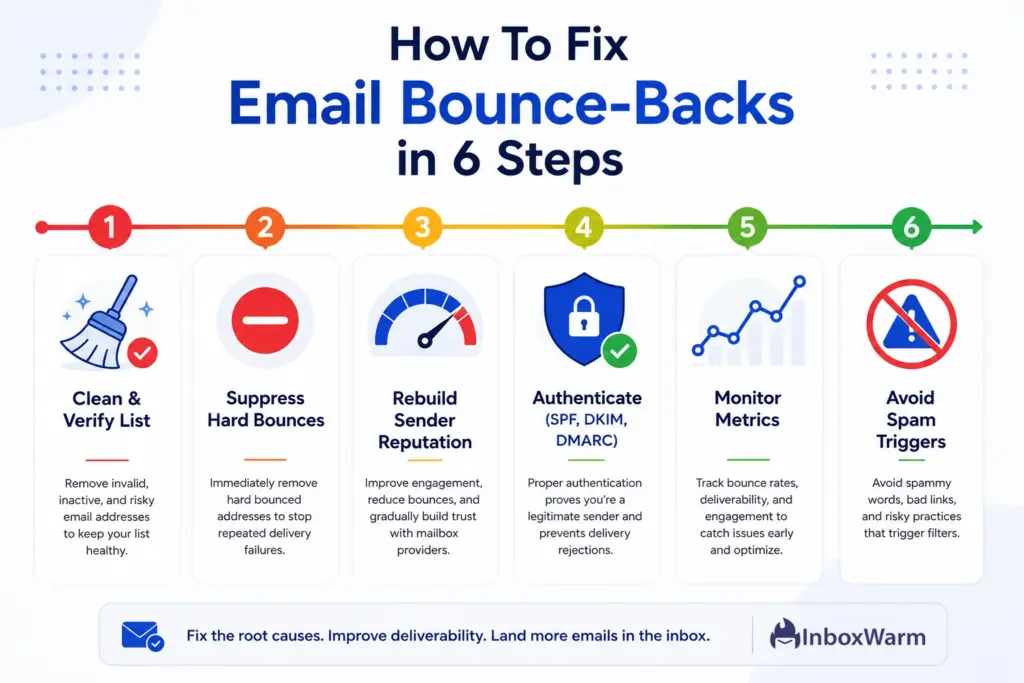
To fix email bounce-backs, work through six steps in order: clean and verify your list, suppress hard-bounced addresses, rebuild your sender reputation, authenticate your domain, monitor your metrics, and stop the practices that trip spam filters.
The steps below move from the fastest wins to the longer-term fixes.
Clean and Verify Your Email List
Run your list through an email verification tool to catch invalid, role-based, and disposable addresses before you send. This single step removes the bulk of your hard bounces, because most permanent failures are simply addresses that should not have been mailed. Verify new contacts at the point of collection so problems never enter your list in the first place.
Remove Hard Bounce Addresses
Suppress every hard-bounced address the moment it fails, and never email it again. Resending to an address that has already returned a permanent failure is one of the clearest negative signals a mailbox provider can see. Most email platforms suppress hard bounces automatically, but confirm yours does and that suppressed contacts cannot slip back into a future campaign.
Improve Your Sender Reputation
Rebuild reputation by sending consistent volume to engaged recipients and keeping complaints near zero. Avoid sudden volume spikes, mail the people who open and reply first, and remove chronically inactive contacts that drag your engagement down. Reputation recovers gradually, so steady, predictable behavior over a few weeks does more than any one-off change.
Authenticate Emails with SPF, DKIM, and DMARC
Set up the three authentication records that prove your mail is genuinely from you. If you do not have them yet, generate a clean SPF record with our SPF generator and publish a policy with our DMARC generator, then add DKIM through your sending platform. Authentication is now mandatory at the major providers, so the next section explains exactly how each record stops bounces.
Monitor Bounce Rates and Delivery Metrics
Track your bounce rate, spam complaint rate, and inbox placement on every campaign, not just when something breaks. Google Postmaster Tools and your ESP dashboard show these numbers daily, and watching them lets you catch a list or reputation problem while it is still small. Set a threshold (for example, a 2% bounce rate) that triggers a list review before you send again.
Avoid Spam Trigger Practices
Stop the behaviors that get you filtered: buying lists, mailing unengaged contacts, hiding the unsubscribe link, and spinning up new domains for sudden blasts. Working through a structured email spam prevention checklist before each major send keeps these habits from quietly raising your bounce and complaint rates.
How Does Email Authentication Prevent Email Bounce-Backs?
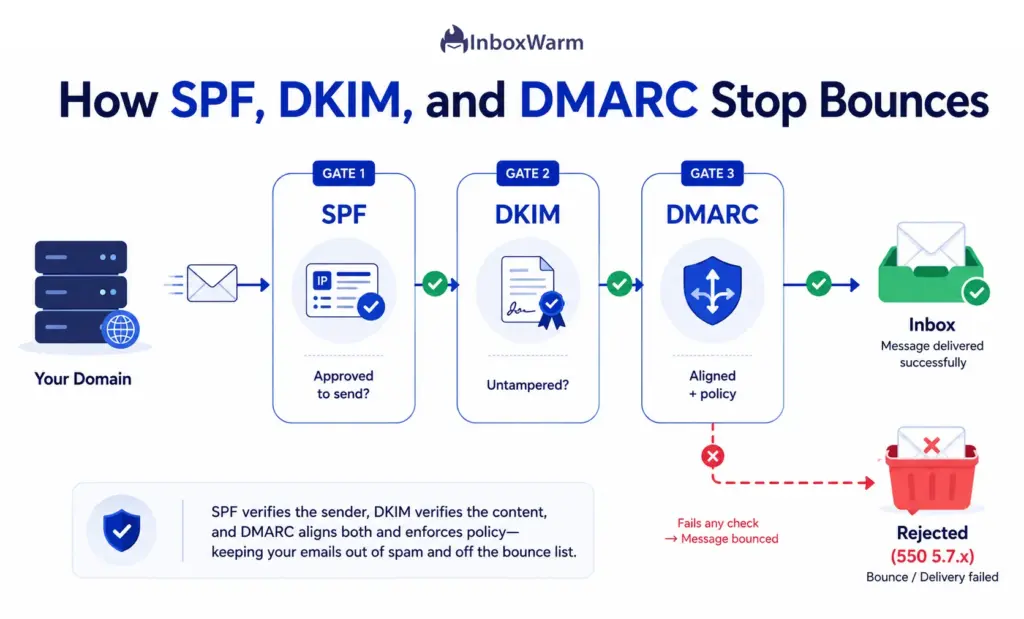
Email authentication prevents bounce-backs by proving to receiving servers that your messages are really from your domain and have not been forged. Since 2024, the largest providers require it, and mail that fails authentication is now rejected rather than merely filtered.
Google’s sender guidelines require authentication for anyone sending 5,000 or more messages a day to Gmail, and Gmail began enforcing rejections on non-compliant mail in November 2025.
What Is SPF and Why Does It Matter?
SPF (Sender Policy Framework) is a DNS record that lists which servers are allowed to send email for your domain. When a receiving server gets your message, it checks the sending IP against that list, and mail from an unlisted source can fail and bounce.
The most common SPF mistake is exceeding the 10 DNS-lookup limit, which silently breaks the record, so confirm yours resolves with an SPF checker after every change. SPF is defined in RFC 7208.
What Is DKIM and How Does It Work?
DKIM (DomainKeys Identified Mail) adds a cryptographic signature to every message, which the receiving server verifies against a public key published in your DNS. If the signature checks out, the server knows the message was not altered in transit and genuinely came from your domain.
A missing or broken DKIM signature weakens authentication and can trigger rejections, so validate it with a DKIM checker on each sending source. DKIM is defined in RFC 6376.
What Is DMARC and Why Should You Use It?
DMARC (Domain-based Message Authentication, Reporting, and Conformance) ties SPF and DKIM together and tells receivers what to do when a message fails: do nothing (p=none), send it to spam (p=quarantine), or reject it (p=reject).
Start at p=none to collect reports, then tighten once you confirm legitimate mail passes. Microsoft now enforces this directly, rejecting unauthenticated bulk mail to Outlook.com with a 550 5.7.515 error since May 2025. Confirm your record with a DMARC checker. DMARC is defined in RFC 7489.
Common Authentication Mistakes That Cause Delivery Failures
A handful of mistakes cause most authentication-related bounces, and each can turn valid mail into a rejection:
- Two SPF records on one domain. Only one is allowed; a second invalidates both.
- Passing the 10-lookup SPF limit. Too many include statements silently break the record.
- Missing DKIM for a new sending tool. Every sending service needs its own DKIM key.
- Jumping to p=reject too early. Enforcing DMARC before confirming alignment rejects your own mail.
- From a domain out of alignment. DMARC fails if the From domain doesn’t match your authenticated domain.
Re-check all three records whenever you add or change a sending service.
How Inbox Warming Helps Reduce Email Bounce-Backs
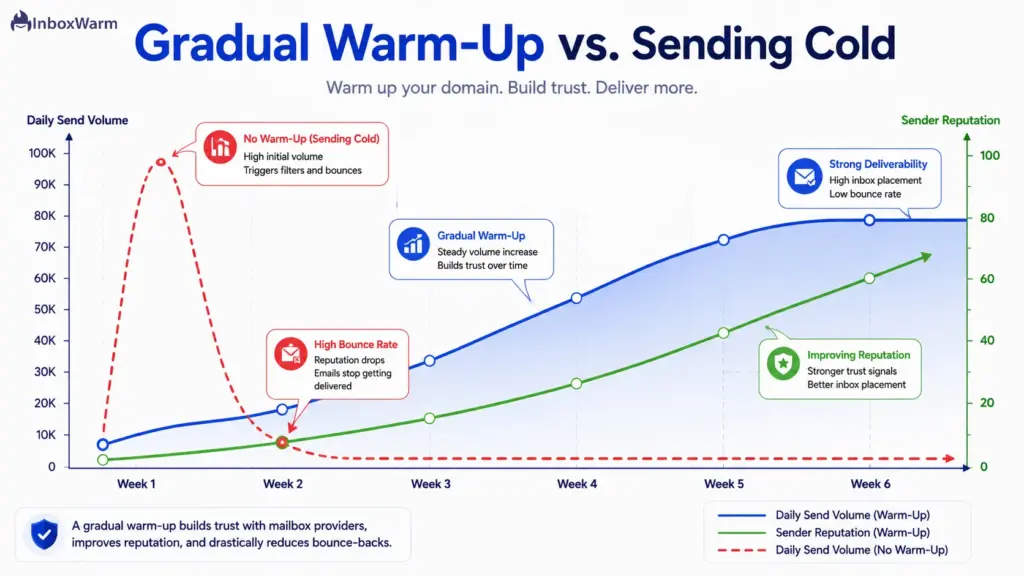
Inbox warming reduces bounce-backs by building a positive sending history before you send at volume, so providers trust your domain instead of deferring or rejecting your mail. A brand-new domain has no reputation, and mailbox providers treat unknown senders with suspicion, which is why fresh domains see throttling and soft bounces almost immediately when they start sending too fast.
Why New Domains Experience Delivery Issues
New domains bounce because they have no track record for providers to evaluate, so a sudden burst of mail looks exactly like a spam attack. Google also accelerates its enforcement timeline for domains that have not been sending steadily, meaning a cold Gmail or Outlook domain hits limits faster than an established one. Without history, even a clean list and perfect authentication will not stop early throttling.
How Inbox Warming Builds Sender Reputation
Inbox warming sends a slowly increasing volume of mail that gets opened, replied to, and moved out of spam, which teaches providers that your domain sends wanted email.
InboxWarm.ai is an AI-powered email warm-up tool that improves inbox placement and sender reputation by automating this engagement at the right pace. You can see the full process in our email warm-up guide.
When to Start Warming a Domain
Start warming before you send a single real campaign, not after the bounces appear. Any new domain or IP needs roughly two to four weeks of warming, and you should also re-warm a domain that has been dormant or is about to scale up its volume sharply. Warming after the fact means repairing damage instead of preventing it.
Best Practices for Sustainable Email Warm-Up
Ramp volume gradually rather than in jumps, keep a consistent daily cadence, and prioritize mail that earns genuine engagement. Do not stop abruptly once you reach target volume, because a sudden gap followed by a spike reads as suspicious all over again. Monitor your reputation throughout so you can slow the ramp if early metrics wobble.
What Are the Best Practices to Prevent Future Email Bounce-Backs?
Preventing future bounce-backs is about maintenance, not one-time fixes. The five practices below keep your list clean, your reputation strong, and your authentication current so bounces stay low for the long run.
Maintain Good Email List Hygiene
Validate your full list on a recurring schedule and adopt a sunset policy that removes contacts who have not engaged in several months. Hygiene is ongoing because lists decay continuously, so a list that was clean in January will not be clean by summer without upkeep. Regular cleaning is the most reliable way to keep hard bounces near zero.
Segment and Engage Your Audience
Segment recipients by how recently and how often they engage, then send your most active contacts first. Strong engagement signals tell providers your mail is wanted, which protects your reputation and indirectly lowers bounces. Mailing everyone at the same cadence, regardless of activity, drags engagement down and invites filtering.
Monitor Domain and IP Reputation
Watch your domain and IP reputation continuously using Google Postmaster Tools, your provider’s sender dashboards, and a blocklist monitor. Catching a reputation dip or a new blacklisting early lets you act before it becomes a wave of rejections. Reputation problems rarely announce themselves, so the monitoring has to be proactive.
Keep Email Authentication Updated
Review your SPF, DKIM, and DMARC records whenever you add or remove a sending tool, and tighten your DMARC policy toward enforcement over time. Provider requirements keep evolving, so staying aligned with the current Google and Yahoo sender requirements is part of routine maintenance, not a one-time setup task.
Regularly Audit Your Email Program
Run a full audit of your sending program at least quarterly: review bounce and complaint trends, re-test authentication, check every sending source, and confirm suppression lists are working. A scheduled audit catches the slow drift that causes bounce rates to creep up over months. Treat it as preventive maintenance for your entire sending setup.
Final Thoughts
Bounce-backs are feedback, and the senders who do well are the ones who listen. A bounce is telling you an address is wrong, a mailbox is full, or a provider does not trust your domain yet. Treated as signal rather than noise, every bounce becomes a chance to tighten your list and your setup before the damage spreads to the rest of your mail.
The fix is rarely one thing. Clean lists, prompt suppression of hard bounces, solid authentication with SPF, DKIM, and DMARC, and a properly warmed domain all work together. Get those right and you hold your bounce rate low, your sender reputation strong, and your inbox placement where it should be.
Knowing how to fix email bounce-backs is the difference between a sending program that scales and one that stalls. Put the steps above into practice, watch your numbers, and your messages will keep reaching the people who actually want to hear from you.
Frequently Asked Questions
What is a good email bounce rate for marketing campaigns?
Most deliverability benchmarks treat a bounce rate below 2% as healthy, with the best programs staying under 1%. Rates between 2% and 5% point to list-quality problems worth fixing, and anything above 5% puts your sender reputation at real risk. Hard bounces specifically should stay well under 1%.
How long does it take to recover from a high email bounce rate?
Recovery usually takes two to four weeks of clean, consistent sending, though severe reputation damage can take longer. Start by suppressing every bounced address, then send only to engaged recipients while trust rebuilds. Gmail, for example, restores delivery mitigation only after spam rates stay below threshold for seven consecutive days, so steady behavior over time is what counts.
Why do emails bounce back only for certain email providers like Gmail or Outlook?
Each provider runs its own filters, reputation systems, and authentication rules, so a setup that passes one can fail another. Outlook, for instance, began rejecting unauthenticated bulk mail with a 550 5.7.515 error in 2025, while Gmail enforces its own spam-rate and authentication requirements. Provider-specific bounces almost always point to an authentication gap or a reputation problem with that one mailbox provider.
Can changing email service providers reduce bounce rates?
Sometimes, but not on its own. A new platform with better infrastructure and built-in validation can help, yet your bounce rate mostly reflects your list quality, authentication, and sender reputation, which all travel with you. Switching providers without fixing those underlying issues tends to reproduce the same bounces on a new platform.
Do email bounce-backs affect inbox placement and spam folder rates?
Yes, directly. High bounce rates lower your sender reputation, and a weaker reputation pushes more of your delivered mail into the spam folder instead of the inbox. This is why bounces and inbox placement move together: fix the bounces, and your placement usually improves alongside them.
How often should email lists be cleaned to prevent bounce-backs?
Validate your full list at least every three to six months, and verify new addresses at the point of collection. High-volume senders, or anyone mailing older lists, should clean monthly. Always suppress hard bounces in real time rather than waiting for the next scheduled cleanup.
Tired of watching good campaigns bounce before they ever reach the inbox?
InboxWarm.ai helps build sender reputation through AI-powered email warm-up, improving inbox placement and reducing the deliverability issues that lead to unnecessary bounce-backs.
Warm up your domain, send with confidence, and stop losing reach to avoidable delivery failures.