

TL;DR
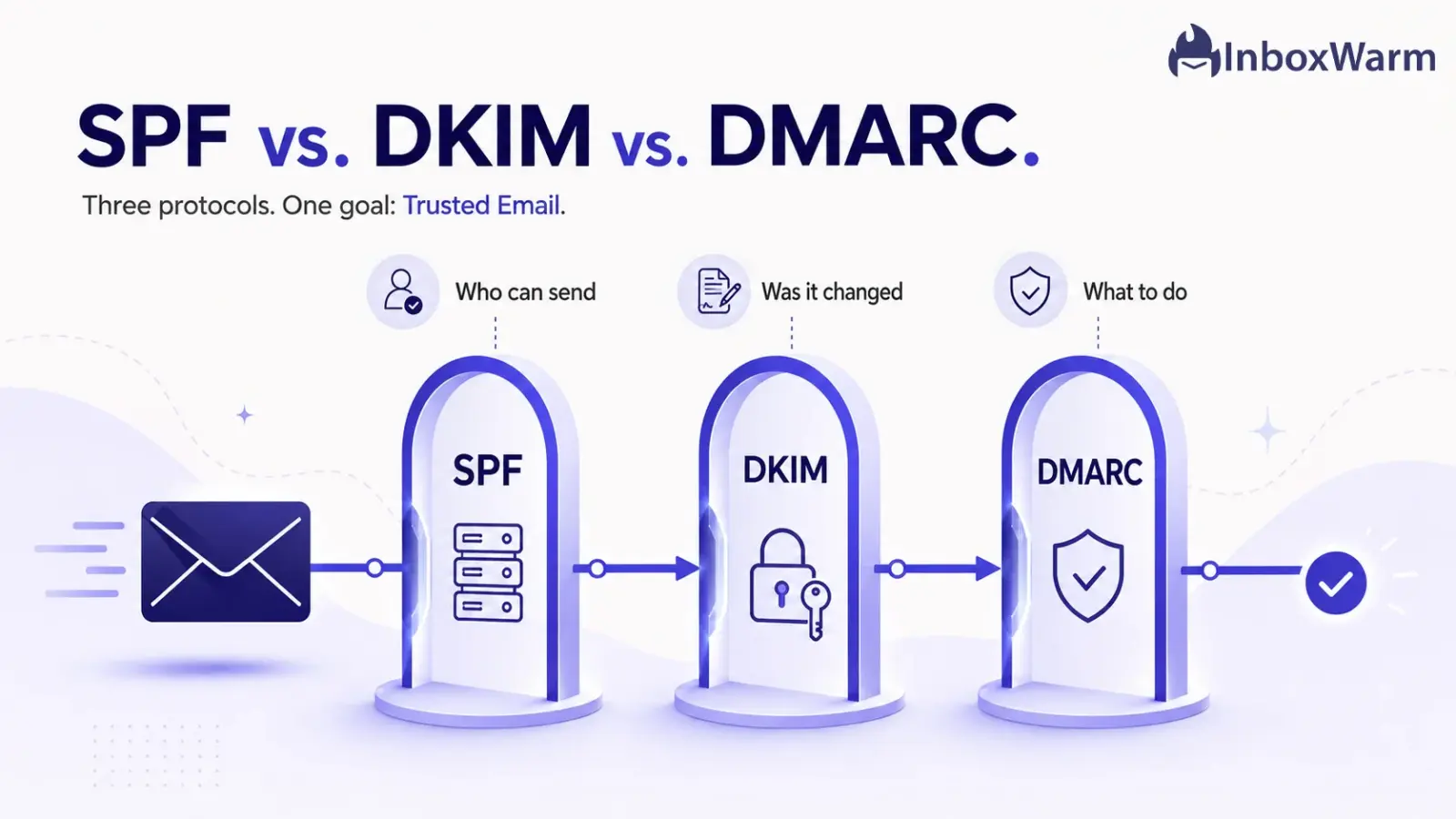
SPF, DKIM, and DMARC are the three email authentication protocols that prove your messages are genuinely from you. SPF authorizes which servers can send for your domain, DKIM signs messages to prevent tampering, and DMARC ties them together with a policy and reporting. You need all three, not one.
- SPF (Sender Policy Framework) lists the IP addresses allowed to send for your domain.
- DKIM (DomainKeys Identified Mail) adds a cryptographic signature that detects tampering.
- DMARC (Domain-based Message Authentication, Reporting, and Conformance) sets the policy for failures and sends you reports.
- Since February 2024, Google and Yahoo require bulk senders to run all three.
Anyone can type your domain into the “From” line of an email. Without authentication, a scammer can send a message that looks exactly like it came from your company, and the receiving server has no reliable way to tell the difference. That is how phishing and business email compromise work. It is also why your real emails sometimes land in spam: if mailbox providers cannot verify that a message is really from you, they treat it with suspicion.
The stakes are not small. The FBI’s Internet Crime Complaint Center reported $16.6 billion in cybercrime losses for 2024, a 33% increase over the prior year, with business email compromise alone accounting for roughly $2.77 billion.
Phishing and spoofing were the single most reported crime type, with more than 193,000 complaints. Email authentication is the first line of defense against domain impersonation, and skipping it costs you on both fronts: security and deliverability.
In this guide, you’ll learn exactly what SPF, DKIM, and DMARC each do, how they work, and where each one falls short on its own.
We’ll compare them side by side, settle the “which is better” debate by use case, walk through the most common setup mistakes, and answer the questions people actually ask.
By the end, you’ll know which of these email authentication protocols you need and why the honest answer is almost always all three.
Table of Contents
SPF vs. DKIM vs. DMARC at a Glance
SPF, DKIM, and DMARC solve three different parts of the same problem.
- SPF answers, “Is this server allowed to send for this domain?”
- DKIM answers, “Was this message changed in transit?”
- DMARC answers, “What should happen when a message fails, and who should be told?”
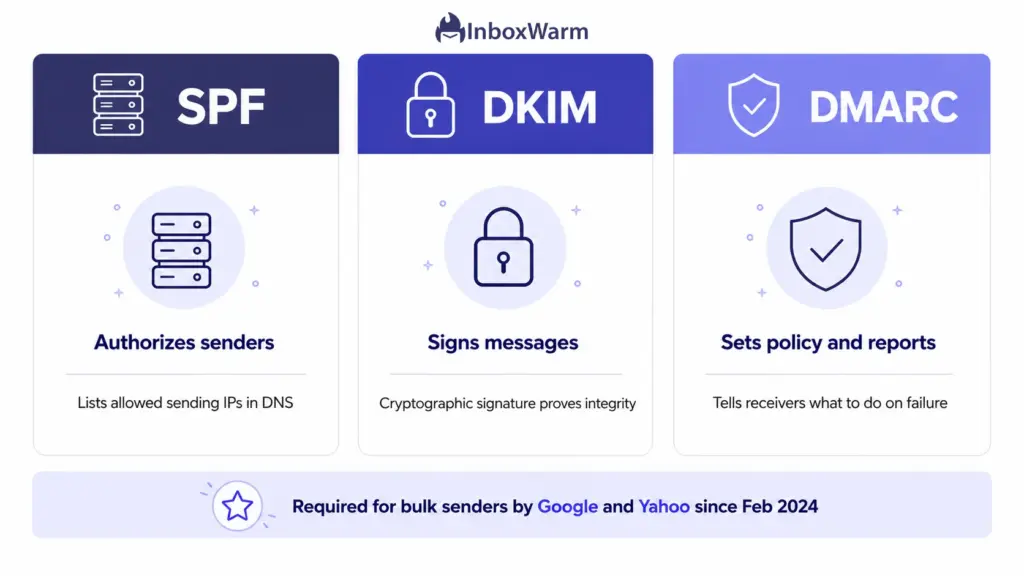
Used together, they verify the sender, protect the content, and enforce a policy.
| Protocol | Full Name | What It Does | Best For |
|---|---|---|---|
| SPF | Sender Policy Framework | Authorizes the IP addresses allowed to send for your domain | Defining who can send for you |
| DKIM | DomainKeys Identified Mail | Cryptographically signs messages so tampering is detectable | Proving the message was not altered |
| DMARC | Domain-based Message Authentication, Reporting and Conformance | Sets the failure policy and sends reports on who uses your domain | Enforcement and visibility |
What Is SPF?
SPF (Sender Policy Framework) is an email authentication protocol that lets a domain owner publish, in DNS, the list of mail servers authorized to send email on the domain’s behalf. Defined in RFC 7208, it is a single TXT record that receiving servers check against the IP address of the server delivering the message.
How SPF Works
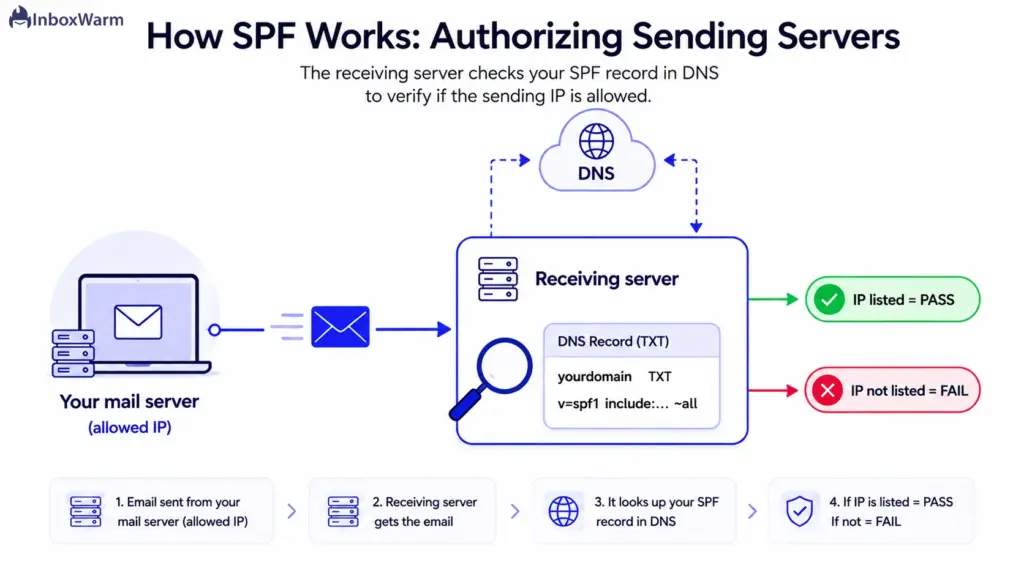
SPF verifies the sending server, not the visible sender. The check runs against the envelope (Return-Path) domain and then compares the sending IP to the published list.
- You publish a TXT record listing authorized sources, for example v=spf1 include:_spf.google.com ~all.
- A receiving server reads the envelope sender domain (the Return-Path, not the visible From address).
- It looks up that domain’s SPF record and compares the sending IP against the authorized list.
- If the IP is listed, SPF passes. If it is not, SPF fails or soft-fails when the record ends in ~all.
You can build a valid record in seconds with an SPF record generator, then confirm it resolves correctly before you rely on it.
Advantages
- Simple to set up and supported by every major mailbox provider.
- Blocks unauthorized servers from sending as your envelope domain.
- Acts as one of the two foundations DMARC depends on.
Limitations
- It breaks on forwarding because the forwarding server’s IP is not on your list.
- It checks the envelope domain, not the visible “From” address, so on its own it does not stop “From” address spoofing.
- It is capped at 10 DNS lookups per check (RFC 7208), and chaining too many include statements causes a permanent error.
- It says nothing about the message content, so it cannot detect tampering.
What Is DKIM?
DKIM (DomainKeys Identified Mail) is an email authentication protocol that attaches a cryptographic signature to every message, letting the receiving server confirm that the email was authorized by the domain and was not altered in transit. Defined in RFC 6376, it uses a public and private key pair: the private key signs outgoing mail, and the matching public key lives in your DNS.
How DKIM Works
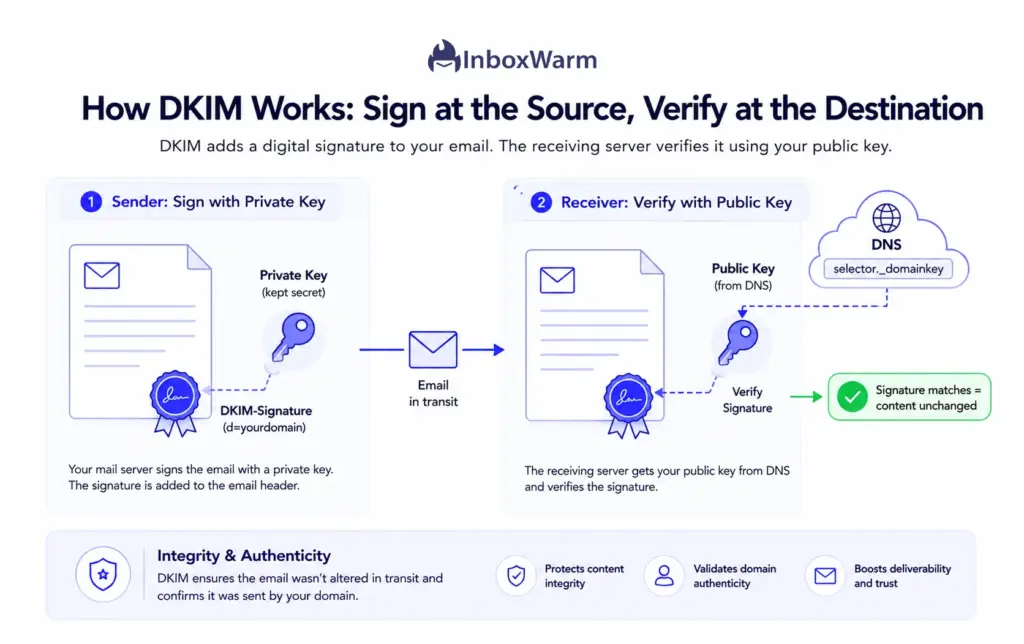
DKIM proves two things at once: that the message came from a server holding the domain’s private key and that the signed content arrived unchanged.
- Your mail server hashes selected headers and the body, then signs that hash with a private key.
- It adds a DKIM-Signature header that names the signing domain (d=) and the selector.
- The receiver fetches the public key from selector._domainkey.yourdomain in DNS.
- It recomputes the hash and verifies the signature. If they match, DKIM passes, and the content is proven intact.
If a recipient reports a missing signature, a DKIM checker will show you exactly what the receiving side sees.
Advantages
- The signature travels with the message, so DKIM usually survives forwarding when content is unchanged.
- It proves content integrity, which SPF cannot do.
- It ties the message to a specific domain through the d= value, which DMARC uses for alignment.
Limitations
- It does not restrict which servers can send, so it does not replace SPF.
- A validly signed message can be captured and re-sent (replayed), because the signature stays valid.
- Keys need management, and a weak 1024-bit key is far easier to compromise than the recommended 2048-bit key.
- On its own, DKIM does not check the visible From address, so it does not stop From-address spoofing.
What Is DMARC?
DMARC (Domain-based Message Authentication, Reporting, and Conformance) is an email authentication protocol that builds on SPF and DKIM. It tells receiving servers what to do when a message fails authentication, and it sends the domain owner reports on every source using its domain. It is defined in RFC 7489.
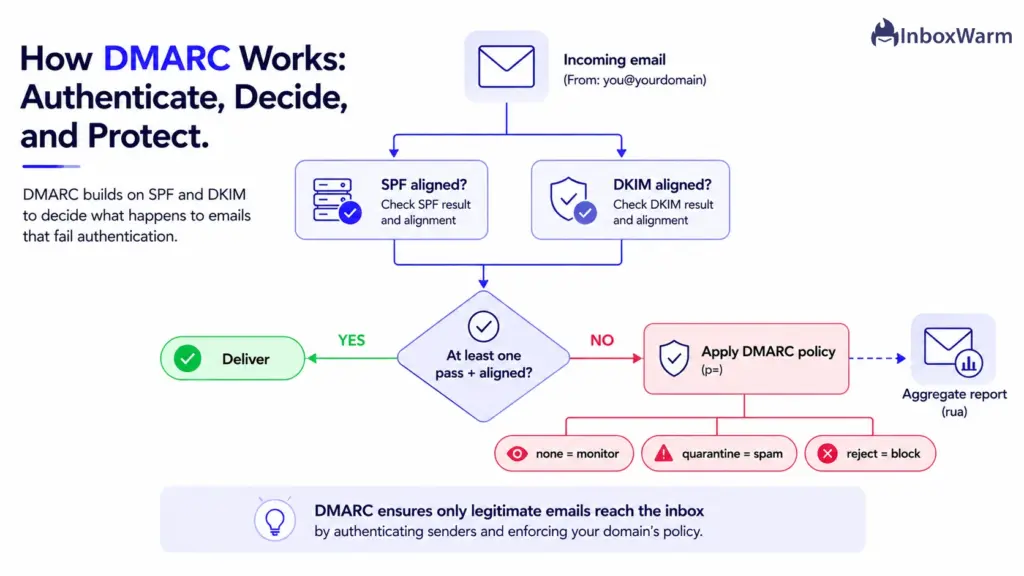
The concept that makes DMARC powerful is alignment. DMARC requires that the domain in the visible From header match the domain validated by SPF or DKIM. That single rule closes the from-spoofing gap that SPF and DKIM each leave open on their own.
How DMARC Works
DMARC runs after SPF and DKIM, adds the alignment test, then enforces your chosen policy and reports back:
- You publish a _dmarc.yourdomain TXT record with a policy (p=) and a reporting address (rua=).
- A receiver evaluates SPF and DKIM, then checks whether either result aligns with the From domain.
- If neither SPF nor DKIM passes and aligns, DMARC fails.
- The receiver applies your policy: p=none (monitor only), p=quarantine (send to spam), or p=reject (block outright).
- Receivers send aggregate reports to your RUA address, so you can see every system sending as your domain.
Generate a starter policy with a DMARC record tool, and use a DMARC checker to confirm it publishes and parses correctly.
Advantages
- It closes the From-spoofing gap by enforcing alignment with the visible sender.
- It gives you real enforcement, from monitoring all the way to blocking.
- Its reports reveal shadow senders, misconfigured tools, and impersonation attempts.
- It is required for bulk senders by Google and Yahoo.
Limitations
- It depends entirely on SPF and DKIM being configured correctly first.
- Jumping straight to p=reject before you have mapped your senders can block legitimate mail.
- Raw aggregate reports are XML, so you need a parser or dashboard to read them.
- A policy left at p=none forever provides reporting but no protection.
SPF vs. DKIM vs. DMARC: Side-by-Side Comparison Table
Here is how the three email authentication protocols compare across the dimensions that matter when you are deciding what to configure and how far to take it.
| Dimension | SPF | DKIM | DMARC |
|---|---|---|---|
| Purpose | Authorize sending servers | Verify message integrity | Enforce policy and report |
| Authentication method | IP address match | Cryptographic signature | Alignment of SPF or DKIM with From |
| DNS record type | TXT | TXT (public key) | TXT |
| Stops server spoofing | Yes | No | Through SPF and DKIM |
| Stops From-address spoofing | No (alone) | No (alone) | Yes |
| Protects against phishing | Partial | Partial | Strong (with p=reject) |
| Reporting capability | None | None | Yes (aggregate and forensic) |
| Setup complexity | Low | Medium | Medium to high |
| Depends on other protocols | No | No | Yes (needs SPF or DKIM) |
Key Differences Between SPF, DKIM, and DMARC
The protocols overlap in purpose but differ sharply in method, coverage, and what they give you back. These five distinctions explain why they are layers rather than substitutes.
Authentication Method
SPF authenticates by IP address, checking whether the sending server is on an approved list. DKIM authenticates by cryptography, signing the message so any change is detectable. DMARC authenticates nothing new on its own. Instead, it reuses the SPF and DKIM results and adds the alignment test against the visible From domain.
Security Coverage
SPF covers the transport path (which server sent the mail). DKIM covers the content (was it altered). Neither, by itself, protects the address your recipient actually sees. DMARC is the only one of the three that secures the visible From address, which is the exact field attackers forge in phishing and business email compromise.
DNS Configuration
All three live in DNS as TXT records, but they sit in different places. SPF is one record on your root domain. DKIM publishes a public key at a selector subdomain (selector._domainkey). DMARC sits at _dmarc.yourdomain. A domain must have exactly one SPF record, but it can carry multiple DKIM selectors for different sending services.
Reporting and Visibility
This is where DMARC stands alone. SPF and DKIM pass or fail silently, with no feedback to you. DMARC’s aggregate reports show every IP and service sending under your domain, which turns authentication from a one-time setup into an ongoing source of intelligence about impersonation and misconfiguration.
Email Deliverability Impact
Authenticated mail is trusted mail. Mailbox providers treat aligned, authenticated messages as lower risk, which improves inbox placement and protects domain authentication reputation over time. Authentication is necessary but not sufficient, though. It makes you eligible for the inbox; consistent sending behavior and email warm-up are what build the reputation that keeps you there.
How Does SPF, DKIM, and DMARC Work Together?
Yes, you need SPF, DKIM, and DMARC together. They are layers, not alternatives. SPF and DKIM each authenticate one aspect of a message, but neither checks the visible From address on its own. DMARC binds both to the From domain through alignment and adds enforcement plus reporting. Remove any single layer and you reopen a gap an attacker can use.
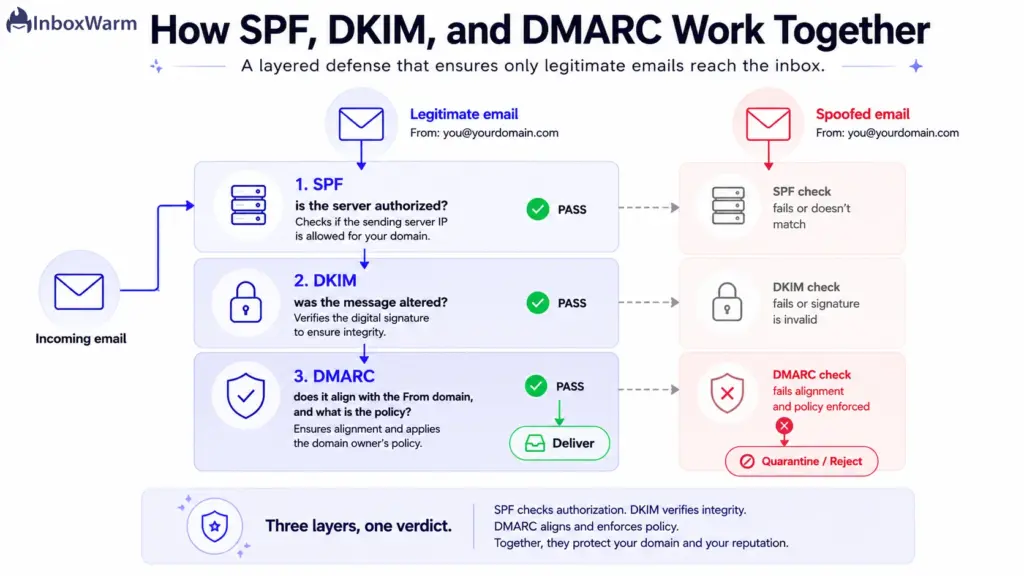
Follow one legitimate message through the full stack:
- SPF confirms the server that sent the message is authorized for your envelope domain.
- DKIM confirms the message body and signed headers were not altered along the way.
- DMARC confirms that at least one of those passing results aligns with the visible From domain and then tells the receiver to deliver it.
Now picture a spoofed message. The attacker can forge your “From” address, but they cannot send from your authorized servers (SPF) and cannot forge your DKIM signature, so alignment fails, and DMARC instructs the receiver to quarantine or reject.
This is exactly why Google and Yahoo made all three mandatory for bulk senders (those sending roughly 5,000 or more messages a day to their users) starting in February 2024, requiring SPF and DKIM plus a DMARC policy of at least p=none, with alignment on at least one method. Microsoft has since rolled out comparable requirements for high-volume senders.
SPF vs. DKIM vs. DMARC: Which One Should You Use?
This is a trick question. There is no SPF vs. DKIM winner because they do different jobs, and DMARC needs both to function. The real decision is how aggressively to configure all three for your situation. Here is the verdict by use case.
| Use Case | Minimum Setup | Recommended DMARC Policy | Priority |
|---|---|---|---|
| Small business | SPF + DKIM + DMARC | Start at p=none, move to p=quarantine | Stop impersonation and reach the inbox |
| SaaS company | All three, plus a subdomain strategy | p=quarantine, then p=reject | Protect signup and transactional mail |
| Enterprise | All three, with continuous monitoring | p=reject (BIMI optional) | Brand protection and compliance |
| Marketing / ESP senders | All three, custom Return-Path for SPF alignment | p=reject | Deliverability at scale |
For Small Businesses
Set up all three, then grow into enforcement. Publish SPF and DKIM for every tool that sends on your behalf (your email host, your CRM, your invoicing app), then start DMARC at p=none to gather reports. Once the reports show only your real senders passing, move to p=quarantine. This is the highest-impact security step most small businesses can take in an afternoon.
For SaaS Companies
Authentication is part of your product’s trust surface. Separate your mail streams (marketing, transactional, and support) onto distinct subdomains so a reputation problem in one does not sink the others. Configure SPF and DKIM per stream, then push DMARC to p=reject once each stream is verified. Transactional email, like password resets and receipts, must reach the inbox, and alignment is what protects it.
For Enterprises
You have the most domains, the most third-party senders, and the most to lose from impersonation. Treat DMARC reporting as an ongoing program, not a project, and work toward p=reject across every domain you own, including parked and non-sending domains. Once you reach enforcement, BIMI can display your verified logo in supporting inboxes, which reinforces brand trust.
For Marketing Email Platforms
Volume magnifies every misstep. Use a custom Return-Path so SPF aligns with your sending domain; sign with DKIM keys on your own domain rather than the platform’s; and hold DMARC at p=reject. At marketing scale, you also need to watch your complaint rate. Google advises keeping spam complaints below 0.1% and treats anything above 0.3% as a problem.
Benefits of Implementing SPF, DKIM, and DMARC
Running all three email security protocols pays off well beyond ticking a compliance box. The benefits compound across security, deliverability, and brand trust.
- Stops domain spoofing and impersonation: Attackers cannot pass alignment without your servers and keys, so DMARC enforcement blocks forged mail.
- Improves deliverability: Mailbox providers extend more trust to authenticated, aligned mail, which supports stronger inbox placement.
- Meets sender requirements: You satisfy the Google, Yahoo, and Microsoft rules for bulk and high-volume senders.
- Gives you visibility: DMARC reports surface every service sending under your domain, including ones you forgot about.
- Protects brand reputation: Customers who never receive a convincing fake from “your” domain keep trusting your real mail.
- Unlocks BIMI: Enforcement is the prerequisite for displaying a verified brand logo in supporting inboxes.
Common SPF, DKIM, and DMARC Mistakes to Avoid
Most authentication failures are configuration mistakes, not protocol weaknesses. These are the ones that quietly break alignment or deliverability.
- Missing SPF records: No SPF record means receivers cannot verify your servers, and a key DMARC input is absent from the start.
- Multiple SPF records: A domain must have exactly one SPF record. Two or more cause a permanent error, so merge every source into a single record.
- Exceeding the DNS lookup limit: SPF allows only 10 DNS lookups per check. Long chains of include statements blow past it and break SPF entirely.
- Misconfigured DKIM signatures: A wrong selector, a missing public key, or a weak 1024-bit key (use 2048-bit) all cause DKIM to fail verification.
- DMARC stuck at p=none forever: Monitoring is the starting line, not the finish. A policy of “none” gives you reports but blocks no spoofed mail.
- Alignment failures: SPF or DKIM can pass while DMARC still fails because the authenticated domain does not match the visible From. A custom Return-Path and DKIM signing on your own domain fix this.
How to Set Up SPF, DKIM, and DMARC
Setting up all three follows the same pattern: publish DNS records, verify them, then tighten enforcement. Here is the high-level sequence.
- Publish your SPF record. List every authorized sending source in one TXT record on your root domain. An SPF record generator handles the syntax.
- Enable DKIM in each sending platform. Generate a key pair, publish the public key at your selector, and turn on signing. Confirm it with a DKIM checker.
- Publish a DMARC record at p=none. Start in monitor mode with a DMARC record generator and point RUA at an address you watch.
- Read your reports. Identify every legitimate sender and fix anything failing alignment before you tighten the policy.
- Tighten enforcement. Move to p=quarantine, then p=reject, once your reports are clean.
Frequently Asked Questions
Can DKIM Work Without SPF?
Yes, DKIM works independently and does not require SPF to verify a signature. In practice you should run both because they protect different things and DMARC can align on either one. Google and Yahoo also require bulk senders to have both SPF and DKIM in place. Running only one leaves a gap and may fail sender requirements.
Do I Need All Three Protocols?
For any domain that sends real email, yes. SPF and DKIM each authenticate one part of a message, and DMARC ties them to the visible From address while adding enforcement and reporting. Skipping DMARC leaves the exact field attackers forge unprotected. If you send in volume, all three are no longer optional under the Google and Yahoo rules.
Does SPF Stop Phishing?
Only partially. SPF blocks unauthorized servers from sending as your envelope domain, but it does not check the visible From address that recipients see. An attacker can pass or bypass SPF and still forge your From line. Stopping that kind of phishing requires DMARC enforcement, which is why the three protocols belong together.
Which Protocol Improves Email Deliverability the Most?
No single protocol wins, because mailbox providers expect to see all three working in alignment. DMARC at enforcement tends to have the most visible effect since it signals a fully authenticated, trustworthy domain. That said, authentication makes you eligible for the inbox rather than guaranteed a place in it. Sustained sending reputation, built through consistent volume and email warm-up, is what carries deliverability over the long term.
Final Thoughts
The SPF vs. DKIM vs. DMARC comparison has a clear conclusion: there is no contest, because the three protocols are not competitors. SPF says which servers may send for you; DKIM proves your messages were not tampered with, and DMARC ties both to your visible domain, enforces a policy, and reports back. Each one closes a gap the others leave open.
That layered design is exactly why mailbox providers now expect all three and why bulk senders to Gmail and Yahoo are required to run them. Configured well, they shut the door on domain impersonation and signal to receiving servers that your mail is genuinely yours. Configured poorly, or left half-finished at a monitoring-only DMARC policy, they leave you exposed and can quietly hurt deliverability.
Start where you are.
Publish SPF and DKIM for every tool that sends on your behalf, turn DMARC on in monitor mode, read the reports, and then tighten to enforcement. Authentication gets you to the inbox door.
Keeping a clean sending reputation is what gets you through it every time.
Authenticated but still landing in spam?
Authentication is the entry ticket; reputation gets you seated. InboxWarm.ai gets your email in front of real people, building the standing that mailbox providers trust and the placement your campaigns depend on.