

TL;DR
A DMARC fail means an email claiming to come from your domain passed neither SPF alignment nor DKIM alignment with the visible From address, so the receiving server cannot confirm you authorized it. Under RFC 7489, DMARC passes only when at least one of SPF or DKIM both passes and aligns to your From domain. If both miss, DMARC fails.
- Most DMARC failures are misconfiguration, not attacks. The usual culprits are unaligned third-party senders, forwarding, and a missing or broken DKIM signature.
- SPF can pass while DMARC still fails. That happens when the SPF-verified domain does not match your From domain, which breaks alignment.
- The fix is repeatable: read your DMARC reports, find the failing source, correct SPF or DKIM alignment, and then retest before tightening your policy.
- Since February 2024, Google and Yahoo require a DMARC record for any domain sending 5,000 or more messages per day to their users.
You set up SPF, DKIM, and a DMARC record; your authentication looked clean; and then a report lands showing a DMARC fail on mail you know is legitimate. It is one of the more confusing moments in email deliverability, because a fail does not always mean someone is spoofing you.
More often, it means one of your own sending sources is not lined up the way DMARC expects.
The cost of ignoring it is real. With an enforced policy, a DMARC fail can route your message to spam or get it rejected before it reaches the inbox. Since Google and Yahoo started requiring DMARC for bulk senders in 2024, and Google moved to permanent rejections in late 2025, an unresolved failure now translates directly into lost replies, broken password resets, and damaged sender reputation.
In this blog, we will walk you through everything you need to know about DMARC failures, from what a DMARC fail means and why receivers flag it to fixing it step-by-step and preventing it long-term.
Table of Contents
What Does a DMARC Fail Actually Mean?
A DMARC fail means an email did not pass DMARC authentication because neither SPF nor DKIM successfully authenticated and aligned with the domain in the From address. When this happens, the receiving mail server follows the domain owner’s DMARC policy, which may monitor the message (p=none), send it to spam (p=quarantine), or reject it entirely (p=reject).
DMARC (Domain-based Message Authentication, Reporting, and Conformance) is an email authentication standard defined in RFC 7489. It builds on SPF and DKIM by adding domain alignment, a requirement that the domain authenticated by SPF or DKIM matches the domain shown in the visible From address.
This alignment check is what makes DMARC effective against spoofing. SPF verifies the sending server, and DKIM verifies the message signature, but neither automatically proves that the sender domain visible to the recipient is legitimate. DMARC closes that gap by requiring a match between authentication results and the From domain.
As a result, a DMARC fail does not always mean an email is malicious. In many cases, the message was sent by a legitimate platform such as a CRM, marketing tool, help desk, or forwarding service that authenticated under a different domain than the one used in the From address.
How Does DMARC Decide Pass or Fail?
DMARC runs a single test with a strict condition. The message passes if SPF passes and its domain aligns with your From domain or if DKIM passes and its signing domain aligns with your From domain. Only one of the two paths needs to succeed. If neither does, DMARC fails, and your policy decides what happens next.
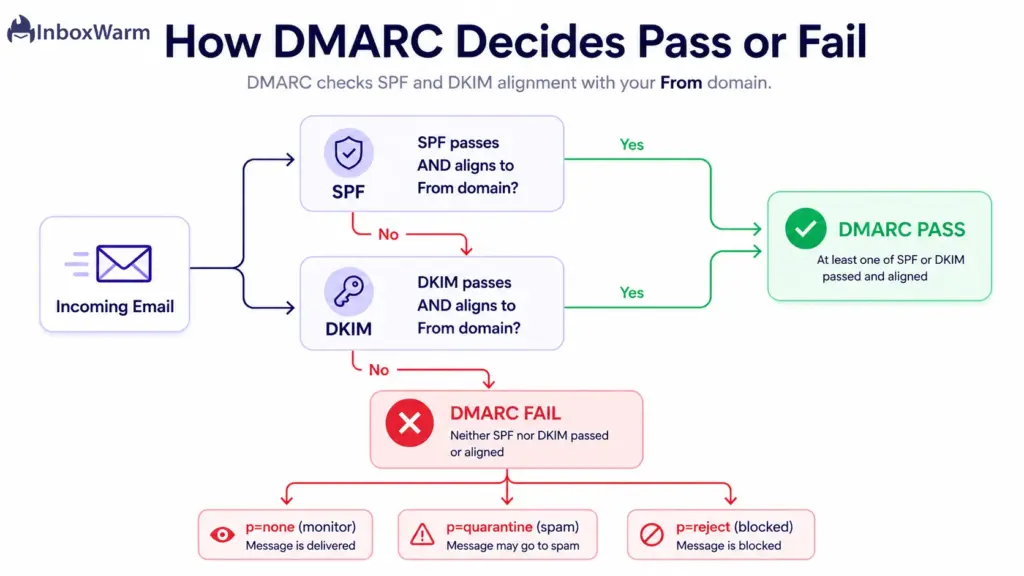
Here is the logic a receiver follows, drawn from RFC 7489:
- SPF path: SPF authenticates the envelope sender (the Return-Path domain). For DMARC, that domain must also align with your From domain.
- DKIM path: DKIM verifies a cryptographic signature tied to a signing domain (the d= value). That signing domain must align with your From domain.
- Result: either path succeeds and DMARC passes. Both miss and DMARC fail.
What happens after a fail depends on the policy you publish with the p= tag in your DMARC record.
RFC 7489 defines three values:
- p=none: monitor only. The receiver still delivers the mail and sends you reports, so you see failures without affecting delivery.
- p=quarantine: treat failing mail as suspicious, usually routing it to the spam or junk folder.
- p=reject: refuse failing mail outright, typically bounced during the SMTP transaction.
This is why the same failure can be invisible on one domain and catastrophic on another.
What Are the Top Causes of DMARC Failures?
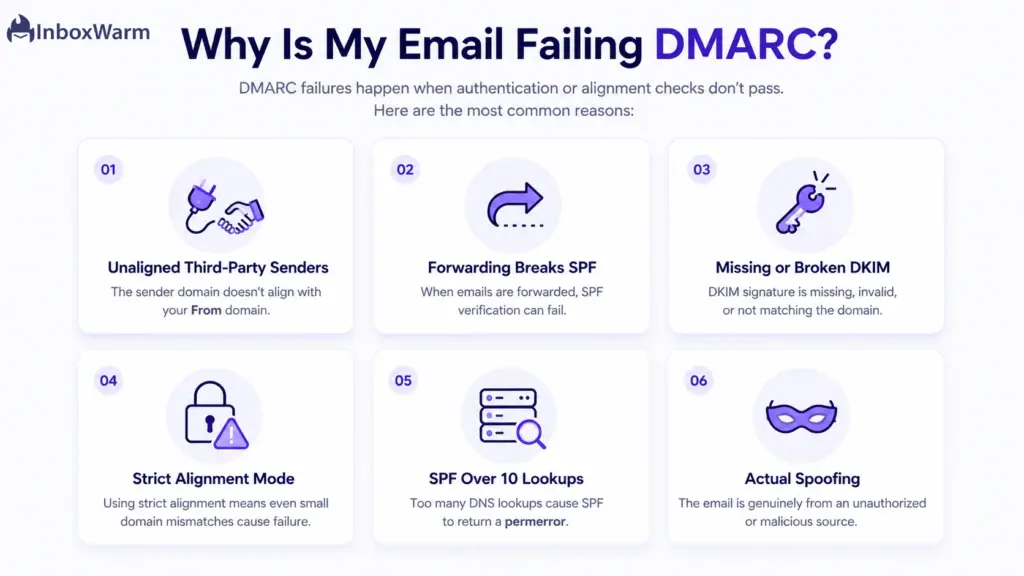
Most DMARC failures come from legitimate mail that authenticates under the wrong domain, not from attackers. The usual causes are third-party senders that are not aligned,
forwarding that breaks SPF, a missing or broken DKIM signature, overly strict alignment, and SPF records that exceed their lookup limit.
Third-Party Senders That Are Not Aligned
When you send through a CRM, marketing platform, or help desk, that service often puts its own domain in the return path. SPF passes for the service’s domain, but because that domain does not match your From domain, SPF alignment fails. Unless the service also signs with aligned DKIM, the message fails DMARC.
The fix is to authenticate each sending tool under your own domain, which most platforms support through a custom domain or branded sending setup.
Email Forwarding That Breaks SPF
Forwarding is the single most common reason legitimate mail fails. When a message is forwarded, the forwarding server’s IP is not in your SPF record, so SPF fails. If the forwarder also alters the message, DKIM can break too, and both failing means DMARC fails.
DKIM signatures survive forwarding as long as the content is not modified, so a valid aligned DKIM signature is your best defense here. For mailing lists, the ARC standard (RFC 8617) preserves authentication results across the forwarding chain.
A Missing or Broken DKIM Signature
If a sending source is not signing with DKIM, or the DKIM key was rotated without updating DNS, you lose one of your two paths to a DMARC pass. That leaves SPF alignment as the only route, which forwarding readily breaks.
Confirm that every sending service signs with DKIM and that the public key in your DNS matches the selector the service uses; a DKIM signature check will surface a key that no longer resolves.
Alignment Set to Strict
DMARC supports two alignment modes, relaxed (the default) and strict. Relaxed mode lets subdomains align with your organizational domain, while strict mode demands an exact match.
If you publish strict alignment (aspf=s or adkim=s) but send it from a subdomain or a slightly different domain, alignment fails even though authentication itself succeeded. Unless you have a specific reason for strict mode, relaxed alignment prevents a large class of avoidable failures.
An SPF Record That Exceeds Its Lookup Limit
SPF allows a maximum of 10 DNS lookups. Stacking too many include statements, one per sending service, pushes you over that limit and returns a permanent error, which counts as an SPF failure. Flatten or consolidate your SPF record, and lean on aligned DKIM So a single SPF problem does not sink DMARC.
Actual Spoofing
Sometimes a DMARC fail is the point. If an attacker sends mail forging your From address, they cannot produce aligned SPF or DKIM for your domain, so DMARC fails and your policy blocks the message. A failure from an IP you do not recognize, with no path to alignment, is DMARC protecting your brand exactly as intended.
Why Does DMARC Fail When SPF or DKIM Passes?
Yes, both happen, and both trace back to alignment. SPF or DKIM can return a clean pass on its own, yet DMARC still fails because the domain that passed does not match your From domain. Authentication and alignment are two separate tests, and DMARC needs both to line up.
DMARC fails but SPF passes
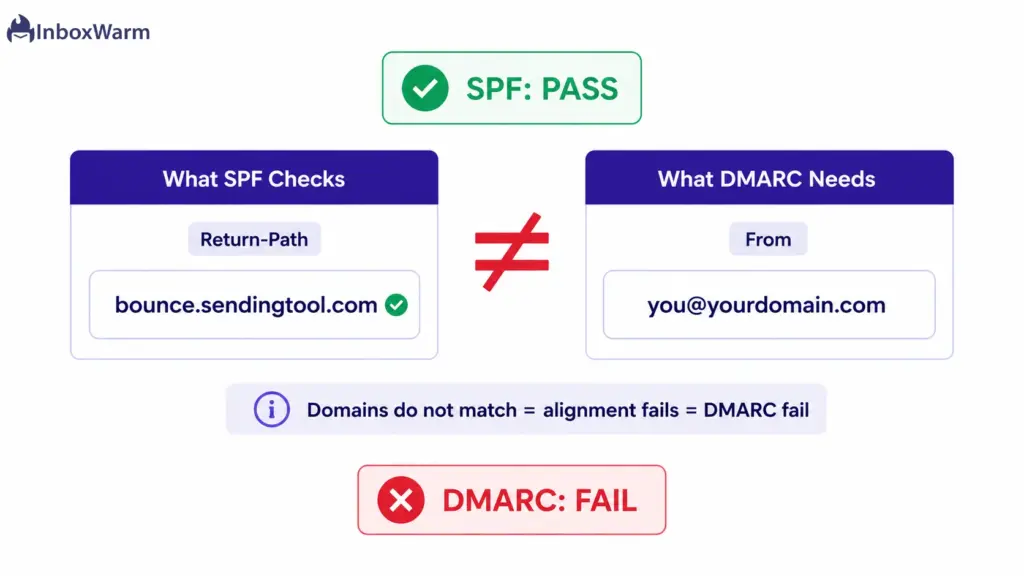
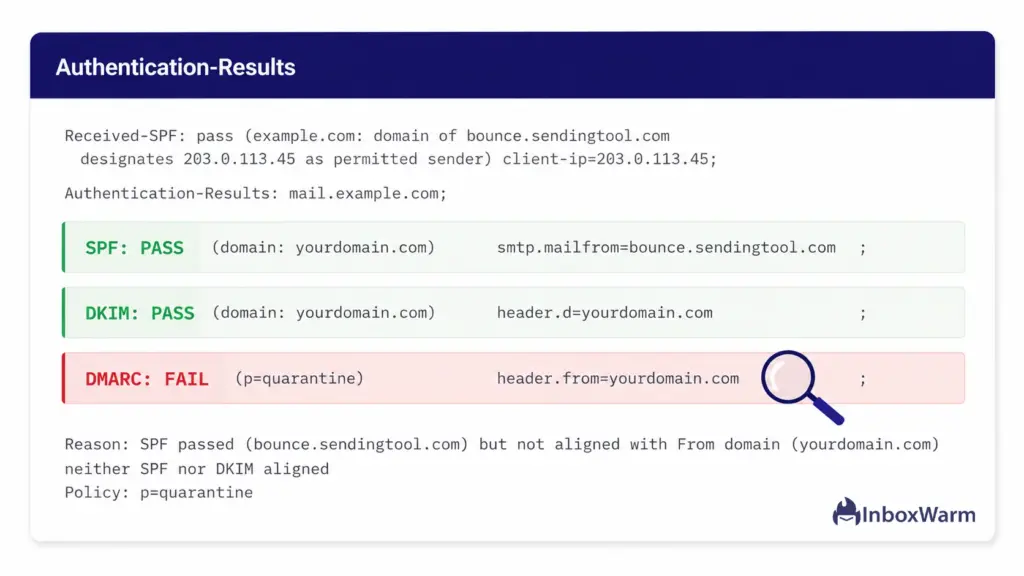
SPF checks the Return-Path domain, not the From domain. When a third-party platform sends on your behalf, SPF can pass for the platform’s Return-Path while your From header shows your own domain. The two do not match, SPF alignment fails, and unless DKIM saves the message, DMARC fails. A green SPF result means nothing to DMARC if it is not aligned.
DMARC fails but DKIM passes
The same trap, one layer over. A message can carry a valid DKIM signature, but if the signing domain (d=) belongs to your provider rather than your own domain, it does not align. The signature verifies, DKIM passes, and DMARC still fails. Aligned DKIM, signed under your domain, is what counts.
The takeaway is to never read SPF or DKIM in isolation when troubleshooting DMARC. Always ask the second question: does the passing domain align with From?
How to Identify a DMARC Failure
You identify a DMARC failure by reading the authentication results in a single message’s headers for spot checks or across your whole sending program through DMARC reports. Both tell you the same thing from different angles.
Below are the ways you can use to identify a DMARC failure:
Using Email Headers
Send a test message to a Gmail account, open it, and choose “Show original.” Gmail displays SPF, DKIM, and DMARC results at the top, each marked PASS or FAIL, along with the domains used. This is the fastest way to confirm a single message’s verdict and see which check broke.
Reading DMARC Reports
Aggregate (RUA) reports are XML files that mailbox providers send daily to the address in your DMARC record. They summarize how many messages passed and failed, from which IPs, and whether SPF and DKIM aligned. Reading them is how you find failures you would never catch one message at a time, especially from third-party senders.
Using Online DMARC Checkers
A DMARC checker reads your published record and flags syntax errors, a missing policy, or strict alignment you did not intend. It will not tell you about live message failures, but it confirms that the record itself is valid and doing what you think it does.
Monitoring Authentication Results
Ongoing monitoring means watching aggregate reports over time, not just once. A sudden spike in failures from a new IP usually means a sending source changed or a new tool was added without authentication. Catching that early is the difference between a quick fix and weeks of degraded deliverability.
How Do You Fix a DMARC Fail in 5 Steps?
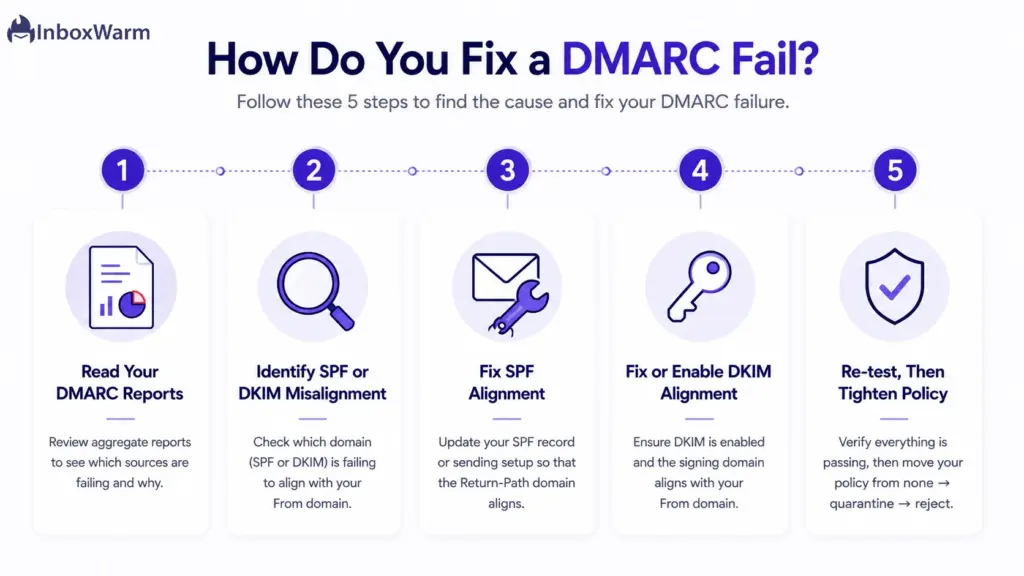
Fixing a DMARC fail is a repeatable process. Read your DMARC reports to see which sources are failing. Identify whether SPF or DKIM alignment is the problem. Correct the configuration for that source, then retest before you tighten your policy. Work one source at a time.
Step 1: Read Your DMARC Reports
Start with the aggregate reports your DMARC record collects through the rua tag. These XML reports list every source sending under your domain, with its SPF and DKIM results and whether each aligned. A DMARC checker turns the raw XML into a readable view, so you stop guessing which IPs and services fail. Expected result: a clear list of failing sources.
Step 2: Identify Whether SPF or DKIM Is Misaligned
For each failing source, check whether SPF passed but did not align, DKIM passed but did not align, or neither passed at all. This single distinction points you to the fix. A passing-but-unaligned result means the source authenticates under the wrong domain, while a hard fail means the source is not authenticating at all. Expected result: a named cause per source.
Step 3: Fix SPF Alignment
If SPF is your intended path, make sure each legitimate sender’s IP or include is present in your SPF record, and that the Return-Path domain aligns with your From domain. Many platforms offer a custom Return-Path or bounce domain to create that alignment. Keep the record under the 10-lookup limit. Expected result: SPF passes and aligns for that source.
Step 4: Fix or Enable DKIM Alignment
DKIM is the more durable path because it survives forwarding. Enable DKIM in each sending service, publish the provided public key at the right selector in your DNS, and confirm the signing domain (d=) matches your From domain. For most senders, aligned DKIM alone is enough to pass DMARC. Expected result: a valid, aligned DKIM signature.
Step 5: Re-test, Then Tighten Policy
After fixing a source, send a test message and recheck authentication, or wait for the next aggregate report to confirm the source now passes. Only once your legitimate sources pass cleanly should you move policy from p=none to p=quarantine, and later to p=reject. Tightening before you fix alignment, which is how senders accidentally block their own mail. Expected result: clean reports and a safe path to enforcement.
How Do You Prevent DMARC Failures Going Forward?
Prevention comes down to three habits: Keep monitoring DMARC reports after you reach enforcement, authenticate every new sending tool before it goes live, and roll out policy changes in stages. Authentication is not a one-time setup, because it drifts as your stack changes.
- Monitor continuously. New tools, vendor changes, and key rotations all introduce failures. Aggregate reports catch them early, while you are still on a forgiving policy.
- Onboard senders deliberately. Every time you add a platform, set up aligned SPF and DKIM under your domain before the first campaign, not after a failure shows up in a report.
- Stage your policy. Move from p=none to p=quarantine to p=reject only as each source proves clean. This is the staged rollout Google and Yahoo themselves recommend.
- Protect your reputation. Authentication failures and the spam they cause both erode sender reputation, which is slow to rebuild. Consistent volume and clean authentication keep it healthy.
Authentication gets your mail eligible for the inbox, but sender reputation decides whether it lands there. If you are sending from a new domain or recovering from a rough patch, pairing clean DMARC with a deliberate email warm-up routine builds the reputation that keeps you out of spam once authentication passes.
DMARC Fail Checklist: 6 Things to Check
Work through this checklist whenever a message fails DMARC. It runs in the same order as the fixes above, from the most common cause to the least, so start at the top and stop when you find the break. Read your latest DMARC report first to see which source is failing, then verify each item against that source.
Quick DMARC Fail Checklist
- Check the SPF record: Is every sending source listed, and are you under 10 DNS lookups?
- Verify DKIM signatures: Is DKIM enabled on each source with a valid key in DNS?
- Confirm domain alignment: Does the Return-Path or d= domain sit under your own domain?
- Review the DMARC record: valid v=DMARC1 syntax, sensible policy, relaxed alignment, RUA set?
- Audit third-party senders: Is every tool that sends on your domain authenticated and aligned?
- Test emails after changes: allow DNS to propagate, then re-read the headers for dmarc=pass.
Conclusion
A DMARC fail is rarely as mysterious as it first looks. In almost every case it comes down to one question: did SPF and DKIM both pass and align with the domain in your From address? When the answer is no, the receiver falls back on your policy, and the message is monitored, quarantined, or rejected. The confusing cases, SPF pass but DMARC fail and DKIM pass but DMARC fail, are simply alignment problems wearing a disguise.
Fix failures in order: confirm SPF, confirm DKIM, correct alignment so the authenticated domain is your own, and then validate the DMARC record itself. Authenticate every sending source, including the third-party tools that quietly send as your domain, and keep an eye on your aggregate reports so the next problem surfaces in a dashboard instead of in your reply rate. With Google, Yahoo, and Microsoft all enforcing authentication, a clean DMARC setup is now table stakes for reaching the inbox.
Once authentication is solid, the remaining work is rebuilding the trust that a stretch of DMARC failures can cost you, which is a matter of consistent sending and patient reputation repair rather than another DNS edit.
Frequently Asked Questions
Why does my email fail DMARC but pass SPF?
Because SPF and alignment are separate tests. SPF checks the Return-Path domain, which is frequently your sending platform's domain rather than your own. When that domain does not match your From domain, SPF alignment fails, and DMARC fails with it unless an aligned DKIM signature is present. A passing SPF result alone does not satisfy DMARC.
Can an email fail DMARC even if DKIM passes?
Yes. If the DKIM signing domain (the d= value) belongs to your email provider instead of your own domain, the signature verifies but does not align with your From address. DKIM passes on its own while DMARC still fails. You need DKIM signed under your own domain for it to count toward DMARC.
Does a DMARC fail mean someone is spoofing me?
Not usually. Genuine spoofing does cause DMARC failures, which is the protection working as intended. But the majority of failures come from your own legitimate sources, such as forwarding, unaligned third-party tools, or a missing DKIM signature. Your DMARC reports show the source so you can tell the difference.
How long does it take to fix a DMARC failure?
The configuration change itself is quick, but DNS updates can take up to 48 hours to propagate, and aggregate reports arrive on roughly a daily cycle. Plan to fix a source, wait for propagation, then confirm with the next report. Resolving every source on a complex setup can take a few weeks of iteration.
Will a DMARC fail send my email to spam?
It depends on your policy. On p=none, failing mail is still delivered and only logged. On p=quarantine, it usually goes to the spam or junk folder. On p=reject, it is blocked entirely. The same failure has very different consequences depending on the policy you publish.
Do I need DMARC if I am not a bulk sender?
It is strongly recommended even below the bulk threshold. Since February 2024, Google and Yahoo require a DMARC record for senders of 5,000 or more messages per day, and Gmail now applies a quarantine policy to messages impersonating Gmail addresses. Beyond compliance, DMARC protects your domain from being spoofed regardless of your volume.
DMARC fixed, but mail still landing in spam?
InboxWarm.ai is an AI-powered email warm-up tool that improves inbox placement and sender reputation, so the mail you have authenticated actually reaches real inboxes.