

TL;DR
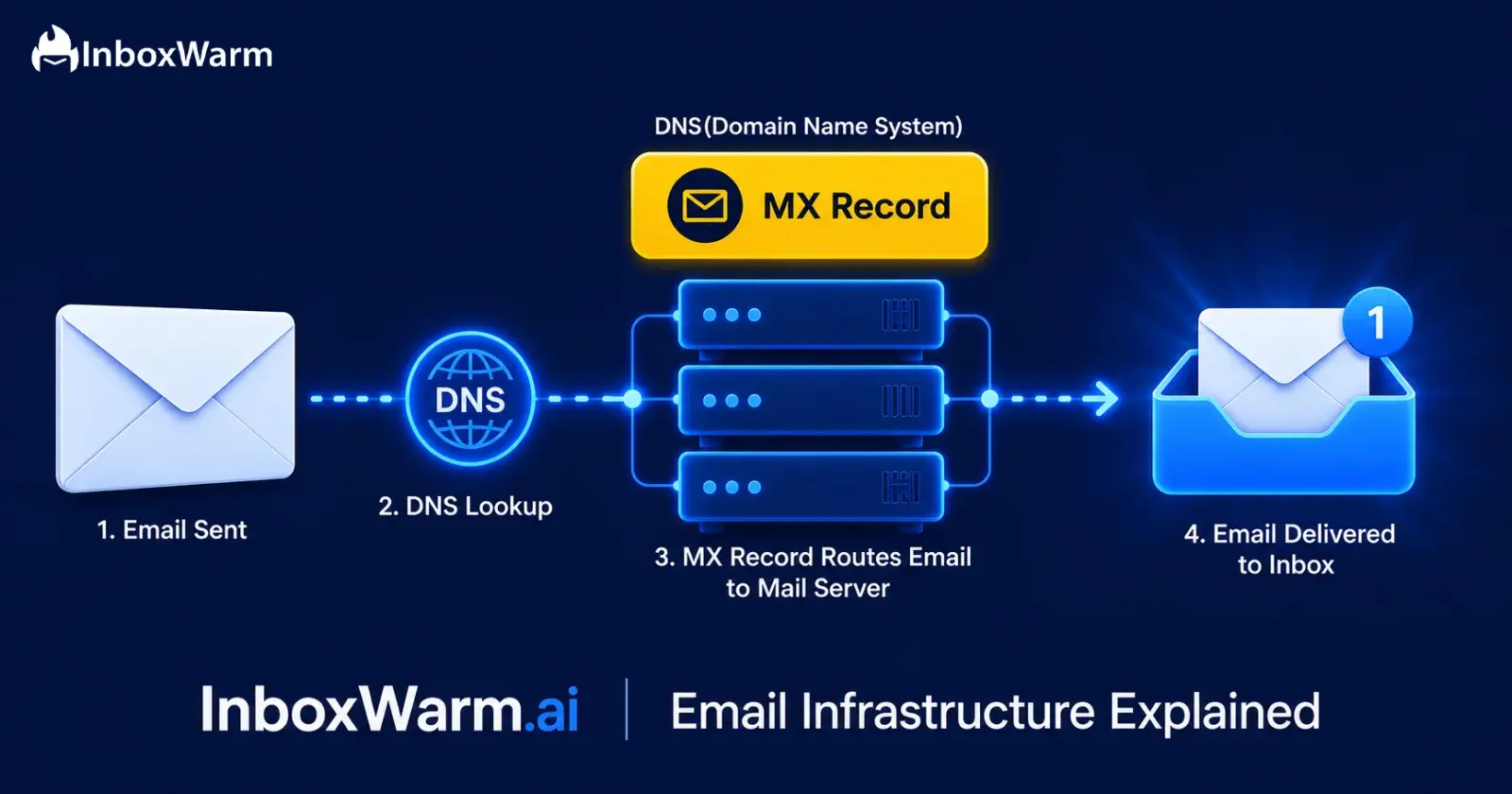
- An MX record (Mail Exchanger record) is a DNS entry that tells the internet which mail server handles incoming email for your domain.
- Without a correctly configured MX record, email sent to your domain will bounce, queue indefinitely, or route to the wrong server entirely.
- MX records are foundational to email deliverability: they work alongside SPF, DKIM, and DMARC to establish your domain’s email identity.
- According to EmailToolTester’s 2024 benchmarks, the average email deliverability rate is 83.1%, meaning roughly 1 in 6 emails never reach the inbox. MX misconfigurations are a silent contributor.
- Misconfigured MX records break warm-up reply loops, damage new domain reputation, and are one of the most preventable causes of campaign failure.
Every email you send begins with a simple DNS lookup. Behind the scenes, an MX (Mail Exchange) record tells the internet exactly where emails for your domain should be delivered. Whether someone is emailing you@yourdomain.com or replying to a marketing campaign, your MX record acts as the routing system that ensures messages reach the correct mail server.
When that routing system is misconfigured, the consequences can be costly. According to EmailToolTester’s deliverability research, the average inbox placement rate across major email service providers is just 83.1%, meaning nearly 1 in 6 emails never reaches the intended inbox. While many factors influence deliverability, email infrastructure issues are among the most overlooked and preventable causes.
As email providers continue tightening authentication requirements, a properly configured MX record has become a foundational part of email deliverability.
In this guide, you’ll learn what MX records are, how they work within DNS, why they matter for sending and receiving email, and how to configure them correctly before launching campaigns or warming up a domain.
Table of Contents
What Is an MX Record and What Does It Actually Do?
An MX record, short for Mail Exchanger record, is a type of DNS (Domain Name System) resource record. Its sole job is to specify the hostname of the mail server responsible for accepting incoming email on behalf of your domain. Every domain intended to receive email must have at least one MX record published in its DNS zone. This standard is defined in detail in RFC 5321, the authoritative SMTP specification published by the Internet Engineering Task Force (IETF).
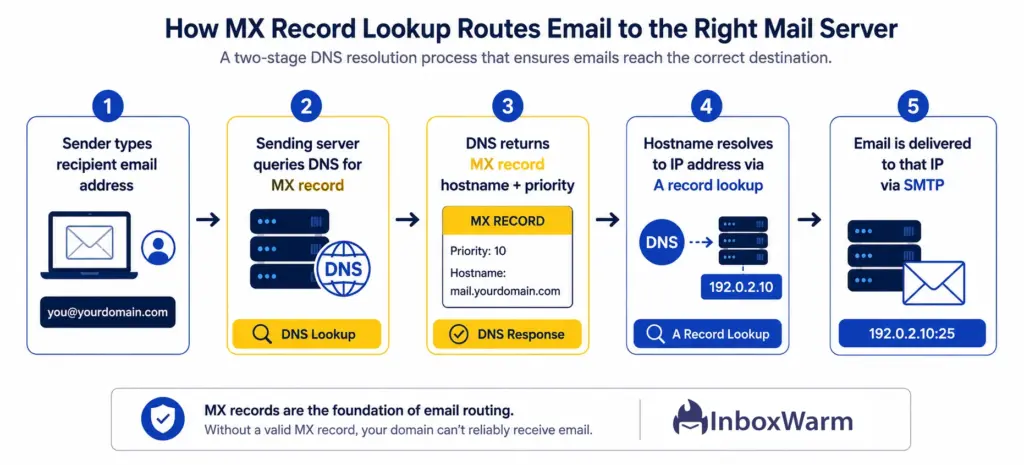
Think of DNS as the internet’s address book. Just as an address book maps names to locations, DNS maps domain names to servers and service endpoints. Your MX record is the specific entry that says: ‘To deliver email to this domain, connect to this mail server.’ Every time someone sends you an email, their mail server consults that entry before delivering anything.
Each MX record contains 2 key components:
- Priority (preference value): A number that tells sending servers which mail server to try first. Lower numbers mean higher priority. If your primary server is down, the next-lowest priority server takes over automatically.
- Mail server hostname: The domain name (not an IP address) of the server that handles incoming mail. For example: mail.yourdomain.com or aspmx.l.google.com for Google Workspace users.
A domain can publish multiple MX records with different priority values for redundancy. Per RFC 5321, the sending server will always attempt delivery to the highest-priority (lowest-numbered) server first, queuing and retrying for up to five days before returning a bounce notice if all options fail.
How Does Email Routing Actually Work Step by Step?
Email routing is the complete journey an email takes from the moment you click ‘send’ to the moment it appears in the recipient’s inbox. MX records are the pivot point in that journey.
Here is exactly what happens:
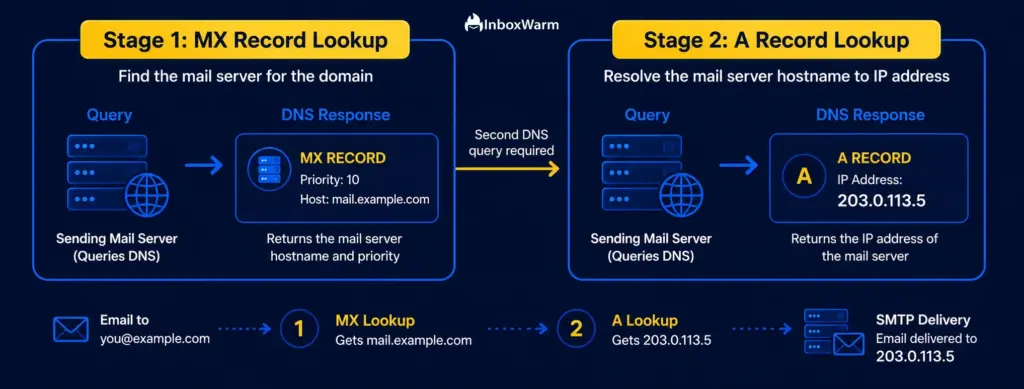
Step 1: The Sending Server Queries the Recipient’s MX Record
When your mail server sends an email to someone@theirdomain.com, it does not know where that domain’s mail server lives. So it asks. The sending server queries the DNS system for the MX records published under theirdomain.com. This query happens in milliseconds and is handled automatically by every standards-compliant mail transfer agent (MTA).
Step 2: DNS Returns the MX Record with Priority Values
The DNS system returns one or more MX records, each containing a mail server hostname and a priority number. The sending server reads these, sorts them by priority, and selects the mail server with the lowest priority number (highest delivery preference) as its first connection target.
Step 3: The Hostname Resolves to an IP Address via A Record Lookup
MX records point to hostnames, not IP addresses. This is a deliberate design choice defined in RFC 974 and RFC 5321: using a hostname as an intermediary means that if the mail server’s underlying IP address ever changes, only the A record needs updating. The MX record itself remains untouched, and delivery continues without interruption. After retrieving the MX hostname, the sending server performs a second DNS lookup (an A or AAAA record query) to resolve that hostname to an IP address. This two-step process is mandatory.
Step 4: The Sending Server Establishes an SMTP Connection
With the IP address resolved, the sending server opens an SMTP (Simple Mail Transfer Protocol) connection to port 25 on the receiving mail server (or 465/587 for TLS-encrypted connections). The two servers exchange a formal SMTP handshake: EHLO greeting, authentication checks, and protocol capability negotiation.
Step 5: The Email Is Delivered, Filtered, and Placed
The receiving mail server accepts the message (or rejects it with an SMTP error code), runs spam and content filters, verifies authentication records (SPF, DKIM, DMARC), and routes the message to either the inbox, spam folder, or back to the sender as a bounce. Every step in this sequence depends on the MX record being valid, resolvable, and pointing to an active mail server
What Do MX Record Priority Values Actually Mean?
Priority values in MX records are frequently misunderstood. The convention is counterintuitive: lower numbers mean higher preference. A server with priority 5 is tried before one with priority 20.
Here is a practical breakdown of how priority works in a typical multi-server setup:
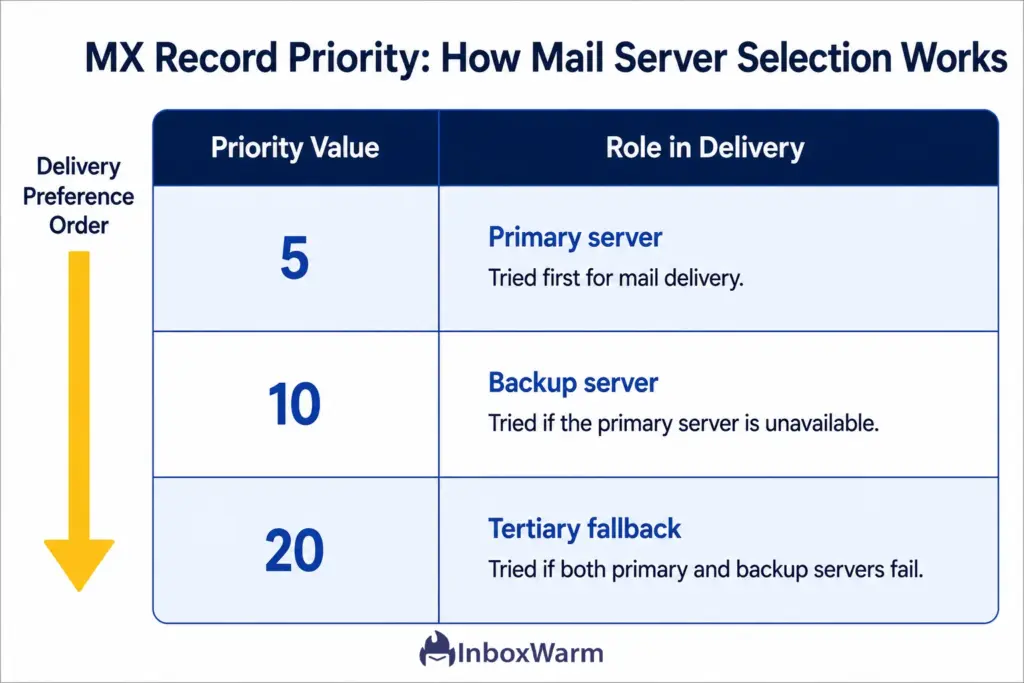
Priority values only affect incoming mail routing. They have zero impact on outgoing email, sender reputation, or deliverability scores. When you send a cold email, your sending server’s IP address and authentication records are what determine deliverability, not your MX record priority.
One nuance worth knowing: two MX records assigned the same priority value are treated as equals. The sending server will load-balance randomly between them. This is sometimes intentional for high-volume inbound mail distribution, but it can confuse if it happens accidentally during a migration.
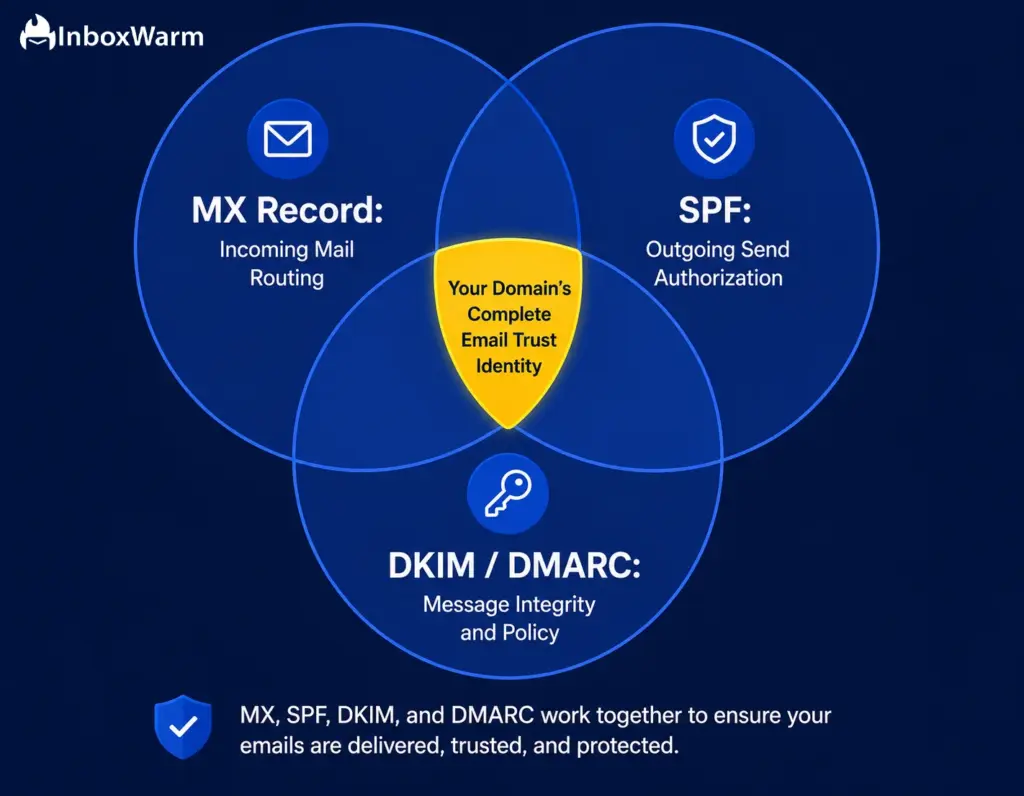
How Do MX Records Interact with SPF, DKIM, and DMARC?
MX records govern incoming email routing. SPF, DKIM, and DMARC govern outgoing email authentication. They operate on different sides of the email transaction but form a coordinated trust infrastructure. Understanding how they interact became critical in February 2024, when Google and Yahoo mandated SPF, DKIM, and DMARC for all bulk senders sending more than 5,000 emails per day, and again in May 2025 when Microsoft introduced matching requirements for Outlook and Hotmail.
1. SPF and the MX Mechanism
SPF (Sender Policy Framework) records list which IP addresses are authorized to send email from your domain. SPF includes a mechanism called ‘mx’ (lowercase in your SPF record) that automatically authorizes whatever servers are listed in your MX records to also send on your behalf.
An SPF record using this mechanism looks like this: v=spf1 mx include:_spf.google.com ~all. This is convenient but carries a risk: if your MX servers are shared hosting infrastructure, the ‘mx’ mechanism may inadvertently authorize servers you do not control.
For dedicated cold email infrastructure, explicitly listing authorized sending IPs using the ‘ip4:’ mechanism is safer.
2. DMARC and MX Record Alignment
DMARC (Domain-based Message Authentication, Reporting, and Conformance) requires that either SPF or DKIM aligns with the From: header domain. DMARC does not interact with MX records directly, but the domain in your MX record’s hostname is often the same domain used for DKIM signing.
Mismatches between these domains can cause DMARC failures even when SPF and DKIM individually pass. DMARC adoption jumped to 53.8% in 2024, up from 42.6% the prior year, driven entirely by Gmail and Yahoo’s bulk sender requirements, according to Prospeo’s 2024 MX Record Setup Guide
3. The Warm-Up Implication
When you configure a new sending domain for cold email, your MX record must be live and pointing to an active inbox before you start any warm-up sequence. Receiving servers check your sending domain’s MX record as part of domain legitimacy assessment. A domain with no MX record or an unresolvable MX hostname can be treated as a disposable domain by spam filters, regardless of how clean your sending IP is.
Is your new domain fully configured?
Check your MX, SPF, DKIM, and DMARC in one click at InboxWarm.ai:
Free Domain Health Check.
What Are the Most Common MX Record Mistakes and How Do You Fix Them?
When we review deliverability issues across cold email campaigns, MX record misconfigurations consistently fall into the same categories.
Here are the 5 most common mistakes and their fixes:
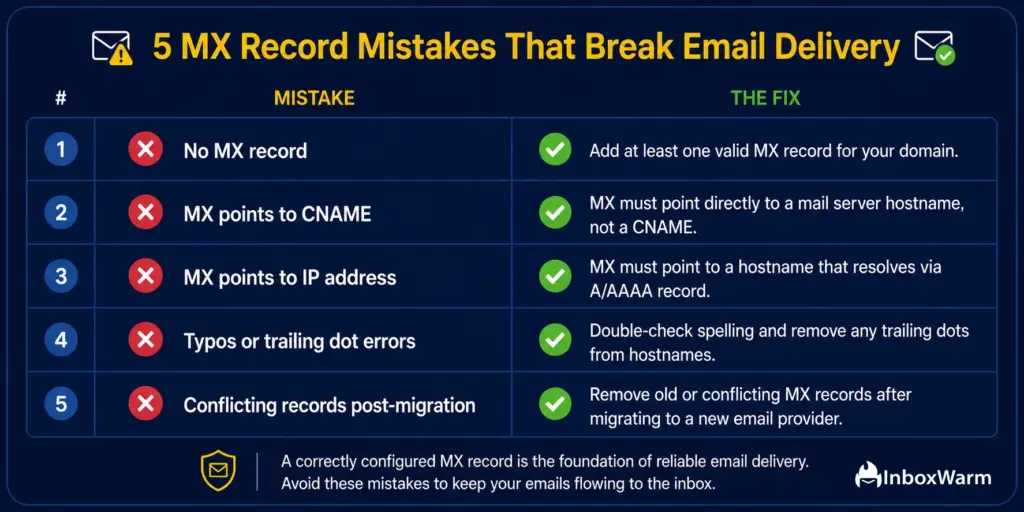
Mistake 1: No MX Record at All
A domain with no MX record cannot receive email. Any message sent to it will result in a hard bounce with a ‘No MX record found’ SMTP error. More importantly for cold email senders: some receiving servers check whether a sending domain has a valid MX record as a legitimacy signal. Domains without MX records can be flagged as disposable or fraudulent.
Fix: Add at least one MX record through your DNS provider. If you use Google Workspace, add Google’s five MX entries. If you use Microsoft 365, add Microsoft’s records. Even if you never plan to receive email on this domain, publish a functional MX record pointing to a monitored inbox.
Mistake 2: MX Record Points to a CNAME
According to RFC 2181 and RFC 5321, MX records must point directly to a hostname that resolves via an A or AAAA record. Pointing an MX record to a CNAME is technically invalid and non-compliant with internet standards. Some receiving servers will reject email from domains with this configuration, citing RFC violations.
Fix: Ensure the mail server field in your MX record contains a fully qualified domain name (FQDN) that resolves through a direct A record lookup, not through a CNAME chain.
Mistake 3: MX Record Points to an IP Address
MX records must point to a hostname, never to an IP address directly. This is explicitly prohibited by RFC 974 and RFC 5321. Some DNS control panels will accept an IP address in the hostname field without displaying a warning, leading to silent delivery failures that are difficult to diagnose.
Fix: Replace the IP address with a valid hostname, then confirm that hostname has an A record pointing to the correct IP.
Mistake 4: Typos, Trailing Dot Errors, or Provider Mismatches
DNS is unforgiving of small errors. A single character substitution in a mail server hostname (for example, typing a capital ‘I’ instead of a lowercase ‘l’ in ‘google.com’) causes all inbound mail to fail.
Some DNS interfaces require a trailing dot at the end of fully qualified domain names and will behave incorrectly if it is absent; others append the trailing dot automatically and break records if you add it yourself.
Fix: Always verify your MX records using an external DNS lookup tool after making any change. Never rely solely on what your DNS panel displays after saving.
Mistake 5: Conflicting MX Records After Provider Migration
When companies migrate from one email provider to another, they sometimes leave old MX records in place. This causes inbound email to split between two mail servers: some messages arrive in the new system, others route to the old one. Recipients lose email; senders see inconsistent reply patterns. For cold email senders in the middle of a warm-up campaign, this creates a broken engagement loop.
Fix: Before completing any mail provider migration, remove all old provider MX records. Verify full DNS propagation using a tool like MXToolbox or DNSChecker before decommissioning access to the old system.
How Do You Check and Verify Your MX Records?
Verifying your MX records takes under two minutes. Here are four reliable methods used by deliverability professionals:
Method 1: MXToolbox
MXToolbox (mxtoolbox.com) is the industry-standard free DNS diagnostic tool. Enter your domain in the MX Lookup field, and it returns all MX records, their priority values, and whether each mail server hostname correctly resolves to an A record. It also flags common configuration errors including CNAME conflicts, missing A record resolution, and unresponsive servers.
Method 2: dig or nslookup from the Terminal
For technical users, the command ‘dig MX yourdomain.com’ on Linux or macOS, or ‘nslookup -type=MX yourdomain.com’ on Windows, returns raw MX record data directly from the authoritative DNS server. This method bypasses DNS caching that browser-based tools can encounter and gives you the most current view of your live records.
Method 3: Your Email Provider’s Setup Verification
Google Workspace, Microsoft 365, Zoho, and most other email providers include a DNS verification step in their setup wizard. This step automatically checks whether your MX records point to their servers correctly. A passed verification confirms your MX configuration is live and correctly configured for that specific provider.
Method 4: InboxWarm.ai Domain Health Check
InboxWarm.ai’s free Domain Health Check runs a simultaneous diagnostic across MX, SPF, DKIM, and DMARC, returning all results in a single view with clear pass/fail indicators and remediation guidance. For cold email senders managing multiple domains, this is significantly faster than running individual checks for each record type. Run your check at InboxWarm.ai.
Run a free Domain Health Check at InboxWarm.ai: verify your MX, SPF, DKIM, and DMARC are fully configured before your next campaign launches.
How Do MX Records Affect Email Warm-Up and Cold Email Deliverability?
MX records are infrastructure, not a deliverability ranking factor in the traditional sense. But they have two specific implications for cold email senders that are non-negotiable:
Implication 1: Receiving Servers Check Your MX Record as a Legitimacy Signal
When your outgoing email arrives at a receiving server, some mail servers perform a domain legitimacy check that includes querying your sending domain’s MX record. The reasoning is straightforward: a legitimate business domain almost always has an MX record because legitimate businesses receive email. Domains with no MX record or broken MX infrastructure can be scored negatively by spam filters as potential throwaway or spoof domains. This is separate from SPF/DKIM/DMARC scoring but contributes to the cumulative trust assessment that determines inbox placement. Per Mailmend’s cold email deliverability analysis, 17% of cold emails never reach the inbox at all, with infrastructure misconfigurations being among the most preventable causes.
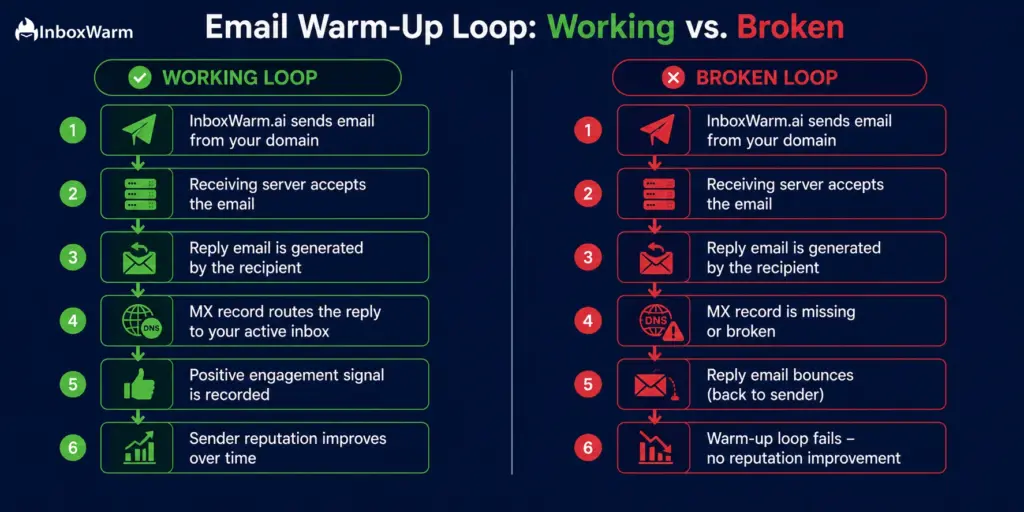
Implication 2: Warm-Up Reply Loops Cannot Complete with a Broken MX Record
Email warm-up works by simulating a natural send-and-reply engagement pattern. InboxWarm.ai sends emails from your domain and generates realistic reply emails back to it, creating positive engagement signals (opens, replies, inbox-to-spam rescues) that build your sender reputation with mailbox providers like Google, Microsoft, and Yahoo. If your MX record is missing, misconfigured, or pointing to an inactive server, those reply emails bounce. The engagement loop never completes. According to Validity’s 2024 Email Deliverability Benchmark, authentication and IP warm-up together make top ESPs 20% more likely to reach the inbox. That improvement is zero if warm-up replies cannot be delivered.
The practical rule: before running any email warm-up campaign, confirm your MX record is live and pointing to an inbox you can monitor. This is not optional. It is the prerequisite that every other warm-up strategy depends on.
What Is the Difference Between MX Records and Other DNS Email Records?
Email infrastructure relies on several DNS record types that are frequently confused.
Here is how each one differs from MX records:
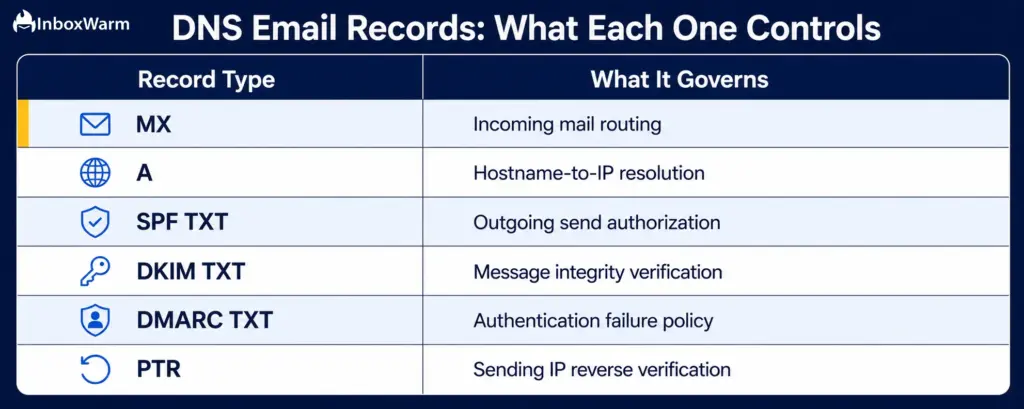
- MX Record: Controls where incoming email is delivered. Points to your mail server hostname. Required for receiving email. Does not affect outgoing sending.
- A Record: Maps a hostname to an IPv4 address. MX records depend on A records to complete the hostname-to-IP resolution step. Not email-specific.
- SPF Record (TXT): Specifies which servers are authorized to send email from your domain. Governs outgoing mail authorization. Checked by receiving servers during inbound delivery.
- DKIM Record (TXT): Publishes the public key used to verify the cryptographic signature on outgoing emails. Proves message integrity: confirms the email was not altered in transit.
- DMARC Record (TXT): Defines the policy for handling emails that fail SPF or DKIM checks. Also enables delivery reports back to the domain owner. As of November 2025, enforced by Google, Yahoo, and Microsoft for bulk senders.
- PTR Record (Reverse DNS): Maps a sending IP address back to a hostname. Used by receiving servers to verify the sender’s IP identity. Set by your IP owner or hosting provider, not in your domain’s own DNS zone.
Each of these records operates independently, but they function as a coordinated system. Domains with all six correctly configured are substantially more likely to achieve consistent inbox placement.
Mailmend’s analysis of DMARC adoption data found that only 9.7% of domains had DMARC implemented despite Gmail and Yahoo’s mandates, meaning the majority of senders are still operating with incomplete email infrastructure.
Frequently Asked Questions About MX Records
How long does it take for MX record changes to propagate?
Propagation depends on the TTL (Time to Live) value set on your existing MX records. Most changes propagate globally within 1 to 4 hours, but can take up to 48 hours in edge cases. You can monitor propagation in real time at dnschecker.org. For planned migrations, lower your MX record TTL to 300 seconds (5 minutes) at least 24 hours before making the change to ensure rapid global propagation.
Do you need an MX record if you only send cold email and never receive it?
Yes, you still need one. Some spam filters check for a valid MX record as part of domain legitimacy scoring for outgoing mail. Additionally, warm-up tools like InboxWarm.ai generate reply emails back to your domain as part of the reputation-building process. Those replies require a working MX record. A domain without any MX record looks like a throwaway sending domain, which is exactly what spam filters are trained to penalize.
What happens if your MX record goes down or becomes unreachable?
Sending servers do not discard the email immediately. Per RFC 5321 section 4.5.4, they will queue the message and retry delivery for up to 5 days before returning a non-delivery report (NDR) to the original sender. Short outages can be recovered without mail loss. Extended outages beyond the retry window result in hard bounces and sender reputation damage.
Can you use the same MX record for multiple sending domains?
Yes. This is standard practice in enterprise environments where many domains share a single mail server infrastructure. Each domain publishes its own MX record, but all records point to the same mail server hostname. The mail server must be configured to accept and route mail for each domain individually.
Does your MX record directly affect inbox placement scores?
Not directly in terms of spam filter scoring. But indirectly in two ways: first, some receiving servers check your sending domain's MX record as a domain legitimacy signal; second, a broken MX record prevents warm-up reply loops from completing, eliminating the engagement signals that build sender reputation with Gmail, Yahoo, and Outlook.
What is the difference between TTL and DNS propagation?
TTL (Time to Live) is the setting on your DNS record that tells other servers how long to cache the record before checking for updates. Propagation is the real-world process of those cached values expiring and refreshing across all DNS servers worldwide. A lower TTL means faster propagation after a change, but results in more frequent DNS queries against your authoritative server during normal operation.
How Does InboxWarm.ai Use Your MX Record During Warm-Up?
InboxWarm.ai sends emails from your domain and generates reply emails back to it as part of the warm-up engagement loop. Those replies are delivered to your domain via your MX record. InboxWarm.ai's Domain Health Check verifies your MX configuration is live before any warm-up campaign begins, preventing broken reply loops that would generate negative bounce signals instead of positive engagement signals.
Bottom Line
An MX record does one quiet, essential job: it tells the internet where to deliver your email. It is not glamorous. It is not a metric you can optimize your way around. But every part of your email infrastructure- your SPF record, your DKIM signature, your DMARC policy, your warm-up strategy- depends on a correctly configured MX record to function.
With the global inbox placement rate sitting at 83.5% and Gmail, Yahoo, and Microsoft all enforcing mandatory authentication since 2024 and 2025, there is no longer a margin for infrastructure errors at the DNS level.
For cold email senders, the implications are concrete. A domain without a valid MX record looks suspicious to spam filters. A broken MX record during warm-up means engagement signals never complete their loop and sender reputation never builds. A conflicting MX record after a provider migration means your leads’ replies quietly disappear.
These failures are preventable. A five-minute DNS check with InboxWarm.ai Domain Health Check catches all of them before they cost you a campaign.
Before your next campaign. Before your next warm-up sequence. Before you spin up another sending domain: verify your MX record is live, your A record resolves correctly, and your SPF/DKIM/DMARC are properly aligned.
The senders who treat infrastructure as a prerequisite rather than an afterthought consistently outperform those who discover DNS errors mid-campaign. Make the check a habit before every send.
Start your warm-up on solid infrastructure. Run InboxWarm.ai’s free Domain Health Check to verify MX, SPF, DKIM, and DMARC in one step, then let InboxWarm.ai build your sender reputation automatically.