

TL;DR
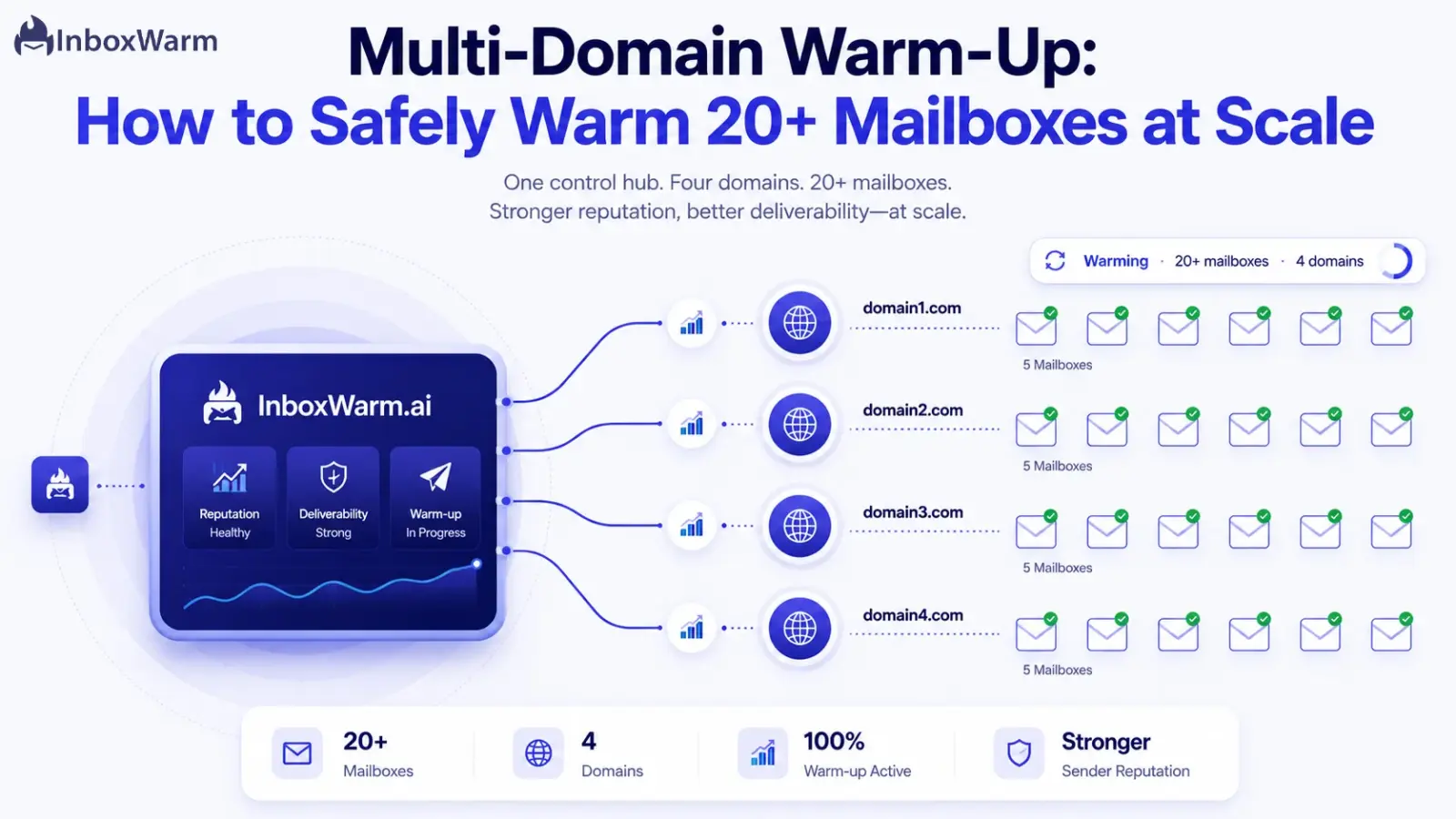
Multi-domain warm-up is the process of gradually building sender reputation across several sending domains and dozens of mailboxes at once, so high-volume cold outreach lands in the inbox. Warm each mailbox for three to six weeks, ramp volume slowly, monitor every inbox on its own, and never stop warming up the day campaigns launch.
- You warm 20+ mailboxes the same way you warm one, just tracked individually and ramped in staggered batches.
- Authenticate every domain with SPF, DKIM, and DMARC before sending a single email.
- Google treats senders of 5,000 or more daily Gmail messages as bulk senders and expects a spam complaint rate under 0.3%.
- Keep warm-up running at low volume alongside live campaigns to protect deliverability.
Agencies and growth teams stopped betting everything on one sending domain a long time ago. One spam trap, one bad list, one complaint spike, and a single domain’s reputation collapses, taking every campaign running on it down at the same time. So teams spread their sending across many domains and dozens of mailboxes. That spreads the risk, but it multiplies the warm-up problem.
Warming 20+ mailboxes is not 20 copies of the same easy task. Each domain has its own reputation, its own engagement history, and its own standing with Gmail, Outlook, and Yahoo. Treat them all identically and ramp them too fast, and you don’t burn one inbox, you burn the entire fleet on the same day. A torched domain can take weeks to recover, and some never fully do.
In this guide, you’ll learn why businesses run multiple domains, what makes warming 20+ mailboxes harder than warming a single one, whether to warm them all at once or in waves, and a five-step email warm-up strategy you can run at scale.
You’ll also see the mistakes that quietly kill deliverability across domains and roughly how long the whole process takes.
Table of Contents
Why Businesses Use Multiple Domains for Cold Email
Businesses use multiple domains for cold email to protect their primary domain, scale sending volume safely, separate campaigns, and contain the damage if one domain gets flagged. No single mailbox can carry high-volume outreach without tripping spam filters, so the load gets spread across a portfolio of domains and inboxes.
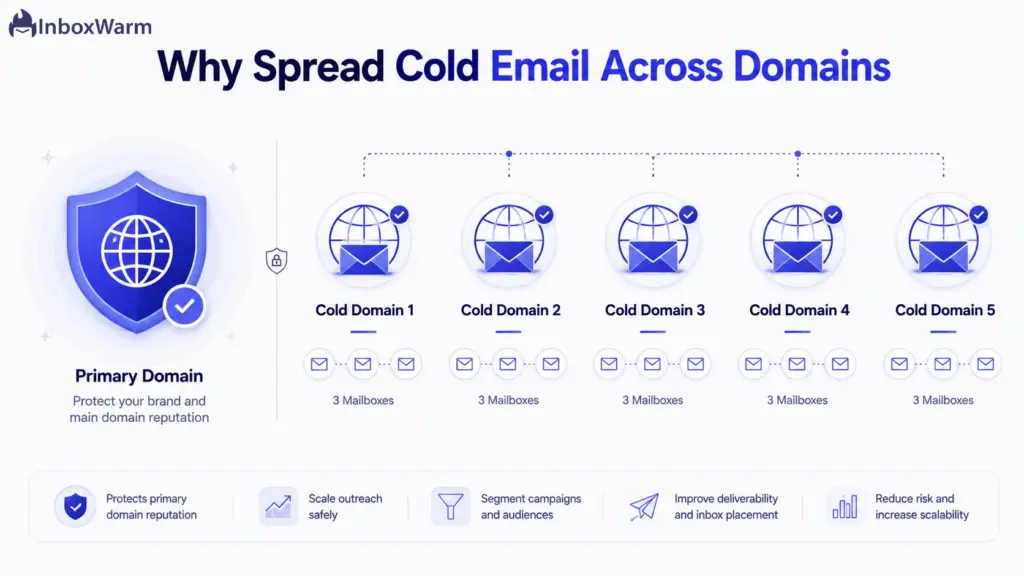
- Protecting the primary domain. Your main company domain handles sales, support, contracts, and transactional email. A cold campaign that draws complaints can damage that reputation for good. Running outreach from separate domains keeps your core business email out of the blast radius.
- Scaling outreach volume. A warmed inbox can safely send only a modest number of cold emails per day. To reach thousands of prospects, you distribute that volume across many mailboxes so no single inbox ever spikes.
- Separating campaigns. Different offers, regions, or clients can live on different domains. If one campaign underperforms or attracts complaints, the fallout stays contained to that domain.
- Reducing reputation risk. Spreading volume means a single blocklist hit or complaint spike damages one domain, not your whole operation. That redundancy is the entire point of multiple domains for cold email.
The Challenge of Warming 20+ Mailboxes Simultaneously
Warming 20+ mailboxes at once is harder than warming one because every domain carries its own reputation, every inbox produces its own engagement signals, and one ramp schedule applied across all of them can trip spam filters fleet-wide on the same day. At scale, small mistakes become expensive ones.
- Different domain reputations. A two-week-old domain and a six-month-old domain don’t deserve the same daily volume. Treat them the same and you overload the younger ones while underusing the older ones.
- Monitoring engagement signals. Opens, replies, and spam-folder rescues are the signals mailbox providers use to build trust. Tracking those across 20+ inboxes by hand is slow and error-prone.
- Volume management. Twenty inboxes ramping at five emails a day is 100 sends; at 40 a day, it’s 800. Coordinating that increase across a fleet without sudden spikes takes a system, not a spreadsheet.
- Avoiding spam folder placement. One domain landing in spam can drag related domains down if they share infrastructure, content, or sending patterns. Maintaining email deliverability across domains means watching the fleet, not just each inbox.
- Maintaining consistency. Mailbox providers reward steady, predictable behavior. Gaps, bursts, and erratic ramps across a fleet read as automated and risky.
Should You Warm All Mailboxes at the Same Time?
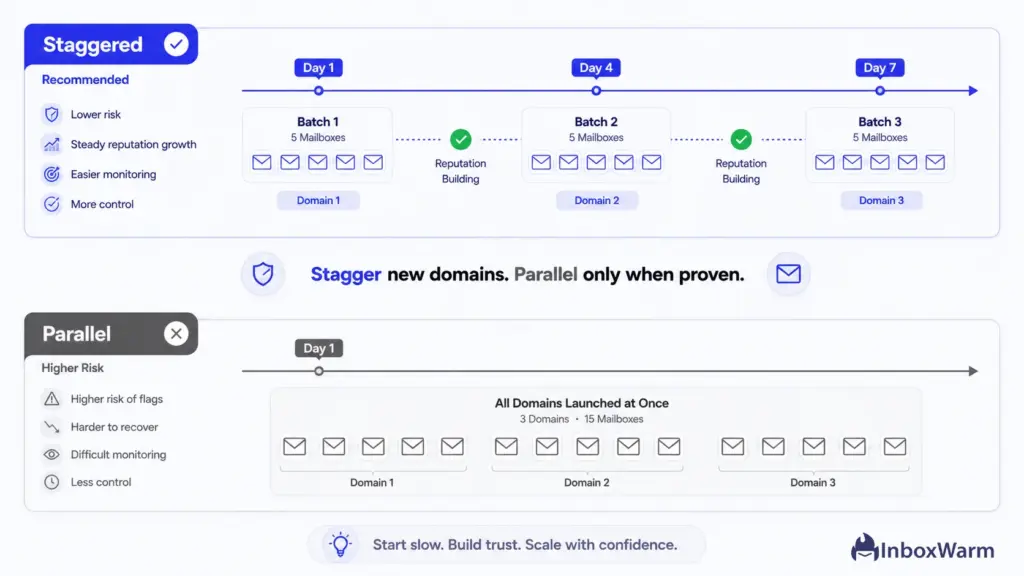
You can warm multiple mailboxes in parallel, but you shouldn’t switch on 20+ brand-new mailboxes the same day. Stagger them in batches so a configuration error or reputation problem surfaces on a few inboxes instead of all of them. Parallel warm-up is fine once each batch has proven stable.
Benefits Of Parallel Warm-Up
- Faster time to launch, since inboxes reach campaign-ready volume in the same window.
- Simpler scheduling when every mailbox runs on one shared ramp plan.
- Predictable capacity planning, because your full sending fleet comes online together.
Risks Of Warming Everything At Once
- A single DNS mistake or bad sending pattern replicates across every inbox at the same moment.
- You lose the early-warning signal a staggered rollout gives you, so problems show up fleet-wide.
- If providers flag the pattern as coordinated automation, the whole batch suffers together.
When Staggered Warm-Up Makes Sense
Stagger when you’re using new domains, running a large fleet of 20+ mailboxes, sharing infrastructure across domains, or you can’t watch every inbox closely. Add mailboxes in waves of three to five per domain, a few days apart, and only start the next wave once the current one looks clean.
When Parallel Warm-Up Is Acceptable
Parallel warm-up is reasonable on aged domains with an established reputation, in small batches you can monitor closely, or when you’re adding inboxes to a domain that’s already warmed and sending cleanly. The trust the domain has already earned absorbs more of the risk.
A Safe Multi-Domain Warm-Up Strategy
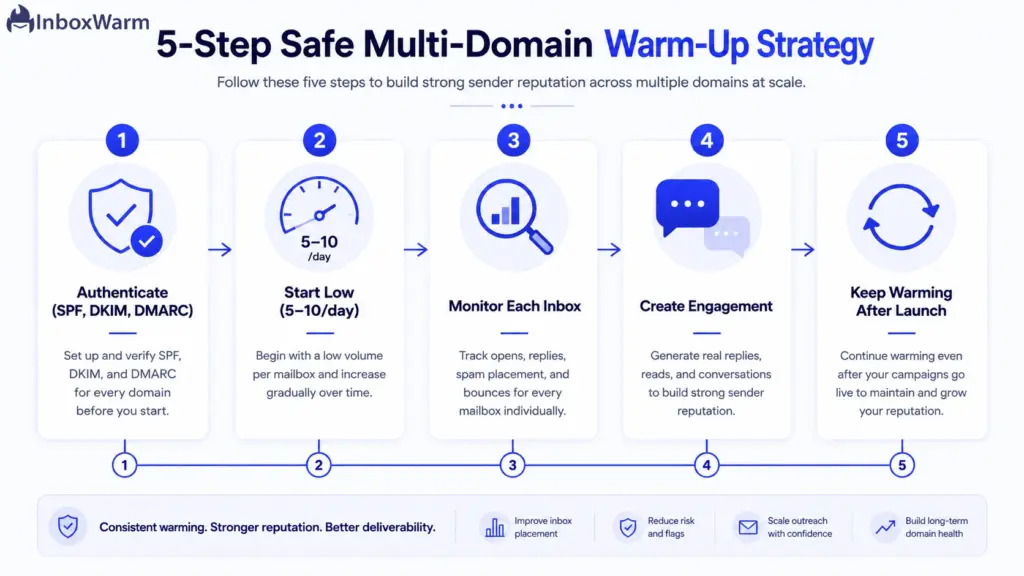
A safe multi-domain warm-up strategy comes down to five steps: authenticate every domain, start at low volume, monitor each mailbox on its own, generate realistic engagement, and keep warming after launch.
Run the same five steps on every inbox, just tracked separately and ramped in waves.
Step 1: Configure Domain Authentication
Authenticate every domain before any mailbox sends a single email. Authentication proves to Gmail, Outlook, and Yahoo that you’re who you claim to be. Without it, warm-up barely works, and bulk senders get rejected outright.
- SPF (Sender Policy Framework) is a DNS record that lists which servers are allowed to send mail for your domain.
- DKIM (DomainKeys Identified Mail) adds a cryptographic signature that proves the message wasn’t altered in transit.
- DMARC (Domain-based Message Authentication, Reporting, and Conformance) tells receivers what to do when SPF or DKIM fails and sends you reports. Start at p=none “monitor,” then move to p=quarantine before p=reject.
This isn’t optional at scale. Google requires bulk senders to set up DMARC and pass SPF or DKIM alignment, per Google’s sender guidelines. Verify all three records on every domain before warm-up starts.
Step 2: Start With Low Sending Volumes
Begin each mailbox at five to 10 emails per day. New senders that jump straight to high volume look exactly like spammers to a mailbox provider, and sudden volume spikes are a leading cause of spam placement.
- Start at five to 10 emails per mailbox per day during the first week.
- Increase volume by a small amount every few days, and only when your metrics stay clean.
- Hold or step back from the ramp the moment open or reply rates drop or spam placement climbs.
Step 3: Monitor Mailbox Reputation Individually
Track every mailbox on its own. A fleet average hides the one inbox that’s quietly tanking and dragging shared infrastructure down with it. Watch four numbers per mailbox:
- Open rates show whether your subject lines and sender reputation are earning attention.
- Reply rates are the strongest positive signal a mailbox provider can see during warm-up.
- Spam placement tells you where you’re actually landing. Use seed inboxes and Google Postmaster Tools to confirm.
- Bounce rates flag list hygiene problems. High hard-bounce rates erode sender reputation fast.
Keep a close eye on the spam complaint rate. Google asks senders to stay below 0.1% and to never reach 0.3%, and bulk senders that cross 0.3% lose access to mitigation until they hold under that line for seven consecutive days, again per Google’s sender guidelines.
Step 4: Create Realistic Engagement Signals
Warm-up works by generating the engagement mailbox providers trust. The goal is to make each new inbox look like a real person having real conversations, not a machine blasting mail.
- Replies. Two-way exchanges tell providers a human is on the other end and wants your mail.
- Reads. Opens from trusted accounts build a baseline of positive engagement.
- Threaded conversations. Back-and-forth threads mimic genuine correspondence rather than one-off sends.
- Inbox interactions. Starring, marking as important, and moving messages from spam to the inbox are some of the strongest trust signals available.
Doing this by hand across 20+ inboxes is impractical, which is why automated warm-up networks generate these signals at scale on every mailbox at once.
Step 5: Continue Warm-Up After Launch
Don’t stop warm-up the day campaigns go live. Cold email naturally earns lower engagement than warm-up traffic, so cutting warm-up entirely lets reputation slide right when you need it most. Keep a baseline of warm-up activity running in parallel with live sending so positive signals keep flowing while cold replies build up.
Common Multi-Domain Warm-Up Mistakes
The most common multi-domain warm-up mistakes are ramping volume too fast, warming every mailbox on an identical schedule, ignoring domain age, launching campaigns before warm-up finishes, and sending from domains with broken DNS records.
Each one quietly erodes deliverability across the whole fleet.
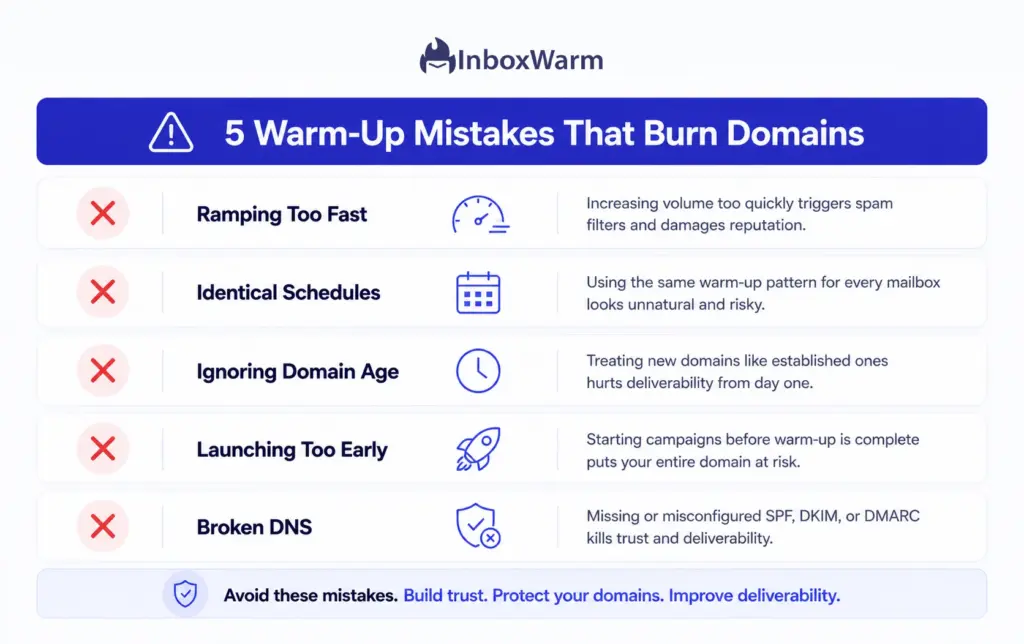
- Increasing volume too quickly. Aggressive ramps are the fastest way to send a new domain straight to spam. Climb in small steps, not jumps.
- Warming every mailbox identically. A one-size ramp ignores that domains differ in age and reputation. Match the schedule to each domain’s standing.
- Ignoring domain age. Brand-new domains need a slower start. Even an old domain that’s been dormant looks like a fresh risk when it suddenly sends at volume.
- Launching campaigns before warm-up completion. Going live early, before reputation is built, undoes the work and can burn the domain on day one.
- Using poorly configured DNS records. Broken or missing SPF, DKIM, or DMARC records sabotage warm-up no matter how careful the ramp. Validate DNS on every domain first.
How InboxWarm.ai Simplifies Multi-Domain Warm-Up
InboxWarm.ai is an AI-powered email warm-up tool that improves inbox placement and sender reputation. It runs multi-domain warm-up from one dashboard, automates engagement across every mailbox, and monitors deliverability per inbox so you can scale to 20+ mailboxes without babysitting each one by hand.
- Manage multiple domains from one dashboard. See every domain and mailbox in a single view instead of logging into separate accounts and tools.
- Automated engagement. Opens, replies, threaded conversations, and spam rescues are generated in every inbox automatically, which is the part that’s impossible to do by hand at scale.
- Scalable mailbox management. Add inboxes in waves and ramp them on schedules that fit each domain’s age and reputation, the core of email warm-up for agencies.
- Deliverability monitoring. Per-inbox placement and reputation tracking surface the one mailbox that’s slipping before it affects your live campaigns.
- Consistent reputation building. Steady, predictable activity across the fleet is exactly the behavior mailbox providers reward.
How Long Does It Take to Warm 20+ Mailboxes?
Warming 20+ mailboxes takes roughly three to six weeks, the same per-inbox timeline as warming a single one, because you warm them in parallel rather than one after another. The total calendar time depends mostly on domain age, infrastructure quality, and how high your daily volume target needs to climb.
- Domain age. Older domains with sending history earn trust faster. New domains, and old domains that have sat inactive, need a slower, longer ramp.
- Infrastructure quality. Clean authentication, a reputable mailbox provider, and valid reverse DNS all shorten the path to the inbox. Broken setup drags it out.
- Sending volume goals. A target of 20 emails per inbox per day warms faster than a target of 50. The higher you need to climb, the longer the ramp.
A typical per-mailbox ramp looks like this:
| Phase | Volume Per Mailbox | Focus |
|---|---|---|
| Week 1 | 5–10 / day | Authentication checks, warm-up network engagement |
| Week 2 | 10–20 / day | Build replies and threaded conversations |
| Week 3 | 20–35 / day | Layer in light cold volume, watch each inbox |
| Weeks 4–6 | 35–50 / day | Blend cold campaigns with ongoing warm-up |
These ranges reflect common cold email infrastructure practice, not numbers published by any mailbox provider. Treat them as a starting point and let each inbox’s own metrics set the actual pace.
Frequently Asked Questions
How Many Mailboxes Should I Create Per Domain?
A common, conservative pattern is two to three mailboxes per domain so each one stays well within safe daily limits. Spreading inboxes across more domains rather than piling them onto a few keeps any single domain’s volume modest and lowers reputation risk. Use real-sounding names like firstname@yourdomain.com and avoid addresses like sales123@ that look automated.
How Long Should I Warm A New Mailbox?
Warm a new mailbox for about three to six weeks before pushing it to full cold-email volume. Newer domains and higher volume goals sit at the longer end of that range. The honest answer is that warm-up never fully stops; you keep a baseline of warm-up activity running even after campaigns launch.
Can I Send Cold Emails During Warm-Up?
You can begin layering in small amounts of cold email once a mailbox has a few clean days of engagement, but don’t lead with it. Cold email earns lower engagement than warm-up traffic, so introducing it too early or too fast can stall the reputation you’re trying to build. Ramp cold volume gradually and back off if open rates fall or spam placement rises.
What Happens If One Mailbox Gets Flagged?
If one mailbox gets flagged, pause its sending, check authentication and list hygiene, and re-warm it at lower volume before resuming. Because you’re running multiple domains, a single flagged inbox should stay contained rather than taking down your whole operation. This containment is the main reason to spread cold email across domains in the first place.
Conclusion
Multi-domain warm-up is no longer a nice-to-have for teams that send at volume. It’s the foundation that makes scalable outreach possible at all. Spreading sending across domains protects your primary domain and contains risk, but it only pays off if every mailbox in the fleet is warmed properly and watched individually.
The teams that get this right share one habit: they value consistency over speed. A steady, staggered ramp with realistic engagement beats a fast, aggressive one every time, because mailbox providers reward predictable behavior and punish spikes. Proper warm-up is what protects both deliverability and the domain reputation you’re spending real money to build.
Done by hand, warming 20+ mailboxes is a full-time job. Done with the right system, it’s a background process. Tools that automate engagement, monitor each inbox, and ramp on schedule are what make large-scale warm-up manageable, so your team can focus on the campaigns instead of the plumbing.
Warming 20+ mailboxes by hand is a full-time job you don’t have time for.
InboxWarm.ai automates multi-domain warm-up, generates realistic engagement across every inbox, and monitors deliverability per mailbox, so your whole fleet builds reputation while you focus on outreach.