


TL;DR
• Email warm-up is non-negotiable in 2026 after Google, Yahoo, and Microsoft tightened sender requirements.
• Top standalone warm-up tools include InboxWarm.ai, Mailreach, TrulyInbox, Warmy.io, and Warmbox.
• Bundled platforms like Instantly and Smartlead include warm-up inside their outreach plans.
• Agencies managing 10+ inboxes should prioritize flat-rate or unlimited-mailbox pricing.
• Warm-up alone does not save a bad list. SPF, DKIM, and DMARC authentication must come first.
• InboxWarm.ai uses a peer-to-peer real-business network for stronger engagement signals.
If your cold emails are landing in spam before your warm-up even finishes, you are not alone. In 2026, inbox providers have raised the bar on sender trust. Google, Yahoo, and Microsoft now require SPF, DKIM, and DMARC authentication as baseline requirements, while filtering more aggressively based on behavioral signals such as open rates, reply rates, and bounce patterns.
A properly warmed inbox can reach full sending capacity within 3 to 5 weeks while maintaining bounce rates below 2% and spam placement under 5%, giving new domains a far better chance of reaching the inbox.
As a result, email warm-up has become a critical part of any outbound strategy. The market now offers everything from dedicated warm-up platforms and peer-to-peer business networks to all-in-one cold email tools with built-in warm-up functionality.
According to industry deliverability research, inboxes that maintain strong engagement during the warm-up phase can achieve significantly higher inbox placement rates than those that skip the process entirely.
However, not all warm-up tools are created equal. Differences in network quality, pricing structure, scalability, and deliverability monitoring can have a major impact on long-term results.
In this article, you’ll learn how email warm-up works, why it matters in 2026, and which tools are best for improving deliverability and inbox placement.
Table of Contents
What Is Email Warm-Up and Why Does It Still Matter in 2026?
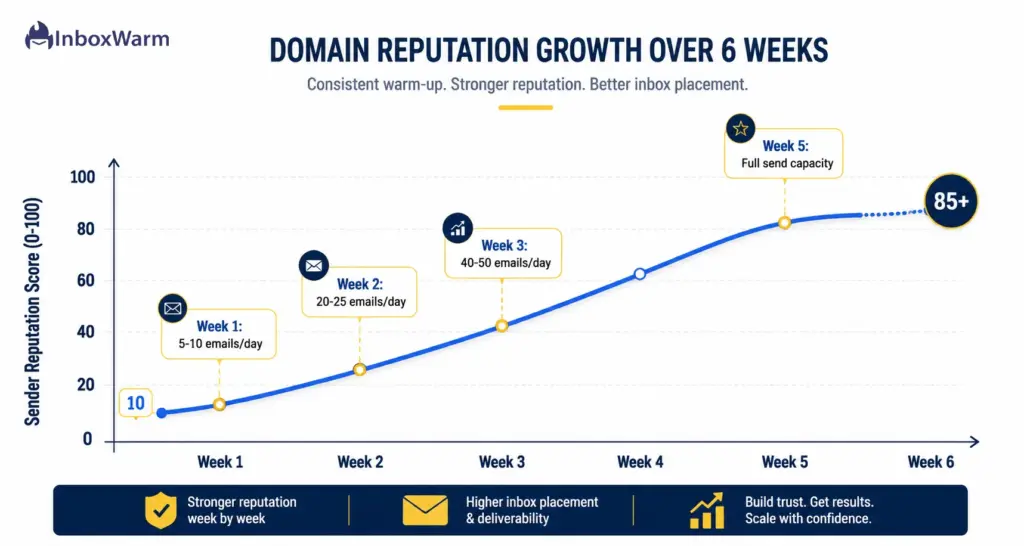
Email warm-up is the process of gradually increasing the sending volume from a new or dormant domain while generating positive engagement signals: opens, replies, and inbox rescues from spam folders. The goal is to teach mailbox providers that your domain belongs in the inbox, not the spam folder.
The mechanics have not changed, but the stakes have. Since Google and Yahoo enforced bulk sender authentication requirements beginning in early 2024, domains that skip warm-up face steeper penalties.
Research from cold email infrastructure firms tracking over 650,000 inboxes in Q1 2026 found that inboxes maintaining a 30 to 35% reply rate during warm-up consistently outperformed inboxes that did not by 17% on inbox placement in the first 30 days of live sending. That gap compounds quickly when you are running an agency with dozens of client domains.
The other reason warm-up still matters in 2026: most cold email platforms, including Outreach, Salesloft, and Apollo, do not include domain warm-up as a built-in feature. You need either a standalone tool or a bundled platform that handles both warm-up and sequencing in a single environment.
How Do Email Warm-Up Tools Actually Build Sender Reputation?
Every warm-up tool on this list works on the same core principle: connect your mailbox to a network of other inboxes, then exchange low-volume, human-mimicking emails that generate positive engagement signals. The differences lie in how that network is built and what those emails look like to a mailbox provider.
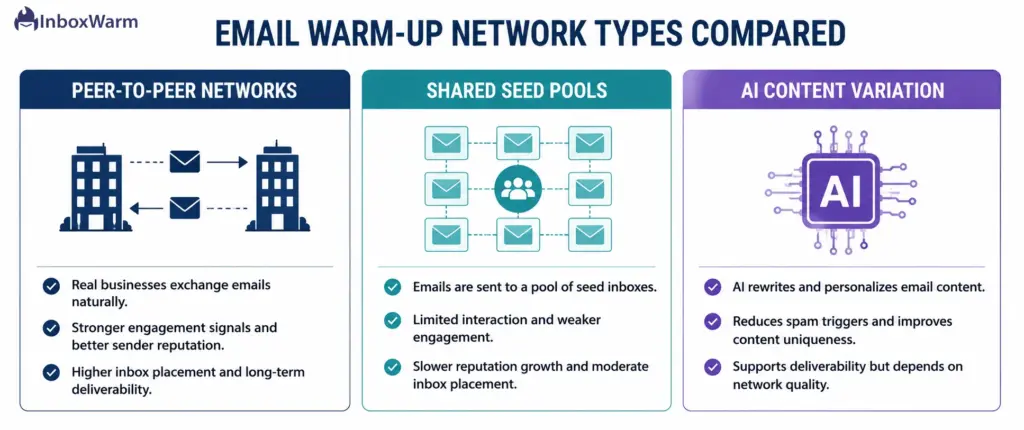
Peer-to-Peer Real-Business Networks
Tools in this category exchange warm-up emails between verified business inboxes that are actively used by real companies. Because the sending and receiving accounts look like genuine organizations conducting real correspondence, the engagement signals carry more weight with mailbox providers like Gmail and Outlook.
InboxWarm.ai operates on this model, ensuring that warm-up interactions happen between actual businesses rather than fabricated or bot-operated accounts.
Shared Seed Pools
The majority of warm-up tools maintain large pools of seed mailboxes, often tens of thousands, that automatically open, reply to, and rescue your warm-up emails from spam. The quality of this approach varies considerably.
Pools built on verified Google Workspace and Microsoft 365 accounts produce better results than pools using generic SMTP inboxes. Warmforge, for example, uses exclusively aged Google Workspace and Microsoft 365 accounts in its network.
Tools that mix in unverified SMTP inboxes risk what practitioners call a noisy-neighbor effect: bad actors in the shared pool can contaminate the reputation signals for everyone else.
AI-Generated Content Variation
Modern tools use AI to vary warm-up email content, send times, and reply patterns so that the activity looks like natural human correspondence rather than automated sequences. Generic or repetitive warm-up emails can be flagged by mailbox providers, which is why content variation matters.
TrulyInbox and Warmy.io both emphasize AI-generated variation as a core differentiator.
Which Email Warm-Up Tools Are Worth Your Time in 2026?
Here is the honest breakdown of the 8 tools most commonly evaluated by agencies and founders in 2026. Each entry covers what the tool does well, where it falls short, and who it is best suited for.
1. InboxWarm.ai
InboxWarm.ai is an AI-powered email warm-up tool designed for cold email agencies, SaaS founders, SDR teams, and freelance lead generation specialists who need reliable inbox placement across multiple accounts.
Its peer-to-peer model is the standout differentiator: warm-up interactions happen between real businesses actively using the service, which generates stronger engagement signals than bot-operated seed pools. This is particularly meaningful for Gmail and Outlook, where behavioral signals from verified business accounts carry more algorithmic weight.
The platform supports Gmail, Outlook, Microsoft 365, Yahoo, and custom SMTP providers. It handles multi-mailbox management from a single dashboard, making it practical for agencies running 20 or more client accounts without toggling between environments.
The AI layer varies send times, content, and engagement patterns to mimic authentic human correspondence, reducing the risk of pattern detection by inbox providers.
✅ Pricing verified: $25/inbox/month (1 inbox) | $20/inbox at 5 | $15/inbox at 10 | $12/inbox at 25 | $10/inbox at 51-100. Free 10-day trial, no credit card required. Source: inboxwarm.ai official pricing page, May 2026.
- Best for: Cold email agencies, SaaS founders, SDR teams, freelance lead gen specialists
- Network type: Peer-to-peer real-business. nboxes
- Supported providers: Gmail, Outlook, Microsoft 365, Yahoo, SMTP
- Standout feature: Real business-to-business engagement signals vs. bot pools; volume pricing drops to $10/inbox at scale
- Free trial: 10 days, no credit card required
2. Mailreach
Mailreach is consistently ranked as the strongest standalone warm-up tool in 2026 for teams that want detailed deliverability analytics alongside warm-up. Its network produces Good or High Google Postmaster ratings in 82 to 88% of completions.
The monitoring features are genuinely useful beyond the warm-up phase: blacklist alerts, spam score tracking, and provider-specific inbox placement testing that tells you where your emails are landing after you start live sending.
The per-inbox pricing model at $25/month works well for small teams but becomes expensive at agency scale. If you are managing 20 or more inboxes, run the math carefully before committing.
✅ Pricing verified: $25/inbox/month (1-5 mailboxes) | $19.50/inbox/month (6-20 mailboxes) | Volume discounts above 20. No free trial for warm-up. Source: Multiple independent reviews cross-referenced against Mailreach public pricing, April/May 2026.
- Best for: Teams that want warm-up plus ongoing deliverability monitoring and spam placement testing
- Pricing: $25/inbox/month (1-5), $19.50/inbox (6-20), lower above 20
- Network quality: 20,000+ real inboxes; Good/High Postmaster in 82-88% of completions
- Standout feature: Built-in spam placement testing with unique ID tracking across providers
- Limitation: No free trial; per-inbox cost adds up at 20+ mailboxes
3. TrulyInbox
TrulyInbox takes an AI-first approach, sending warm-up emails one at a time at varied intervals to mimic natural human behavior. The platform supports unlimited mailbox connections starting at $22/month on annual billing, which makes it one of the most cost-effective options for agencies.
Users see inbox placement rates above 97% within four weeks according to the platform’s own data. It supports all major providers: Gmail, Outlook, Microsoft 365, Zoho, and Yahoo. The deliverability score dashboard gives visibility into inbox placement early enough to course-correct before launch.
✅ Pricing verified: $29/month (monthly billing) or $22/month (annual billing) for unlimited mailboxes. Free-forever plan: 1 inbox, 10 emails/day. Source: TrulyInbox official site + multiple third-party reviews, 2026.
- Best for: Budget-conscious agencies managing 5+ inboxes
- Pricing: $29/month (monthly) or $22/month (annual) for unlimited mailboxes
- Standout feature: Unlimited inbox connections at flat pricing; free-forever plan to test first
- Limitation: Smaller pool size than Mailreach; vendor-sourced inbox placement data
4. Warmy.io
Warmy.io positions itself as the premium standalone option. Its ‘Adeline’ AI engine adjusts warm-up patterns in real time based on mailbox provider behavior, which is more adaptive than tools running fixed ramp schedules.
The seed list testing feature is a genuine differentiator: it sends test emails to a reference list of inboxes across major providers so you can see where your emails land before launching a live campaign. That kind of pre-send visibility is not standard on most warm-up tools.
The pricing starts at $49+ per mailbox per month, which is on the expensive end for a standalone tool. Some users on G2 flag the per-mailbox cost as a concern at higher inbox counts, and the shared warm-up infrastructure carries the same noisy-neighbor risk as other pool-based tools.
✅ Pricing verified: Pricing not publicly listed on Warmy.io website. Third-party estimates: ~$49/month per mailbox (Starter, 1 inbox). At 10 inboxes, costs can reach $490+/month. Treat as planning ranges, not confirmed list prices. Source: Multiple independent reviews, April/May 2026.
- Best for: Solo founders and small teams warming 1-3 inboxes who want premium support and pre-send diagnostics
- Pricing: Not published. Est. $49/month per mailbox (Starter); contact sales for exact quote
- Standout feature: Real-time adaptive AI warm-up; seed list inbox placement testing before campaigns
- Limitation: No public pricing; steep per-inbox cost makes it expensive for agencies at scale
5. Mailivery
Mailivery is the agency pricing story: unlimited mailbox connections on flat monthly pricing, which means your per-inbox cost drops the more accounts you add. For anyone running five or more mailboxes, the math works out better than per-inbox tools.
It uses AI to simulate realistic email conversations rather than sending generic warm-up messages, which produces more natural-looking activity. The API is a genuine differentiator for SaaS platforms that want to white-label warm-up as part of their product offering. Pricing is typically in the $120 to $200 per month range on enterprise tiers.
✅ Pricing verified: Starter plan: ~$29/month (unlimited mailboxes). Agency/enterprise tiers: typically $120-200/month. 7-day free trial available. Unlimited mailboxes on all plans. 50,000+ mailbox network. Source: Mailivery official site + third-party comparisons, April 2026.
- Best for: Agencies managing warm-up across multiple client accounts who want a large network at flat pricing
- Pricing: From ~$29/month (Starters, unlimited mailboxes). Agency tiers ~$120-200/month
- Standout feature: 50,000+ mailbox network; 70+ blacklist monitoring; white-label API
- Limitation: Less community validation than Mailreach or TrulyInbox; entry plan caps daily warm-up volume
6. Instantly (Bundled Platform)
Instantly is an AI-powered cold email platform that includes unlimited warm-up starting at $37/month as part of its outreach environment. If you are running cold email campaigns and need warm-up in the same tool, Instantly eliminates the cost of a separate warm-up subscription.
The bundled model is the right call for agencies and high-volume senders who want inbox rotation, campaign automation, and warm-up managed from one place. If you are not using Instantly for outreach, the warm-up alone does not justify the subscription when standalone tools offer more granular control.
✅ Pricing verified: Growth plan: $30/month (annual billing) or ~$37/month (monthly). Unlimited email accounts and warm-up included on all outreach plans. Source: Instantly.ai official pricing + independent reviews, April 2026.
- Best for: Agencies and high-volume senders who want outreach plus warm-up bundled in one platform
- Pricing: $30/month (annual) or ~$37/month (monthly). Unlimited warm-up on all plans
- Standout feature: All-in-one platform; eliminates separate warm-up tool cost entirely
- Limitation: Less granular warm-up control than dedicated standalone tools; platform lock-in
7. Smartlead (Bundled Platform)
Smartlead follows the same bundled model as Instantly and is the other top recommendation for agencies handling high inbox counts. Its built-in unlimited warm-up generates realistic engagement between mailboxes to strengthen sender reputation over time.
The platform handles inbox rotation and multi-channel sequencing, which makes it well-suited to operations where SDRs manage dozens of outbound campaigns simultaneously.
✅ Pricing verified: $39/month (entry plan, unlimited accounts + warm-up). Agency plan: $174/month (unlimited clients, white-label dashboard). Source: Smartlead.ai official pricing + independent reviews, April 2026.
- Best for: High-volume agencies and SDR teams running multi-inbox outbound at scale
- Pricing: $39/month (entry), $174/month (agency with white-label)
- Standout feature: Inbox rotation plus warm-up; white-label agency dashboard at scale
- Limitation: Platform commitment; warm-up is a side feature vs. core product
8. Warmbox
Warmbox is the entry-level standalone option, starting at $19/month for a single inbox. It does not offer the deep analytics of Mailreach or the adaptive AI of Warmy, but it covers the core warm-up function reliably. For small teams or solo founders on a tight budget managing one to three mailboxes, Warmbox is a practical starting point that does not require a large monthly commitment.
✅ Pricing verified: Solo plan: $15/inbox/month (annual billing, 1 inbox). Start-up: $79/month (3 inboxes). Growth: $159/month (6 inboxes). No free trial. Note: many third-party articles still cite the outdated $19/month figure. Source: Warmbox.ai official pricing + multiple verified reviews, May 2026.
- Best for: Solo founders and small teams warming 1 to 3 inboxes on the tightest possible budget
- Pricing: $15/inbox/month (Solo, annual). $79/month for 3 inboxes (Start-up)
- Standout feature: Lowest entry price among reliable standalone warm-up tools
- Limitation: No free trial; limited analytics; per-inbox pricing becomes expensive above 5 inboxes
How Do the Top Tools Compare Side by Side?
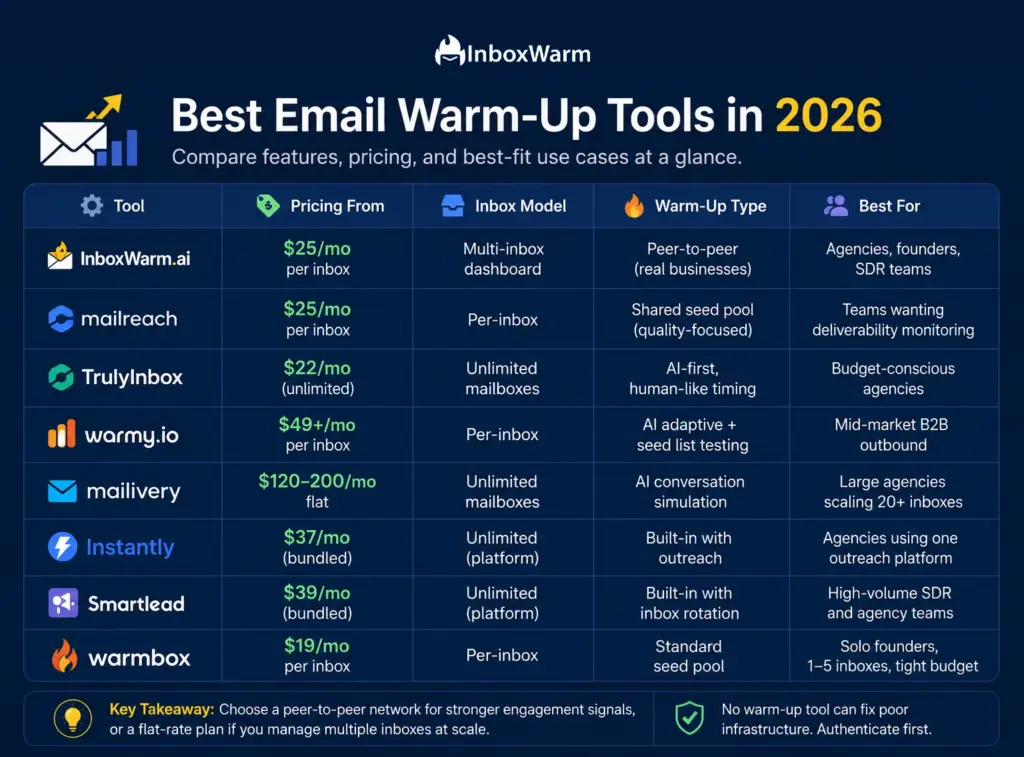
Use this comparison to quickly match the right tool to your situation based on pricing model, inbox support, and best-fit use case.
| Tool | Pricing From | Inbox Model | Warm-Up Type | Best For |
|---|---|---|---|---|
| InboxWarm.ai | $29/mo per inbox | Multi-inbox dashboard | Peer-to-peer (real businesses) | Agencies, founders, SDR teams |
| Mailreach | $25/mo per inbox | Per-inbox | Shared seed pool (quality-focused) | Teams wanting deliverability monitoring |
| TrulyInbox | $22/mo (unlimited) | Unlimited mailboxes | AI-first, human-like timing | Budget-conscious agencies |
| Warmy.io | $49+/mo per inbox | Per-inbox | AI adaptive + seed list testing | Mid-market B2B outbound |
| Mailivery | $120–200/mo flat | Unlimited mailboxes | AI conversation simulation | Large agencies scaling 20+ inboxes |
| Instantly | $37/mo (bundled) | Unlimited (platform) | Built-in with outreach | Agencies using one outreach platform |
| Smartlead | $39/mo (bundled) | Unlimited (platform) | Built-in with inbox rotation | High-volume SDR and agency teams |
| Warmbox | $19/mo per inbox | Per-inbox | Standard seed pool | Solo founders and small teams |
What Should Agencies Look for in an Email Warm-Up Tool?
Not every warm-up tool is built for agency operations. Tools designed around single-user workflows become expensive and unmanageable when you are coordinating warm-up across 15 or 30 client mailboxes.
Here are the factors that separate agency-grade tools from solo-user tools:
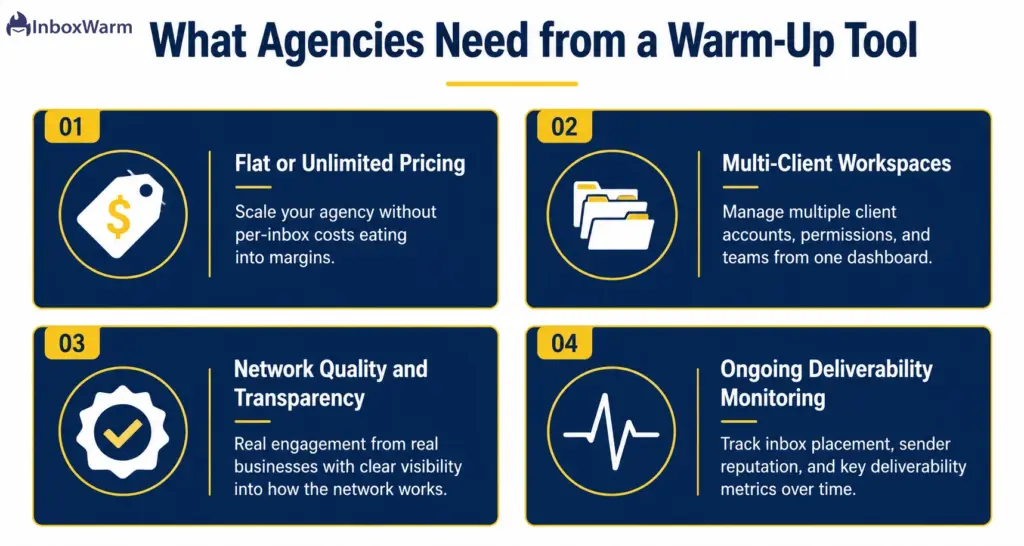
1. Pricing Structure at Scale
Per-inbox pricing that makes sense at one mailbox becomes a budget problem at 20. A tool charging $29/month per inbox costs $580/month at 20 inboxes.
Tools with flat pricing, unlimited mailbox tiers, or bundled warm-up inside a platform subscription offer far better unit economics at agency scale. This single factor eliminates most tools before any feature comparison.
2. Multi-Client Management
Agency-grade tools need workspace separation per client, clear reporting by account, and the ability to onboard or offboard inboxes without affecting other clients. Tools built for individual users often lack workspace-level organization, which creates operational chaos at scale.
3. Network Quality and Transparency
Ask any warm-up vendor what their seed network is made up of. Tools using exclusively verified Google Workspace and Microsoft 365 accounts produce stronger engagement signals than those mixing in unverified SMTP inboxes.
Peer-to-peer networks built on real business accounts, like InboxWarm.ai’s model, produce the most credible engagement patterns because they look exactly like what they are: actual businesses exchanging emails.
4. Deliverability Monitoring Beyond Warm-Up
Warm-up is not a one-time event. Your sender reputation degrades when campaigns generate high bounce rates or low engagement. Tools that offer ongoing monitoring, blacklist alerts, and inbox placement testing after warm-up completes give you the early warning signals you need to protect client domains before a problem becomes a crisis.
Running multiple client mailboxes?
See how InboxWarm.ai handles warm-up at agency scale.
Does Email Warm-Up Actually Work, or Is It Overhyped?
This is the right question to ask in 2026. Independent research on warm-up effectiveness is genuinely mixed, and the most credible critiques deserve a direct answer.
The honest framing: warm-up is necessary but not sufficient. Authentication infrastructure, specifically SPF, DKIM, and DMARC records configured correctly, does more for baseline inbox placement than any warm-up tool.
A damaged list with high bounce rates will erode your domain reputation faster than warm-up can rebuild it. Warm-up tools protect domains that are already set up correctly and help them reach sending capacity safely. They do not rescue domains from authentication failures or bad list hygiene.
The data that does hold up: inboxes that maintain warm-up activity alongside live cold sending retain measurably better inbox placement over a 90-day window compared to inboxes that stop warm-up entirely after launching campaigns.
The specific figure cited across infrastructure research is an 8% higher placement rate. At scale, that difference translates to meaningful revenue impact for agencies where campaign performance directly drives client retention.
The bottom line on efficacy: warm-up works when it runs alongside correct authentication setup and clean list verification. It does not work as a substitute for either.
What Common Mistakes Kill Email Warm-Up Results?
Even with the right tool, avoidable mistakes undermine warm-up results. These are the errors that practitioners at cold email agencies see most often.
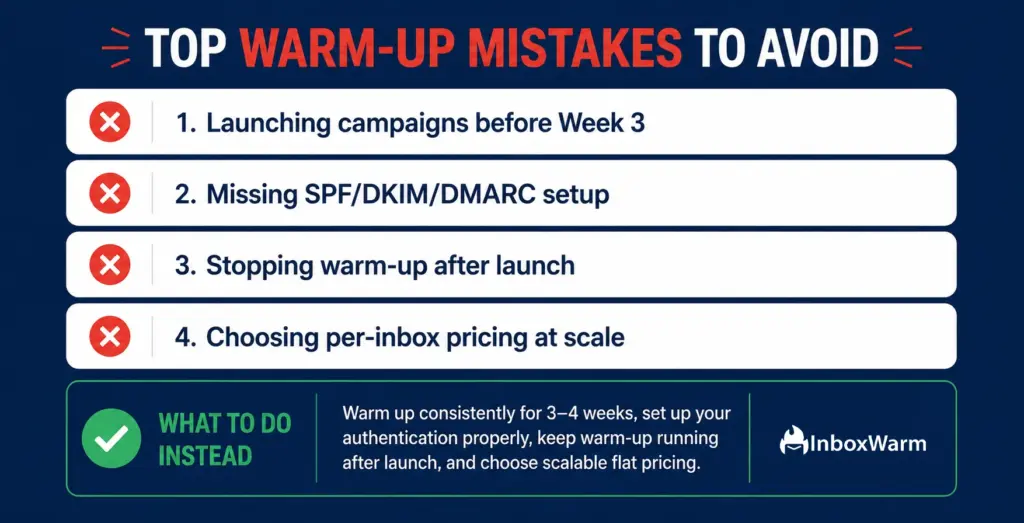
1. Starting Live Campaigns Too Early
The most common mistake is rushing the ramp. Full sending capacity, meaning 50 to 100 emails per day from a given inbox, takes three to five weeks of consistent warm-up. Launching cold campaigns in week one or two against a partially warmed inbox generates elevated bounce rates that undo the reputation building you started.
2. Skipping Authentication Setup Before Warm-Up
Warm-up cannot compensate for missing or misconfigured SPF, DKIM, and DMARC records. Google and Yahoo now treat authentication as a baseline requirement for bulk senders. Starting warm-up on a domain without correct authentication is like trying to build a credit score with a fraudulent identity: the system rejects the signals before they register.
3. Stopping Warm-Up When Campaigns Launch
Warm-up should continue in the background even after your cold campaigns are live. Research from cold email infrastructure platforms consistently shows that inboxes that maintain blended warm-up alongside live sending retain significantly better inbox placement over 90 days compared to inboxes where warm-up stops entirely at launch.
4. Choosing the Wrong Tool for Your Inbox Count
A per-inbox tool priced at $29/month per account looks reasonable at two inboxes and becomes a significant line item at 25. Agencies that start with per-inbox pricing and then scale without reconsidering their tool selection end up paying three to five times more per inbox than the alternatives. Run the pricing math at your actual inbox count, not at one or two.
How Do You Choose the Right Warm-Up Tool for Your Situation?
Here is the decision framework based on role and inbox count:
1. If You Are a Solo Founder or Freelancer (1 to 5 Inboxes)
Start with a tool that keeps your monthly commitment low while covering the core warm-up function. Warmbox at $19/month per inbox is the lowest-cost entry point. InboxWarm.ai at $29/month per inbox gives you the peer-to-peer network quality advantage for a modest premium.
Both are manageable at one to five inboxes without overspending on features you do not need yet.
2. If You Are an SDR Team Using a Sequencing Platform
Check whether your sending platform already includes warm-up. Instantly and Smartlead both bundle unlimited warm-up starting at $37 to $39/month for the entire platform, which eliminates the need for a separate tool.
If you are on Outreach or Salesloft, which do not include warm-up, a dedicated tool like InboxWarm.ai or Mailreach connects via SMTP and handles warm-up outside your sending environment.
3. If You Are a Cold Email Agency (10+ Client Inboxes)
Prioritize flat-rate or unlimited-mailbox pricing above all else. Mailivery’s agency-focused flat pricing and TrulyInbox’s unlimited mailbox tiers are built for this scenario. InboxWarm.ai’s multi-inbox dashboard with peer-to-peer network quality is the right choice when network credibility matters as much as cost. Run the total cost at your actual mailbox count before committing.
4. If You Are a SaaS Founder Sending Your First Outbound Campaign
Your priority is getting a new domain to Good reputation status on Google Postmaster before your first campaign touches a prospect list. Start with a peer-to-peer tool like InboxWarm.ai or a quality seed pool tool like Mailreach. Give it four weeks minimum. Configure SPF, DKIM, and DMARC before you connect your inbox to any warm-up tool.
New domain?
Don’t let your first campaign go to spam. Start warming with InboxWarm.ai today. Real business peer-to-peer engagement from day one.
Frequently Asked Questions
2. Should You Keep Running Warm-Up After Your Campaign Launches?
Yes. Research across cold email infrastructure platforms consistently shows that inboxes maintaining blended warm-up alongside live campaigns retain 8% higher inbox placement rates over 90 days compared to inboxes where warm-up stops at launch. The warm-up layer should run continuously in the background.
3. Are There Free Email Warm-Up Tools That Actually Work?
There are no reliable free warm-up tools in 2026 for meaningful cold email scale. Free plan send caps, typically 10 to 20 warm-up emails per day, are fine for the first two weeks of ramp but too low for weeks three through six. Bundled platforms like Instantly and Smartlead include unlimited warm-up starting at $37/month, which is effectively the lowest-cost entry point for full-scale warm-up.
4. What Is The Difference Between A Peer-To-Peer Warm-Up Network And A Seed Pool?
A peer-to-peer network exchanges warm-up emails between real business inboxes actively used by verified companies. A seed pool uses a large collection of accounts managed by the warm-up vendor specifically for generating engagement signals. Peer-to-peer networks tend to produce stronger engagement signals because the sending and receiving accounts look like genuine business correspondence to mailbox providers, not automated tool activity.
5. Does Warm-Up Help If Your Spf, Dkim, Or Dmarc Is Not Set Up?
No. Authentication is a prerequisite, not an optional extra. Google and Yahoo enforce SPF, DKIM, and DMARC as baseline requirements for bulk senders. Warm-up cannot compensate for missing authentication records. Configure authentication first, verify it with a tool like MXToolbox, and then begin warm-up.
6. Can You Warm Up Multiple Inboxes At Once?
Yes, and most tools designed for agencies support multi-inbox warm-up from a single dashboard. The key is choosing a tool with pricing that does not scale linearly with inbox count. Per-inbox tools that charge $25 to $49 per account per month become very expensive at 20+ inboxes. Flat-rate or unlimited-mailbox options from tools like TrulyInbox, Mailivery, or bundled platforms like Instantly are structured for this use case.
7. How Do You Know If Your Warm-Up Is Actually Working?
Monitor your Google Postmaster Tools domain reputation score throughout warm-up. A domain hitting Good or High status on Postmaster within four weeks is on track. Warm-up tools like Mailreach and Warmy.io include inbox placement testing that shows where your emails are landing across major providers. If your score is stuck at Low or Medium after four weeks, check for authentication issues, list quality problems, or warm-up network quality before continuing.
8. What Happens If Your Domain Gets Blacklisted During Warm-Up?
Stop all sending immediately and run a blacklist check across Spamhaus, MXToolbox, and the major blocklists. Identify what triggered the listing: sending to invalid addresses, high spam complaint rates, or being on a shared IP with a bad actor. Most tools include blacklist monitoring as part of their monitoring feature set. After resolving the root cause, submit a delisting request to the relevant blocklist operators, reconfigure authentication if needed, and restart warm-up from a lower baseline volume.
Bottom Line: Which Email Warm-Up Tool Should You Use in 2026?
The email warm-up market in 2026 is more mature than it was just a few years ago, and the biggest differences between tools now come down to network quality, pricing at your inbox count, and the deliverability insights available after warm-up is complete.
For agencies managing multiple client inboxes, flat-rate or unlimited-mailbox pricing often provides the best long-term value. For founders and smaller teams, the right choice depends on budget, sending volume, and the level of deliverability monitoring required.
Regardless of the platform you choose, warm-up should be viewed as one part of a broader deliverability strategy rather than a standalone solution.
The fundamentals still matter most: configure SPF, DKIM, and DMARC correctly, give new domains enough time to build reputation, and continue warm-up alongside live campaigns.
Many of the inbox placement issues often attributed to warm-up are actually caused by authentication gaps.
When combined with proper authentication and good list hygiene, a consistent warm-up process can help build stronger sender reputation and improve long-term deliverability.