

TL;DR
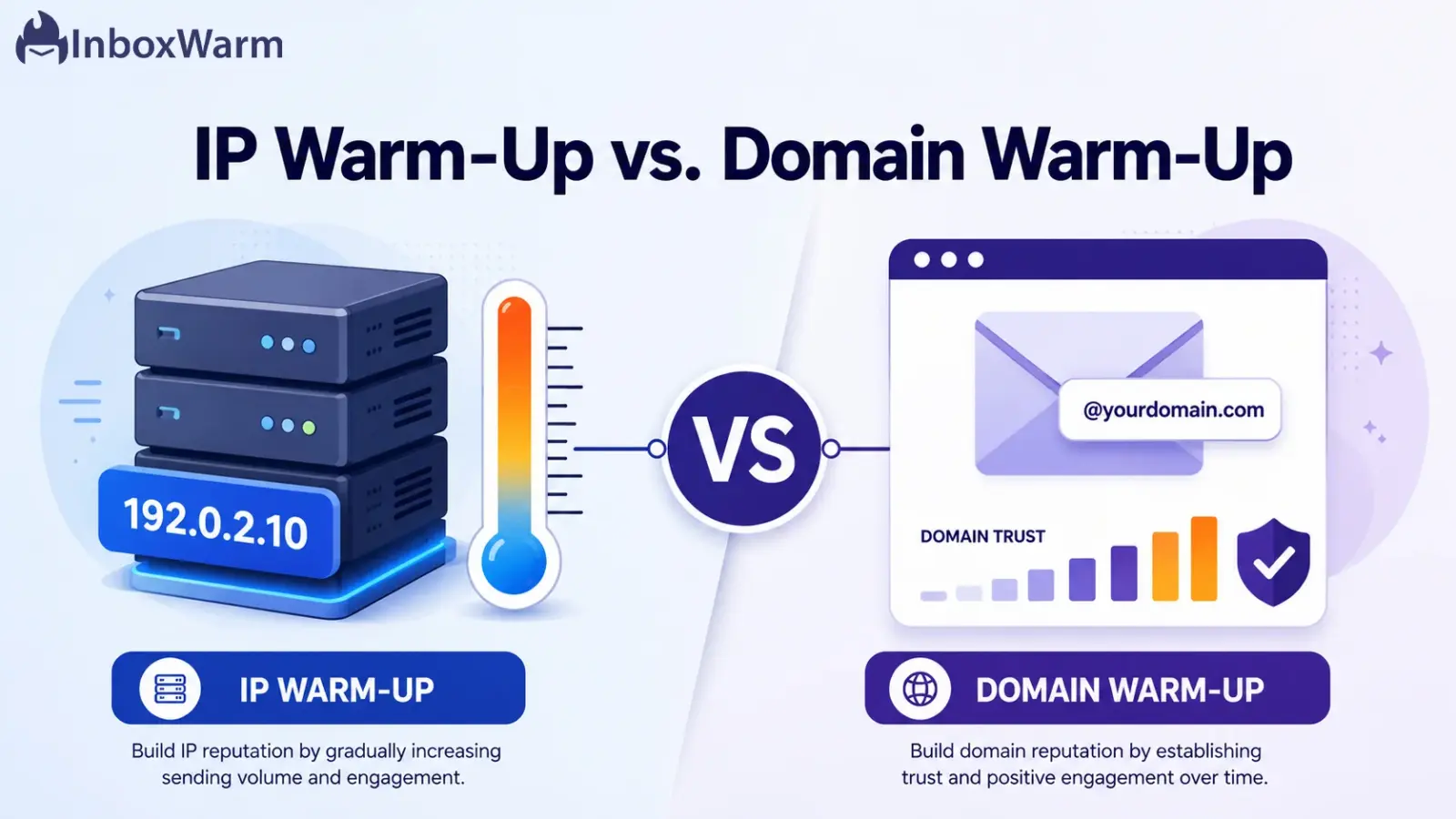
IP warm-up builds a sending reputation for a new IP address. Domain warm-up builds reputation for your sending domain. They are two separate scores, and mailbox providers judge both. Most cold email senders run on shared IPs, so domain warm-up matters most. High-volume senders on a dedicated IP need both.
- IP warm-up applies to a new or unused dedicated IP. You can skip it on a shared IP.
- Domain warm-up applies to every new sending domain or subdomain.
- IP reputation resets when you change IPs. Domain reputation follows your domain.
- For cold outreach on Gmail or Outlook mailboxes, warm the domain and inboxes, not the IP.
You bought a fresh domain, set up your mailboxes, and hit send on your first campaign. Then nothing lands. Half your emails sit in spam, and the rest seem to vanish. The problem usually is not your copy or your offer. It is that mailbox providers do not trust you yet, because you skipped warm-up.
Email warm-up is not optional anymore. Even with everything configured correctly, inbox placement is never a sure thing. Validity’s 2026 Email Deliverability Benchmark Report found that the global inbox placement rate reached 87.2% in 2025. That still leaves about one in eight legitimate emails missing the inbox. Where your mail lands depends heavily on reputation, and reputation is built during warm-up. Confuse IP warm-up with domain warm-up, and you can spend weeks warming the wrong thing.
This guide breaks down IP warm-up vs. domain warm-up in plain terms. You’ll learn what each process does, how domain reputation differs from IP reputation, which one matters for cold email, and how to warm up an email domain step by step.
By the end, you’ll know exactly what to warm, in what order, and why. If you want the wider picture first, start with the fundamentals of email warm-up.
Table of Contents
What Is IP Warm-Up?
IP warm-up is the process of gradually increasing email volume from a new or previously unused IP address to build a positive reputation with mailbox providers. A fresh IP has no sending history. Send thousands of emails on day one, and that burst looks suspicious, which triggers filters. Slow, steady sending earns trust instead.
Two terms matter here.
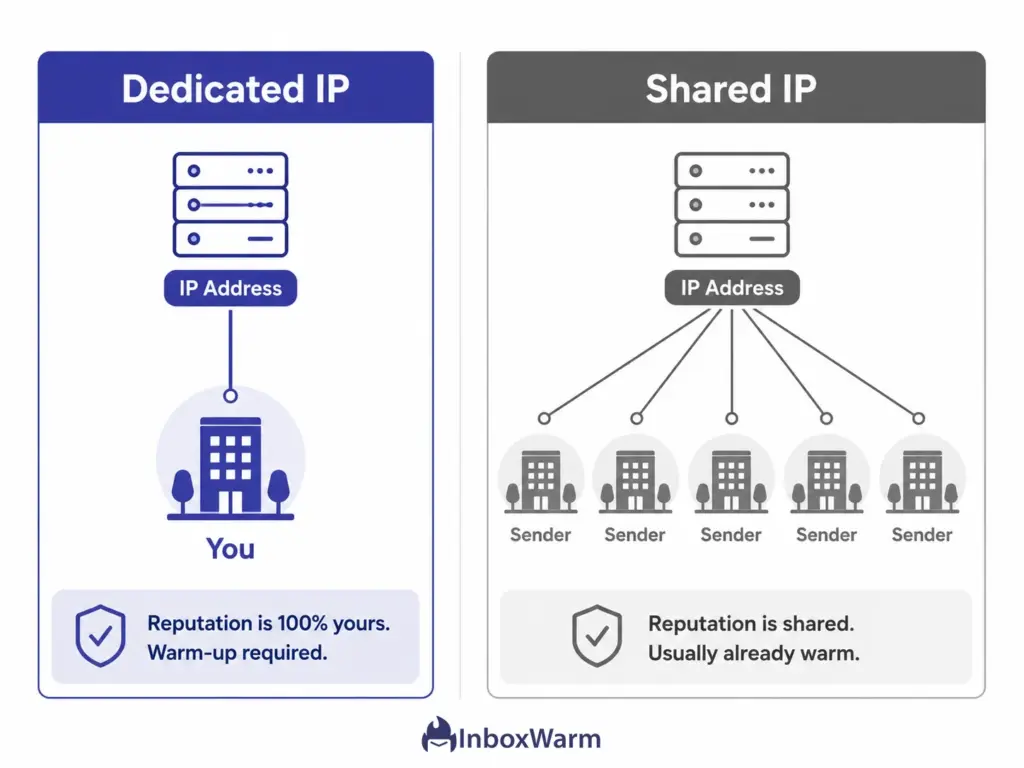
- A dedicated IP is an address that only you send from.
- A shared IP is part of a pool used by many senders, where reputation is collective.
The distinction decides whether IP warm-up is even your job.
You need IP warm-up when:
- You moved to a new dedicated IP from a provider like Amazon SES or SendGrid, or you run self-hosted mail infrastructure.
- You send high volume and want an isolated reputation you fully control.
- You spun up a new dedicated IP after your old one was blocklisted.
You can skip IP warm-up when:
- You send on a shared IP. The pool is usually already warm from other senders’ traffic, and your provider manages that reputation for you.
- You send through Gmail or Microsoft 365 mailboxes, which sit on shared infrastructure by default.
What Is Domain Warm-Up?
Domain warm-up is the process of building a sending reputation for a new or inactive domain by slowly increasing volume and generating real engagement. Mailbox providers track your domain’s behavior over time, so the domain carries trust no matter which IP your mail leaves from.
Domain reputation is the trust score a provider assigns to your sending domain based on its history: how much you send, how recipients react, and how clean your list stays. Unlike an IP, the domain is the identity recipients actually see in the From address, which is why it tends to matter more in the long run.
A few rules hold for almost every sender:
- Every new sending domain needs warm-up. Even an aged domain with no sending history is treated as new.
- Engagement weighs heavily here. Opens, clicks, and especially replies tell providers your mail is wanted.
- Authenticate before you send. Set up SPF, DKIM, and DMARC first, or warm-up signals will not count for much.
IP Warm-Up vs. Domain Warm-Up: The Key Differences
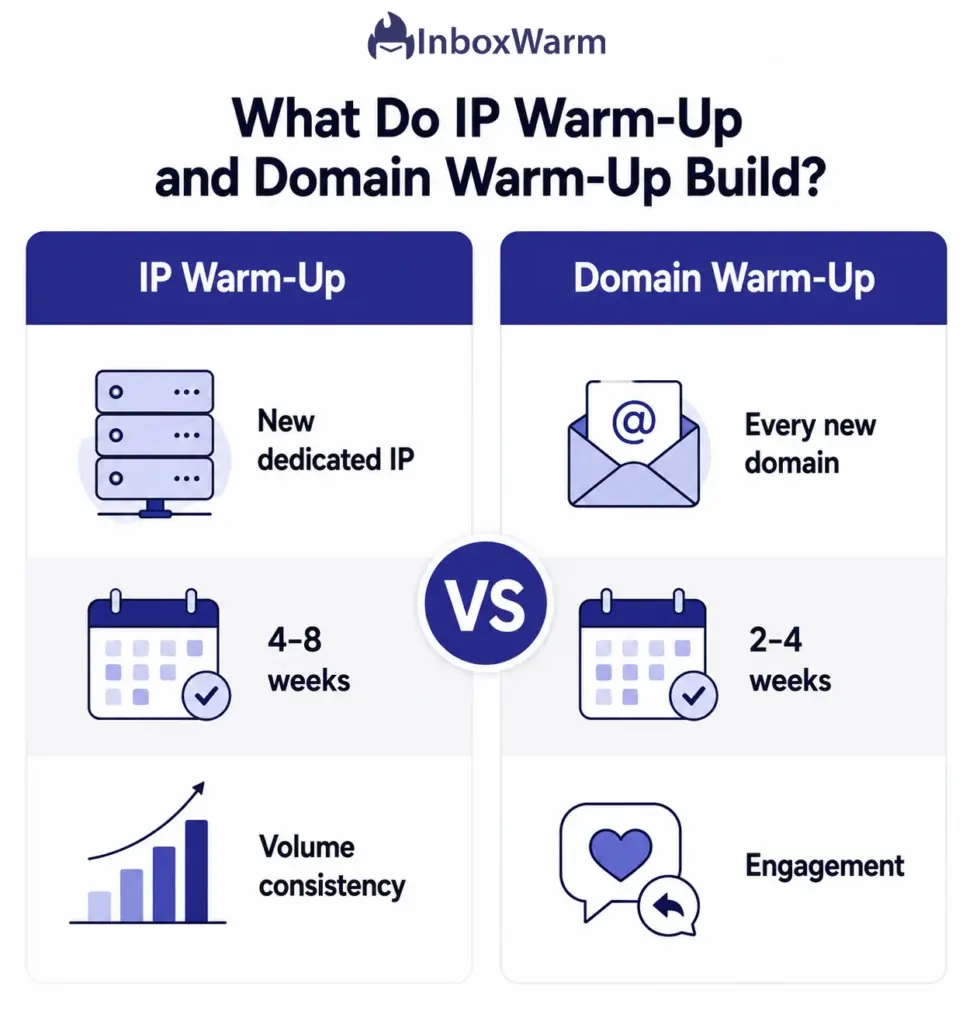
The core difference is simple: IP warm-up builds trust for the address your mail leaves from, while domain warm-up builds trust for the identity recipients see. You can warm one and neglect the other, which is exactly why many senders stay stuck in spam.
The table below shows where they split.
| Factor | IP Warm-Up | Domain Warm-Up |
|---|---|---|
| What it builds | Reputation for the sending IP address | Reputation for the sending domain |
| Applies to | New or unused dedicated IPs | Every new domain or subdomain |
| Who needs it | High-volume senders on a dedicated IP | Almost everyone, including cold emailers |
| Resets when | You move to a different IP | Rarely; reputation follows the domain |
| Typical timeline | About four to eight weeks | About two to four weeks |
| Biggest signal | Consistent, gradual volume | Recipient engagement |
The verdict by use case: If you send through Gmail or Outlook mailboxes, domain warm-up wins because the IP is already shared and warm. If you run a dedicated IP through an enterprise ESP, you need both warmed in parallel. Timelines vary with your volume and list quality, so treat the ranges above as starting points, not deadlines.
Domain Reputation vs. IP Reputation: Two Scores, Not One
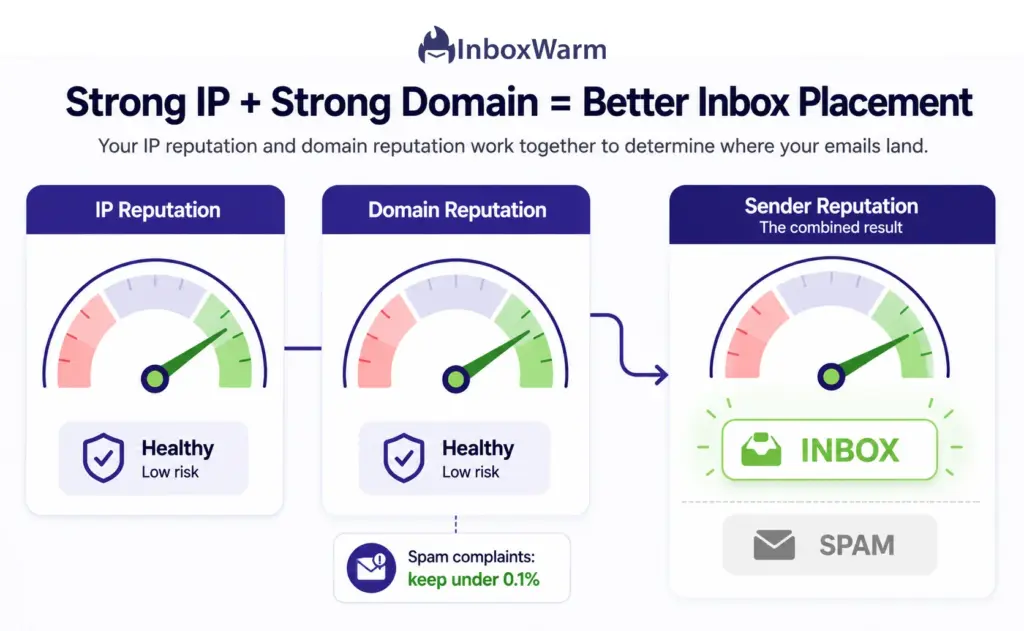
Mailbox providers keep two separate reputation scores, one for your IP and one for your domain. Both feed into your overall sender reputation, the trust score that decides inbox placement. A clean IP cannot rescue a domain with a bad history, and a trusted domain cannot fully offset a cold IP.
- IP reputation is tied to the address. Move to a new IP, and you start from zero, even after years of clean sending elsewhere.
- Domain reputation is tied to your identity. It persists across IP changes and ESP migrations, so it is the asset worth protecting most.
- Engagement leans on the domain. Opens, clicks, and replies shape domain reputation more than they shape IP reputation.
- Subdomains carry their own reputation. A marketing subdomain needs its own warm-up and does not fully inherit the root domain’s trust.
Complaints damage both scores fast. Google’s email sender guidelines tell bulk senders to keep their user-reported spam rate below 0.1% and never let it reach 0.3%. Cross that line and Gmail can throttle or reject your mail. Domain reputation absorbs the long-term hit, which is why warm-up focuses so hard on engaged recipients and clean lists.
IP Warm-Up vs. Domain Warm-Up for Cold Email: Which Matters More?
For cold email, domain warm-up matters far more than IP warm-up. Most cold outreach runs through standard mailboxes on shared IPs, which are already warm. Your real job is to warm the domain and the individual inboxes, not the IP.
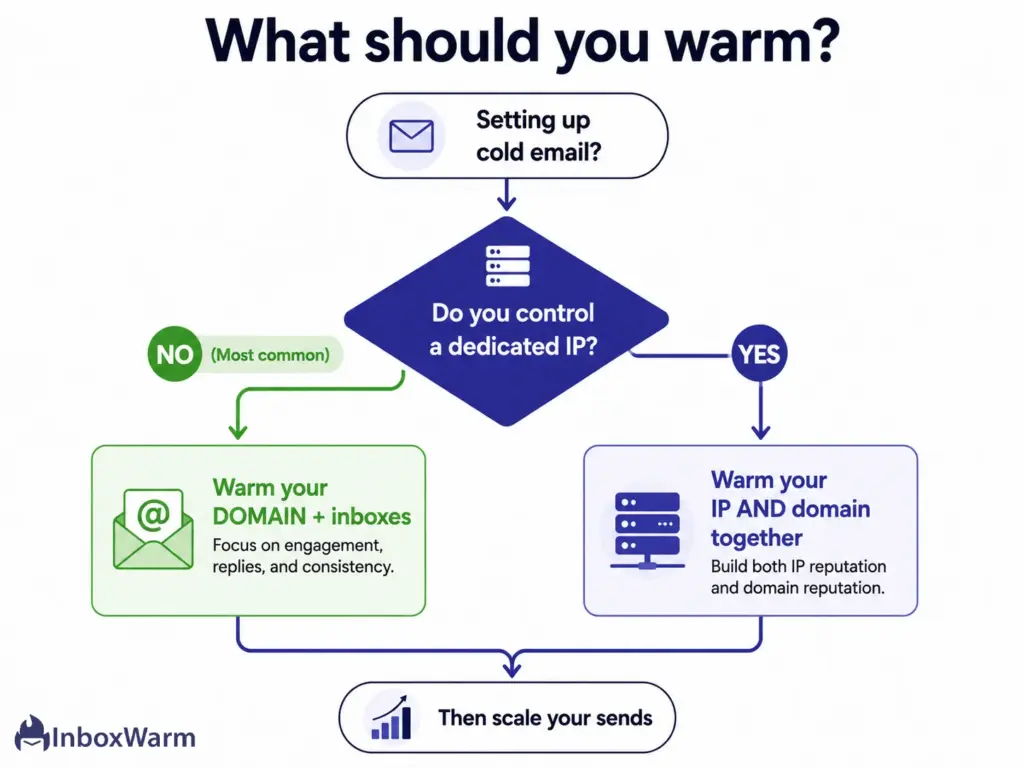
Here is why the answer is so lopsided for outreach:
- Cold emailers rarely control a dedicated IP. Gmail and Outlook mailboxes share infrastructure, so the provider handles IP reputation.
- That leaves domain and mailbox reputation as your main levers. Both are built by sending and receiving genuine, engaged email.
- Sending volume alone no longer cuts it. Providers want human signals like replies and ‘mark as important,’ not just a rising count.
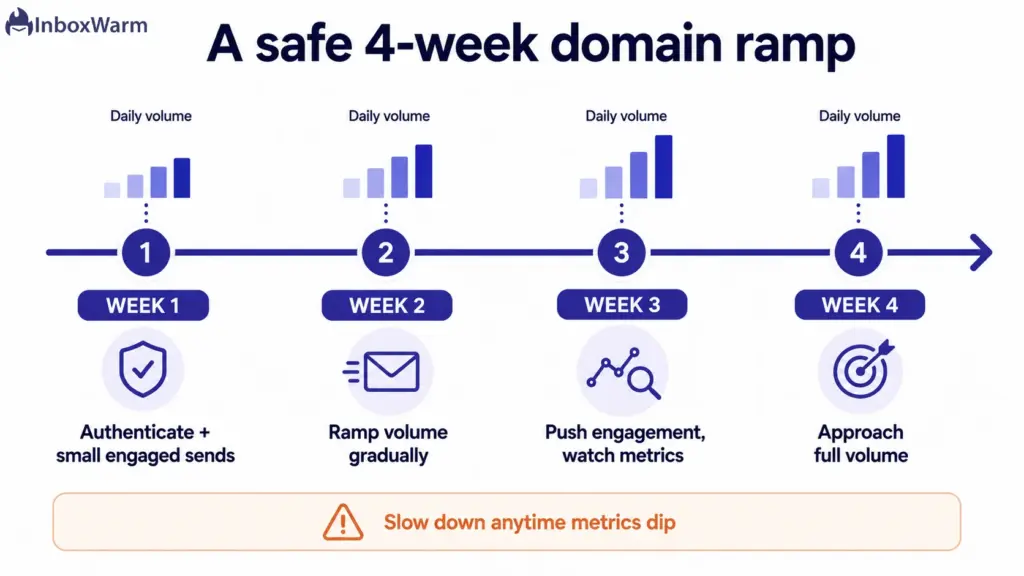
The best email warm-up strategy for cold outreach is short to state and hard to skip: authenticate your domain, start with a small batch of engaged contacts, ramp volume slowly over two to four weeks, and keep complaints near zero. This is also where automated warm-up earns its keep. Tools run continuous, two-way email between real inboxes, so your domain builds positive engagement signals before your first prospect ever gets a message.
How to Warm Up an Email Domain Step-by-Step
Warming a domain follows a predictable arc: authenticate, start small, ramp slowly, drive engagement, and watch your metrics. The five steps below map to that arc and apply whether you send marketing email or cold outreach.
Step 1: Authenticate Your Domain First
Set up SPF, DKIM, and DMARC before you send a single message. Authentication proves you are who you claim to be, and without it, every other warm-up signal is weaker. Run your DMARC record through a checker to confirm it passes. Result: providers can verify your mail, so warm-up activity actually counts toward reputation.
Step 2: Start With a Small, Engaged Audience
Send your first emails to the people most likely to open and reply, such as recent signups, teammates, or known-good contacts. Keep daily volume low, often a few dozen messages. Result: early engagement is strong, which signals to providers that your mail is wanted.
Step 3: Increase Volume Gradually
Raise your daily send in steady increments rather than sudden jumps. A common pattern is to grow volume by a modest percentage each day as long as engagement stays healthy. Result: providers see normal, organic growth instead of a spam-like spike.
Step 4: Generate Real Engagement
Prioritize replies, opens, and positive actions over raw numbers. Lead with your best-performing content and segments, and ask for responses where it makes sense. Result: your domain accumulates the human signals that move reputation the most.
Step 5: Monitor and Adjust
Watch your spam complaint rate, bounce rate, and inbox placement throughout the ramp. If any metric wobbles, slow down or pause before damage compounds. Result: you catch problems early and protect the reputation you are building.
Common Warm-Up Mistakes That Hurt Inbox Placement
Most failed warm-ups repeat the same handful of errors. Avoid these and you sidestep the majority of spam-folder problems:
- Warming the IP while ignoring the domain, or the reverse. Both scores need attention when both are new.
- Sending before authentication is in place, so SPF, DKIM, and DMARC are not validating your mail.
- Ramping volume too fast and tripping spam filters with a sudden spike.
- Mailing cold, unverified lists during warm-up, which drives bounces and complaints.
- Treating warm-up as one-and-done instead of an ongoing practice with monitoring.
- Launching a fresh subdomain at full volume without warming it separately.
Conclusion
IP warm-up vs. domain warm-up is not really an either/or for most senders. The better question is which one your setup actually needs. If you send on a shared IP, which covers nearly all cold email, focus your energy on the domain and your mailboxes. If you run a dedicated IP through an enterprise ESP, warm both in parallel so neither score drags the other down.
Reputation is the long game. Your IP reputation can reset the moment you change addresses, but your domain reputation follows you across providers and platforms. That makes the domain the asset worth protecting most. Authenticate first, ramp slowly, drive genuine engagement, and keep complaints near zero, and you build trust that holds up as you scale.
Get the order right, and warm-up stops being a guessing game. You will know what to warm, how long it takes, and how to tell when your sending is ready for full volume.
Tired of watching good emails land in spam during warm-up?
InboxWarm.ai automates the slow part. It runs continuous, two-way warm-up across a large network of real inboxes, so your domain builds a positive sender reputation before you scale your real sends. Start free for 10 days, no credit card required.
Frequently Asked Questions
How long does email warm-up take?
A new domain usually takes about two to four weeks to warm, while a new dedicated IP often takes four to eight weeks. The exact timeline depends on your sending volume, list quality, and engagement. Higher volumes and colder lists take longer, so it is safer to ramp slowly than to rush and trigger a reputation reset.
Does a shared IP need warming?
Usually not. A shared IP pool is already warm from the traffic of other senders on it, and the provider manages that collective reputation. Your focus should be on warming your domain and following good sending practices. Bad behavior can still affect a shared pool, so list hygiene still matters.
What is more important, domain reputation or IP reputation?
For most senders, domain reputation matters more over time. It is tied to the identity recipients see and follows you across IP changes and platform migrations. IP reputation resets whenever you move to a new IP. Engagement signals also weigh more heavily on the domain.
Can I warm up a domain manually?
Yes, but it is tedious and hard to scale. Manual warm-up means asking real people to open, reply to, and prioritize your emails every day for weeks. It works for very small programs, but it becomes impractical for a full sales team. Automated warm-up handles the volume and consistency for you.
Do subdomains need their own warm-up?
Yes. Mailbox providers track subdomains as largely separate from the root domain, so a new sending subdomain starts with little trust. If you set up a dedicated subdomain for marketing or outreach, warm it the same way you would warm a new domain. It does not fully inherit the parent domain's reputation.
What happens if I skip warm-up?
Skipping warm-up tells mailbox providers that an unknown sender suddenly went to high volume, which looks like spam. The likely results are spam-folder placement, throttling, bounces, or outright blocks. Recovering from a damaged reputation takes far longer than warming up correctly in the first place.