
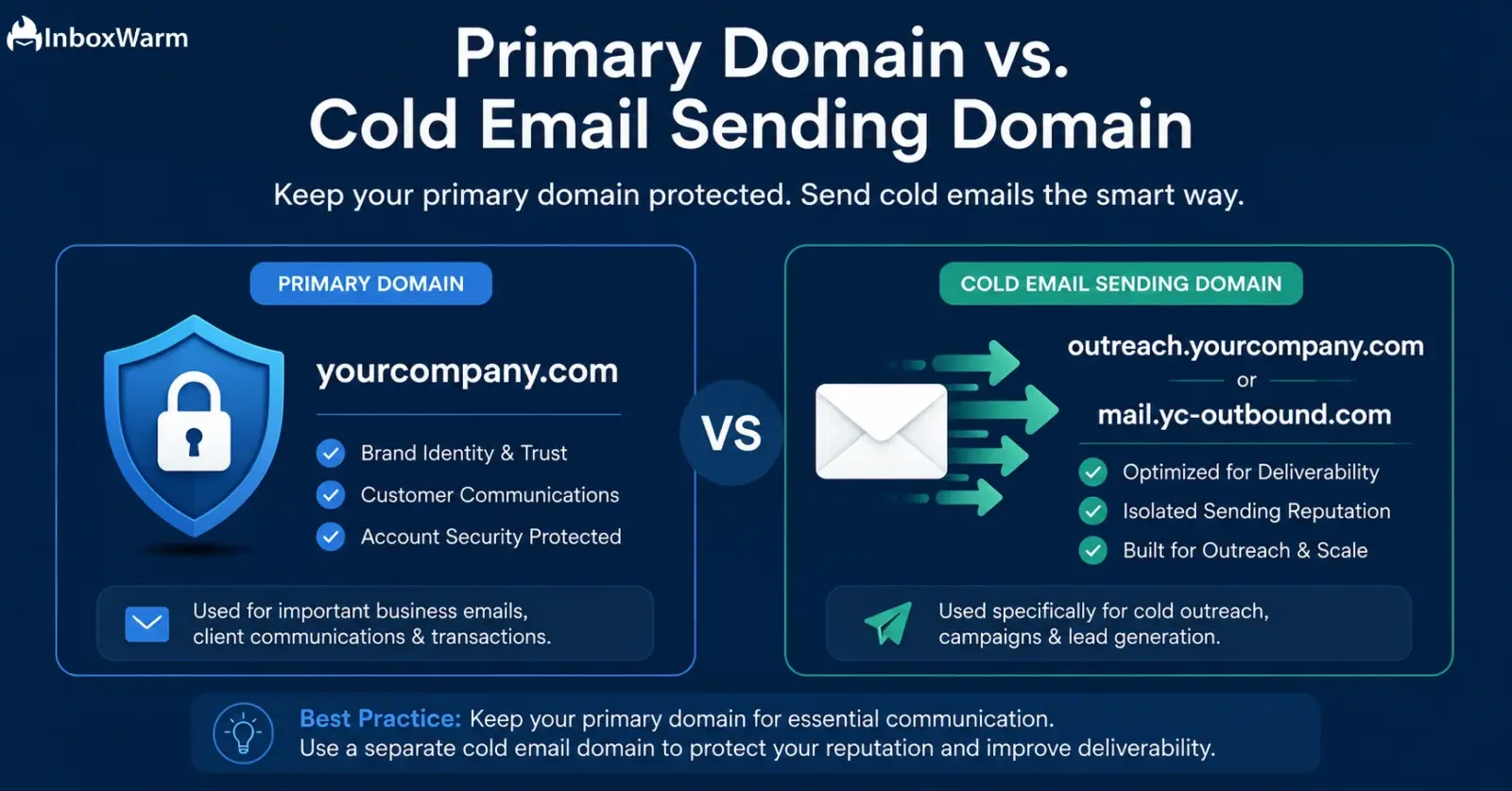

TL;DR
- Your primary domain carries all your brand equity: protecting it from cold email risk is non-negotiable.
- Cold email campaigns use a separate sending domain to absorb spam complaints and deliverability damage.
- A separate domain with proper SPF, DKIM, and DMARC setup keeps your main inbox reputation intact.
- Warming up your cold email domain before sending is essential: skipping it leads to immediate spam folder placement.
- InboxWarm.ai automates domain warm-up so your sending domain builds trust fast without the guesswork.
Your primary domain is the foundation of your business reputation. Every email you send from it to customers, investors, and partners builds trust over months and years. Using that same domain for cold email outreach puts all of that at risk in a single campaign.
The answer is a dedicated sending domain: a separate domain used exclusively for outbound prospecting, keeping your main domain clean and protected.
In fact, according to research by Validity, 21% of permission-based emails never reach the inbox. For cold email, that number is significantly higher. Every spam complaint, bounce, and low open-rate signal you generate during cold outreach is logged against your sending domain by inbox providers like Gmail and Outlook.
When that domain is your primary one, the damage spreads to your transactional emails, customer replies, and sales follow-ups.
This article breaks down exactly what a cold email domain is, why keeping it separate from your primary domain is critical, how to set one up correctly, and how to warm it up before your first campaign goes out.
Table of Contents
What Is the Difference Between a Primary Domain and a Cold Email Domain?
Before getting into the mechanics, the distinction needs to be clear.
These 2 domains serve completely different purposes and should never overlap.
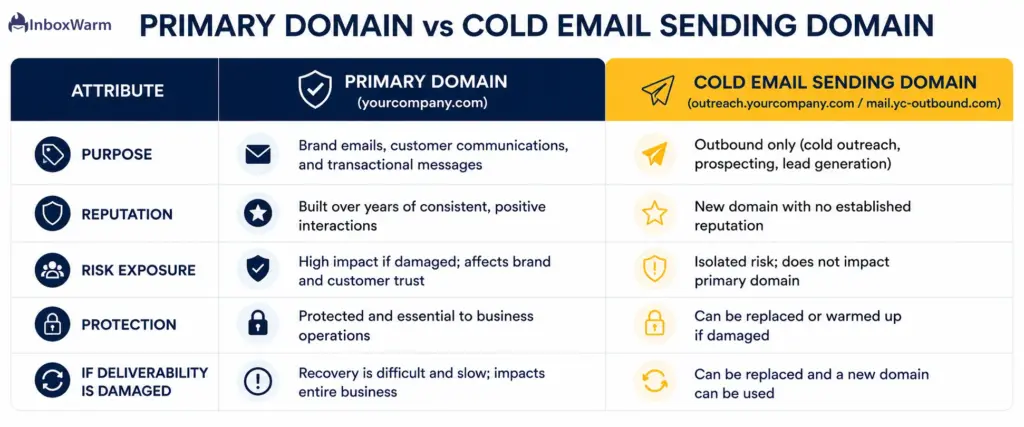
What Is a Primary Domain?
Your primary domain is the one your business was built on: the URL on your website, the email addresses in your email signatures, and the sender identity your customers recognise. Emails from your primary domain include things like invoices, onboarding sequences, support replies, and team communications. Inbox providers score this domain based on years of sending history, complaint rates, and engagement signals.
What Is a Cold Email Sending Domain?
A cold email domain is a separate domain registered specifically for outbound prospecting. It might look like yourbrand-outreach.com, yourbrandteam.com, or try-yourbrand.com. It is not your main brand domain. Its only job is to send cold emails to prospects who have never interacted with you before. Any negative signals generated by cold outreach stay confined to this domain.
Why the Separation of Primary and Cold Emails Matters?
Inbox providers like Gmail use domain reputation as one of the primary signals for inbox placement decisions. When spam complaints and low engagement accumulate against a domain, that domain’s overall reputation drops. If that is your primary domain, the damage is not isolated: it affects every email you send. Separating cold email onto a dedicated domain creates a firewall between your prospecting activity and your core business communications.
What Risks Does Cold Email Pose to Your Primary Domain?
The risks are specific, measurable, and in many cases permanent.
Here is exactly what can go wrong when you send cold email from your main domain.
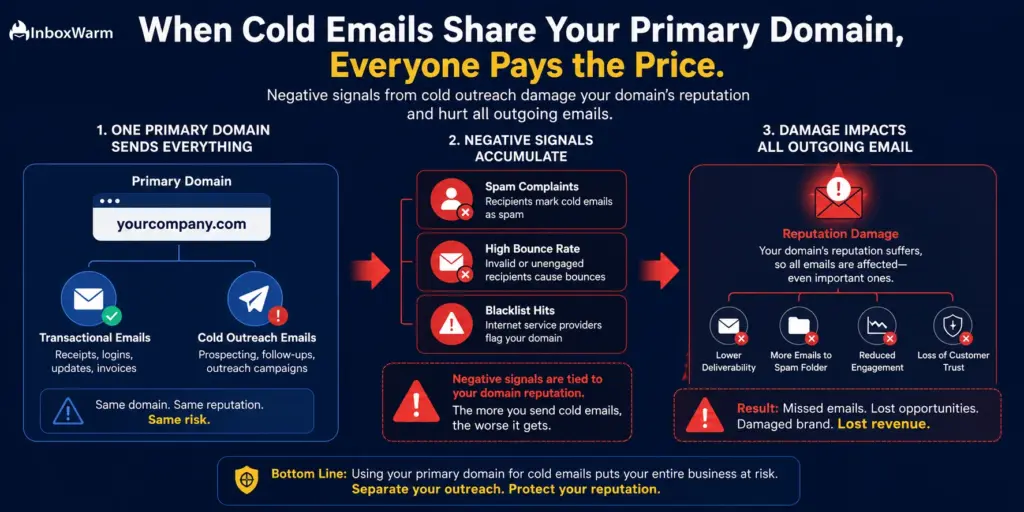
1. Spam Complaints
When a recipient marks your email as spam, that signal is recorded against your sending domain. Gmail’s threshold is around 0.1% to 0.3% of sends per day. One poor campaign sending 500 emails with 5 spam reports is already at 1%: ten times the safe threshold. Repeated violations push your domain toward automatic deferral or blocking.
2. Bounce Rate Accumulation
Cold prospect lists always contain invalid addresses. Every hard bounce is a negative signal. High bounce rates tell inbox providers that you are not maintaining list hygiene, which further damages your domain score.
3. Low Engagement Rates
Cold email open rates typically range from 15% to 30% on a well-warmed domain with good copy. If your cold campaigns pull 5% to 8% open rates because your list is cold and your domain is new, that low engagement also feeds negatively into your domain reputation.
4. Blacklist Placement
Organisations like Spamhaus and Barracuda maintain blocklists of domains sending high-complaint or high-spam volume email. Once your domain lands on a major blocklist, removal can take weeks. If that is your primary domain, your customer invoices and onboarding emails are being blocked alongside your cold outreach.
How Do You Set Up a Cold Email Domain Correctly?
Setting up a separate sending domain is a straightforward process. The key is doing it right from day one so the domain is structured to survive cold outreach volume.
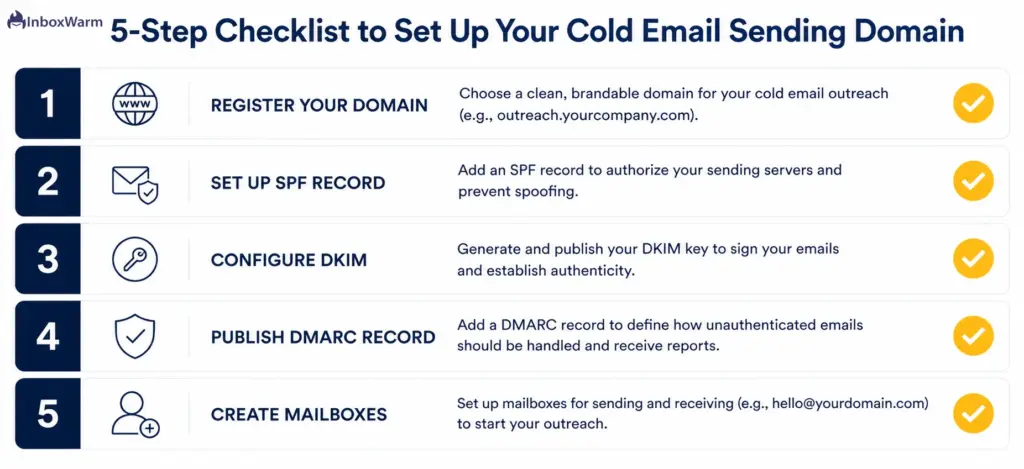
Step 1: Register a Sending Domain
Choose a domain name that is clearly connected to your brand but distinct from your main domain. Common formats include yourbrand-sales.com, mail.yourbrandname.com (as a subdomain), or a variation like yourbrandHQ.com. Register it from a reputable registrar like Namecheap, Cloudflare Registrar, or Squarespace Domains.
Step 2: Set Up SPF
SPF (Sender Policy Framework) is a DNS record that tells inbox providers which mail servers are authorised to send email from your domain. Without it, Gmail and Outlook will treat your emails as suspicious by default. Your SPF record typically looks like: v=spf1 include:_spf.google.com ~all for Google Workspace senders.
Step 3: Configure DKIM
DKIM (DomainKeys Identified Mail) adds a digital signature to every email you send, allowing receiving servers to verify that the email has not been tampered with in transit. Your email provider (Google Workspace, Microsoft 365, etc.) will provide a DKIM key to add to your DNS settings. This step is now mandatory under Google and Yahoo’s 2024 bulk sender requirements.
Step 4: Publish a DMARC Record
DMARC (Domain-based Message Authentication, Reporting, and Conformance) tells inbox providers what to do when emails claiming to be from your domain fail SPF or DKIM checks. A basic policy of p=none is sufficient to start: it allows email through while logging failures. You can tighten it to p=quarantine or p=reject as your sending history builds. DMARC is also now required for bulk senders by Google and Yahoo.
Step 5: Configure a Mailbox
Set up at least one mailbox on your sending domain: for example, firstname@yourbrand-sales.com. Use Google Workspace or Microsoft 365 for best deliverability. Avoid free email providers for cold outreach.
Set up your cold email domain in minutes
InboxWarm.ai auto-detects your DNS configuration and flags missing SPF, DKIM, and DMARC records before your first campaign.
Run Free Domain Check
Why Do You Need to Warm Up Your Cold Email Domain Before Sending?
A brand-new domain has zero sending history. Inbox providers have no signal to indicate whether it is trustworthy or not. Sending cold email from a new domain without warming it up is one of the most common deliverability mistakes made by teams new to outbound.
What Is Domain Warm-Up?
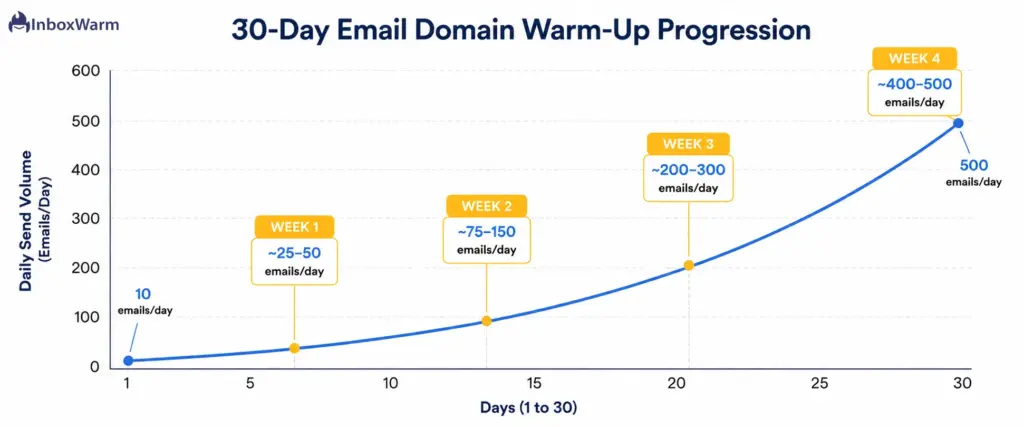
Email warm-up is the process of gradually increasing your sending volume and generating positive engagement signals on a new domain before sending at full scale. During warm-up, automated tools send emails between real mailboxes, open them, reply to them, and move them out of spam. This builds your domain’s reputation with inbox providers by demonstrating consistent, engaged sending behaviour.
What Happens If You Skip Warm-Up?
Skipping warm-up on a brand-new domain almost guarantees spam folder placement for your first campaign. Without a reputation baseline, Gmail and Outlook will route your emails to spam by default, especially if you are sending to cold contacts who have no prior engagement with your domain. Recovery from an early reputation hit can take weeks.
How Long Does Warm-Up Take?
A standard warm-up period runs between 2 and 6 weeks depending on your target sending volume. A domain targeting 100 emails per day typically needs about 2 to 3 weeks of gradual ramp-up. A domain targeting 500+ emails per day should warm up for 4 to 6 weeks. InboxWarm.ai automates this process, starting from low daily volumes and incrementally increasing based on your domain’s engagement signals.
How Many Cold Email Domains Do You Actually Need?
This depends on your sending volume and the number of mailboxes you are managing. Here are the standard rules of thumb used by experienced cold email practitioners.
1. One Domain Per 30 to 50 Emails Per Day Per Mailbox
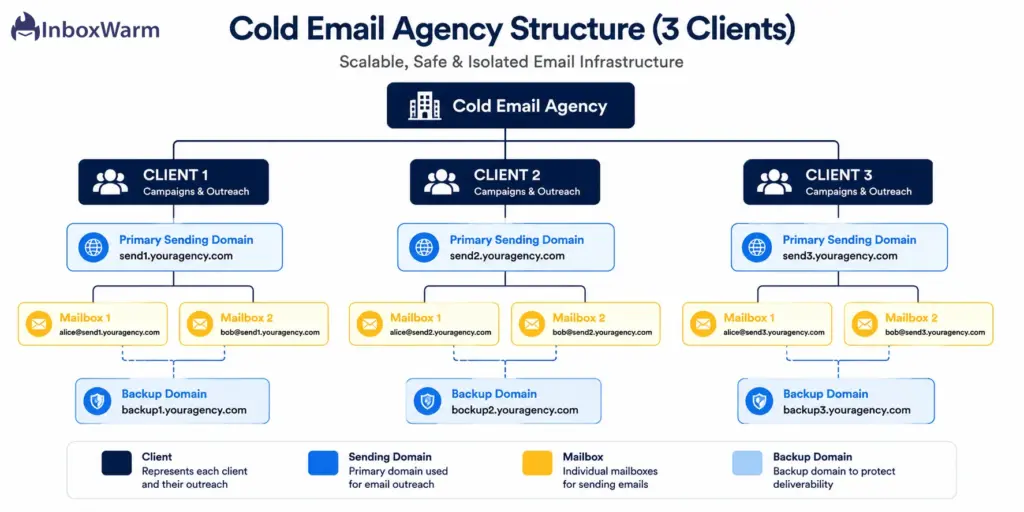
Each mailbox should send no more than 30 to 50 cold emails per day to maintain safe sending rates. If you plan to send 200 cold emails per day, you need 4 to 6 mailboxes. Those mailboxes should be spread across 2 to 3 domains to further dilute risk.
2. One Backup Domain Per Active Sending Domain
Many experienced cold email teams register backup domains alongside each active sending domain. If your primary cold email domain gets flagged or blacklisted, the backup is already warmed up and ready to switch to. This minimises campaign downtime to hours rather than weeks.
3. Agency Considerations
Cold email agencies managing multiple clients should never share a domain across clients. Each client should have at least one dedicated cold email domain. Shared domains mean that one client’s campaign problems cascade across every other client using that infrastructure.
What Should Your Cold Email Domain Look Like?
Domain naming is part of deliverability strategy. A domain that looks like spam bait will be treated like it.
1. Use Brand-Adjacent Names
The best cold email domains are clearly connected to your brand but not identical to it. Examples: getbrandname.com, brandnameHQ.com, brandname-team.com, trybrandname.com. These look professional and give recipients context about who is emailing them.
2. Avoid Keyword Stuffing
Domains like best-sales-outreach-2024.com or cold-email-agency-pro.net raise immediate red flags with spam filters. Keep it simple, professional, and brand-adjacent.
3. Register Multiple TLDs if Needed
If you are running high volume, register your sending domain across .com, .io, and .co to prevent competitors or spammers from registering similar variants and damaging your brand by association.
How Does InboxWarm.ai Help You Manage Sending Domain Reputation?
Setting up and warming a sending domain manually is tedious and error-prone. InboxWarm.ai automates the most critical parts of the process so your domain builds trust quickly and your campaigns launch on a healthy foundation.
1. Automated Warm-Up
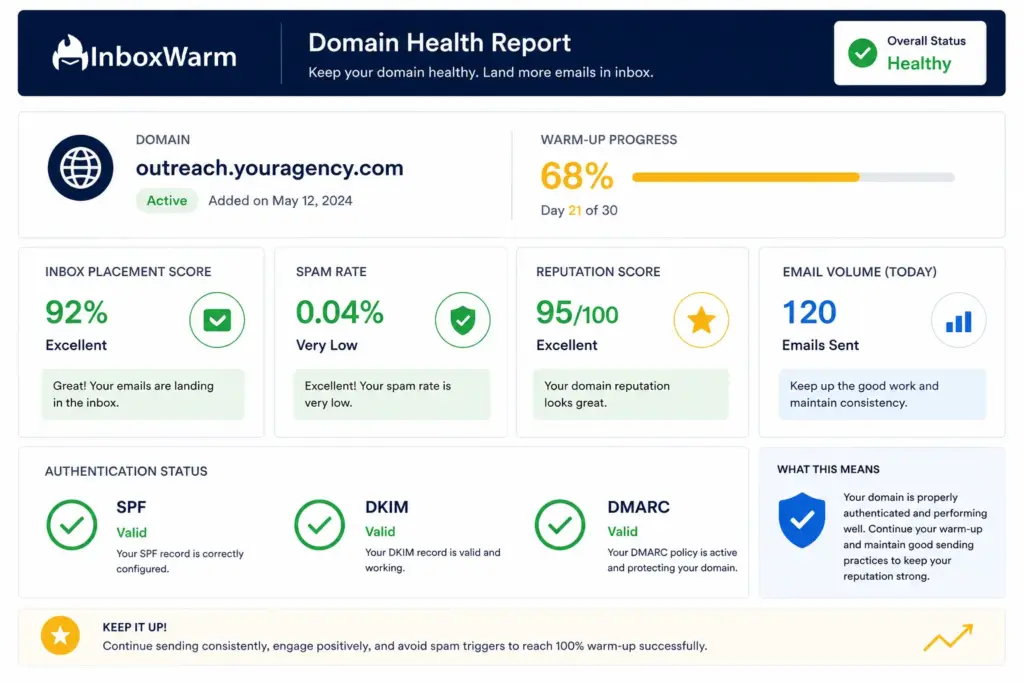
InboxWarm.ai uses a network of real mailboxes to send, open, and engage with your warm-up emails automatically. This builds your domain’s inbox placement score without manual effort. You set your target daily volume, and InboxWarm handles the ramp.
2. DNS Health Checks
Before your first campaign, InboxWarm.ai scans your domain’s DNS configuration and flags missing or misconfigured SPF, DKIM, and DMARC records. Fixing authentication issues before you send is far easier than recovering from a deliverability crisis mid-campaign.
3. Reputation Monitoring
InboxWarm.ai continuously monitors your sending domain’s reputation, spam placement rates, and blacklist status. If something goes wrong, you get an alert before it derails your campaign. Agencies can monitor all client domains from a single dashboard.
Is your cold email domain ready to send?
Run a free domain health check with InboxWarm.ai and see your SPF, DKIM, DMARC status, and inbox placement score in under 60 seconds.
Frequently Asked Questions
2. How Many Emails Can You Send Per Day From A New Cold Email Domain?
During warm-up, you should start at 10 to 20 emails per day and increase gradually over 3 to 6 weeks. After a successful warm-up, a single mailbox can safely send 30 to 50 cold emails per day. Sending higher volumes from a single mailbox increases spam risk regardless of warm-up status.
3. What Happens If Your Cold Email Domain Gets Blacklisted?
If your sending domain lands on a major blocklist like Spamhaus, you should stop sending from it immediately. Begin the delisting request process through the blocklist's removal portal. Simultaneously, switch to a warmed backup domain to keep campaigns running. This is why maintaining pre-warmed backup domains is part of professional cold email infrastructure.
4. Do You Need A Separate Cold Email Domain If You Only Send A Small Volume Of Prospecting Emails?
Yes: even at low volume. Spam complaints are absolute counts, not just percentages. Two complaints from 20 emails is a 10% complaint rate, which will flag your domain immediately. The cost of registering and warming a separate sending domain is minimal compared to the risk of damaging your primary domain's reputation.
5. How Long Does It Take To Warm Up A New Cold Email Domain?
A standard warm-up takes 2 to 6 weeks depending on your target send volume. Using an automated warm-up tool like InboxWarm.ai compresses this process by generating consistent positive engagement signals around the clock, which builds reputation faster than manual sending alone.
6. Should You Set Up DMARC On Your Cold Email Domain?
Yes. DMARC is now required by Google and Yahoo for all senders exceeding 5,000 emails per day, and it is best practice for all senders regardless of volume. Start with a p=none policy to monitor without disrupting delivery, then move to p=quarantine or p=reject as your domain reputation stabilises.
7. Can You Use The Same Warm-Up Tool For Both Your Primary Domain And My Cold Email Domain?
Yes. InboxWarm.ai supports multiple domains and mailboxes within a single account, making it practical to warm up both your primary domain (if it ever needs reputation recovery) and all your cold-email-sending domains from a single dashboard.
Bottom Line
Protecting your primary domain is not optional: it is the foundation everything else depends on. Your customers recognise it, your brand equity lives in it, and years of sending history back it up. Running cold email outreach from that domain puts all of that at risk with every campaign.
A separate cold email domain costs less than $15 per year to register. Setting up SPF, DKIM, and DMARC takes under an hour. Warming it up with InboxWarm.ai takes 2 to 4 weeks of automated activity running in the background. The investment is minimal. The protection it provides is substantial: isolated risk, clean primary domain reputation, and cold campaigns that actually land in inboxes.
If you are running cold email at any volume and you have not set up a dedicated sending domain yet, that is the single most important deliverability change you can make today. Set it up, authenticate it, warm it up, and launch with confidence.
Proper authentication is a critical part of the process, so make sure your SPF, DKIM, and DMARC records are configured correctly before you start sending.