
TL;DR
- Send a demo recap the same business day when practical. Lead with the buyer’s use case.
- Share the resource you promised and give a date for any answer you still need to verify.
- Confirm the next action, who owns it, and when it’s due.
- If the buyer goes quiet, use the agreed checkpoint and ask one question about whether the evaluation is still active.
The demo ended with “This looks promising. I’ll share it with the team.” Now you need to write something your buyer can actually forward. A feature list gives them more reading. A short recap of their workflow, the answer you owe them, and what happens next gives them something to work with.
A follow-up email after a product demo should thank the buyer, recap the use case they cared about, and confirm the next step you discussed. If you left an integration, security, or rollout question open, say when you’ll get back to them with an answer.
Table of Contents
When Should You Send a Follow-Up Email After a Product Demo?
Aim to send the demo recap the same business day while the details are fresh. Send a later message when you have a verified answer or when the buyer’s agreed review date arrives. HubSpot’s guide to sales follow-ups recommends using the post-demo recap to connect what the buyer responded to, any objections, and what happens next.
| Situation | What to Send | What to Include |
|---|---|---|
| The demo just ended | Send a short thank-you and recap | The buyer’s goal, one relevant takeaway, and the agreed next step |
| An answer is still pending | Acknowledge the question in the recap, then send the verified answer | What works, any constraint, and when you can confirm what remains open |
| You agreed on a checkpoint | Use the date you agreed on | Action, owner, and deadline |
| They haven’t replied | Send a brief check-in if the evaluation is still relevant | One question about the priority or timeline |
What Should a Post-Demo Email Include?
Write the recap so someone who missed the demo can understand why it happened and what decision comes next. Use the buyer’s words where you can.
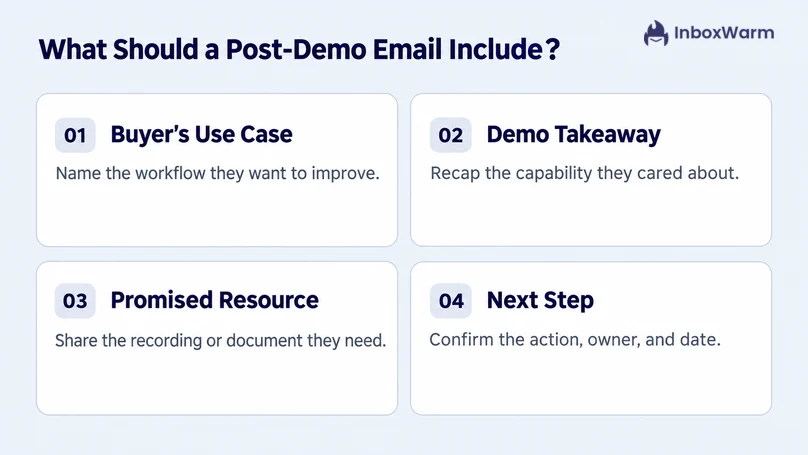
- The use case. Name what the buyer is trying to change, such as moving invoice approvals out of a shared inbox.
- What you showed. Pick one capability that addressed the workflow and state any relevant limits you verified.
- What you promised. Share the recording, documentation, or worksheet if it answers a question they raised. Check that they can open the link.
- The next step. Confirm the action, owner, and deadline. Ask one focused question if the next step is still open.
Gong’s post-meeting follow-up examples also recommend calling out action items and including resources that answer a specific buyer question. If the demo surfaced a possible need the buyer hasn’t confirmed, InboxWarm’s prospect needs validation templates show how to ask a focused question about their actual priorities.
4 Product Demo Follow-Up Email Templates
Choose the template based on what the buyer needs from you now. Replace the brackets with what the buyer said, what you showed, and what each side actually agreed to.
1. Send a Same-Day Demo Recap
Use this when the buyer needs a short summary to refer to or forward.
2. Answer an Open Product or Integration Question
Use this once you’ve checked the answer. If the product has a limitation or the integration requires additional work, explain that in the email.
3. Confirm the Next Step After a Sales Demo
Use this when both sides agreed on a pilot, technical review, or another action.
4. Follow Up After the Demo if the Buyer Hasn’t Replied
Use this after an agreed checkpoint has passed or after giving the buyer time to review what you sent.
What Does a Demo Follow-Up Email Look Like in Practice?
These two fictional examples show how the same demo can lead to two different emails. One confirms a plan both sides agreed to. The other answers a technical question before the buyer decides whether to proceed.
Example 1. Recap a Demo and Confirm the Pilot Review
Example 2. Answer an Integration Question With a Limitation
What Can You Send if the Buyer Needs to Brief Their Team?
Add a short, forwardable recap when the buyer says a manager, finance lead, or technical reviewer needs to weigh in. Give that person enough context to understand the problem, what the demo showed, and what their team still needs to decide.
Goal. Finance wants to see who owns each stalled invoice without searching a shared inbox.
What we saw. The approval queue showed the current approver and how long the invoice had been waiting.
Decision for Friday. Can one accounts payable team join the pilot, and would a daily export meet its reporting needs?
Put the recap in the email body so the buyer can forward it as-is. If they asked for a recording or technical document, add the relevant link and check that the people reviewing it can open it.
How Do You Follow Up After a Demo With No Response?
If the buyer gave you a date, use it. If they didn’t, give them time to review what you sent and check in when you have a useful reason to write. Ask whether the evaluation is still active or whether the timeline changed. If they asked for a resource during the demo, frame it around the work it helps them do. InboxWarm’s resource-first email templates show how to explain what a worksheet or guide helps the buyer evaluate.
If you never agreed on another step and the check-in goes unanswered, leave the next move with the buyer.
Will Your Buyer See the Demo Recap They’re Waiting For?
You answered their questions on the call. If the recap lands in spam, they may miss the next steps. Use InboxWarm to warm up your sending inbox before your next outreach campaign.
Frequently Asked Questions
Use these answers to decide when to send the recap, what to share, and when to pause outreach.
How Soon Should You Send a Product Demo Follow-Up Email?
Send the recap the same business day when practical. If an answer needs verification, give the buyer a realistic date and send the answer separately.
Should You Include a Demo Recording in the Follow-Up?
Include the recording when you have permission to share it and recipients can access it. Point them to the relevant segment if the recording is long. If they only need an answer or a checklist, send that item.
What Should You Send if the Buyer Needs to Share the Demo Internally?
Provide a short, forwardable summary of the buyer’s goal, what the demo showed for that workflow, the open questions, and any decision the team needs to make.
Should You Ask for Another Meeting in Every Demo Follow-Up?
Ask for another meeting when it’s the agreed next step or the buyer needs a live review to make progress. If an email can answer the open question, start there.
How Many Times Should You Follow Up if the Buyer Goes Quiet?
Use the agreed timeline first. If there’s no checkpoint, give the buyer time to review, then send a brief note with one question. Pause if they remain silent and stop after a decline or opt-out.