
TL;DR
- A resource-first cold email offers a prepared asset connected to a specific task the prospect handles.
- Describe the audience, format, scope, and access conditions so the reader knows what they would receive.
- Use five first-email templates for a general resource offer, checklist, worked example, worksheet, or research summary.
- Choose between asking first and sharing a clearly labelled link; neither approach guarantees replies or delivery.
- Send the promised resource when requested, without unexpectedly replacing it with a form or mandatory demo.
- A resource request shows interest in the resource, not confirmed need, budget, or buying intent.
A cold email offering a useful resource should explain what the resource helps the recipient do and why that task is relevant to their work. Name the asset, describe its scope, and give the person a clear way to request or review it.
“I have something valuable to share” leaves the reader guessing. “A one-page checklist for confirming project scope before a delivery handoff” gives them enough detail to assess the offer. The templates below help you make that value clear while keeping the commercial reason for writing honest.
Table of Contents
How Do You Offer a Resource in a Cold Email?
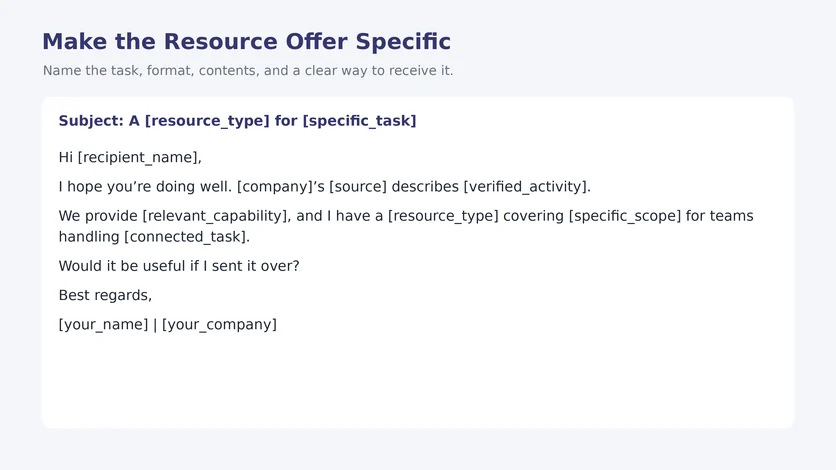
Use this main template when a verified company detail explains why the resource may fit. The asset should already exist and be useful within the scope you describe.
Replace every placeholder. “We provide” explains the commercial context; it should not turn into a long product pitch. Describe the resource concretely enough that the recipient can decide without first agreeing to a meeting.
What Makes the Resource Worth Offering?
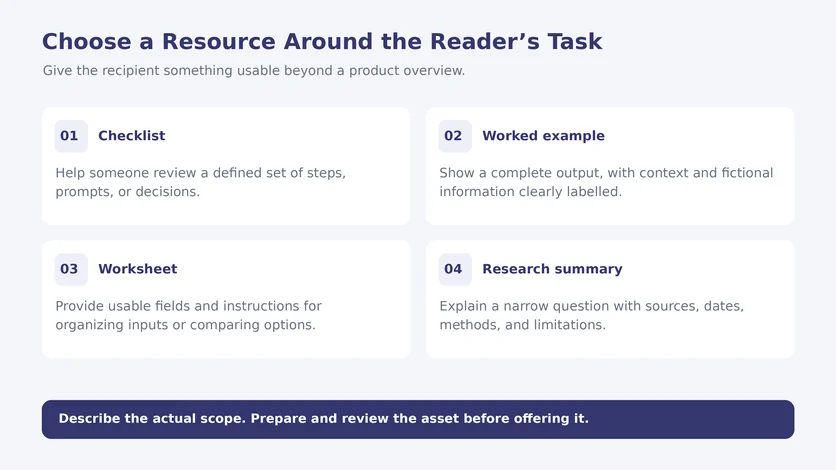
Start with a task and choose the format that helps someone complete or understand it. GOV.UK’s content-design guidance emphasizes user needs, suitable formats, and keeping content up to date. Those principles are useful for judging an asset; they are not evidence of a guaranteed cold-email response.
| Resource | Useful When the Reader Needs To | Include |
|---|---|---|
| Checklist | Check a defined set of steps or decisions. | Clear prompts, scope, and any conditions that affect use. |
| Worked example | See how an approach could look in practice. | A complete example, relevant context, and honest labels for fictional data. |
| Worksheet | Organize inputs or compare options. | Usable fields, instructions, and a filled example where helpful. |
| Research summary | Understand evidence around a narrow question. | Sources, dates, methods, limitations, and the actual findings. |
| Short guide | Carry out one specific task. | Practical steps and necessary context beyond a product overview. |
In B2B lead generation, audience fit still matters. A polished checklist does not become relevant to every company in a broad industry. Explain the connection between the recipient’s work and the task the resource supports.
A useful test is whether the recipient can learn or do something with it before buying from you. A brochure may describe your product accurately, but it should not be presented as an independent guide, original research, or a personalized audit.
How Specific Should Your Resource Description Be?
Give the reader the details that change their decision to open or request it. Avoid replacing those details with adjectives such as “exclusive,” “powerful,” or “game-changing.”
| Vague Offer | More Informative Description |
|---|---|
| A valuable guide | A short guide to the three decisions involved in assigning an onboarding owner. |
| A free audit | A self-review worksheet for checking which fields are required before a project handoff. |
| An industry benchmark | A summary of a defined dataset, with the period, method, and limitations stated. |
| A customized playbook | A reusable example for a named use case; call it customized only if it actually is. |
| A quick resource | A one-page checklist, if it is genuinely one page, with the task and scope named. |
State any material access requirement: a form, account, payment, or request for permission. Do not promise a reading time or a result you have not checked.
Which Email Fits the Resource You Want to Share?
Choose one of these four alternatives when the asset type gives you a clearer offer. Together with the main template, they provide five first-email options rather than a sequence to send to one recipient.
1. Offer a Checklist for a Defined Task
Use it when: The resource helps a relevant team review a specific set of steps or decisions.
Resource check: A checklist should contain usable prompts, not just a list of reasons to buy your product. Keep its title and actual contents aligned.
2. Share a Worked Example
Use it when: The reader could benefit from seeing a complete example of the task or output your capability supports.
Resource check: Label illustrative or fictional information clearly. If it is a real customer example, confirm that it is appropriate to share and preserve any limits on what its results show.
3. Provide a Worksheet With a Clearly Labelled Link
Use it when: The worksheet is ready, its destination is appropriate to share, and you can describe the access conditions accurately.
Resource check: Replace the placeholder with a direct, descriptive link to the actual worksheet. Verify access as a recipient would experience it. Do not write “no form required” if opening the resource leads to a registration page.
4. Offer a Sourced Research Summary
Use it when: You have a real, relevant summary with evidence that helps the reader understand a narrow question.
Resource check: Describe a literature summary as a summary, not original research. Do not invent sample sizes, averages, performance claims, or a connection between the evidence and this prospect’s results.
Should You Ask First or Include the Resource Link?
Choose the approach that gives this recipient a clear, honest experience. An ask-first message can make the offer easy to decline; a direct link can let someone assess a resource without another exchange.
| Approach | Practical Benefit | What to Check |
|---|---|---|
| Ask before sending | The recipient chooses whether to receive the resource. | The asset is ready and you can supply what was described. |
| Include a direct link | The reader can access the resource immediately. | The label, destination, access conditions, and scope are clear. |
| Include a small excerpt | The recipient can assess a useful part inside the message. | The excerpt is accurate, relevant, and does not misrepresent the full resource. |
Nielsen Norman Group’s guidance on information scent explains how link labels and context help people judge a destination. Apply that principle by naming the asset and its purpose instead of using a vague “click here.” It does not establish a universal rule about links in cold emails.
Adding or removing a resource link cannot guarantee inbox placement. Review the sending setup, contact suitability, provider policies, and campaign requirements separately from the resource format.
A Worked Example: Offer Something the Reader Can Actually Use
Fictional illustration: MapleStudio, BriefTrack, the recipient Aisha, and the sender Sam are invented. The example is not a customer story or evidence of campaign results.
Assume MapleStudio’s current services page describes project-based work. BriefTrack supports structured handoff notes, and Sam has prepared a one-page checklist for passing agreed project details from sales to delivery.
The checklist could include these practical fields:
| Field | Prompt for the Team |
|---|---|
| Agreed scope | What work is included, and where is the agreed description recorded? |
| Exclusions | What is explicitly outside the agreed work? |
| Next owner | Who receives the handoff and owns the next action? |
| Required inputs | Which files or decisions are needed before work starts? |
| Next checkpoint | What is the next agreed milestone or review point? |
These prompts provide a usable resource beyond a product description. They do not establish that MapleStudio’s existing handoffs are incomplete, and they may need adaptation for the team’s process.
The reader knows what the resource contains before replying. The email does not claim that the checklist was customized for MapleStudio or that Sam reviewed its internal operations.
What Should You Send When the Prospect Says “Yes”?
Deliver the promised resource first. Keep the response easy to use: identify the asset, give access, and mention the limits that affect how it should be interpreted.
Example reply: “Thank you, [recipient_name]. Here is the [resource_title]: [resource_url]. It covers [scope] and is a reusable example, rather than a review of your internal process. I hope it is useful. If a specific part needs clarification, I’d be happy to help.”
If you offered access without a form or meeting, provide that experience. Do not replace the asset with a scheduling link or describe a requested resource as consent to an unrelated campaign.
A request for the checklist confirms interest in receiving it. It does not confirm a problem, a buying project, or a need for a demo. Let any next step follow the conversation.
How Can You Follow Up Without Repeating “Just Checking In”?
Use a useful detail about the resource or close the sequence politely. Choose a reasonable gap for the audience and situation, and stop after a refusal or opt-out.
Follow-Up 1: Explain One Concrete Part of the Resource
Follow-Up 2: Close the Offer
Use “Re:” only in the actual thread. Do not claim the person read or opened the original email, invent an expiry date, or suggest that receiving a resource creates an obligation to reply.
Is the Resource Ready for a Real Recipient?
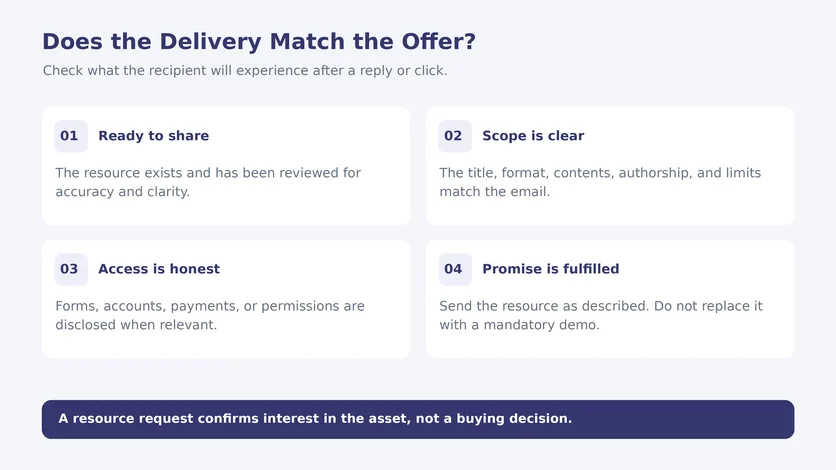
Check the asset and the email together before sending. The experience after a reply or click should match the offer the reader used to make that decision.
- Relevance: Can you name the task, audience, and source supporting the connection?
- Readiness: Does the resource exist, and has it been reviewed for accuracy and clarity?
- Scope: Does the email accurately describe the format, contents, authorship, and limits?
- Access: Are the link, permissions, file, and any form or payment requirements clear?
- Usability: Can the recipient use the resource without an unexpected sales commitment?
- Campaign: Have you checked sender details, contact fit, refusals, opt-outs, relevant requirements, and provider policies?
Track whether the resource was requested, delivered as promised, and discussed in a useful way. Keep those outcomes separate from qualification and purchase intent. No resource or template guarantees replies, leads, or inbox placement.
Frequently Asked Questions
What Is a Resource-First Cold Email?
It is a commercial introduction that offers a prepared, relevant resource before asking for a larger commitment. The email explains who the resource helps, the task it supports, and what the recipient can expect if they request or open it.
What Kind of Resource Should I Offer?
Choose the format around the task: a checklist for reviewing steps, a worked example for seeing an approach, a worksheet for organizing inputs, or a sourced summary for understanding evidence. The resource should provide value beyond a product overview.
Should I Ask Before Sending the Link?
Either an ask-first message or a clearly described direct link can fit. Asking first makes the offer optional but adds an exchange. A direct link gives immediate access but requires the recipient to assess an unfamiliar destination. Choose based on the resource, audience, and access conditions.
Should the Resource Be Free?
Describe the actual terms. If there is a charge, registration requirement, or account restriction, make it clear. If you describe the resource as free or accessible without a form, verify that the recipient’s experience matches that description.
Can I Offer a Resource I Have Not Created Yet?
Prepare and review it before sending the offer. A recipient should not have to wait for an asset you implied was ready. If you are proposing a custom service or future deliverable instead, describe that honestly.
Can I Share a Resource Created by Someone Else?
Yes, when sharing the original public source or another version you are authorized to distribute. Attribute the creator accurately, explain why the material is relevant, and do not claim authorship or remove limitations that affect its meaning.
Does a Request for the Resource Mean the Prospect Wants a Demo?
No. It confirms interest in receiving the resource. Send what you promised, then let the person assess it. Ask about a further step when the conversation supports it rather than treating the request as agreement to a sales meeting.
How Should I Follow Up If the Prospect Does Not Reply?
Add one useful detail about the resource’s contents or close the sequence politely. Do not pretend the recipient read the original email, invent scarcity, or make a gift imply an obligation to respond. Stop after a refusal or opt-out.
Your Resource Is Ready. Is Your Sending Domain?
Pair a useful, relevant resource with a prepared sending setup. Check your domain for configuration issues that could affect delivery before you start your outreach.