

TL;DR
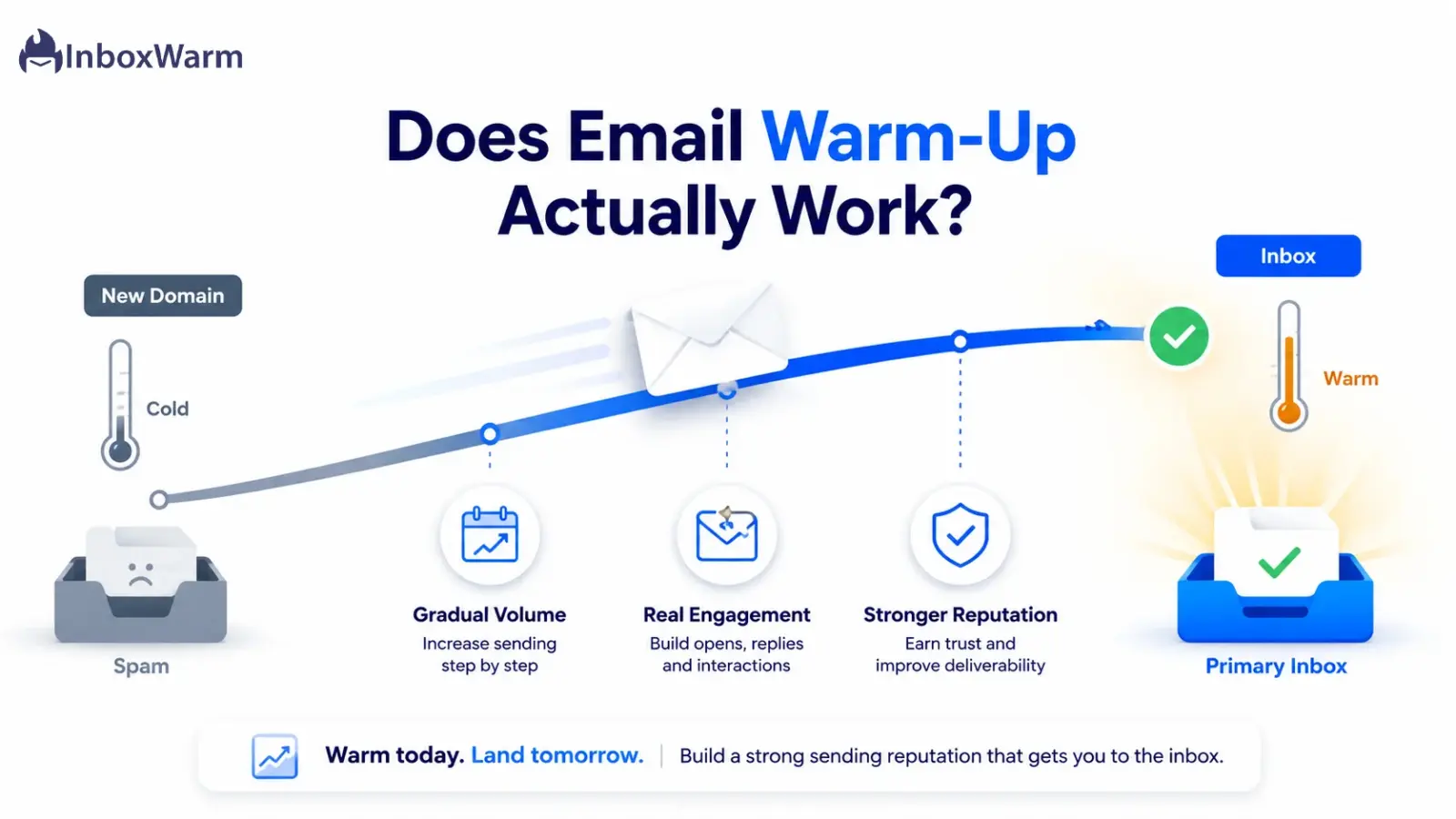
Yes, email warm-up works, but only as one layer of deliverability. Gradually increasing volume while generating positive engagement teaches Gmail and Outlook to trust a new domain, which measurably lifts inbox placement. Warm-up cannot fix broken authentication, dirty lists, or weak copy. Treat it as reputation building, not a magic switch.
- Mailbox providers reward consistent volume and real engagement, the exact behavior warm-up creates.
- Microsoft says reaching maximum deliverability takes four to eight weeks for a new domain.
- Validity pegs global inbox placement near 83%, so roughly one in six emails never reaches the inbox.
- Warm-up helps most for new domains and cold outreach, and least for healthy, low-volume personal mail.
You buy a clean new domain, plug it into your sequencer, load a thousand leads, and hit send. Instead of replies, you get bounces and a folder full of mail that landed in spam. The copy was fine. The offer was fine. The problem was trust. To Gmail and Outlook, a brand-new domain firing high volume looks identical to a spammer warming up a burner.
That gap between sending and actually reaching the inbox is where revenue quietly leaks. Independent benchmarks put average inbox placement around 83%, meaning a sixth of legitimate email never gets seen. Get deliverability wrong on a domain you paid to build, and one impatient week can cost a month of recovery. This is the exact problem email warm-up is designed to solve.
So does email warm-up actually work, or is it a feature vendors sell to scare new senders?
In this guide, you will see what the data and provider documentation say, what warm-up can and cannot improve, when it matters most, how long it takes before you see results, and the best practices that separate real reputation gains from wasted sends.
Table of Contents
What Is Email Warm-Up?
Email warm-up is the process of gradually increasing how much mail a new domain or inbox sends while generating positive engagement so mailbox providers build trust in the sender before any real campaign goes out. It is reputation construction, not outreach. Think of it as building a credit score before you apply for a large loan.
How Does Email Warm-Up Work?
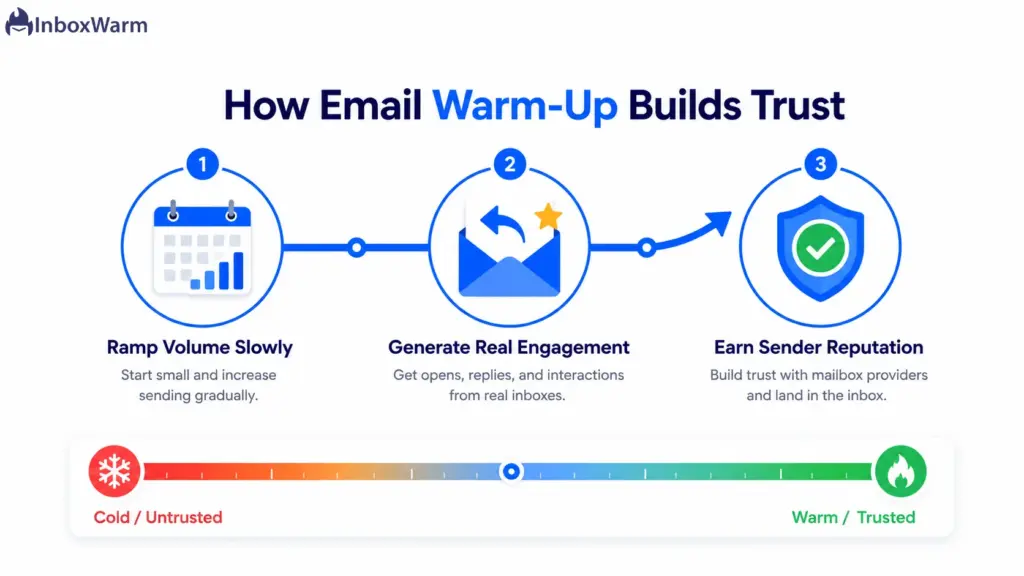
Warm-up starts small and ramps up on a schedule. Early sends go to recipients who reliably open, reply, and mark messages as important, which produces the signals providers reward. Automated tools simulate this by exchanging mail across a pool of trusted inboxes that open, reply to, and rescue messages from spam while raising volume day by day.
- Volume ramp: daily sends rise in small steps instead of one large spike.
- Engagement signals: opens, replies, stars, and spam-to-inbox rescues tell providers a human wants this mail.
- Consistency: steady daily cadence, including weekends, looks natural to filtering algorithms.
Why Do People Use Email Warm-Up?
People use email warm-up to avoid the spam folder when their reputation is low or nonexistent. New senders, cold outreach teams, and anyone scaling fast all face the same wall: providers distrust unfamiliar, sudden volume. Warm-up exists to remove that distrust before money is on the line.
Here are the specific problems it targets.
- Low sender reputation: a poor or absent track record sends mail straight to spam, and warm-up rebuilds the signal over time.
- Spam placement: untrusted domains get filtered even when the message is legitimate and wanted.
- New domains: a fresh domain has zero history, so any real volume looks suspicious from day one.
- Cold email campaigns: unsolicited mail draws lower engagement and more complaints, so a trust buffer is essential.
- Inbox placement: The goal is not just delivery; it is landing in the primary inbox where replies actually happen.
That last distinction matters. Email delivery means a receiving server accepted your message. Inbox placement means it reached the inbox rather than spam. An email can pass delivery and still vanish into junk, which is why warm-up targets placement, not raw delivery rates.
Does Email Warm-Up Actually Work? Here Is What the Data Says
Email warm-up works because it produces exactly the behavior mailbox providers measure and reward: consistent volume, low complaints, and genuine engagement. The evidence comes less from a single controlled study and more from how Gmail, Outlook, and Yahoo openly say they evaluate senders. Warm-up aligns your sending with those published rules instead of fighting them.
What Google and Microsoft Reward
Google’s own email sender guidelines tell senders to avoid sudden volume spikes, warning that immediately doubling previous volumes can trigger rate limiting or reputation drops, and to ramp modified traffic gradually while monitoring server responses. That is a warm-up instruction in everything but name.
Microsoft is even more direct in its warm-up process documentation, stating that providers view mail from a new domain as suspicious until it establishes a positive reputation, and that achieving maximum deliverability takes four to eight weeks depending on volume and engagement.
The Reputation and Engagement Signals
Both providers anchor on the same metrics that warm-up is built to optimize:
- Spam complaint rate: Google says keep it under 0.1% and never let it reach 0.3%, calculated daily in Postmaster Tools. Cross 0.3% and you lose access to mitigation until you stay clean for seven straight days.
- Authentication: SPF, DKIM, and DMARC are mandatory for bulk senders (5,000+ messages per day to personal Gmail), and filters favor authenticated mail for everyone else.
- Engagement: opens, replies, deletes-without-reading, and spam-to-inbox moves all feed reputation. Low or negative engagement pushes mail to spam even with a clean complaint rate.
- Volume consistency: Microsoft notes that the more consistent your volume and frequency, the faster you build a positive reputation. Sending less than weekly slows it down.
What the Benchmarks Show
Industry data explains why the stakes are high enough to warrant warm-up at all:
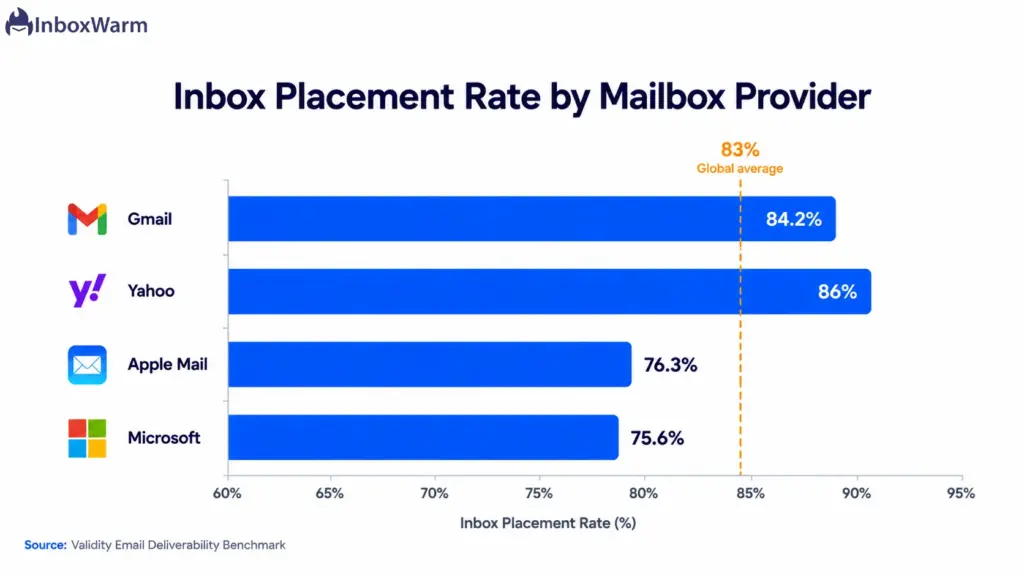
- Validity’s 2025 benchmark puts global inbox placement near 83%, so about one in six emails never reaches the inbox.
- Placement varies sharply by provider. Microsoft sits around 75.6% and Apple Mail near 76.3%, while Gmail is higher but slid from roughly 89.8% to 84.2% across 2024 as filters tightened (Validity 2025 Benchmark Report).
- Authentication alone is not enough. Independent 2025 inbox testing found fully authenticated mail still hit spam-placement rates above 30%, which is why providers shift to engagement-based evaluation after the basics pass.
- Reputation drives the outcome. Strong senders commonly see around 92% inbox placement, while a Validity Sender Score below 70 can drop placement under 50%.
- Clean sending compounds. Validity found senders holding bounce rates under 1.5% see 10% to 12% higher inbox placement.
What Experts Agree On
There is broad consensus on three points.
- First, a brand-new domain blasting cold volume will get filtered, full stop.
- Second, gradual ramp-up plus engagement is the proven way to establish trust, which is precisely what warm-up automates.
- Third, a warm-up is necessary but not sufficient: it builds reputation; it does not paper over broken fundamentals.
Honest practitioners are clear that pool-only warm-up has limits too, since providers have learned to recognize closed-loop networks, so mixing in real engagement matters.
What Can Email Warm-Up Improve?
Warm-up reliably improves the trust-based factors that decide inbox placement. None of these are instant, and none are guaranteed, but each moves in the right direction when warm-up is done consistently on a sound setup.
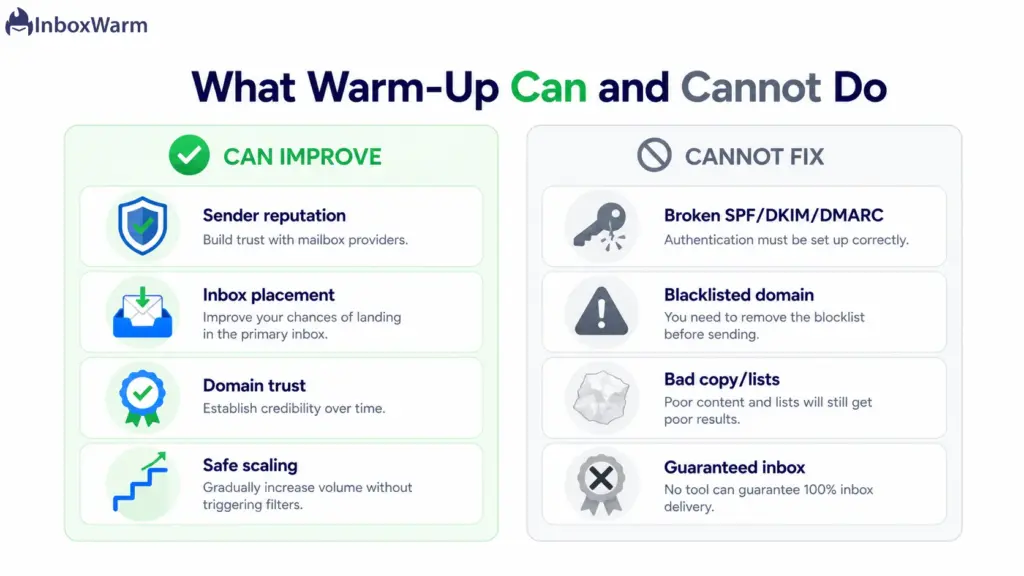
- Sender reputation: a steady history of low-complaint, well-engaged sending lifts how providers score your domain.
- Inbox placement: a better reputation means more mail in the primary inbox and less in spam or Promotions.
- Domain trust: a new domain or subdomain proves it behaves like a legitimate sender, not a disposable one.
- Engagement signals: positive interactions during warm-up create the buffer that absorbs the occasional cold-prospect complaint.
- Safe volume scaling: gradual increases let you reach campaign volume without tripping the spike detectors.
This is the core promise behind the tool itself: InboxWarm.ai is an AI-powered email warm-up tool that improves inbox placement and sender reputation by automating the consistent volume and engagement that providers reward.
What Email Warm-Up Cannot Do
This is where honest expectations matter. Warm-up builds reputation. It does not repair broken infrastructure or rescue bad sending habits. If any of the following are true, fix them first, because no amount of warm-up will compensate.
- Fix broken SPF, DKIM, or DMARC: authentication has to pass before warm-up means anything. DNS changes mid-warm-up can even reset verification.
- Repair a blacklisted domain overnight: a domain that is already burned can take weeks to recover, and warm-up is not a reset button.
- Improve poor email copy: spammy, misleading, or image-heavy content trips filters regardless of reputation.
- Fix bad prospect lists: scraped or stale lists full of invalid addresses and spam traps damage reputation faster than warm-up can build it.
- Guarantee inbox placement: no tool can promise the inbox. Providers make the final call based on dozens of live signals.
Before warming anything, confirm your records pass with an SPF checker, DKIM checker, and DMARC checker. Warming up on a broken foundation just wastes the clock.
When Does Email Warm-Up Make the Biggest Difference?
Warm-up pays off most when reputation is low, volume is rising, or recipients have not opted in. These are the situations where the trust buffer is the difference between the inbox and the spam folder.
- New domains: zero history means everything has to be earned. This is the highest-impact case.
- New inboxes and subdomains: each subdomain starts cold and needs its own warm-up, even if the root domain is years old.
- Cold outreach: unsolicited mail draws lower engagement, so the positive buffer warm-up creates is non-negotiable.
- Agencies scaling: managing many client domains makes manual warm-up unworkable and automation essential.
- Sales and SDR teams: multiple sending inboxes per rep all need consistent reputation to keep replies flowing.
- High-volume senders: scaling toward thousands of sends per day without a ramp is the fastest way to get throttled.
Provider-specific ramps help here too. The trust curve differs across Gmail warm-up, Outlook warm-up, and SMTP warm-up, so matching the schedule to the mailbox provider improves results.
How Long Does Email Warm-Up Take Before You See Results?
A new inbox on an existing domain typically needs two to three weeks of warm-up before light sending, and a new inbox on a brand-new domain needs longer because you are building domain reputation at the same time. Microsoft puts full ramp-up at four to eight weeks for maximum email deliverability.
There is no universal timer; the timeline of warm-up depends on your target volume and your engagement quality.
A Realistic Ramp Schedule
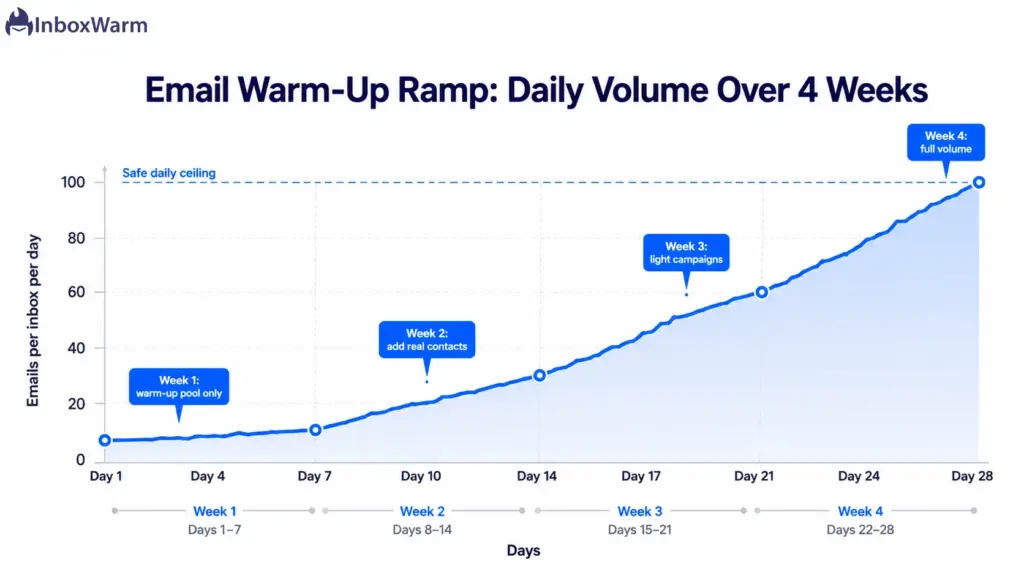
Most successful warm-ups follow a gradual curve. The numbers below are a common starting framework, not a rule, and you should slow down the moment metrics dip.
- Week 1: start at roughly 5 to 10 sends per inbox per day to recipients who will definitely engage.
- Week 2: build toward 25 to 50 per day, never increasing volume by more than about double in a single day.
- Weeks 3 to 4: scale to 50 to 100 per day while watching opens, replies, and bounces closely.
- Ongoing: hold a per-inbox ceiling near 30 to 50 cold sends per day and add inboxes to grow, rather than overloading one.
Why Consistency Matters More Than Speed
Mailbox providers reward predictable patterns. Sending 10 on Monday and 200 on Tuesday flags the spike and can set you back further than not warming at all. Gaps look unnatural too, so warm-up should run every day, weekends included. If open rates drop sharply or a single spam complaint appears, pause for a day or two, diagnose, and resume at a lower volume. One impatient week really can undo weeks of careful reputation building.
Best Practices to Get Real Results From Email Warm-Up
Warm-up rewards discipline. These practices come straight from how providers say they evaluate senders, and they are what turn a warm-up program into actual inbox placement.
Authenticate Before You Warm Up
Set up and verify SPF, DKIM, and DMARC first. Without passing email authentication, warm-up is far less effective, and bulk mail can be rejected outright. Generate clean records with an SPF generator and DMARC generator, then confirm they resolve before day one.
Increase Volume Slowly
Follow a strict ramp and never more than roughly double in a day, even when engagement looks great. Sudden spikes are the single most common cause of spam placement.
Keep Engagement High
Send early warm-up mail to recipients who open and reply, and mix real human engagement with any pool-based tool. Pool-only networks have known limits, so genuine interaction strengthens the signal.
Monitor Reputation Continuously
Watch Google Postmaster Tools v2, which now reports a binary compliance status of “Pass” or “Fail” across authentication, unsubscribe, and spam rate. A failure needs immediate action. Use Microsoft SNDS for Outlook and run seed-based placement tests to see where mail actually lands.
Do Not Stop Warming Up Too Early
Keep a low level of warm-up running even after campaigns start. Ongoing positive engagement cushions reputation against the nonresponses cold outbound naturally generates. Killing warm-up the moment you go live is a common reason reputations slip after a strong start.
Email Warm-Up vs. Manual Reputation Building
You can build a reputation by hand, coordinating contacts, sending on a schedule, and tracking engagement yourself. It works, but it is slow, fragile, and hard to scale past a handful of inboxes. Automation does the same job with consistency a human cannot match across many domains. Here is the honest comparison.
| Factor | Manual Reputation Building | Automated Warm-Up |
|---|---|---|
| Speed | Slow and labor-heavy | Faster, runs daily on autopilot |
| Effort | Hours per day coordinating sends | Set once, monitored lightly |
| Consistency | Easy to miss days, breaks cadence | Steady 7-day cadence by default |
| Engagement | Depends on willing contacts | Pool plus real engagement signals |
| Scale | Hard past a few inboxes | Scales across many domains |
| Monitoring | Manual, often guesswork | Built-in reputation tracking |
This is the gap that automated email warm-up closes.
Frequently Asked Questions
Is email warm-up necessary?
It is necessary for new domains, new inboxes, and cold outreach, where there is little or no reputation to lean on. It is far less necessary for low-volume, opted-in mail on an established, healthy domain. Match the effort to the risk: the colder the audience and the newer the domain, the more warm-up matters.
How long should I warm up an email?
Plan for two to three weeks before light sending on an existing domain, and four to eight weeks for full volume on a brand-new domain, which is the range Microsoft cites for maximum deliverability. The exact timeline depends on your target volume and engagement quality. Slow down any time metrics dip rather than racing the calendar.
Can warm-up improve sender reputation?
Yes, improving sender reputation is the main thing warm-up does. A consistent history of low-complaint, well-engaged sending raises how Gmail and Outlook score your domain. Reputation is the largest single factor in placement, with strong senders often near 92% inbox placement versus under 50% for poor ones.
Can email warm-up stop emails from going to spam?
It reduces spam placement, but it cannot guarantee the inbox. Warm-up addresses the reputation side of filtering, yet providers also weigh content, list quality, and complaints. Even fully authenticated mail can still hit spam-placement rates above 30% in independent testing, so warm-up lowers the odds rather than eliminating them.
Does Google recommend email warm-up?
Google does not use the term "warm-up," but its email sender guidelines recommend the same behavior: avoid sudden volume spikes, ramp gradually, and monitor reputation as you scale. It warns that immediately doubling volume can cause rate limiting or reputation drops. In practice, that is an endorsement of warming up.
Is email warm-up useful for cold emails?
Very. Cold email draws lower engagement and more complaints than opted-in mail, so a trust buffer is essential. Warm-up builds a cushion of positive interactions that lets your domain absorb the occasional cold-prospect complaint without being filtered. Keep a low level of warm-up running alongside live cold campaigns.
Can I stop warming up after launch?
Not entirely. Stopping warm-up the moment campaigns go live is a common reason reputations slip after a strong start. A low level of ongoing warm-up maintains your engagement signals and offsets the non-responses cold outreach generates. Keep it running in the background as a maintenance layer.
Does warm-up work without SPF, DKIM, and DMARC?
No, not reliably. Authentication is the foundation warm-up builds on, and bulk senders without it can be rejected outright. Set up and verify SPF, DKIM, and DMARC before you start, and avoid changing those DNS records mid-warm-up, since changes can reset authentication verification.
Final Verdict: Is Email Warm-Up Worth It?
Email warm-up is worth it for the senders who need it and a waste of effort for those who do not. If you are launching a new domain, scaling cold outreach, or spinning up sending inboxes for a sales team, warm-up is the difference between landing in the inbox and quietly dying in spam. The data backs this up: providers reward consistent volume and real engagement, and warm-up manufactures both at a scale manual effort cannot match.
What warm-up will not do is rescue a broken setup. Fix authentication, clean your lists, and sharpen your copy first. Done on a sound foundation, warm-up measurably lifts sender reputation and inbox placement over four to eight weeks. The honest answer to whether email warm-up actually works is yes, with the caveat that it is one layer of deliverability, not the whole stack.
If your domain is new or your reputation is shaky, start warming before you send a single real campaign, then keep a light warm-up running as maintenance. Reputation is slow to build and fast to lose, and the senders who respect that timeline are the ones whose mail keeps reaching the inbox.
Tired of watching cold emails land in spam on a domain you paid to build?
InboxWarm.ai automates the consistent volume and real engagement that mailbox providers reward, so your sender reputation and inbox placement climb on autopilot.