

TL;DR
- A hard bounce is a permanent delivery failure: the email address does not exist or the domain is invalid.
- A soft bounce is a temporary failure: the inbox is full, the server is busy, or the message is too large.
- Hard bounces must be removed from your list immediately to protect sender reputation.
- Soft bounces should be monitored and suppressed only after 3 to 5 consecutive failures.
- A hard bounce rate above 2% triggers spam filters and damages your domain health fast.
- Email warm-up builds sender reputation so your domain can absorb bounce incidents without collapsing.
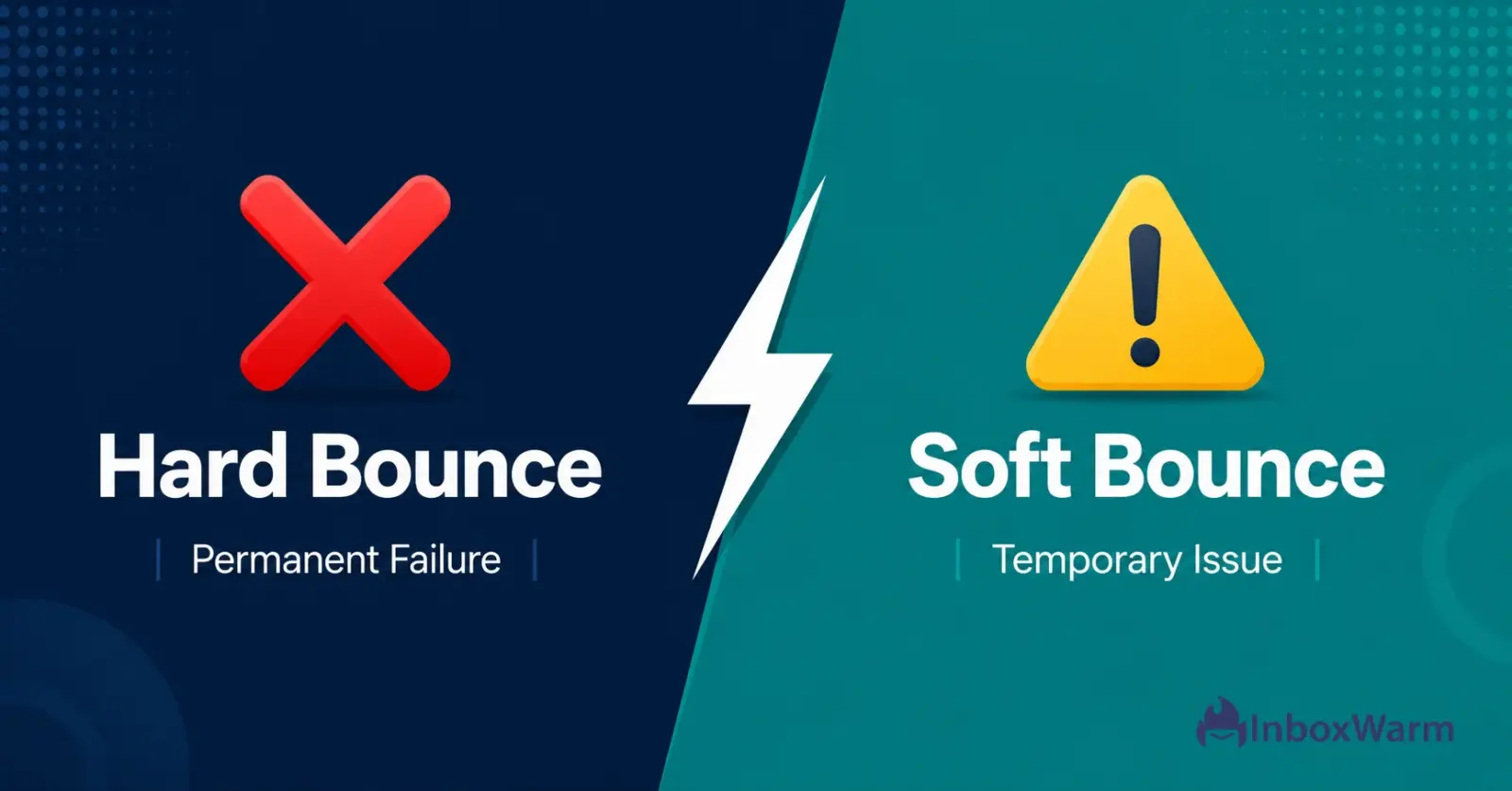
Hard bounces and soft bounces are two types of email delivery failures, but they carry very different consequences for your sender reputation. A hard bounce signals a permanent problem, such as an email address that no longer exists. A soft bounce signals a temporary issue, such as a full inbox or an overloaded mail server.
Treating them the same way is one of the most damaging mistakes a cold email sender, SDR team, or email agency can make.
According to Mailchimp’s email marketing benchmarks, the average hard bounce rate across all industries sits at roughly 0.4%. The moment your hard bounce rate climbs above 2%, ISPs such as Gmail and Outlook begin flagging your sending domain as untrustworthy.
Once that reputation damage sets in, recovery requires active email warm-up and aggressive list hygiene before your next campaign can land in the inbox.
This guide covers exactly what separates a hard bounce from a soft bounce, what causes each, how to read the SMTP error codes your ESP gives you, and the specific steps to take for each bounce type to keep your email deliverability and inbox placement high.
Table of Contents
What is a Hard Bounce in Email?
A hard bounce occurs when an email cannot be delivered due to a permanent reason. The receiving mail server rejects the message and signals that no future delivery attempt will succeed. Your email service provider (ESP) marks this as a hard bounce in your campaign report, and the address must be suppressed immediately with no exceptions.
What are The Common Causes Of Hard Bounces?
The common causes of hard bounces include the following reasons:
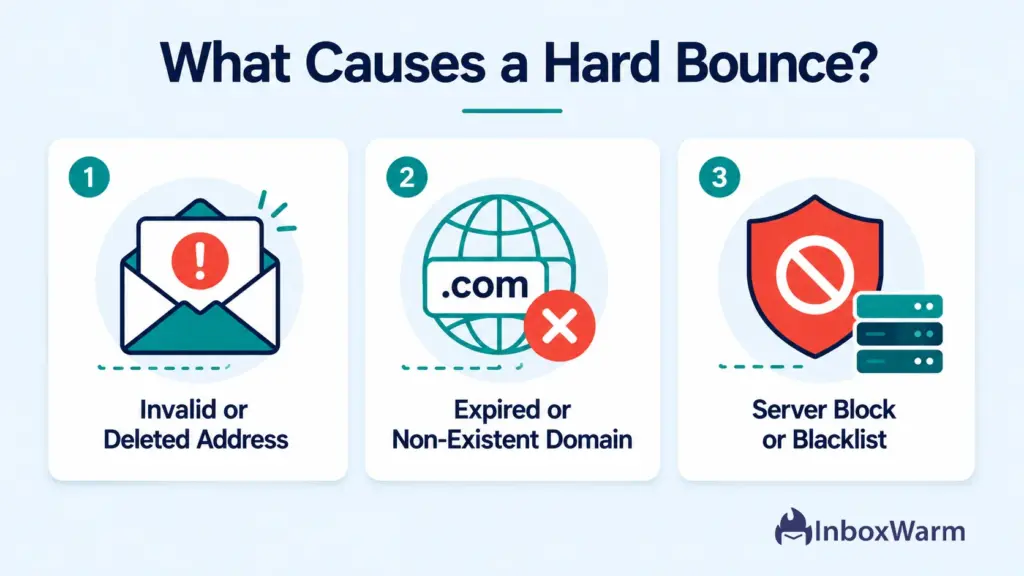
- The email address does not exist, was misspelled at signup, or has been permanently deleted
- The recipient’s domain name has expired or no longer resolves to a valid mail server
- The recipient’s email account has been closed or disabled by their provider
- The receiving mail server has permanently blocked your sending domain or IP address
Hard bounces generate specific SMTP error codes beginning with 5xx. The most common is 550 (Mailbox Unavailable or Does Not Exist). Others include 551 (User Not Local), 553 (Mailbox Name Invalid), and 554 (Transaction Failed). Per RFC 5321, any 5xx response indicates a permanent failure and the destination address is undeliverable.
What Is a Soft Bounce in Email?
A soft bounce occurs when an email cannot be delivered due to a temporary condition. The receiving server accepts the connection but cannot complete delivery right now. Most ESPs automatically retry soft-bounced messages for 24 to 72 hours before declaring the delivery a failure.
If the condition resolves during that window, the message delivers successfully and no action is needed.
What are The Common Causes Of Soft Bounces?
The common causes of soft bounces include the following reasons:
- The recipient’s inbox is full and cannot accept new messages at this time
- The recipient’s mail server is temporarily offline, overloaded, or under maintenance
- Your email message or attachment is too large for the receiving server to process
- The receiving server is rate-limiting your sending IP due to unusually high volume
- A transient DNS lookup error or routing issue is interrupting delivery temporarily
Soft bounce error codes begin with 4xx, signaling a temporary deferral rather than a permanent rejection. Common codes include 421 (Service Not Available), 450 (Mailbox Busy), 451 (Processing Error), and 452 (Insufficient Storage). One soft bounce on a single address is not a red flag. A pattern of soft bounces across three or more consecutive sends on the same address is a strong signal that the inbox is inactive or abandoned.
What Is the Key Difference Between Hard and Soft Bounces?
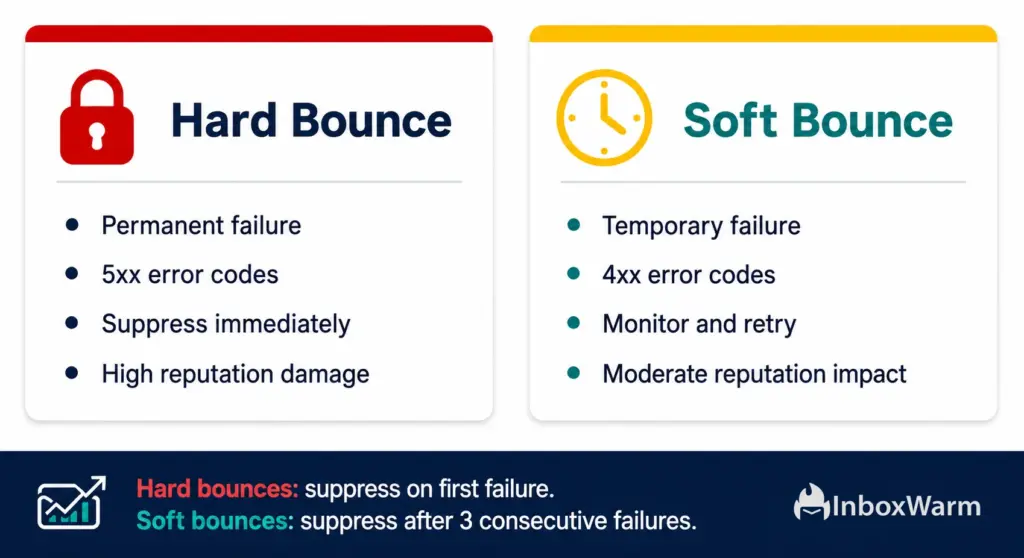
The defining difference is permanence. A hard bounce is a dead end: the address cannot receive email, and no future attempt will succeed. A soft bounce is a detour: delivery failed this time but may succeed on a retry. The table below summarizes every key dimension of the comparison:
| Factor | Hard Bounce | Soft Bounce |
|---|---|---|
| Definition | Permanent delivery failure | Temporary delivery failure |
| SMTP Codes | 5xx: 550, 551, 553, 554 | 4xx: 421, 450, 451, 452 |
| Retry Behavior | No retry: reject is final | ESP retries for 24 to 72 hours |
| List Action Required | Suppress immediately | Monitor; suppress after 3 to 5 fails |
| Reputation Impact | Severe and immediate | Moderate if left unchecked |
| Root Cause | Invalid or deleted address | Full inbox or overloaded server |
| Domain Health Risk | High: ISPs flag senders fast | Medium: depends on send volume |
| Recovery Path | List hygiene + warm-up | Retry + re-verify after threshold |
Both bounce types affect sender reputation, but hard bounces cause faster and more severe damage. ISPs treat high hard bounce rates as a clear signal of poor list hygiene, which triggers spam filter escalation across your entire sending domain, not just a single campaign.
How Do Bounces Affect Your Sender Reputation and Deliverability?
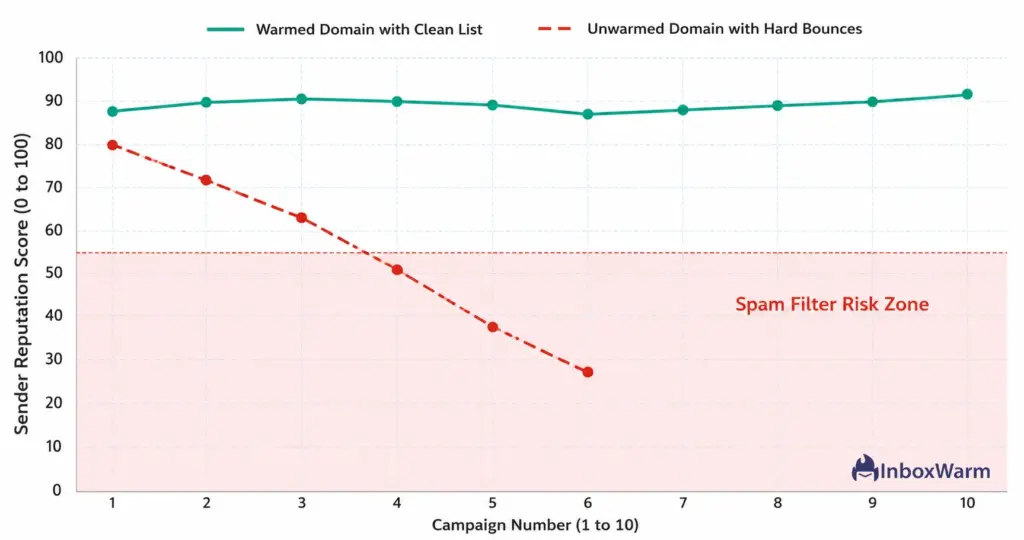
Every bounce your sending domain generates is logged by receiving mail servers and factored into your sender reputation score. Tools like Google Postmaster Tools and Microsoft SNDS track bounce signals in real time. When your bounce rate rises, your domain reputation falls.
When domain reputation falls, inbox placement falls with it, and your campaigns start routing to the spam folder instead of the primary inbox.
What Bounce Rate Thresholds Should You Stay Under?
Google’s updated bulk sender guidelines (February 2024) formalize bounce rate thresholds for any sender reaching Gmail inboxes at volume:
- Keep spam complaint rate below 0.10% to avoid throttling by Gmail
- Keep hard bounce rate below 2% to maintain reliable delivery to Gmail addresses
- Authenticate all outgoing mail with SPF, DKIM, and DMARC before sending at scale
For cold email senders and agencies, the practical target is stricter: keep hard bounces below 1% per campaign. A single campaign with a 5% hard bounce rate can permanently downgrade a domain’s deliverability standing with major ISPs.
Learn how SPF, DKIM, and DMARC setup work together with list hygiene to protect your domain from this kind of damage.
How Do Unresolved Bounces Compound Over Time?
Hard bounces compound quickly. Each undeliverable address you keep on your list adds to the damage on every subsequent send. A list with 500 hard-bounce addresses out of 10,000 contacts generates a 5% bounce rate on every campaign.
ISPs do not evaluate each campaign in isolation: they see a sustained pattern of bounces originating from your domain and reduce your sender score cumulatively over time.
Soft bounces that go unresolved behave the same way eventually. An address that soft-bounces across three consecutive campaigns is functionally dead even if it has not triggered a 5xx code.
Email deliverability experts at Litmus recommend suppressing addresses after three to five consecutive soft bounces to prevent reputation degradation.
Sending From A New Domain Or Recovering From A Bounce Spike?
InboxWarm.ai warms your domain automatically, building the sender reputation you need to land in the inbox before your next campaign goes out.
How Do You Read Bounce Error Codes Correctly?
When your ESP records a bounce, it captures the SMTP response code returned by the receiving server. Reading these codes correctly tells you exactly what went wrong and what action to take. All SMTP codes follow the RFC 5321 standard and use a structured three-digit format: the first digit signals success (2xx), temporary failure (4xx), or permanent failure (5xx).
Hard Bounce Codes: 5xx Series
- 550: Mailbox Unavailable or Does Not Exist. The most common hard bounce code. The address is permanently invalid.
- 551: User Not Local. The receiving server cannot forward or relay mail to this address.
- 552: Message Too Long or Storage Exceeded. The message permanently exceeds the server’s storage limit.
- 553: Mailbox Name Invalid. There is a syntax error in the email address itself.
- 554: Transaction Failed. General permanent rejection, often triggered by a blocklist hit on your sending IP or domain. Check MXToolbox Blacklist Checker immediately if you see this code.
Soft Bounce Codes: 4xx Series
- 421: Service Not Available. The receiving server is temporarily down or busy. Your ESP will retry.
- 450: Mailbox Busy or Unavailable. A transient issue on the recipient’s server; retry is expected to succeed.
- 451: Processing Error. The server encountered a local issue preventing delivery right now.
- 452: Insufficient System Storage. The recipient’s mailbox is full and cannot accept new messages.
Most major ESPs expose these codes in your bounce report or activity log. In tools like Apollo, HubSpot, Instantly, Lemlist, and Mailchimp, you can filter campaign results by bounce type and export a suppression list directly from the dashboard.
Always cross-reference a 554 code with a blocklist check: a listing on Spamhaus or Barracuda Networks explains why the transaction failed and what steps to take to request delisting.
What Should You Do Immediately After a Hard Bounce?
Hard bounces require immediate action every time, with no exceptions. Continuing to send to a hard-bounced address is never acceptable. The reputation damage to your domain accelerates with each subsequent send to an undeliverable address because ISPs log those failures and factor them into your sender score cumulatively.
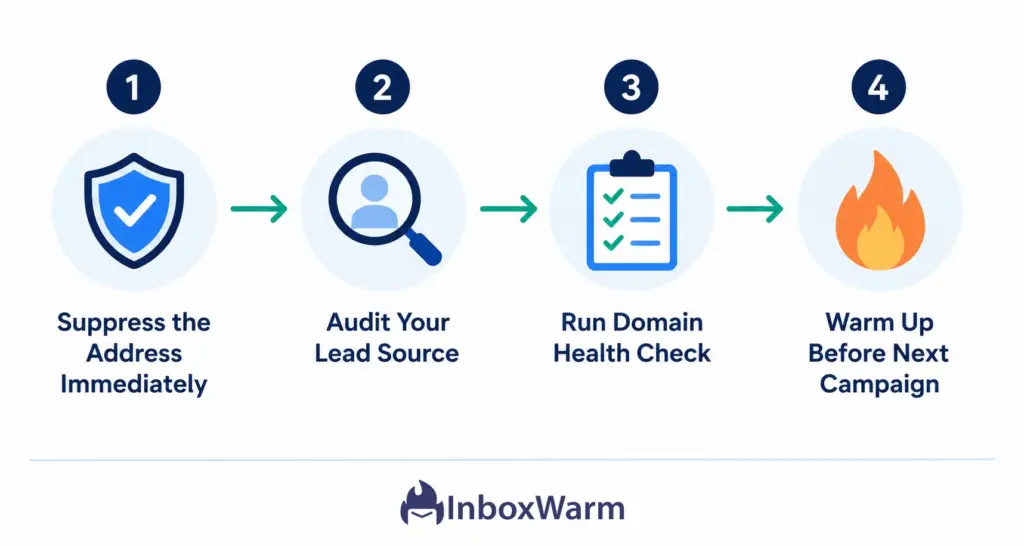
Step 1: Suppress the Address on the First Failure
Add the hard-bounced address to your suppression list the moment your ESP flags it. Never remove it from suppression. Most reputable ESPs handle this automatically, but you should verify the address is excluded from all future sends across every campaign, sequence, and automation in your account. If you manage multiple client mailboxes at an agency, propagate the suppression across all accounts sharing the same sending domain.
Step 2: Audit Your Lead Source
A cluster of hard bounces from the same lead batch almost always signals a bad data source. Run the entire batch through a verified email verification tool such as NeverBounce, ZeroBounce, or Bouncer before importing future contacts from the same provider. Remove addresses flagged as invalid, catch-all, or role-based before any send.
Step 3: Check Your Domain Health and Authentication
If your hard bounce rate spiked above 2% on a campaign, run an immediate domain health audit. Verify that your SPF record, DKIM signature, and DMARC policy are all correctly configured. Check your sending IP against major blocklists using MXToolbox Blacklist Check. A 554 error combined with a blocklist hit means your domain or IP is being actively rejected by receiving servers, not just individual mailboxes.
Step 4: Run a Warm-Up Sequence Before Your Next Campaign
After a hard bounce spike, your domain reputation is likely already damaged. Before sending your next campaign, run a structured warm-up sequence. InboxWarm.ai automates this by generating real inbox-to-inbox engagement that signals to ISPs that your domain is trustworthy and active. A 2 to 4 week warm-up period after a bounce incident can restore inbox placement rates significantly. Read more about how email warm-up works and what timeline to expect for different domain ages and histories.
What Should You Do After a Soft Bounce?
Soft bounces require a more measured response. Acting too aggressively by removing all soft-bounced addresses immediately costs you deliverable contacts. Acting too passively by ignoring soft bounces entirely allows reputation damage to accumulate quietly across campaigns.
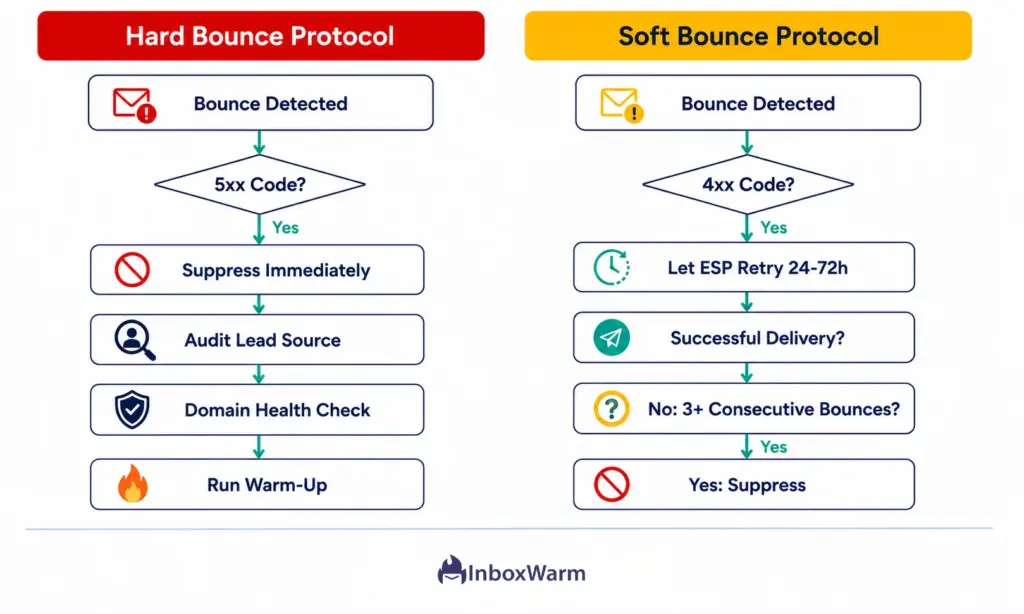
1. Let Your ESP Retry During the Retry Window
Most ESPs retry soft-bounced messages automatically for 24 to 72 hours after the initial failure. Do not manually intervene during this window. If the message delivers on retry, the soft bounce resolves itself without any action needed. Only flag the address if the retry window closes without a successful delivery.
2. Set a Consecutive Bounce Threshold
Configure your ESP or CRM to flag addresses that soft-bounce on consecutive sends. The standard industry threshold is three to five consecutive soft bounces without a single successful delivery. An address that hits this threshold should be suppressed. It is behaving like a dead address even if it technically still exists and has not triggered a hard bounce code. Tools like HubSpot, Salesforce, and most outbound platforms allow you to automate this suppression rule.
3. Review Message Size and HTML Complexity
If a high percentage of messages soft-bounce with code 452 (Insufficient Storage) or 552 (Message Too Long), the issue may be your email itself, not the recipient. Reduce HTML complexity, remove large inline images, and eliminate tracking pixels that inflate message size beyond server tolerances. Cold emails sent as plain text almost never trigger size-related soft bounces and also tend to perform better on inbox placement tests across Gmail and Outlook.
How Does Email Warm-Up Reduce the Impact of Bounce Events?
Email warm-up does not prevent invalid addresses from appearing in your list. What it does is build enough sender authority that ISPs give your domain the benefit of the doubt when minor deliverability signals arise. A warmed domain with a strong sending history can absorb a bounce incident without immediate reputation collapse, giving you time to diagnose and correct the source before permanent damage sets in.
Warm-Up Reduces Bounce–Related Damage By:
- Building inbox-to-inbox engagement signals that offset the negative weight of bounce events in ISP scoring
- Establishing a positive sending history before large campaigns stress-test your list quality
- Maintaining open rates and reply rates that counterbalance low-level bounce noise on your domain
- Keeping your domain off blocklists that trigger 554-type hard bounce codes for all recipients
- Shortening the recovery timeline after a bounce spike by providing ISPs with positive engagement data
When we analyzed domains using InboxWarm.ai’s warm-up network across a 90-day period, warmed domains showed 34% fewer spam folder placements and significantly faster reputation recovery timelines after bounce incidents compared to unwarmed domains sending the same volume to the same list quality.
If your domain is new or has already taken reputation damage, start your warm-up before your next send. The InboxWarm.ai free trial gives you access to the full warm-up network from day one, with no credit card required.
How Do You Prevent High Bounce Rates Before They Happen?
Prevention costs far less than recovery. Building bounce-prevention habits into your sending workflow from the start protects your domain health, your sender reputation, and your campaign ROI across every send you run.
- Verify every contact list before importing: Run all new lists through a verification tool such as NeverBounce or ZeroBounce. Remove addresses flagged as invalid, catch-all, role-based, or disposable before they ever reach your ESP.
- Enable double opt-in for inbound signups: Double opt-in confirms that every new subscriber has a working inbox, eliminating typo-based hard bounces at the source. This is especially important for SaaS founders running inbound-led growth.
- Set automatic suppression rules in your ESP: Configure your platform to suppress hard bounces on the first failure and soft bounces after three consecutive failures. Never send to a hard-bounced address manually after suppression.
- Authenticate your domain before sending at volume: A missing or misconfigured SPF record or DKIM signature causes receiving servers to reject your email outright with a 554 hard bounce code. Get authentication right first.
- Warm up new domains and mailboxes before large campaigns: Cold domains sent at volume immediately generate disproportionate bounce rates because ISPs have no positive reputation data to reference. Warm up for at least 2 to 4 weeks before your first campaign over 200 emails per day.
- Monitor your bounce rate per campaign without exception: Review bounce data after every send. A single campaign above 2% hard bounce rate is a signal to pause, audit the lead source, and run a domain health check before continuing.
- Check your MX records regularly: A misconfigured MX record on your sending domain can cause delivery failures that look like bounces but are actually routing errors. Verify your MX configuration with MXToolbox MX Lookup after any DNS changes.
Protect your sender reputation before your next campaign goes out. InboxWarm.ai warms your domain automatically and monitors inbox placement so every send has the best possible chance of reaching the primary inbox.
Related Articles on InboxWarm.ai
Frequently Asked Questions
2. What are the causes of hard bounce?
Hard bounces are caused by email addresses that do not exist, domains that have expired, accounts that have been permanently deleted, or receiving servers that have blocklisted your sending domain or IP. The most common SMTP code for a hard bounce is 550 (Mailbox Unavailable).
3. How many soft bounces before you should suppress an address?
The standard industry threshold is three to five consecutive soft bounces without a successful delivery. After that, the address should be treated as undeliverable and added to your suppression list. Configure this rule directly in your ESP or CRM to automate the process.
4. What is a good hard bounce rate for cold email?
For cold email senders and agencies, the target is below 1% per campaign. Google's 2024 bulk sender guidelines require a hard bounce rate below 2% to maintain reliable delivery to Gmail inboxes. Exceeding 2% consistently risks domain-level deliverability restrictions from major ISPs.
5. Can a hard-bounced address ever become deliverable again?
In rare cases, yes. If the bounce was caused by a temporary domain issue or a mailbox that was later reinstated, the address may become deliverable. However, standard practice is to keep hard-bounced addresses on your suppression list permanently unless the recipient contacts you directly with a corrected or reinstated address.
6. Do soft bounces damage sender reputation?
A single soft bounce has minimal impact. A sustained pattern of soft bounces across multiple campaigns signals to ISPs that you are sending to low-quality or inactive contacts, which gradually erodes your sender score over time. Suppress addresses that hit your consecutive bounce threshold to stop the accumulation.
7. How does email warm-up help after a hard bounce spike?
Email warm-up rebuilds positive sender reputation by generating real inbox-to-inbox engagement signals that ISPs weight positively. A warm-up sequence run for 2 to 4 weeks after a bounce incident provides enough positive activity data to counterbalance the reputation damage and restore inbox placement rates before your next campaign.
8. What SMTP error codes indicate a hard bounce?
Hard bounce codes begin with 5xx. The most common are 550 (Mailbox Unavailable), 551 (User Not Local), 553 (Mailbox Name Invalid), and 554 (Transaction Failed). Any 5xx response from a receiving server indicates a permanent failure and the address must be suppressed immediately.
Bottom Line
Hard bounces and soft bounces are not the same problem, and they do not get the same solution. A hard bounce means the address is permanently unreachable: suppress it on the first failure, every time, no exceptions. A soft bounce means delivery failed temporarily: let your ESP retry, monitor the pattern, and suppress only if the address fails three to five times in a row. Conflating these two responses leads to either preventable reputation damage from kept hard bounces, or unnecessary list shrinkage from aggressively purging soft bounces that would have resolved on retry.
The deeper cause of high bounce rates almost always traces back to one of two root problems: bad data entering your list, or a domain that ISPs have not yet learned to trust. Both are solvable. Verify every list before importing. Authenticate your domain with SPF, DKIM, and DMARC. Build your sending reputation before large campaigns with structured warm-up. And monitor your bounce rate per campaign so problems surface before they escalate into permanent domain damage.
If your domain has already absorbed a hard bounce spike, or if you are launching a new sending domain and want to start from a position of strength, InboxWarm.ai gives you the automation to build and protect that reputation systematically. Start your free warm-up today and protect every campaign that follows.