
TL;DR
- A value proposition sales cold email explains why one product capability could matter to the recipient’s work.
- Connect one relevant requirement to one useful outcome. A feature list asks the reader to work out the value for themselves.
- Use a verified product capability, a demonstrable example, or approved customer evidence as your reason to believe.
- Describe potential value honestly. Do not invent time savings, revenue lifts, adoption speed, or customer results.
- Make a small request, such as permission to send an example, before asking the prospect to invest in a longer conversation.
- Choose a variation based on the recipient’s situation and measure relevant replies, not just opens.
Your product may automate tasks, connect systems, or bring information into one place. The prospect’s question is simpler: what would that change for my team? A value proposition sales cold email answers that question without asking the reader to translate a list of features into a business case.
Use this guide to connect a real product capability to a relevant outcome, show a credible reason to consider it, and make an easy first request. You’ll find a main template, five variations, subject lines, a filled-in example, and follow-ups that keep the conversation focused.
Table of Contents
The Value Proposition Sales Cold Email Template
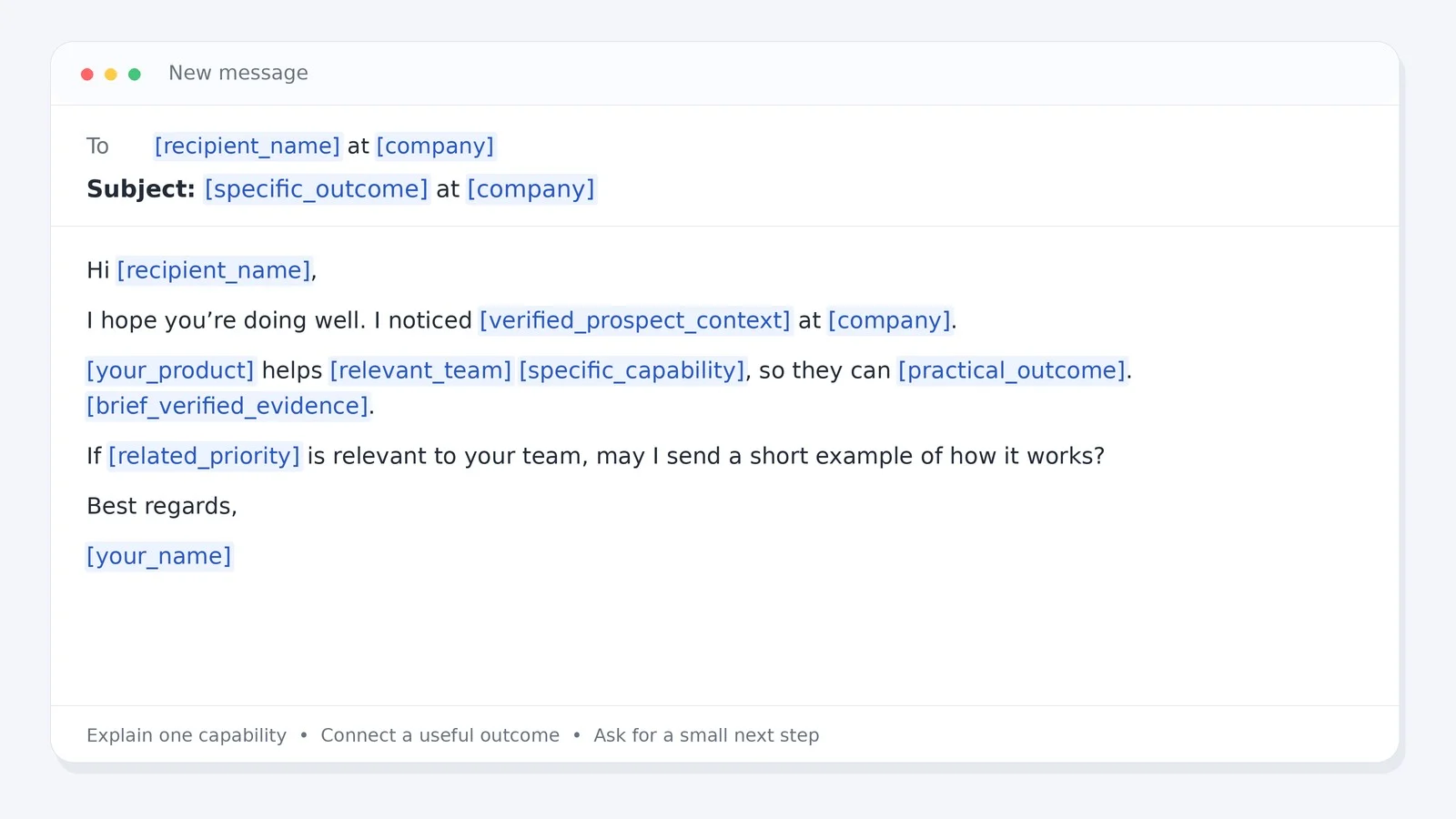
Build the message around four parts: a relevant context, one capability, the practical outcome it supports, and a small next step. Leave secondary features for a later conversation.
The capability explains what the product actually does. The outcome explains why the reader might care. The evidence can be an approved customer result, a documented workflow, or a feature you can demonstrate. If you cannot support an evidence statement, remove it rather than filling the space with a claim.
What Is the Difference Between a Feature and a Value Proposition?
A feature describes the product. A value proposition connects that feature to a job the recipient needs to do. It becomes more credible when the email explains how the capability supports the outcome.
| Feature Statement | Practical Value | What to Verify |
|---|---|---|
| Scheduled report exports | The team can prepare recurring reports without rebuilding the same export each time. | Supported report types, scheduling options, and plan limits. |
| Shared approval workspace | Reviewers can see the current version and the next approval step in one place. | Permissions, version history, and supported review workflows. |
| A supported CRM integration | The team can move specified information between tools with fewer manual handoffs. | Which fields sync, in which direction, and under what conditions. |
| Configurable customer alerts | The team can respond to defined events through a consistent process. | Trigger options, delivery channels, and any required setup. |
These are illustrative examples, not claims about InboxWarm or another particular product. Use only the capabilities your product currently supports. Avoid jumping from a feature to an unsupported promise such as “double revenue” or “save ten hours every week.”
Subject Lines That Fit a Value Proposition Email
Lead with a recognizable workflow or outcome. Keep the subject accurate to the message. Avoid a false reply prefix, a vague “quick question,” or a result your evidence cannot support.
| Subject Line | Best Fit |
|---|---|
| [specific_outcome] at [company] | The outcome is specific and relevant to the recipient’s role. |
| A simpler way to [specific_task] | You can demonstrate a real reduction in process complexity. |
| [specific_workflow], with fewer handoffs | The product genuinely removes or combines particular handoff steps. |
| An option for [verified_initiative] | The company has publicly announced the initiative. |
| Would a [use_case] example help? | You want a direct, permission-based request. |
When Should You Send This Template?
Use this format when you can explain a useful product–prospect connection without needing a long introduction. The recipient does not have to be actively shopping, but you should have a credible reason to believe the proposed outcome could matter to them.
- The work is relevant. The recipient owns or influences the workflow you are discussing.
- The context is grounded. A first-party announcement, role description, or direct conversation supports your opening.
- The capability is real. You can check it against current product documentation and demonstrate it under the relevant conditions.
- The outcome follows from the mechanism. You can explain what changes in the workflow without inventing a numeric result.
When Should You Not Use a Value Proposition Email?
Do not use a broad benefit to hide an unclear fit. “Grow faster,” “improve efficiency,” and “unlock potential” do not tell the reader what would change. If the same opening works for almost any role at any company, your message probably needs more research.
Avoid asserting that someone is wasting time, losing revenue, or using the wrong process without evidence. Turn uncertainty into a genuine question. If the product only helps under a particular plan, integration, or setup, keep that limitation in view.
A competitor switch email fits a verified comparison with an incumbent tool. A problem–solution email is useful when a specific, substantiated problem provides the opening. Here, the central job is explaining the value of one capability.
Value Proposition Email Templates for Different Outreach Situations
Choose the angle that matches what you know about the recipient. These five messages are alternatives for first contact, not a sequence. Each keeps the benefit narrow and asks for one next step.
1. Explain the Value of Removing a Manual Step
When to Use It: Use this when you can verify the workflow and identify a manual step your product actually supports replacing.
Personalization Tip: Name the step your product changes. Do not assume a fixed time saving or imply that every part of the workflow becomes automatic.
2. Connect Shared Visibility to a Role’s Responsibility
When to Use It: Use this when the recipient owns a workflow that benefits from a shared view of relevant information.
Personalization Tip: Be precise about the information included and the sources supported. A shared view is not automatically a complete source of truth.
3. Show the Value of a More Consistent Customer Process
When to Use It: Use this when a documented capability supports a specific customer-facing workflow.
Personalization Tip: Describe the process the capability supports. Do not promise higher satisfaction, retention, or revenue without relevant evidence.
4. Explain How a Capability Supports a Growing Workload
When to Use It: Use this after a verified change that may affect the team’s workload, such as expansion or a new service.
Personalization Tip: A growth announcement is a reason to ask about changing needs, not evidence that the team is struggling or must replace staff.
5. Explain the Value of Fitting Into Existing Tools
When to Use It: Use this when the prospect’s tool usage and your product’s supported integration are both confirmed.
Personalization Tip: Verify integration direction, supported data, setup, and plan requirements. Do not describe the rollout as effortless unless you can support that claim.
What It Looks Like Filled In
Fictional example for illustration: The names and scenario below demonstrate the email structure. They are not a customer case study, a verified product claim, or a promise of performance.
The example connects an imagined capability to a specific workflow change. It does not invent a customer result or estimate the hours saved. In real outreach, both the prospect context and the product capability must be accurate.
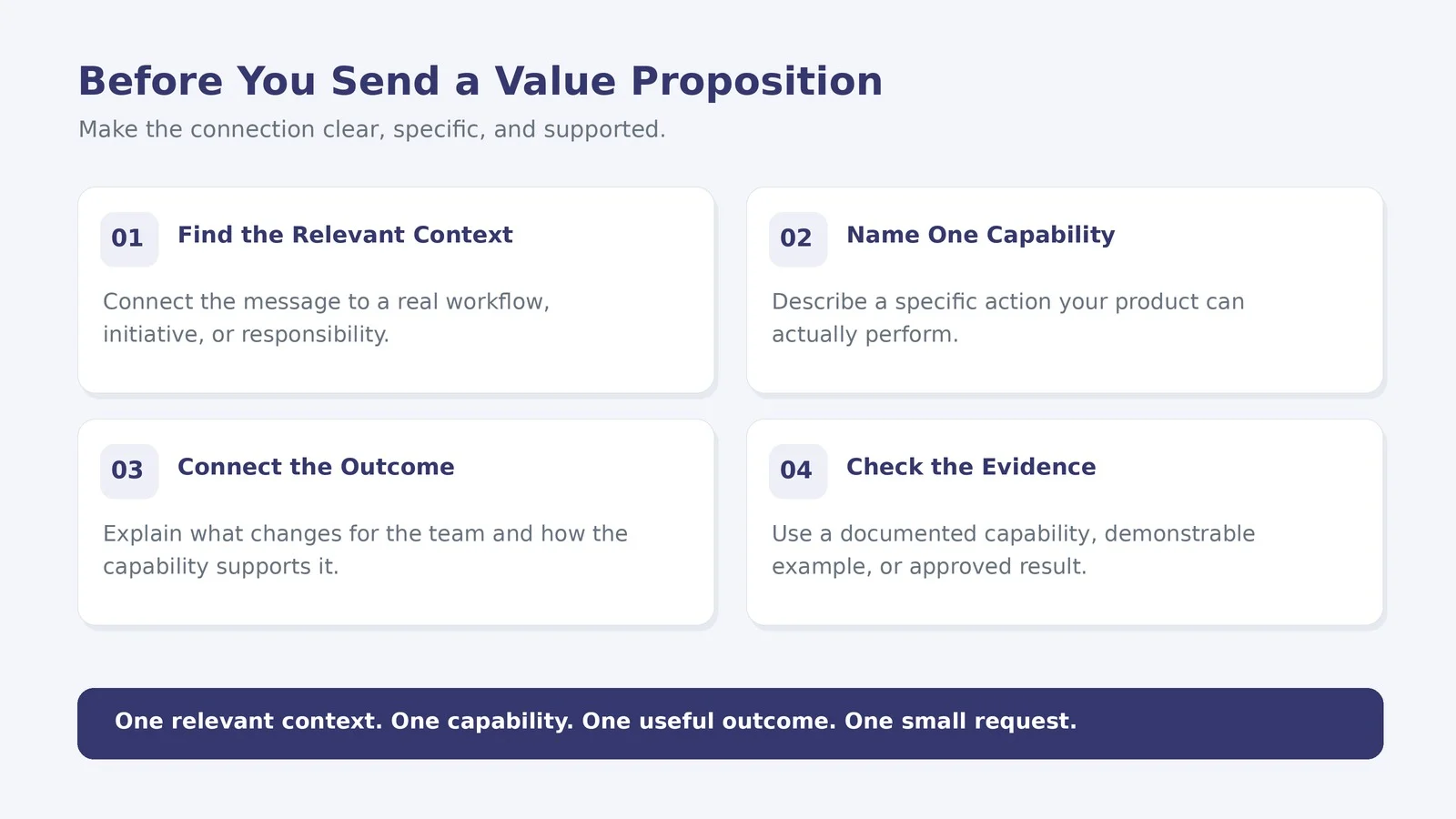
What to Personalize and Where to Find It
| Detail | What to Find | Where to Check |
|---|---|---|
| [verified_prospect_context] | A real workflow, initiative, or responsibility relevant to your offer. | The company’s website, announcements, interviews, or the recipient’s own posts. |
| [specific_capability] | The exact action your product can perform and the conditions required. | Current product documentation, a working demo, or your product team. |
| [practical_outcome] | What changes for the team when that capability is used. | A documented workflow, approved customer evidence, or a demonstrable process change. |
| [brief_verified_evidence] | A relevant, approved reason to believe the product can support the claim. | A published customer story, product documentation, or an accurate demonstration. |
| [related_priority] | The recipient’s likely interest, stated as a question if it is not confirmed. | First-party research or a direct conversation. |
Keep the source and date for material claims. Check that the evidence matches the plan, integration, and use case you are describing. A precise connection to the recipient’s work is more useful than a sentence of personal praise unrelated to the offer.
How to Write a Value Proposition That Sounds Credible
Start with a capability you can explain plainly. Then finish the sentence “so the team can…” with a practical change. If the outcome is still vague, name the task, information, or handoff affected.
For example, “automates reporting” leaves the reader guessing. “Schedules approved report exports so the team does not rebuild the same export each month” explains the mechanism. It still needs to be true, but it is specific enough for a prospect to judge.
Add one reason to believe when you have it. An approved customer result needs its measurement context. A documented capability needs its relevant conditions. If you have neither, offer an accurate demonstration rather than inventing proof. Keep the first message about one reason to care.
Will This Land in the Inbox?
Clear value helps a reader understand your message, but it does not guarantee delivery. Authentication, sending reputation, list quality, recipient expectations, and sending behaviour all affect inbox placement. Review your setup against Google’s email sender guidelines and your email provider’s requirements.
Keep the first email focused. Avoid misleading subject lines, unnecessary attachments, and multiple competing links. InboxWarm’s spam word checker and subject line tester can help review the copy; neither certifies delivery.
If you use email warmup, treat it as one part of your sending process. It does not replace authentication, relevant targeting, provider requirements, or monitoring. Do not increase sending volume solely because a warmup tool is connected.
How to Follow Up Without Repeating the Pitch
Use each follow-up to make the value easier to assess. You might first clarify the workflow, then share approved evidence or a limitation, and later close the loop. Space messages around the audience and context; a sample sequence is not a guaranteed formula.
Follow-Up 1: Make the Workflow Concrete
Follow-Up 2: Add a Useful Reason to Believe
Follow-Up 3: Close the Loop Respectfully
Use “Re:” only when replying within the original thread. Stop after a refusal or opt-out, and make it easy for recipients to decline further messages. A reply asking for an example should receive the example, not another pitch.
What Should You Measure?
Track positive replies, requests for examples, qualified conversations, useful objections, bounces, and opt-outs. Open rates alone do not tell you whether the recipient understood or valued the offer.
Compare messages across similar audiences and change one meaningful element at a time. If replies suggest the benefit is unclear, explain the mechanism more plainly. If people understand the offer but say it is not relevant, revisit targeting. If they ask about a missing capability, do not fix the objection with stronger wording than your product can support.
Frequently Asked Questions
What Is a Value Proposition Sales Cold Email?
It is a short outreach email that connects a specific product capability to a practical outcome relevant to the prospect. It explains why the reader might care and asks for a small next step.
How Is a Value Proposition Different From a Feature List?
A feature list describes what a product includes. A value proposition explains how one capability could change the recipient’s work. The connection should be specific enough to understand and accurate enough to demonstrate.
Should I Include a Customer Result in the Email?
Include one when it is approved, relevant, and documented. Preserve the scope and timeframe when they affect the meaning. If you do not have suitable customer evidence, use an accurate product example or offer a demonstration.
How Many Benefits Should I Mention?
These templates focus on one main benefit. A single relevant outcome is easier to assess than several unrelated promises. Additional capabilities can be discussed once the prospect shows interest.
What If I Do Not Know the Prospect’s Main Priority?
Use first-party research to identify a relevant context and ask whether the outcome matters. Avoid presenting an unconfirmed priority as something you know about the team.
What Is a Good Call to Action for This Email?
Ask permission to send a short example, workflow explanation, or walkthrough. Make the request match the recipient’s level of interest instead of immediately asking for a long meeting.
Check Your Sending Setup Before Your Next Sales Campaign
Pair a relevant value proposition with a sound sending setup. Review your domain’s email configuration alongside your targeting and message before increasing outreach.