
TL;DR
- A competitor switch cold email gives someone using another product a specific reason to consider an alternative.
- Confirm the current tool and a relevant switching trigger before you write. Tool usage alone does not prove dissatisfaction.
- Compare one workflow or outcome, acknowledge the effort of switching, and ask permission to share a short comparison.
- Use verified product facts and approved customer evidence. Never invent savings, migration promises, renewal dates, or competitor weaknesses.
- Choose one of the five variations below for cost, feature fit, migration concerns, renewal planning, or changing team needs.
- Keep follow-ups useful and stop after a refusal or opt-out. A suggested cadence is a starting point to test, not a performance guarantee.
Your prospect already has a tool. They have a process around it, people trained to use it, and a reason they chose it. A competitor switch cold email needs to respect that investment before it can earn attention for an alternative.
Use this guide when you can verify which product a company uses and explain one relevant difference your product offers. Below, you’ll find a copy-ready template, five situation-specific variations, a filled-in example, and follow-ups that address the practical work of changing tools.
Table of Contents
The Competitor Switch Cold Email Template
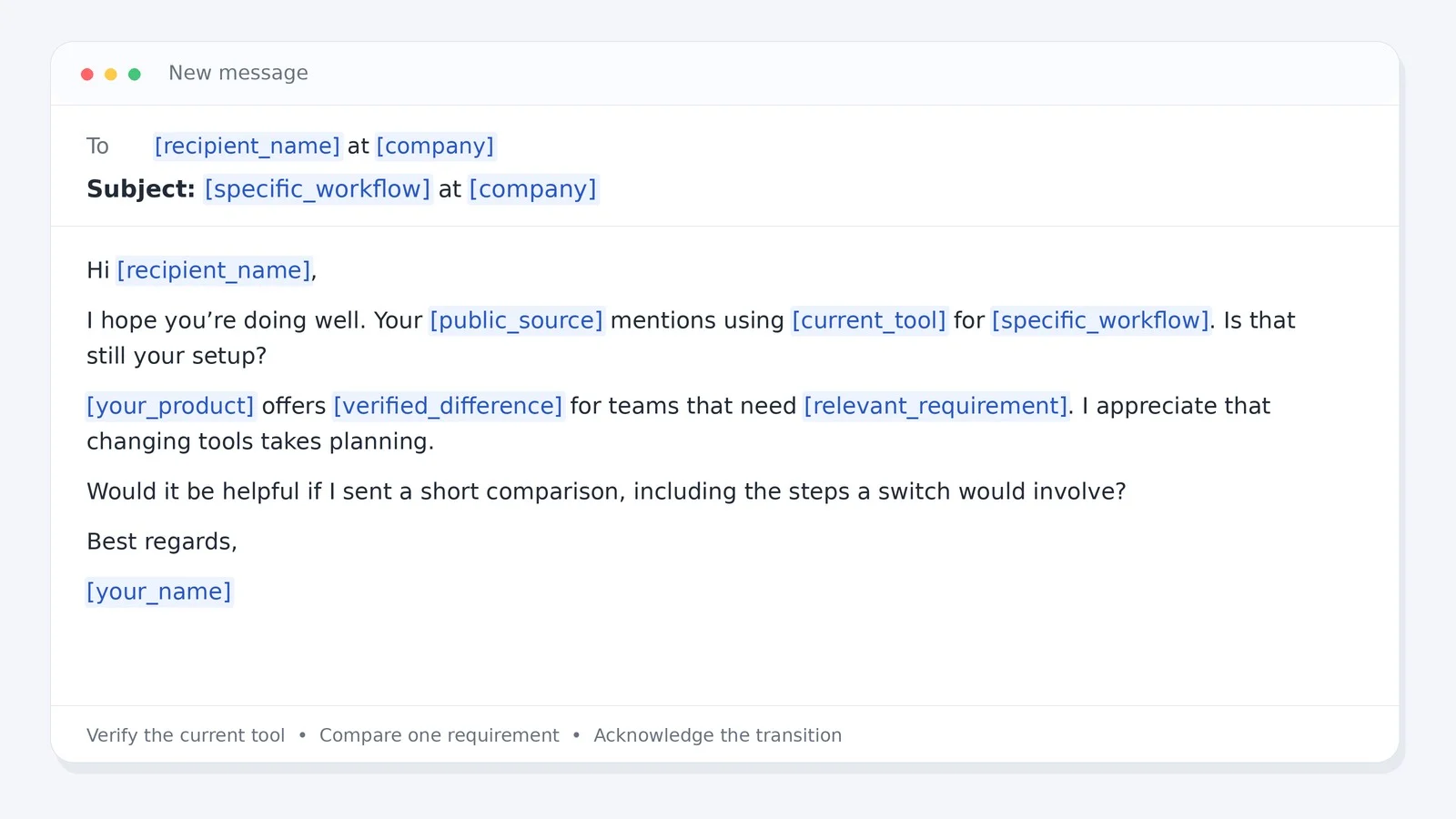
The structure is simple: reference the current setup, introduce one relevant difference, acknowledge the transition, and make a small request. You are opening a comparison, not asking someone to replace their software after one email.
The opening gives the recipient room to correct outdated research. The comparison stays narrow enough to verify. The final line addresses switching effort without promising that migration will be instant, free, or disruption-free.
Subject Lines That Fit a Competitor Switch Email
Use a subject that accurately describes the conversation. Avoid “Re:” on a new thread, renewal warnings you cannot substantiate, or claims that the recipient’s current vendor has a problem.
| Subject Line | Best Fit |
|---|---|
| [specific_workflow] at [company] | A neutral first approach about a relevant workflow. |
| An option alongside [current_tool] | A verified complementary use case rather than a full replacement. |
| Comparing options for [requirement]? | A requirement the company has publicly discussed. |
| Planning your next [category] review | A confirmed review process; no assumed renewal date. |
| A question about switching [category] tools | The recipient has already signalled interest in alternatives. |
When Should You Send This Template?
Look for both a verified current setup and a reason this conversation could be relevant now. A technology-detection result may be a lead for research, but it is not reliable proof of how a particular team works today.
- A relevant requirement is visible. A job description, company post, or first-party announcement identifies a workflow your product supports.
- You can substantiate the difference. Check current product documentation, pricing terms, and plan limitations for both products before writing a comparison.
- The recipient owns the decision or workflow. Contact someone who can judge the use case rather than a shared inbox or unrelated executive.
- You can explain the transition honestly. Know what can be imported, what must be rebuilt, who needs training, and what support you actually provide.
When Should You Not Use a Competitor Switch Email?
Do not assume someone dislikes a product simply because you found it in their stack. Avoid this approach when the tool usage is unverified, the person has already declined, or the difference you are promoting does not apply to their plan or workflow.
Do not attribute an anonymous public review to a specific prospect. Reviews can identify questions to investigate, but they do not prove that a company has the same issue. If the prospect is still handling a job manually, use a product discovery email instead. If the problem matters more than the incumbent tool, a problem–solution email may be a better fit.
Competitor Switch Email Templates for Different Outreach Situations
Choose one variation for your first message. These five emails are alternatives, not a sequence to send to the same person. Keep the greeting and closing natural, and replace every placeholder before sending.
1. When Cost Is Part of a Confirmed Review
When to Use It: Use this when the recipient or company has indicated that cost is under review. Compare total cost, including seats, usage, implementation, and contract terms.
Personalization Tip: Do not call your product cheaper until you can compare equivalent plans and the prospect’s actual requirements.
2. When a Specific Capability Matters
When to Use It: Use this when a visible requirement matches a capability your product supports. Verify whether the incumbent also offers it and under which plan.
Personalization Tip: Describe what your product supports. Avoid claiming the current tool cannot do it unless you have checked current documentation.
3. When Migration Effort Is the Main Concern
When to Use It: Use this when the prospect has openly discussed a change or when you can offer a documented migration outline without assuming they intend to switch.
Personalization Tip: Only mention migration services and import formats your team currently supports. Do not promise zero downtime without evidence.
4. When a Vendor Review Is Approaching
When to Use It: Use this only when the review or renewal timing has been confirmed. If you do not know the timing, ask rather than state it as fact.
Personalization Tip: Use “you mentioned” only when they actually did. For a first contact, reference the genuine public announcement instead.
5. When Team Needs Have Changed
When to Use It: Use this after a verified change such as team expansion or a new workflow. Ask about the new requirement without suggesting their existing product has failed.
Personalization Tip: Connect the change to a specific need. Hiring alone does not mean a company has outgrown its software.
What It Looks Like Filled In
Illustrative example: The companies and products below are fictional. This demonstrates the structure and is not a customer case study, verified product comparison, or performance claim.
The example names a workflow and one capability. It does not claim the current product lacks that capability or that the recipient is unhappy. In a real message, verify the public reference and your own product claim before sending.
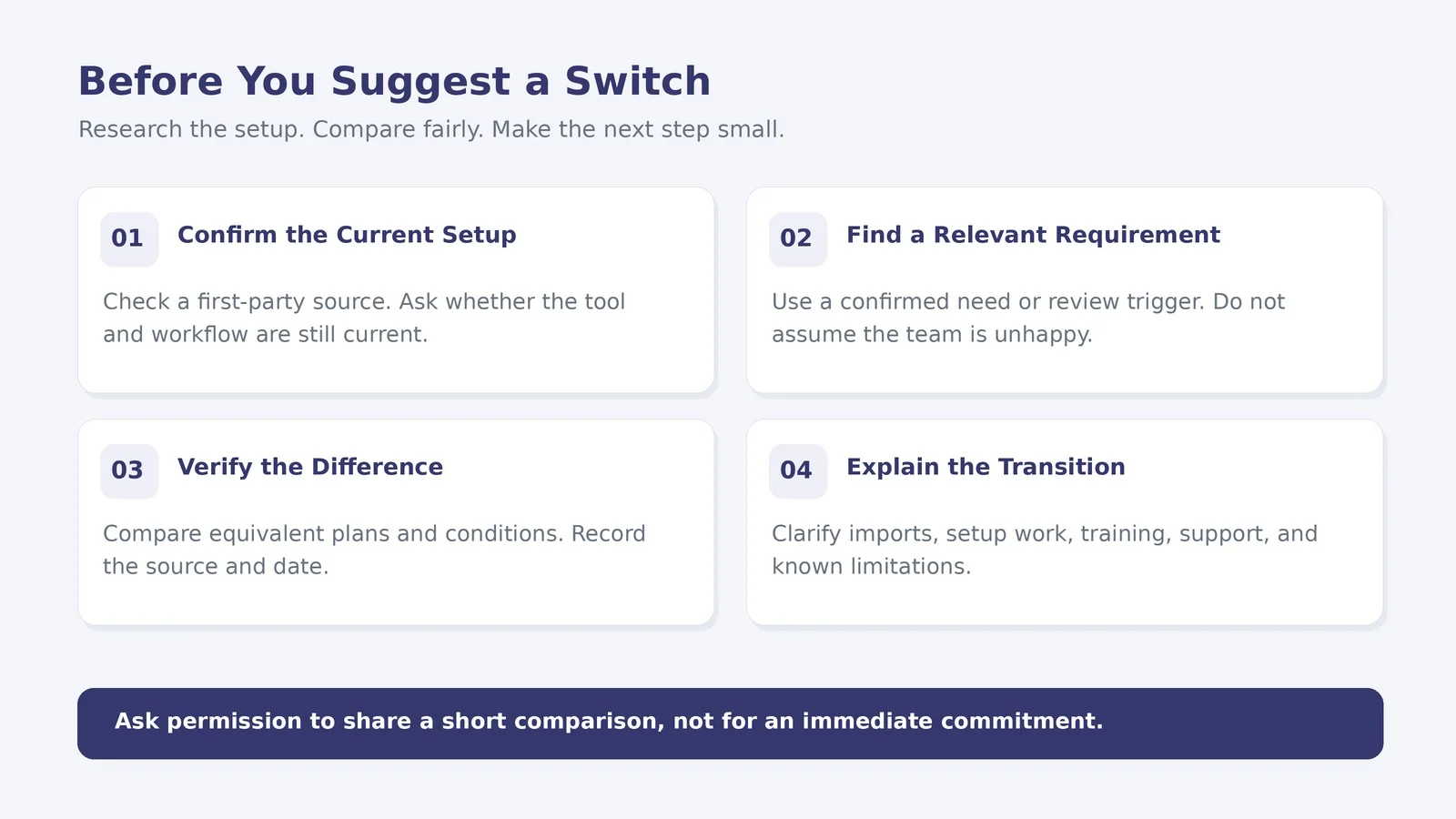
What to Personalize and Where to Find It
| Detail | What to Verify | Useful Source |
|---|---|---|
| [current_tool] | The team actually uses the product for the relevant job. | The company’s own posts, case studies, or a direct conversation. |
| [specific_workflow] | The recipient owns or influences that work. | Role description, team page, or first-party interview. |
| [verified_difference] | The capability, plan, limits, and conditions are accurate. | Current official product documentation for both tools. |
| [switching_trigger] | The timing or requirement is real, not inferred dissatisfaction. | Company announcements, published initiatives, or their own comments. |
| Transition effort | Import coverage, setup tasks, training, and support. | Your migration documentation and product or onboarding team. |
Keep a source note and date for each material claim. If a key fact is uncertain, turn it into a genuine question or remove it. Personalization is strongest when it makes the message more accurate, not merely more familiar.
Make the Comparison Fair and Useful
Compare one job under equivalent conditions. “Includes scheduled exports on this plan” is useful when the prospect needs scheduled exports. “The best alternative” says little about fit. Include constraints that could change the decision, such as supported integrations, data retention, contract terms, or implementation work.
When a recipient asks for details, send a short comparison with columns for the requirement, each product’s current support, the relevant plan, and the source checked. If your product is weaker on a requirement, say so. A useful comparison helps someone decide whether to continue the conversation.
Will This Land in the Inbox?
No template can guarantee inbox placement. Authentication, recipient expectations, sending reputation, list quality, and sending behaviour all matter. A polished comparison will not fix an invalid address or an unwanted campaign.
Check your setup against Google’s email sender guidelines. For messages sent to personal Gmail accounts, Google requires SPF or DKIM for all senders and SPF, DKIM, and DMARC for bulk senders. Requirements depend on your sending situation; review the source for the full conditions.
Keep the first message focused and easy to reply to. Avoid unnecessary attachments, misleading subjects, and a collection of tracking links. Use InboxWarm’s spam word checker as a copy review aid and its subject line tester for subject feedback. Neither tool can certify that an email will reach the inbox.
If you are assessing email warmup, treat it as one part of your sending process. It does not replace authentication, relevant targeting, provider requirements, or monitoring. Do not increase volume simply because a warmup tool is connected.
How to Follow Up Without Pressuring the Prospect?
A practical starting point is one initial email and up to three useful follow-ups spread over roughly two to three weeks. This is an example cadence to adapt to context, not a proven optimum. Stop immediately after an opt-out or clear refusal; do not move them into another sequence.
Follow-Up 1: Offer One Concrete Comparison
Follow-Up 2: Clarify the Transition
Follow-Up 3: Close the Loop
Use “Re:” only when replying in the original thread. Respect the recipient’s preferences and applicable outreach rules, and provide an easy way to decline further contact.
What Reply Rate Should You Expect?
There is no reliable universal reply rate for a competitor switch email. An installed product does not establish buying intent. Timing, relevance, contact accuracy, the strength of your difference, and the effort of switching can change the result.
Track positive replies, requests for a comparison, qualified conversations, objections, bounces, and opt-outs. Separate “we already use another tool” from “we cannot move this year” and “your product lacks a required feature.” Each points to a different targeting or product issue. Compare variations on similar audiences and avoid declaring a winner from a handful of replies.
Frequently Asked Questions
What Is a Competitor Switch Cold Email?
It is an outreach email to someone using another product that introduces a relevant alternative. A good message verifies the current setup, explains one meaningful difference, acknowledges switching effort, and asks for a small next step.
Should I Mention the Competitor by Name?
Yes, when the product name is relevant and your research supports its use. Keep the wording factual and neutral. If the information may be outdated, ask whether it is still their setup rather than presenting it as certainty.
How Do I Write a Competitor Switch Email Without Sounding Pushy?
Respect the existing choice, avoid assumptions about dissatisfaction, and ask permission to share useful information. Offer a comparison or transition outline before asking for a meeting or commitment.
Can I Say My Product Is Cheaper or Better?
Only make specific claims you can substantiate under equivalent conditions. Compare the relevant plans, usage, contract terms, and implementation costs. Explain the particular advantage instead of making an unsupported overall claim.
How Many Competitor Switch Follow-Ups Should I Send?
The sample sequence here uses up to three follow-ups, each adding useful information. Adapt the cadence to the audience and stop after a refusal or opt-out. More messages are not automatically better.
Does Email Warmup Guarantee That These Emails Reach the Inbox?
No. Inbox placement depends on multiple factors, including authentication, reputation, recipient expectations, and sending behaviour. Warmup cannot guarantee delivery or compensate for poor targeting.
Check Your Sending Setup Before Your Next Campaign
Your comparison deserves a sound sending setup. Review your domain’s email configuration alongside your targeting and message before increasing outreach.