
TL;DR
- A relevant job opening gives you a task to investigate, not confirmation that the company needs a vendor.
- Read the responsibilities separately from candidate requirements, benefits, and company background.
- Use five first-email templates for a named workflow, a tool-related task, planned work, role onboarding, or an ownership question.
- Check the original listing and current status before saying the company is hiring for the role.
- A salary range, tool requirement, or open vacancy does not establish software budget, current configuration, or an internal problem.
- Choose a business contact connected to the task, offer a prepared resource, and stop after a refusal or opt-out.
A cold email to a company hiring for a relevant role should connect one advertised responsibility to a capability you can support. Name the role and task accurately, explain your offer, and ask whether a small next step would be useful.
This guide is for B2B sellers using hiring activity to research an account. It is not a job application template or a recruitment pitch to candidates. You will find five first-email examples, a worked example, subject lines, and follow-ups focused on the work behind the vacancy.
Table of Contents
What Should You Write When a Job Posting Matches Your Offer?
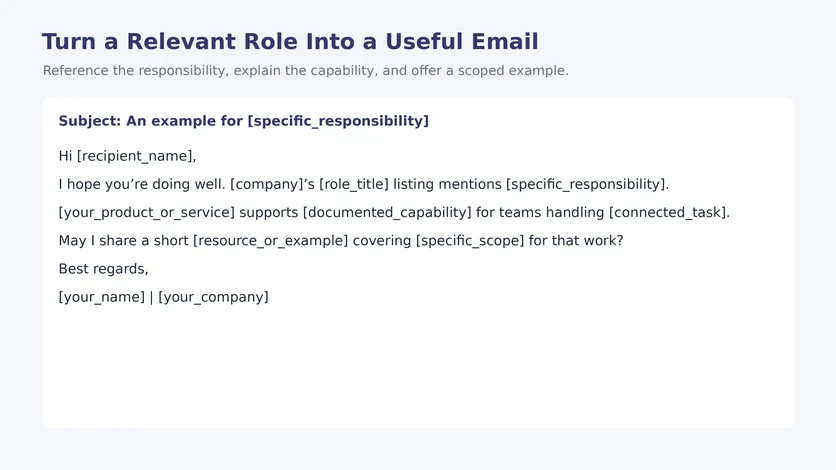
Use this main template when the current posting names a specific responsibility your product or service supports. Keep the connection narrow enough that the recipient can understand it without accepting a claim about their internal process.
For example, “maintain customer onboarding documentation” can support an offer about organizing onboarding materials. It does not support “your onboarding is slowing down growth.” Replace every placeholder and prepare the resource before offering it.
Which Details in a Job Description Are Useful for Outreach?
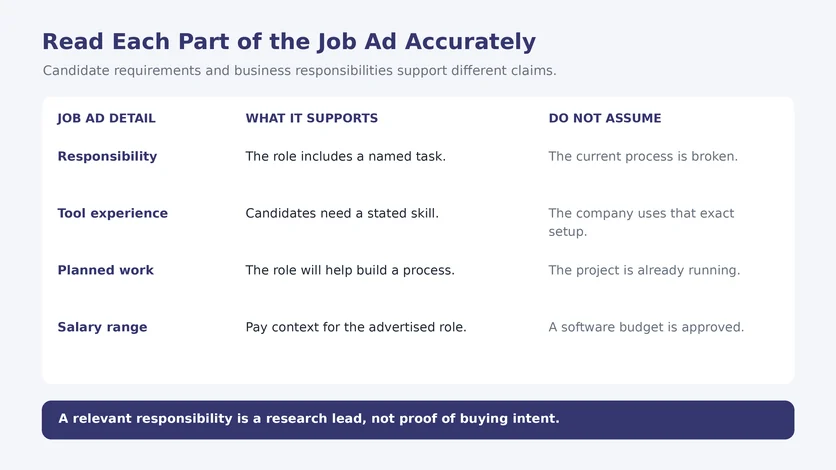
Look first at what the person will do. A responsibility can explain the relevance of an offer more clearly than a job title, general company description, or long list of preferred skills.
Workable’s job-creation guidance describes the public advert as information about the role, requirements, and benefits for candidates. Read those sections according to their purpose; they are not interchangeable evidence about the company’s operations.
| Posting Detail | Potentially Useful Connection | Keep Unconfirmed |
|---|---|---|
| A responsibility such as maintaining account routing rules | A relevant routing review example or change-history capability. | Whether rules are currently wrong or the team wants a new tool. |
| A task to develop onboarding documentation | A sample content structure or documentation workflow. | Whether existing onboarding is slow or undocumented. |
| Experience with a named platform | A reason to investigate a compatible workflow. | The current deployment, edition, configuration, or integration scope. |
| A plan to build a new reporting process | An example supporting the named reporting task. | Whether the process is already live or current reporting has failed. |
| Location, salary, and benefits | Context about the advertised position. | A local expansion plan, vendor budget, or urgency to buy. |
A responsibility might involve established work, a planned initiative, or ongoing maintenance. Preserve the wording that distinguishes them. “Will help build” should not become “already runs,” and “experience preferred” should not become “your team uses.”
How Do You Check Whether the Hiring Signal Is Current?
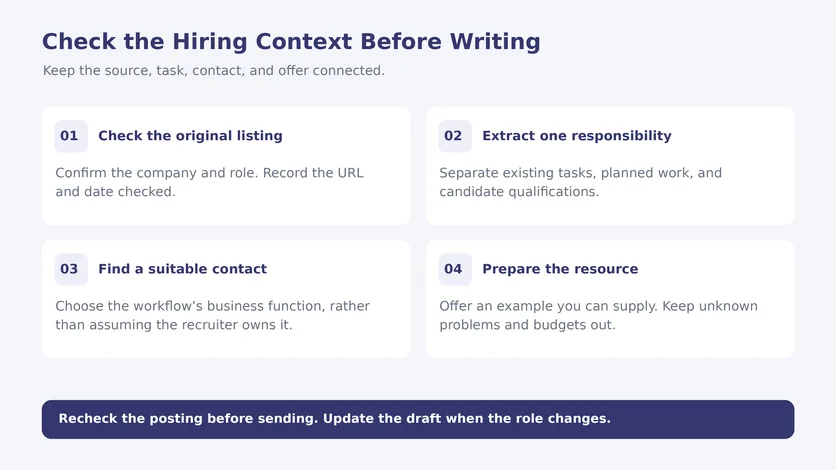
Open the company’s careers page or its linked applicant-tracking page rather than relying only on a search snippet or reposted summary. Record what you checked so that the opening can be reviewed before sending.
- Confirm the employer and role. Match the company, title, department, and location. An agency listing may not identify the employer clearly enough for a company-specific claim.
- Record the source and date checked. Keep the URL and any posting date provided. A visible listing does not tell you when the role was approved or whether hiring is urgent.
- Extract the exact task. Separate responsibilities from qualifications. Note whether the wording describes existing work, future work, or general experience.
- Check the offer’s fit. Identify the capability and a resource you can provide for that task. Leave current tools, problems, and purchasing plans open when unverified.
- Recheck before the first email. If the listing has disappeared or changed, revise the opening. Do not claim that a closed role was filled unless the company confirms it.
A vacancy can be relevant without being newly published. If it is an evergreen talent listing or only a general invitation to apply, avoid inventing an immediate staffing event. Research another current company detail if that gives the offer a better foundation.
Who Owns the Work Behind the Vacancy?
In B2B lead generation, choosing a relevant contact requires more than finding the person who shared the job ad. Contact the business function connected to the task your offer supports.
| Advertised Responsibility | Possible Starting Function | What to Verify |
|---|---|---|
| CRM routing, reporting, or sales process work | Revenue operations or sales operations. | The specific workflow and the contact’s current responsibilities. |
| Customer onboarding or implementation materials | Customer success, implementation, or operations. | Which team owns the relevant part of onboarding. |
| Campaign reporting or content operations | Marketing operations or the relevant marketing team. | Whether the role supports the task named in your offer. |
| Internal knowledge or employee onboarding | People operations or the relevant operational team. | Whether the work concerns employees, customers, or another audience. |
A recruiter may coordinate applicants without owning the workflow or vendor decision. Use an appropriate business contact channel, rather than putting a sales pitch into a job application form. If ownership remains uncertain, use the routing template below.
How Can You Turn Different Hiring Signals Into Relevant Emails?
Choose one of these four alternatives when the posting supports its specific angle. Together with the main template, they give you five first-email options; they are not a sequence to send to one person.
1. A Tool-Related Responsibility
Use it when: The responsibility itself names a task involving a platform, and your relevant capability or compatibility is documented. A general request for platform experience is not enough to claim that a specific setup exists.
Adaptation note: Be precise about supported platforms and limitations. Do not invent an integration, assume access to the company’s environment, or suggest replacing the advertised employee.
2. A Planned Process or Initiative
Use it when: The listing explicitly describes work the role will help establish. Keep the task in the future tense rather than treating it as an existing operational problem.
Adaptation note: An intention to build a process does not establish a project deadline, procurement plan, or failure of the current approach.
3. A Resource to Support Role Onboarding
Use it when: The advertised responsibilities make a role-specific onboarding resource useful, and you can provide it. Leave hiring progress and the start date unresolved.
Adaptation note: Do not congratulate the recipient on a “new hire” while the role is still advertised. A sample checklist is not a personalized onboarding plan based on access to the company’s systems.
4. A Question About Workflow Ownership
Use it when: The task is a plausible fit but you cannot confirm who owns it. Ask a relevant starting contact one routing question without treating their title as confirmed authority.
Adaptation note: If someone suggests another contact, describe the routing accurately. Do not turn a suggested name into an endorsement of your offer.
Subject Lines That Refer to the Work, Not Just the Vacancy
Make the subject useful to the person receiving the email. Naming the task helps distinguish a business offer from an application or a generic “saw you’re hiring” message.
| Subject | Suitable Context |
|---|---|
| An example for [specific_responsibility] | A prepared example tied to one advertised task. |
| [platform_task] example | A supported platform task and a capability you can demonstrate. |
| A sample for [planned_process] | The listing identifies planned work and your resource fits its scope. |
| An onboarding resource for [role_title] | A role-specific resource, without claiming a person has already started. |
| Who handles [specific_task]? | A genuine question about the relevant business function. |
Avoid “Application for [role]” when you are selling a service. Do not imply an interview, a requested proposal, or an existing conversation. Use “Re:” only for an actual reply in the original email thread.
A Worked Example: Using a Task Without Inventing a Problem
Fictional illustration: NorthstarDesk, the recipient Aisha, the sender Sam, and the product RouteLedger are invented. This example demonstrates how to interpret a posting; it is not a customer case study or campaign result.
Assume NorthstarDesk has a current revenue operations analyst listing. One responsibility is to maintain CRM account routing rules. A current team page identifies Aisha as leading revenue operations. RouteLedger can record routing-rule changes and reviewer notes, and Sam has a sample review log.
| What the Source Supports | What the Email Should Do |
|---|---|
| The advertised role includes routing-rule maintenance. | Mention the responsibility rather than just the job title. |
| Aisha leads the relevant function. | Use a plausible contact without claiming she has approved budget. |
| The sender can demonstrate a review-log capability. | Offer the prepared log example. |
| The condition of the company’s routing rules is unknown. | Remove “your routing must be causing missed leads.” |
The capability supports work named in the role. The email leaves the existing system, process quality, hiring deadline, and interest in a purchase unconfirmed.
When Should You Send or Hold a Hiring-Based Email?
Use the current responsibility and the offer’s relevance to make that decision. There is no universal number of days after a vacancy appears that makes a sales email appropriate.
- Send for campaign review: The listing is current, the task fits, the contact is suitable, and the resource is ready.
- Research further: Only the title matches, the source is a repost, or a qualification is being mistaken for a current process.
- Revise the angle: The listing has closed, changed, or moved to a different team. Use current evidence before continuing.
- Skip: You need an invented problem, budget, or claim that the company wants to outsource the role to make the offer fit.
If the company publishes a hiring update later, check what it actually confirms. Do not assume a repost means failed recruitment, a long-open vacancy means urgency, or an open role means the team is growing.
Follow-Ups That Add a Useful Detail
Explain the resource’s scope rather than repeatedly reminding the recipient about the vacancy. Choose a reasonable gap for the audience, respond directly to real replies, and stop after a refusal or opt-out.
Follow-Up 1: Clarify What the Example Shows
Follow-Up 2: Close the Sequence
Recheck the listing before repeating a claim that hiring is active. If the recipient explains that the role or workflow has changed, update the account notes and respond to that information instead of continuing the original pitch.
Does Your Draft Make a Claim the Job Ad Cannot Support?
Read the email alongside the source before sending. This final check helps keep the role, offer, and recipient connected without silently adding assumptions.
- Source: Is the role current, and have you recorded the original URL and date checked?
- Task: Did you use a responsibility rather than turn a candidate qualification into a claim about the company?
- Capability: Can you demonstrate the feature, compatibility, or service scope described?
- Contact: Is the person connected to the business workflow, or are you clearly asking about ownership?
- Next step: Can you supply exactly what you offered without requiring an unexpected demo?
- Campaign: Have you checked sender information, refusals, opt-outs, relevant campaign requirements, and your sending provider’s policies?
Evaluate whether replies confirm responsibility, relevance, or an agreed next step. A recruiter redirect or polite acknowledgment is not the same as purchase interest. Review sending configuration separately; no hiring signal or email template guarantees replies or inbox placement.
Frequently Asked Questions
What Is a Hiring Signal Cold Email?
It is a B2B outreach email that uses a relevant job posting as context for an offer connected to the role’s work. It should reference a specific responsibility or initiative, rather than treating any open role as proof of a problem or buying intent.
How Do I Know Whether a Job Opening Is Relevant to My Offer?
Identify a task in the posting that your product or service can directly support. Then explain the connection through a capability you can demonstrate. If the only link is a broad department name or an unrelated skill requirement, the opening is too weak for this angle.
Who Should I Contact: the Recruiter or the Hiring Manager?
Choose a suitable business contact connected to the workflow you support. A recruiter may handle applications without owning the operational process or vendor decision. If responsibility is uncertain, ask a plausible contact which function handles the work.
Does a Named Tool Prove the Company Uses It?
Not always. A requirement for experience with a tool describes candidate qualifications. It may not establish the company’s current setup, edition, configuration, or integration needs. Keep those details unconfirmed unless the source explicitly supports them.
Does the Salary Range Reveal the Company’s Software Budget?
No. A compensation range describes pay context for the advertised role. It does not establish funds allocated to your product or service, approval authority, or a purchasing deadline. Avoid using salary as a basis for claiming your offer is already budgeted.
Can I Say the Company Is Growing Because It Is Hiring?
Only when the company’s own wording supports that conclusion. A job opening alone does not tell you whether the role is new, a replacement, or part of another staffing change. Reference the advertised responsibility instead of adding a growth claim.
What Should I Do If the Job Posting Has Closed?
Check whether the workflow remains relevant through current company information. Do not keep describing the company as actively hiring for that role. A closed listing does not tell you whether someone was hired, the role changed, or the vacancy was withdrawn.
Can I Offer a Service Instead of the Advertised Employee?
Only frame the offer as an alternative when you can describe its scope honestly and have a relevant reason to propose it. A job ad does not prove the company wants to outsource the role. These templates mainly offer support for the work rather than claiming a person can be replaced.
Found a Relevant Hiring Signal? Get Your Email Ready to Send
Connect your offer to the responsibilities in the job posting, then check your sending domain for configuration issues that could affect delivery. Give your outreach a relevant message and a well-prepared sending setup.