
TL;DR
- A leadership-change cold email should connect a confirmed responsibility or stated priority to a relevant offer.
- Verify the appointment type, announcement date, effective date, and current remit before writing.
- Use five first-email templates for a new remit, a public priority, an internal promotion, a later initiative, or an ownership question.
- A new leader does not automatically mean new budget, a vendor review, or dissatisfaction with existing tools.
- Match the message to the person’s current role rather than guessing their plans from a previous employer.
- Offer a prepared resource, follow up with useful context, and stop after a refusal or opt-out.
A cold email after a leadership change should explain why your offer is relevant to the person’s confirmed work. Briefly acknowledge the appointment if appropriate, connect one responsibility or public priority to your capability, and ask whether a specific resource would be useful.
The change gives you a reason to update your account research. It does not give you a reason to assume that everything at the company is about to change. This guide includes five first-email templates, a worked example, subject lines, and follow-ups for introducing a relevant offer without inventing the new leader’s plans.
Table of Contents
How Do You Introduce an Offer to a Newly Appointed Leader?
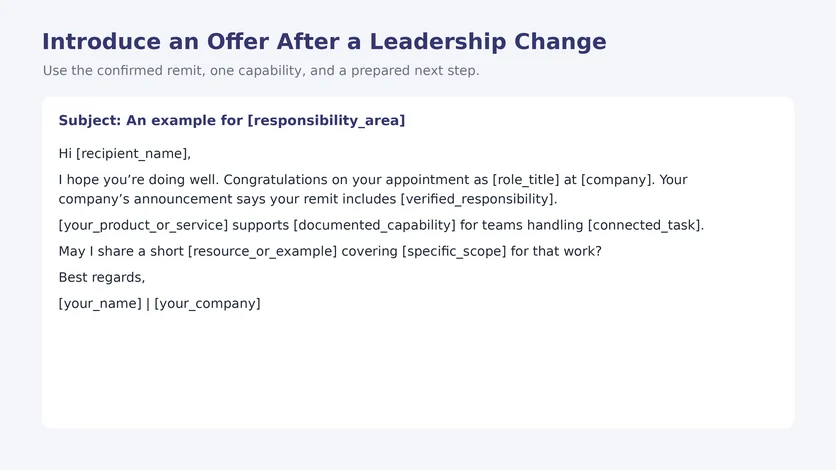
Use this main template after the appointment has taken effect and the company has described a responsibility connected to your offer. The remit should explain the connection more clearly than a generic congratulation.
Replace every placeholder with current information. If the announcement does not describe a relevant responsibility, check another first-party source rather than completing the sentence with a generic assumption about the job title.
What Does the Leadership Announcement Actually Confirm?
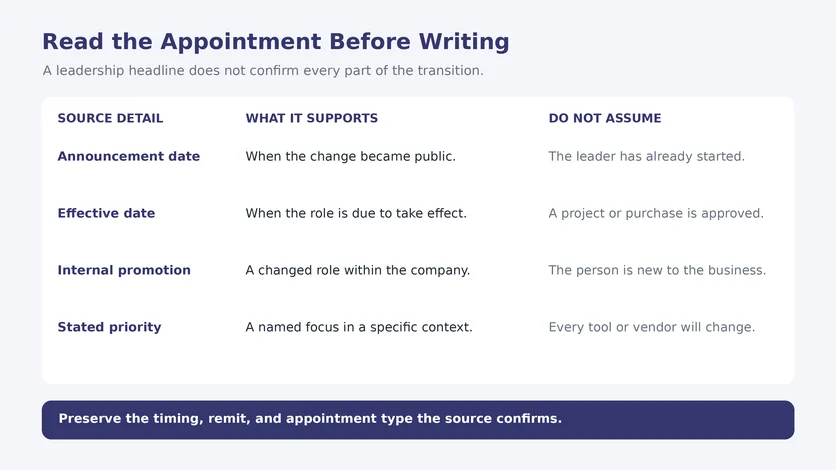
Read the appointment as a change in responsibility, with its own timing and scope. An external hire, internal promotion, interim assignment, and future succession plan need different wording.
| Announcement Detail | What You Can Say | What Remains Unconfirmed |
|---|---|---|
| An external appointment with an effective date | The person is taking or has taken the named role, depending on the date. | Which tools they want to change or whether they are inviting vendor proposals. |
| An internal promotion or expanded remit | The person’s responsibility has changed as described. | That they are new to the company or unfamiliar with existing operations. |
| An interim leadership assignment | The person has the stated interim responsibility. | A permanent mandate or unrestricted purchasing authority. |
| A future succession plan | The company has announced an upcoming transition. | That the incoming leader already owns the decisions involved. |
| A leader’s public statement about a priority | The speaker has identified that specific priority in that context. | A funded project, approved deadline, or need for your solution. |
For a real example of these distinctions, Microsoft’s March 2026 leadership announcement described a July transition and work to align decision ownership. It also said core priorities would remain unchanged. The announcement illustrates why a leadership change should not be rewritten as an automatic strategy reset.
Keep publication dates and effective dates separate in your notes. If the person is still an incoming leader, do not write as though they have already begun a project or approved a purchase.
What Should You Research Before Writing?
Build a short appointment note before drafting. You need enough information to explain the business connection, not a biography assembled from every public detail about the person.
- Verify the company and appointment. Use a company announcement, current leadership page, or another reliable first-party source. Record the source URL and date checked.
- Separate the announcement from the start date. Note when the role takes effect and whether the appointment is permanent, interim, or part of a transition.
- Identify the relevant remit. Look for a named responsibility, team, product area, or operating scope that your capability can support.
- Attribute priorities accurately. Distinguish the new leader’s own statement from the company’s description of the role or a third party’s interpretation.
- Prepare a specific offer. Define what the example or resource covers and confirm you can provide it before asking to send it.
Keep unknowns visible: current tools, process quality, approved budget, and procurement plans may all remain unresolved. Professional history can help you understand context, but it should not be used to predict that the person will recreate a previous employer’s setup.
Should You Contact the New Leader or Their Team?
In B2B lead generation, contact fit depends on the work your offer supports. The highest-ranking person named in an announcement is not automatically the right starting point.
| Your Proposed Topic | Possible Starting Point | Check First |
|---|---|---|
| A function-wide operating priority the leader has named | The leader or a relevant function head. | Whether the offer matches that priority at the appropriate scope. |
| A specific workflow inside the function | The team responsible for that workflow. | Current ownership and whether the leadership change affects it. |
| A technical implementation detail | A relevant technical or operational owner. | The task, environment, and documented compatibility of your offer. |
| An uncertain responsibility after a reorganization | A plausible contact with a clear routing question. | Whether the company has published the new ownership structure. |
Do not work around a prior refusal by emailing each new executive at the account. A new appointment does not erase contact preferences or make an unrelated offer relevant. Avoid copying the whole leadership team into the first message.
What Can You Say Beyond “Congratulations on the New Role”?
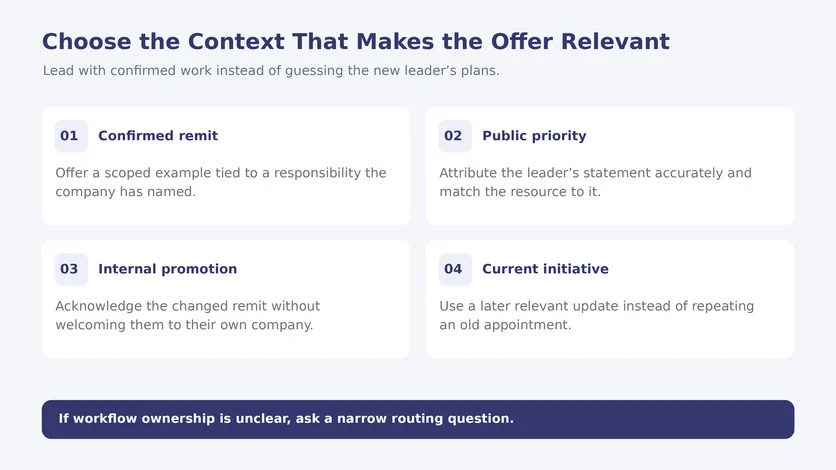
Choose the version supported by the appointment and the current business context. These four alternatives, together with the main template, are separate first-email options rather than a sequence to send to one person.
1. Respond to a Priority the Leader Has Publicly Named
Use it when: A current company post, interview, or announcement clearly attributes a relevant priority to the recipient.
Research check: Keep the statement within its original context. A broad priority such as improving customer experience does not, by itself, establish a plan to replace a platform.
2. Acknowledge an Internal Promotion Accurately
Use it when: The company confirms an internal appointment or expanded responsibility. The offer should relate to the changed remit rather than assume the person needs an introduction to the business.
Research check: Avoid “welcome to [company]” for an internal promotion. Do not imply the person’s previous team or predecessor handled the work poorly.
3. Lead With a Later Initiative Instead of an Old Appointment
Use it when: The leader is established in the role and a newer source provides a more useful reason to write.
Research check: Do not keep calling someone “newly appointed” because an old contact list contains the appointment date. Use the current initiative as the opening and verify that the responsibility is still accurate.
4. Ask Who Owns the Relevant Workflow
Use it when: The appointment affects a relevant function, but responsibility for your specific topic is unclear.
Research check: A routing response helps identify a possible contact. It is not an endorsement, a confirmed buying process, or permission to claim a personal introduction that did not happen.
Subject Lines That Describe a Relevant Conversation
Put the work or offered resource in the subject. The appointment can stay in the opening when a more specific subject helps the recipient understand the message.
| Subject Line | Use It When |
|---|---|
| An example for [responsibility_area] | The announced remit supports a specific example. |
| A resource for [stated_priority] | The person has publicly identified that priority. |
| [specific_workflow] at [company] | The offer concerns a defined task rather than the appointment itself. |
| An example for your [expanded_remit] | An internal promotion creates a relevant change in scope. |
| Who handles [specific_workflow]? | Your first question genuinely concerns ownership. |
Do not imply an investor referral, board request, prior meeting, or conversation with the predecessor unless it is true and appropriate to mention. A congratulatory subject should not hide an unrelated sales pitch.
A Worked Example: An Internal Promotion With a Clear Remit
Fictional illustration: CedarCloud, the recipient Aisha, the sender Sam, and the product HandoffNotes are invented. This example shows a drafting decision, not a customer relationship or measured campaign result.
Assume CedarCloud announces that Aisha has been promoted from implementation director to VP of Customer Operations. The appointment is now effective, and the announcement says her remit includes implementation handoffs. HandoffNotes supports shared handoff checklists, and Sam has a sample for that workflow.
| Verified Context in the Example | Effect on the Email |
|---|---|
| The appointment is an internal promotion. | Acknowledge the new role without welcoming Aisha to the company. |
| The effective date has passed. | Refer to the current role rather than an upcoming appointment. |
| The remit includes implementation handoffs. | Connect the capability to that named responsibility. |
| A sample handoff checklist is ready. | Offer the sample rather than an undefined transition audit. |
| Existing process quality and tool plans are unknown. | Remove “your new role means you need to replace the current system.” |
The offer is tied to the stated remit. It does not assume that Aisha wants new software, has an immediate budget, or needs advice on how to understand a company she already knows.
When Is Leadership-Change Outreach Worth Sending?
Choose timing based on the effective appointment and a current, relevant business connection. A calendar window is not a substitute for those checks.
McKinsey’s leadership-transition guidance emphasizes understanding the starting situation before acting and cautions against treating 100 days as a universal deadline for impact. It is leadership guidance, not evidence for a particular sales-email timing window.
| Situation | Recommended Decision |
|---|---|
| The person is announced but has not started. | Avoid implying current ownership; consider waiting for an effective role and a relevant reason. |
| The appointment is effective and the remit clearly fits the offer. | Prepare the scoped resource and complete the normal campaign review. |
| Only the new title is known. | Research the responsibility before proposing a change. |
| The appointment is old but a current initiative fits. | Lead with the current initiative rather than the old congratulations. |
| The role is interim or responsibilities remain unsettled. | Keep the stated scope precise or ask a narrow ownership question. |
If the transition involves a sensitive departure, avoid speculating about why the predecessor left or using organizational uncertainty as pressure. Keep the message focused on confirmed professional responsibilities.
Two Follow-Ups That Respect the Transition
Add a useful detail about the resource rather than asking whether the recipient has settled in yet. Choose a reasonable gap for the situation, respond to real replies, and stop after a refusal or opt-out.
Follow-Up 1: Explain the Resource’s Scope
Follow-Up 2: Close the Sequence Politely
Use “Re:” only within the original thread. If the recipient says the work belongs elsewhere, priorities have changed, or timing is unsuitable, update your notes instead of repeating the appointment-based pitch.
Does Your Email Reflect the Leader’s Actual Role?
Check the finished draft against the appointment and any supporting source. Every company-specific sentence should preserve what is confirmed and leave the remaining questions open.
- Appointment: Are the person, company, title, and appointment type correct?
- Timing: Does the wording match the effective date?
- Remit: Is the proposed topic inside a stated responsibility or accurately attributed priority?
- Claims: Have you removed assumptions about a budget, vendor review, predecessor, or strategy reset?
- Offer: Can you provide exactly the capability and resource described?
- Campaign: Have you checked sender details, refusals, opt-outs, relevant campaign requirements, and your provider’s policies?
Track whether responses confirm relevance, ownership, or an agreed next step. A congratulatory acknowledgment or routing reply is not the same as buying interest. Check delivery separately from the message; no leadership event or template guarantees replies or inbox placement.
Frequently Asked Questions
What Is a Leadership Change Cold Email?
It is a B2B introduction that uses a verified appointment, promotion, or change in responsibility as context for a relevant offer. A useful message connects the person’s confirmed remit or stated priority to a supported capability and a small next step.
When Should I Email a Newly Appointed Executive?
Check whether the appointment has taken effect and whether your offer fits a current responsibility or initiative. An announcement date alone does not establish readiness for vendor conversations. Avoid treating a fixed first-30-day or first-90-day window as a universal rule.
Should I Congratulate the Leader on the Appointment?
A brief, sincere acknowledgment is optional. It should not take the place of a relevant business connection. If the person has been promoted internally, acknowledge the new role rather than welcoming them to a company they already know.
Does a New Executive Mean the Company Will Review Its Vendors?
No. An appointment does not establish a vendor review, a dissatisfaction with current tools, or a new budget. Use a publicly stated initiative when available, and leave procurement plans unconfirmed unless the company or recipient provides that information.
What If the New Leader Has Not Started Yet?
Describe the role as an upcoming appointment if you mention it. Do not imply the person already owns decisions or has begun a project. For routine vendor outreach, consider waiting until the role is effective and a relevant business reason is clear.
Can I Mention the Leader’s Previous Company?
Only when the professional detail is accurate, necessary, and relevant. Their previous employer’s tools or strategy do not establish what they will use or change in the new role. Do not imply a personal relationship or referral that does not exist.
How Should I Email Someone Promoted Internally?
Reference the expanded or changed responsibility described by the company. Do not assume the person is unfamiliar with the business or needs a basic transition plan. Offer a scoped resource connected to the new remit.
What If the Leader Refers Me to Someone Else?
Record the referral accurately and contact the appropriate person with clear context, if suitable. A routing suggestion is not an endorsement of your product or confirmation of buying interest. Respect any limits in the response and stop after a refusal or opt-out.
Reaching Out to a New Leader? Check Your Sending Domain
Connect your offer to the leader’s confirmed responsibilities, then check your sending domain for configuration issues that could affect delivery. Prepare both the message and the sending setup before you reach out.