
TL;DR
- A complementary-tool cold email explains a useful capability alongside the prospect’s existing workflow.
- Check tool usage separately from compatibility: evidence of one does not establish the other.
- Use five first-email templates for workflow fit, a native integration, third-party automation, a manual handoff, or unconfirmed usage.
- Name the actual connection method and important requirements instead of promising a seamless integration.
- The worked example shows how to offer a field-mapping sample when the handoff uses a file rather than a native connector.
- Offer a scoped resource, respond to corrections about the tool, and stop after a refusal or opt-out.
A prospect’s tech stack is the set of software tools their team uses. Tech stack cold emails reference those tools to explain a relevant offer. When your product complements that setup, name the capability it adds to a specific workflow and describe the connection method accurately.
The useful question is where the two products fit together. You might support a step before information enters the existing tool, help with a task around it, or provide something useful after its output. This guide includes five first-email templates, subject lines, a worked example, and follow-ups for making that connection honestly.
Table of Contents
How Do You Introduce a Tool That Supports an Existing Workflow?
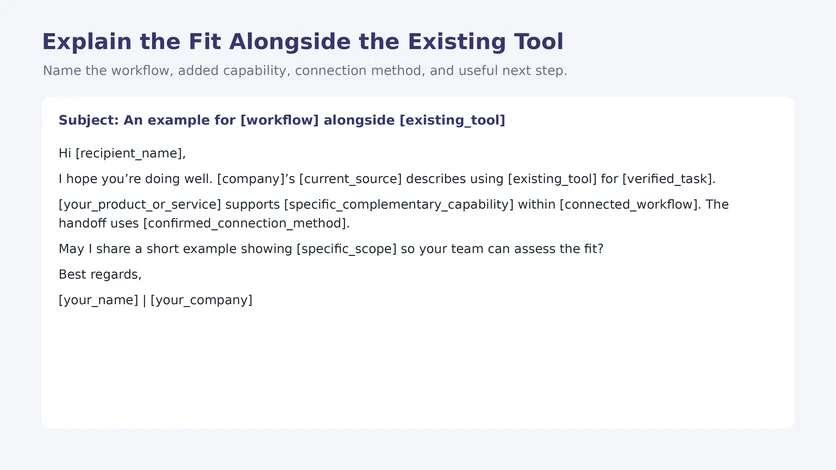
Use this main template when a current source supports the prospect’s use of the tool and your offer has a clear connection to a named task. Keep the extra capability more prominent than a general claim to improve their entire setup.
Replace the connection method with what is actually supported: a native connector, a named automation service, a file import, or a defined manual step. If the offer does not involve moving information between systems, describe the adjacent task instead of implying a technical connection.
What Makes Two Tools Complementary?
Tools are complementary when their capabilities can support connected work in a useful way. That relationship may be functional, technical, or both. It does not require the prospect’s current product to be defective or incomplete.
| Relationship | What Your Offer Adds | What to Explain |
|---|---|---|
| A step before the existing tool | A way to prepare, review, or organize inputs. | Which inputs are supported and how they reach the next step. |
| A step around the existing workflow | A review, approval, documentation, or coordination capability. | How the team uses it alongside the existing process. |
| A step after the tool’s output | A defined way to use exported information or completed work. | The supported output and any manual handoff. |
| A documented technical connection | A specific supported action between products. | The connection method, scope, requirements, and limits. |
This article concerns selling a relevant product or service to a tool user. If your goal is a commercial partnership with the software vendor itself, the audience and offer need a different approach.
Do You Have Evidence of Usage, Compatibility, or Both?
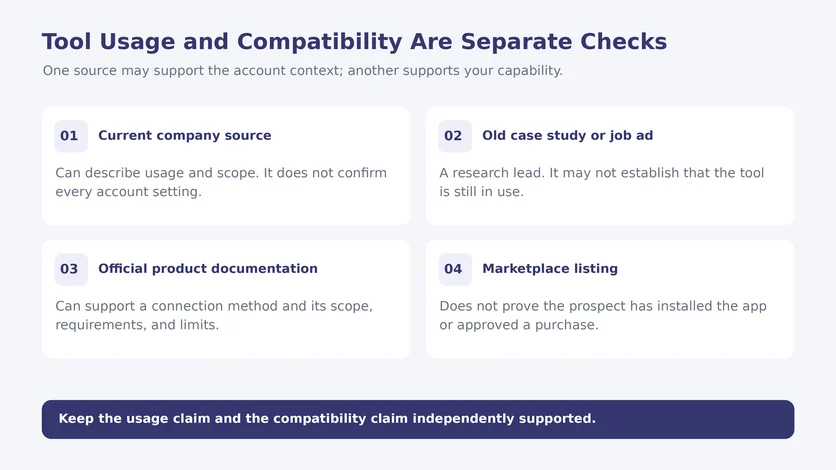
Keep two research questions separate. First, what supports the claim that the prospect uses the tool? Second, what supports the claim that your offer can work with the relevant workflow?
| Evidence You Found | What It Can Support | What It Does Not Confirm |
|---|---|---|
| A current company workflow page naming the tool | The usage and scope described by the company. | The account’s edition, permissions, configuration, or interest in another product. |
| A dated customer case study | The use described at the time of publication. | That the same setup is still active. |
| A job posting requesting experience with the tool | A candidate skill requirement or a named task, depending on the wording. | Current deployment or a plan to buy your product. |
| A third-party technology signal | A lead for further research. | The company-wide setup, paid subscription, or internal workflow. |
| Your product’s official integration documentation | A supported connection within its stated scope. | That the prospect uses or has installed it. |
| A marketplace page | A listing and the requirements it publishes. | A customer relationship, endorsement, or deployment at the prospect. |
Record the source URL, date checked, exact usage statement, and current uncertainties. Avoid writing “I can see your team uses…” when you only have an indirect signal. Use the conditional template below when the context is relevant but current usage remains open.
What Should You Check Before Promising an Integration?
Use official documentation to describe the actual handoff. A broad compatibility label is less useful than knowing which step is supported and what the team would need to use it.
- Method: Is it native, delivered through another service, custom work, a file transfer, or a manual process?
- Scope: Which actions, fields, objects, or outputs are supported?
- Direction: Does information move one way, both ways, or only when a person runs a step?
- Requirements: Which plans, permissions, versions, or account conditions apply?
- Availability: Is the connection public, invite-only, in beta, or generally available?
- Limits: What setup work, recurring manual steps, or exclusions matter to the example?
For example, HubSpot’s app-installation guidance tells users to review an app’s requirements, including compatible subscriptions and account permissions. A listing is therefore a starting point for checking fit, not a basis for assuming every account can use every capability.
Zapier’s app guidance also distinguishes public, premium, and private apps. If your example depends on another platform, include that platform in the explanation instead of describing the connection as native.
Do not claim “seamless,” “real-time,” “two-way,” or “no setup” unless the exact workflow supports that description. Compatibility also does not establish a formal partnership with the other vendor.
Which Email Fits Your Connection Method?
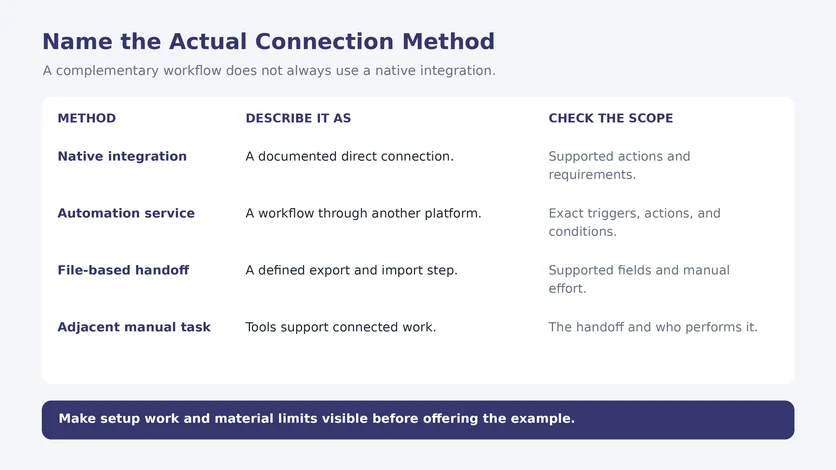
Choose the alternative that matches the documented workflow and the strength of your account research. These four versions and the main template are separate first-message options, not a sequence for one recipient.
1. A Documented Native Integration
Use it when: Current usage is supported, your product has a documented native integration, and you can describe its specific scope accurately.
Fit check: Name a material requirement rather than imply universal availability. Do not turn one supported action into a claim that every part of the workflow is synchronized.
2. A Connection Through an Automation Service
Use it when: The documented connection uses a third-party platform, and the trigger, action, and requirements for your example are supported.
Fit check: Both apps being listed on an automation platform does not prove your exact workflow is supported. Check the actions and conditions involved, and disclose the additional service.
3. A File-Based or Manual Handoff
Use it when: The tools can support connected work, but the handoff depends on an export, import, or other manual step.
Fit check: Keep the manual effort visible. Do not call a file upload an automatic integration or imply the example can read live account information.
4. A Relevant Workflow With Unconfirmed Tool Usage
Use it when: A source provides a genuine reason to investigate the workflow, but you cannot confirm that the tool is still in use.
Fit check: Use a truthful source description and keep the question conditional. If the evidence is too weak to support even that context, research further rather than creating a tool-based pitch.
Who Should Receive a Complementary-Tool Email?
In B2B lead generation, the workflow owner and the technical administrator can be different people. Start with the function that would use the capability, then assess technical feasibility with the appropriate team if there is interest.
| Your Topic | Possible Starting Contact | Keep Separate |
|---|---|---|
| A sales or CRM workflow | The relevant sales operations or revenue operations role. | Owning the workflow and holding app-install permissions. |
| A customer support process | The support operations or customer experience function. | Using a help desk and deciding its technical integrations. |
| A content or campaign handoff | The relevant marketing or content operations role. | Running the process and approving another tool. |
| An uncertain cross-team workflow | A plausible business contact with a routing question. | A referral and an endorsement of the offer. |
Do not request credentials or live account access in the first email. A scoped example using sample information can help the team evaluate the idea before any technical access is discussed.
A Worked Example: A Useful Handoff Without a Native Connector
Fictional illustration: CedarWorks, LedgerCRM, BriefDock, the recipient Aisha, and the sender Sam are invented. The example demonstrates honest workflow wording, not a real integration, customer relationship, or campaign result.
Assume CedarWorks’ current workflow page says its sales team records approved project details in LedgerCRM. BriefDock can build a delivery brief from a supported CSV import. The handoff is a person exporting the supported fields and uploading the file; there is no native connector in this example. Aisha leads sales operations.
| Confirmed Context in the Example | What the Email Should Explain |
|---|---|
| The company describes recording project details in LedgerCRM. | Reference the stated task rather than claim access to the account. |
| BriefDock can create a brief from the supported CSV input. | Describe the import capability within that scope. |
| A person exports and uploads the file. | Name the manual handoff and avoid claiming automatic sync. |
| A sample field map is ready. | Offer the field map and the steps so the recipient can assess the effort. |
| Current process quality is unknown. | Remove “your handoffs are causing delays.” |
The email makes both the capability and the effort visible. The recipient can evaluate an adjacent workflow without first accepting a claim that the existing CRM is inadequate.
Subject Lines That Describe the Added Capability
Make the subject specific to the workflow or example. A tool name can provide useful context, but it should not imply an official relationship with that vendor.
| Subject Line | Suitable Context |
|---|---|
| [specific_action] with [existing_tool] | A supported action with an accurately described method. |
| An example for [workflow] alongside [existing_tool] | A capability that fits a named workflow. |
| A field map for [source] to [destination] | A genuine field-mapping example, including manual steps. |
| [workflow] through [automation_service] | A documented example that depends on the named third party. |
| A question about [specific_workflow] | A relevant process question when current tool usage is unconfirmed. |
Avoid “your [tool] account” if you cannot support current usage. Do not use “official partner,” “recommended by,” or “your integration team asked” without accurate evidence for that statement.
Follow-Ups That Clarify the Workflow
Use the follow-up to explain a useful detail about the example rather than repeat the tool name. Choose a reasonable gap for the audience and stop after a refusal or opt-out.
Follow-Up 1: Make the Scope Clearer
Follow-Up 2: Close the Sequence
Use “Re:” only in the actual thread. If the recipient corrects the tool, method, or workflow, update the account notes before continuing. A request for documentation is evidence of interest in reviewing it, not a confirmed purchasing decision.
Can Your Team Support Every Compatibility Claim in the Draft?
Read the message beside the usage source and your current product documentation. The finished email should let the recipient distinguish a relevant idea from a confirmed connection and understand the next step you are offering.
- Usage: Is the tool reference current and supported, or clearly conditional?
- Value: Have you named a specific complementary capability?
- Method: Does the email identify the actual native, third-party, file-based, or manual approach?
- Limits: Are material requirements and unsupported features clear?
- Relationship: Have you avoided an invented vendor partnership, endorsement, or account relationship?
- Campaign: Have you reviewed sender details, contact fit, refusals, opt-outs, relevant requirements, and your provider’s policies?
Measure whether replies confirm the workflow, ownership, compatibility questions, or an agreed next step. Review the sending setup separately from account fit. A relevant tool connection does not guarantee replies, adoption, or inbox placement.
Frequently Asked Questions
What Is a Complementary Tool Cold Email?
It is a B2B introduction that explains how your product or service can support a workflow alongside a tool the prospect uses or may use. The offer adds a specific capability rather than relying on a claim that the existing product should be replaced.
Does a Complementary Tool Need a Direct Integration?
No. Two tools can support adjacent steps through a native integration, a third-party automation service, a file transfer, or a documented manual process. Explain the method accurately and do not describe a manual handoff as an automatic connection.
How Can I Verify Which Tool a Prospect Uses?
Look for a current first-party statement, company workflow page, or relevant case study, and check its date and scope. A job qualification, old customer story, or third-party technology signal can guide research without confirming current usage or account configuration.
Can I Mention a Tool If Current Usage Is Unconfirmed?
Use conditional wording only when there is a genuine business reason to investigate that workflow. For example, ask whether the tool is still part of the process rather than stating that you know the current setup. If the source is too weak, research further or choose another angle.
What Should I Check Before Claiming an Integration?
Check the official documentation for the connection method, supported actions or objects, required plans, permissions, availability, and important limits. A marketplace listing does not establish that the prospect has installed the app or can use every feature.
Can I Say My Product Is an Official Partner of the Other Tool?
Only when the relationship is accurate, current, and appropriate to describe that way. Compatibility, a connector, or a public marketplace listing alone should not be rewritten as a partnership, recommendation, or endorsement.
Who Should Receive the Email?
Start with the business function that owns the workflow. A technical administrator may be relevant to feasibility, while another team owns the process and decision. If ownership is unclear, ask a suitable starting contact rather than assuming the tool administrator is the buyer.
What If the Prospect No Longer Uses the Tool?
Update the account record and stop using that tool as the opening. If the underlying workflow remains relevant, respond to the information they share and reassess the offer. Do not continue the same sequence after a refusal or opt-out.
Found a Tool Fit? Prepare Your Email for Outreach
Explain the added capability and connection method clearly, then check your sending domain for configuration issues that could affect delivery. Give your message a relevant offer and a well-prepared sending setup.