
TL;DR
- A cold email from a new sales domain should make the sender and company easy to recognize and explain a specific reason for contact.
- The template below uses a brief introduction, verified prospect context, one supported capability, and a small request.
- Before outreach, review authentication, mailbox reply handling, sender identity, audience suitability, and suppression records.
- A provider’s sending limit is a ceiling, not a recommended target. A fixed warmup period does not prove campaign readiness.
- Use five alternative introductions to match the situation, then follow up only when it is appropriate to continue.
- A new domain, clearer copy, or a warmup tool cannot guarantee inbox placement. Do not use domain changes to evade restrictions or continue unwanted outreach.
You have set up a new sales domain, created a mailbox, and reached the point where you need to write the first introduction. What should the email say? The prospect does not need a story about your domain setup. They need to know who you are, why you contacted them, and whether the next step is worth considering.
This cold email template for a new sales domain gives you a clear starting message, five alternatives, and three follow-ups. It also separates the writing decisions from the sending checks that need attention before a campaign begins. A polished email is useful; it is not evidence that a domain is technically ready.
Table of Contents
The Cold Email Template for a New Sales Domain
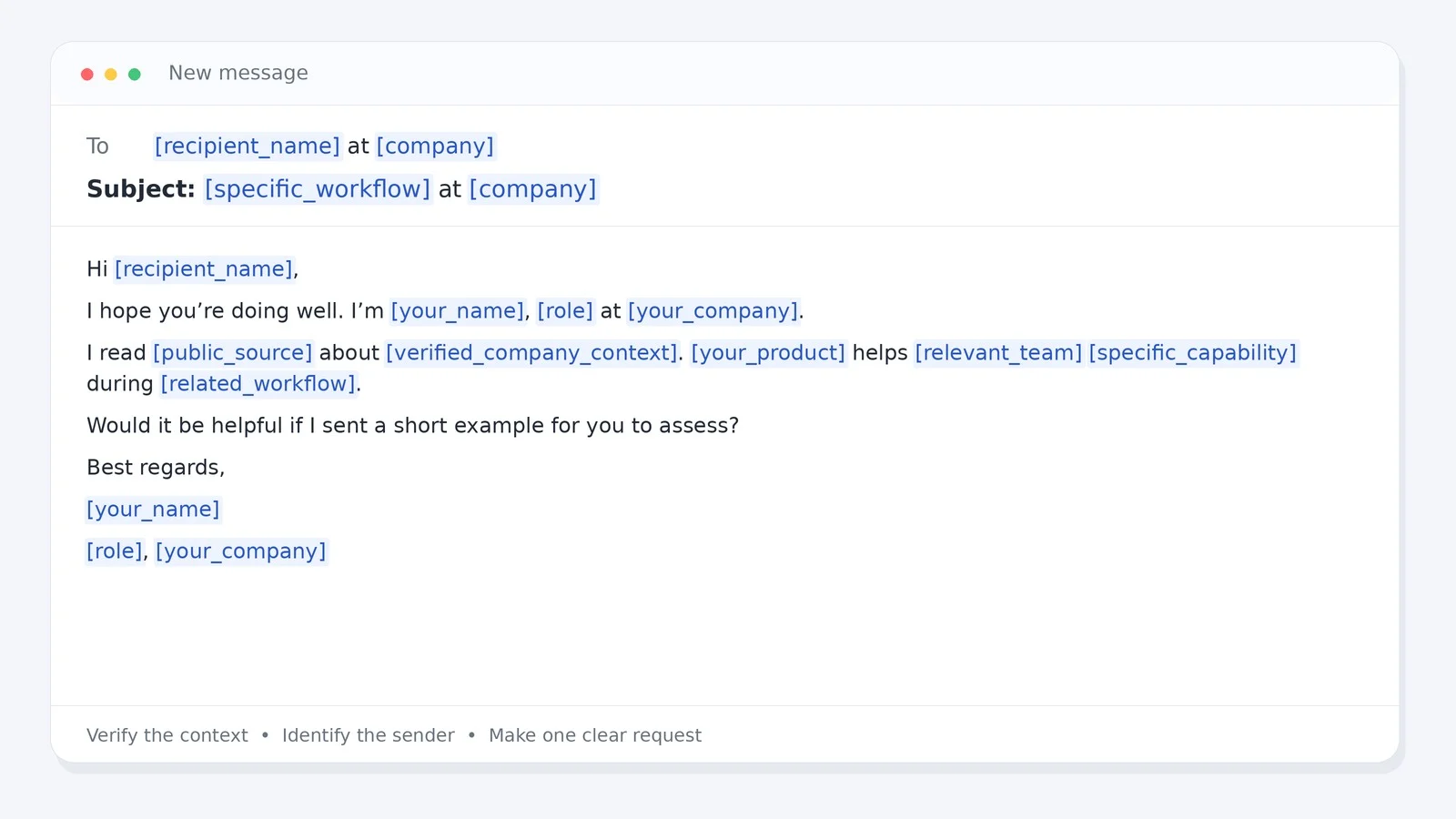
Use this version for a first introduction when you have a verified reason to contact the recipient and your provider permits the intended outreach. Replace every placeholder before sending.
Use your organization’s appropriate sender information and unsubscribe mechanism with the message. Keep opt-out handling in place from the first campaign. A friendly closing or a reply-based opt-out sentence does not replace technical unsubscribe functionality where it is required.
Why This Introduction Works as a Starting Point?
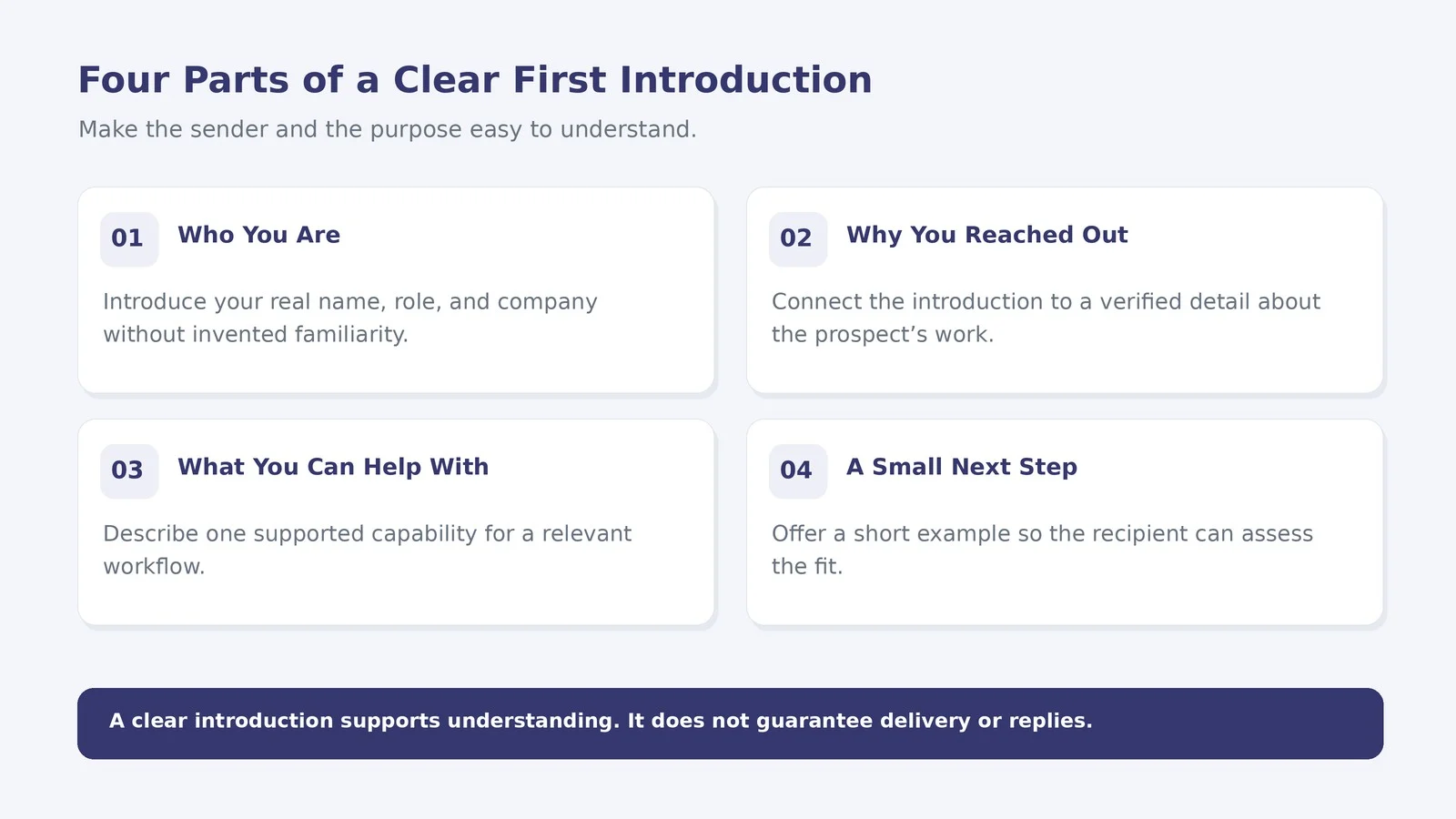
- It identifies the sender immediately. A recipient who has never heard from you can see your name, role, and company.
- It gives a real reason for contact. The public source connects the introduction to the prospect’s work.
- It explains one capability. The reader does not have to interpret a long product description.
- It offers a manageable next step. A short example lets the recipient assess relevance before discussing a meeting.
- It avoids invented familiarity. There is no false reply prefix, implied prior conversation, or claim that you already know their internal problems.
These choices make the message easier to assess. They do not make a new domain trusted automatically, and they do not guarantee a response.
Before Sending From a New Sales Domain
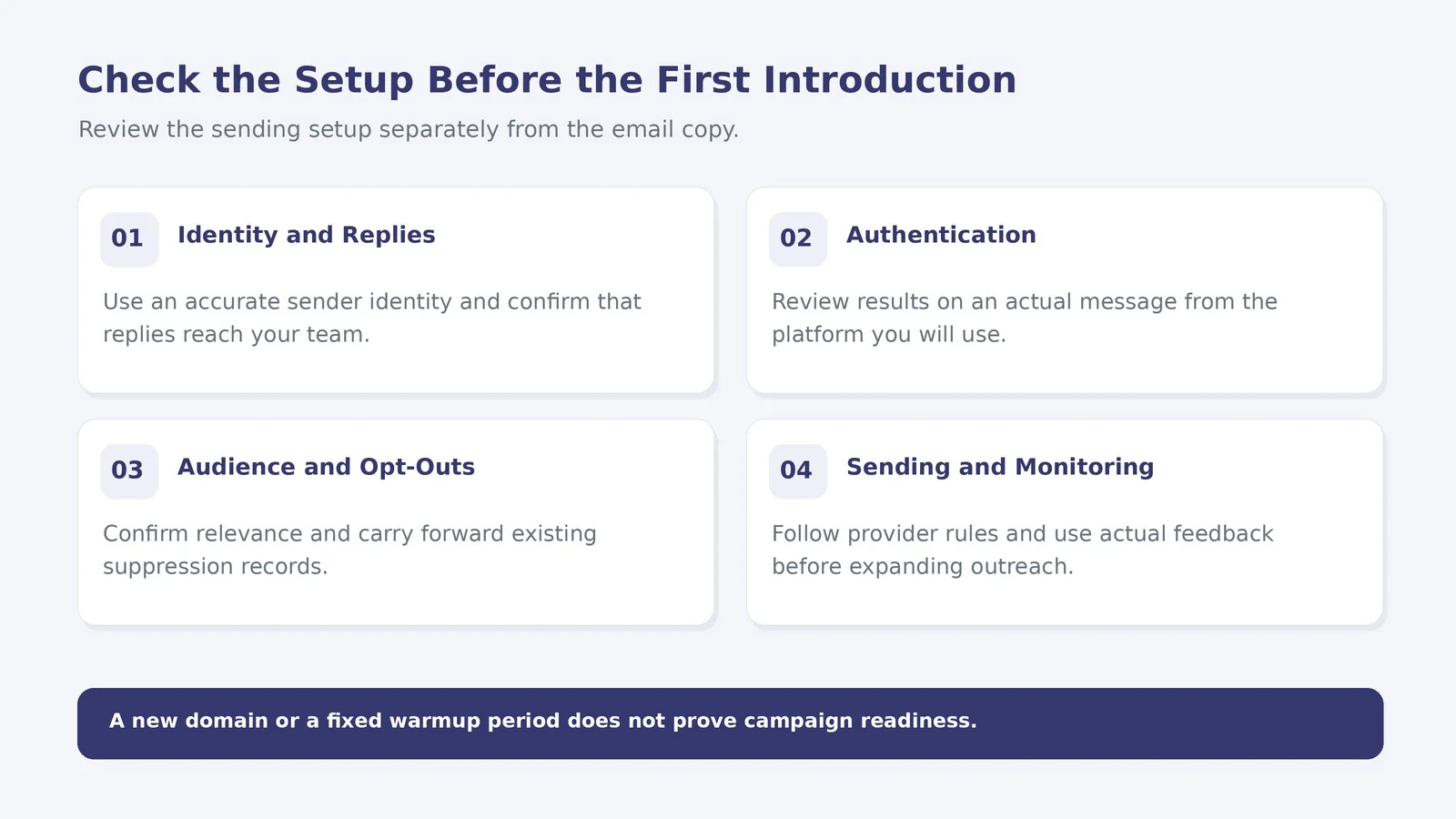
Treat the domain, the mailbox, and the campaign as separate things to check. Registering a domain does not confirm that the sending platform authenticates messages correctly, that replies reach your team, or that a campaign is appropriate for its audience.
| Area | What to Check | Why It Matters |
|---|---|---|
| Sender identity | Use an accurate display name, company name, signature, and reply address. Keep the company’s identity independently verifiable. | Recipients should be able to understand who is contacting them. |
| Authentication | Check the results on an actual message from the platform you will use. Review SPF, DKIM, and DMARC setup and relevant alignment with your provider. | Publishing records alone is not the same as confirming the actual sending path. |
| Mailbox and reply handling | Send a controlled test and reply to it. Confirm that the right person receives and monitors responses. | A sales conversation needs a working path back to the sender. |
| Audience suitability | Confirm contact accuracy, role relevance, provider rules, and whether the intended outreach is appropriate. | A new sending address does not establish permission or relevance. |
| Suppression and opt-outs | Carry forward the organization’s existing opt-out records and check the campaign against them. | Changing a domain must not restart outreach to someone who declined. |
| Sending and monitoring | Review your provider’s limits and guidance, set a monitored approach, and investigate adverse signals before expanding. | Maximum account limits are not evidence of campaign readiness. |
What Google Says About Starting and Increasing Sending?
For personal Gmail recipients, Google requires SPF or DKIM for all senders and additional authentication requirements for bulk senders. It recommends SPF, DKIM, and DMARC more broadly. Applicable bulk marketing and subscribed messages also need the required unsubscribe support.
Google advises consistent sending, a low starting volume to engaged users, and gradual increases while monitoring responses, feedback, and reputation. This is not permission for cold outreach or a universal ramp-up schedule. Follow the provider’s rules and investigate bounces or deferrals. See Google’s email sender guidelines for the requirements and scope.
Do not convert an account’s maximum sending limit into a daily campaign goal. Choose a monitored approach based on the actual setup and audience. Avoid claiming that a particular number of days or messages makes every new sales domain ready.
Subject Lines for a First Sales Introduction
A useful subject describes the conversation the recipient will find inside the message. You do not need to announce that the sending domain is new.
| Subject Line | When It Fits |
|---|---|
| [specific_workflow] at [company] | You can connect the product to a workflow the recipient recognizes. |
| A question about [verified_initiative] | A real public initiative gives you a relevant reason to ask. |
| An example for [specific_task] | You are offering an example you can actually send. |
| How does [company] handle [specific_task]? | The message asks a genuine process question without assuming a problem. |
| A relevant [use_case] example | Approved evidence helps explain an unfamiliar company’s offer. |
Avoid “Re:” on a new thread, misleading internal labels, or subject lines that imply an existing relationship. A truthful subject helps the reader understand the email; it is not an inbox-placement shortcut.
When to Use This Template—and When to Wait
Use it when a new sales operation needs a clear introductory message, a company is establishing a legitimate sending identity, or a team wants a specific baseline before testing different relevance angles. The audience still needs to fit the offer, and the sending setup must be reviewed separately.
Wait when authentication is failing, reply handling is broken, or the campaign cannot explain why the contacts are relevant. Investigate known delivery problems before expanding. Do not use a new domain as a reset button for an unresolved complaint problem, a provider restriction, or a list of people who have opted out.
Five Alternatives for Introducing Yourself From a New Sales Domain
Choose one alternative based on the recipient and the offer. These are five possible first messages, not a five-email sequence. Keep your real sender identity consistent across whichever version you use.
1. Introduce a New Sales Team Clearly
When to Use It: Use this when you are opening conversations for a newly formed sales team and need to establish who is contacting the prospect.
Personalization Tip: Use a real sender and a company identity the recipient can independently verify. Do not present a newly formed team as an existing relationship.
2. Connect the Introduction to a Verified Initiative
When to Use It: Use this when a recent public initiative provides a relevant reason to introduce your company.
Personalization Tip: Name the actual initiative without inventing a deadline, an internal problem, or a budget.
3. Ask Permission to Share a Useful Resource
When to Use It: Use this when you have a relevant resource but do not need to attach it or include several links in the opening email.
Personalization Tip: Offer a resource that already exists and directly addresses the use case. Keeping an optional link out of the first email does not guarantee inbox placement.
4. Start With One Relevant Process Question
When to Use It: Use this when you can identify a specific task but should not assume the prospect has a problem.
Personalization Tip: Ask a question you can act on. Do not pretend to be conducting independent research if the purpose is a sales introduction.
5. Introduce the Company Through Relevant Evidence
When to Use It: Use this when you have approved customer evidence that helps an unfamiliar recipient understand the use case.
Personalization Tip: Use approved, documented evidence. A new sales domain is not a reason to invent a customer, a result, or a prior connection.
A Filled-In Example for a New Sales Domain
Illustrative example: Cedar Rooms, Maya, and LumaOps are fictional. The scenario demonstrates the structure and does not describe verified product capabilities or customer results.
The sender introduces the company before presenting the use case. The opening names a public event, while the product sentence describes a concrete workflow. In a real campaign, verify the event, the recipient’s responsibility, and the capability. Do not imply that the expansion proves a maintenance problem.
What to Personalize Before the First Send?
| Field | Research or Check | Avoid |
|---|---|---|
| [role] and [your_company] | Use your current role and the organization you actually represent. | An invented identity or a misleading brand relationship. |
| [public_source] | Record the source and date in your research notes. | Claiming to have read a source you have not reviewed. |
| [verified_company_context] | Confirm that the event or initiative is real and relevant now. | Treating an old announcement as a current priority. |
| [relevant_team] | Check whether the team plausibly owns the workflow. | Assuming a need from a matching title alone. |
| [specific_capability] | Use current product documentation or a verified demonstration. | Promising planned features or unsupported outcomes. |
| The offered example | Prepare something concise and relevant before offering to send it. | Using a small request as a pretext for an unexpected meeting pitch. |
Keep the First Message Clear Without Making Delivery Promises
Use readable text, one clear offer, and a consistent sender identity. Review any links you include and avoid attaching several resources before establishing relevance. An optional resource can wait until the recipient asks for it. Keep the unsubscribe functionality and sender information that apply to your messages.
Neither plain text nor HTML guarantees delivery. A domain health check, a controlled test, and a warmup status each answer different questions; none proves that every prospect will receive or welcome the campaign. Use them alongside actual sending feedback.
Follow-Up Emails for the New Sales Domain
Only follow up when it remains appropriate to contact the recipient and you have no unresolved sending issue that needs investigation. Let the audience and context guide spacing. If someone replies, respond to their message instead of continuing an automated script. Stop after a refusal or opt-out.
Follow-Up 1: Clarify the Use Case
Follow-Up 2: Share a Relevant Reason to Review
Follow-Up 3: Close the Conversation Politely
Use “Re:” only within the original conversation. Do not switch to another mailbox or domain to continue contacting someone who asked you to stop. Your suppression process should follow the recipient across the organization’s campaigns.
How to Review the First Campaign?
Keep a record of the sender, platform, audience criteria, message version, sending conditions, and observation window. Review delivery errors and available feedback before drawing conclusions about the writing. A lack of replies does not establish that the email went to spam, and a delivery-accepted status does not confirm inbox placement.
Track positive replies separately from refusals, automatic responses, and total replies. A useful product question or a request for the example may count as positive under your documented definition. Once the setup is stable, compare one meaningful copy change at a time with reasonably comparable audiences.
If replies are low without clear evidence of a delivery problem, use the low-reply-rate template and campaign checklist to review targeting, value, and the size of the request. Diagnose the specific issue rather than assuming that the domain’s age explains every outcome.
Frequently Asked Questions
What Is a Cold Email Template for a New Sales Domain?
It is an introductory sales message used from a newly established sending domain. It should identify the real sender, explain a verified reason for contact, describe a relevant capability, and offer a proportionate next step. It cannot replace the technical or audience checks needed before sending.
Should I Tell Prospects That My Sales Domain Is New?
Usually the recipient needs to understand who you are and why the message matters, rather than your domain’s launch date. Identify yourself and your company accurately. Explain a changed address only when it is relevant to a real existing relationship; that situation is different from a first cold introduction.
How Many Cold Emails Can I Send Each Day From a New Domain?
There is no universal safe daily number. Follow your platform’s limits and acceptable-use rules, review your technical setup, and use actual delivery and recipient feedback to guide decisions. A provider’s maximum limit is not a recommended campaign target.
How Long Should I Warm Up a New Sales Domain?
Do not treat a fixed number of days as proof that a domain is ready. Review authentication, reply handling, controlled tests, provider guidance, and sending signals. A warmup status or elapsed waiting period does not guarantee that a campaign will reach the inbox.
Can I Use a New Domain to Replace One With Deliverability Problems?
Do not treat domain replacement as a way to continue the same unwanted campaign or bypass a restriction. Investigate the causes, correct the practices involved, and retain opt-out and suppression records. A different domain does not make an irrelevant list appropriate to contact.
Should the First Email From a New Domain Contain No Links?
There is no universal link rule that guarantees delivery. Keep links necessary and accurate, review their destinations, and retain required unsubscribe functionality. You can offer to send an optional resource after a reply instead of including several resources immediately.
Does Using InboxWarm Guarantee That a New Sales Domain Is Ready?
No warmup tool can guarantee campaign readiness, inbox placement, or replies. Evaluate the sending setup, audience fit, provider rules, and real sending feedback alongside any warmup activity.
Check Your New Sales Domain Before Starting Outreach
Review your domain’s email configuration alongside your sender identity, audience, and reply handling. Use the findings to guide the checks your team needs next.