

Table of Contents
TL;DR
Automated email warmup is software that builds sender reputation across your mailboxes on a managed schedule, sending and replying to human-like messages so your cold outreach lands in the inbox instead of spam.
Manual warm-up stops being realistic past roughly 10 to 15 mailboxes. Agencies running 30 to 100 inboxes across multiple client domains need automation to stay consistent and avoid reputation gaps.
Google and Yahoo block bulk senders whose spam complaint rate hits 0.3%, and Google tells you to stay under 0.1% (Google email sender guidelines, enforced since February 1, 2024). At that rate, just 3 complaints per 1,000 emails trips the line.
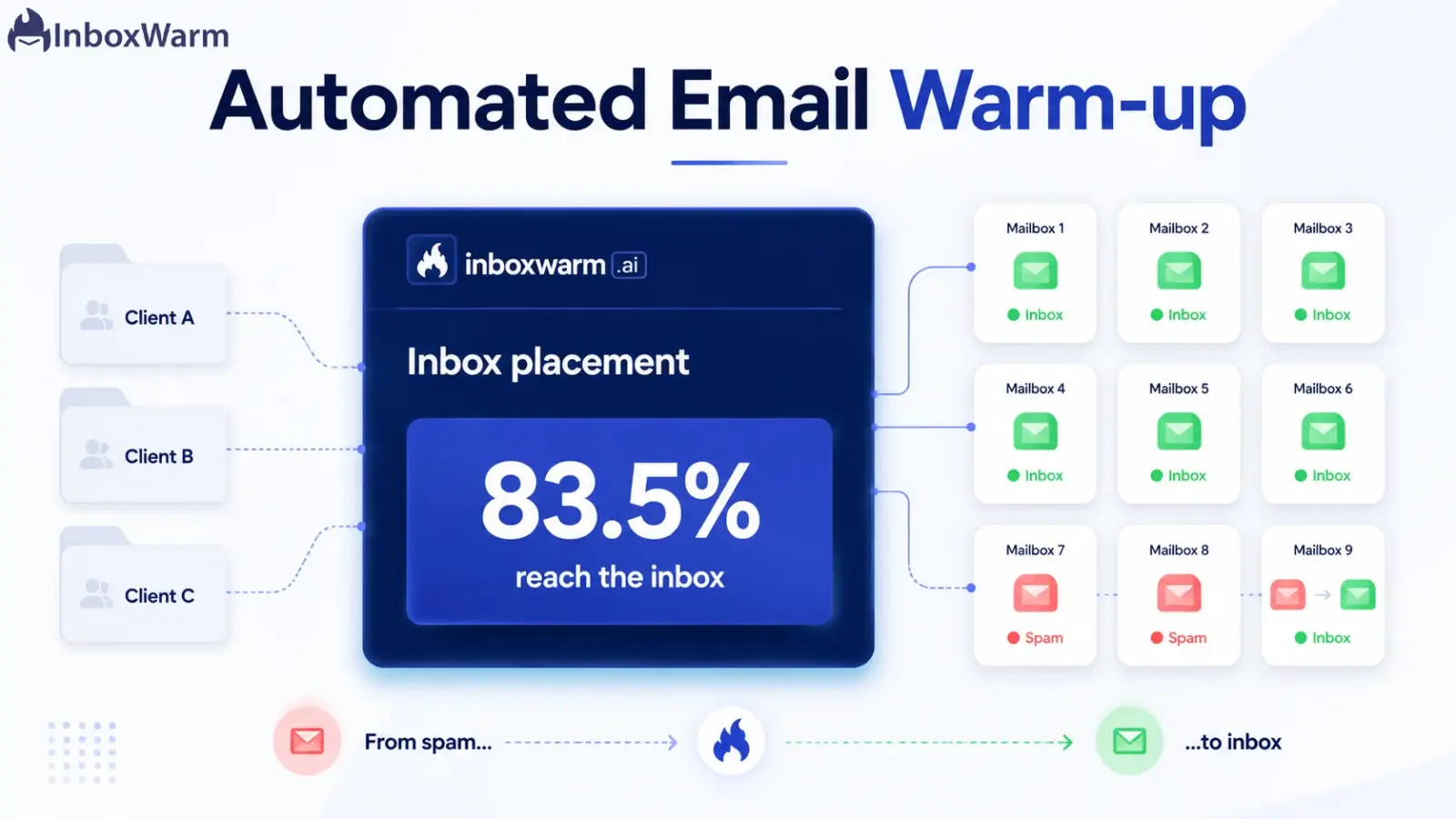
Roughly 1 in 6 legitimate emails never reaches the inbox (Validity 2025 Email Deliverability Benchmark, average inbox placement of 83.5%). Warm-up keeps you on the right side of that number.
The best email warmup software gives you multi-domain management, per-mailbox analytics, real inbox-placement data, and a recovery mode, not just a single warm-up progress bar.
What This Guide Covers
Automated email warmup is software that builds and maintains sender reputation across your mailboxes without manual work. It sends human-like emails, opens and replies to them, and pulls messages out of spam on a managed schedule. For an agency running dozens of inboxes across client domains, automation is the only practical way to warm up at scale without burning a domain.
This guide is written for cold email agencies and lead-gen teams. We cover what automated warm-up does, why manual warm-up collapses once you pass a handful of inboxes, how to choose email warmup software, how long automatic inbox warming takes, what it cannot fix, and how to roll it out across a full client portfolio.
What Is Automated Email Warmup?
Email warm-up is the process of gradually building a mailbox’s sending reputation before you run real campaigns. Automated email warmup hands that process to software, so the daily sending, opening, replying, and spam rescue happen on a schedule instead of by hand. People also call it automatic inbox warming, and it means the same thing.
The mechanism is straightforward. The software sends low volumes of natural-looking email from your mailbox to a pool of other real inboxes inside its network. Those recipients open the message, mark it as important, drag it out of spam if it lands there, and reply in a human-like thread. Mailbox providers read those interactions as proof that real people want your email, and your sender reputation climbs accordingly.
For a single inbox, you could fake all of that by hand. For an agency, you cannot, and that gap is the entire reason this category of software exists.
Why Does Manual Warmup Break Down at Agency Scale?
One inbox is easy to warm up by hand. You send a few emails a day, reply to a few, ramp slowly over three to four weeks, and you are done. Agency math does not look like one inbox. A mid-sized cold email shop runs 30 to 100 mailboxes spread across a dozen or more client domains, and every one of them needs daily, consistent activity for weeks before it is safe to send a real campaign.
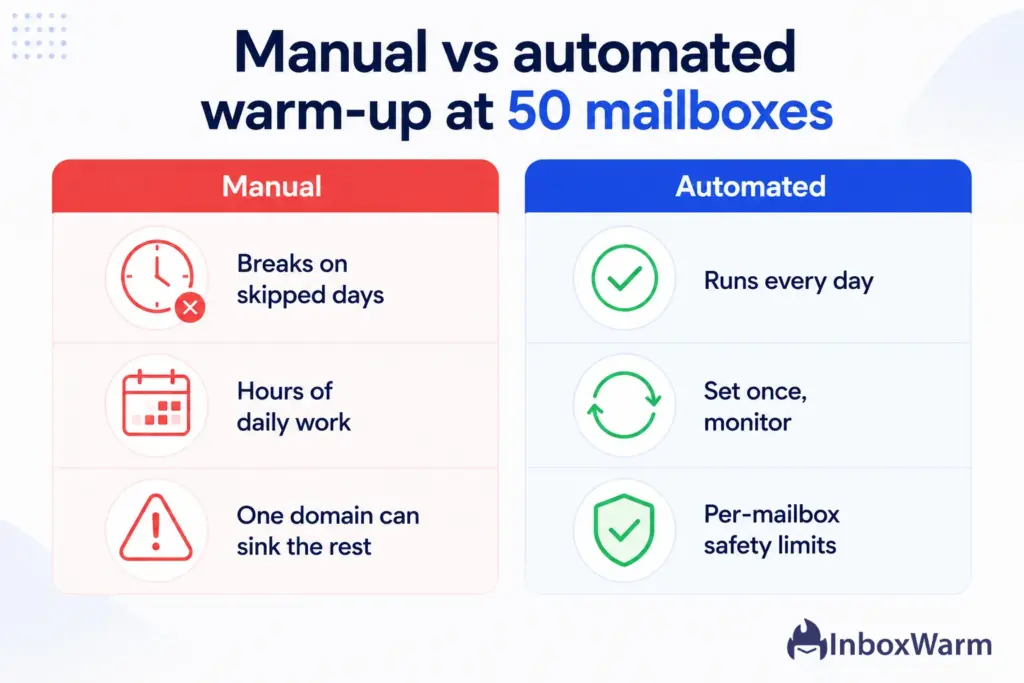
Manual warm-up at that scale fails for three predictable reasons.
Consistency: Reputation decays when you skip days, and no human hand sends a warm-up email over a weekend or a holiday. Miss a few days across a portfolio, and you are re-warming domains you already paid to warm.
Time: Even at two minutes per mailbox per day, 60 mailboxes is two hours of mindless sending and replying every single day. That is a salary, not a task.
Blast radius: Google and Yahoo measure spam complaints against delivered volume, and the threshold is brutal. A 0.3% rate means just 3 complaints per 1,000 emails, and Google wants you under 0.1% (Google email sender guidelines). One neglected client domain can cross that line and damage the campaigns you were hired to protect.
Automation removes the human bottleneck. The schedule runs every day; whether you are at your desk or not, the ramp stays gradual, and you watch one dashboard instead of 60 browser tabs.
Most agencies hit this wall somewhere between 10 and 15 mailboxes, and that is the point where email warmup software becomes your infrastructure.
How Does Automated Email Warmup Actually Work?
Automated warm-up runs the same loop for every mailbox, then repeats it daily until the inbox is ready and beyond. Knowing the loop helps you read the dashboard and catch problems before they cost a client a campaign.
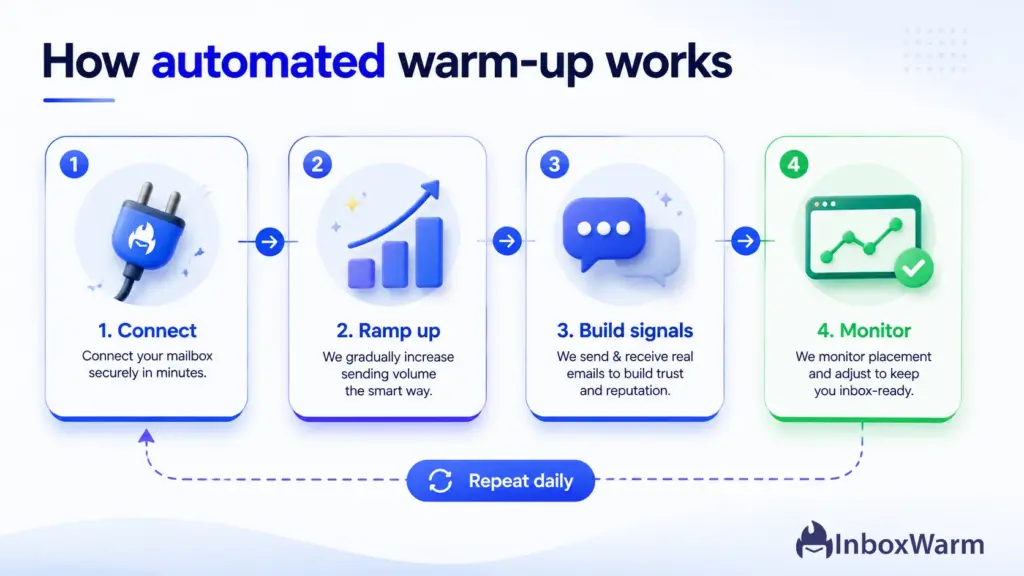
Step 1: Connect Each Mailbox
You link each mailbox to the tool through OAuth for Gmail and Outlook or through SMTP credentials for dedicated infrastructure. Connection takes under five minutes per inbox. Good software lets you tag each one by client, so your portfolio stays organized from day one and your reporting maps cleanly to who you bill.
Step 2: Ramp Sending Volume Gradually
The tool sends a small number of warm-up emails on day one, then increases volume on a slow, automatic curve. Sudden jumps are the single biggest red flag to mailbox providers, so the ramp is deliberately patient. You should never see a mailbox leap from 20 to 200 emails overnight, no matter how good yesterday’s reputation looked.
Step 3: Build Positive Engagement Signals
This is the actual reputation-building work. Recipients in the warm-up network open your email, mark it important, rescue it from the spam folder, and reply in natural threads. Those four signals, opens, importance, spam rescue, and replies, are exactly what reputation systems reward. The quality of the replies matters; human-like conversation builds trust, while obvious robotic loops can do the opposite.
Step 4: Monitor and Adjust Per Mailbox
The dashboard tracks inbox placement, spam rate, and sender health for each mailbox individually. Strong tools slow the ramp automatically when an inbox starts slipping toward spam and flag the domains that need attention. This is also why warm-up never fully stops for active senders; most agencies keep a low maintenance level running alongside live campaigns so reputation holds steady.
What Should Agencies Look For in Email Warmup Software?
Most warm-up tools handle a single inbox fine. The gap shows up at agency scale, where you manage many mailboxes at once, report real results to clients, and need to rescue domains that go cold. These are the features that separate consumer-grade tools from agency-grade email warmup software.
| What to look for | Why it matters for agencies |
|---|---|
| Multi-domain dashboard | Manage every client mailbox from one view, grouped by client. Switching between separate accounts is where mistakes happen. |
| Per-mailbox analytics | You need inbox placement, spam rate, and sender health for each inbox, not a single blended score. One bad domain hides inside an average. |
| Real inbox-placement data | A genuine placement number beats a vague progress bar. You report results to clients, so the metric has to be real. |
| Provider coverage | Support for Gmail, Outlook, SMTP, and Amazon SES so you can warm up whatever stack a client runs. |
| Human-like replies | AI-generated, natural conversations build reputation. Robotic, repetitive loops can flag as inauthentic. |
| Recovery mode | When a domain lands in spam, you need a deliberate rewarming path, not just a fresh start. |
| Per-mailbox pricing | Margins are tight. Predictable cost per inbox lets you price client retainers without surprises. |
A dedicated warm-up tool gives you deeper placement data, per-mailbox control, and a cleaner recovery path when a domain slips. That matters more for an agency than for a solo sender, because you are not warming one inbox; you are protecting a portfolio of client domains, each with its own reputation to defend and results to report.
How Long Does Automatic Inbox Warming Take?
There is no single number, and any tool that promises one is overselling. Every provider has its own warm-up timeline, and the domain’s age plus your planned sending volume both move it.
New Gmail and Outlook Mailboxes
A new Gmail or Google Workspace mailbox typically needs 14 to 30 days before it is ready for cold outreach, and Outlook and Microsoft 365 mailboxes sit in a similar range. If the domain itself is brand new, treat the first 30 days as non-negotiable. The mailbox might look ready earlier, but sending hard before reputation is established is how new domains end up in spam.
Dedicated SMTP and Amazon SES
SMTP setups and Amazon SES usually take longer, because you are building both IP reputation and domain reputation at the same time. Plan for several weeks, and ramp even more conservatively than you would on a shared Google or Microsoft pool. The payoff is more control over deliverability once the IP is trusted.
Two rules hold across every scenario. Never jump volume in large steps, because a sudden spike looks unnatural regardless of yesterday’s reputation. And never cut warm-up dead on launch day; taper it as live volume climbs so reputation does not wobble during the handoff.
What Automated Warmup Won’t Fix
Warm-up builds reputation. It does not repair the things that destroy reputation in the first place, and treating it as a cure-all is how agencies burn domains with a tool still running. Handle these three separately.
Missing authentication. Warm-up without complete SPF, DKIM, and DMARC is wasted effort, because providers distrust unauthenticated mail no matter how warm the sender looks. Verify those records before you connect a single mailbox.
Poor list quality. Emailing purchased or unverified lists with high bounce rates erodes reputation as fast as warm-up builds it. Clean and verify every list first.
Spam-triggering copy. Heavy link counts, attachment-stuffed emails, and classic spam phrasing trip content filters even for a perfectly warmed sender. Reputation gets you delivered; copy decides whether you stay.
The bar keeps rising. Microsoft began enforcing bulk-sender requirements for Outlook and Hotmail in May 2025, and Google moved from temporary delays to permanent rejections for non-compliant bulk senders in November 2025 (Google email sender guidelines). Warm-up gets you to the inbox; authentication, list hygiene, and copy keep you there.
How to Roll Out Automated Warmup Across a Client Portfolio
Rolling out warm-up for one inbox is simple. Rolling it out across a dozen client domains at once is where agencies trip, usually by connecting everything on day one and launching before any domain is ready. A staged rollout fixes that. It protects each client’s reputation independently and gives you a clear read on what is safe to send.
Here is the sequence we would follow to onboard a full book of client mailboxes without tripping a provider threshold.
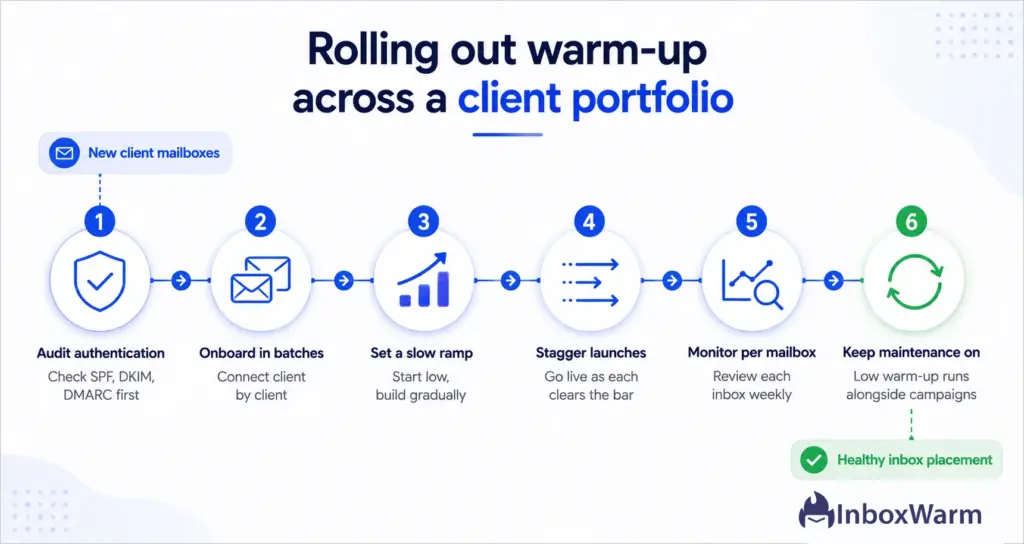
Step 1: Audit Authentication First
Verify SPF, DKIM, and DMARC on every domain before you connect a single inbox. Authentication gaps are the most common reason a warmed domain still lands in spam, and they are cheap to fix up front and expensive to fix after a client complains.
Step 2: Onboard Mailboxes in Batches
Connect inboxes client by client rather than all at once. Batching lets you confirm each connection, tag mailboxes to the right client, and catch a misconfigured account before it pollutes your data or your warm-up network.
Step 3: Set a Conservative Ramp
Start every mailbox low and let the automatic schedule build the volume. Speed costs reputation, and patience earns it, so resist the urge to rush a domain just because a client is impatient to launch.
Step 4: Stagger Your Campaign Launches
Bring domains live as each one clears your inbox-placement bar, not on a single launch day. Staggering keeps your total complaint exposure low and gives you a clean read on which domains are genuinely ready.
Step 5: Monitor Placement Per Mailbox
Review each inbox individually at least weekly. The moment a mailbox drifts toward spam, pull it back into a heavier warm-up cycle before it drags down the client’s live campaign and your renewal odds with it.
Step 6: Keep Maintenance Warm-Up Running
Leave a low background level of warm-up running alongside active campaigns. It is the cheapest way to protect the reputation you just spent weeks building, and it costs you almost nothing to keep on.
Warming 50 mailboxes by hand is a full-time job nobody wants.
InboxWarm.ai is built to run warm-up across every client domain on autopilot, on a safe, gradual ramp. You get real inbox-placement data per mailbox and not a minute of manual sending.
The Bottom Line for Agencies
Automated email warmup is the line between a deliverability program that scales and one that quietly breaks the moment you sign the next client. For an agency, getting this wrong is not just a spam folder. It is a client churning because their pipeline dried up, a domain you have to retire, and weeks of unbilled rewarming to clean up the mess.
Get authentication right first, choose email warmup software built for multiple domains, ramp slowly, monitor every inbox on its own, and keep a maintenance level running once campaigns go live. Do that across your whole portfolio, and warm-up becomes a quiet system humming in the background, the kind of unglamorous infrastructure that keeps clients renewing because their emails simply land.
That is the difference between an agency that blames the algorithm and one that owns the inbox!
Frequently Asked Questions
How many warm-up emails should each mailbox send per day?
Start low, often under 10 to 20 emails per day, then increase gradually over several weeks. The exact curve depends on the provider and the domain's age, so there is no universal number. Good email warmup software sets and adjusts the ramp automatically, which removes the guesswork. Your job is to avoid overriding it with a faster schedule.
Can I warm up multiple client domains at the same time?
Yes, and that is precisely what automation is built for. Agency-grade tools manage many domains from one dashboard with separate analytics for each mailbox. That per-client visibility is the only realistic way to run automatic inbox warming at scale. Juggling separate logins is where mistakes creep in.
Does automated warmup work for SMTP and Amazon SES?
Yes. Dedicated SMTP and Amazon SES setups need both IP and domain reputation built, so they generally take longer than a Gmail or Outlook mailbox. Confirm your tool supports the exact provider your client runs before you onboard them. Ramp these setups even more conservatively than shared pools.
Do I still need warm-up if the domain is old?
Sometimes, yes. A domain that has been inactive for 60 or more days can lose reputation and should be re-warmed before outreach. A brand-new mailbox on an established domain also starts with no individual sender score of its own. When in doubt, run a short warm-up rather than risk a cold start.
Can warm-up recover a domain that is already in spam?
It can help, but only as part of a recovery process. You also have to fix authentication, clean the list, and file delisting requests where a blacklist is involved. Look for a tool with a dedicated recovery mode rather than a plain restart. Warm-up alone will not undo the behavior that caused the problem.
How much does email warmup software cost for an agency?
Most agency tools price per mailbox, which keeps cost predictable as you add clients. That structure lets you build the per-inbox cost directly into a client retainer instead of eating it. Check current pricing before committing a full portfolio. The cheapest tool is rarely the one that saves a client domain.