
TL;DR
- A B2B lead generation cold email should test a specific fit between a researched account, a relevant contact, and a supported offer.
- The main template uses verified context, one capability, and a small request to assess relevance.
- Research company fit and workflow ownership before writing. A funding round, job title, or expansion announcement alone does not prove a need.
- Four alternative first emails cover researched accounts, public initiatives, useful resources, and unclear ownership.
- Measure what replies confirm: relevance, ownership, a stated need, or an agreed next step. Keep referrals and automatic responses separate from buying interest.
- Follow up with useful context and stop after a refusal or opt-out. No template guarantees leads, replies, or inbox placement.
A list of company names and email addresses gives you people to research. It does not tell you which companies need your offer, which person owns the workflow, or whether a conversation would be useful. Those are the questions your first email should help you explore.
This cold email template for B2B lead generation gives you a starting message, four alternatives, and follow-ups. It also shows what to verify before sending and how to interpret the response. The goal is a relevant opening conversation, with enough evidence to decide what should happen next.
Table of Contents
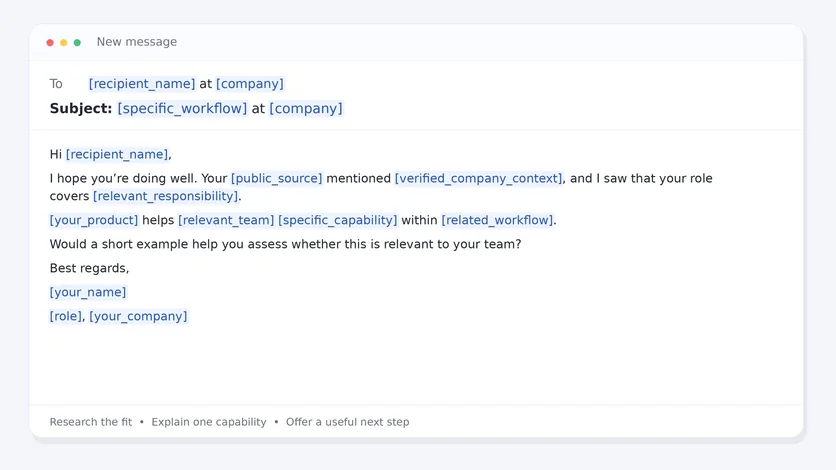
The Cold Email Template for B2B Lead Generation
Use this version when you can support the connection between the company, the recipient’s work, and your capability. Keep the request small enough for the person to assess without first agreeing to a full sales meeting.
Replace every placeholder with accurate information. If the responsibility is unconfirmed, use the ownership-check variation below instead of presenting it as fact. Keep your real sender identity and the sender information and unsubscribe functionality appropriate to your campaign.
Who Should You Contact?
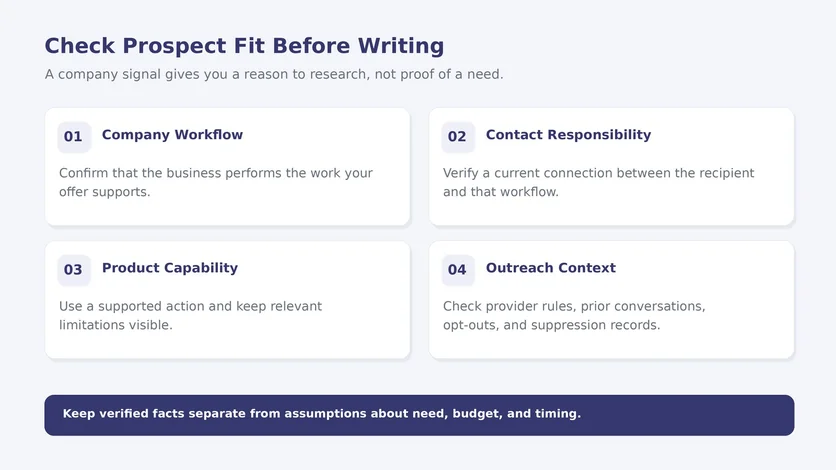
Start with the workflow your product supports. Then identify the kinds of companies that perform that work and the people responsible for it. You need a plausible connection at both levels: an appropriate account and an appropriate contact.
| Fit Question | Evidence to Look For | Do Not Assume |
|---|---|---|
| Does the business perform the relevant work? | Current company descriptions, services, product information, or operating context. | A broad industry label means every company has the same process. |
| Can your product support a specific part of that work? | Current documentation or a verified demonstration of the capability. | A generic promise such as “grow faster” establishes a usable fit. |
| Is this person connected to the workflow? | A current team page, role description, public interview, or other professional source. | A senior title proves ownership or budget authority. |
| Is the context current enough to use? | The date, status, and scope of the announcement or source. | An old initiative is still a priority. |
| Is the outreach appropriate? | Provider rules, contact context, and your organization’s opt-out and suppression records. | A public business address or a new sending domain makes every campaign appropriate. |
Write a one-sentence fit hypothesis before the email: “This company performs [workflow], this role appears responsible for [task], and our product supports [specific action].” If you cannot fill in the sentence credibly, continue the research or skip the contact.
What Makes a Prospect Worth Researching?
A useful signal gives you a reason to investigate. It does not give you permission to invent an internal problem. For example, an expansion announcement may make a multi-location workflow relevant to research. It does not prove that the company’s current process is broken.
| Observed Signal | Reasonable Research Question | Unsupported Leap |
|---|---|---|
| A company announces expansion | Will the relevant workflow operate across more teams or locations? | “You must be struggling to manage the expansion.” |
| A team is hiring for a relevant function | What responsibility will the role cover, and is your use case connected? | “You have budget for our product.” |
| A leader discusses a process publicly | What exactly did they describe, and what capability could be relevant? | “They are actively shopping for software.” |
| A company describes a complementary tool | Does your documented capability work with that environment? | “They want to replace their existing stack.” |
You can use a researched account without a recent announcement. A clear, current workflow fit is a better starting point than forcing a news hook that has little connection to your offer.
What to Verify Before Writing the Opening
- The source: save the URL and date in your research notes. Make sure it actually supports the statement you plan to make.
- The responsibility: separate a verified role connection from a hypothesis about who evaluates or approves a change.
- The capability: use a feature or action the product supports today. Keep limitations that affect the use case visible.
- The offered resource: have the example, checklist, or summary ready before offering to send it.
- The outreach status: check for previous conversations, refusals, opt-outs, and other active outreach from your own team.
Use public professional context that helps explain the business fit. Unrelated personal details do not establish relevance. Do not claim that someone requested information, visited a page, or was referred by a colleague unless that statement is accurate and appropriate to use.
When Should You Skip the Outreach?
Skip the contact when the use case does not fit, the key facts cannot be verified, or your product cannot support the capability you would need to promise. A superficially personalized email does not solve those problems.
Do not restart outreach after an opt-out or treat a different address as a way around a refusal. If the company is already in an active conversation with a colleague, coordinate internally. If provider errors or other adverse sending signals show an unresolved issue, investigate before expanding the campaign.
Subject Lines for a Relevant First Conversation
Make the subject describe what is actually inside the email. Avoid false reply prefixes, invented deadlines, and vague claims that require the recipient to open the message to understand the purpose.
| Subject Line | When It Fits |
|---|---|
| [specific_workflow] at [company] | A recognizable workflow anchors the offer. |
| An example for [specific_task] | You have a useful example to send. |
| A question about [verified_initiative] | A genuine initiative provides relevant context. |
| A [specific_task] checklist for your team? | A prepared checklist is the next step you are offering. |
| Which team handles [specific_workflow]? | Reasonable research has not confirmed ownership. |
Four B2B Lead Generation Email Variations
These are alternative first messages. Select one based on the evidence and the next step you can offer; do not send all four as a sequence. The differences should come from the use case and the prospect’s context, not just changes to the greeting.
1. Introduce a Relevant Workflow to a Researched Account
When to Use It: Use this when the company fits your target profile and you can verify a responsibility connected to your use case.
Personalization Tip: Explain the specific fit. Company size and industry can help narrow research, but they do not establish a current need.
2. Connect the Offer to a Verified Company Initiative
When to Use It: Use this when a public announcement gives a plausible reason to research the account now.
Personalization Tip: Treat the initiative as context, not proof of a problem, budget, or buying deadline. Only use the conditional connection when it is plausible.
3. Offer a Resource That Helps the Prospect Assess the Use Case
When to Use It: Use this when you have an existing, specific resource that is useful before a sales conversation.
Personalization Tip: Prepare the resource before offering it. Do not describe a sales deck as an independent guide or imply the resource request is consent to an unrelated sequence.
4. Confirm the Relevant Function When Ownership Is Unclear
When to Use It: Use this after reasonable research when the account fits but ownership of the workflow is unconfirmed.
Personalization Tip: Ask a plausible contact a precise question. A routing reply is useful research, but it is not evidence that the referred team wants to buy.
A Filled-In B2B Lead Generation Email
Fictional example for illustration: Mira, Cedar Facilities, and WorkThread are invented. The scenario shows the research-to-message connection and does not describe a verified company announcement, product capability, or customer result.
The company signal explains why the workflow is worth discussing. The role detail explains why Mira is a plausible contact. The product sentence gives a concrete action, and the request asks whether an example is relevant. It does not claim that expansion caused a problem or that Mira has a buying project.
Turn the Research Into Useful Personalization
| Email Field | Use This Kind of Detail | Avoid |
|---|---|---|
| [verified_company_context] | A specific, current first-party fact connected to the workflow. | Generic praise or an assumed pain point. |
| [relevant_responsibility] | A documented connection between the person’s role and the task. | Treating seniority as evidence of ownership. |
| [specific_capability] | A supported action that fits the workflow. | A feature list or an unsubstantiated performance promise. |
| [related_workflow] | The process the recipient would recognize. | Broad labels such as “business growth” without a concrete task. |
| The example or resource | Something useful for assessing the use case. | A surprise request for a call after promising a resource. |
If the role is the part you cannot verify, use the decision-maker outreach guide to research ownership and frame a respectful routing question. If the prospect first needs to understand a type of solution, the product introduction templates provide another starting point.
Follow-Ups That Help the Prospect Decide
Use reasonable spacing for the audience and context. Each follow-up should add something useful: a clearer capability, an available resource, or a polite close. Stop after a refusal or opt-out. When someone replies, answer that reply instead of continuing the automated sequence.
Follow-Up 1: Clarify the Specific Use Case
Follow-Up 2: Offer a Concrete Resource
Follow-Up 3: Close the Loop
Use “Re:” only when replying within the original conversation. These examples do not establish a universal cadence or a requirement to send every touch.
What Counts as a Useful Reply?
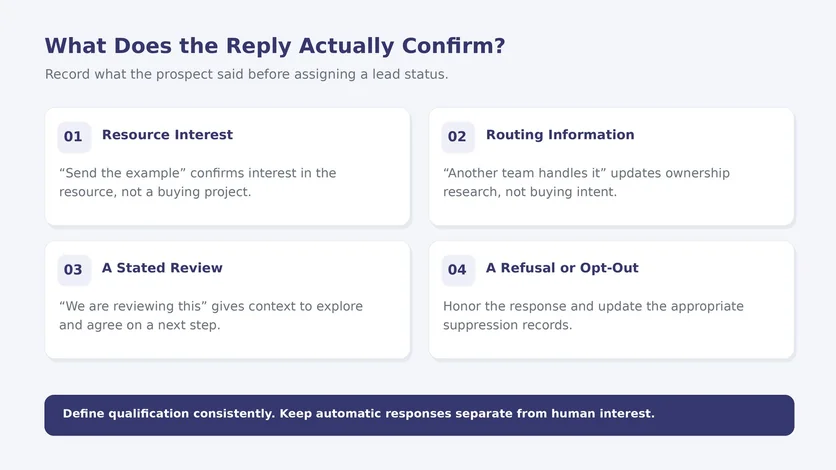
Define your reply categories before evaluating the campaign. The table below is a practical starting point; adapt it to the qualification process your team actually uses.
| Reply Type | What It Confirms | Appropriate Next Step |
|---|---|---|
| “Yes, please send the example.” | Interest in the offered example, not necessarily a buying project. | Send the promised resource and answer relevant questions. |
| “We handle that, but not in the way you described.” | Workflow ownership and a correction to your hypothesis. | Acknowledge the correction and ask a proportionate question if invited. |
| “Another team handles this.” | Your initial ownership research needs updating. | Record the routing information without labeling it buying interest. |
| “We are reviewing this process.” | A stated area of interest that needs context. | Explore the use case and agree on a relevant next step. |
| “Not interested” or an opt-out | A refusal or request to stop. | Honor it and update the appropriate suppression records. |
| An automatic out-of-office response | An automated reply, not human interest. | Record it separately; do not count it as a qualified response. |
Track positive replies, confirmed relevant contacts, useful next steps, and qualified conversations separately from total replies. Keep bounces and opt-outs visible. When comparing versions, use consistent definitions, comparable audiences, and the same observation window. A higher reply count caused by refusals does not show better lead quality.
Check Delivery Separately From Lead Quality
An unanswered email does not establish that the offer is irrelevant, and a delivery-accepted status does not confirm that a recipient read the message. Review sending evidence alongside targeting and copy. Use the low-reply-rate checklist for a wider campaign review.
Follow your sending provider’s rules and the applicable requirements for your recipients. For personal Gmail accounts, Google’s sender guidance covers authentication and sending requirements, with additional obligations for bulk senders. A template or a warmup tool cannot guarantee delivery or make an unsuitable campaign appropriate.
Frequently Asked Questions
What Is a B2B Lead Generation Cold Email?
It is an introductory business email intended to test whether a specific offer is relevant to an appropriate prospect and start a useful conversation. The first step is establishing fit, not assuming that a contact is already interested or qualified.
How Is This Different From a Sales Cold Email?
The emphasis here is the early question of relevance: which accounts and contacts fit, why the offer may matter, and what the response actually confirms. A later sales conversation can explore requirements, evaluation, and next steps. These activities can overlap, so organize articles around distinct reader needs rather than labels alone.
What Should I Research Before Sending?
Verify the company’s fit, the recipient’s current responsibility, the source behind your opening, the capability you offer, and the resource you promise to send. Keep verified facts separate from assumptions about need, budget, or timing.
What Counts as a Qualified Reply?
Define that for your own process. A useful starting point is a relevant contact confirming a workflow or need and agreeing to an appropriate next step. A polite reply, automatic response, or referral alone does not establish buying interest or budget authority.
Should I Offer a Meeting or a Resource First?
Choose a next step that matches the context and the prospect’s likely effort. The examples here offer a short resource or workflow example first. A meeting may fit a stronger context, but no single CTA is right for every audience.
How Many Follow-Ups Should I Send?
Use the follow-ups as options, not a requirement to complete a sequence. Consider the relevance, sending feedback, and previous responses. Stop after a refusal or opt-out, and answer a real reply directly. There is no universally effective cadence.
Can I Use the Same Template for Every B2B Company?
Keep a repeatable structure, but research each relevant account and adapt the use case, recipient, context, and offer. If those fields do not change meaningfully across unrelated businesses, revisit the targeting rather than adding superficial personalization.
Does This Template Guarantee Leads or Inbox Placement?
No. Copy cannot guarantee recipient interest, inbox placement, replies, or qualified opportunities. Audience fit, sending setup, provider policies, and recipient feedback also need attention.
Review Your Sending Setup Before Your Next Campaign
Start with a relevant prospect and a specific message. Check your domain’s email configuration alongside the audience, offer, and sending practices.