
TL;DR
- A cold email to a decision-maker should connect one verified business context to a responsibility the recipient actually owns.
- Choose the contact by their role in the workflow or decision, rather than seniority alone.
- The main template offers one supported capability and asks whether a short example would be useful.
- Five alternatives cover role relevance, public priorities, a budget-owner perspective, technical evaluation, and a respectful routing request.
- A referral or helpful reply does not prove final buying authority. Confirm the review process as the conversation develops.
- Use follow-ups to add useful context. Stop after a refusal or opt-out; no template guarantees access, replies, or inbox placement.
You can write a clear sales email and still send it to someone who does not own the decision. The CEO may not review the workflow. A department head may own the need but not the budget. A technical lead may evaluate the product without approving the purchase.
This cold email template for reaching decision-makers helps you choose a relevant starting contact and write around their responsibilities. Use the main message, five alternatives, and follow-ups to open a useful conversation without pretending you know the prospect’s buying process.
Choose the template that fits your situation:
Table of Contents
The Cold Email Template for Reaching Decision-Makers
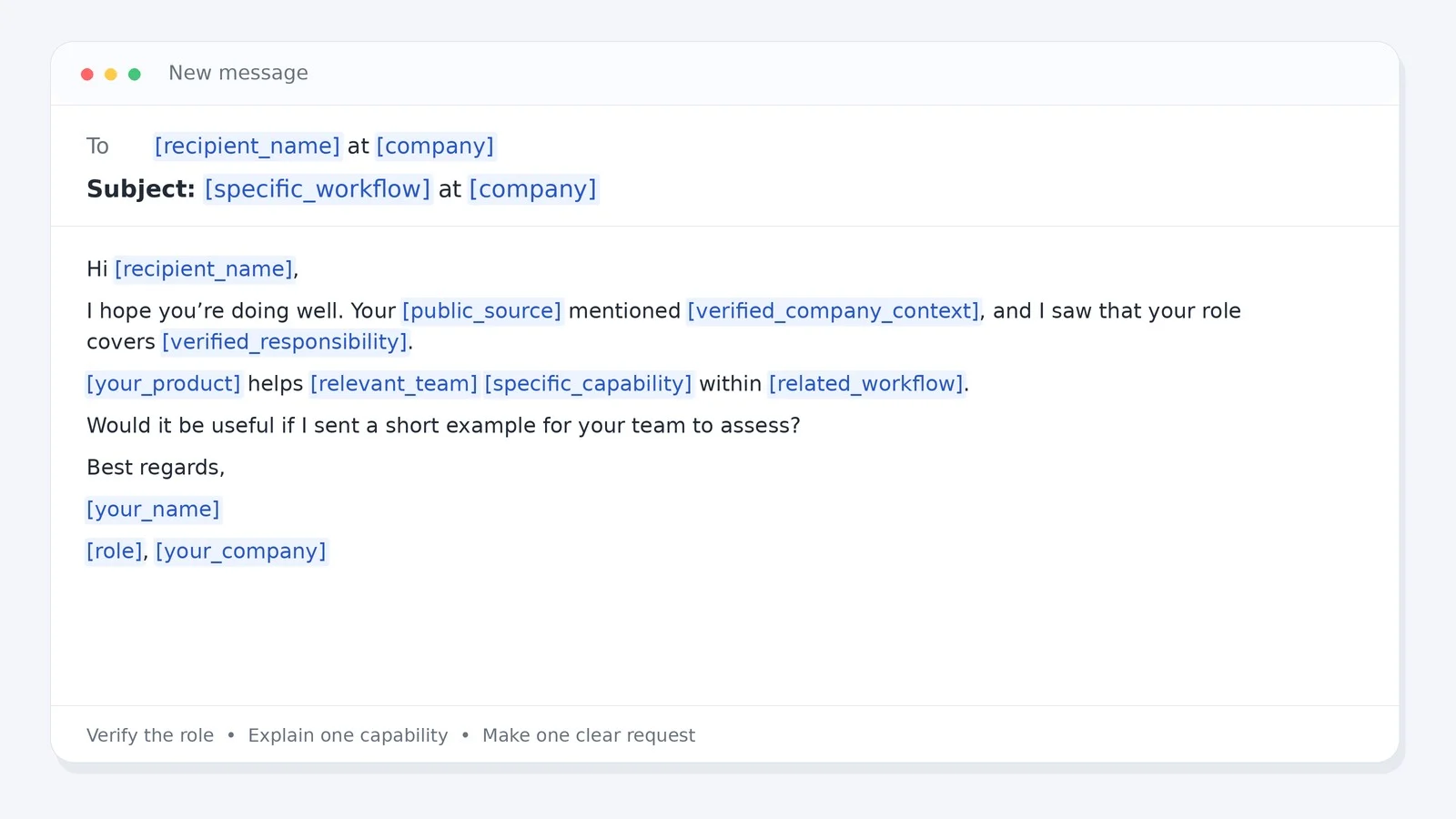
Start with a verified company detail, connect it to a workflow the person plausibly owns, and explain one supported capability. Give the recipient a small next step rather than asking them to commit to a purchase conversation immediately.
Use this version only when the role connection is supported. If you cannot confirm the responsibility, use the routing variation below. Replace every placeholder, keep your actual sender identity, and use the sender information and unsubscribe functionality appropriate to your campaign.
Who Counts as the Right Decision-Maker?
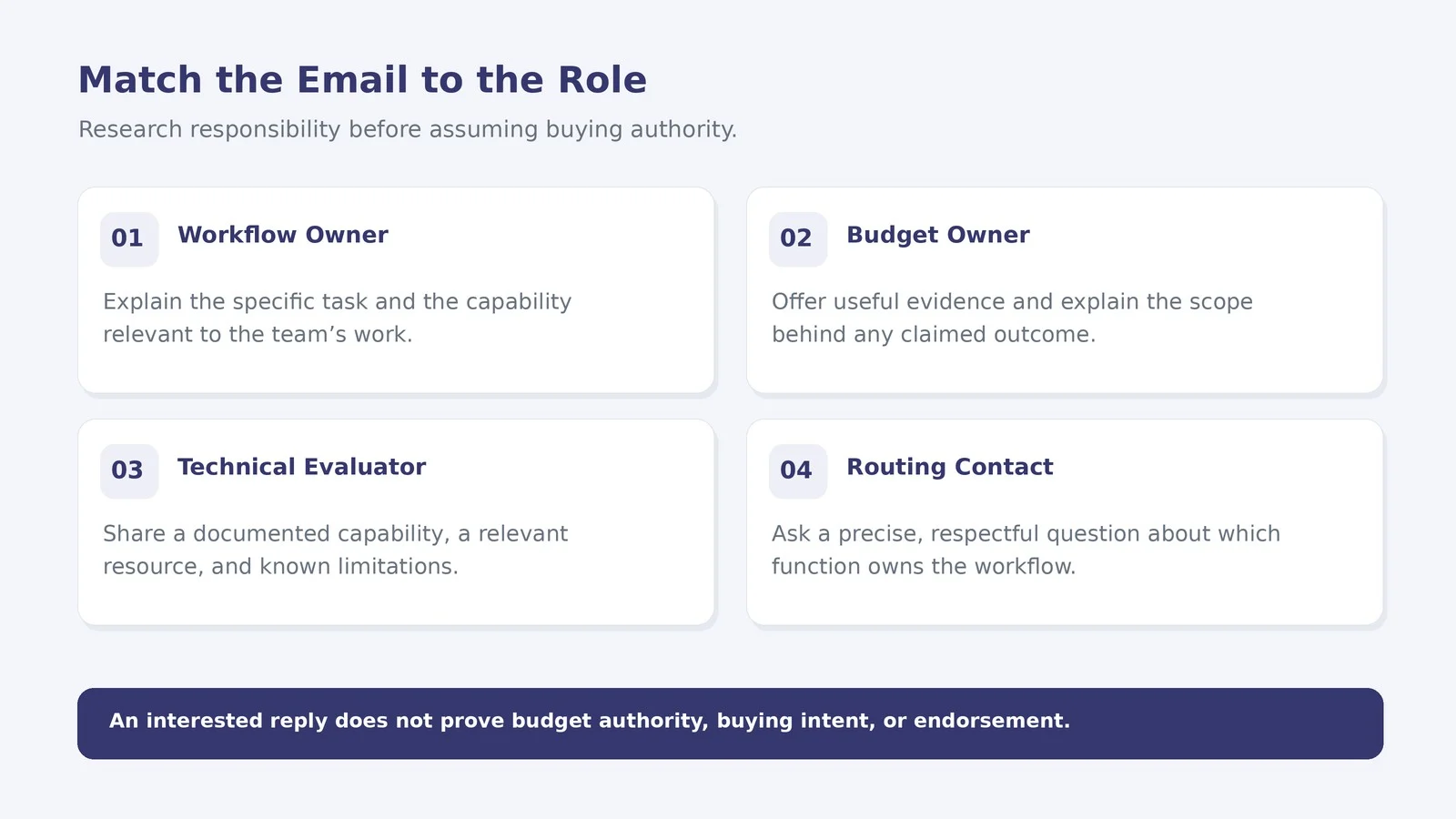
For outreach planning, distinguish the people involved in a decision rather than labeling everyone a buyer. One person may hold several responsibilities, and the process may change with the purchase. The categories below are a research framework, not a claim about a particular company.
| Role in the Decision | What to Establish | What the First Email Should Explain |
|---|---|---|
| Workflow or business owner | Who is responsible for the process and its practical outcomes? | The specific task and the capability relevant to it. |
| Budget owner | Who reviews or approves the relevant investment? | The use case, supporting evidence, and scope of any claimed outcome. |
| Technical evaluator | Who assesses technical fit or implementation requirements? | A documented capability, relevant resource, and known limitations. |
| Internal advocate | Who experiences the workflow and may help evaluate a change? | Why the example is useful to their work, without assuming influence or endorsement. |
| Routing contact or assistant | Who can help identify the appropriate function? | A precise, respectful question about ownership rather than a demand for executive access. |
An interested reply is a starting conversation. It does not establish budget authority, a buying timeline, or agreement from other stakeholders. Confirm those points through the discussion rather than writing them into your opening assumptions.
How to Research the Right Contact Before Sending
- Define the workflow first. Write down the specific task your product supports and the team likely to perform it. “Any business that wants growth” is too broad to guide contact selection.
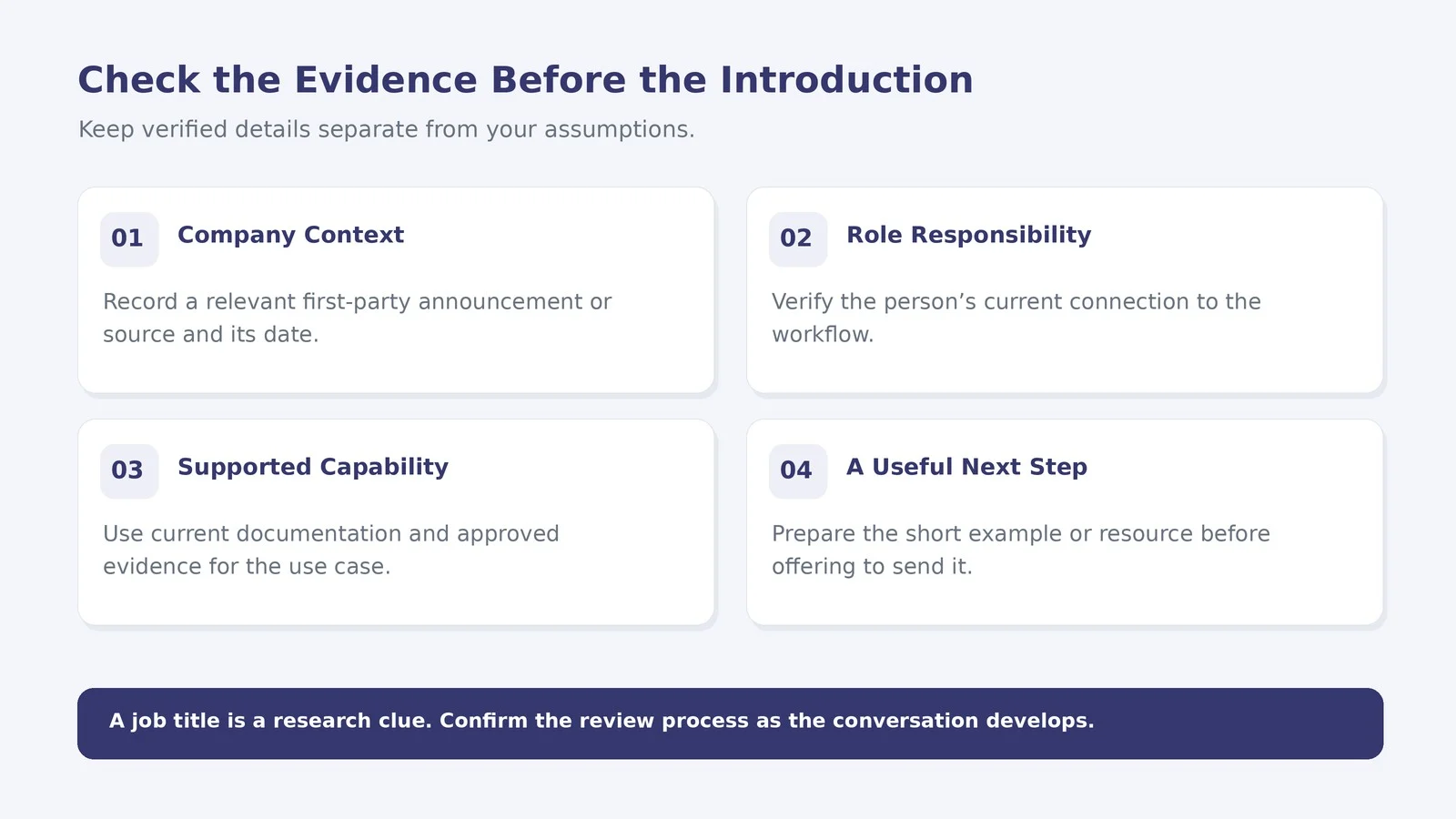
- Look for current first-party evidence. Check company team pages, role descriptions, announcements, and public interviews. Record the source and date.
- Separate the company signal from the person signal. An expansion announcement may explain a relevant use case; it does not prove that a particular executive manages the related process.
- Keep a known-versus-assumed note. Record the verified responsibility separately from your hypothesis about evaluation or budget ownership.
- Choose one appropriate starting conversation. Coordinate with your own team so the prospect is not receiving competing introductions from several colleagues.
Use public professional context that connects to the work. Personal interests, family details, and unrelated social posts do not establish a business reason to contact someone. If research does not support a plausible use case, reconsider the contact rather than forcing a personalization line.
Subject Lines That Make the Purpose Clear
Choose a subject that describes the actual conversation. Avoid false urgency, a misleading “Re:” on a new thread, or wording that suggests a referral or prior relationship you do not have.
| Subject Line | When to Use It |
|---|---|
| [specific_workflow] at [company] | You have a specific workflow and a relevant starting contact. |
| An option for [verified_initiative] | A real initiative gives the capability context. |
| A [use_case] example for your team | The next step is an example you can actually share. |
| [specific_requirement] within [workflow] | A technical evaluator may find a precise capability relevant. |
| Who handles [specific_workflow] at [company]? | Reasonable research has not confirmed ownership. |
When to Use This Template—and When to Choose Another Approach
Use this approach when you can name a relevant business workflow, explain a supported capability, and identify either a plausible owner or someone appropriate to ask about ownership. It also suits situations where a broad executive pitch needs a clearer connection to a particular role.
Do not assume that emailing the most senior person will make an unrelated offer relevant. If the recipient has already declined, contacting their manager with the same pitch is not an appropriate continuation of the sequence. If a colleague has offered an introduction, follow the scope they actually agreed to; do not turn it into an implied endorsement.
When the recipient’s responsibility is clear but the type of solution is unfamiliar, a product introduction email may help explain the category. When you have a verified problem and a supported capability, a problem–solution email gives you another relevant starting point.
Five Email Variations for Different Decision-Making Roles
Choose the variation that matches what you know. These are alternative first messages, not five emails to send to the same person. Keep the greeting natural, make one clear request, and do not invent authority or interest.
1. Connect the Offer to a Role-Owned Outcome
When to Use It: Use this when you can verify the recipient’s responsibility and explain how your capability connects to it.
Personalization Tip: Connect the capability to a responsibility, not just a title. Do not assume the person controls the budget or has a current buying project.
2. Reference a Public Business Priority
When to Use It: Use this when an announcement or first-party interview identifies a relevant initiative.
Personalization Tip: Use the actual announcement. Do not turn a public priority into an invented deadline, budget, or internal problem.
3. Give a Budget Owner Evidence They Can Assess
When to Use It: Use this when research suggests the person oversees the relevant investment and you have approved evidence.
Personalization Tip: Keep cost, time, and performance claims tied to real evidence and its conditions. If you have no approved customer story, offer a product example instead.
4. Give a Technical Evaluator a Specific Starting Point
When to Use It: Use this when the recipient appears responsible for evaluating the workflow’s technical fit.
Personalization Tip: Use current documentation. Do not invent compatibility, security certifications, integrations, or access to a prospect’s systems.
5. Ask for Direction When Ownership Is Unclear
When to Use It: Use this after reasonable research when you have a relevant business use case but cannot confirm which team owns it.
Personalization Tip: Make the routing question specific. Do not demand a personal introduction, imply a referral you have not received, or treat an assistant as an obstacle.
A Filled-In Example
Fictional example for illustration: Maya, Cedar Support, and QueueBridge are invented. The example shows the writing structure and does not describe a real customer result or verified product capability.
The opening connects a company initiative to a documented responsibility. The product sentence explains an action rather than promising a performance result. The request gives Maya a small decision to make without assuming she controls the purchase.
What to Personalize and What to Leave Unsaid
| Detail | What to Verify | Avoid Assuming |
|---|---|---|
| The recipient’s responsibility | Current first-party role or team information. | A title proves ownership, budget control, or buying intent. |
| The company context | A real announcement, interview, or company page. | A public initiative automatically creates an urgent problem. |
| The capability | Current documentation or a verified product demonstration. | A planned feature is already available. |
| Customer evidence | Sharing approval, documented outcome, and relevant conditions. | Another customer’s experience is a promise for this prospect. |
| A referral | Who referred you and what they actually permitted you to say. | A suggested contact means endorsement or interest. |
| The offered resource | An available, relevant example with the scope you described. | A permission-based request justifies an unexpected meeting pitch. |
What to Do When They Refer You to Someone Else?
Thank them, update your contact notes, and check what the referral establishes. “The operations team handles this” identifies a function. It does not mean that a named operations contact wants a demo. If someone explicitly names a colleague, describe that accurately without adding an endorsement.
In the next introduction, explain the same workflow and why it may relate to the new person’s responsibilities. Mention the referral only when that is appropriate and within the context given. If permission to name the referrer is unclear, ask or use a neutral introduction. Do not continue contacting a person who opted out just because a referral created another thread.
Follow-Ups That Add Useful Context
Use reasonable spacing for your audience and the situation. A follow-up should clarify the offer or add relevant evidence. It should not use guilt, repeated “bumping,” or a threat to escalate. Stop when someone declines or opts out. Once they answer, respond to that answer instead of continuing an automated sequence.
Follow-Up 1: Clarify the Workflow
Follow-Up 2: Offer a Relevant Resource
Follow-Up 3: Close the Loop Politely
Use “Re:” only within the original conversation. Do not move the same sequence to another address to get around a refusal, and do not claim that the recipient opened or read earlier messages as a reason they should respond.
Measure Useful Conversations, Not Just Executive Replies
Before sending, define the outcomes you want to understand: a relevant reply, confirmed workflow ownership, a useful resource request, or an agreed next conversation. Keep those separate from automatic replies, refusals, and a routing response that only corrects your research.
Record your ownership hypothesis and whether the conversation confirms it. A campaign may reveal that your ideal starting contact is a functional lead rather than an executive. Treat that as information about targeting. Do not label every referral as a qualified sales opportunity.
When testing copy, keep audiences and observation windows reasonably comparable and change one meaningful element at a time. If delivery errors or an inaccurate list are already visible, investigate those foundations before attributing the result to your CTA. Use the low-reply-rate checklist when you need a broader diagnosis.
Check the Sending Setup Alongside the Contact Strategy
Choosing a relevant contact does not guarantee that the message reaches their inbox. For personal Gmail recipients, Google’s sender guidance includes authentication and sending requirements, with additional obligations for bulk senders. Review the current requirements for the mail you send, alongside your provider’s policies and the campaign’s sender information and unsubscribe setup.
Keep technical checks separate from the question of buying authority. A domain health check can support a configuration review; it does not prove that the recipient is the right stakeholder or will welcome the offer.
Frequently Asked Questions
How Do You Email a Busy Decision-Maker?
Name one workflow they’re responsible for, explain one useful outcome your offer can support, and make one clear request. For example, “Would it help if I sent a short example of how a finance team tracks overdue approvals?” If you’re unsure who owns the workflow, ask who handles it.
How Do I Find the Right Decision-Maker for a Cold Email?
Start with the workflow your product supports, then research who owns the process, evaluates a change, or approves the relevant investment. Use current first-party company information where available. Treat ownership as a working hypothesis until it is confirmed.
Should I Always Email the CEO?
No. Choose the person whose responsibilities connect to the use case. A team lead, functional owner, evaluator, or budget owner may be a better starting contact. Seniority alone does not establish ownership of the decision.
What If I Cannot Confirm Who Owns the Workflow?
Research the likely team first. If ownership remains unclear, ask a plausible contact a brief, specific routing question. Leave room for them to decline and do not require a named referral.
How Do I Contact an Executive Assistant Respectfully?
Explain who you are, the business workflow involved, and why you believe the conversation may be relevant. Ask for guidance rather than access. Do not pretend to know the executive, imply a prior appointment, or pressure the assistant to share private contact details.
Should I Ask for a Meeting in the First Email?
Match the request to the relevance you have established. These templates offer a short example or resource first. A meeting can be appropriate when the context supports it, but no single CTA is right for every recipient.
Can I Email Several People at the Same Company?
Only contact people with distinct, relevant responsibilities and coordinate your outreach. Avoid sending the same generic sequence to a whole team, escalating around someone who declined, or implying that another colleague endorsed the pitch.
How Often Should I Follow Up With a Decision-Maker?
Use reasonable spacing based on the audience and context. Follow up with useful information rather than repeated pressure. Stop after a refusal or opt-out, and respond directly when someone replies instead of continuing the automated sequence.
Does This Template Guarantee a Reply or Inbox Placement?
No. A relevant message and an appropriate contact can improve the quality of the conversation you are trying to start, but they cannot guarantee delivery, replies, buying authority, or a sale.
Review Your Sending Setup Before the Next Introduction.
Research the relevant contact, make the message specific, and check your domain’s email configuration alongside your sending practices.