

TL;DR
A 550 permanent failure is an SMTP error that means the receiving mail server has permanently rejected your email, so it will not retry delivery. It is triggered by an invalid recipient address, a full or disabled mailbox, a blocked sending IP, or failed SPF, DKIM, or DMARC authentication. Read the enhanced status code (the 5.x.x numbers) to find the exact cause, then fix that one issue before resending.
- Permanent (5xx) means do not retry as-is. Unlike a 4xx temporary defer, resending the same message will fail again until you fix the root cause.
- The subcode tells you where to look. 550 5.1.1 is a bad address, 550 5.2.2 is a full mailbox, 550 5.7.1 is a policy or IP block, and 550 5.7.26 is an authentication failure.
- Most sender-side 550s trace back to authentication or reputation. Correct SPF, DKIM, and DMARC, clean your list, and warm the domain before you scale.
- Prevention beats firefighting. Verified lists, aligned authentication, and a warmed sending domain stop most 550 errors before they start.
You hit send on an important email, and seconds later a bounce message lands in your inbox with the words “550 permanent failure” buried in it. The recipient never saw your message, and the wording sounds final. For a cold email agency running campaigns across dozens of inboxes, or a founder whose onboarding sequence just stopped reaching new users, that single line can quietly tank a quarter of your pipeline.
The frustrating part is that “550” on its own tells you almost nothing. The same code fires when an address has a typo, when a mailbox is full, when your sending IP is on a blocklist, and when your domain fails authentication checks. Each of those has a completely different fix, and guessing wastes time while your sender reputation keeps sliding.
Get the diagnosis wrong and you can make the problem worse, because repeatedly hammering a server that already rejected you is a fast way to earn a harder block.
In this guide, you will learn exactly what a 550 permanent failure error means, how to read the enhanced status code so you know the precise cause, the full list of sender-side and recipient-side triggers, a step-by-step fix process, what the provider-specific versions from Gmail and Outlook look like, and the prevention habits that keep these errors from coming back.
By the end, you will be able to look at any 550 bounce and know your next move.
Table of Contents
What Does A 550 Permanent Failure Error Mean?
A 550 permanent failure means the recipient’s mail server received your message and refused to deliver it permanently. The server will not try again, so the message bounces straight back to you with the 550 code attached. It is a hard stop, not a delay.
The 550 code comes from the Simple Mail Transfer Protocol (SMTP), the standard that mail servers use to hand messages to one another. SMTP defines a set of three-digit reply codes, and per RFC 5321, code 550 is defined as “Requested action not taken: mailbox unavailable.” The same RFC notes that delivery failures normally produce a 550 or 553 reply.
The first digit is what makes 550 “permanent.” Reply codes in the 5xx range signal a permanent error, while codes in the 4xx range signal a temporary one. A 4xx defer says “try again later,” and your server will. A 5xx rejection says, “Do not bother retrying this message in its current form.”
Is A 550 Error The Same As A Temporary Bounce?
No. A 550 (or any 5xx) is a hard bounce, and a 4xx is a soft bounce. This distinction decides your next action, so it is worth being precise about.
| Attribute | 4xx Temporary Failure (Soft Bounce) | 5xx Permanent Failure (Hard Bounce) |
|---|---|---|
| Server behavior | Queues and retries automatically | Rejects outright, no retry |
| Typical cause | Greylisting, rate limit, server busy, mailbox temporarily full | Bad address, blocked IP, failed authentication, policy rejection |
| What you should do | Wait, the retry often succeeds | Diagnose and fix before resending |
| Effect of resending as-is | Usually harmless | Fails again, can worsen reputation |
This split is not informal jargon. RFC 3463, which defines enhanced mail system status codes, states that a permanent failure (class 5) is one that is not likely to be resolved by resending the message in its current form and that some change to the message or the destination must be made for delivery to succeed.
How Do You Read The Numbers In A 550 Error?
A bare 550 is vague, but most modern bounces also include an improved status code: a second set of three numbers like 5.1.1 or 5.7.26. That code pinpoints the cause. Reading it correctly is the single fastest way to diagnose a 550 failure.
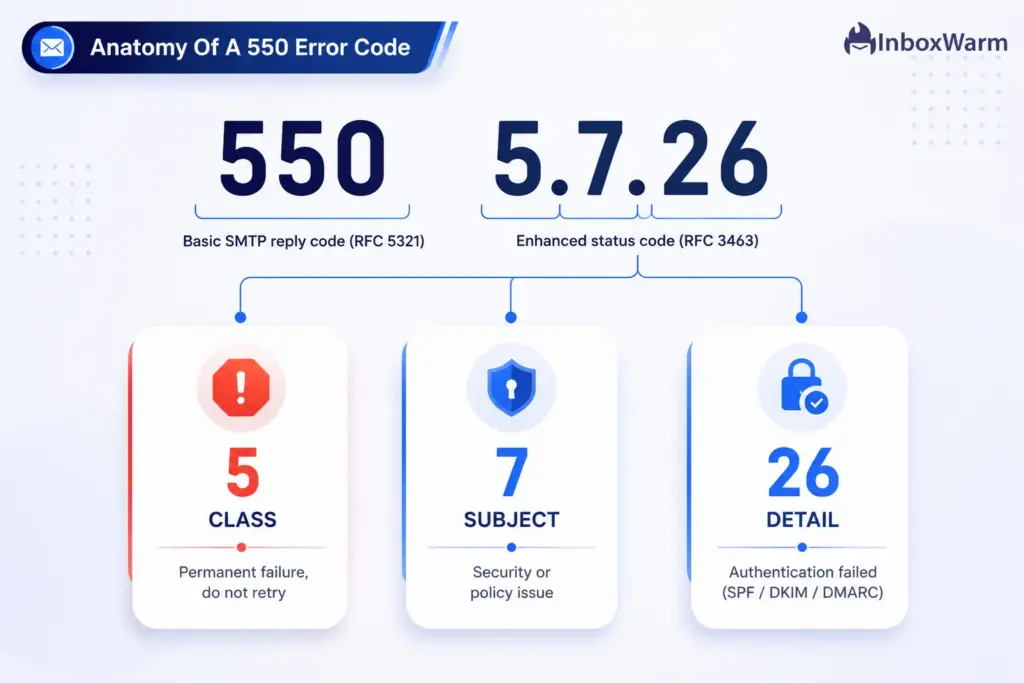
Per RFC 3463, the enhanced code follows a class.subject.detail structure.
- The first number is the class (5 means permanent failure).
- The second is the subject, which points to the source of the problem: 1 is addressing, 2 is mailbox, and 7 is security or policy.
- The third number is the specific detail. So in 550 5.7.26, the 5 means permanent, the 7 means a security or policy issue, and the 26 narrows it to an authentication failure.
Here are the 550 subcodes you will see most often, and what each one is telling you:
| Enhanced Code | Meaning | Where The Problem Lives |
|---|---|---|
| 550 5.1.1 | Bad destination mailbox, the address does not exist (user unknown) | Recipient address |
| 550 5.1.0 / 5.1.2 | Other addressing error, often a bad or unroutable domain | Recipient address |
| 550 5.2.1 | Mailbox disabled or suspended | Recipient mailbox |
| 550 5.2.2 | Mailbox full or over quota | Recipient mailbox |
| 550 5.7.1 | Delivery not authorized, message refused by policy, relay denied, or sending IP blocked | Sender (policy / reputation) |
| 550 5.7.26 | Message blocked because the sender is unauthenticated (SPF, DKIM, or DMARC failed) | Sender (authentication) |
As a rule of thumb, 5.1 and 5.2 codes point at the recipient (their address or mailbox), while 5.7 codes point back at you (your authentication, your reputation, or a policy block). That single read tells you which half of this guide to focus on.
What Causes A 550 Permanent Failure Error?
A 550 error has two broad sources: problems on the recipient’s side that you cannot fully control and problems on your side that you absolutely can. Sorting causes into these two buckets keeps you from chasing the wrong fix.
Recipient-Side Causes
These are issues with the address or the receiving mailbox itself. They usually surface as 5.1.x or 5.2.x codes.
- Invalid or mistyped address: The mailbox simply does not exist on that server, often from a typo, an outdated contact, or a guessed address. RFC 5321 specifies that a server returns a 550 reply when the recipient is known not to be a deliverable address.
- Disabled or suspended account: The user left the company, or an administrator suspended the account, so the server refuses new mail.
- Full mailbox: The recipient is over quota, and the server rejects rather than queues, which shows up as 550 5.2.2.
- Recipient-side filtering: The receiving organization keeps a block list, and your domain or address is on it, sometimes because a previous message was marked as spam.
Sender-Side Causes
These are the ones that matter most for anyone sending at volume, because they are within your control and they almost always show up as 5.7.x codes.
- Failed authentication: Your SPF, DKIM, or DMARC checks did not pass or did not align with your visible From domain. Gmail returns 550 5.7.26 with the message that the mail was blocked because the sender is unauthenticated.
- Blocklisted sending IP or domain: Your IP appears on a reputation blocklist such as Spamhaus or on a provider’s internal list, so mail is refused with a 550 5.7.1 style policy rejection.
- Poor sender reputation: High bounce rates, spam complaints, or a cold domain sending too much too soon all degrade the reputation that providers use to decide whether to accept you.
- Content or policy violation: Spam-trigger content, dangerous attachment types, or formatting that breaks the RFC 5322 message standard can get a message refused outright.
- Missing DNS records: No reverse DNS (PTR) record for your sending IP, or a broken SPF record, makes you look untrustworthy and invites rejection.
The pattern worth remembering
Most recurring 550 errors on outbound campaigns are not address problems. They are authentication and reputation problems wearing a 5.7.x label. That is good news, because those are the causes you can engineer away.
How Do You Fix A 550 Permanent Failure Error?
Fix a 550 error by reading its enhanced status code first, then resolving that specific cause before you resend. Work through these steps in order. Do not skip to resending, because a permanent failure will simply repeat until the underlying issue is gone.
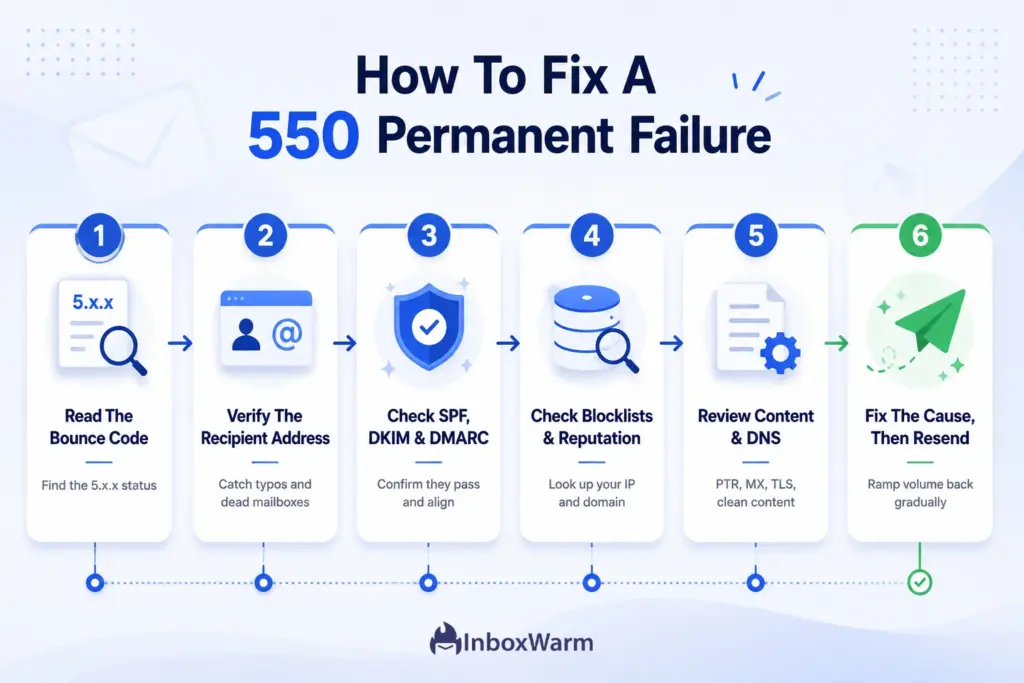
Step 1: Read The Full Bounce Message
Open the bounce notification and find the enhanced status code (the 5.x.x numbers) and any diagnostic text. Match it against the subcode table above. This tells you whether you are dealing with a recipient address, a recipient mailbox, or a sender-side authentication or policy issue, so you fix the right thing first.
Step 2: Verify The Recipient Address
If you see 5.1.1 or another 5.1.x code, confirm the address is spelled correctly and still active. Check for typos, removed employees, and dead domains. For ongoing campaigns, run your list through an email verification tool before sending so invalid addresses never trigger a bounce in the first place.
Step 3: Check Your Email Authentication
If you see 5.7.26 or 5.7.1, your authentication is the prime suspect. Confirm you have a valid SPF record that includes every service sending on your behalf, a working DKIM signature that matches your domain, and a published DMARC policy. All three must align with your visible From domain, because alignment, not mere presence, is what receiving servers check.
Step 4: Check Blocklists And Sender Reputation
If the diagnostic text mentions a block list, an IP, or reputation, look up your sending IP and domain on the major blocklists. If you are listed, identify and stop the behavior that caused it (a spike in complaints, a spam trap hit, or a compromised account), then submit a delisting request through the relevant blocklist or provider portal. Delisting before you fix the cause only buys a short reprieve.
Step 5: Review Content And DNS Configuration
Strip spam-trigger phrasing and risky attachment types, and confirm your message is well-formed. Then verify the infrastructure basics: a valid reverse DNS (PTR) record for your sending IP, correct MX records on the recipient domain if you control it, and a TLS-capable connection. These quiet misconfigurations cause a surprising share of policy rejections.
Step 6: Fix The Cause, Then Resend
Only after the specific cause is resolved should you resend, and only to verified, valid addresses. If the failure was reputation-driven, do not resume full volume immediately. Ramp back up gradually so you rebuild trust rather than trip over the same block again.
What Do Provider-Specific 550 Errors Look Like?
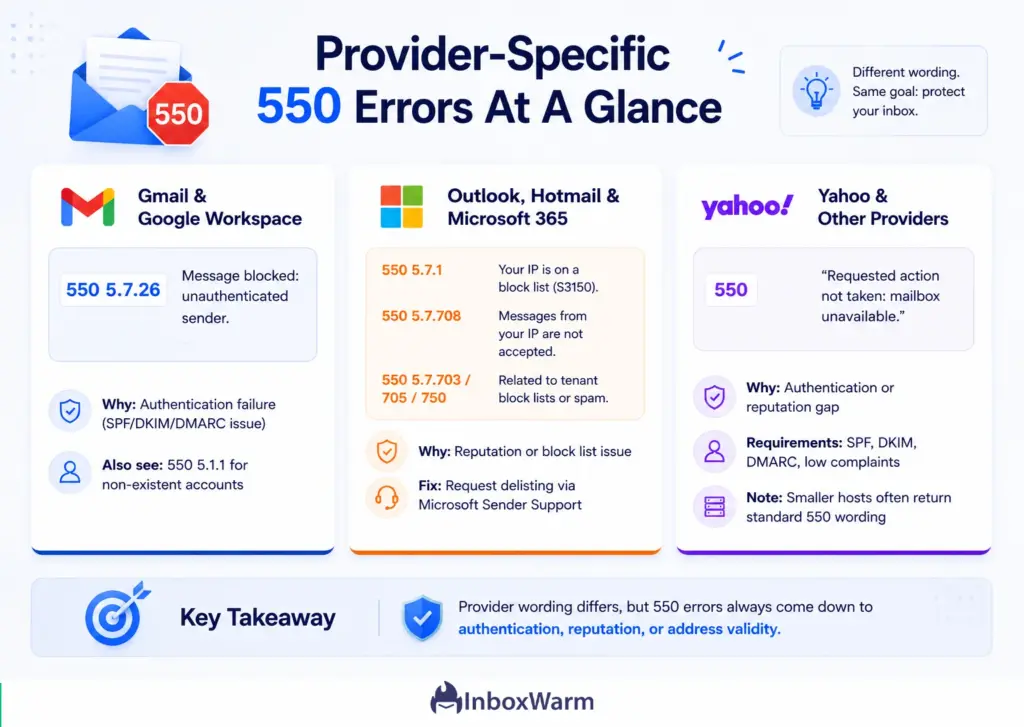
Every provider phrases its 550 differently, and the exact wording is a strong clue to the cause. Here is how the major mailbox providers present a permanent rejection and what each one usually means.
Gmail And Google Workspace
Gmail commonly returns 550 5.7.26 with text stating the mail was blocked because the sender is unauthenticated, pointing to its authentication help page.
Under Google’s email sender guidelines, every sender to Gmail must set up SPF or DKIM, maintain valid forward and reverse DNS, and use a TLS connection. If you send to Gmail addresses, this is the bar you must clear. You will also see 550 5.1.1 when an account does not exist.
Outlook, Hotmail, And Microsoft 365
Microsoft typically returns 550 5.7.1 with a note that messages from your IP were not sent because part of the network is on its block list (often tagged S3150) or 550 5.7.708 when traffic from your IP is not accepted.
Per Microsoft’s documentation, codes such as 550 5.7.703, 5.7.705, 5.7.708, and 5.7.750 are tied to tenant block lists or outbound spam, and delisting is requested through the Microsoft Sender Support Portal. Senders to Outlook and Hotmail addresses see these most often when reputation slips.
Yahoo And Other Providers
Yahoo and AOL follow the same shared sender requirements as Google: bulk senders must authenticate with SPF, DKIM, and DMARC; keep complaint rates low; and offer one-click unsubscribe.
A 550 from these providers usually signals an authentication or reputation gap rather than a bad address. Smaller hosts often return the plain RFC wording, “550 Requested action not taken: mailbox unavailable.”
How Do You Prevent 550 Permanent Failure Errors?
Prevent 550 errors by sending only to verified addresses from a properly authenticated, warmed, and well-monitored domain. Prevention is cheaper than recovery, because once reputation damage triggers blocks, rebuilding trust takes weeks.
Build the following habits into your sending program:
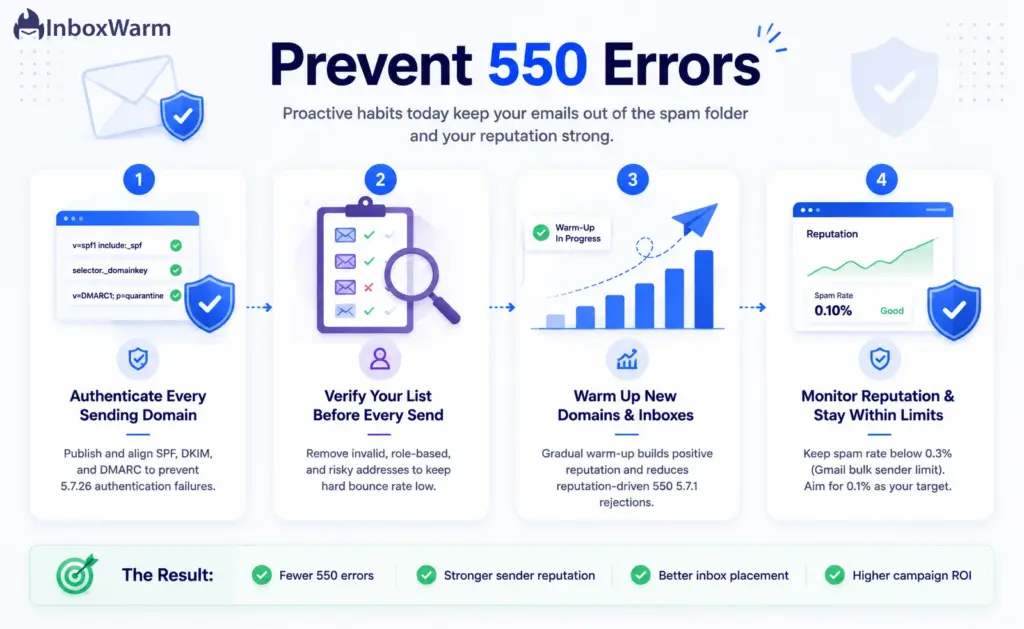
Authenticate Every Sending Domain
Publish and align SPF, DKIM, and DMARC for every domain you send from. Start your DMARC policy at p=none to monitor, then move to p=quarantine before p=reject once your reports are clean. This is the foundation that prevents the 5.7.26 authentication failures, and it is non-negotiable for anyone sending to Gmail or Yahoo at volume.
Verify Your List Before Every Send
Run contact lists through an email verification tool to remove invalid, role-based, and risky addresses. Clean lists keep your hard bounce rate low, and a low bounce rate is one of the strongest signals that protects your sender reputation. This single habit eliminates the bulk of 5.1.1 address bounces.
Warm Up New Domains And Inboxes
A brand-new domain has no sending history, so providers treat its mail with suspicion and reject it more readily. Gradual email warm-up builds a positive reputation by slowly increasing volume and generating genuine positive engagement before you run real campaigns.
InboxWarm.ai is an AI-powered email warm-up tool that improves inbox placement and sender reputation, which directly reduces the reputation-driven 550 5.7.1 rejections that hit cold domains hardest. The same logic applies whether you send through Gmail or a custom SMTP provider.
Monitor Reputation And Stay Within Provider Limits
Watch your sender reputation continuously with tools like Google Postmaster Tools. Google’s guidelines require bulk senders, defined as those sending 5,000 or more messages per day to Gmail accounts, to keep their user-reported spam rate below 0.3%. Exceed that and you lose access to Gmail’s mitigation until you stay under the threshold for seven consecutive days. Treat 0.1% as your working target, not 0.3%.
Conclusion
A 550 permanent failure looks intimidating because of the word “permanent,” but it is really just a precise instruction: the receiving server has rejected this message, and it will keep rejecting it until you change something. The code is not the enemy. It is a diagnosis, and once you learn to read the enhanced status code attached to it, you can tell within seconds whether you are looking at a bad address, a full mailbox, a blocked IP, or a failed authentication check.
The most important shift for anyone sending at scale is to stop treating each 550 as a one-off and start treating recurring ones as a reputation signal. Address bounces are easy to clean up with verification. The 5.7.x failures, the authentication and policy rejections, are the ones that compound, and they are almost entirely preventable with aligned SPF, DKIM, and DMARC, a verified list, and a properly warmed sending domain.
Do that consistently, and the 550 permanent failure error stops being a recurring fire drill and becomes a rare exception. Diagnose precisely, fix the actual cause, and protect your reputation, and your messages will land where they belong: in the inbox.
Frequently Asked Questions
Why am I getting a 550 permanent failure error?
You are getting it because something caused the receiving server to refuse your message outright. The fastest way to find out is to read the enhanced status code in the bounce: a 5.1.1 points to a bad address, 5.2.2 to a full mailbox, 5.7.1 to a policy or IP block, and 5.7.26 to an authentication failure. The subcode tells you which cause to fix.
How do I fix a 550 permanent failure error?
Start by reading the enhanced status code to identify the exact cause. If it is an address issue, verify and correct the recipient address. If it is a 5.7.x authentication or policy issue, check that your SPF, DKIM, and DMARC are valid and aligned and confirm your sending IP is not blacklisted. Fix that specific cause, then resend only to valid addresses.
Is a 550 error the same as a temporary bounce?
No. A 550 is a permanent (5xx) hard bounce, meaning the server will not retry. A temporary bounce uses a 4xx code, and the sending server retries automatically. Resending a message that got a 550 without fixing the cause will simply fail again and can further damage your sender reputation.
Does a 550 error hurt my sender reputation?
It can, especially if you keep sending to addresses that bounce. High hard bounce rates tell mailbox providers that your list is poor or your practices are risky, which lowers your reputation and makes future 550 rejections more likely. Keeping bounces low through list verification is one of the best ways to protect your standing.
What is the difference between 550 5.1.1 and 550 5.7.26?
550 5.1.1 is an addressing error, meaning the recipient mailbox does not exist, and the fix lives on the recipient side. 550 5.7.26 is a security and policy error, meaning your message failed authentication because SPF, DKIM, or DMARC did not pass or align. The first is fixed by correcting the address and the second by fixing your authentication setup.
Can email warm-up help prevent 550 errors?
Yes, for the reputation-driven 550 errors. Warming up a new domain or inbox gradually builds the positive sending history that providers use to decide whether to accept your mail, which reduces the 5.7.1 reputation and policy rejections that hit cold domains hardest. Warm-up does not fix a bad address, but it directly addresses one of the most common sender-side causes.
Tired Of Reputation-Driven 550 Rejections?
Cold domains and unwarmed inboxes get blocked before your campaign ever has a chance. InboxWarm.ai warms your domain with AI, building the sender reputation that keeps providers from rejecting your mail. Start free for 10 days, no credit card required.