
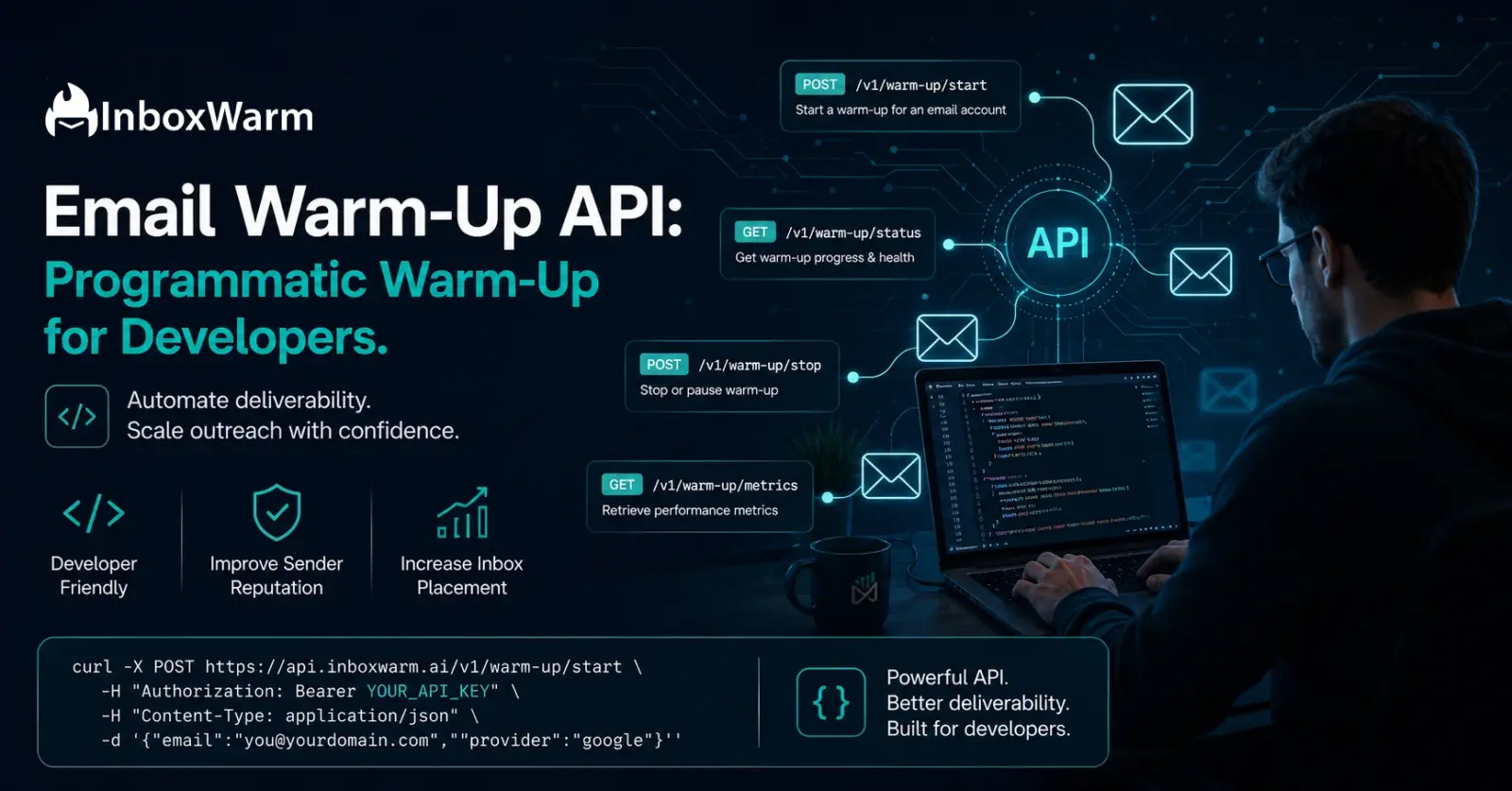

TL;DR
- An email warm-up API automates small batches of inbox-to-inbox interactions to build and maintain sender reputation programmatically.
- Without SPF, DKIM, and DMARC properly aligned, even the best warm-up loop cannot reliably keep mail out of the spam folder.
- An API-driven approach lets developers integrate warm-up controls, domain health metrics, and deliverability status directly into internal dashboards or custom software.
- For agencies, SDR teams, and platform builders, automating domain onboarding with APIs eliminates manual mailbox management at scale.
- InboxWarm.ai provides a robust API to automate domain warming, monitor DNS configuration, and track deliverability metrics programmatically.
An email warm-up API gives developers direct, programmatic control over the warm-up process so you can automate it inside your own tools and platforms rather than managing it manually through a separate dashboard. Instead of logging in to a warm-up tool every time you onboard a new client or spin up a new sending domain, you call an API endpoint and warm-up starts instantly at scale.
Email deliverability is not optional in 2025. Google and Yahoo’s updated sender requirements now mandate proper SPF, DKIM, and DMARC authentication, and domains that skip the warm-up phase routinely see cold email campaigns land in spam or get throttled within the first week. According to research from Validity, nearly 1 in 5 legitimate marketing emails globally never reaches the inbox. For cold email specifically, that number climbs even higher when a new domain skips warm-up entirely.
For developers building cold email platforms, outbound SaaS tools, or agency infrastructure, a warm-up API is the missing layer that ties sending reputation management directly into the product.
This guide covers how email warm-up APIs work, what endpoints to look for, how to integrate one into your stack, and why InboxWarm.ai is built for exactly this use case.
Table of Contents
What Is an Email Warm-Up API and How Does It Work?
An email warm-up API is a set of HTTP endpoints that let developers trigger, manage, and monitor the email warm-up process programmatically. Instead of interacting with a GUI, you send authenticated API calls to start warming a mailbox, check its reputation score, adjust sending volume, or stop the warm-up sequence.
Under the hood, the warm-up service does what it always does: it sends low-volume, human-like emails between a network of real mailboxes and gradually increases volume over time. What changes with API access is who controls the orchestration.
With an API, that control lives inside your application, your CI/CD pipeline, or your onboarding flow.
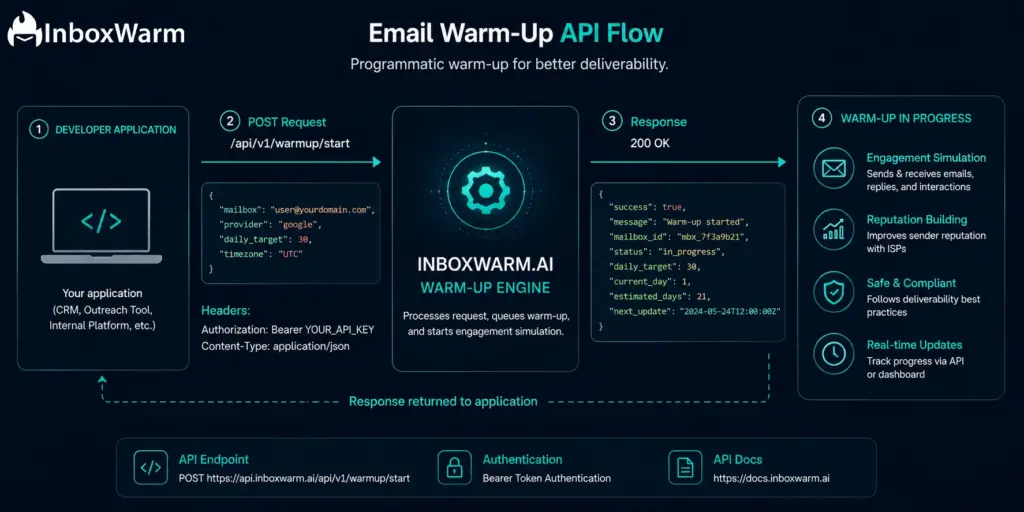
A well-structured warm-up API typically exposes the following:
- Mailbox registration endpoints to connect SMTP credentials or OAuth tokens
- Start and stop endpoints to trigger or pause the warm-up sequence
- Status endpoints to retrieve current sending volume, reputation score, and inbox placement rate
- Configuration endpoints to set warm-up speed, daily volume targets, and schedule
- Webhook support to push real-time updates to your application when reputation thresholds are hit
Who Actually Needs a Warm-Up API?
Not every email sender needs API access to warm-up. If you are managing two or three personal mailboxes for your own outbound campaigns, the standard dashboard is perfectly fine.
But there are specific profiles where manual warm-up management becomes a serious operational bottleneck:
1. Cold Email SaaS Platforms
If you are building a tool that helps users send cold email, warm-up is a core feature expectation. Users signing up for your platform will spin up new domains and mailboxes constantly. Without API-driven warm-up, every new account requires manual configuration. With it, warm-up triggers automatically as part of your onboarding flow.
2. Cold Email Agencies at Scale
Agencies managing 20, 50, or 100+ client mailboxes cannot afford to log in to a separate dashboard for every new client. An API lets them automate warm-up provisioning as part of their client intake process, often triggering warm-up the moment a new domain is purchased and configured.
3. SDR Teams With Automated Onboarding
Sales development teams that onboard new reps regularly need a way to auto-provision fresh mailboxes with warm-up already running. An API integration with the team’s CRM or onboarding tooling removes that manual step entirely.
4. Infrastructure Engineers Building Multi-Tenant Email Stacks
For teams managing shared sending infrastructure, warm-up API access allows per-tenant warm-up control at the infrastructure layer: one call per tenant, fully isolated reputation tracking, no cross-contamination risk.
Ready to Add Warm-Up to Your Platform?
What API Endpoints Should a Warm-Up Service Expose?
When evaluating a warm-up API for integration, these are the core endpoints your stack will actually depend on:
| Endpoint | Method | Purpose |
|---|---|---|
| /mailboxes | POST | Register a new mailbox for warm-up |
| /mailboxes/{id}/warmup/start | POST | Start the warm-up sequence for a mailbox |
| /mailboxes/{id}/warmup/stop | POST | Pause or stop warm-up for a mailbox |
| /mailboxes/{id}/status | GET | Retrieve current reputation score and warm-up progress |
| /mailboxes/{id}/config | PATCH | Update daily volume targets or warm-up speed |
| /webhooks | POST | Register a webhook URL for real-time status updates |
| /reports/{id} | GET | Pull full deliverability report for a mailbox |
| /mailboxes | GET | List all mailboxes under the account with current status |
Beyond these core endpoints, look for support for bulk operations (starting warm-up on 50 mailboxes in one call), rate limit headers in responses, and pagination on list endpoints. These are the signals that the API was designed for production-grade use rather than manual one-off calls.
How Do You Integrate an Email Warm-Up API Into Your Stack?
Integration follows the same pattern as any REST API: authenticate, register your mailbox, start the sequence, and monitor via status calls or webhooks.
Here is a practical step-by-step breakdown:
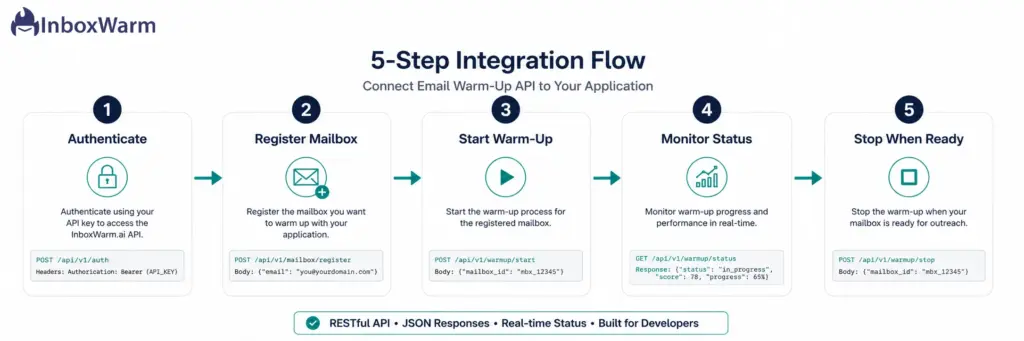
Step 1: Authenticate With Your API Key
Most warm-up APIs use bearer token authentication. Include your API key in the Authorization header on every request. Store it as an environment variable; never hardcode it in your application.
Step 2: Register the Mailbox
Send a POST request to the mailbox registration endpoint with the mailbox SMTP credentials or OAuth token (for Gmail or Outlook). The API returns a mailbox ID you will use for all subsequent calls.
Step 3: Start the Warm-Up Sequence
Call the warm-up start endpoint with the mailbox ID. Pass optional configuration parameters: starting volume, target daily sends, ramp speed (conservative, standard, or aggressive). The warm-up engine begins immediately.
Step 4: Monitor Status via Polling or Webhooks
Either poll the status endpoint on a schedule (every 24 hours is sufficient for most cases) or register a webhook URL to receive push notifications when reputation scores cross defined thresholds. Webhooks are the cleaner approach for production systems.
Step 5: Stop or Pause When the Mailbox Is Ready
Once the mailbox has reached your target reputation score and inbox placement rate (typically after 3 to 5 weeks), call the stop endpoint or set a maintenance mode configuration that keeps the mailbox warm without increasing volume further.
What Are the Essential Metrics a Warm-Up API Should Return?
The status data your API returns is only useful if it maps to the signals that actually matter for deliverability.
These are the metrics that should be visible via your warm-up API’s reporting endpoints:
- Inbox placement rate: Percentage of warm-up emails landing in the inbox versus spam or promotions folder
- Reputation score: A normalized 0 to 100 score reflecting domain and sender reputation based on engagement signals
- Daily send volume: Current number of warm-up emails being sent per day for the mailbox
- Engagement rate: Open and reply rates generated by the warm-up network, which feeds positive signals to mailbox providers
- Blacklist status: Whether the sending domain or IP is currently listed on any major blacklists (Spamhaus, Barracuda, etc.)
- Authentication status: Confirmation that SPF, DKIM, and DMARC records are valid and passing
If a warm-up API only returns binary status (active/inactive) without the underlying metrics, it is not providing enough signal for production use. You need granular data to make decisions about when a mailbox is ready for live campaigns.
How Does InboxWarm.ai Support Developer and API Use Cases?
InboxWarm.ai was built with scalable use cases in mind, including agencies and SaaS teams that need to manage warm-up across dozens or hundreds of mailboxes. The platform supports multi-mailbox management, reputation tracking, and campaign-safe warm-up sequencing designed to work alongside live sending infrastructure, not conflict with it.
Key capabilities relevant to developer and technical users:
- AI-powered warm-up sequencing that mimics real human email behavior to maximize engagement signals
- Dashboard-level visibility into inbox placement rates, reputation scores, and deliverability health per mailbox
- Support for Gmail, Google Workspace, Outlook, and custom SMTP configurations
- Multi-mailbox management to handle agency-scale or platform-scale warm-up across accounts
- Domain health monitoring that flags authentication issues before they impact deliverability
InboxWarm.ai is actively expanding its developer-facing capabilities. If you are building a platform that requires warm-up automation at scale, reach out to the team to discuss API access and integration options tailored to your use case.
Scale Your Email Warm-Up Operations With InboxWarm.ai
What Are Common API Integration Mistakes That Hurt Deliverability?
Even with API access, implementation errors can undermine the warm-up process. These are the most common developer-side mistakes:
1. Starting Warm-Up and Live Sending Simultaneously
The single biggest mistake is launching a live cold email campaign on the same mailbox while the warm-up is still running. Warm-up emails are engineered for high engagement. Cold campaign emails typically generate much lower engagement. Mixing the two poisons the reputation signals the warm-up is trying to build.
2. Skipping Authentication Validation Before Starting Warm-Up
SPF, DKIM, and DMARC must be configured and verified before warm-up starts. If your API integration spins up a warm-up the moment a mailbox is registered but authentication records have not propagated yet, the warm-up period is wasted and could actively damage sender reputation.
3. Setting Aggressive Ramp Speed on New Domains
New domains registered less than 30 days ago are flagged as high-risk by most mailbox providers. Hitting an aggressive warm-up speed on a brand-new domain triggers spam filters before any trust has been established. Use conservative ramp settings for domains under 60 days old.
4. Ignoring Webhook Failures
If your webhook endpoint goes down and you are not polling as a fallback, your application loses visibility into reputation changes. A mailbox that gets flagged while your webhooks are failing will continue sending warm-up emails into spam with no alert. Always build a polling fallback for critical status checks.
5. Not Separating Warm-Up Mailboxes From Production Infrastructure
Warm-up activity should run on the exact mailboxes you plan to use for cold outreach. But those mailboxes should not share IP infrastructure with your transactional email stack. Reputation damage on a cold email domain should not cascade into transactional sends.
How Does API-Driven Warm-Up Compare to Manual Dashboard Warm-Up?
Both approaches ultimately run the same warm-up engine. The difference is entirely in who and what controls the workflow:
| Factor | Manual Dashboard | API-Driven Warm-Up |
|---|---|---|
| Setup Time Per Mailbox | 5 to 10 minutes manually | Seconds via API call |
| Scale | Practical up to ~20 mailboxes | Unlimited, fully automated |
| Integration | Standalone tool | Embedded in your own product |
| Onboarding Automation | Not possible | Triggers on user signup or domain purchase |
| Monitoring | Log in to check dashboard | Webhooks push data to your system |
| Custom Workflows | Limited to dashboard UI | Full programmatic control |
| Best For | Solo senders, small teams | Agencies, SaaS platforms, dev teams |
For any team managing more than a handful of mailboxes or building a product where warm-up is a feature, API access is not a nice-to-have. It is the only way to operate at scale without creating a manual ops burden that grows linearly with your customer base.
Frequently Asked Questions
2. Do You Need API Access If You’re Only Managing My Own Mailboxes?
Not necessarily. If you are managing five or fewer mailboxes for your own outbound campaigns, a standard warm-up dashboard is more than sufficient. API access becomes essential when you are building a product, managing client mailboxes at scale, or needing warm-up to trigger automatically as part of a larger workflow.
3. How Long Does API-Driven Warm-Up Take?
The duration is the same as manual warm-up: typically 3 to 6 weeks for a new domain, and 1 to 3 weeks for a previously active but damaged domain. The API does not accelerate the timeline; it automates the management of that timeline across many mailboxes simultaneously.
Can I Run Warm-Up and Live Cold Campaigns at the Same Time?
No. Running live cold campaigns while warm-up is active on the same mailbox creates conflicting engagement signals. Cold email campaigns generate low open and reply rates, which undermines the high-engagement pattern the warm-up network is building. Always complete the warm-up phase before launching campaigns.
What Authentication Methods Do Warm-Up APIs Typically Support?
Most production-grade warm-up APIs use API key authentication passed via the Authorization header as a Bearer token. Some also support OAuth 2.0 for connecting Gmail and Outlook mailboxes directly without exposing SMTP credentials.
How Many Mailboxes Can I Manage Through a Warm-Up API?
This depends on the platform and your plan tier. Most warm-up tools that offer API access are designed for scale and can handle hundreds or thousands of mailboxes under a single account. InboxWarm.ai supports multi-mailbox management natively and is designed for agency and platform-scale use cases.
Will API-Driven Warm-Up Work With Any Email Provider?
Most warm-up APIs support the major providers: Google Workspace, Gmail, Microsoft 365, Outlook, and custom SMTP configurations. Some providers have restrictions on third-party SMTP access, so verify your ESP's policies before integrating.
What Happens If I Stop Warming Up Too Early?
Stopping warm-up before a mailbox reaches a stable reputation score (typically above 80 on a 100-point scale) and before the inbox placement rate is consistently above 90% means the domain is not ready for cold outreach. Campaigns launched prematurely on under-warmed mailboxes will see high spam placement, low open rates, and accelerated reputation degradation.
Bottom Line
An email warm-up API transforms warm-up from a manual, per-mailbox task into a scalable, automated process that lives inside your own tools and workflows. For developers building cold email platforms, SaaS founders scaling outbound, and agencies managing client infrastructure, API-driven warm-up is the operational layer that makes deliverability management sustainable at scale.
The mechanics are straightforward: authenticate, register mailboxes, start the warm-up sequence, and monitor reputation data via status endpoints or webhooks. The real value is in what that unlocks: zero-touch mailbox onboarding, automated reputation tracking across hundreds of domains, and a warm-up layer that scales with your customer base rather than against it.
InboxWarm.ai provides the AI-powered warm-up infrastructure, multi-mailbox management, and deliverability monitoring your platform needs. Whether you are integrating warm-up into an existing product or building cold email infrastructure from scratch, InboxWarm.ai gives you the foundation to get every mailbox to the inbox, at scale, without the manual overhead.