

TL;DR
To check your domain reputation, use Google Postmaster Tools for Gmail data, Microsoft SNDS for Outlook, and Sender Score or MXToolbox for cross-provider and blacklist signals. A healthy domain keeps its spam complaint rate under 0.1%, passes authentication, and earns steady engagement. A low score usually traces back to spam complaints, bad lists, or weak authentication.
- Check Gmail reputation in Google Postmaster Tools, and check Outlook IP data in Microsoft SNDS.
- Keep your user-reported spam complaint rate below 0.1% and never let it reach 0.3%, per Gmail’s sender requirements.
- The fastest fixable causes are invalid addresses, purchased lists, and missing SPF, DKIM, or DMARC.
- Recovery usually takes two to eight weeks of clean, consistent sending. Email warm-up speeds it up.
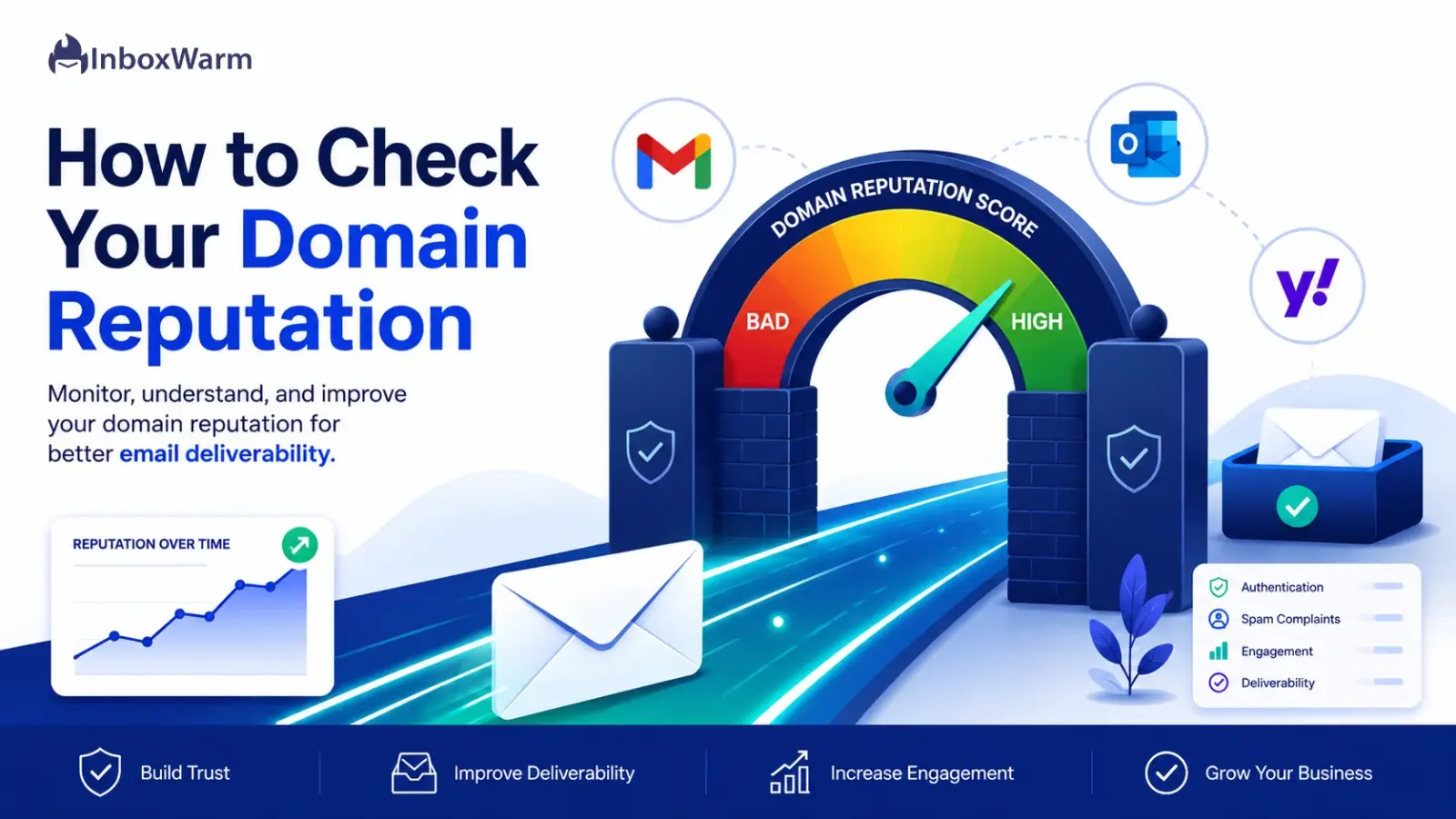
Your domain reputation decides whether your emails reach the inbox or disappear into spam. Mailbox providers like Gmail, Outlook, and Yahoo score every sending domain based on how people react to its mail, and that score follows you across every campaign you send. When it drops, open rates fall, replies dry up, and the revenue tied to email goes with them.
The hard part is that a damaged reputation rarely announces itself. Your emails keep “sending” successfully while quietly landing in spam folders nobody checks. By the time you notice, you may have trained an entire list to ignore you. Reputation also builds slowly and breaks fast, so one careless week of sending can cost months of rebuilding.
In this guide, you’ll learn what domain reputation is, how to check it across Gmail, Outlook, and third-party tools, and the common causes behind a low score. You’ll also get a step-by-step recovery plan, realistic timelines, the best monitoring tools, and how email warm-up helps a new or damaged domain earn trust faster.
Table of Contents
What Is Domain Reputation?
Domain reputation is the trust score that mailbox providers assign to the domain you send email from, based on your sending history and how recipients engage with your mail. A high reputation routes your emails to the inbox. A low one sends them to spam or gets them rejected before they arrive.
Think of it as a credit score for your sending domain. Every email you send either builds or chips away at it, and providers keep their own private ledger. Unlike a one-time setup task, reputation is a living signal that reflects your last few weeks of behavior more than your first day.
To use that score, it helps to understand how providers build it, who is watching, and how domain reputation differs from IP reputation.
How Domain Reputation Works
Mailbox providers track a cluster of signals tied to your domain and combine them into a rolling assessment. The signals that move the needle most are listed below.
- Spam complaints: how often recipients hit “Report spam.” This is the single heaviest negative signal.
- Authentication results: whether your mail passes SPF, DKIM, and DMARC checks.
- Bounce rate: how much of your mail hits invalid or dead addresses.
- Engagement: opens, replies, and whether people delete without reading.
- Volume and consistency: steady sending reads as trustworthy, while sudden spikes read as suspicious.
Because the assessment is rolling, recent behavior counts more than old behavior, which is why a sudden complaint spike can drop a score quickly. At the same time, reputation is sticky. Google notes that single events rarely move the grade, so consistent good behavior is what rebuilds trust.
Who Tracks Your Domain Reputation?
Every major provider keeps its own scorecard, and they do not share data with each other. Here is who is watching and what each one looks at.
- Gmail: scores your domain and exposes it in Google Postmaster Tools on a four-tier scale (Bad, Low, Medium, High), now shown alongside a newer Compliance Status dashboard. Gmail weighs domain reputation heavily, often more than IP reputation.
- Outlook and Microsoft: focus on IP-level data through Microsoft SNDS (Smart Network Data Services). Microsoft does not publish a domain reputation grade the way Gmail does.
- Yahoo and AOL: enforce sender requirements that include SPF, DKIM, DMARC, and a spam complaint rate below 0.3%.
- Spam filtering providers: Cisco Talos, Spamhaus, and reputation networks like Validity (which powers Sender Score) maintain independent data that many corporate email gateways rely on.
Domain Reputation vs. IP Reputation
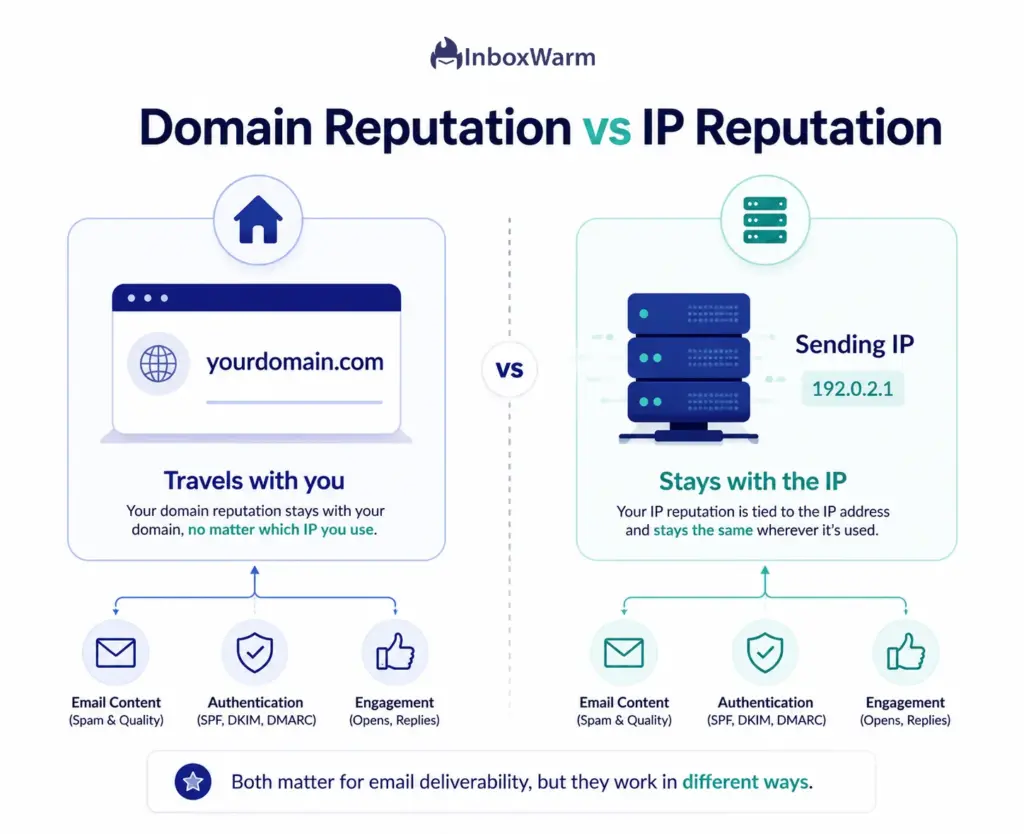
These two terms get mixed up constantly. IP reputation is the trust score tied to the specific IP address that sends your mail, while domain reputation is tied to your sending domain itself. The difference matters because you cannot escape a bad domain reputation simply by switching infrastructure.
| Domain Reputation | IP Reputation | |
|---|---|---|
| Tied to | Your sending domain | Your sending IP address |
| Follows you when you switch servers? | Yes | No, it stays with the IP |
| Shared with others? | No, it is yours alone | Yes, on shared IP pools |
| Primary tracker | Gmail (Postmaster Tools) | Sender Score, Microsoft SNDS |
| Hardest to fix by | Changing infrastructure | Cleaning sending behavior |
For senders mailing Gmail-heavy lists, domain reputation is the more important number to watch. For high-volume senders on dedicated IPs, both matter and should be monitored together.
Why Does Domain Reputation Matter For Email Deliverability?
Domain reputation matters because it directly controls inbox placement. Providers route mail from trusted domains to the inbox and push mail from low-reputation domains to spam or reject it outright. Every metric downstream, opens, clicks, replies, and revenue, depends on that first routing decision.
Email deliverability is the practice of getting your messages into the inbox rather than the spam folder or a hard rejection. Domain reputation is the biggest lever behind it. The impact shows up in three places: where your mail lands, how people engage, and what it does to your business.
Impact on Inbox Placement
Inbox placement is the share of your mail that reaches the primary inbox. A high domain reputation keeps that share strong, while a poor one collapses it. The stakes have risen sharply: since February 2024, Gmail and Yahoo have enforced sender requirements, and Google has tightened enforcement since late 2025 so that non-compliant mail can be rejected with hard 5.7.x error codes instead of quietly filtered to spam.
Impact on Open Rates and Engagement
Mail in the spam folder gets almost no opens, and low opens feed straight back into your reputation as a negative engagement signal. That creates a loop: poor placement lowers engagement, lower engagement lowers reputation, and lower reputation worsens placement. Breaking that loop early is far easier than reversing it after months of decline.
Impact on Business Revenue and Brand Trust
Email is one of the highest-return channels in marketing, so lost inbox placement is lost revenue, not just a vanity metric. A damaged domain also exposes you to brand risk. Without a DMARC policy, attackers can spoof your domain, and recipients who receive phishing mail “from you” lose trust fast. Protecting reputation protects both the pipeline and the brand.
How To Check Your Domain Reputation
To check your domain reputation, combine provider-direct tools with third-party monitors. Use Google Postmaster Tools for Gmail, Microsoft SNDS for Outlook, and Sender Score or MXToolbox for cross-provider reputation and blacklist status; then cross-check spam complaints and engagement in your own sending data.
No single tool sees everything, because each provider guards its own data.
Checking these five sources together gives you the closest thing to a complete picture.
Check Google Postmaster Tools
Start with Gmail, since it makes up a large share of most lists. Verify your domain with a DNS TXT record at Google Postmaster Tools, send enough mail to Gmail for data to populate, then review the Domain Reputation rating (Bad, Low, Medium, or High) and the Compliance Status dashboard. Note that Google has been moving Postmaster Tools toward a v2 interface that emphasizes spam rate and compliance, so check both views.
Use Microsoft SNDS
For Outlook, Hotmail, and Live addresses, register for Microsoft SNDS. It reports IP-level data including complaint rates, spam trap hits, and filter results. Remember that SNDS is IP-based, not domain-based, so pair it with your Gmail domain data rather than treating it as a domain reputation grade.
Monitor Blacklist Status
Run a domain blacklist check with a tool like MXToolbox, which queries more than 100 DNS-based blocklists at once. Check both your domain and your sending IP against major lists such as Spamhaus. A listing can tank deliverability overnight, and most blocklists publish a delisting process once you fix the root cause.
Review Spam Complaint Rates
Your spam complaint rate is the percentage of recipients who mark your mail as spam, and it is the clearest early warning of trouble. Gmail’s guidance is firm: keep the user-reported spam rate below 0.1% and never let it reach 0.3% or higher. You can monitor it in the Postmaster Tools spam rate and feedback loop dashboards.
Analyze Email Engagement Metrics
Finally, read your own numbers. Falling open rates, rising bounces, and climbing unsubscribes often appear before a provider grade changes. Treat a sustained dip in engagement as a reputation problem in progress, not just a campaign that underperformed.
Quick Checklist: Signs Of A Poor Domain Reputation
-
More of your mail is landing in spam or promotions than the inbox. -
Google Postmaster Tools shows a Medium, Low, or Bad domain rating. -
Your spam complaint rate is creeping toward or above 0.1%. -
Bounce rates are rising, often a sign of stale or purchased lists. -
Open and reply rates are falling across otherwise similar campaigns. -
Your domain or IP appears on a public blacklist. -
You are seeing temporary failures or rejection codes in your sending logs.
Common Causes Of A Poor Domain Reputation
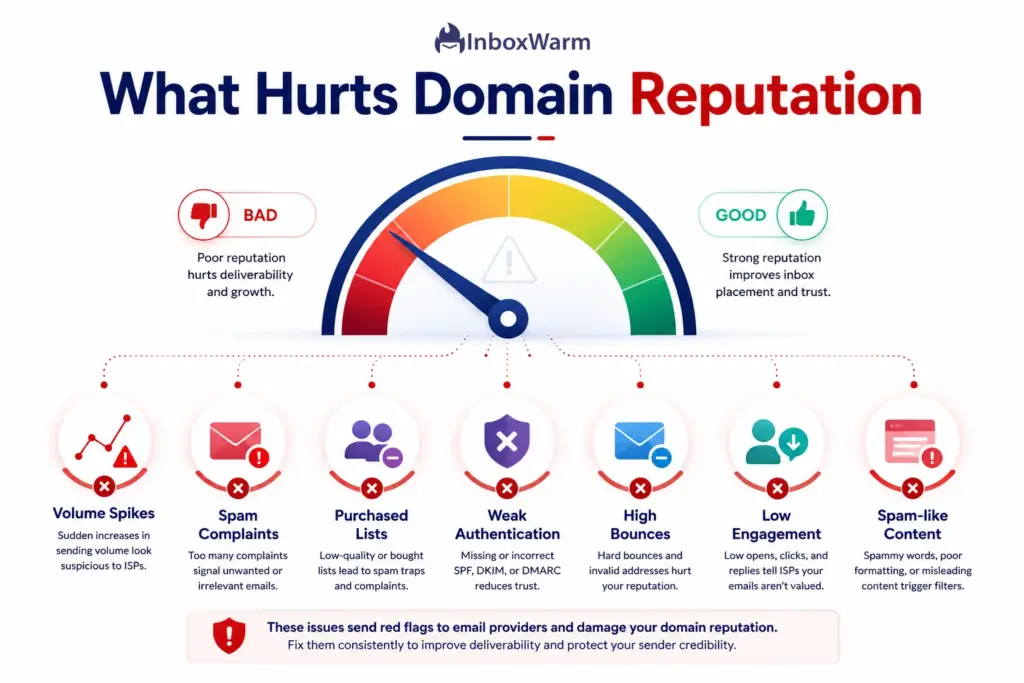
A poor domain reputation almost always comes from sending behavior, not bad luck. The most common causes are spam complaints, bad lists, weak authentication, high bounces, low engagement, and spam-like content. Most are fixable once you know which one is hurting you.
Diagnosing the cause is half the recovery. Work through the seven culprits below and be honest about which ones apply to your program.
Sending Too Many Emails Too Quickly
New or cold domains that blast high volume on day one look exactly like spammers to a provider. Gmail responds with rate limiting and temporary failures, which are a signal to slow down. Ramping volume gradually is the single most important habit for a young domain.
High Spam Complaint Rates
Complaints are the heaviest negative signal a provider tracks. Even a rate above 0.1% drags down Gmail deliverability, and 0.3% triggers loss of mitigation support until you stay under that line for seven consecutive days. Unwanted mail, hidden unsubscribe links, and misleading subject lines all drive complaints.
Purchased or Unverified Email Lists
Bought lists are loaded with spam traps and dead addresses, and they have never opted in to hear from you. Mailing them produces complaints and bounces in equal measure and is one of the fastest ways to destroy a domain. There is no safe way to send to a purchased list.
Poor Email Authentication (SPF, DKIM, DMARC)
SPF (Sender Policy Framework) lists which servers may send for your domain, DKIM (DomainKeys Identified Mail) adds a cryptographic signature, and DMARC (Domain-based Message Authentication, Reporting, and Conformance) tells receivers what to do when checks fail. Missing or broken records make your mail look unauthenticated and easy to spoof. Confirm each with a free SPF checker, DKIM checker, and DMARC checker.
High Bounce Rates
A bounce is a delivery failure, and a hard bounce means the address does not exist. High hard-bounce rates tell providers you are not cleaning your list, which correlates strongly with spam behavior. Keeping bounces low through regular verification protects your reputation directly.
Low Engagement and Open Rates
Providers read sustained low engagement as a sign that people do not want your mail. If recipients never open, reply, or move your messages out of spam, your reputation erodes even without formal complaints. Sending to your most engaged contacts first helps reverse this.
Sending Irrelevant or Spam-Like Content
Spammy formatting, all-caps subject lines, link-heavy bodies, and irrelevant offers raise content-based spam scores. Combined with weak engagement, this content tips borderline mail into the spam folder. Relevant, well-formatted email to people who asked for it is the antidote.
How To Fix A Bad Domain Reputation
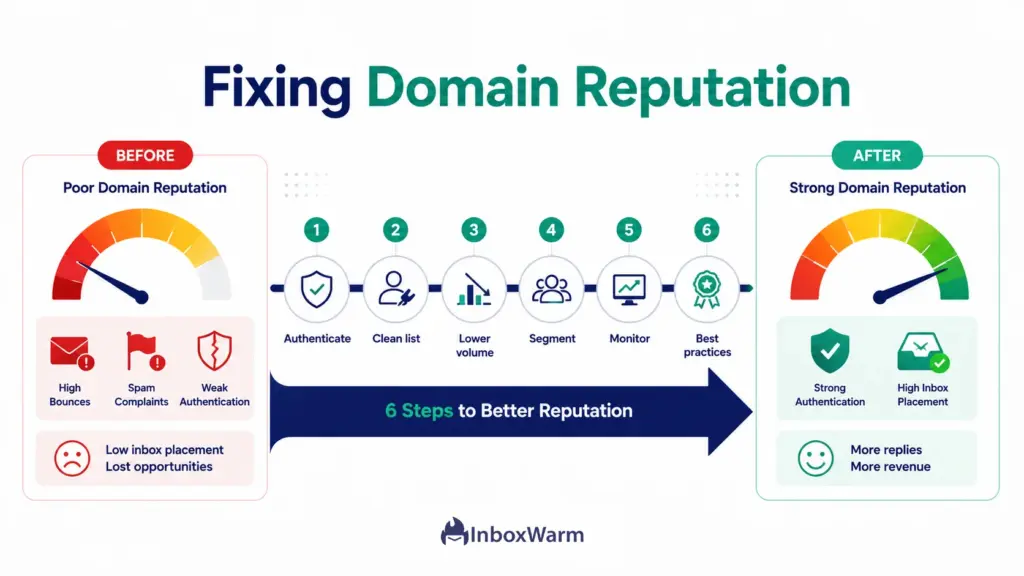
To fix a bad domain reputation, stop the behavior that caused it, then rebuild trust through clean, consistent sending. Authenticate your domain, remove invalid addresses, lower your volume temporarily, tighten relevance, and watch complaints closely while you recover.
These fixes work together. Doing one without the others slows the recovery, so treat the list below as a single program rather than a menu.
Authenticate Your Domain Properly
Set up SPF, DKIM, and DMARC correctly, since unauthenticated mail is a hard fail with modern providers. Roll DMARC out in stages: start at p=none to monitor, move to p=quarantine, then p=reject once your reports are clean. A free SPF generator and DMARC generator make the records easy to build correctly.
Remove Invalid Email Addresses
Run your list through an email verification tool and remove hard bounces, role addresses, and obvious spam traps. Lowering your bounce rate quickly removes one of the strongest negative signals and is often the single highest-impact fix available to you.
Reduce Sending Volume Temporarily
When a domain is damaged, pull volume back and rebuild gradually. Sending less to your best contacts produces strong engagement signals that providers reward. Ramp the volume up only as your reputation indicators improve.
Improve Email Relevance and Segmentation
Segment your list so each message is relevant to the people who receive it. Relevant mail earns opens and replies, the positive signals that rebuild reputation. Generic blasts to your whole list do the opposite during a recovery.
Monitor Complaints and Unsubscribes
Make unsubscribing easy, including one-click unsubscribe for bulk mail, and honor requests within two days, as Gmail and Yahoo require. A visible unsubscribe link is counterintuitively good for reputation, because an unsubscribe is a far weaker negative signal than a spam complaint.
Follow Email Deliverability Best Practices
Send on a consistent schedule, keep formatting clean, authenticate every sending service, and only mail people who opted in. None of these is dramatic on its own, but together they form the steady baseline that keeps a recovered reputation healthy.
Domain Reputation Recovery Steps
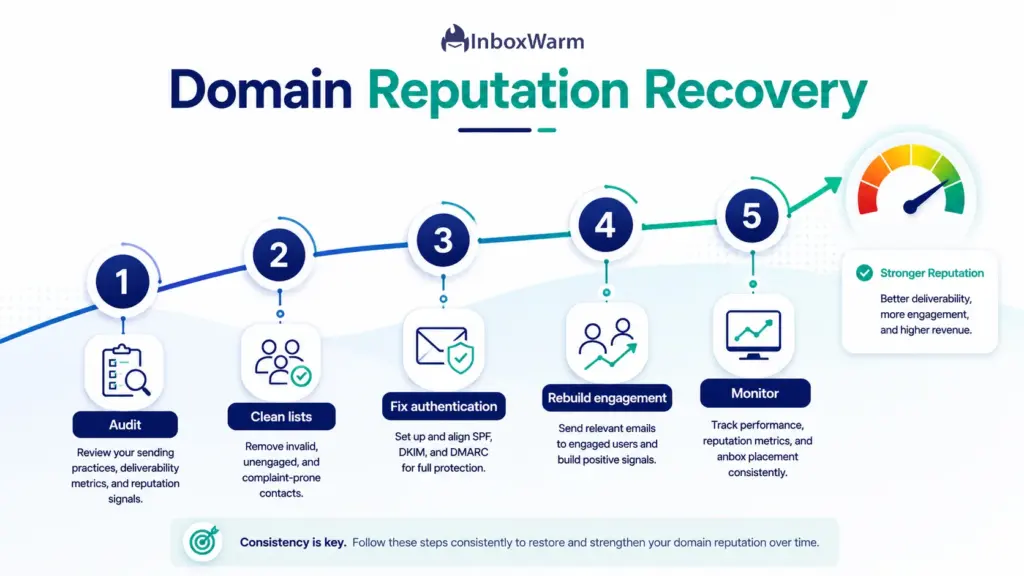
Recovering domain reputation is a sequence, not a single action. Audit your program, clean your lists, fix authentication, rebuild engagement, and then monitor continuously. Follow the five steps below in order for the fastest, most durable recovery.
Each step has a clear action and a clear outcome, so you can tell whether it worked before moving on.
Step 1: Audit Your Email Program
Review your sending sources, volumes, list origins, and recent metrics to pinpoint what caused the drop. The outcome is a short, specific list of root causes you can fix, rather than guessing. Skipping this step means treating symptoms instead of the disease.
Step 2: Clean Your Email Lists
Verify your entire list and remove invalid addresses, spam traps, and long-term non-openers. The outcome is a lower bounce rate and a list of people likely to engage. This is usually the fastest win in the whole sequence.
Step 3: Fix Authentication Issues
Confirm SPF, DKIM, and DMARC pass for every service that sends as your domain, and tighten your DMARC policy over time. The outcome is mail that providers can trust and that attackers cannot spoof. Aim for high authentication pass rates across the board.
Step 4: Rebuild Engagement Metrics
Restart sending at low volume to your most engaged contacts, then expand outward as results hold. The outcome is a stream of opens and replies that tells providers your mail is wanted. This is where patience pays off, because engagement rebuilds reputation more than any single setting.
Step 5: Monitor Reputation Regularly
Keep watching Postmaster Tools, SNDS, blacklists, and your own engagement data so you catch the next dip early. The outcome is a feedback loop that protects the reputation you just rebuilt. Set alerts where you can so monitoring does not depend on memory.
How Long Does It Take To Recover Domain Reputation?
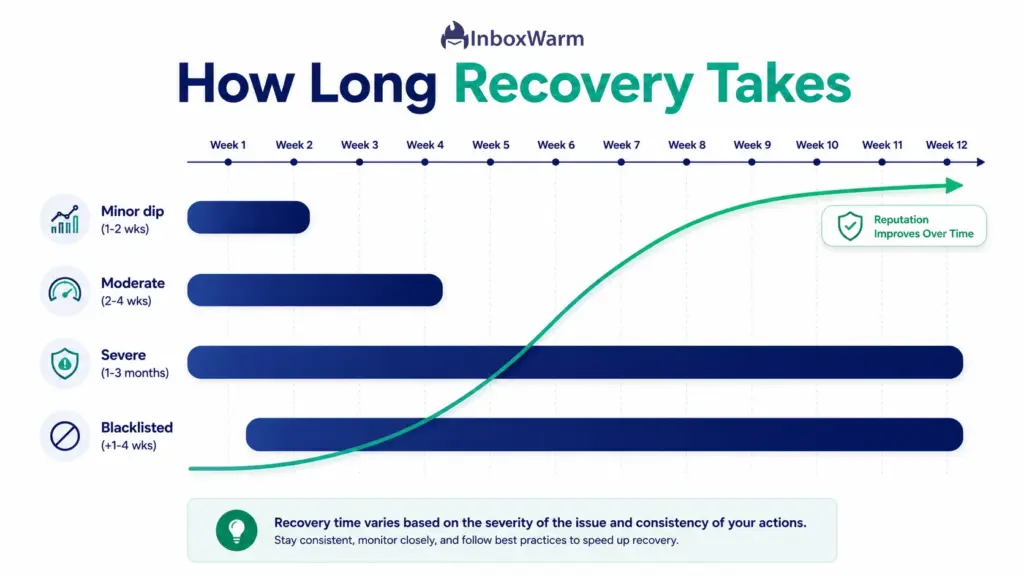
Most domains recover in two to eight weeks of consistent, clean sending, while severe cases can take several months. Recovery speed depends on how damaged the reputation was, your sending volume, and how disciplined you stay about list hygiene and engagement during the rebuild.
There is no instant fix, because reputation is built on a rolling history. Google itself notes that reputation changes are sticky and that dashboard data can take up to seven days to reflect improvements. The factors and timelines below set realistic expectations.
Factors That Affect Recovery Time
How far your reputation fell, how much mail you send, the quality of your remaining list, and how strictly you follow best practices all shape the timeline. A minor dip caught early recovers far faster than a domain that sat in the Bad tier for weeks. Blacklist removal adds its own delay on top.
Typical Recovery Timelines
The ranges below reflect common practitioner experience and should be treated as estimates, not guarantees. Your own results depend heavily on the discipline of your rebuild.
| Severity | Typical timeline | What it looks like |
|---|---|---|
| Minor dip | 1 to 2 weeks | Caught early, small complaint spike, list still healthy |
| Moderate damage | 2 to 4 weeks | Medium or Low rating, elevated bounces or complaints |
| Severe damage | 1 to 3 months | Bad rating, mail mostly in spam, needs full rebuild |
| Blacklisted | Add 1 to 4 weeks | Delisting plus reputation rebuild after the root cause is fixed |
Signs Your Reputation Is Improving
Watch for a Postmaster Tools rating climbing from Low toward Medium or High, a falling spam complaint rate, more mail landing in the inbox on seed tests, and rising opens and replies. When these move together over a couple of weeks, the recovery is real, and you can begin ramping volume again.
How Does Email Warmup Help Improve Domain Reputation?
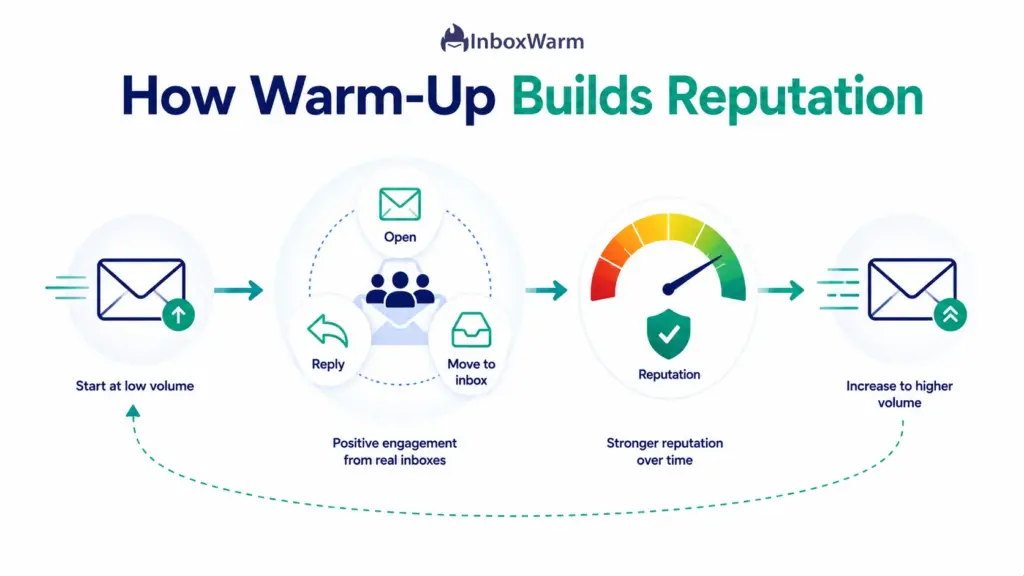
Email warm-up improves domain reputation by gradually increasing sending volume while generating positive engagement, which teaches providers that your domain sends wanted mail. It is the safest way to build trust on a new domain or rebuild it on a damaged one.
Warm-up turns the slow, manual work of earning reputation into a structured, repeatable process.
Here is what it is and why it matters most exactly when your domain is most fragile.
What Is Email Warmup?
Email warm-up is the practice of starting with a low daily volume and increasing it on a schedule while seeding positive interactions like opens and replies. Those interactions tell providers your mail is legitimate and wanted. The result is a steadily rising reputation that can absorb real campaign volume without tripping spam filters.
Why Warmup Matters for New and Damaged Domains
A brand-new domain has no history, so providers treat it with suspicion until it earns trust. A damaged domain has the wrong kind of history and needs fresh positive signals to overwrite it. In both cases, warm-up supplies the consistent, engagement-rich sending pattern that rebuilds reputation faster than waiting it out.
How Inboxwarm Helps Build Domain Reputation
InboxWarm.ai is an AI-powered email warm-up tool that improves inbox placement and sender reputation. It automatically exchanges genuine-looking emails across a network of real inboxes, opens and replies to your messages, and moves them out of spam, which generates the positive engagement providers reward.
You can warm up any sending setup, including Gmail, Outlook, and custom SMTP, and monitor placement as your reputation climbs.
Best Practices To Maintain A Strong Domain Reputation
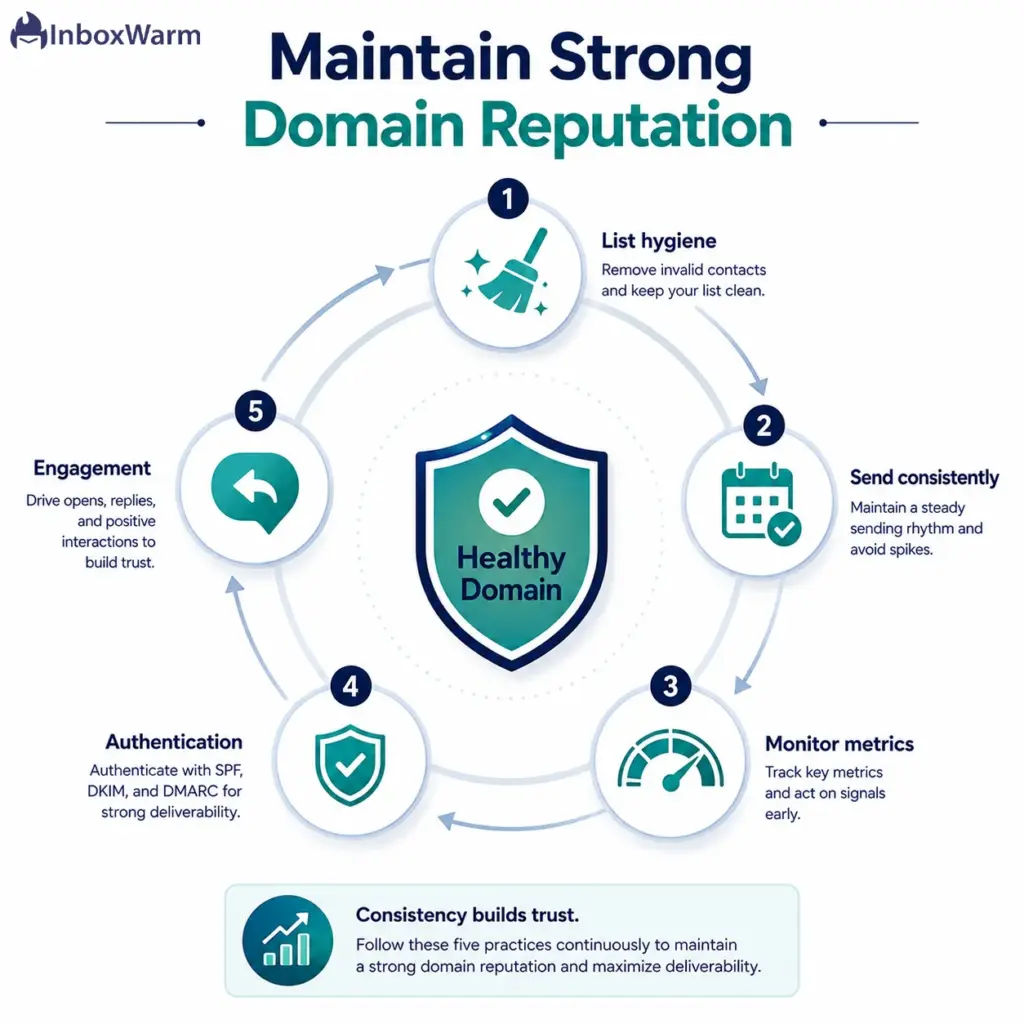
Maintaining a strong domain reputation comes down to five ongoing habits: clean lists, consistent sending, active monitoring, proper authentication, and genuine subscriber engagement. None is complicated, but all five must be steady.
A recovered reputation is easy to lose if you slip back into old habits, so treat the practices below as routine, not a one-time project.
Maintain List Hygiene
Verify new contacts and prune inactive ones on a regular schedule. A clean list keeps bounces and complaints low, which keeps reputation high. This is the habit most senders neglect and the one that pays off most.
Send Consistently
Providers trust predictable senders, so keep your volume and cadence steady rather than swinging between silence and blasts. Consistency signals legitimacy. Sudden spikes, even of good mail, can look suspicious to filters.
Monitor Deliverability Metrics
Check your reputation, spam rate, and engagement on a recurring basis so you catch problems while they are small. Domain reputation monitoring is cheap insurance against an expensive collapse. Set alerts wherever your tools allow it.
Use Proper Authentication
Keep SPF, DKIM, and DMARC valid and aligned, and re-check them whenever you add a new sending service. Authentication is the foundation everything else sits on.
Prioritize Subscriber Engagement
Send relevant mail that people want to open and reply to, and let disengaged contacts go. Engagement is the clearest positive signal a provider has, and prioritizing it keeps your reputation compounding upward. Quality of audience beats quantity every time.
Frequently Asked Questions
How Often Should I Check My Domain Reputation?
Check your domain reputation weekly if you send regular campaigns. During recovery periods or high-volume sending, monitor it daily. Frequent checks help you spot problems early and verify that deliverability improvements are working.
Can Domain Reputation Affect Email Deliverability?
Yes. Domain reputation directly influences whether your emails reach the inbox, land in spam, or get blocked. A strong reputation improves inbox placement, while a poor reputation can hurt deliverability regardless of your email content.
What Is The Difference Between Domain Reputation And Sender Reputation?
Domain reputation reflects the trustworthiness of your sending domain. Sender reputation is a broader metric that includes both domain reputation and IP reputation. Most mailbox providers evaluate both when deciding email placement.
Can A Bad Domain Reputation Be Fixed?
Yes. Most reputation issues can be resolved by cleaning email lists, fixing authentication, reducing sending volume, and rebuilding engagement. Recovery can take anywhere from a few weeks to several months depending on the severity of the problem.
Does Email Warmup Improve Domain Reputation?
Yes. Email warmup helps build domain reputation by generating positive engagement signals and gradually increasing sending volume. When combined with proper authentication and list hygiene, it can significantly improve deliverability over time.
Conclusion
Domain reputation is the quiet force behind every email result you care about. Check it across Google Postmaster Tools, Microsoft SNDS, blacklists, and your own engagement data, and you will usually spot trouble while it is still small. The causes are predictable, the fixes are known, and recovery is a matter of disciplined, consistent sending rather than luck.
If your reputation has slipped, work the recovery sequence in order: audit, clean, authenticate, rebuild engagement, then monitor. Give it two to eight weeks of steady, list-hygiene-first sending, and watch your ratings climb. The senders who stay in the inbox are not the ones who never had a problem but the ones who caught it early and rebuilt on purpose.
Treat domain reputation monitoring as a permanent habit, not a fire drill. Keep your lists clean, your authentication valid, and your sending consistent, and a strong reputation will compound in your favor. From there, getting your next campaign into the inbox stops being a gamble.
Stuck rebuilding a domain that keeps landing in spam?
InboxWarm.ai is an AI-powered email warm-up tool that improves inbox placement and sender reputation, rebuilding trust with real engagement across Gmail, Outlook, and SMTP. Start free for 10 days, no credit card required.