


TL;DR
An email reputation check measures how mailbox providers like Gmail and Outlook score your sending domain and IP. Run it with free tools: Google Postmaster Tools and Microsoft SNDS for provider-specific signals, Validity Sender Score for a 0 to 100 number, and a seed test for real inbox placement. Anything above 80 on Sender Score is healthy.
- Reputation is split into domain reputation and IP reputation. Domain now matters more for most senders.
- The biggest drivers are spam complaint rate, bounce rate, authentication, engagement, and consistent volume.
- Google retired its High/Medium/Low reputation grades on September 30, 2025. Postmaster Tools v2 now reports compliance, not a reputation tier.
- Clean lists, tight authentication, and proper warm-up are what actually move the number.
You hit send, your platform reports the email as delivered, and you assume the job is done. It often is not. According to Validity’s 2025 Email Deliverability Benchmark Report, global inbox placement sits around 83.5%, which means roughly one in six legitimate emails never reaches the inbox.
The reason that gap exists is sender reputation. Mailbox providers score every domain and IP that sends them mail, then use that score to decide whether your message lands in the inbox, the spam folder, or nowhere at all. A delivered notification only confirms a server accepted the message. It says nothing about where the message went next.
In this guide, you will learn what email reputation is, the factors that shape it, and how to run an email reputation check using seven reliable tools.
You will also learn how to read the results without misinterpreting them, what to do when your score drops, and how warm-up rebuilds trust on new and recovering domains.
Table of Contents
What Is Email Reputation?
Email reputation is the trust score that mailbox providers assign to your sending identity based on how you send and how recipients react. It works like a credit score for email. A strong reputation earns inbox placement. A weak reputation earns the spam folder or an outright block.
Providers build this score from behavioral and technical signals: complaints, bounces, authentication, engagement, and sending patterns. The score is dynamic, recalculated on a rolling basis, so recent behavior carries far more weight than what you did three months ago.
Email Reputation vs. Sender Reputation
People use these terms interchangeably, and that is mostly fine. Sender reputation is the umbrella idea: the overall trust a provider places in you. Email reputation usually points to the same thing from the recipient side. The useful distinction is with Sender Score, which is one branded metric from Validity, not the whole picture. Treat any single score as one data point inside a broader reputation profile.
Domain Reputation vs. IP Reputation
Your reputation lives in two places at once. Domain reputation tracks the domain after the @ in your address. IP reputation tracks the server address your mail is sent from.
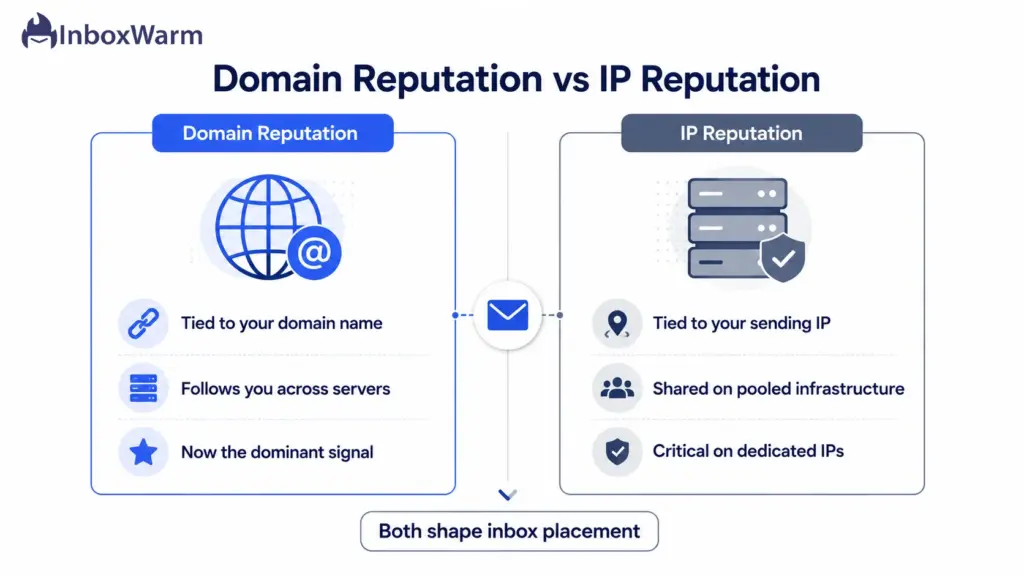
- Domain reputation follows you even if you change infrastructure, and it is now the dominant signal for most senders.
- IP reputation matters most on a dedicated IP. On shared infrastructure like Google Workspace, you inherit the pool’s reputation and share it with thousands of other senders.
For cold email on shared IPs, that split is the catch. Your IP-based Sender Score can look fine while your individual domain reputation, tracked by Google and Microsoft, quietly decides where your mail lands.
Why Mailbox Providers Track Reputation
Providers track reputation to protect their users from spam and abuse without manually reviewing billions of messages. Reputation is how they automate that decision at scale. A trusted sender gets the benefit of the doubt. A suspicious one gets filtered before a human ever sees the message.
Since the 2024 bulk sender rules from Google and Yahoo and Microsoft’s 2025 enforcement, that bar has only risen. Authentication and low complaint rates are no longer nice to have. They are entry requirements.
What Are the Factors That Affect Your Email Reputation?
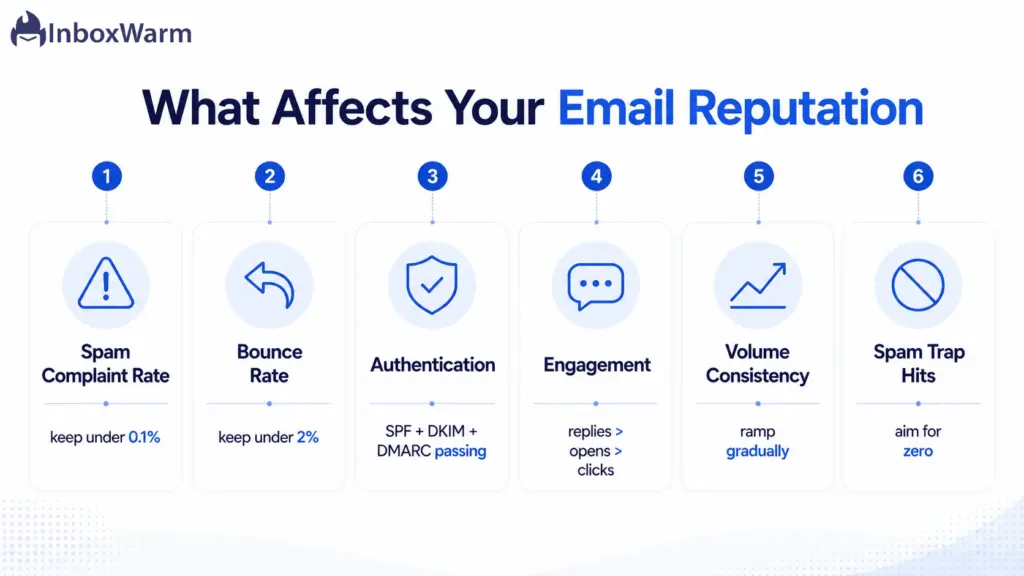
Six factors do most of the work. Each one is something you can measure and improve, which is exactly why a reputation check is actionable rather than abstract.
Spam Complaint Rate
Your spam complaint rate is the share of recipients who hit ‘Report spam.’ It is the single most damaging signal you can generate. Google’s bulk sender guidelines tell you to keep it below 0.1% and treat 0.3% as a hard ceiling. Cross that line consistently and Gmail starts routing your mail to spam by default.
Bounce Rate
A hard bounce means you sent to an address that does not exist. High bounce rates tell providers your list is dirty or purchased, which is a classic spammer pattern. Keep hard bounces under 2%. Above that, list quality is actively hurting you.
Email Authentication (SPF, DKIM, DMARC)
Authentication proves you are who you claim to be. SPF lists the servers allowed to send for your domain, DKIM adds a cryptographic signature, and DMARC ties them together and tells providers what to do on failure. Without all three aligned and passing, bulk mail to Gmail and Outlook gets rejected outright.
Verify your setup before you check reputation. A free SPF lookup and a DMARC checker will confirm your records resolve correctly and that alignment is intact.
Engagement Signals
Providers watch what recipients do. Opens, replies, and emails moved out of spam are positive signals. Deletes without opening and messages left to rot are negative ones. For cold email, replies carry the most weight because they prove a real human wanted to hear from you.
Sending Volume and Consistency
Steady, predictable volume reads as legitimate. Sudden spikes read as a compromised account or a blast campaign. A domain that jumps from 50 to 5,000 emails overnight will get throttled. Ramp gradually and keep your daily cadence consistent.
Spam Trap Hits
Spam traps are addresses that exist only to catch senders with poor list hygiene. Some are recycled dead accounts; others are pristine traps never used by a human. Hitting them signals you are emailing addresses you never earned permission to contact, and it damages your reputation fast.
How To Check Your Email Reputation
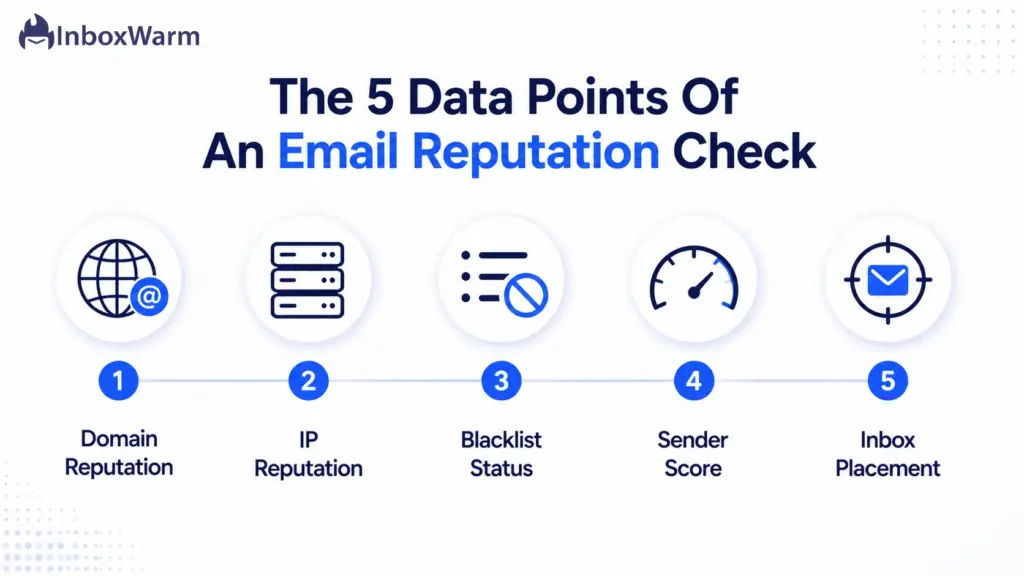
Before you open a single tool, know what you are looking for. No one tool gives a complete picture, so a real email reputation check pulls five distinct data points. Gather these and you can diagnose almost any deliverability problem.
Domain Reputation
How a provider scores the domain after your @. This is the signal that follows you across infrastructure and now drives most inbox decisions. Google and Microsoft are the primary sources for it.
IP Reputation
How your sending IP is scored. Critical on a dedicated IP, less so on a shared pool where you inherit the group’s standing. Check it to rule out a poisoned IP dragging you down.
Blacklist Status
Whether your domain or IP appears on a blocklist such as Spamhaus. A single major listing can tank delivery across many providers at once, so this is the first thing to rule out when mail suddenly stops landing.
Sender Score
Validity’s 0 to 100 reputation proxy for your IP. It will not match any provider’s internal score exactly, but it gives you a single trend line to watch over time. Think smoke alarm, not full diagnosis.
Deliverability Metrics
Actual inbox placement, measured with a seed test across Gmail, Outlook, and Yahoo. This is the only data that tells you where mail truly lands, rather than how a provider grades you in the abstract.
7 Best Email Reputation Check Tools
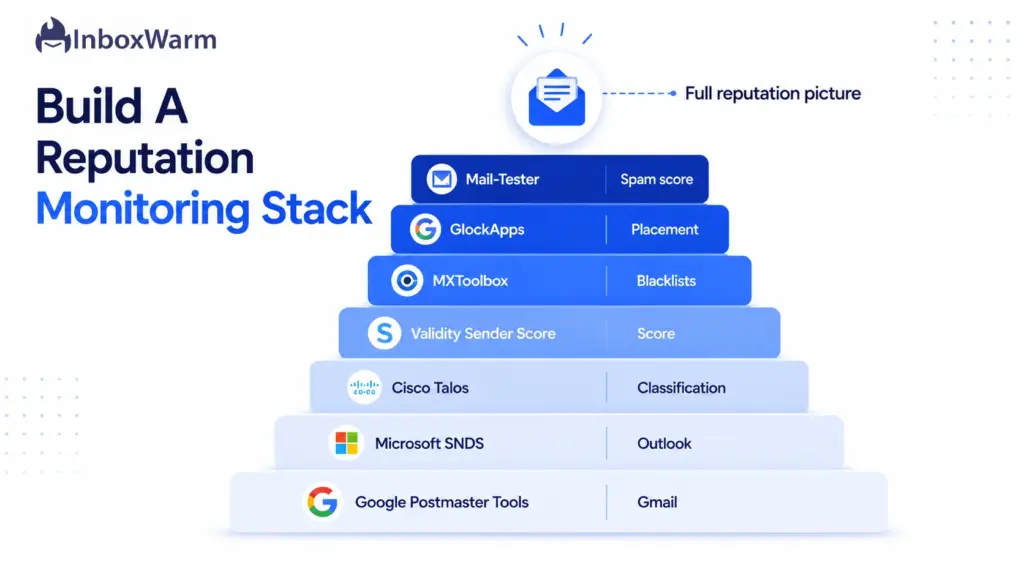
These seven tools cover every data point above, and six of them are free. Use them as a stack, not in isolation. Each one shows a slice of the picture, and the overlap is where the truth lives.
1. Google Postmaster Tools
Google Postmaster Tools is the free, direct line into how Gmail sees your sending. It is the closest thing to ground truth for the world’s largest inbox. One important change: Google retired the old High, Medium, Low, and Bad reputation grades on September 30, 2025. The v2 interface now centers on a compliance status dashboard plus spam rate, authentication, and TLS reporting.
Spam rate is now your headline metric here. Keep it under 0.1%. To populate data, you need consistent volume, roughly 100 or more emails per day to Gmail addresses, with the compliance dashboard requiring 5,000 or more per day.
Because it reads Gmail directly, pair it with a Gmail warm-up routine so the data reflects steady, healthy sending while you build trust.
Key Features: Spam rate, authentication pass rates, TLS, delivery errors, compliance status
Pros: Free, Gmail’s own data, fast to set up, updates within 24 to 48 hours
Cons: Gmail only, no real-time alerts, reputation tier grades removed in v2, needs steady volume
Best For: Any sender mailing Gmail and Google Workspace recipients
2. Microsoft SNDS
Smart Network Data Services is Microsoft’s equivalent of Postmaster Tools for Outlook, Hotmail, and Live addresses. It reports IP-level telemetry: complaint rates, spam trap hits, and a color-coded status of green, yellow, or red for your sending IPs.
Treat the color as direction, not a verdict. A green status does not guarantee Outlook inbox placement, but a red one is a clear warning to act. If your prospect lists skew toward Microsoft inboxes, run an Outlook warm-up alongside it to keep complaint rates low.
Key Features: IP complaint rate, spam trap hits, filter result data, color-coded IP status
Pros: Free, the best window into Microsoft inboxes, useful spam trap visibility
Cons: IP-based, not domain-based; clunky interface; requires IP-level access; directional only
Best For: B2B senders with significant Outlook and Microsoft 365 audiences
3. Cisco Talos Intelligence
Talos is Cisco’s threat intelligence platform, and its reputation lookup is a quick way to see how your domain or IP is classified: Good, Neutral, or Poor. A Neutral or Poor rating is a red flag that the wider security community views your sending with suspicion.
It is most useful as a second opinion next to Sender Score and your provider tools, especially for spotting infrastructure or classification problems early.
Key Features: Domain and IP reputation classification, email volume estimates, blocklist context
Pros: Free, no account needed, respected security source, instant lookup
Cons: Three-tier rating lacks granularity, no historical trend, security-focused not marketing-focused
Best For: Confirming your domain or IP is not flagged by security filters
4. Validity Sender Score
Sender Score is Validity’s free 0 to 100 rating for your sending IP, calculated on a rolling 30-day average against a cooperative network of more than 80 mailbox and security providers. A score works like a percentile: 85 means your IP outperforms 85% of others tracked.
Read it as a benchmark, not gospel. Above 80 is healthy, 90 and up is excellent, and below 70 points to real problems. It is IP-based, so on shared infrastructure it reflects the pool more than you specifically.
Key Features: 0 to 100 IP reputation score, category breakdown for complaints, traps, and unknown users
Pros: Free with an account, single trackable number, trusted industry standard
Cons: IP-based only, less meaningful on shared IPs, not used directly by Gmail or Outlook
Best For: Dedicated-IP senders who want one trend line to watch
5. MXToolbox
MXToolbox is the fastest way to check whether your domain or IP sits on a blocklist. Its free blacklist lookup checks your address against more than 100 known lists at once, and its DNS tools verify SPF, DKIM, and DMARC records resolve correctly.
When mail suddenly stops landing, this is the first tool to open. A blacklist hit explains a lot of damage quickly, and the sooner you spot it, the sooner you can start delisting.
Key Features: Blacklist check across 100+ lists, SPF/DKIM/DMARC lookups, MX and DNS diagnostics
Pros: Free core checks, fast, comprehensive blocklist coverage, no account needed
Cons: Advanced monitoring is paid, snapshot rather than continuous, no inbox placement data
Best For: Diagnosing blacklist listings and authentication record errors
6. GlockApps
GlockApps measures the one thing reputation scores cannot: where your mail actually lands. You send a test email to its seed list spanning Gmail, Outlook, Yahoo, and other providers, and it reports placement as inbox, spam, or missing for each one.
This is the proof step. A clean Sender Score and a green SNDS status still do not confirm inbox placement, and a seed test closes that gap before you mail real prospects.
Key Features: Seed-list placement testing, per-provider inbox/spam/missing breakdown, spam filter and authentication analysis
Pros: Real placement data across providers, clear per-inbox results, automation on paid plans
Cons: Free tier is limited, ongoing testing is paid, seed results approximate real recipients
Best For: Confirming real inbox placement before and during campaigns
7. Mail Tester
Mail-Tester gives you a simple score out of 10 for a single email. You send a message to the unique address it generates, then view a breakdown of authentication, content, blocklist status, and formatting issues that may be costing you placement.
It is a fast pre-send sanity check, not an ongoing monitor. Aim for a 10 out of 10, fix whatever it flags, and treat it as a starting point rather than a full reputation diagnosis.
Key Features: Score out of 10, SPF/DKIM/DMARC checks, content and blocklist analysis, broken-link detection
Pros: Free, instant, beginner-friendly, clear actionable fixes
Cons: Tests one email at a time, no ongoing monitoring, limited free checks per day
Best For: A quick health check on a single email before launch
How To Read Email Reputation Results
This is where most senders go wrong. They check one number, see green or a high score, and assume they are safe. Reputation data does not work that way.
Here is how to read the results without fooling yourself.
- First, read trends, not snapshots. A single day’s score means little. A Sender Score that climbs steadily from 60 to 88 over three weeks is genuine progress. One that spikes after a lucky send, then wobbles, is noise. Watch the direction over time.
- Second, no score equals inbox placement. A green SNDS status, a high Sender Score, and a clean compliance check all describe how a provider categorizes your traffic. None of them confirm a specific email reached a specific inbox. Only a seed test does that.
- Third, cross-reference before you act. A reputation dip means little on its own. Line it up against your spam rate, bounce rate, authentication pass rates, and recent sending changes. The cause is almost always one of those, and a single signal rarely tells the whole story.
- Fourth, know the scale you are reading. Sender Score runs from 0 to 100, where 80-plus is healthy. Mail-Tester runs from 0 to 10, where you want a perfect 10. SNDS uses red, yellow, and green. Mixing these up leads to false comfort or needless panic, so always check what ‘good’ means for the tool in front of you.
What To Do If Your Email Reputation Is Low
A low score is a diagnosis, not a sentence. Reputation recovers when you remove the behaviors that damaged it and consistently send the way trusted senders do. Work through these five fixes in order.
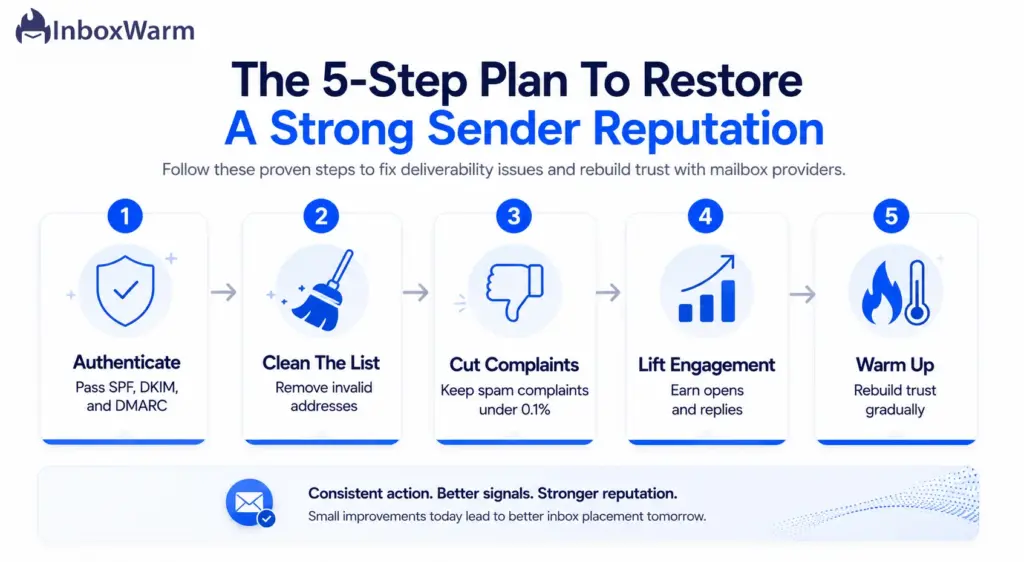
Authenticate Your Domain Properly
Start here, because nothing else works without it. Confirm SPF, DKIM, and DMARC all pass and align. Set DMARC to a meaningful policy, moving from p=none to p=quarantine once you have confirmed legitimate mail passes. Unauthenticated mail is the fastest route to the spam folder in 2026.
Remove Invalid Email Addresses
Run your list through verification and strip dead addresses, role accounts, and obvious typos. This single step slashes your bounce rate, which is one of the most direct reputation signals you control. Never buy lists, because they are loaded with spam traps.
Reduce Spam Complaints
Tighten who you email. Mail only people who are likely to want it, make unsubscribing one click, and honor opt-outs within two days. Lowering complaints below 0.1% is often the difference between the inbox and the spam folder.
Improve Engagement Rates
Engagement is a reputation input, so earn it. Segment your list, personalize your messaging, and send to your most engaged recipients first. For cold email, optimize for replies, the strongest positive signal a provider can see.
Warm Up New Domains and Mailboxes
If your domain or mailbox is new or recovering, email warm-up rebuilds trust by generating positive, human-like activity at a gradually rising volume. It is the most reliable way to establish a sending history that providers trust before you scale.
How Does Email Warmup Help Improve Sender Reputation?
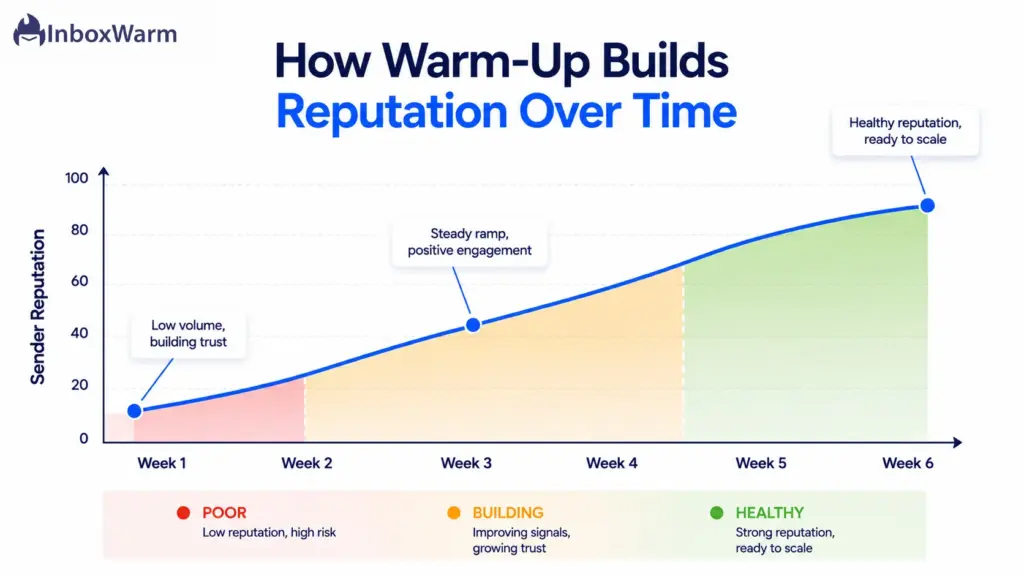
Warm-up directly produces the signals reputation systems reward: consistent volume, real engagement, near-zero complaints, and clean bounces. For a domain with no history, that activity is what convinces providers you are safe to deliver.
Why New Domains Struggle With Reputation
A brand-new domain has no track record, so providers default to skepticism. They cannot tell a legitimate new business from a throwaway spam domain, so they throttle and scrutinize until you prove yourself. Sending real campaign volume on day one is the classic mistake that lands a fresh domain in spam immediately.
How Warmup Builds Trust Signals
Warm-up simulates the sending pattern of an established, trusted account. It sends a small, steadily increasing number of emails that get opened, replied to, and pulled out of spam. Over a few weeks, that pattern of positive engagement teaches providers your domain belongs in the inbox.
How InboxWarm.ai Supports Better Deliverability
InboxWarm.ai is an AI-powered email warm-up tool that improves inbox placement and sender reputation. It automates the warm-up process across a network of real inboxes, gradually ramping volume, generating genuine engagement, and rescuing messages from spam folders so your reputation builds without manual effort.
It connects to Gmail, Outlook, SMTP, and major sending platforms and tracks placement as it goes. The result is a sending history providers trust, built steadily rather than risked all at once.
What Are the Email Reputation Best Practices For 2026
Reputation is maintained, not set once. These five habits keep your sender reputation strong as provider rules keep tightening.
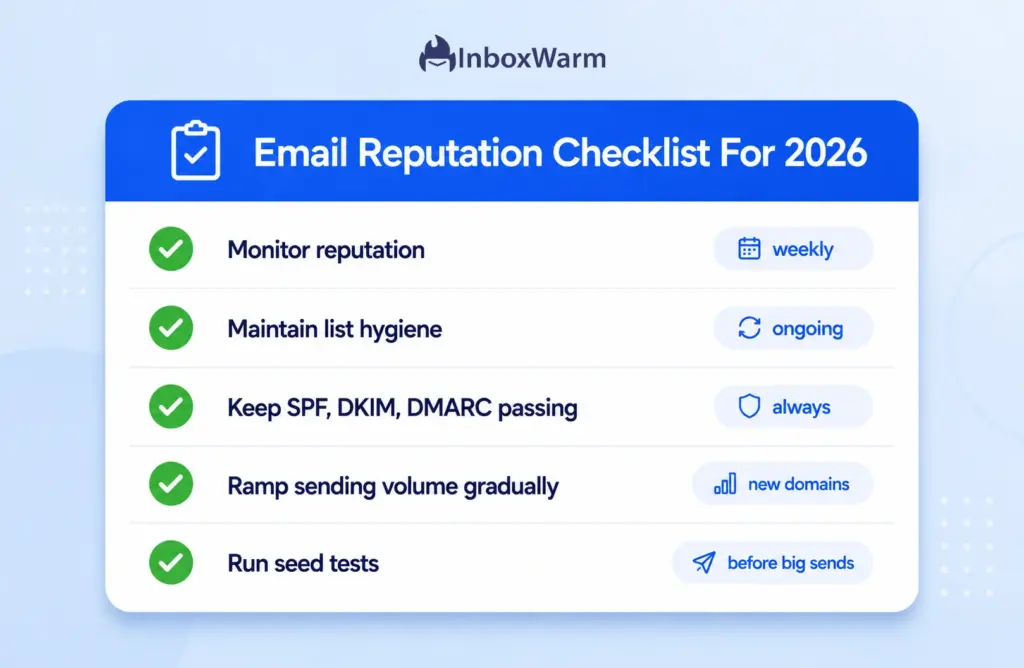
- Monitor reputation regularly. Check Postmaster Tools and SNDS weekly and Sender Score and blacklists monthly. During any major change, like a new IP or ESP, check daily until things stabilize.
- Maintain list hygiene. Verify new addresses, prune contacts who have not engaged in six months, and remove hard bounces immediately.
- Use authentication protocols. Keep SPF, DKIM, and DMARC passing and aligned at all times, and move DMARC toward an enforcing policy.
- Gradually increase sending volume. Ramp new domains slowly and avoid sudden spikes. Consistency beats volume every time.
- Track deliverability metrics. Run seed tests before major sends and watch spam rate, bounce rate, and engagement as leading indicators.
Frequently Asked Questions
What Is A Good Sender Reputation Score?
On the Sender Score scale of 0 to 100, anything above 80 is healthy and 90 or higher is excellent. Below 70 signals real deliverability problems. For Gmail, the metric that matters most now is spam rate, which Google's bulk sender guidelines say to keep under 0.1% and never above 0.3%.
How Often Should I Monitor Email Reputation?
Check provider tools like Postmaster Tools and SNDS weekly, and review Sender Score, Talos, and blacklists monthly. After any major sending change, such as a new ESP, IP, or large list import, monitor daily for about two weeks until performance stabilizes.
Can Email Warmup Improve Sender Reputation?
Yes. Warm-up builds the exact signals reputation systems measure: consistent volume, strong engagement, zero complaints, and clean bounces. It is most effective for new domains with no history and for domains recovering from a reputation drop, where a fresh pattern of positive activity is what rebuilds trust.
How Long Does It Take To Improve Email Reputation?
It depends on the damage and your sending discipline. A new domain typically needs two to four weeks of consistent, clean warm-up to establish trust. Recovering a domain hit by high complaints or a blacklisting can take several weeks to a few months of disciplined sending and list cleanup.
Why Do My Emails Go To Spam Despite Passing Authentication?
Because authentication is necessary, not sufficient. SPF, DKIM, and DMARC prove your identity and get your mail accepted, but they do not by themselves earn inbox placement. Research from Unspam's 2025 analysis found that emails passing full authentication still landed in spam more than 30% of the time when reputation, engagement, or content signals were weak. Authentication clears the door. Reputation decides which room you end up in.
Conclusion
An email reputation check is the difference between guessing why your emails underperform and knowing. With one in six legitimate emails missing the inbox, the senders who win are the ones watching their reputation closely enough to catch problems before a campaign exposes them.
No single tool tells the whole story. Pair provider data from Postmaster Tools and SNDS with a Sender Score trend, a blacklist scan, and a seed test, then read the results as trends rather than snapshots. That combined view is what lets you act early instead of reacting after delivery has already dropped.
Strong sender reputation is not a one-time fix. It rests on consistent sending practices, disciplined list hygiene, tight authentication, and proper warm-up for anything new or recovering. Monitor regularly; send the way trusted senders do, and the inbox follows.
Tired of watching your reputation slip and your emails land in spam?
InboxWarm.ai rebuilds sender reputation automatically, ramping volume and generating real engagement across a network of live inboxes. Start free for 10 days, no credit card required.