
TL;DR
- Use this template when the prospect handles the job manually and has never looked for software; you are competing with the status quo, not a competitor.
- Open with what they do today, not with your product. [current_method] is the variable the whole email rests on.
- Keep it to about 62 words, with no links and no attachments on first contact.
- Ask for two minutes, not a demo. Someone who was not looking for a tool will not give you fifteen.
- Budget roughly six minutes of research per prospect, three of them on how they work today.
- Follow up four times across eighteen days, longer gaps than a problem–solution sequence needs.
- A clean email from an unwarmed domain still lands in spam, so warm the domain before you send at volume.
Use this template when your prospect doesn’t know a tool like yours exists. They handle the job manually; they have never searched for software to do it, and they are not comparing vendors. You are competing with the status quo, not a competitor, which changes both the opening line and the size of the ask.
Table of Contents
The Product Discovery Template
Three beats: name what they do today, name what it quietly costs, and offer one alternative. No category explainer, no feature list.
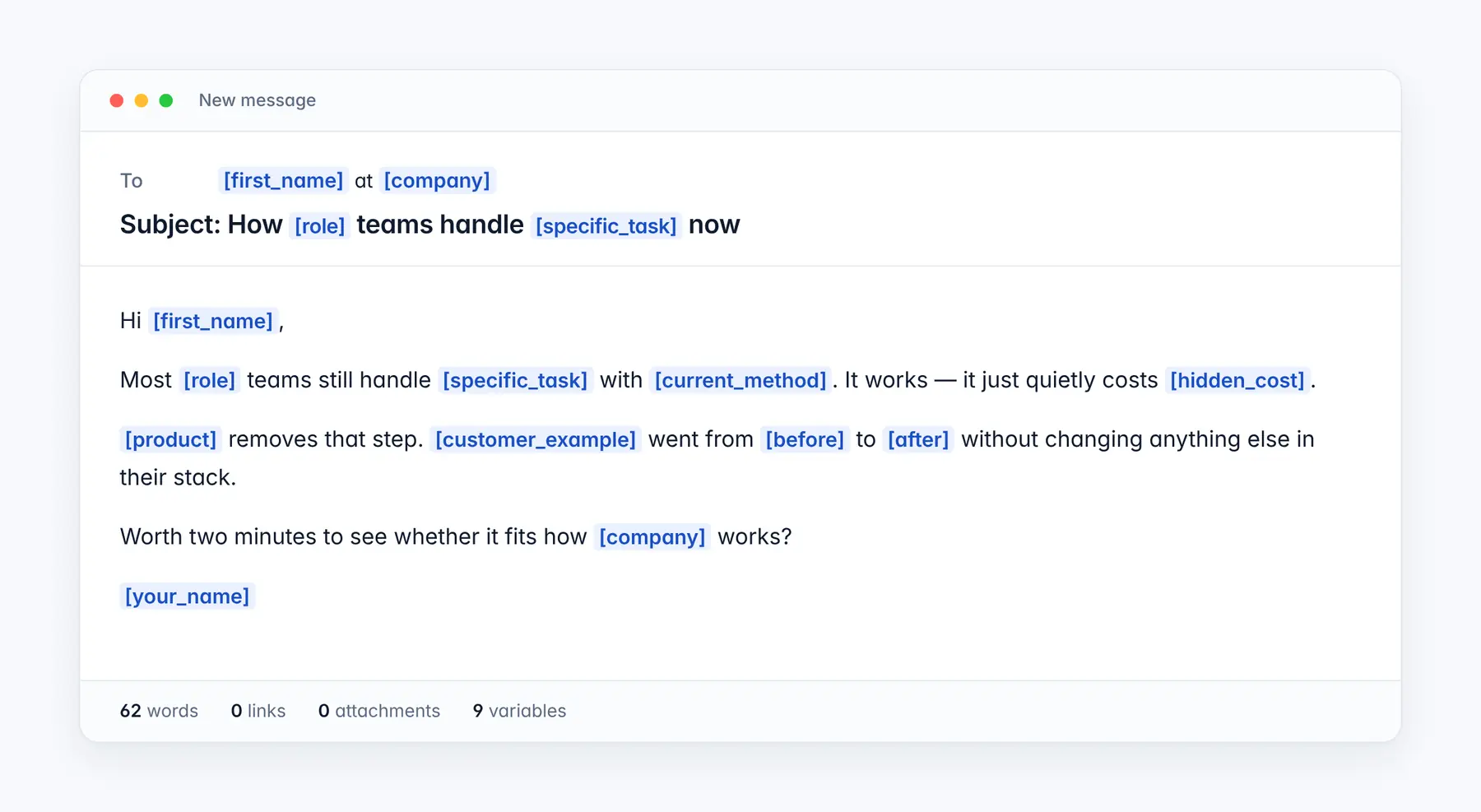
Sixty-two words, no links, no attachments. The ask is two minutes rather than a demo, and that is deliberate; someone who was not looking for a tool will not give you fifteen.
5 Product Discovery Email Templates for Different Prospect Needs
Choose a variation based on what you know about the prospect. These are alternative first emails, not a five-email sequence. Replace every placeholder with verified information before sending.
1. Introduce an Alternative to a Manual Process
When to use it: Use this when a public source shows how the prospect handles a relevant task.
Personalization tip: Reference something you actually reviewed. Do not assume their current process is a problem.
2. Introduce Your Product During Team Growth
When to use it: Use this after a verified hiring or expansion announcement relevant to your product.
Personalization tip: Name the actual announcement. Growth is a reason to ask about a workflow, not proof that the team is struggling.
3. Introduce a Product That Works With Their Existing Tools
When to use it: Use this when you have confirmed their existing tool and your product’s supported integration.
Personalization tip: Verify the integration and any plan requirements before mentioning it.
4. Introduce Your Product Through a Relevant Customer Example
When to use it: Use this when you have an approved customer story with a relevant, documented result.
Personalization tip: Use real, approved customer evidence. If you cannot support a result, choose another template.
5. Offer a Small Starting Point
When to use it: Use this when your product supports one narrow task without replacing the entire process.
Personalization tip: Offer a starting point your product actually supports. Check the terms before promising a trial or free setup.
Subject Lines That Work for This
Discovery subject lines describe the job, not the product. The prospect has no idea what your product is called, so the only recognizable word in the line has to be their own work.
| Subject line | Characters | Works when |
|---|---|---|
| How [role] teams handle [specific_task] now | 40 | The job has a name they would recognize. |
| [specific_task] without [current_method] | 36 | The current method is obviously painful. |
| A faster way to [specific_task]? | 31 | Speed is the clearest benefit |
| [first_name] — [specific_task] at [company] | 40 | You want it to read as one-to-one. |
When Should You Send This?
Four conditions, and all four need to hold:
- You know how they do it today. A job posting asking for spreadsheet skills, a tool listed in their stack, a process described in a case study or a podcast.
- The cost is real and nameable. Hours per week, error rate, and a delayed close. Not “inefficiency.”
- Your category is genuinely unfamiliar to them. If they already evaluated two competitors last quarter, this is the wrong email.
- You have a comparable customer. Discovery emails need proof more than any other play, because you are asking someone to believe a whole category is worth their attention.
When Not to Use This Template?
- They are already evaluating. Telling a buyer mid-comparison that a category exists is the fastest way to look late. Send a problem–solution email or a demo request instead.
- Your product is a commodity in a crowded category. Nobody needs to discover CRM software. Lead with the differentiator, not the category.
- You are guessing at [current_method]. Get this wrong, and the whole email collapses; you have told them you do not understand their work.
Which Template Should You Actually Send?
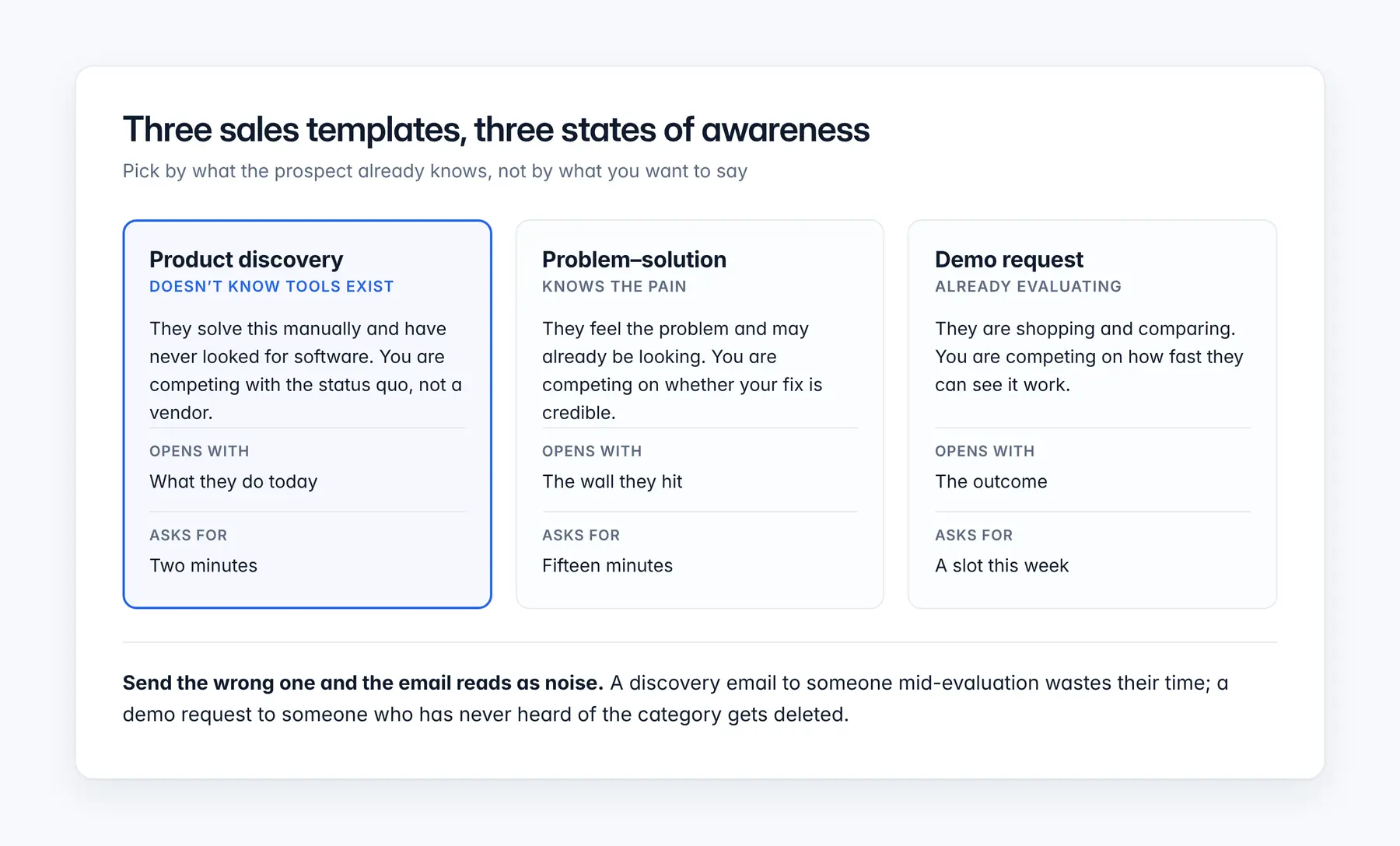
The three sales templates in this library are not interchangeable. Each assumes a different level of awareness, and sending the wrong one wastes the research you did.
What It Looks Like Filled In
“Still audit carrier invoices in spreadsheets” is the line doing the work. It proves you looked, and it names the status quo you are competing with in six words.
What to Personalize and Where to Find It?
| Variable | What to find | Where | Time |
|---|---|---|---|
| [current_method] | How they do the job today | Job postings, tech stack, their blog | 3 min |
| [specific_task] | The job in their own words | Role descriptions, help docs | 1 min |
| [hidden_cost] | Hours, error rate, or delay | Your own customer data | 1 min |
| [customer_example] | Your closest comparable account | Your case studies | 1 min |
Six minutes per prospect. The first row is worth three of those on its own; everything else in the email is replaceable, but a wrong guess about how they work ends the conversation before the second sentence.
Will This Land in the Inbox?
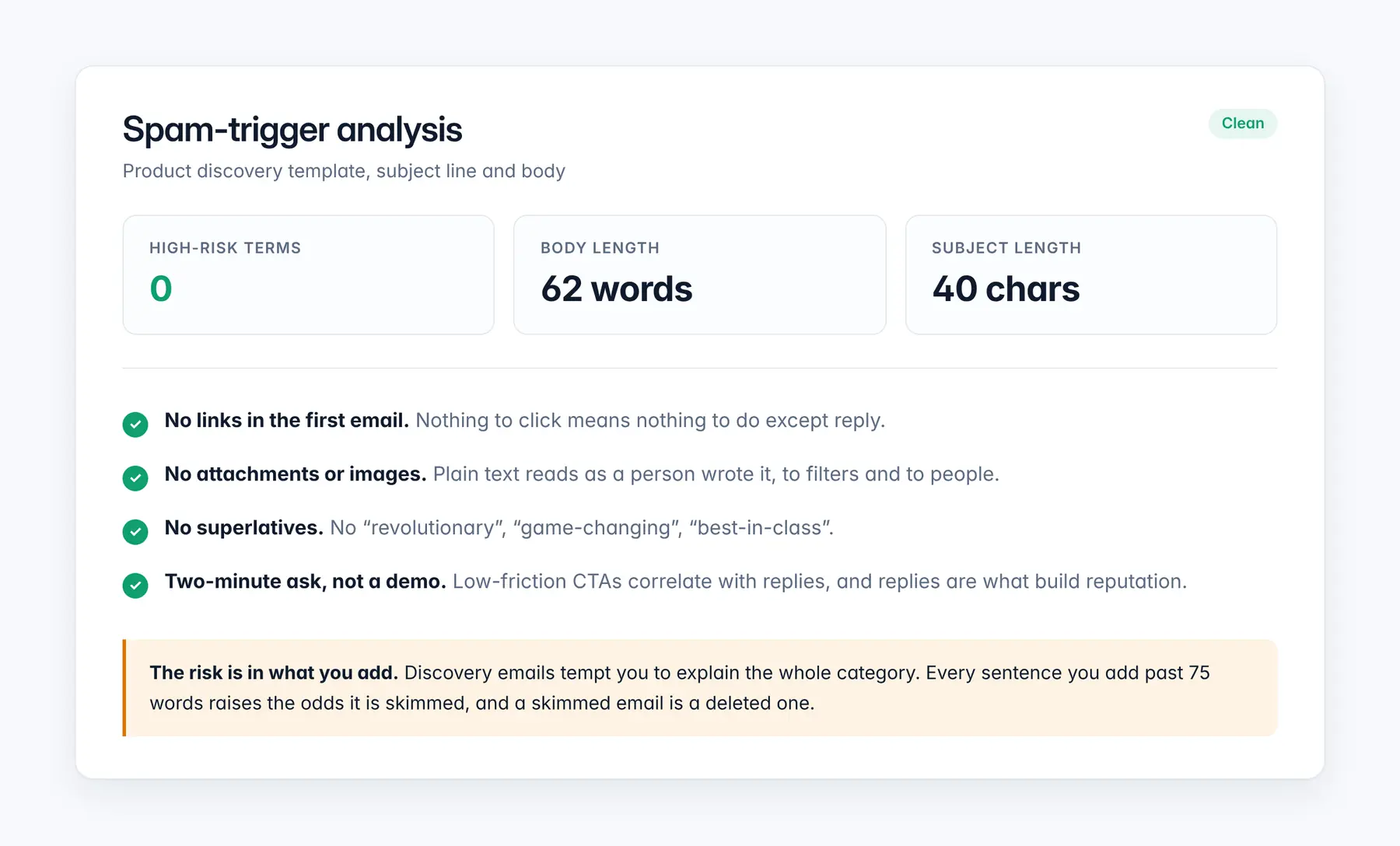
The template is clean. Discovery emails carry one specific temptation that the others do not: explaining the category. Every sentence you add past 75 words raises the chance the email is skimmed, and a skimmed cold email is a deleted one.
Resist adding a link to your homepage, too. The reader has no reason to click a domain they do not recognize, and a link on first contact from a new domain is a filtering risk for no benefit.
The larger variable is the domain itself. A clean 62-word email sent to 400 people from a domain registered last month lands in spam, whatever it says. Sender reputation is built before the campaign, not during it. Run your filled-in version through the spam word checker before you send it at volume.
How to Follow Up
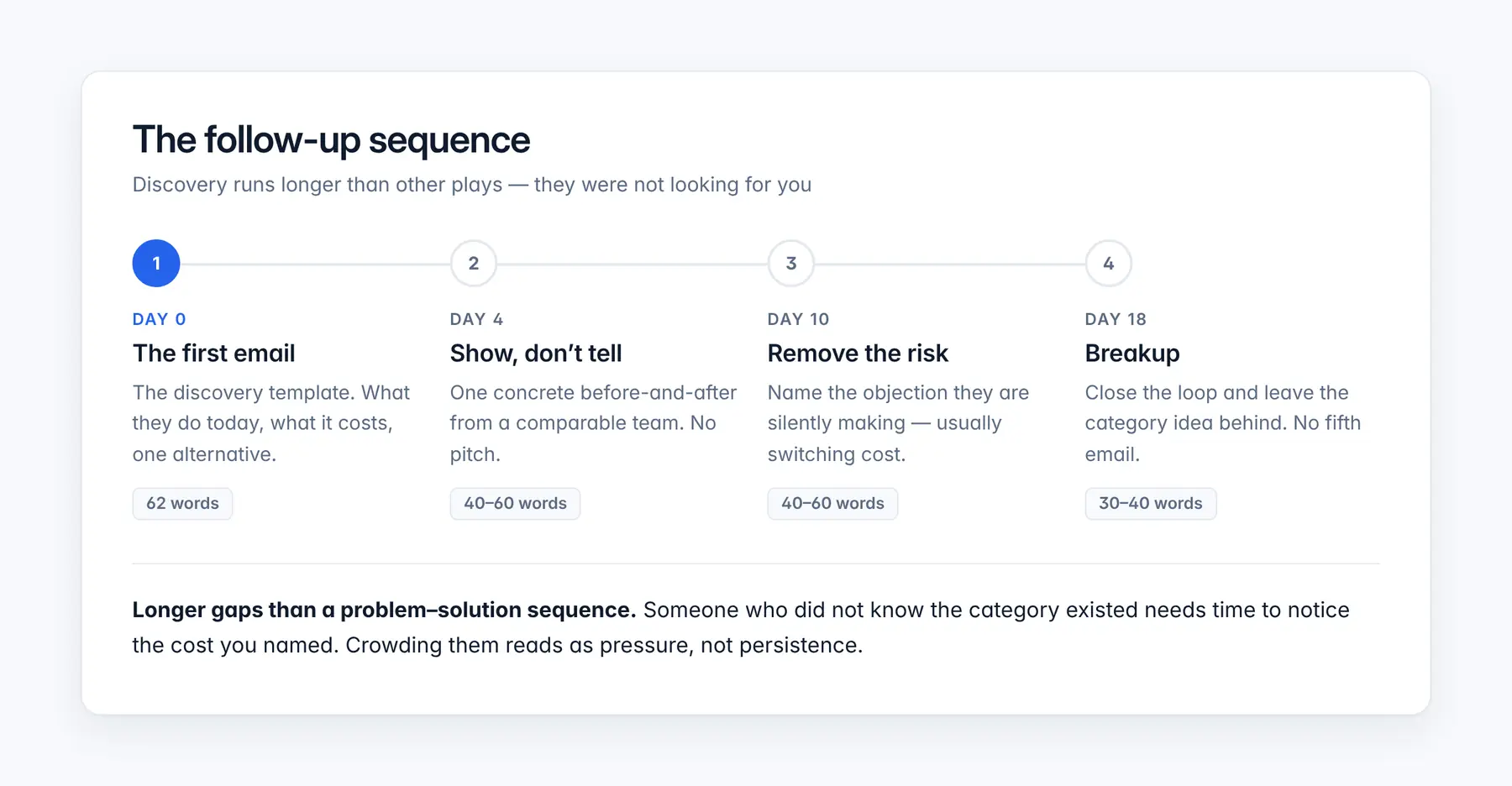
Discovery sequences run longer than the others, and the gaps matter. Someone who did not know the category existed needs time to notice the cost you named; often, they only see it at the next month’s end. Crowding them reads as pressure rather than persistence.
The one rule that holds across every sequence: never send a follow-up whose only content is that you sent an earlier email. Each touch carries a new number, a new angle, or it does not go.
What Reply Rate Should You Expect?
Discovery emails typically reply lower than problem–solution on the first touch and recover across the sequence, because the first email is doing education rather than persuasion. Judge this play on replies across four touches, not on day one.
Benchmarks vary far more with list quality and domain reputation than with the template. For current ranges and how they are measured, see our cold email statistics breakdown, and measure your own baseline over at least 200 sends before judging any template.
Frequently Asked Questions
What Is a Product Discovery Email?
A cold email that introduces a category of solution to someone who does not know it exists. It opens with how the prospect handles the job today rather than with the product, because the reader has no context for the product yet.
How Is It Different From a Problem-Solution Email?
Problem–solution assumes the reader already feels the pain and may be looking for a fix. Product discovery assumes they have accepted the current way of working as normal. The first competes against other vendors; the second competes against doing nothing.
Should I Explain What My Product Does?
One sentence, no more. The goal of a discovery email is a reply, not comprehension. Explaining the category in full is what turns a 60-word email into a 200-word one that nobody finishes.
Why Ask for Two Minutes Instead of a Demo?
Because the reader was not looking for a tool. A fifteen-minute demo request assumes an intent they do not have yet. A two-minute ask is small enough to say yes to, and a yes is what starts the conversation.
Why Is My Cold Email Going to Spam Even Though the Copy Is Clean?
Copy is one input and rarely the decisive one. Domain age, authentication records, sending volume, and ramp speed all weigh more. A new domain sending hundreds of messages on day one will be filtered no matter how the email reads. Warm the domain first.
Is your domain ready to scale past starter volume?
Run a free Domain Health Check with InboxWarm.ai to see your current sender reputation, authentication status, and a recommended daily sending volume before you increase outreach.
★ Run Free Domain Health Check