


Use this template when you can name one specific problem your prospect already has and point at what causes it. It works best for software sold to a named role rather than to a whole company. It needs real research — about seven minutes per prospect — and it usually takes two follow-ups before anyone replies.
Table of Contents
The problem–solution template
The structure is three beats: name the wall they hit, name the fix, ask for fifteen minutes. Nothing else.
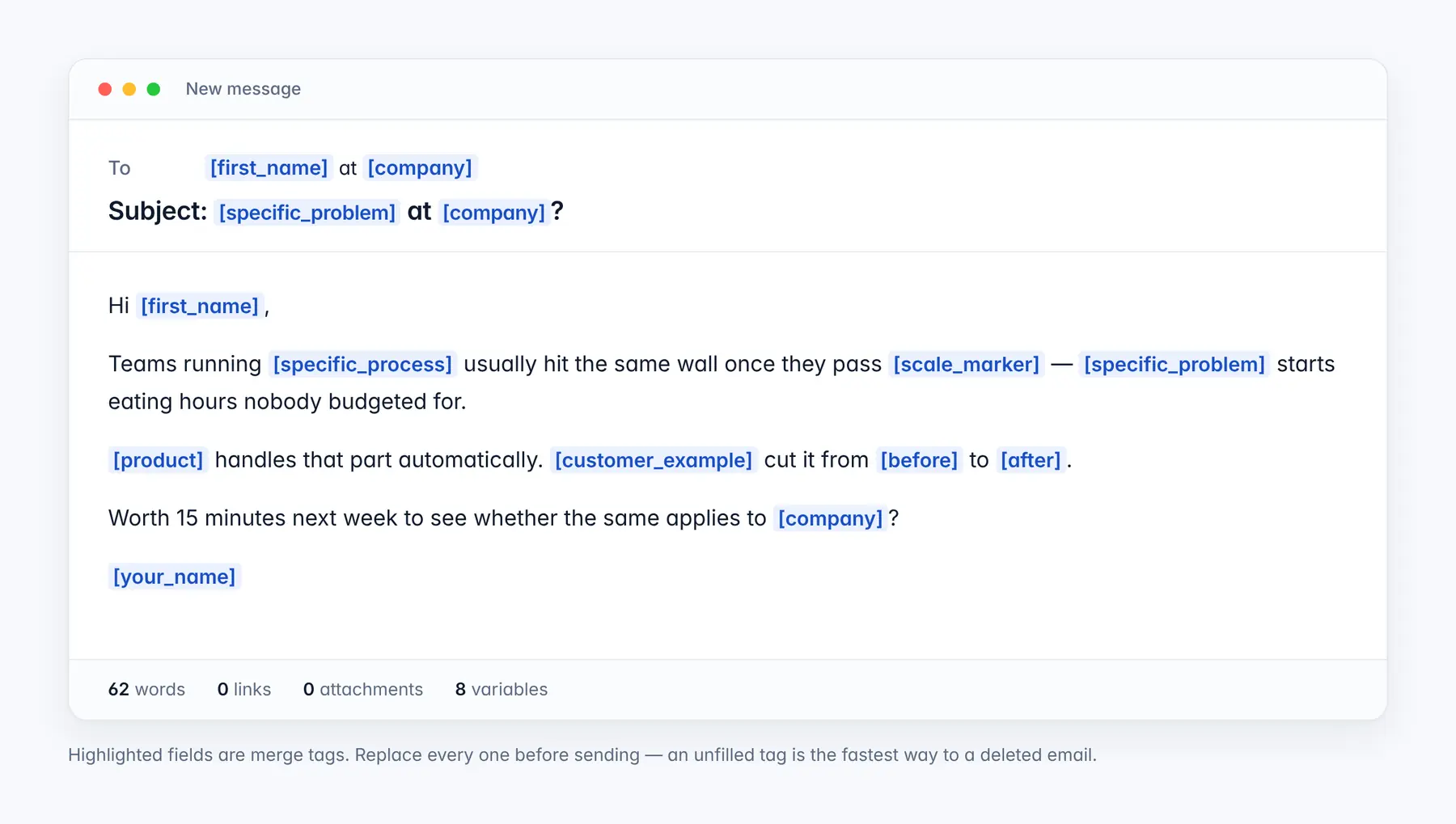
Subject: [specific_problem] at [company]?
Hi [first_name],
Teams running [specific_process] usually hit the same wall once they pass [scale_marker] — [specific_problem] starts eating hours nobody budgeted for.
[product] handles that part automatically. [customer_example] cut it from [before] to [after].
Worth 15 minutes next week to see whether the same applies to [company]?
[your_name]
Sixty-two words, no links, no attachments. Each of those is a deliverability decision as much as a copywriting one, and the section below explains why.
Subject lines that work for this
Mobile clients truncate somewhere around 35 to 40 characters, so the first three words carry the open. All four of these put the specific detail first.
| Subject line | Characters | Works when |
|---|---|---|
| [specific_problem] at [company]? | 34 | You can name the problem in three words |
| [first_name] — [specific_process] at [company] | 42 | The process is the hook, not the pain |
| Question about [company]’s [specific_process] | 44 | Softer. Better for senior titles |
| [scale_marker] and [specific_problem] | 31 | The number does the work |
When should you send this?
Four things have to be true before this is the right template:
- You can name the problem specifically. “Reconciliation takes nine days at month end” works. “Inefficiency” does not.
- Something visible told you they have it. A job posting, a tech-stack change, a funding round, or a review complaining about the same thing.
- You have a comparable customer. The [customer_example] line turns a claim into evidence. Without one, the email is an assertion.
- You are writing to the person who owns the problem, not to their VP and not to a shared inbox.
When not to use this template
Three situations where it reliably fails:
- You are guessing at the problem. Naming the wrong pain confidently is worse than naming none. The reply is silence, and the contact is burned.
- Solving the problem is their job. Telling a Head of RevOps their revenue operations are inefficient reads as an insult, not an insight. Reframe around what the fix frees them to do.
- Your domain is under 30 days old and you want to send 500 of these. The template is not the variable deciding whether it arrives.
What it looks like filled in
The same template with every variable replaced. The company is invented; the shape is not.
Subject: Manual invoice matching at Northwind Logistics?
Hi Dana,
Teams running three-way invoice matching usually hit the same wall once they pass about 2,000 invoices a month — reconciliation starts eating hours nobody budgeted for.
Ledgerline handles the matching automatically. Brightpath Freight cut their month-end close from nine days to four.
Worth 15 minutes next week to see whether the same applies to Northwind?
Asad
Notice what the filled version does that the template cannot show: “2,000 invoices a month” and “nine days to four” are the two numbers doing the persuading. If you cannot produce numbers that specific, this is the wrong template.
What to personalise, and where to find it
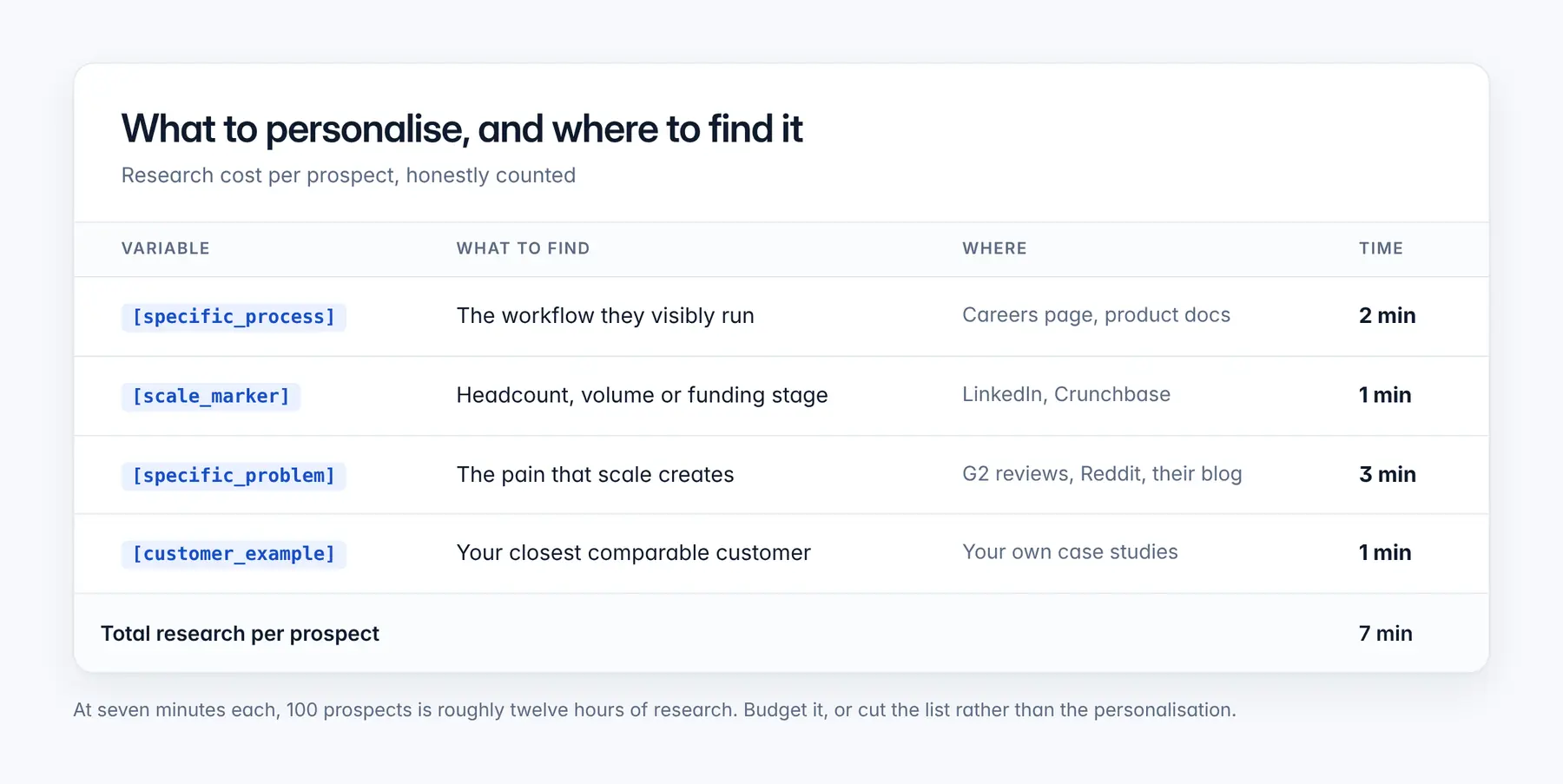
Seven minutes per prospect is the honest cost. For a hundred-prospect list that is roughly twelve hours of research before a single email goes out. Budget it properly, or cut the list rather than the personalisation — a hundred researched emails outperform a thousand generic ones, and they do far less damage to your sender reputation.
Will this land in the inbox?
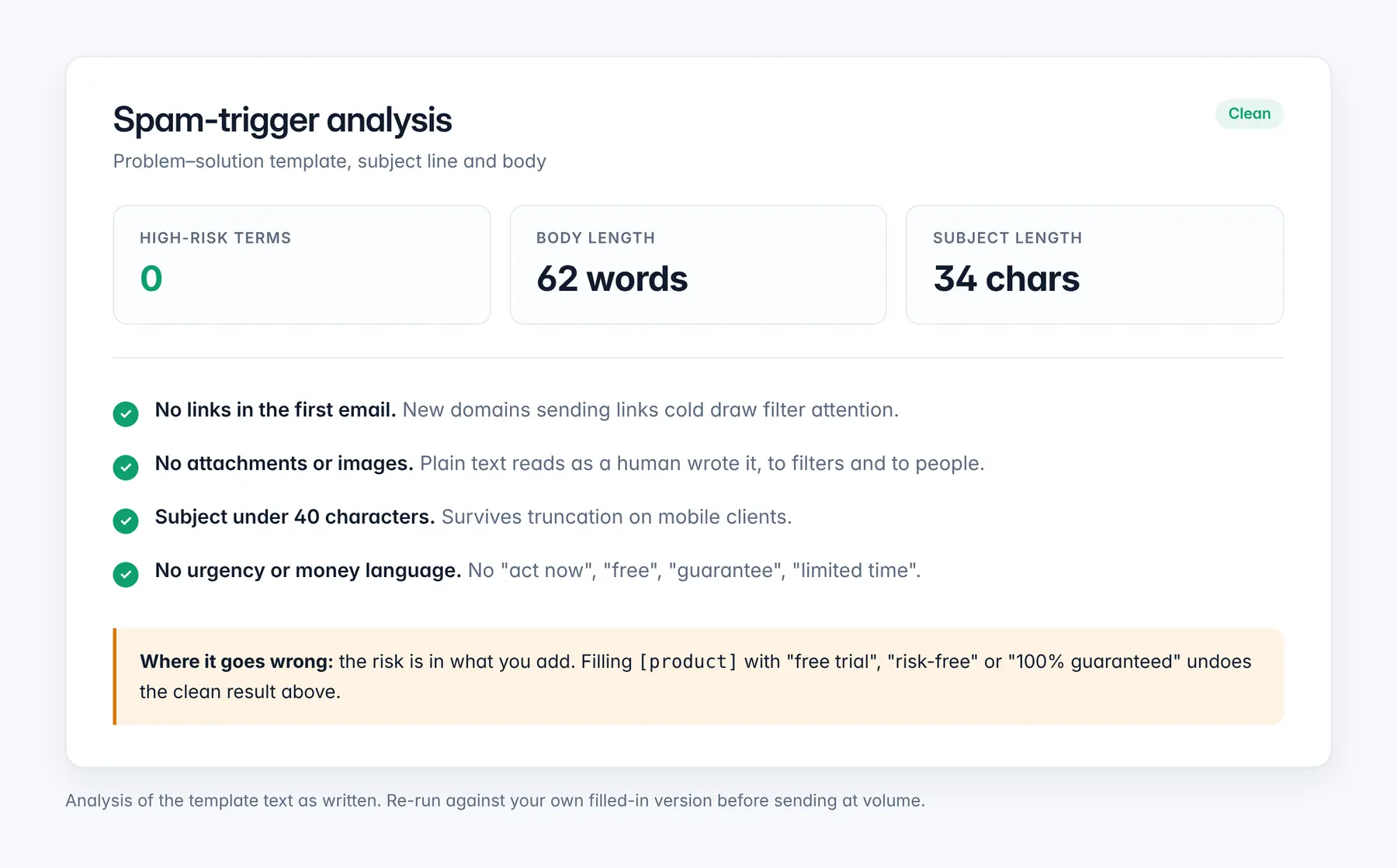
The template itself is clean. The risk is in what you add to it. Filling [product] with “free trial”, “risk-free” or “100% guaranteed” undoes every structural advantage above, and so does pasting in a calendar link before anyone has agreed to meet.
The bigger variable is not the copy at all. A clean 62-word email sent from a domain registered last week, to 400 people on day one, lands in spam regardless of how it reads. Sender reputation is built before the first campaign, not during it. If your domain is new, or has been used for volume sending before, warm it first and ramp gradually.
Before you send, run your filled-in version through the spam word checker and test your subject line with the subject line tester. Both take under a minute.
How to follow up
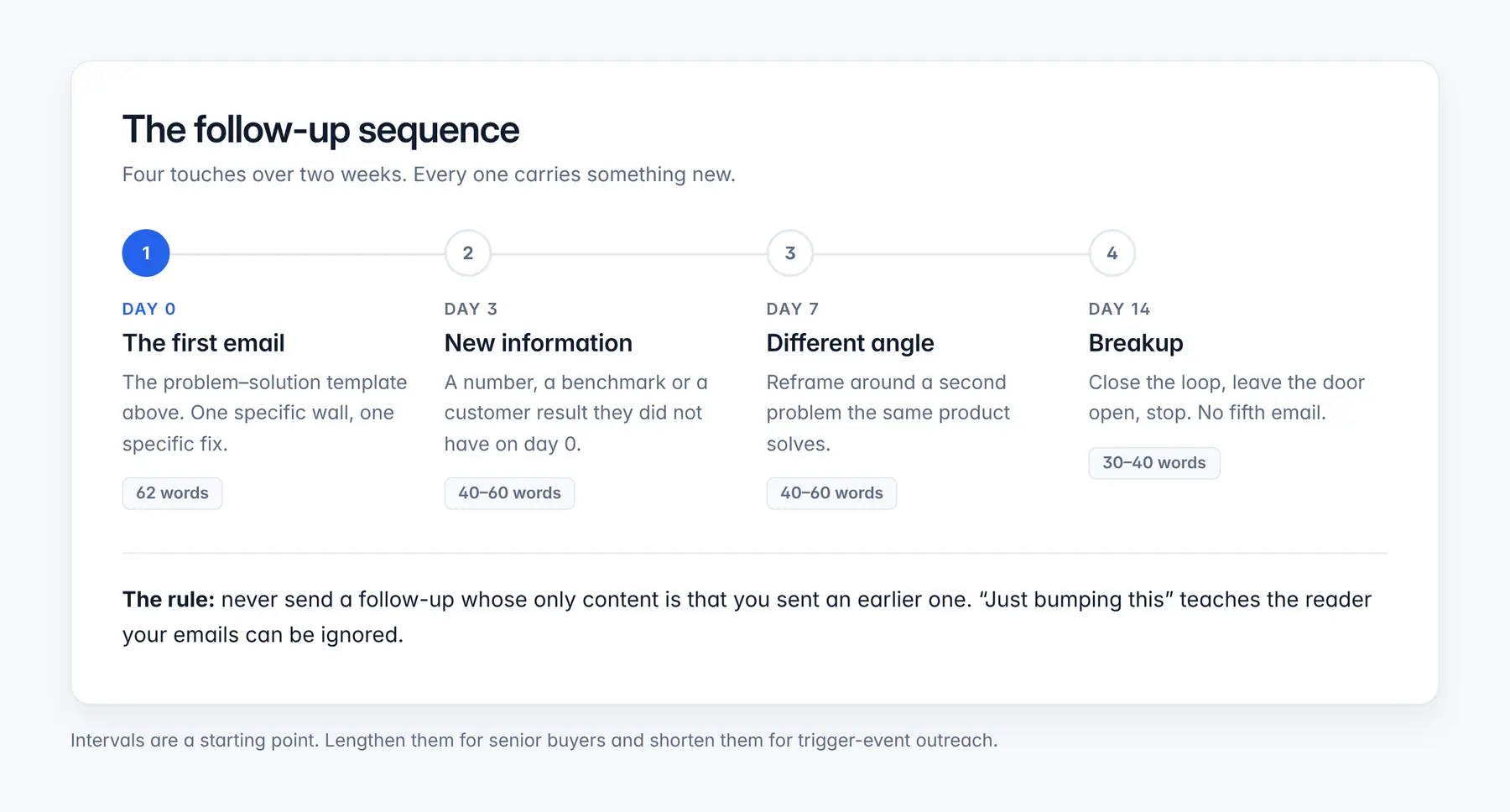
Most replies to this template arrive on the second or third touch, not the first, which is why sending it as a one-off wastes the research you just did.
The rule that matters: never send a follow-up whose only content is that you sent an earlier email. “Just bumping this to the top of your inbox” tells the reader your emails can safely be ignored, and it teaches spam filters that your messages generate no engagement. Every follow-up carries a new number, a new angle, or it does not go.
Stop at four. A fifth email converts almost nobody and measurably raises your complaint rate, which is the metric mailbox providers care most about.
What reply rate should you expect?
It depends far more on list quality and domain reputation than on the template, which is why a single benchmark number is usually misleading. Reply rates for researched, role-targeted outreach sit well above those for generic list sends, but the gap between a warmed domain and a cold one is often larger than the gap between a good template and a bad one.
For current benchmark ranges and how they are measured, see our cold email statistics breakdown. Measure your own baseline over at least 200 sends before judging any template, including this one.
Common questions
How long should a problem-solution cold email be?
Between 50 and 90 words. This template is 62. Shorter than 50 and there is no room for both the problem and the evidence; longer than 90 and the ask gets buried below the fold on a phone, where most first reads happen.
Should I include a link in the first email?
No. A first cold email with no link is less likely to be filtered, and it gives the recipient nothing to click instead of replying. Save links for the second or third touch, once the thread has a reply in it.
How many follow-ups should I send?
Three, over fourteen days, as laid out above — four touches including the first email. A fifth converts almost nobody and raises your complaint rate, which damages deliverability for every campaign that follows.
Why is my cold email going to spam even though the copy is clean?
Copy is one input and rarely the decisive one. Domain age, authentication records, sending volume and ramp speed, and recipient engagement all weigh more. A new domain sending hundreds of messages on day one will be filtered no matter how the email reads. Warm the domain first.
Can I use this template for an audience that already knows me?
You can, but it wastes its best feature. The problem-solution structure earns attention from a stranger. With a warm contact, open by referencing the existing relationship and get to the ask faster.
Related templates
- Quick question opener — when you have a genuine researched question but no comparable customer yet.
- Case study share — when the evidence is stronger than the problem you can name.
- Reaching the right person — when you are not sure who owns the problem.
- Breakup email — when this template and three follow-ups have gone unanswered.
Before you run this at volume
A researched template sent from an unwarmed domain is seven minutes of work landing in a spam folder. Warm your sending domain before the first campaign and ramp gradually — it is the one step that affects every template you will ever send.