

TL;DR
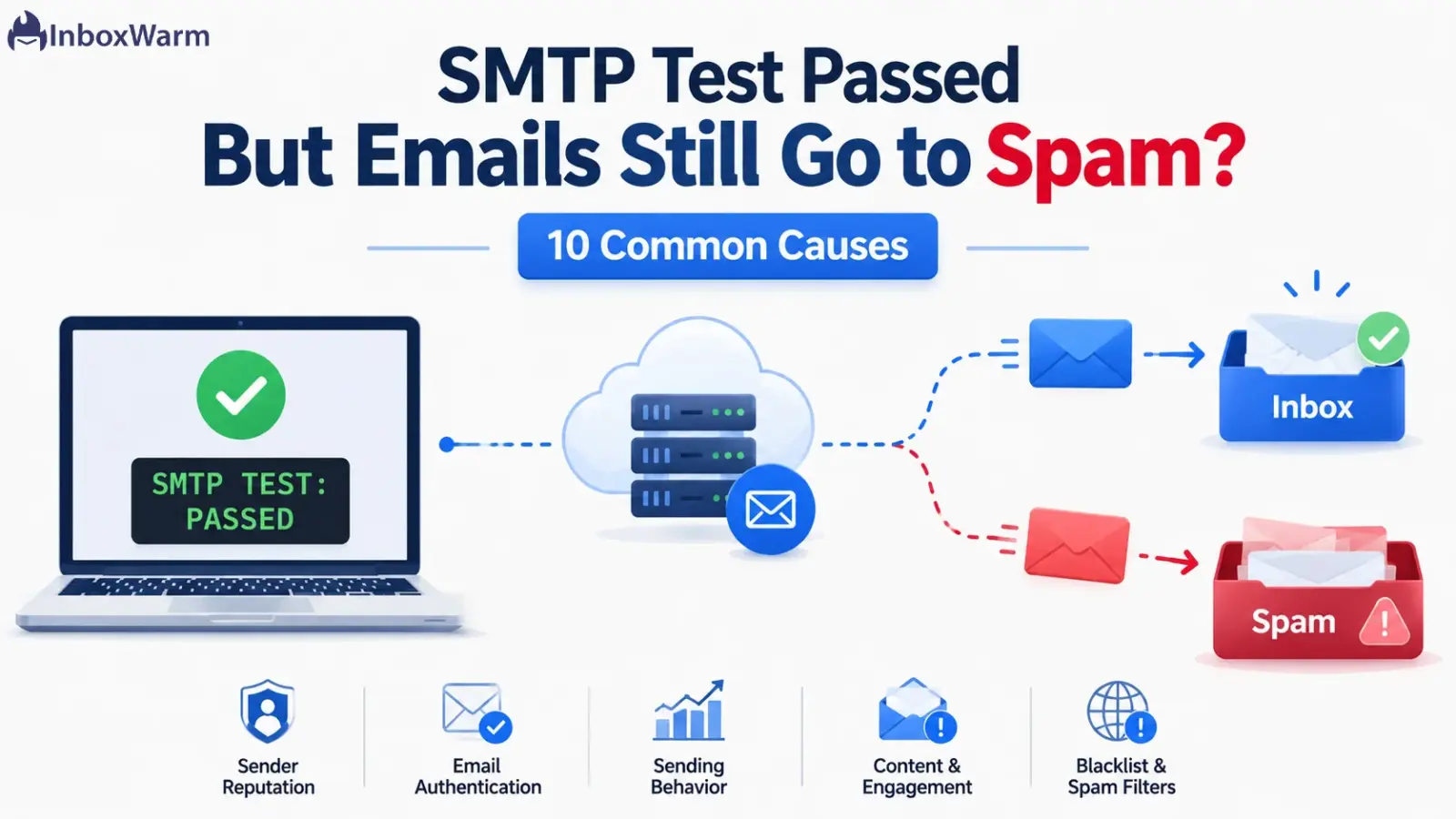
A passing SMTP test only confirms that your mail server accepts a connection, logs in, and sends a message. It says nothing about inbox placement. Emails still go to spam because of authentication gaps, weak sender reputation, no warm-up, spammy content, or blacklists. The receiving server decides the inbox, not your test.
- An SMTP test checks connection, login, and TLS, not deliverability.
- Inbox placement depends on SPF, DKIM, DMARC, reputation, and engagement.
- The fastest fixes: repair authentication, warm up the domain, and clean your list.
- Gmail and Outlook judge senders on signals your SMTP test never measures.
A green check mark says the SMTP test passed. The connection worked, the login was accepted, and the test message sent without an error. Then the real campaign lands in spam anyway. That gap is confusing, and it quietly costs replies, demos, and revenue.
Here is the hard part. A passing SMTP test feels like proof that everything works. It is not. The test only confirms that your server can hand off mail. Whether that mail reaches the inbox is a separate decision, made by Gmail, Outlook, and other receiving servers, using signals your test never looks at.
In this guide, you will learn what an SMTP test actually checks, why a pass does not guarantee inbox placement, and the 10 most common reasons your emails still go to spam.
You will also get a clear fix plan and provider notes for Gmail and Outlook. If you send cold outreach, email warm-up will come up more than once, because it solves several of these causes at the root.
Table of Contents
What Does An SMTP Test Actually Check?
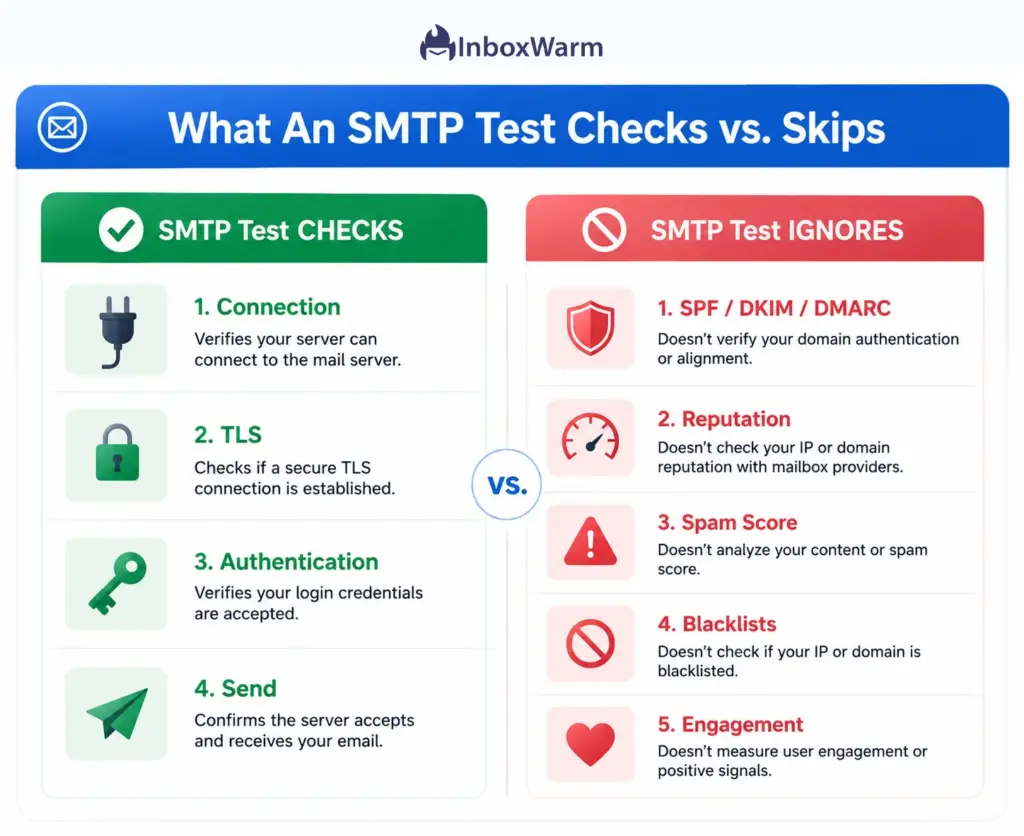
An SMTP test, also called an SMTP server test or SMTP connection test, confirms that your mail server can be reached, that your login works, and that a message can leave the server. It checks your sending setup. It does not measure deliverability.
SMTP (Simple Mail Transfer Protocol) is the standard that servers use to send email to each other. A standard SMTP email test verifies four things:
- Connection: the server responds on its SMTP port, usually 587, 465, or 25.
- Encryption: the connection can negotiate TLS.
- SMTP authentication: your username and password are accepted.
- Send: A test message leaves the server without a protocol error.
That is useful, but narrow. A passing result tells you the plumbing works. It does not tell you the inbox is open. The test never sees any of this:
- Whether SPF, DKIM, and DMARC pass and align at the receiving end.
- Your domain reputation or IP reputation.
- Your content’s spam score.
- Whether your domain or IP sits on a blacklist.
- How recipients engage with your mail.
Why Does A Passing SMTP Test Not Guarantee Inbox Placement?
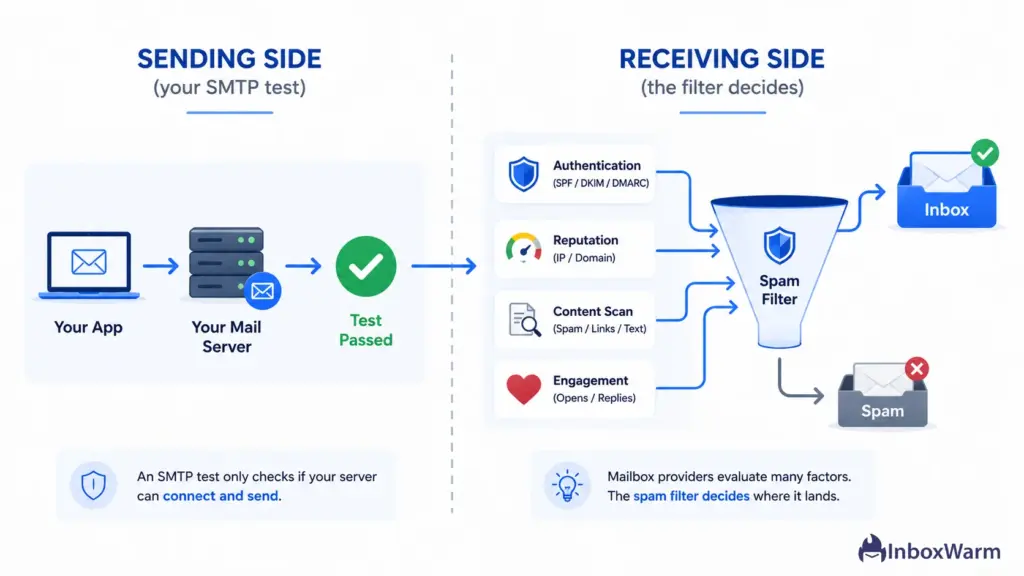
A passing SMTP test does not guarantee inbox placement because the test runs on the sending side, while spam filtering happens on the receiving side. Your server can send a message perfectly, and the receiving server can still route it to spam based on reputation, authentication, and behavior.
It helps to see them as two different jobs:
- The SMTP test answers: can my server send this email?
- The spam filter answers: should I trust this email enough to show it?
Receiving servers like Gmail and Outlook score every message. They weigh authentication, sender reputation, content, and recipient behavior in real time. None of that is visible to a test that stops at the send command.
This is also why an SMTP test successful but email not delivered is such a common complaint. The handoff worked. The receiving filter simply made its own call, and that call did not go your way.
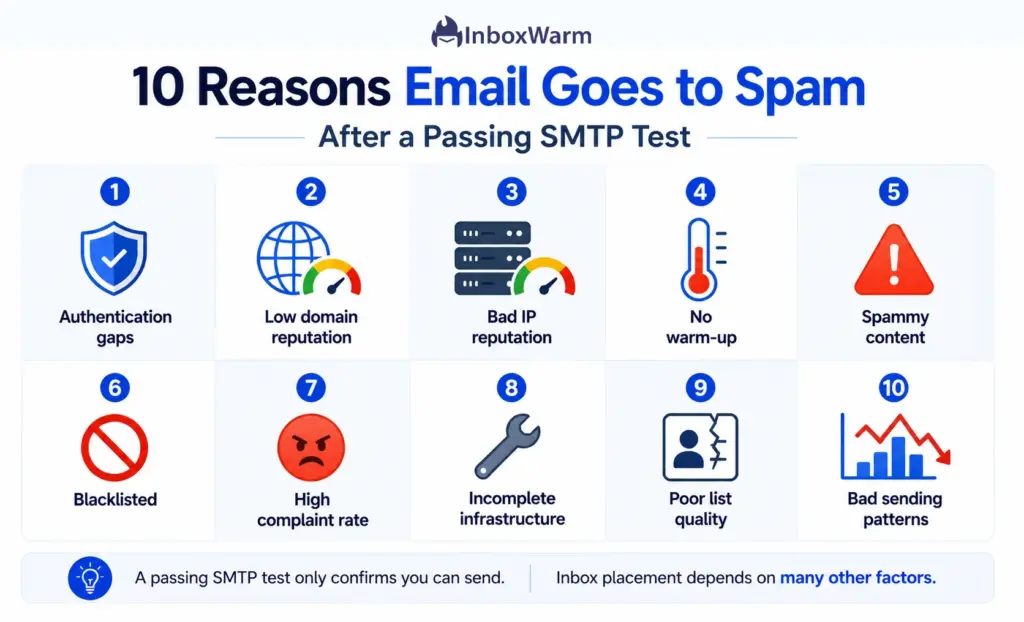
10 Reasons Emails Still Go To Spam After A Passing SMTP Test
Most of these trace back to trust and identity, not your server. Here are the 10 causes we see most often, in roughly the order worth checking them.
1. Your SPF, DKIM, And DMARC Records Are Missing Or Misaligned
Email authentication is the set of DNS records that prove you are allowed to send from your domain. SPF lists the servers permitted to send for you. DKIM adds a cryptographic signature. DMARC tells receivers what to do when SPF or DKIM fails, and it requires the visible From domain to align with one of them.
Your SMTP test checks none of this at the receiver. Gmail can reject unauthenticated mail with a 5.7.26 error, and since November 2025, Gmail and Microsoft issue permanent rejections for non-compliant bulk mail rather than just filtering it. Validate your records with an SPF checker, DKIM checker, and DMARC checker, then confirm from alignment.
2. Your Domain Reputation Is Low Or Untested
Domain reputation is the trust score a receiving server assigns to your sending domain. A brand-new domain has no track record. A domain that once sent spam has a bad one. Either way, filters hedge by sending you to the spam folder.
- New domains need time and a steady stream of wanted mail to build trust.
- Sudden volume from a cold domain looks like exactly what spammers do.
3. Your Sending IP Has A Bad Reputation
IP reputation is the trust tied to the IP address your mail leaves from. It is separate from your domain, and it can sink you on its own.
- Shared IP: Other senders on the same IP affect you, so a bad neighbor drags you down.
- Dedicated IP: Your own history is the whole story, which is why a new dedicated IP needs warm-up before volume.
4. You Skipped Email Warm-Up
Email warm-up is the practice of gradually increasing sending volume from a new domain or IP while generating positive engagement, so receivers learn to trust you. Skip it and you push cold volume into filters that have never seen you. That pattern reads as spam.
InboxWarm.ai is an AI-powered email warm-up tool that improves inbox placement and sender reputation. If you send through a custom server, you can warm up your SMTP server before your first real campaign rather than learning the hard way.
5. Your Content Triggers Spam Filters
Spam filters score the content of every message. A clean SMTP test does nothing to soften a message that looks promotional, deceptive, or sloppy. Common triggers include:
- Spam-trigger words and ALL CAPS or clickbait subject lines.
- A single large image with little or no body text.
- Too many links, or links pointing to flagged domains.
- Broken HTML, hidden text, or a poor text-to-image ratio.
6. Your Domain Or IP Is On A Blacklist
A blacklist, also called a blocklist, is a public list of domains and IPs known for sending spam. Spamhaus is the best known. If you are listed, many receivers block or junk your mail on sight, no matter how clean your SMTP test was. Check the major blocklists, fix the root cause, then request delisting.
7. Your Spam Complaint Rate Is Too High
Spam complaint rate is the share of recipients who click “report spam.” Google tells senders to keep this rate below 0.1% and to never let it reach 0.3%. Cross that line and inbox placement collapses fast, because complaints are a direct signal from real people.
- High complaints usually mean weak targeting or thin permission.
- One bad send can spike the rate for weeks, so prevention beats cleanup.
8. Your Infrastructure Basics Are Incomplete
Some setup details sit outside the SMTP test but still matter to receivers. Google’s sender guidelines require valid forward and reverse DNS plus a TLS connection. Check these three:
- PTR record (reverse DNS): your sending IP should resolve back to your hostname.
- TLS: receivers expect an encrypted connection, and many penalize plain text.
- HELO and FROM alignment: the names your server announces should match your real sending domain.
9. Your List Quality Is Poor
Sending to bad addresses hurts you fast, and your SMTP test will happily send to a dead list. The receiving server notices what your test cannot.
- Invalid addresses cause hard bounces, which signal careless sending.
- Spam traps flag your domain as a sender who does not clean lists.
- Old, unengaged contacts drag down the engagement filters weigh heavily.
10. Your Sending Patterns Or Compliance Signals Are Off
Filters watch how you send, not only what you send. A few patterns reliably trip them:
- Sudden volume spikes look automated and untrusted.
- Inconsistent, stop-start sending erodes the reputation you build.
- Missing one-click unsubscribe breaks Google and Yahoo rules for bulk senders.
Google defines a bulk sender as anyone sending 5,000 or more messages per day to Gmail accounts. At that volume, both SPF and DKIM are required, DMARC must be in place, and one-click unsubscribe is mandatory for marketing mail.
How Do You Fix Emails Going to Spam After an SMTP Test?
To fix emails going to spam after a passing SMTP test, repair authentication first, then build reputation through warm-up, clean your list, and improve content and engagement.
Work from the top down, because authentication and reputation gate everything below them.
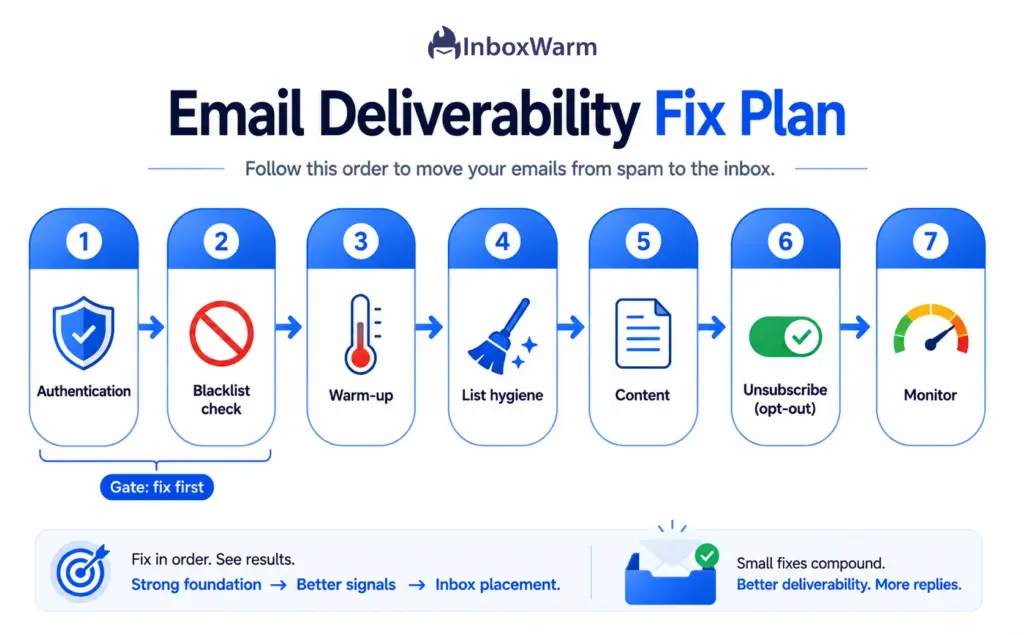
- Validate SPF, DKIM, and DMARC, then fix From alignment.
- Check the major blacklists and request delisting if you are listed.
- Warm up the domain and IP before sending real volume.
- Clean the list: remove invalid addresses and suppress complainers.
- Fix content: balance text and images, and cut spam triggers.
- Add one-click unsubscribe and honor opt-outs within two days.
- Monitor spam rate and compliance in Google Postmaster Tools.
One important update on that last step. As of late 2025, Google retired the old Domain Reputation and IP Reputation dashboards, the familiar High, Medium, Low, and Bad scores, and replaced them with a Compliance Status view in Postmaster Tools v2. So do not go looking for an old reputation grade.
Watch your compliance status and your spam rate instead, since those are now the signals Google surfaces.
SMTP Test Passed, But Gmail or Outlook Still Sends to Spam?
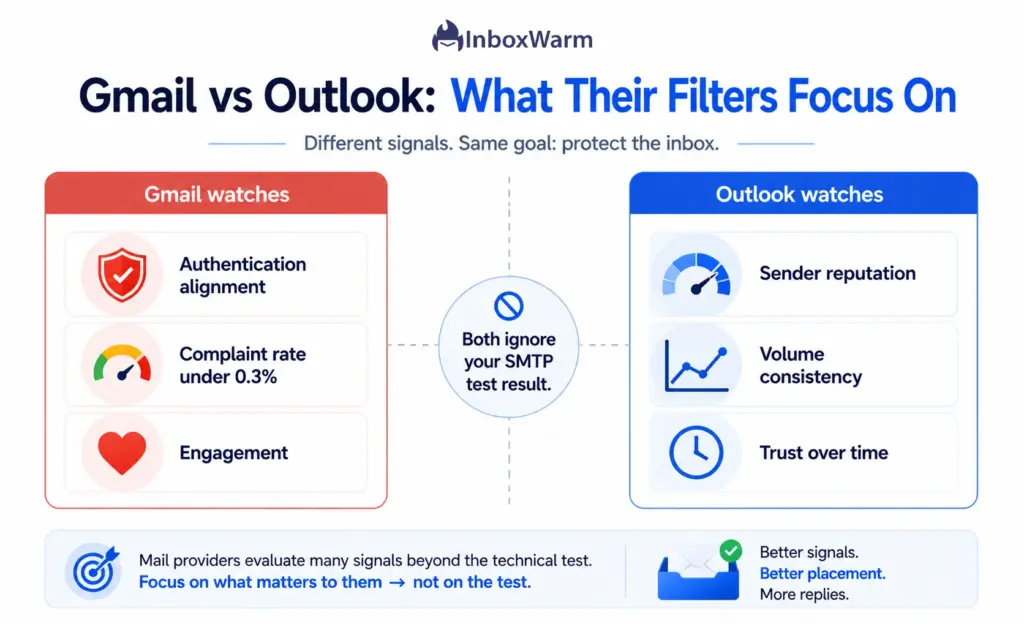
Gmail and Outlook apply their own filters after your SMTP test passes, so a green result cannot stop either one from junking mail that fails their trust checks. Each provider weighs authentication and engagement a little differently.
SMTP Test Passed But Gmail Sends Emails To Spam
Gmail leans hard on authentication and complaint rate. For bulk senders, Gmail requires SPF, DKIM, and DMARC alignment; one-click unsubscribe; and a spam rate that stays under 0.3%. If you send from Gmail or Google Workspace infrastructure, a Gmail warm-up routine builds the engagement history Gmail rewards before you scale up.
SMTP Test Passed But Outlook Sends Emails To Spam
Outlook and Microsoft 365 are especially sensitive to reputation and sudden volume. New senders often watch early mail land in Junk until trust builds, and Microsoft now applies the same 5,000-per-day bulk threshold with 550-level rejections for noncompliant mail. An Outlook warm-up routine smooths that ramp so you are not fighting the filter from a standing start.
Conclusion
A passing SMTP test is good news about one thing: your server can send mail. It is not a verdict on whether that mail reaches the inbox. That decision belongs to the receiving server, and it rests on authentication, reputation, content, and behavior your test never sees.
If your SMTP test passed but emails still go to spam, start at the top. Fix SPF, DKIM, and DMARC, then build reputation through steady warm-up and a clean list. Almost every spam problem traces back to one of the 10 causes above, and most are fixable in days, not months.
Inbox placement is earned, not tested. Treat your SMTP test as a first checkpoint, then do the work that receiving servers actually reward.
Frequently Asked Questions
Does a successful SMTP test mean my email was delivered?
No. A successful SMTP test means your server connected, authenticated, and sent a message without a protocol error. Delivery to the inbox is a separate outcome that the receiving server controls. An email can send cleanly and still be routed to spam or rejected.
Why does passing an SMTP test not guarantee inbox placement?
An SMTP test runs on the sending side, while spam filtering happens on the receiving side. The test asks whether your server can send. The filter asks whether it should trust you. Those are different questions, and only the second one decides the inbox.
How do I fix emails going to spam after an SMTP test?
Start with authentication: validate SPF, DKIM, and DMARC and fix From alignment. Then check blacklists, warm up your domain and IP, clean your list, and improve content. Add one-click unsubscribe and monitor your spam rate. Work top down, since authentication and reputation gate everything else.
Can SPF, DKIM, and DMARC affect deliverability if my SMTP test passes?
Yes, and they often are the cause. Your SMTP test does not verify how these records resolve at the receiver. If SPF or DKIM fails or the From domain does not align, Gmail and Outlook can route your mail to spam or reject it outright, even though the test passed.
What is a safe spam complaint rate?
Google asks senders to keep the user-reported spam rate below 0.1% and to never let it reach 0.3%. At or above 0.3%, deliverability drops sharply, and you lose access to Google's mitigation support. Monitor the rate in Google Postmaster Tools and treat any upward trend as a warning.
A passing SMTP test won’t save a cold domain from the spam folder.
InboxWarm.ai warms up your domain and inboxes with AI, building the sender reputation inbox placement depends on. Free for 10 days, no credit card.