
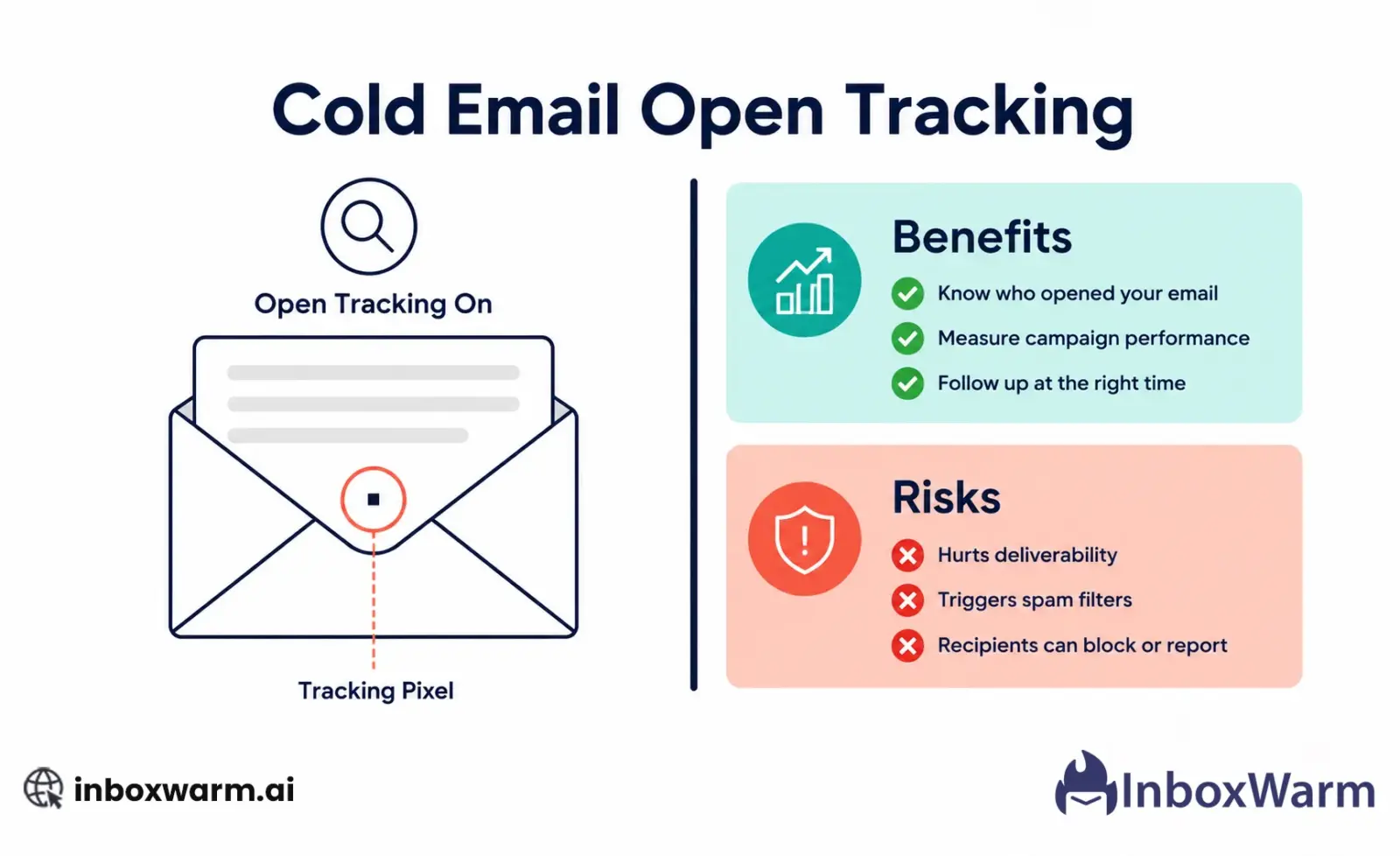

Cold email open tracking uses a hidden pixel to detect when a recipient opens your email. The benefit is engagement data. The risk, which most guides understate, is that tracking pixels can hurt your inbox placement, that Apple Mail Privacy Protection makes open data unreliable for a significant portion of your list, and that some prospects actively distrust senders who track without consent. Whether to use it depends on what you value more: data or deliverability.
Most cold email guides either tell you to always use open tracking or to always turn it off. Both positions are too simple. The reality is more nuanced, and understanding it properly will help you make a better decision for your specific situation.
This article covers how open tracking actually works under the hood, the real benefits it provides, the risks most guides do not explain properly, the Apple MPP problem that has made open data significantly less reliable, and a clear framework for deciding whether to use it.
- How cold email tracking pixels actually work technically
- The benefits of open tracking and when they genuinely matter
- The deliverability risk that most articles bury in a footnote
- Why Apple Mail Privacy Protection has broken open tracking for a large share of email clients
- How Gmail’s image proxy affects your location and device data
- A clear decision framework: when to use it and when to turn it off
Table of Contents
How Does Cold Email Open Tracking Actually Work?
Cold email open tracking works by embedding a tiny, transparent image inside your email: a single pixel that is invisible to the recipient. When the email is opened and images load, the recipient’s email client requests that image from a tracking server. That request is logged with a timestamp, and you receive a notification that your email was opened.
Every tracked email gets a unique image URL. The URL contains an identifier that links the request back to a specific recipient in your campaign. So the server knows not just that someone opened an email, but exactly which recipient, at what time, and from what IP address.
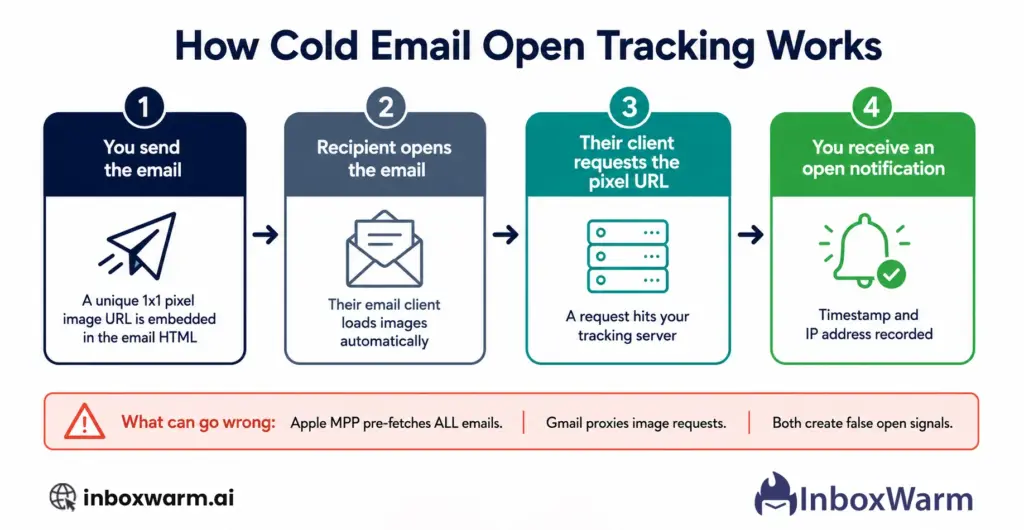
This mechanism is straightforward, but it has two significant failure points that anyone relying on open data needs to understand.
Failure Point One: Apple Mail Privacy Protection
In September 2021, Apple introduced Mail Privacy Protection (MPP). When a user enables MPP on their iPhone, iPad, or Mac, Apple pre-fetches all emails in the background before the user ever opens them. This prefetch loads every image in every email, including your tracking pixel, before the recipient reads a single word.
The result: every email sent to an Apple Mail user with MPP enabled registers as opened, regardless of whether it was actually read. Apple does not tell you this happened. Your open tracking dashboard just shows an open at the time Apple fetched the email, usually within seconds of delivery.
This is not a minor edge case. Apple Mail has a significant share of the email client market, and MPP is on by default. If a substantial portion of your prospect list uses Apple Mail on iOS or macOS, your open rates are inflated, and your open data is not reliable. This is why building a strong sender reputation through email warm-up matters before you rely on any open data.
Failure Point Two: Gmail’s Image Proxy
Gmail does not load images directly from the original server. Instead, it routes image requests through Google’s own proxy servers. This means that when a Gmail user opens your email, the request hits Google’s servers first, not yours.
The practical consequences are that you cannot see the recipient’s real IP address or location, you cannot accurately detect the device or email client they used, and in some cases the proxy caches images so that subsequent opens in the same session may not register as separate events.
Gmail is the dominant email client for many cold email audiences. If you are selling to startups, tech companies, or individual professionals, a large share of your list is likely on Gmail. The location and device data you get from those opens is Google’s proxy data, not your prospect’s actual data.
If your list includes Apple Mail users, your open rates are inflated. You cannot distinguish a real open from an MPP prefetch without additional signals.
If your list is Gmail-heavy, your open data exists, but location and device signals are Google proxy data, not prospect data.
Open rates are still a directional signal, but they are not a precise one. Treat them as a rough indicator of campaign interest, not a reliable measure of individual engagement.
What Are the Real Benefits of Cold Email Open Tracking?
Despite the reliability issues, open tracking still provides genuine value when used with the right expectations. Here are the benefits that actually hold up.
1. Directional Signal on Campaign Performance
If a campaign with open tracking enabled shows 5 percent opens, and the next campaign shows 35 percent opens, something meaningful changed between the two. The exact numbers may be inflated, but the relative difference is a real signal. Open tracking gives you a way to compare campaigns, identify subject line performance, and spot sequences that are resonating versus those that are not.
2. Follow-Up Timing and Prioritisation
When someone opens your email three times in a 24-hour window, that is a behavioral signal worth acting on. Even with the caveats around MPP and Gmail proxy, a prospect who has opened your email multiple times within a short period is showing more interest than one who has not opened at all. That signal is useful for prioritizing who to follow up with first.
3. Identifying Active Sequences and Dead Ones
Open tracking helps you identify when a sequence has stopped performing. If a sequence that was generating 40 percent open rates drops to 8 percent over the course of two weeks, you have a signal that something changed. It could be the subject line burning out, a domain reputation issue developing, or a list quality problem. Open tracking gives you the trigger to investigate.
4. Subject Line Testing
Open rates are one of the primary metrics for A/B testing subject lines. The MPP inflation problem affects this too, but if both subject line variants are going to the same list, the inflation affects them equally. The relative comparison between the two variants is still a meaningful signal for which subject line is generating more genuine interest.
What Are the Real Risks of Open Tracking for Cold Email?
1. The Deliverability Risk: Tracking Pixels and Spam Filters
This is the risk that most open tracking guides mention briefly and move on from. It deserves more attention. Spam filters evaluate incoming emails for signals that indicate bulk or unsolicited sending. A tracking pixel is an HTML image tag with a unique URL pointing to a third-party server. Spam filters, particularly corporate email gateways and older ISP filters, recognize this pattern. The presence of a tracking pixel in a cold email is a signal that the email was sent by a bulk tool, not composed manually.
The severity of this risk depends on the recipients you are targeting. Consumer Gmail users are less likely to be affected because Gmail’s spam filter is sophisticated and context-aware. Corporate email gateways, particularly Microsoft Exchange environments and organizations using Mimecast, Proofpoint, or Barracuda email security, are more likely to flag or downgrade cold emails that include tracking pixels from commercial sending tools.
If your prospect list is heavily enterprise-focused or includes companies running their own email security infrastructure, the deliverability cost of open tracking is higher than it would be for a startup-heavy list on Gmail.
For senders actively warming up a domain, open tracking is a particular risk. A warming domain does not yet have established trust with spam filters. Adding a tracking pixel to emails sent from a warming domain increases the likelihood that warm-up emails are caught by filters, reducing the positive engagement signals that warm-up depends on.
Our recommendation: turn open tracking off during the warm-up period. Turn it back on once your domain reputation is stable and your inbox placement rate is consistently above 85 percent.
2. Privacy and Trust: Prospects Can Detect Tracking
Email clients that block image loading, privacy-focused tools like Hey email or Superhuman, and browser extensions like PixelBlock actively detect and block tracking pixels. Some prospects use these tools specifically because they do not want to be tracked. When your tracking pixel is blocked, you lose the open data anyway. Being caught tracking without disclosure can damage trust before a conversation even starts.
3. GDPR and Privacy Regulations
In the European Union and UK, GDPR applies to the processing of personal data. A tracking pixel collects data about an individual’s behavior. Whether this constitutes processing of personal data under GDPR is a legal question, not a technical one. If you are sending cold emails to recipients in the EU or UK, the safest approach from a compliance perspective is to disclose tracking or to turn it off.
4. Inflated Metrics Leading to Wrong Decisions
The combination of Apple MPP inflation and the unreliability of location and device data means that senders who treat open rate as a precise metric will make decisions based on data that does not reflect reality. A 60 percent open rate that is partly driven by MPP pre-fetches is not the same as a 60 percent open rate from genuine human opens.
Should You Use Open Tracking for Cold Email?
The honest answer is that it depends on your priorities, your audience, and where you are in the lifecycle of your sending setup.
Here is a clear framework.
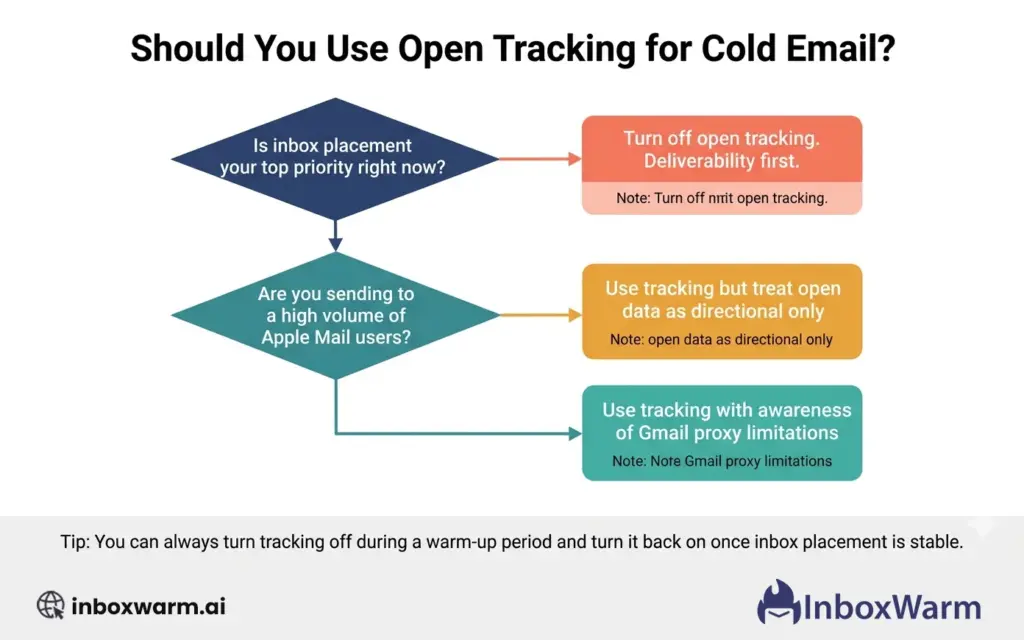
You are actively warming up a new domain. Your prospect list is primarily enterprise companies or includes organizations likely to use advanced email security (Mimecast, Proofpoint, and Barracuda). Inbox placement is your primary concern right now. You are sending to a high percentage of EU or UK recipients, and GDPR compliance is a priority for your business.
Your domain is fully warmed, and inbox placement is stable. Your prospect list is startup or SMB-heavy on Gmail. You are using open data directionally (campaign comparisons, sequence performance) rather than as a precise measure of individual engagement. You understand that Apple MPP inflates your numbers, and you account for that in how you interpret the data.
Your audience is on email clients that do not implement MPP (older Android email clients, certain corporate Outlook environments). Your domain reputation is strong and inbox placement is consistently high. You have tested campaigns with and without tracking and verified that your inbox placement is not negatively affected by the tracking pixel.
One practical approach used by experienced cold email practitioners: run the first two to three weeks of any new sequence without open tracking. This protects inbox placement during the period when the sequence is most sensitive to spam filter signals.
Once the sequence is performing well and inbox placement is stable, enable open tracking for subsequent sends in the same sequence to gather directional performance data.
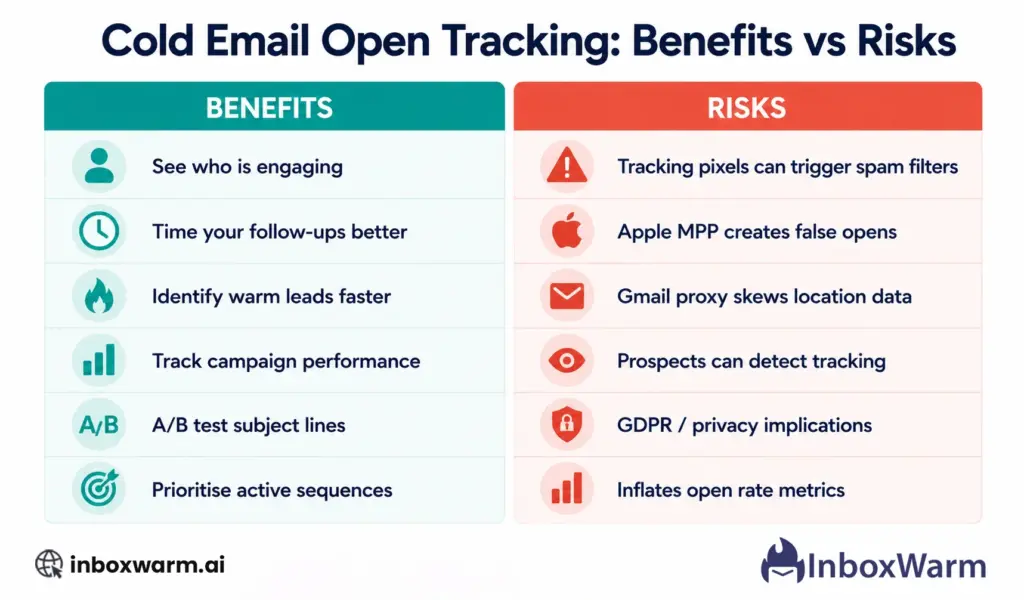
Open Tracking Benefits and Risks: The Side-By-Side Summary
How Do Cold Email Tools Handle Open Tracking Differently?
Most cold email tools offer open tracking as an opt-in feature that you can enable or disable per campaign or per sequence. The implementation matters.
| What to Look For in a Tool | Why It Matters |
|---|---|
| Ability to disable tracking per campaign | You want to turn tracking off during warm-up and turn it back on for established campaigns without affecting your entire account. |
| Apple MPP detection or filtering | Some newer tools attempt to detect and exclude MPP-generated opens from your reported open rate. This gives you a cleaner signal, though the detection is not always perfect. |
| Gmail proxy awareness | Better tools note when open data is coming through a proxy and flag it accordingly, rather than reporting it as a direct open with a specific location. |
| First-party tracking domains | Some tools allow you to host the tracking pixel on your own domain rather than a shared tracking domain. This reduces the spam filter signal because the pixel URL does not point to a known commercial tracking server. |
| Transparent disclosure | Some compliance-focused tools add a one-line disclosure to tracked emails. For EU and UK senders, this is worth considering. |
What Metrics Should You Trust More Than Open Rates?
Given the reliability problems with open tracking in 2026, here are the metrics that give you more accurate signals about cold email performance.
1. Reply Rate
Reply rate is the cleanest signal in cold email. A reply requires a human to actually read the email and choose to respond. It cannot be inflated by Apple MPP, Google proxies, or cached image loads. If your reply rate is healthy, your campaign is working.
2. Inbox Placement Rate
Inbox placement rate tells you what percentage of your emails are actually reaching the inbox rather than the spam folder or promotions tab. This is the foundational metric for cold email. Monitor it using your warm-up tool’s dashboard and Google Postmaster Tools. Also, verify your DKIM authentication is passing before sending any campaign.
3. Click Rate (If Applicable)
If your cold emails include a link, click rate is a much stronger engagement signal than open rate. A click requires the recipient to read enough to take action. It is harder to inflate artificially than an open one.
4. Bounce Rate
A high bounce rate is one of the fastest ways to damage your sender reputation and ultimately your inbox placement. Keep your hard bounce rate below 2 percent and your overall bounce rate as low as possible. Verify your list before sending and remove bounced addresses immediately.
Protect Your Inbox Placement While Running Cold Email
Open tracking is one piece of the cold email puzzle. The piece that determines whether your emails get read at all is your sender reputation. InboxWarm.ai builds and maintains that reputation automatically so your campaigns start from the strongest possible foundation.
Frequently Asked Questions
Does Open Tracking Hurt Email Deliverability?
Yes, it can. Tracking pixels are HTML image tags pointing to third-party servers. Spam filters, particularly corporate email security gateways like Mimecast, Proofpoint, and Barracuda, recognise this as a pattern associated with bulk sending tools. For senders targeting enterprise companies or anyone with advanced email security, a tracking pixel increases the probability that an email is flagged or downgraded. For senders actively warming up a domain, we recommend disabling open tracking until inbox placement is stable.
What Is Apple Mail Privacy Protection and How Does It Affect Open Tracking?
Apple Mail Privacy Protection (MPP) is a feature introduced in iOS 15 and macOS Monterey in September 2021. When enabled, Apple pre-fetches all emails in the background before the user opens them, including loading all images. This means every email sent to an Apple Mail user with MPP enabled registers as opened on your tracking dashboard, regardless of whether the recipient actually read it. MPP is on by default for Apple Mail users, which makes open rate data unreliable for any list that includes a significant share of Apple Mail recipients.
Should You Turn Off Open Tracking for Cold Email?
It depends on your situation. Turn it off if you are actively warming up a domain, if your prospect list is heavily enterprise or Microsoft-focused, or if inbox placement is your primary concern right now. Use it with awareness if your domain is fully warmed and inbox placement is stable. The key is to treat open data as a directional signal rather than a precise metric and to never optimize your campaigns around open rates alone when reply rate and inbox placement are available as more reliable signals.
How Does Gmail Affect Open Tracking Data?
Gmail routes image requests through Google's own proxy servers rather than loading images directly from the original tracking server. This means that open data from Gmail recipients does not include the recipient's real IP address or location. The location shown in your tracking dashboard for Gmail opens is a Google data center location, not your prospect's actual location. Device and email client data is also affected. Open rates from Gmail are still recorded, but location and device signals from Gmail users are not reliable.
Is Cold Email Open Tracking Legal Under GDPR?
This is a legal question, and the answer varies by interpretation and jurisdiction. A tracking pixel collects behavioral data about an individual, which may constitute processing of personal data under GDPR. If you are sending cold emails to recipients in the EU or UK, the safest approach is to either disclose tracking in your email or turn it off. This article does not constitute legal advice. Consult a qualified privacy lawyer for guidance specific to your sending program and jurisdiction.
What Is a Better Metric Than Open Rate for Cold Email?
Reply rate is the most reliable metric for cold email performance because it requires a human to actually read and respond to the email. It cannot be inflated by Apple MPP or Gmail proxy. Inbox placement rate is equally important because it tells you whether your emails are reaching the inbox at all. Click rate (if your emails include links) is also a stronger engagement signal than open rate because it requires deliberate action. Use open rate as a rough directional indicator, not as your primary measure of campaign success.
Can Prospects Tell If You Are Using Open Tracking?
Yes. Privacy-conscious email users can detect tracking pixels using email clients that block remote images, dedicated privacy tools like Hey or Superhuman, or browser extensions like PixelBlock. Some technical buyers inspect email headers or source code. Using first-party tracking (hosting the pixel on your own domain rather than a commercial tracking server) reduces detectability but does not eliminate it. For audiences where trust is important, consider whether the data gained from tracking is worth the risk of being perceived as covertly monitoring your prospects.
Conclusion
Cold email open tracking is not inherently good or bad. It is a tool with a specific set of tradeoffs, and those tradeoffs are more significant than most guides acknowledge. The benefits are real: directional campaign data, follow-up prioritization, subject line testing, and the ability to spot when a sequence stops performing.
But the risks are also real and often understated. Tracking pixels add a spam signal to your cold emails that can affect inbox placement, particularly for enterprise-focused lists and senders with warming domains. Apple Mail Privacy Protection has made open rate data unreliable for a large and growing share of email clients.
The practical takeaway is simple. If you are warming up a new domain, turn open tracking off until your inbox placement is stable. Once it is stable, use tracking as a directional tool and interpret the data with appropriate skepticism. Replace open rate as your primary success metric with reply rate and inbox placement rate, which are both more reliable and more directly tied to the outcomes that matter in cold email.
Open tracking gives you data, but ensure your inbox warm-up is complete and emails are reaching the inbox before prioritizing those metrics. Replace open rate as your primary success metric with reply rate and inbox placement rate, which are both more reliable and more directly tied to the outcomes that matter in cold email.