

TL;DR
- Great cold email copy means nothing if the email lands in spam.
- Deliverability depends on variables like:
- subject lines
- link count
- plain text vs HTML
- personalization
- sending volume
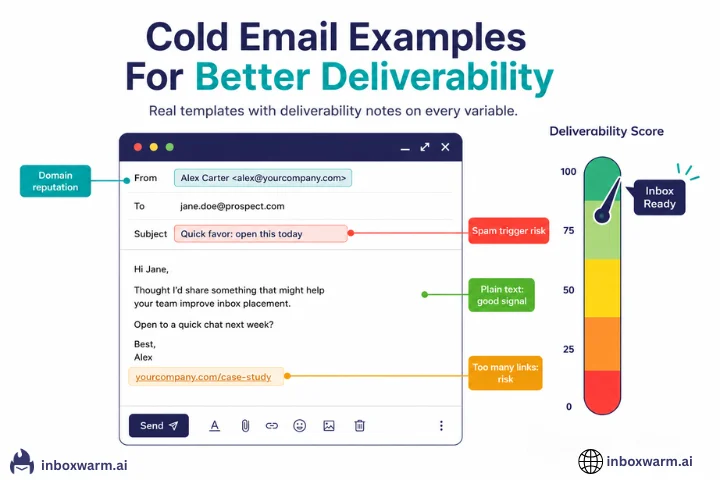
- This guide shows real cold email examples with deliverability notes explaining what helps inbox placement and what hurts it.
- In most cases, short plain-text emails with minimal links perform best.
Most cold email guides focus on copy. Write a better subject line. Personalize the opening. Keep it short. All of that matters. But none of it matters if your email never reaches the inbox.
Every variable in a cold email, from how you format the body to whether you include images, affects deliverability. Some variables hurt inbox placement slightly. Others are significant enough to send an otherwise excellent email straight to spam. This guide covers both.
- Each cold email example is followed by a deliverability note explaining what that example does right or wrong from a spam filter perspective.
- Green notes highlight what a specific element does to help inbox placement.
- Red notes highlight what hurts it and why.
- The annotation sections after each example explain the deliverability impact of individual variables.
Table of Contents
What Does Deliverability Have to Do With Cold Email Copy?
Everything and nothing, depending on what you are optimizing for. Your copy determines whether someone replies. Your deliverability determines whether they ever see it. A cold email with perfect personalization and a compelling offer has a zero percent reply rate if it lands in the spam folder.
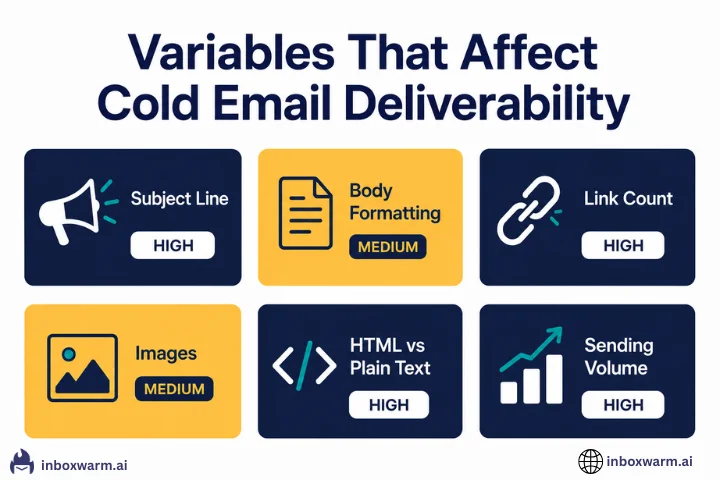
Spam filters do not read your email the way a human does. They evaluate signals: is this email plain text or HTML-heavy? Does it contain words or phrases associated with bulk sending? How many links does it include? Is the sender domain warmed up? Does the sending volume look organic, or does it look like a blast?
To put this into perspective, a meaningful portion of cold outreach never even reaches a human inbox. Recent cold email benchmarks show that around 7–8% of cold emails bounce, while roughly 17% never reach the inbox due to deliverability issues and spam filtering. In other words, even before performance or copy comes into play, a significant share of emails is filtered out or never delivered at all.
The cold email variables that affect deliverability most are subject line length and content, body formatting, link count, image use, plain text versus HTML, personalization signals, and sending volume per day. The examples below show each of these in action.
What Does a High-Deliverability Cold Email Look Like?
The example below is built around the variables that give you the best chance of reaching the inbox. Read it first, then read the deliverability notes underneath.
- Plain text only: no HTML tags, no inline images, no tracking pixels. Spam filters score this as a personal email, not a bulk send.
- One specific observation about the recipient’s tool stack: personalization that is verifiable signals a human wrote this, not a mail merge script.
- No links: a zero link count is one of the strongest inbox placement signals in a first cold email. Nothing for spam filters to evaluate.
- Short and specific: under 100 words. Spam filters score brevity positively. Short emails also reduce the chance of triggering keyword filters.
- No promotional language: no ‘free trial,’ no ‘click here,’ no ‘limited time offer.’ These phrases are high-risk spam triggers.
| Variable | This Email's Choice | Deliverability Impact |
|---|---|---|
| Subject line | Short, question format, no caps or punctuation spam signals | Low spam filter risk. Question subjects have high open rates without triggering filters. |
| Format | Plain text only | Strong positive signal. Plain text looks like a personal email. |
| Links | Zero links | Maximum inbox placement benefit. No URLs for filters to evaluate. |
| Images | No images | Removes image-based spam filter triggers and tracking pixel risk. |
| Length | Under 100 words | Short emails rarely trigger keyword density filters. |
| Call to action | Soft offer, no pressure | Low spam trigger risk. Hard CTAs ('Book a call now') are higher risk. |
| Personalization | Specific tool name (Instantly) + specific problem (week three drop) | Signals individual composition, not templated bulk sending. |
What Does a Low-Deliverability Cold Email Look Like?
The example below uses patterns that appear in a large share of cold emails that end up in spam. The offer itself is reasonable. The deliverability signals are not.
- Subject line: two exclamation marks and ALL CAPS text are among the highest-risk spam trigger combinations. ‘FREE’ in the subject is a direct spam filter flag.
- Unfilled merge tag: ‘{First Name}’ appears as a literal placeholder. This signals a broken bulk send and is an immediate trust failure with the recipient and with spam filters that pattern-match merge tags.
- ALL CAPS words in the body: ‘INCREASE REVENUE’ and ‘GUARANTEED,’ are classic spam filter triggers. Caps-heavy emails score poorly across virtually every commercial spam filter.
- Long URL: a long, parameter-heavy Calendly link with ‘free-demo-2026-special-offer’ in the URL path is a spam signal. URL shorteners are even worse.
- Urgency language: ‘expires Friday’ and ‘do not miss out’ are high-frequency spam phrases.
- Unsubscribe footer: Adding opt-out footer language to a cold email is a compliance signal but also visually marks the email as a mass send to both spam filters and recipients.
- HTML signature with multiple links: Three links (Unsubscribe, Privacy Policy, View in Browser) in the signature add to the total link count and increase HTML complexity.
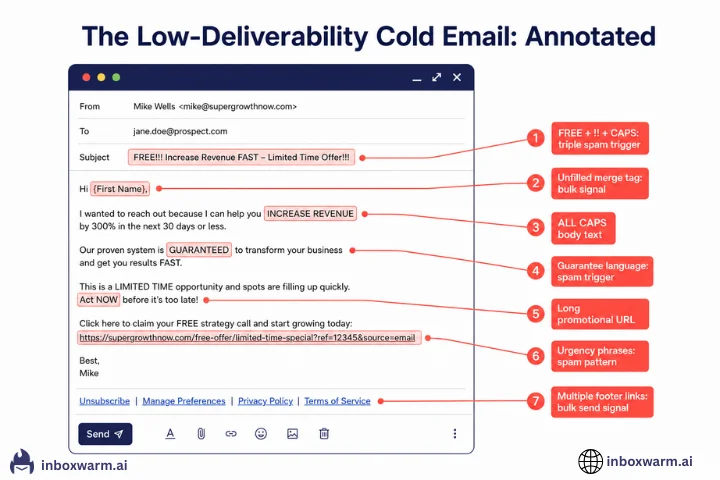
None of these mistakes are about the offer or the copy. The offer might be genuinely useful. The problem is that every spam filter the email passes through scores it as a bulk promotional send before a human ever reads it. A cold email that looks like a newsletter and reads like a sales page will be filtered to promotions or spam before it gets a chance.
How Does Subject Line Choice Affect Cold Email Deliverability?
Subject lines affect deliverability in two ways: spam filter scoring and open rate. Both matter, and they do not always point in the same direction. Spam filters analyze subject lines for patterns associated with bulk promotional sending: excessive punctuation, capitalized words, promotional phrases, length extremes, and specific trigger words.
Spam filters analyze subject lines for patterns associated with bulk promotional sending: excessive punctuation, capitalized words, promotional phrases, length extremes (very short or very long), and specific trigger words. A subject line that triggers these filters can cause your email to be filtered before it reaches the inbox regardless of how clean your domain reputation is.
| Subject Line | Spam Filter Risk | Why |
|---|---|---|
| Quick question about your onboarding | Very Low | Short, plain, no promotional language, question format signals personal send |
| Are you dealing with this problem too? | Very Low | Curiosity-based, no triggers, reads as individual email |
| Saw your post about [specific topic] | Very Low | Personalised reference, impossible to template at scale, human signal |
| Following up on my last email | Low | Common phrase but not a spam trigger. Slightly overused. |
| FREE: Get 3x more revenue this week | Very High | FREE (in caps), revenue claim, urgency. Triple trigger combination. |
| IMPORTANT: Action required on your account | Very High | IMPORTANT in caps + action required = phishing / bulk pattern |
| Congrats! You have been selected!!! | Very High | Congratulations pattern + exclamation marks = immediate flag |
| RE: Our conversation | Medium | A reply prefix on a cold email is deceptive. Some filters flag it. Opens are high, but trust damage is real. |
| [Company name] x [Your company name] | Low to Medium | Partnership format. Low trigger risk but increasingly overused. |
| Quick note | Very Low | Four characters, no triggers, reads as genuinely personal |
The Re: Prefix Problem
Using ‘RE:’ or ‘FWD:’ in a subject line to simulate a reply thread is a deliverability grey area. Open rates tend to be high because recipients assume they are responding to an existing conversation. But many advanced spam filters flag this pattern as deceptive. Short-term open rate gain creates a long-term reputation cost.
What Does a Deliverability-Safe Cold Email Follow-Up Look Like?
Follow-up emails are where most cold email sequences start to accumulate deliverability damage. The deliverability-safe approach to follow-ups is to keep them shorter than the original email, not longer. Remove any link from the follow-up if the original email already included one. Never add urgency language. Keep it plain text.
- Thread reply format: using the same subject with ‘Re:’ on a genuine follow-up (not a cold first email) is legitimate and helps maintain thread context. This is different from using “RE:” on a first cold email.
- Three sentences: Follow-ups should be shorter than the original. This is shorter than the original. Passes every length-based spam filter check easily.
- No links: the original email had no links. This follow-up has no links. Consistent across the thread.
- No urgency language: “in case it got buried” is a natural human phrase. No ‘expires today,’ no ‘final reminder.’
- Plain text: same format as the original. Consistency across a thread is a positive signal.
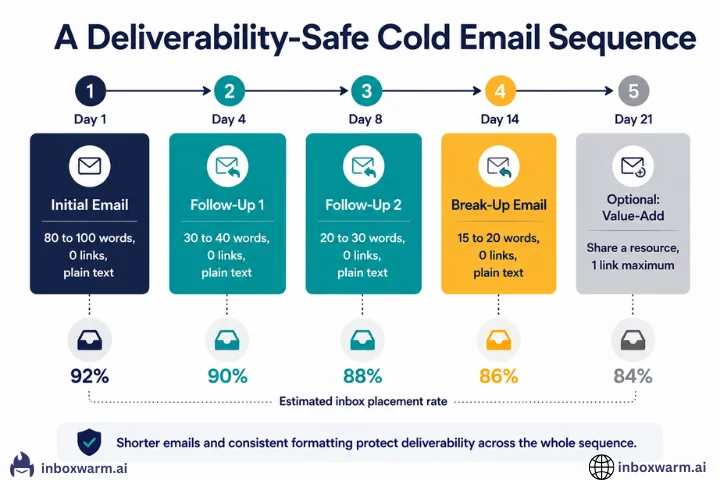
Sending all five follow-ups in 48 hours is not a sequence. It is a spam burst. Space follow-ups by at least three to five days. Keep daily sending volume consistent. A consistent low-volume pattern builds reputation; an inconsistent burst pattern damages it.
How Does Personalization Affect Cold Email Deliverability?
Personalization affects deliverability in an indirect but important way. Spam filters evaluate whether an email appears to have been composed individually or assembled from a template and merged at scale.
The signals that indicate template-based bulk sending are merge tags left unfilled or filled with placeholder text, identical sentence structures across a campaign, over-personalization with forced references that no human would actually write, and large-scale identical messages with only the recipient’s first name changed.
- Unfilled merge tags: if any variable fails to populate, the email sends with literal placeholder text. Most spam filters have seen enough {FirstName} failures to flag this pattern.
- Subject line with merge variables: a subject line containing curly braces is immediately identifiable as a template to advanced filters.
- Over-stacked personalization: six merged variables in the first two sentences create a mechanical pattern that looks nothing like how a human writes. The overuse of the company name is a flag to both spam filters and human recipients.
- Generic body after personalized opening: Starting with hyper-specific personalization and ending with a completely generic outcome claim and CTA creates a structural mismatch that both filters and recipients recognize.
- One real personalization signal: a specific observation about their actual product (payment-gated trial) is something that requires genuine research. It cannot be merged from a data field. This is the strongest possible personalization signal to both the recipient and the spam filter.
- No merge tags: everything in this email could have been written manually. There is nothing that pattern-matches to bulk personalization.
- Value-first offer: offering to share research rather than asking for time signals that the sender has something to give, not just something to sell.
- No links: the research offer is verbal. The link to the resource can go in the follow-up once the recipient has expressed interest.
What Cold Email Formatting Decisions Hurt Inbox Placement?
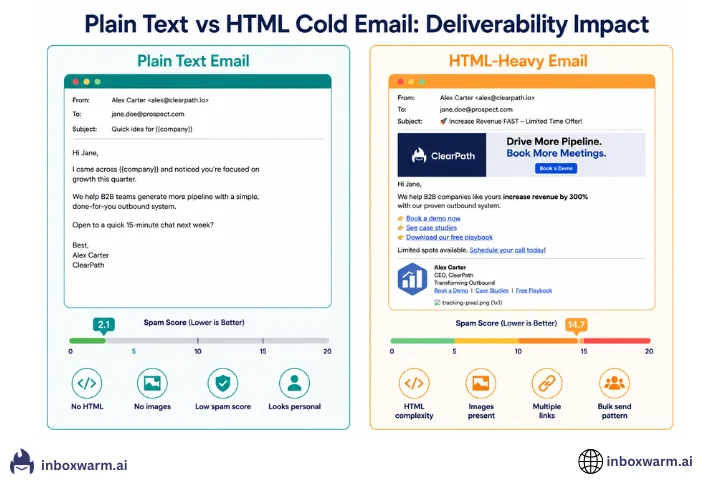
Formatting is one of the most overlooked deliverability variables. Spam filters evaluate the HTML footprint of your email alongside the text content.
| Formatting Choice | Deliverability Impact |
|---|---|
| Plain text email | Best possible signal. Looks like a personal email composed in a mail client, not a bulk tool. |
| Minimal HTML (line breaks only) | Good. Small HTML footprint. Does not significantly increase spam filter risk. |
| HTML with inline styles | Medium risk. Increases HTML complexity. Corporate email gateways scrutinize heavy HTML more closely. |
| Embedded images in body | Medium to high risk. Images increase HTML complexity and file size. Spam filters score image-heavy emails more suspiciously, particularly for senders without established reputations. |
| Tracking pixel enabled | Medium risk. Adds an image tag to the email. For warming domains, this is a meaningful risk. See our article on cold email open tracking for a full breakdown. |
| Signature with logo image | Medium risk. A logo image in the signature adds HTML complexity and an image load. Plain text signatures perform better for deliverability. |
| Signature with multiple links | Medium to high risk. Three or more links in a signature meaningfully increase the total link count, which spam filters score negatively. |
| Coloured or formatted text (bold, italic) | Low to medium risk. Moderate use is fine. Heavy formatting signals promotional content. |
| Long email (300 plus words) | Medium risk. Longer emails give spam filters more content to evaluate. Keyword density filters trigger more easily on long emails. |
| Bullet point lists | Low risk. Formatting is readable but not a significant spam signal by itself. |
How Does Daily Sending Volume Affect Cold Email Deliverability?
The copy in your cold email is what a human reads. The sending volume pattern is what email providers track at the infrastructure level. Both matter. Sending 500 cold emails on day one from a domain that was registered last week is one of the clearest spam signals that exists. It is not the content of the email that triggers the filter. It is the pattern: a new domain, zero prior history, sudden high volume.
This is exactly what email warm-up solves. A warmed domain has a sending history that looks organic. Volume built up gradually over weeks. Positive engagement signals from real inbox interactions. When you send your first real campaign from a warmed domain, the volume increase looks like a natural escalation of established activity rather than a cold start spike.
| Scenario | Volume Pattern | Deliverability Outcome |
|---|---|---|
| New unwarmed domain, first campaign | 0 emails on day 1 to 300 on day 7 | Very high spam placement rate. Pattern matches bulk sender from day one. |
| New domain, properly warmed over 30 days | 5 emails on day 1 increasing to 150 emails on day 30 | Good inbox placement by end of warm-up. The pattern looks organic. |
| Warmed domain, consistent sending | 150 emails per day maintained across weeks | Excellent inbox placement. Consistency is a strong positive signal. |
| Warmed domain, sudden spike | 150 emails per day to 1,000 emails overnight | Partial spam filtering. Sudden spikes trigger rate-limiting even on warmed domains. |
| Warmed domain, maintenance warm-up running | 150 campaign emails plus 20 warm-up emails per day | Best possible scenario. A warm-up counter balances any negative signals from the campaign. |
Your Copy Is Only as Good as Your Deliverability
The best cold email examples in the world do not matter if they land in spam. InboxWarm.ai builds and maintains the sender reputation that gets your emails to the inbox, so the work you put into your copy actually reaches someone.
Frequently Asked Questions
How Many Links Can I Include in a Cold Email?
For a first cold email, zero links is the strongest deliverability choice. One link, to a relevant resource or a simple calendar booking page, is acceptable if the email has strong personalization and is sent from a warmed domain. Two or more links in a first cold email meaningfully increase spam filter risk. If you need to share a link, put it in the follow-up after the recipient has expressed interest, not in the cold first email.
Should Cold Emails Be Plain Text or HTML?
Plain text is better for deliverability, particularly for first cold emails and for senders with new or warming domains. Plain text emails have a smaller HTML footprint, no image-loading signals, and look indistinguishable from a personally composed email in a standard mail client. HTML emails offer design flexibility but add complexity that spam filters evaluate. For a cold email where the goal is to start a conversation rather than showcase a brand, plain text almost always wins on both deliverability and reply rate.
What Are the Biggest Spam Trigger Words to Avoid in Cold Email?
The highest-risk phrases are those associated with bulk promotional sending: FREE (especially in caps), GUARANTEED, limited time offer, act now, do not miss out, click here, unsubscribe, you have been selected, and combinations of multiple exclamation marks or question marks. Beyond individual words, spam filters also evaluate patterns: a subject line with all caps combined with an exclamation mark combined with a promotional phrase is scored much more harshly than any single element alone. The safest approach is to write your cold email as if you were composing it individually for one person, because that is what a low-spam-risk cold email reads like.
How Does Email Warm-Up Improve Cold Email Performance?
Email warm-up builds your sender reputation before you launch a cold email campaign. A warmed domain has a positive engagement history with Gmail, Outlook, and other email providers, which means your cold emails start from a position of partial trust rather than complete unknown. Without warm-up, a new domain sending cold emails at any meaningful volume is starting each campaign with the maximum possible spam filter suspicion. With warm-up, that suspicion is reduced enough that clean content and good list quality can do the work they are supposed to do.
Why Did My Cold Email Land in Spam Despite Good Copy?
The most common reasons a well-written cold email lands in spam are the following: the sending domain was not warmed up before the campaign; the domain reputation dropped due to a previous campaign with high bounce rates or spam complaints; open tracking is enabled and the tracking pixel is triggering a corporate spam filter; the email includes links or images that increase its spam score; the sending volume spiked unexpectedly relative to the domain's normal pattern; or the email is being sent to a list with outdated addresses generating hard bounces. Copy is the last variable to blame for spam placement. Infrastructure is usually the first.
Conclusion
Cold email is not just a copywriting exercise. Every variable in an email, from the subject line to the number of links to the HTML complexity of the signature, sends a signal to spam filters before a human ever reads a word.
The best cold email examples are the ones that pass both tests: they are compelling enough for a human to reply to, and they are clean enough for a spam filter to deliver. Those two goals are almost always aligned. The writing style that resonates with humans (short, specific, personal, no pressure) is also the style that spam filters score most favorably.
The five examples in this guide cover the most important scenarios: a high-deliverability first email, a low-deliverability email with multiple avoidable mistakes, a deliverability-safe follow-up, over-templated personalization and what it costs you, and natural personalization that reads as human.
But all of this assumes your domain is warmed up before you start sending. None of these optimizations matter if your emails are going to spam because your sender reputation has not been established. That is the foundation everything else builds on. An authentic email warm-up tool ensures your domain builds a natural sending reputation before you scale outreach, so your cold emails actually reach the inbox instead of getting filtered.