

TL;DR
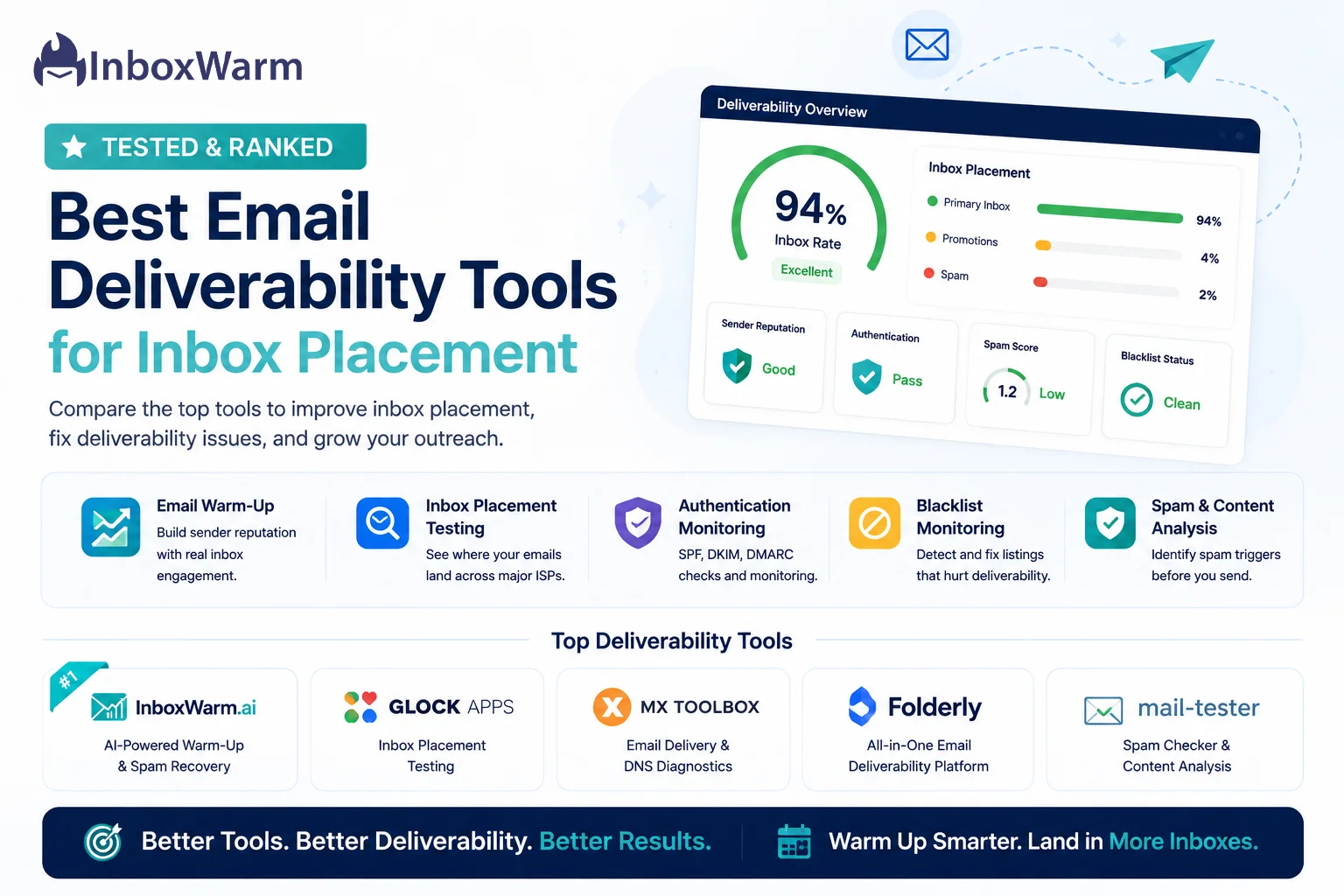
- Email deliverability tools help you fix inbox placement failures caused by authentication gaps, weak sender reputation, and spam-trigger content.
- The best tools combine email warm-up, inbox placement testing, SPF/DKIM/DMARC monitoring, and blacklist detection.
- InboxWarm.ai ranks #1 for AI-powered warm-up across multiple mailboxes.
- Other strong options include GlockApps for placement testing, MXToolbox for DNS diagnostics, and Folderly for all-in-one monitoring.
- Always fix authentication first, then warm up, then test placement before launching any campaign.
You spent hours writing the perfect cold email. The subject line is sharp. The copy is tight. The offer is relevant. Then you hit send and hear nothing. No replies. No opens. No pipeline. The worst part: your ESP says every email was delivered.
That is the deliverability trap. “Delivered” does not mean “seen.” According to Validity’s 2023 State of Email report, nearly 1 in 6 emails never reach the primary inbox, landing in spam or vanishing entirely without a single bounce notification. Your campaigns can be failing at scale, and your reporting dashboard will never tell you.
The fix is not better copywriting. It is better infrastructure. Litmus research shows sender reputation alone drives over 83% of ISP inbox placement decisions.
In this guide, we tested and ranked the best email deliverability tools across warm-up, placement testing, authentication monitoring, and blacklist detection so you know exactly what to use and in what order.
Table of Contents
What Is an Email Deliverability Tool and Why Do You Need One?
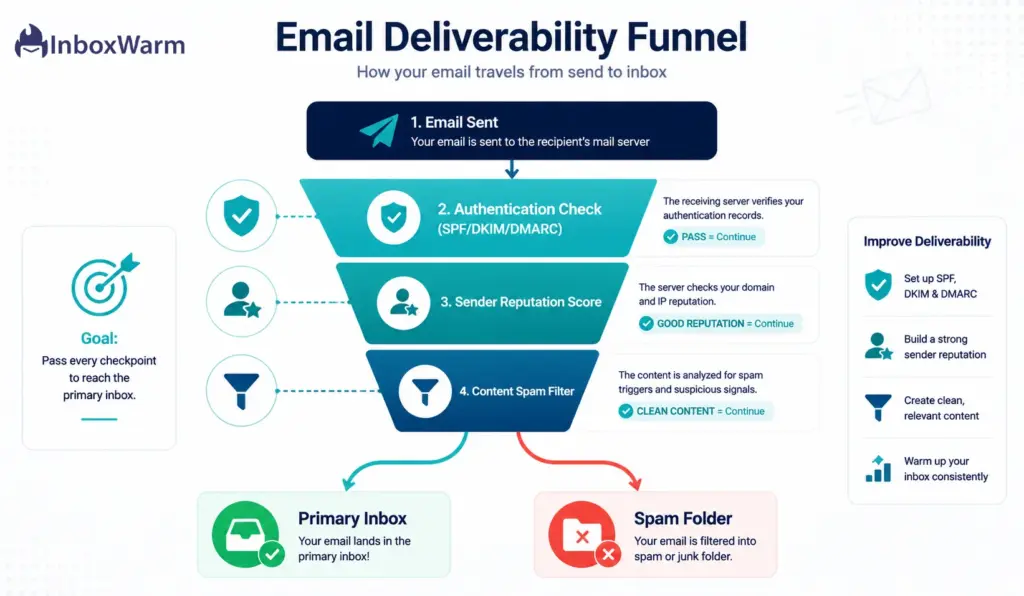
An email deliverability tool is any platform that helps you diagnose, fix, or prevent inbox placement failures. The category covers email warm-up tools that build sender reputation, spam checkers that flag risky content before sending, inbox placement testers that show where your messages actually land across major ISPs, and authentication platforms that validate your SPF, DKIM, and DMARC setup. Each layer solves a different part of the same problem.
You need at least one of these tools the moment you start sending cold email from a new or recovering domain. Without warm-up infrastructure, a brand-new domain sending even 100 emails per day will trigger spam filters within the first week.
Google’s Bulk Sender Guidelines now require valid SPF, DKIM, and DMARC records for anyone sending more than 5,000 emails per day to Gmail or risk automatic bulk filtering. If your authentication is broken, no amount of warm-up or content polish will save your inbox placement.
The good news: deliverability is entirely fixable. The right tools combined with consistent warm-up and correctly configured authentication will move your inbox placement rate from below 60% to above 90% within 30 to 60 days for most domains.
What Should You Look for in an Email Deliverability Tool?
Not all deliverability tools do the same thing. Before choosing, match the tool to your actual problem.
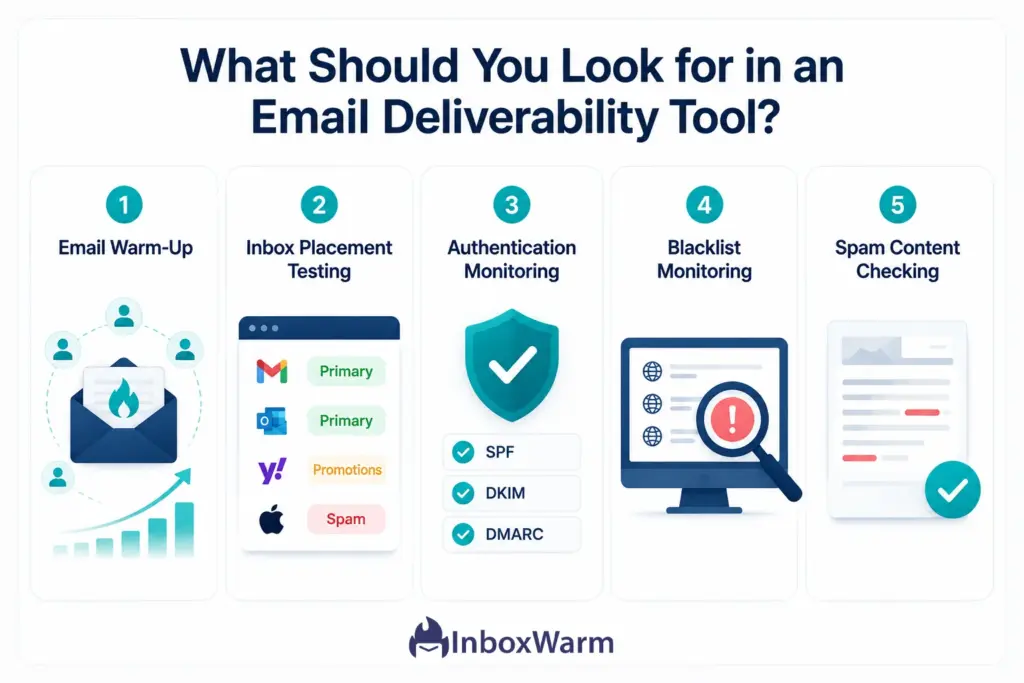
Here are the 5 capabilities that matter most:
1. Email Warm-Up
Warm-up tools gradually build your domain’s sending reputation by simulating real engagement: sending emails to real inboxes, generating opens and replies, and moving messages out of spam. This is the single highest-impact action for any new domain or domain recovering from spam folder placement.
A good warm-up tool runs on a network of real mailboxes (not bots), scales intelligently across multiple accounts, and delivers a daily reputation score. InboxWarm.ai is purpose-built for this and covers every step of the warm-up process automatically.
2. Inbox Placement Testing
Placement testers send a test email to a seed list of real Gmail, Outlook, Yahoo, and other ISP inboxes, then report exactly where your message landed. This is critically different from a delivery confirmation.
According to GlockApps deliverability data, as many as 21% of legitimate emails land outside the primary inbox even when the receiving server confirms delivery. Placement testing is the only way to verify real inbox placement before you burn send volume on a failing campaign.
3. Authentication Monitoring (SPF, DKIM, DMARC)
Authentication failures are silent deliverability killers. SPF verifies that your sending server is authorized for your domain. DKIM adds a cryptographic signature that receiving servers use to verify message integrity.
DMARC tells receiving servers what to do when SPF or DKIM checks fail. All three must be correctly configured and monitored continuously. Our full breakdown of SPF, DKIM, and DMARC authentication explains how each record works and how to validate them correctly.
4. Blacklist Monitoring
If your sending IP or domain lands on a major blacklist like Spamhaus or Barracuda, your inbox placement rate will collapse across any ISP that checks against that list. Blacklist monitoring tools alert you the moment your domain or IP appears so you can act before the damage compounds across active campaigns.
5. Spam Content Checking
Some deliverability problems are content-related rather than infrastructure-related. Spam checkers analyze your subject line, body copy, HTML structure, and link destinations for patterns that commonly trigger filters. Tools like GlockApps and Folderly include content scoring as part of their full diagnostic suite.
Which Email Deliverability Tools Are the Best for Inbox Placement?
We tested and evaluated the leading tools across each category.
Here is our ranked breakdown with honest assessments of where each excels and where it falls short.
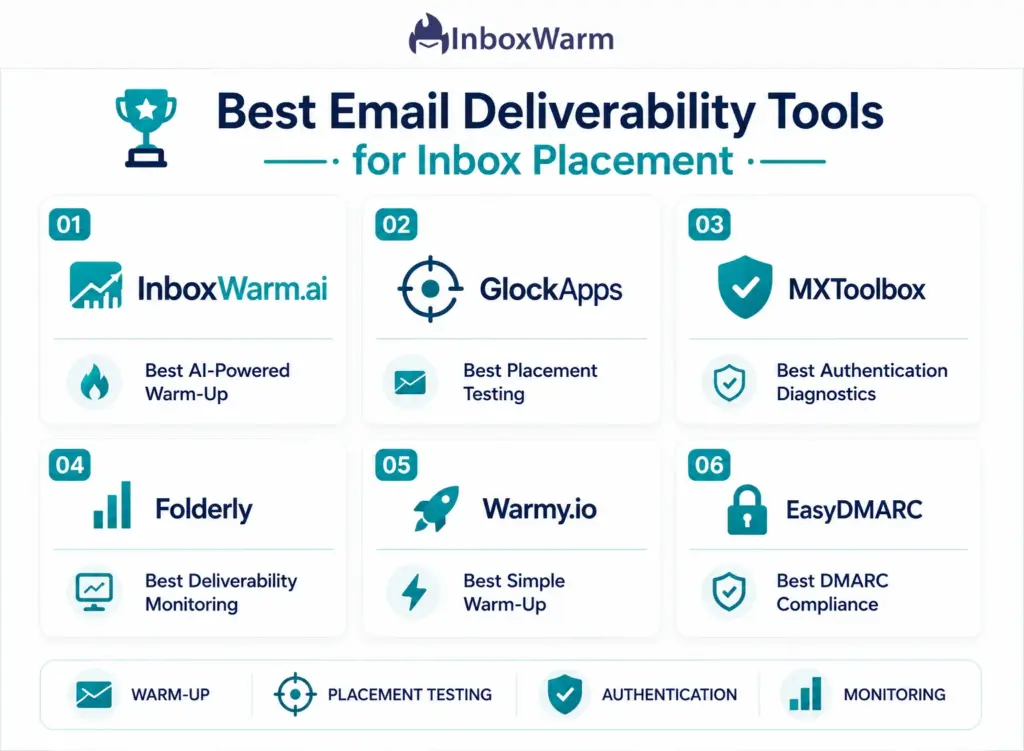
1. InboxWarm.ai: Best for AI-Powered Email Warm-Up at Scale
InboxWarm.ai is the strongest warm-up tool for teams sending cold email at scale. Its AI-driven approach produces natural engagement signals that ISPs trust: real opens, real replies, and real inbox rescues generated across a network of genuine mailboxes rather than bots.
Unlike tools that run a generic warm-up schedule, InboxWarm.ai adapts its activity to mirror your actual sending behavior, which produces more credible reputation signals with Gmail and Outlook algorithms.
The multi-mailbox dashboard makes it the top choice for cold email agencies managing 10 or more client accounts simultaneously. Each mailbox gets its own warm-up schedule, daily reputation score, and authentication health check. Domain recovery workflows for blacklisted or spam-flagged domains are built in, not bolted on.
Best for: Cold email agencies, SaaS founders, SDR teams, and freelancers managing multiple mailboxes
Struggling with emails landing in spam? Fix your sender reputation in 30 days.
2. GlockApps: Best for Inbox Placement Testing and Spam Diagnostics
GlockApps is the most comprehensive standalone inbox placement tester available. Its Inbox Insight feature runs seed list tests across Gmail, Outlook, Yahoo, Apple Mail, and more, then reports exactly whether each mailbox received your message in Primary, Promotions, Other, or Spam.
Beyond placement testing, GlockApps includes spam-trigger content analysis, DMARC digest reports, and real-time blacklist alerts. Pair it with InboxWarm.ai for warm-up and you have a complete pre-send diagnostic stack.
Best for: Teams that need to verify inbox placement across multiple ISPs before launching campaigns. Pricing starts at approximately $9 per month for basic testing, scaling with test volume.
3. MXToolbox: Best Free Tool for Authentication and DNS Diagnostics
MXToolbox is the go-to free diagnostic tool for authentication troubleshooting. It validates SPF, DKIM, DMARC, and MX records, checks your domain and IP against more than 100 blacklists simultaneously, and analyzes email headers to trace the full delivery path.
It will not fix your deliverability on its own, but it tells you exactly what is broken in your DNS setup before you start warm-up or sending.
Best for: Technical users diagnosing authentication and DNS configuration issues. Core tools are free. MXToolbox Monitor for continuous automated monitoring starts at approximately $129 per month.
4. Folderly: Best for All-in-One Deliverability Monitoring
Folderly combines automated spam-trigger detection, daily inbox placement counts, and a deliverability score out of 100 in one platform. It integrates directly with Gmail, Outlook, Amazon SES, Mailgun, and SendGrid and provides AI-based recommendations for improving content and sending behavior.
It is a strong choice for established teams that are already sending at volume and need continuous visibility into live campaign performance.
Best for: Outbound sales teams that want automated spam checking and placement monitoring without managing multiple standalone tools. Pricing starts at approximately $120 per month. Best used alongside InboxWarm.ai rather than as a replacement for it.
5. Warmy.io: Best for Simple Hands-Off Warm-Up
Warmy.io offers a clean entry-level warm-up experience: connect your inbox, set your target volume, and warm-up runs automatically in the background. It supports Gmail, Outlook, Zoho, and custom SMTP accounts with basic inbox placement monitoring and a daily deliverability score. It is a solid choice for solo founders or small teams that want simplicity over depth.
Best for: Solo founders and small teams that want a set-it-and-forget-it warm-up solution. For agencies managing multiple client mailboxes or teams needing advanced analytics and domain recovery tools, InboxWarm.ai offers significantly more control and scale. Pricing starts at approximately $49 per month per inbox.
6. EasyDMARC: Best for Domain Authentication and DMARC Compliance
EasyDMARC is the strongest authentication-focused platform for organizations that need full DMARC compliance. It guides you through SPF, DKIM, and DMARC deployment step by step, analyzes DMARC aggregate reports to show which sources are sending on behalf of your domain, and provides phishing and spoofing protection through continuous domain monitoring.
Best for: Organizations subject to Google and Yahoo’s bulk sender requirements. Pair it with InboxWarm.ai to cover both authentication and warm-up simultaneously. A free plan is available for basic DMARC setup; paid plans start at approximately $45 per month.
How Do These Tools Compare Side by Side?
Here is a quick-reference comparison of the six tools across the 5 core deliverability capabilities:
| Tool | Warm-Up | Placement Test | Auth Monitor | Blacklist Check | Starting Price |
|---|---|---|---|---|---|
| InboxWarm.ai | Yes (AI-Powered) | Yes (Built-In) | Yes | Yes | Free Trial |
| GlockApps | No | Yes (Best-in-Class) | Yes (DMARC) | Yes | ~$9/mo |
| MXToolbox | No | No | Yes (DNS) | Yes (100+ Lists) | Free |
| Folderly | Yes | Yes (Daily Count) | Yes | Limited | ~$120/mo |
| Warmy.io | Yes (Basic) | Yes (Basic) | Limited | No | ~$49/mo |
| EasyDMARC | No | Yes (Diagnostic) | Yes (DMARC) | No | ~$45/mo |
What Is the Right Order to Use These Tools for Maximum Inbox Placement?
Most teams make the mistake of reaching for a spam checker or placement tester before fixing the underlying infrastructure.
Here is the correct sequence, based on Google’s sender best practices documentation:
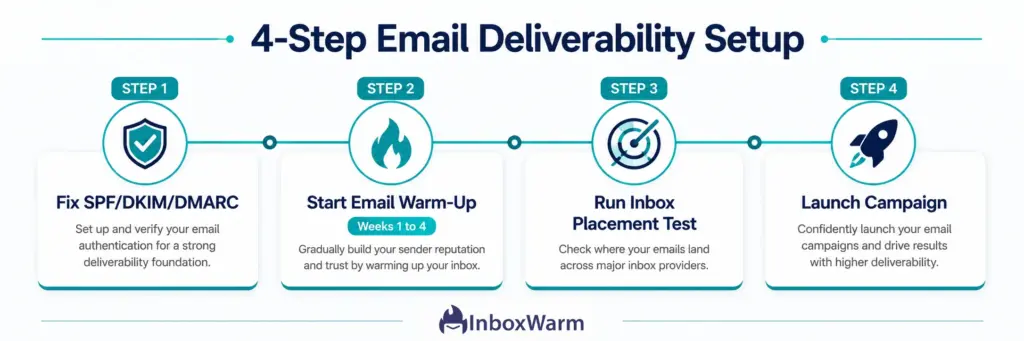
Step 1: Fix Authentication First
Before warming up or testing placement, confirm your SPF, DKIM, and DMARC records are correctly configured and passing validation. Use MXToolbox or EasyDMARC to verify. A broken DKIM record will undermine every other deliverability effort downstream.
Step 2: Start Warm-Up Immediately on New Domains
The moment you register a new domain for cold email, connect it to InboxWarm.ai and begin warm-up. Do not send any outbound campaigns until you have 3 to 4 weeks of warm-up activity logged and your sender reputation score is consistently above 80.
Skipping this step is the single most common cause of new domain spam placement, and recovering a damaged domain reputation takes significantly longer than building one correctly from the start.
Step 3: Test Placement Before You Launch
Once warm-up is complete and authentication is clean, run an inbox placement test through GlockApps before sending your first campaign. Confirm you are landing in Primary across Gmail and Outlook.
If you are hitting Promotions or Spam on any major ISP, identify the root cause before you burn send volume on a failing campaign.
Step 4: Monitor Continuously During Active Campaigns
Once campaigns are live, use Folderly or EasyDMARC to monitor placement and authentication health daily. Set up blacklist alerts through MXToolbox so you catch any blacklist events within hours rather than days.
Keep InboxWarm.ai running in the background even during active sends: consistent warm-up activity signals natural sending behavior to ISPs and protects your reputation between campaign bursts. For a deeper guide on managing deliverability across active campaigns, read our piece on how to recover a domain from spam folder placement.
Ready to fix your inbox placement? Start with the highest-impact tool first.
What Are the Most Common Email Deliverability Mistakes That Kill Inbox Placement?
These are the deliverability mistakes that cause the most lasting damage, based on patterns across thousands of sending domains:
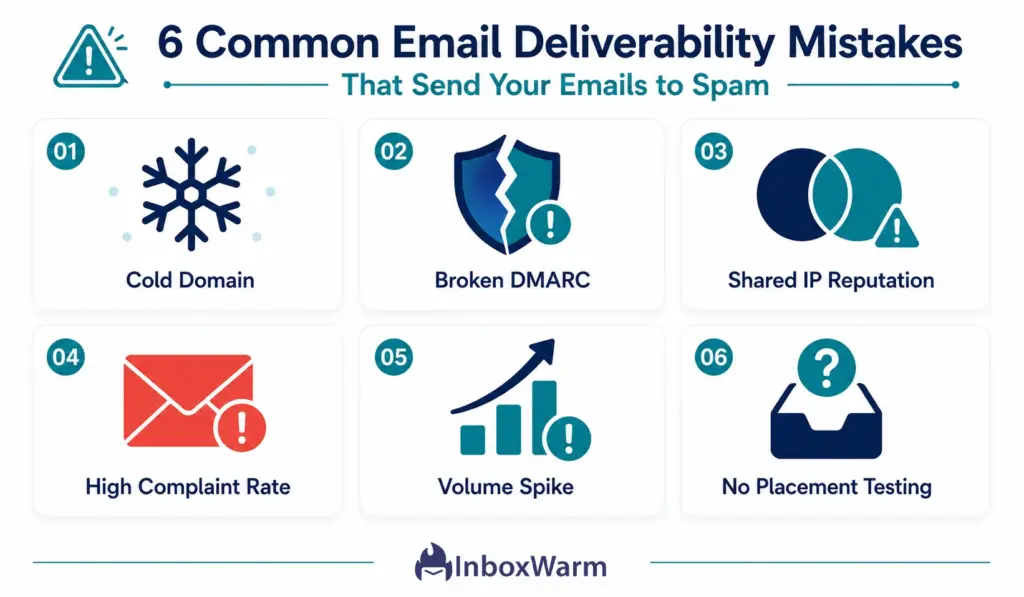
- Sending from a cold domain with zero warm-up history: ISPs have no reputation signal to trust, so they default to spam filtering. Read our guide on email warm-up to understand the correct ramp-up timeline.
- Missing or misconfigured DMARC: Without DMARC, your domain is vulnerable to spoofing and bulk filtering. Google requires DMARC for all bulk senders sending more than 5,000 emails per day to Gmail.
- Using shared sending IPs without checking reputation: If you are on a shared IP with a sender that has a poor reputation, you inherit their deliverability problems and spam complaints.
- Exceeding Google’s spam complaint threshold: Google’s postmaster guidelines set the complaint rate ceiling at 0.10%. Exceeding it triggers automatic bulk filtering. A bounce rate above 2% causes similar damage.
- Sending at high volume too fast: Volume spikes on new or recovering domains trigger spam filters even when your content is clean. Gradual ramp-up via a warm-up tool is the only way to avoid this safely.
- Never testing inbox placement: Most teams only discover deliverability problems when open rates collapse. By then, domain reputation damage can take 4 to 8 weeks to fully repair.
Frequently Asked Questions
2. How Long Does Email Warm-Up Take Before You Can Send Cold Campaigns?
Most domains require 3 to 6 weeks of warm-up before sending cold emails at volume. Newer domains need closer to 6 weeks. Domains recovering from spam folder placement may need 4 to 8 weeks.
3. Can You Warm Up Multiple Mailboxes At The Same Time?
Yes. InboxWarm is built specifically for multi-mailbox warm-up, making it the best choice for agencies and SDR teams managing 10 or more sending accounts simultaneously. Each mailbox gets its own warm-up schedule and independent reputation tracking.
Do I need DMARC even if I already have SPF and DKIM set up?
Yes. SPF and DKIM authenticate your emails individually, but DMARC ties them together and instructs receiving servers what to do when those checks fail. Without DMARC, your domain is vulnerable to spoofing.
What inbox placement rate should I target for cold email campaigns?
A healthy cold email program should target a Primary inbox placement rate above 85% across Gmail and Outlook. Below 70%, your campaigns are likely being significantly suppressed. Below 50%, your domain reputation is in serious trouble and you need to pause sending and start a domain recovery warm-up immediately.
Is email warm-up still necessary?
Yes, more than ever. Google and Yahoo's 2024 sender requirement updates increased scrutiny on bulk senders significantly. Warm-up is not optional for anyone sending cold email from a domain less than 6 months old or from any domain that has experienced spam folder placement.
What is a spam trap and how do deliverability tools help me avoid them?
A spam trap is an email address used by ISPs and blacklist operators like Spamhaus to identify senders with poor list hygiene. Sending to a spam trap damages your sender reputation and can trigger blacklisting. Regular list cleaning and email validation before sending significantly reduces your exposure.
How do I recover a domain that has been blacklisted?
First, identify which blacklists your domain or IP appears on using MXToolbox's blacklist checker. Then request removal from each list directly. Simultaneously, start a domain recovery warm-up through InboxWarm.ai to rebuild your sender reputation.
Bottom Line
Email deliverability is not a mystery. It is a collection of technical factors that can be measured, improved, and monitored with the right tools. Whether you’re struggling with spam folder placement, poor inbox rates, or declining sender reputation, the solution starts with building a strong deliverability foundation.
For most teams, that means validating your authentication records with MXToolbox, warming up your domain with InboxWarm.ai, and verifying inbox placement with a tool like GlockApps before launching any campaign. As your sending volume grows, ongoing monitoring through platforms like Folderly or EasyDMARC helps protect the reputation you’ve worked to build.
The companies consistently landing in the primary inbox are not necessarily sending better emails—they are managing their email infrastructure more effectively. Research from Validity shows that organizations actively monitoring sender reputation often achieve significantly higher engagement rates than those that do not.
If you’re just getting started, understanding what email warm-up is and how it works is the first step toward building a trustworthy sender reputation. Email warm-up helps establish credibility with mailbox providers, improves inbox placement, and reduces the risk of future deliverability issues before you begin sending at scale.