
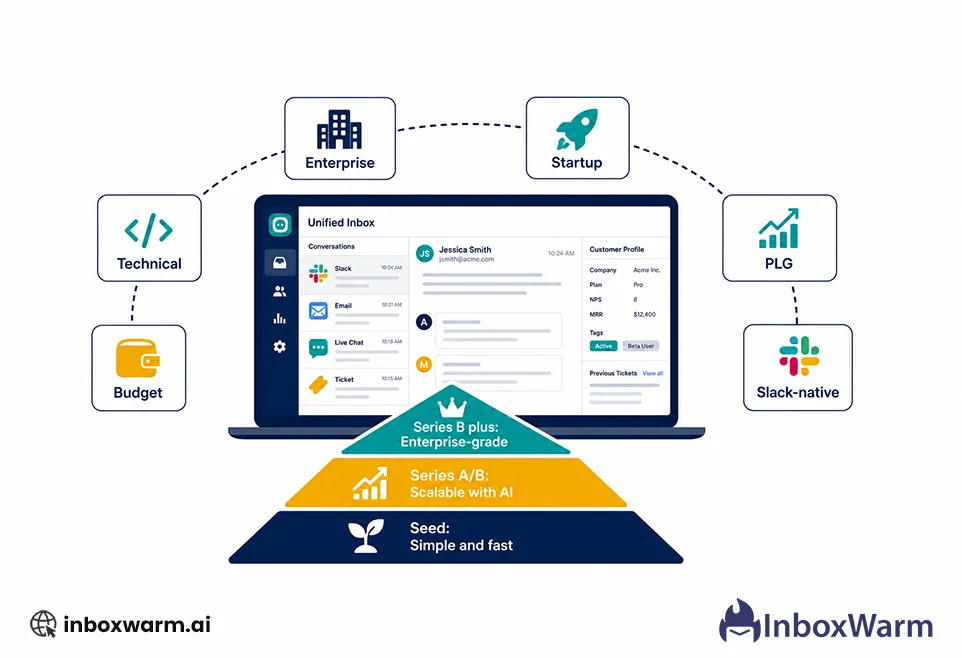

The best B2B SaaS customer support software in 2026 depends on three things: your company stage, where your customers want to communicate, and how your AI pricing model will scale. For technical teams, Plain leads. For PLG companies, Intercom. For enterprises, Zendesk. For startups on a budget, Help Scout or Freshdesk. This guide compares all 11 with honest limitations on each.
Choosing support software for a B2B SaaS company is not the same as choosing it for a consumer business. Your customers are companies, not individuals. They have multiple stakeholders, complex technical issues, longer escalation chains, and expectations shaped by enterprise relationships. They want to reach you on Slack, not a contact form.
Most comparison guides list the same ten tools with the same feature bullets and the same non-committal ‘it depends’ verdicts.
This guide makes actual recommendations, explains why, and tells you what each tool does not do well.
Section 2: The six features that matter most for B2B SaaS teams
Section 3: Quick-pick recommendations by use case
Section 4: Detailed reviews of all 11 tools
Section 5: Master comparison table
Section 6: How to choose by company stage
Section 7: AI pricing models explained (flat vs per-resolution)
Section 8: FAQ and conclusion
Table of Contents
What Makes B2B SaaS Customer Support Different from B2C?
This distinction matters before you evaluate a single tool. The majority of customer support platforms were built for B2C: high ticket volume, simple issues, one person per ticket, and short resolution time. B2B SaaS support operates on a completely different model.
| B2B SaaS Support Reality | Why It Changes What You Need |
|---|---|
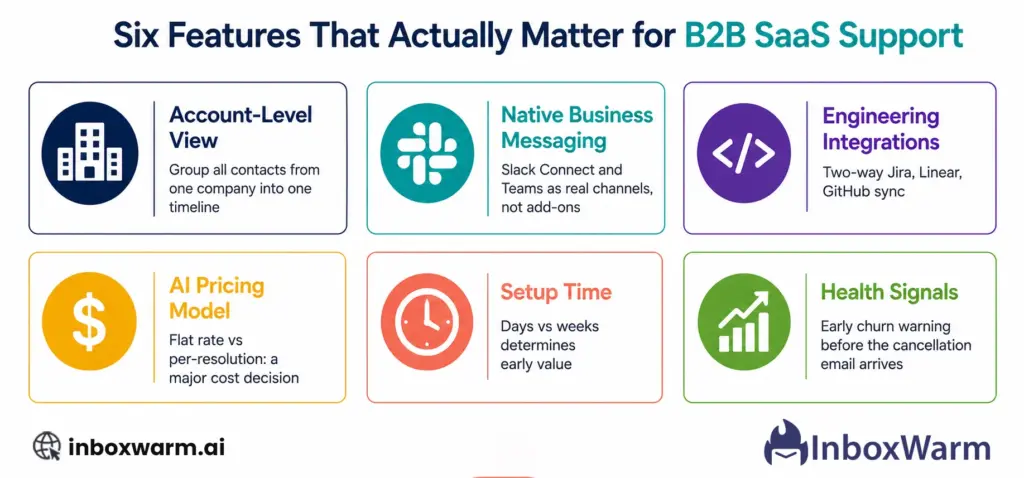
| Your customer is a company, not a person | You need account-level ticketing that groups every contact from the same company into one view. Seeing twelve tickets from twelve people at Acme Corp as twelve separate conversations is unusable. |
| Multiple stakeholders per account | A ticket from the CEO, the IT admin, and the end user about the same issue should be linked. Tools that treat each contact separately lose the relationship context. |
| Technical escalation is common | Support tickets frequently need to become engineering tickets. Tools that cannot bridge Jira, Linear, or GitHub to your inbox create manual copy-paste workflows that slow down resolution. |
| Customers communicate in Slack | Enterprise and mid-market B2B customers increasingly want support via Slack Connect or Microsoft Teams, not a support widget. Tools without native business messaging support require expensive workarounds. |
| Churn risk is concentrated | Losing one enterprise customer can mean losing 20 percent of your revenue. Tools that give you early signals (engagement drop, ticket sentiment, account health) are worth more than tools that just manage tickets. |
| Longer resolution cycles | B2B issues are more complex. They often span days or weeks with multiple updates. You need SLA tracking, internal notes, and threaded conversations by account, not just ticket status updates. |
What are the Most Important Features to Look for in B2B SaaS Support Software?
There are dozens of features across these platforms. Six of them actually matter for B2B SaaS companies. Everything else is either a nice-to-have or a distraction.
Which B2B SaaS Customer Support Tool Is Right for Your Situation?
Before the detailed reviews, here is the honest short version. Most teams can stop reading here and make a decision.
Used by Vercel, Cursor, n8n, and Sourcegraph. Native Slack, Teams, Discord, and email in one inbox. Two-way Linear and Jira sync. API-first with no rate limits. Flat pricing with no per-resolution AI fees. Sets up in one to three days.
The market leader for conversational AI in SaaS. Fin AI agent handles a significant share of routine queries automatically. Best-in-class in-app messaging and onboarding flows. Per-resolution AI pricing can become expensive and unpredictable as you scale.
The established standard for large support organizations. Handles millions of tickets. Over 1,200 integrations. Sophisticated SLA management and custom reporting. Requires dedicated admin and 4 to 8 weeks to implement. Per-resolution AI at $1.50 is the highest in this comparison.
Clean, simple, and affordable. Shared inbox with collision detection. Solid knowledge base. AI included in paid plans at flat rate. No account-level intelligence and limited Slack support, but ideal for teams that primarily support via email.
Free tier available. Broad omnichannel coverage at the lowest price point of any tool in this comparison. B2B account-level features are less mature. Good for teams getting out of Gmail who are not yet managing complex enterprise accounts.
Native Slack Connect and Teams channels. Account management features built in alongside ticketing. AI agents trained on your knowledge base. Starting price is higher than Freshdesk or Help Scout, but the Slack-native architecture is genuinely differentiated for enterprise-facing B2B teams.
Unified customer data across sales, marketing, and support in one CRM. Free tier available. Best-in-class when your support team needs to see deal history, contact records, and ticket history in one place. Less suitable if you are not already in the HubSpot ecosystem.
What Does Each B2B SaaS Customer Support Tool Actually Do?
Here are the detailed reviews with honest limitations on each tool. Pricing is verified as of May 2026. Confirm current pricing at each tool’s website before making a purchasing decision.
1. Plain
Best for: Technical B2B SaaS teams, developer-facing products, companies where customers communicate in Slack, Teams, or Discord. Used by Vercel, Cursor, n8n, Tines, and Sourcegraph.
Not ideal for: Non-technical customers who do not use Slack or Discord. Teams that need phone support.
Pricing
Foundation: from $35/seat/month, Slack, email, live chat, Linear, and Jira integration, Ari AI agent
What it does well
- Native first-class support for Slack Connect, Microsoft Teams, Discord, and email in a single unified inbox. Not bolt-on integrations: actual native architecture.
- Two-way Linear and Jira integration: support conversations become engineering tickets with status updates flowing back automatically.
- GraphQL API with no rate limits. Custom integrations, AI agents, and engineering-tool workflows do not hit walls.
- AI included in base pricing at flat rate. No per-resolution fees means costs are predictable as you scale.
- Sets up in one to three days. No dedicated admin required for basic implementation.
- Account-level company views group all contacts from the same company into one context panel.
Honest limitations
- Primarily designed for technical teams. If your customers are not technical or do not use business messaging tools, many of Plain’s differentiating features are irrelevant.
- Phone support is not available. Email and business messaging only.
- The Horizon plan’s $269/month base can be a significant step up from the Foundation for early-stage teams.
2. Intercom
Best for: Series A and B PLG SaaS companies with high chat volume and in-app messaging needs. Teams prioritizing AI-automated ticket deflection and onboarding flows.
Not ideal for: Cost-sensitive teams: per-resolution AI pricing becomes unpredictable at scale. Teams that primarily support via email rather than chat.
Pricing
Essential: From $0.99 per Fin outcome $29 per seat/mo, Fin AI agent, ticketing system, public help center
What it does well
- Fin AI agent is the most capable AI support bot in the consumer SaaS space. Reported 67 percent average resolution rate with top customers exceeding 80 percent.
- Best-in-class in-app messaging and product onboarding flows. No other tool in this comparison matches Intercom’s in-product communication capabilities.
- Comprehensive automation: workflows, campaigns, outbound messaging, and proactive support in one system.
- Strong CSAT prediction: Intercom can predict and assign CSAT scores to conversations even when customers did not complete a survey.
Honest limitations
- Per-resolution AI pricing is the biggest risk. Costs scale with your success: the more issues your AI resolves, the more you pay, with no ceiling.
- B2C architecture at the core: originally built for consumer SaaS. Account-level B2B features are less mature than tools built B2B-first.
- Slack integration creates separate channels, which can become messy at scale. Not the same as Plain’s native Slack-first architecture.
- Total cost of ownership is often higher than it appears from the base seat price once AI fees and add-ons are factored in.
Pro tip: If your SDR or sales team uses Outlook alongside Intercom for outbound, make sure their sending domains are properly warmed first. Outlook email warmup is a critical step before running any outbound campaign; cold emails from unwarmed Outlook accounts land in Junk before a single support conversation even starts.
3. Zendesk
Best for: Series B plus companies and enterprises with high ticket volume, complex multi-channel needs, and dedicated support operations teams. Companies with compliance or regulatory requirements.
Not ideal for: Early-stage startups: implementation complexity and cost are not justified. Teams without a dedicated admin or IT resource.
Pricing
Support Team: $19/agent/month, ticketing only
Suite Team: $55/agent/month (help center, messaging, basic AI)
Suite Professional: $115/agent/month, advanced automation, SLA management, custom reporting
Suite Enterprise: $169/agent/month up to 300 help centers, app builder, custom agent roles
What it does well
- Battle-tested at genuine enterprise scale. Handles millions of tickets without performance issues.
- Over 1,200 integrations. More integration options than any other tool in this comparison.
- Sophisticated SLA management, custom reporting, and skills-based routing for complex support operations.
- SOC 2 Type II, ISO 27001, and FedRAMP authorization. Strongest compliance posture in this comparison.
- Multiple help center support (up to 300 on Enterprise) with multilingual capabilities.
Honest limitations
- Per-resolution AI at $1.50 is the most expensive in this comparison. AI costs are difficult to forecast.
- Implementation requires real investment: 4 to 8 weeks is typical, and teams without a dedicated admin struggle to manage the configuration.
- The per-agent pricing model means a team of 10 on Suite Professional is looking at over $13,000 annually before add-ons.
- Slack and Teams integrations are add-ons, not native. B2B teams with Slack-first customers will find this frustrating.
- Can feel over-engineered for companies that do not need enterprise scale. Many features are unused by mid-market teams.
4. Help Scout
Best for: Seed-to-Series B2B SaaS startups and SMBs that primarily support customers via email. Teams that want to get out of Gmail without adding complexity.
Not ideal for: Teams whose customers communicate in Slack or Teams. Companies need account-level B2B intelligence or advanced enterprise routing.
Pricing
Standard: $25/user/month, multiple inboxes, AI inbox assistant, multiple knowledge bases
Plus: $45/user/month advanced workflows, unlimited AI drafts, round-robin routing
Pro: $75/user/month, SSO and SAML, priority support, advanced permissions
What it does well
- Cleanest user interface in this comparison. Minimal learning curve. New agents are productive in hours, not days.
- Collision detection prevents two agents from replying to the same conversation simultaneously.
- AI features (drafts, summaries, and AI assistant) are included in paid plans at a flat rate. No per-resolution surprises.
- Solid knowledge base with SEO-friendly URLs and good article management tools.
- Affordable per-user pricing with a real free tier for getting started.
Honest limitations
- No native Slack or Teams integration. Email-centric by design. This is a significant limitation for B2B teams with enterprise customers.
- Account-level intelligence is limited. Help Scout does not provide the account health signals or churn risk indicators that dedicated B2B tools offer.
- Automation is less sophisticated than Intercom, Zendesk, or Pylon. Rule-based workflows, not AI-driven routing.
- Not built for high-volume enterprise support. Teams processing hundreds of tickets per day will hit their limits.
5. Freshdesk
Best for: Seed-stage startups and budget-conscious teams getting out of Gmail. Teams that need omnichannel coverage (email, phone, chat, social) without enterprise pricing.
Not ideal for: Teams managing complex enterprise accounts with multi-stakeholder relationships. B2B companies that need true account-level intelligence.
Pricing
Growth: $19/agent/month, email ticketing, basic automation, one SLA
Pro: $55/agent/month, multiple SLAs, custom reporting, multilingual, 5,000 collaborators
Enterprise: $89/agent/month, audit logs, skill-based routing, sandbox environment
What it does well
- Free tier provides genuine functionality, not just a lead capture form. Two agents and basic ticketing at no cost.
- Lowest paid entry price of all tools with full omnichannel coverage: email, chat, phone, and social from the Growth plan.
- AI Copilot is included for reply suggestions, summaries, and sentiment detection without per-resolution fees.
- Part of the Freshworks suite, so it integrates naturally with Freshsales (CRM) and Freshservice (ITSM) if you use those.
- Freshdesk has a maximum of 40 Slack channels (not native) but is adequate for SMBs that need some Slack presence.
Honest limitations
- True B2B account-level views are limited or locked behind Enterprise pricing. Teams with complex multi-stakeholder accounts feel the constraint quickly.
- Slack integration is not native and capped at 40 channels. Not designed for Slack-first B2B teams.
- AI features are less sophisticated than Intercom or Plain at the high end.
- The free plan limits some features and is best used as a trial rather than a permanent setup.
6. Front
Best for: Series A and B B2B teams where account managers and customer success managers handle support conversations alongside their relationship work. Teams that want email-style collaboration with a helpdesk structure.
Not ideal for: Teams needing native Slack support. Cost-sensitive startups: Front gets expensive fast with per-seat pricing.
Pricing
Starter: $25/seat/month, single channel only, up to 10 seats
Professional: $65/seat/month, omnichannel, advanced analytics, up to 50 seats
Enterprise: $105/seat/month (annual billing required), unlimited seats, advanced AI
What it does well
- Internal comments, @mentions, and shared drafts allow team collaboration without forwarding chains. Multiple people can work on a conversation without creating reply conflicts.
- Guest collaborators: you can bring in someone from outside Front (like a solutions engineer) by email to help on a thread without giving them a full seat.
- Unified inbox across email, SMS, WhatsApp, live chat, and social. Genuinely omnichannel.
- Works well for account managers who prefer email-style workflows over ticket-queue workflows.
Honest limitations
- Pricing escalates significantly: Starter is single-channel only and capped at 10 seats. A team that outgrows Starter faces an immediate jump to $85/seat/month.
- Reliability issues have been noted by users: missed emails and connection drops appear in reviews.
- Not B2B-native: lacks the account health scoring and churn intelligence that purpose-built B2B tools provide.
- No native Slack Connect integration for serving customers in Slack.
7. Pylon
Best for: B2B SaaS companies whose enterprise customers communicate via Slack Connect. Customer success teams are managing complex accounts. Teams that want account management features alongside support ticketing.
Not ideal for: Teams whose customers do not use Slack or Teams. Budget-conscious teams: Pylon is one of the higher-priced options per seat.
Pricing
Standard: from $4.00/per project, support inbox, knowledge base, ticket forms
Pro: $10.00/per project, Slack and WhatsApp connector, API, analytics, automations
Enterprise: custom pricing
What it does well
- Genuine Slack-native architecture: customer conversations in Slack Connect channels appear directly in Pylon alongside email and other channels.
- Account management features built alongside support: account health scores, engagement tracking, and churn risk signals in one platform.
- AI agents can resolve issues and triage tickets autonomously, not just suggest responses.
- Knowledge base that generates new articles based on patterns in customer conversations.
- CSAT tracking and SLA adherence built into the core product.
Honest limitations
- Starting price is $70/seat/month with a 3-seat minimum, making it one of the more expensive options for small teams.
- Microsoft Teams support exists but user reviews report reliability issues. Teams-first customers may experience inconsistency.
- Linear integration is one-way only: you can create issues, but status updates do not sync back. Less powerful than Plain’s two-way sync.
- API documentation is less comprehensive than Plain’s for teams that need deep custom integrations.
8. TeamSupport
Best for: Series B plus mid-market B2B SaaS companies with dedicated support operations teams who need genuine account-level intelligence and churn risk prediction.
Not ideal for: Early-stage startups: the interface and pricing are designed for established teams, not founders. Teams that need a modern, intuitive UI.
Pricing
Starter: $45/user/month ticketing, workflow automation, omnichannel, AI productivity tools
Professional: $65/user/month advanced routing, customer distress index, AI agent Kevin
Scale: $85/user/month, multiple brands, sandbox, advanced BI reporting
What it does well
- One of the few platforms in this comparison built specifically around B2B account relationships, not ticket volume.
- Customer distress index uses sentiment analysis to identify accounts likely to churn before they cancel. Proactive churn prevention rather than reactive ticket resolution.
- Account-level 360-degree view of all activity, history, and health across every contact at a company.
- AI agent Kevin handles automated responses from the Professional tier.
Honest limitations
- User interface is consistently cited in reviews as less intuitive than newer platforms. Expect more training time for new agents.
- Priced for established mid-market teams. At $45 per user per month at minimum, early-stage startups will find better value elsewhere.
- Lacks the native Slack or Teams integration that increasingly defines B2B support expectations.
- Less modern aesthetically than Plain, Pylon, or Intercom. This matters for agent adoption and daily usability.
9. HubSpot Service Hub
Best for: Sales-led B2B companies that already use HubSpot for CRM and marketing. Teams that want support, history, deal history, and contact data unified in one platform.
Not ideal for: Teams not already in the HubSpot ecosystem: the premium is not justified if you do not use HubSpot for sales and marketing. Teams that need advanced technical support features.
Pricing
Starter: $9/seat/month, more tickets, email templates, calling
Professional: $800/seat/month automation, SLA policies, customer portal, surveys
Enterprise: $3600/seat/month, custom objects, advanced permissions, SSO
What it does well
- Unmatched CRM integration: support agents see deal stage, contact history, marketing engagement, and support tickets in one unified view.
- Free tier is genuinely functional for getting started. Not a feature-limited bait-and-switch.
- Breeze AI included at flat rate: no per-resolution pricing surprises.
- Customer portal lets customers view and update their own tickets.
- Strong CSAT surveys and customer feedback tools built directly into the platform.
Honest limitations
- Value drops significantly if you do not use HubSpot for sales and marketing. The CRM integration is the core value proposition.
- Professional plan at $90/seat/month is expensive relative to Help Scout or Freshdesk for teams that just need ticketing.
- Less sophisticated for purely technical support workflows. Jira and Linear integrations are available but less deep than Plain.
- Slack integration exists but is not native in the B2B-first sense.
10. Groove
Best for: Very early-stage B2B SaaS teams (2 to 15 people) that want a step up from Gmail without the complexity or cost of larger platforms.
Not ideal for: Teams that need omnichannel support, native Slack integration, or account-level B2B intelligence.
Pricing
Starter: from 5% platform on sale, shared inbox, knowledge base, basic reporting
What it does well
- Lowest per-seat pricing of any tool in this comparison with a genuine feature set.
- Shared inbox covers the essential use case for small teams without overwhelming them with features they will not use.
- Quick to set up. Small teams typically leave under a day.
- Knowledge base included at all tiers.
Honest limitations
- Limited B2B account-level features. Suitable for managing tickets, not for managing complex multi-stakeholder enterprise relationships.
- No native Slack or Teams support.
- AI capabilities are less advanced than other tools in this comparison.
- Teams will likely outgrow Groove by Series A and need to migrate. Migration is painful. Factor this switching cost into the initial decision.
11. Crisp
Best for: Seed-stage and pre-revenue B2B SaaS teams that need live chat and shared inbox at the lowest possible cost. Startups testing support processes before investing in a full platform.
Not ideal for: Teams managing complex B2B enterprise relationships. Companies that need serious B2B account intelligence or advanced automation.
Pricing
Free plan: basic live chat and shared inbox
Mini: $45/workspace/month, 4 agents, unlimited conversations, email campaigns
Essential: $95/workspace/month, unlimited agents, full feature set
What it does well
- Per-workspace pricing rather than per-seat: a team of ten agents on the Unlimited plan pays the same as a team of four. This makes scaling affordable.
- Genuinely useful free tier with no time limit. Good for testing support workflows before committing.
- Live chat, email, and messenger integrations (Facebook, WhatsApp, Instagram) included.
- MagicReply AI is included at a flat rate in paid plans.
Honest limitations
- B2B account management features are minimal. Crisp is a shared inbox and live chat tool, not a B2B relationship management platform.
- No native Slack or Teams integration.
- Enterprise compliance features (SOC 2, SSO, audit logs) are absent. This limits Crisp to early-stage teams that have not yet entered enterprise sales cycles.
- Less suitable as your company grows into more complex support needs.
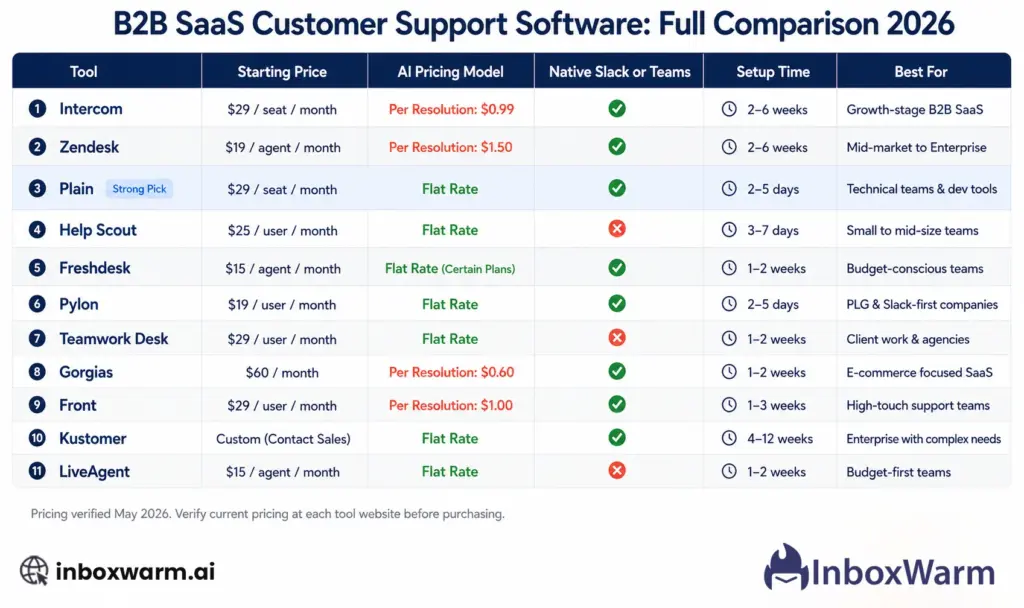
How Do All 11 B2B SaaS Customer Support Tools Compare Side by Side?
Pricing is verified as of May 2026. Confirm current pricing at each tool’s website before making a final decision.
How Do You Choose the Right B2B Customer Support Software for Your Stage?
Stage matters more than feature lists when choosing support software. A tool that is perfect for a 200-person team is actively harmful for a 10-person team, and vice versa.
Here is the honest stage-by-stage breakdown:
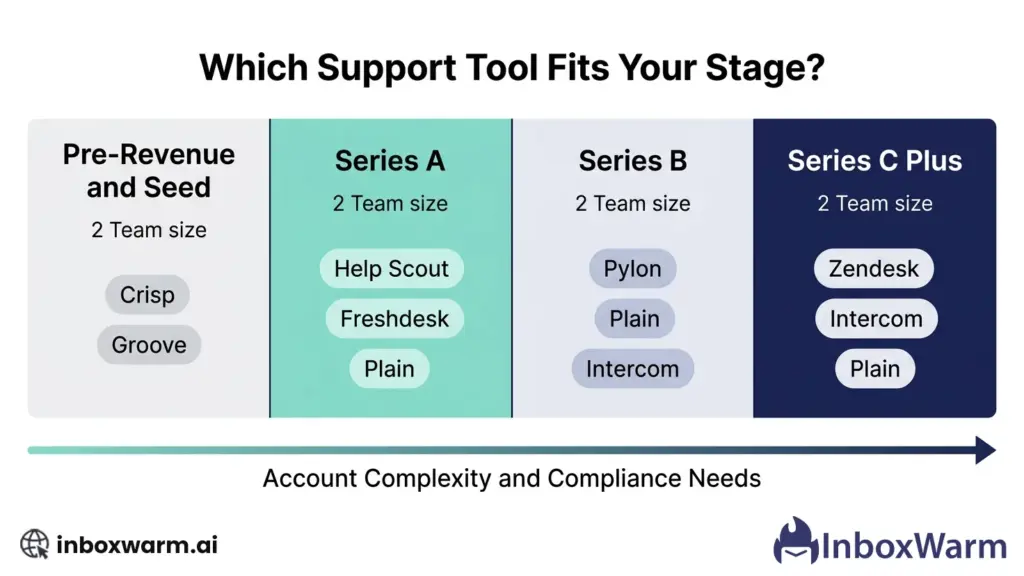
Pre-Revenue and Seed Stage
Your priorities are speed and cost. You need to be able to answer customer questions without an operations team. The right tools are those that go live in under a day and do not require dedicated admin work to maintain them.
Recommended: Crisp (free tier, workspace pricing), Groove (lowest per-seat cost), Help Scout (simple setup, flat-rate AI). Avoid Zendesk and TeamSupport entirely at this stage.
Series A
You have product-market fit and are scaling customers. Your support volume is growing. You need something that will not require replacement within 12 months. The key question at this stage is where your customers communicate: if they are in Slack, Plain, or Pylon. If they are primarily email-based, Help Scout or Freshdesk.
Recommended: Plain (if technical product and Slack-native customers), Help Scout (email-first), Freshdesk (budget with omnichannel coverage), Intercom (if PLG with high chat volume and AI deflection is a priority).
Series B
You are managing enterprise accounts and multi-stakeholder relationships. Churn prevention is a revenue priority. You likely have a dedicated support manager or small team. The tool needs account-level intelligence, not just ticket management.
Recommended: Pylon (Slack-native enterprise B2B), Plain (technical enterprise customers), Intercom (PLG with complex automation needs), TeamSupport (dedicated B2B account management with churn signals).
Series C and Beyond
Enterprise scale requires enterprise infrastructure. High ticket volume, complex compliance needs, multi-brand support, and sophisticated reporting become table stakes. The switching cost at this stage is extremely high, so choose something you can grow with.
Recommended: Zendesk (for enterprises with compliance needs and very high ticket volume), Intercom (for enterprise PLG), Plain (for enterprise technical products). HubSpot Service Hub for sales-led enterprises is already deep in the HubSpot ecosystem.
Note for sales teams at Series B and beyond: As your SDR headcount grows, each new mailbox needs to warm up your sending domain before launching outbound campaigns. Unwarmed Outlook and Gmail accounts landing in spam are a silent pipeline killer that your support software will never fix.
Why Does an AI Pricing Model Matter More Than You Think?
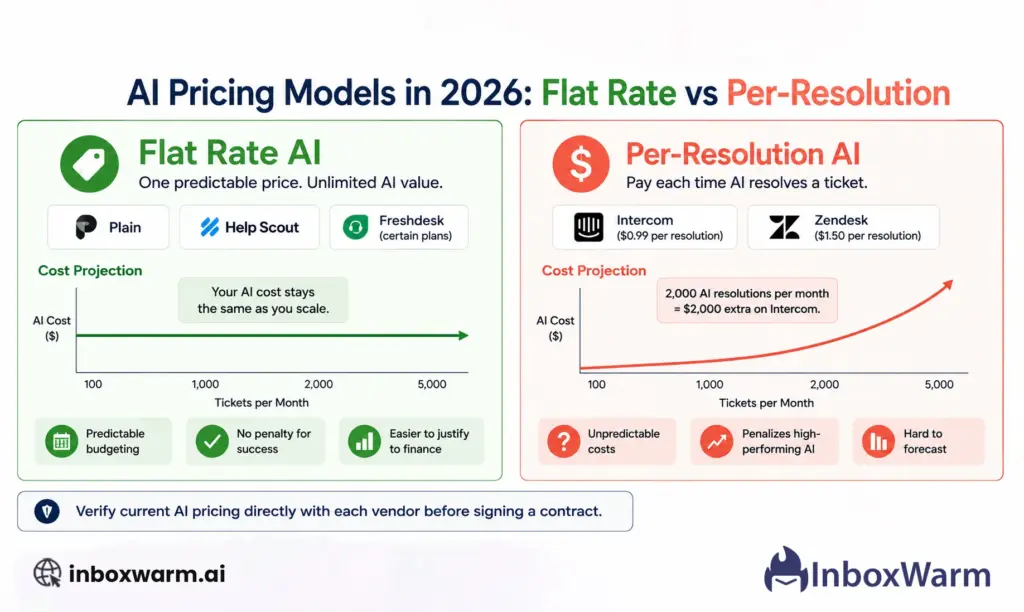
The single most important financial decision when choosing support software in 2026 is not the base seat price. It is the AI pricing model.
In 2026, most B2B support platforms will have integrated AI agents that automatically resolve tickets, suggest responses, and triage incoming requests. The question is not whether AI is included: it is whether you pay for it as a flat rate or per resolution.
| AI Pricing Model | What It Means in Practice |
|---|---|
| Flat rate (AI included in base plan) | Your AI costs are fixed regardless of how many tickets the AI resolves. As your support volume grows, your AI costs stay flat. Plain, Help Scout, and Freshdesk use this model. It makes budgeting predictable and removes the penalty for AI success. |
| Per-resolution pricing | You pay a fee every time the AI resolves a ticket autonomously. Intercom charges $0.99 per resolution. Zendesk charges $1.50. A team with 2,000 AI-resolved tickets per month is paying $1,980 on Intercom and $3,000 on Zendesk in AI fees alone, on top of base seat costs. |
| Why this matters at scale | At low volume, the difference is small. At Series B and beyond, with thousands of AI-resolved tickets per month, the per-resolution model can make AI more expensive than your entire base seat cost. Choose flat-rate AI if you expect to scale your support volume significantly. |
Protect Your Inbox Placement While Running Cold Email
Open tracking is one piece of the cold email puzzle. The piece that determines whether your emails get read at all is your sender reputation. InboxWarm.ai builds and maintains that reputation automatically so your campaigns start from the strongest possible foundation.
Frequently Asked Questions
How Is B2B Customer Support Software Different from B2C?
B2B customer support software is designed around company accounts rather than individual contacts. It groups all interactions from everyone at the same company into one account view, tracks relationship health across multiple stakeholders, integrates with engineering tools for technical escalation, and surfaces churn risk signals before a customer cancels. B2C support software optimizes for high ticket volume and fast individual resolutions. Most popular support platforms were built for B2C use cases and adapted for B2B, which is why genuinely B2B-first tools like TeamSupport and Plain stand out.
Does B2B Customer Support Software Need to Support Slack?
Increasingly yes, for companies selling to enterprise or mid-market B2B customers. Large organizations expect to communicate with vendors in Slack Connect channels, not through a support widget. If a significant portion of your customer base is enterprise or mid-market B2B, choosing a tool without native Slack support means either maintaining a manual bridging workflow or disappointing customers who want Slack-native support. Plain and Pylon both offer genuine Slack-native architecture. Other tools offer varying levels of Slack integration, some limited, some add-on only.
What Is the Difference Between Plain and Intercom for B2B SaaS?
Plain and Intercom serve different primary use cases. Plain is built for technical B2B teams whose customers communicate in Slack, Teams, or Discord. It has native two-way integration with Linear and Jira, an open API with no rate limits, and flat-rate AI pricing. Intercom is built for product-led growth companies prioritizing conversational AI, in-app messaging, and onboarding flows. Intercom charges $0.99 per Fin AI resolution, which becomes expensive at scale. Plain charges a flat rate for AI. If your product is technical and your customers are in Slack, Plain is the better fit. If you prioritize in-app messaging and conversational automation, Intercom is stronger.
How Much Does B2B Customer Support Software Cost?
Costs vary significantly based on platform and team size. Entry-level paid plans start around $12 to $35 per user per month (Groove, Help Scout, Plain, Freshdesk). Mid-range platforms run $55 to $90 per user per month (Zendesk Suite Team, Front Professional, HubSpot Professional). Enterprise platforms range from $100 to $220 per user per month (Zendesk Suite Enterprise, Front Enterprise, Pylon Professional). Beyond seat costs, factor in AI pricing: platforms using per-resolution AI (Intercom at $0.99, Zendesk at $1.50) add a variable cost component that can exceed base seat costs at high support volumes. Always calculate the total cost of ownership at your expected 12-month ticket volume before comparing sticker prices.
How Long Does It Take to Implement B2B Customer Support Software?
Implementation time varies dramatically by platform. Quick-start platforms (Plain, Help Scout, Freshdesk, Groove, and Crisp) can be live in one to three days for basic configuration. Mid-complexity platforms (Intercom, Pylon, HubSpot Service Hub, Front) typically require one to three weeks for full implementation, including integrations and workflow setup. Enterprise platforms (Zendesk, TeamSupport) typically require four to eight weeks and benefit significantly from a dedicated admin or implementation partner. If you are evaluating support software with the intent to launch quickly, filter first by implementation time before comparing features.
Conclusion
Choosing the right B2B SaaS customer support software is not a feature comparison exercise. It is a strategic decision that affects how your customers perceive your company, how quickly your team can resolve complex multi-stakeholder issues, and how early you can identify accounts drifting toward churn.
The 11 tools in this guide cover the full spectrum from free-tier early-stage options to enterprise-grade platforms.
The honest answer is that most teams will find the right choice among four categories: Plain for technical B2B teams with Slack-native customers; Intercom for PLG companies prioritizing AI automation; Zendesk for enterprises that need scale and compliance; and Help Scout or Freshdesk for email-first startups that value simplicity over sophistication.
The most important decision point in 2026 that most guides overlook: the AI pricing model. Flat-rate AI (Plain, Help Scout, Freshdesk) is significantly cheaper than per-resolution AI (Intercom, Zendesk) at the volumes most B2B SaaS companies reach by Series B. Run the math at your expected 12-month ticket volume before committing to a platform.
And choose a platform you can grow with. Migrating support software is expensive, disruptive, and time-consuming. The right tool for where you are going is worth slightly more than the right tool for where you are today.
For teams running cold outreach alongside support operations, InboxWarm.ai ensures those sales emails actually reach the inbox, so your brand signal is positive before a customer ever opens a support ticket.