
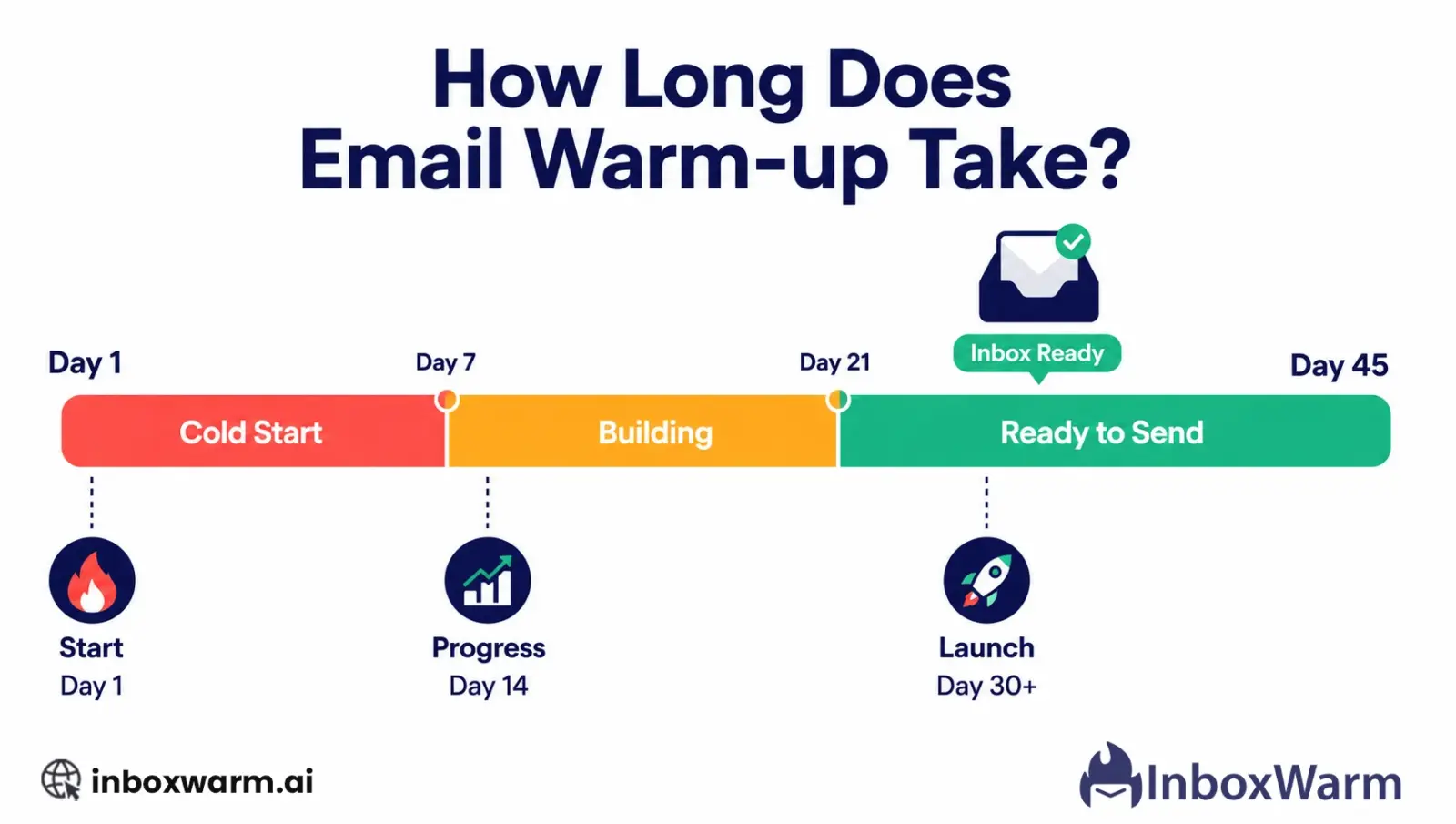

Email warm-up takes between 14 and 45 days for most senders. New domains sending low volumes are ready in 14 to 21 days. High-volume senders targeting hundreds of emails per day need 30 to 45 days. Domains recovering from blacklisting or spam filtering can take 60 to 90 days. The exact timeline depends on three things: your target daily sending volume, your domain’s history, and which email providers you are sending to.
Most people ask this question at one of two moments: right before they launch a cold email campaign or right after a campaign fails. Either way, the answer matters a lot because starting too early is one of the most common reasons cold emails go straight to spam.
This guide gives you the full picture: typical timelines, what slows the process down, and how to know when your warm-up is actually done.
Table of Contents
What Is Email Warm Up and Why Does the Timeline Matter?
Email warm-up is the process of gradually increasing the number of emails you send from a new or inactive email address. The goal is to build a positive sending reputation with email providers like Gmail and Outlook before you start sending at full volume.
Email providers keep a reputation score for every sending domain and IP address. A brand new domain has a score of zero. That does not mean it is trusted. It means it is unknown. And unknown senders get treated with suspicion.
The warm-up timeline matters because it is the minimum amount of time needed to move from unknown to trusted. Rush it and your emails go to spam. Follow it, and your campaigns start with a real chance of reaching the inbox.
Why the timeline is not the same for everyone
There is no single correct answer to how long email warm-up takes because every domain starts from a different position. A brand new domain that has never sent a single email needs more time than a domain that has been sending cleanly for months but went dormant. A domain that has been blacklisted needs more time than either of those.
How Long Does Email Warm Up Take for a New Domain?
For a brand new domain, the standard warm-up timeline runs between 14 and 45 days. The exact duration depends almost entirely on your target sending volume: how many emails per day you plan to send once the warm-up is complete.
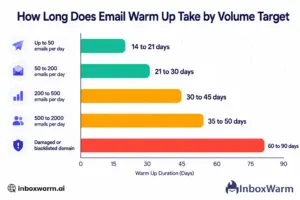
To make this easier to understand, here is a breakdown of how long email warm-up takes based on your daily sending volume:
| Target Daily Sending Volume | Recommended Warm Up Duration | Starting Volume on Day One |
|---|---|---|
| Up to 50 emails per day | 14 to 21 days | 5 emails per day |
| 50 to 200 emails per day | 21 to 30 days | 5 to 10 emails per day |
| 200 to 500 emails per day | 30 to 45 days | 10 emails per day |
| 500 to 2,000 emails per day | 35 to 50 days | 10 to 20 emails per day |
| 2,000 plus emails per day | 45 to 60 days | 20 to 30 emails per day |
These timelines assume your domain’s SPF, DKIM, and DMARC records are correctly configured before warm-up begins. If authentication is not in place, warm up will not work correctly regardless of how long you run it.
What Factors Affect How Long Email Warm Up Takes?
The 14 to 45 day range is a guideline, not a guarantee. Several factors can push your timeline shorter or longer. Here are the most common factors that affect the timeline of email warm-up:
Your Target Sending Volume
This is the biggest factor. A sender targeting 50 emails per day needs a shorter warm-up than one targeting 500. The higher your volume target, the more reputation you need to build before you get there, and that takes time.
Your Domain’s History
A domain that has never sent any email starts from zero. A domain that has been sending clean, engaged email for months and then went dormant for 60 days still has some residual reputation. A domain that was used aggressively and ended up on a blacklist starts from below zero and needs a recovery protocol, not a standard warm-up.
Email Providers You Are Sending To
Gmail and Outlook are the two most important providers, and they evaluate sender reputation differently. Outlook is generally stricter with new senders and can take longer to update its records. If your recipient list skews heavily toward Microsoft addresses (Outlook, Hotmail, Live), expect the timeline to lean toward the longer end of the range.
How Consistent Your Sending Pattern Is
A warm-up that increases volume smoothly and consistently every few days looks organic to email providers. A warm-up that jumps from 10 emails on day five to 200 emails on day six looks like a sudden spike, which is one of the signals providers use to identify spammers. Consistency is what makes a warm-up work.
The Quality of Your Warm-Up Tool’s Network
Warm-up tools work by sending emails to a network of real inboxes and generating positive engagement. A tool with a large, diverse network of Gmail and Outlook accounts generates engagement signals that look natural to email providers. A tool with a small or repetitive network generates patterns that can look synthetic. The quality of the network directly affects how quickly your reputation builds.
What Does a Typical Email Warm Up Schedule Look Like Week by Week?
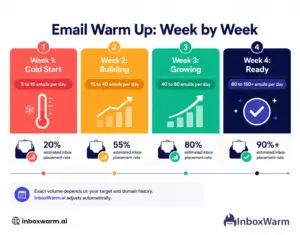
Email warm-up works in gradual stages rather than a sudden increase in sending volume. Each week builds more trust with email providers as your domain shows consistent, natural sending behavior. Here is how a standard 30-day warm-up breaks down for a sender targeting around 100 to 150 emails per day.
Week One: The Cold Start
Send 5 to 15 emails per day. This feels uncomfortably slow, but it is intentional. You are not trying to achieve anything in week one except establishing that your domain exists and is sending small amounts of legitimate-looking email. Most of your warm-up emails during this period will land in spam or go unnoticed. That is normal and expected.
Week Two: The Building Phase
Increase to 15 to 40 emails per day. Engagement signals from your warm-up tool are starting to accumulate. Gmail and Outlook are beginning to build a record for your domain. Inbox placement rates are still inconsistent at this point, often sitting between 40 and 60 percent. Do not launch a real campaign during week two.
Week Three: Gaining Ground
Increase to 40 to 80 emails per day. This is where most senders start to see a meaningful improvement in inbox placement. Google Postmaster Tools will begin showing a domain reputation signal, usually at the Low or Medium level. Inbox placement rates for your warm-up emails typically climb above 75 percent during this week.
Week Four: Approaching Launch-Ready
Increase to 80 to 150 emails per day. By the end of week four, a sender targeting 100 to 150 emails per day should have a domain reputation showing Medium or High in Google Postmaster Tools and an inbox placement rate consistently above 85 percent. At this point, a low-volume test campaign is reasonable. A full campaign launch should wait for the day-30 check.
How Do You Know When Your Email Warm Up Is Complete?
Time alone is not a reliable signal that your warm-up is done. The correct signal is inbox placement rate, not days elapsed. A domain that has been warming for 30 days but has a 50 percent inbox placement rate is not ready. A domain that has been warming for 21 days with a 92 percent placement rate might be.
Check these three things before launching any campaign:
- Google Postmaster Tools shows your domain reputation as Medium or High. “Low” or “bad” means you are not ready.
- Your spam rate is below 0.08 percent. Anything above 0.10 percent puts you in Google’s yellow zone.
- Your inbox placement rate has been above 88 percent for at least 7 consecutive days, not just on one good day.
Stopping warm-up the moment you launch a campaign is a mistake. Keep your warm-up running at a reduced maintenance volume of 10 to 20 emails per day throughout your campaign. Those positive engagement signals counterbalance any negative signals your campaign generates, like the occasional spam complaint or bounce. Turn off the warm-up, and you leave your reputation exposed.
How Long Does Email Warm Up Take for a Damaged Domain?
A domain that has been blacklisted, spam-flagged, or used aggressively without warm-up is not starting from zero. It is starting from a negative position, and a standard warm-up protocol is not enough to recover it.
Recovery warm-up for a damaged domain typically takes 60 to 90 days and follows a more conservative approach:
- Start at 3 to 5 emails per day instead of the standard 5 to 10.
- Increase volume more slowly, every 5 to 7 days instead of every 3.
- Submit formal delisting requests to the relevant blacklist providers (Spamhaus, Barracuda, and Mimecast) in parallel with the warm-up process.
- Monitor Google Postmaster Tools daily rather than weekly.
- Do not launch any real campaigns until reputation reaches “High” in Postmaster Tools and inbox placement is stable above 90 percent for 10 consecutive days.
The reason recovery takes longer is not just the time involved. It is the fact that email providers remember negative history. A domain with a spam complaint spike from two months ago is still evaluated differently from a clean new domain, even after the warm-up is complete. Patience at this stage is not optional.
Does Email Warm Up Take Longer on Gmail Than on Outlook?
Generally speaking, email warm-up in Gmail shows results faster because Gmail updates its sender reputation records more quickly than Outlook does. Most senders notice that Gmail inbox placement improves within the first two to three weeks of a properly executed warm-up. Outlook, on the other hand, tends to take longer, often requiring an additional week or two before placement rates stabilize at a similar level.
This difference becomes even more noticeable when your audience is split across providers. A sales team targeting enterprise companies on Microsoft 365 should plan for a longer warm-up window compared to teams focused mainly on Gmail-heavy audiences. Similarly, inbox warm-up in Yahoo can follow a more moderate pace, typically sitting between Gmail and Outlook in terms of reputation update speed.
| Provider | Typical Reputation Update Speed |
|---|---|
| Gmail (Google Workspace) | Faster: visible signals in 2 to 3 weeks |
| Outlook / Microsoft 365 | Slower: 3 to 5 weeks before stable placement |
| Yahoo / Others | Moderate: 2 to 4 weeks |
Can You Speed Up How Long Email Warm Up Takes?
You can optimize your warm-up to move through the timeline as efficiently as possible, but you cannot compress the fundamental biology of reputation building. Email providers need time to observe consistent behavior. That observation window is what the timeline represents.
What you can do to keep the process on track:
- Set up SPF, DKIM, and DMARC correctly before day one. Authentication problems slow down reputation building and can cause warm-up signals to be discarded entirely.
- Use a warm-up tool with a large, diverse inbox network. More engagement diversity means more convincing signals.
- Keep your sending schedule consistent. Warming up heavily on some days and not at all on others creates an irregular pattern that does not build a reputation as efficiently.
- Do not try to run real campaigns in parallel with a warm-up on the same domain. The spam complaints and bounces from a real campaign counteract the positive signals from the warm-up.
- Monitor Google Postmaster Tools weekly. If something is wrong, catching it early means you can adjust without losing weeks of progress.
What you should never do to speed up warm-up
- Do not increase your sending volume in large jumps. Going from 20 emails to 200 emails overnight is a red flag for email providers regardless of how good your reputation was the day before. The ramp must be gradual.
- Do not buy a ‘pre-warmed’ domain from an unknown source. There is no reliable way to verify the reputation history of a domain you did not warm up yourself.
Let InboxWarm.ai Handle the Timeline for You
InboxWarm.ai manages the full warm-up schedule automatically. Connect your mailbox in 5 minutes, and the platform handles the daily volume, the ramp-up pace, and the inbox placement monitoring. You just watch the progress and launch when you are ready.
Frequently Asked Questions
Is 7 Days Enough for Email Warm-Up?
No. Seven days is not enough for a complete email warm-up on a new domain. A one-week warm-up may show some early reputation signals, but inbox placement rates are still highly inconsistent at that stage, and launching a campaign would likely result in a significant portion of emails landing in spam. The minimum recommended warm-up duration for even low-volume senders is 14 days.
Can I Send Real Emails While Warming Up?
You can send transactional emails (receipts, confirmations, password resets) from a warmed-up primary domain during warm-up. However, you should not run cold email outreach campaigns on the same domain you are actively warming up. The spam complaints and hard bounces that come with cold outreach will counteract the positive signals that warm up is trying to build.
Does Email Warm Up Need to Be Done Every Time I Use a New Domain?
Yes. Every new domain starts with zero reputation, regardless of how well-established your other domains are. Email providers evaluate sender reputation at the domain level (and in some cases at the IP level), not at the account or company level. A new domain used by a company with an excellent reputation on its main domain will still land in spam if it has not been warmed up.
How Long Does Email Warm Up Take on Microsoft Outlook?
Outlook tends to update sender reputation records more slowly than Gmail. Most senders find that Outlook inbox placement stabilizes between weeks three and five of a standard warm-up, compared to weeks two and three for Gmail. If a significant portion of your recipient list uses Outlook or Microsoft 365, build the longer end of the timeline into your launch planning.
What Happens If I Stop Warming Up Before It Is Finished?
If you stop warming up before your domain reputation is fully established and then launch a campaign, you are likely to see much lower inbox placement than you would have with a completed warm up. The positive engagement signals that warm up generates are cumulative. Stopping early means stopping before you have accumulated enough to override the default suspicion email providers apply to low-history domains.
Does Email Warm Up Take Longer for Cold Email Than for Regular Email Marketing?
Cold email and regular email marketing (newsletters, promotional sends) both require domain warm up, but they carry different risk profiles. Cold email is sent to people who have not opted in, which makes it more likely to generate spam complaints. This means the warm-up before a cold email campaign needs to be thorough, and the ongoing maintenance warm-up during the campaign is especially important to offset complaint signals.
How Do I Know If My Email Warm Up Is Working?
The clearest signal is your inbox placement rate in your warm-up tool's dashboard. It should increase gradually over the first two to three weeks, moving from 20 to 40 percent in week one toward 80 to 90 percent by week three or four. You can also check Google Postmaster Tools directly. If your domain reputation is moving from low toward medium or high during the warm-up period, the process is working.
Bottom Line
Email warm-up usually takes between 14 and 45 days, depending on your daily sending volume. Lower-volume senders get ready faster, while higher-volume or riskier setups need more time to build a stable reputation.
- New domain, low volume: 14 to 21 days
- Standard volume: 21 to 30 days
- High volume: 30 to 45 days
- Damaged or blacklisted domain: 60 to 90 days
Don’t rely only on time. Launch when your inbox placement stays above 88 percent for 7 consecutive days and Google Postmaster Tools shows a Medium or High domain reputation.
Even after launch, keep a light warm-up running in the background to maintain sender reputation. Using a reliable email warm-up tool helps keep this process consistent and stable over time.