
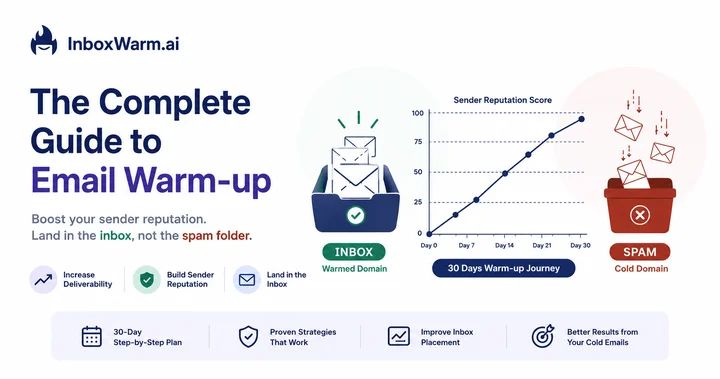

Email warm-up is the process of gradually increasing the volume of emails sent from a new or recovering email address to build sender reputation before launching a cold email campaign. Without it, new domains have a 60–80% chance of landing directly in the spam folder on their first send. A properly warmed domain typically reaches consistent inbox placement within 14 to 30 days, depending on the email provider and daily sending volume.
If your cold emails are going to spam, or if you’re setting up a new domain and don’t want them to, this guide covers everything you need to know about email warm-up: how it works at a technical level, how long it actually takes, and how to do it correctly.
- What email warm-up is and why it’s not optional for cold email
- The technical mechanics behind how warm-up builds sender reputation
- A realistic day-by-day warm-up timeline for new and recovering domains
- A step-by-step warm-up process you can follow starting today
- The most common warm-up mistakes that tank open rates
- How to choose the right warm-up tool for your setup
Table of Contents
What Is Email Warm-Up?
Email warm-up is the systematic process of establishing a trustworthy sender reputation for a new or dormant email address by gradually increasing sending volume and generating genuine engagement signals, opens, replies, and inbox placements, before running high-volume cold outreach.
When you create a new email domain and start sending 200 cold emails on day one, Gmail, Outlook, and other email providers see a domain with zero history sending a high volume of unsolicited messages. Their spam filters make a simple calculation: unknown sender + high volume + no engagement history = likely spam.
Email warm-up solves this problem by training the algorithms to see your domain as a legitimate, engaged sender before you need it to carry the weight of a real campaign.
What ‘sender reputation’ actually means
Every email address and domain has an invisible score, maintained separately by major providers like Google and Microsoft, that determines whether your messages reach the inbox, the promotions tab, or spam. This score is calculated from:
- Open rate: How often your emails are opened vs. ignored
- Reply rate: Whether recipients actually respond
- Spam complaint rate: How many recipients mark you as spam (Google’s threshold is 0.1%; above 0.3% triggers automatic filtering)
- Bounce rate: How often your emails fail to deliver (hard bounces above 2% signal list quality problems)
- Domain age and history: How long the domain has been sending email, and whether it has a spam history
- Engagement pattern: Whether emails are being moved out of spam to inbox by recipients, one of the strongest positive signals
According to Google Postmaster Tools data, domains that begin cold outreach without a warm-up period see an average spam placement rate of 52–68% on their first campaign, compared to 4–8% for fully warmed domains at equivalent sending volumes.
Why Is Email Warm-Up Not Optional in 2026?
The stakes for skipping email warm-up have never been higher. In February 2024, Google and Yahoo implemented new bulk sender requirements that made SPF, DKIM, and DMARC authentication mandatory and set explicit spam rate thresholds above which your email domain can be rate-limited or blacklisted entirely.
But authentication alone isn’t enough. You can have a perfect DMARC record and still land in spam if your sender reputation is unestablished. Warm-up is what bridges the gap between a technically correct setup and actual inbox placement.
The cost of skipping warm-up
- Lost campaign ROI: If you spent $2,000 on a copywriter and $500 on a prospect list, and those emails land in spam, the entire investment is wasted.
- Domain blacklisting: Aggressive sending from a cold domain can result in Spamhaus or Barracuda blacklisting within days, recovery can take 2–6 weeks.
- Permanent reputation damage: Google maintains historical data on your domain. A bad start can create a reputation debt that’s difficult to recover from, even months later.
- Client relationship risk: For agencies managing campaigns on behalf of clients, a deliverability failure is a contractual and reputational crisis.
How Email Warm-Up Works: The Technical Reality
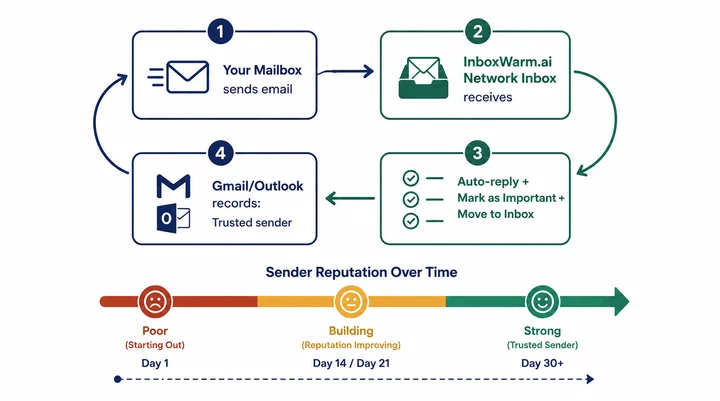
Email warm-up tools operate by simulating real human email activity between your mailbox and a network of other inboxes controlled by the tool provider. Here’s exactly what happens:
- Your mailbox sends a low-volume batch of emails to inboxes within the warm-up tool’s network.
- Those inboxes automatically receive the email and perform positive engagement actions: opening it, marking it as important, moving it from spam to inbox if necessary, and sometimes replying.
- These engagement signals are recorded by Gmail’s and Outlook’s algorithms, which update your sender reputation score accordingly.
- The following day, the sending volume is slightly increased — typically by 15–25 additional emails per day.
- This cycle repeats over 14 to 45 days until your domain has established a strong, consistent positive engagement history.
The key insight is that email providers don’t just track what you send; they track how recipients respond. Warm-up tools engineer a favorable response pattern so that when your real campaign launches, the algorithms are already primed to trust your domain.
SMTP warm-up refers to warming up a dedicated IP address (used with custom SMTP setups). Domain warm-up refers to building the reputation of the domain itself. Most cold email setups using Google Workspace or Microsoft 365 needs domain warm-up. Dedicated SMTP users (SendGrid, AWS SES, Postmark) need both. InboxWarm.ai handles both automatically.
Who Needs Email Warm-Up (and When)
Email warm-up is required in any of the following situations:
- New domain or subdomain: Any domain registered less than 90 days ago has no sending history. Treat it as zero reputation.
- New email account on existing domain: Even if the domain is established, a brand-new Google Workspace mailbox starts with no individual sender score.
- Dormant domain reactivation: A domain that has been inactive for 60+ days can lose its reputation. Warm it up again before any outreach.
- Post-blacklist recovery: If your domain has been blacklisted or spam-flagged, warm-up is the core component of the recovery process, alongside delisting requests.
- Platform migration: Moving from one ESP to another (e.g., from Mailchimp to a custom SMTP setup) means your sending history doesn’t transfer. Re-warm.
- Significant volume increase: If you’re scaling from 50 emails/day to 500/day, treat it as a mini warm-up cycle, don’t jump volumes overnight.
How Long Does Email Warm-Up Take?
The honest answer is it depends on three factors: your starting point, your target sending volume, and whether your domain has any existing negative history. Here’s a realistic framework:
| Scenario | Recommended Duration | Notes |
|---|---|---|
| Brand-new domain, low volume target (<50/day) | 14–21 days | Fastest path. Small daily increments. Low risk of triggering filters. |
| Brand-new domain, medium volume (50–200/day) | 21–30 days | Standard warm-up. Use a tool to automate the daily volume ramp. |
| Brand-new domain, high volume (200–500/day) | 30–45 days | Conservative ramp-up essential. Jump too fast and you'll trigger rate limiting. |
| Previously blacklisted or spam-flagged domain | 45–60 days | Recovery warm-up. Start at 3–5 emails/day. Slower ramp. Monitor G Suite Postmaster Tools daily. |
| Dormant domain (inactive 60+ days) | 21–30 days | Treat like a new domain. Previous good reputation may partially persist, monitor reputation scores. |
| Existing domain scaling up volume | 7–14 days | Incremental warm-up. Start from current volume + 20% and ramp up over 2 weeks. |
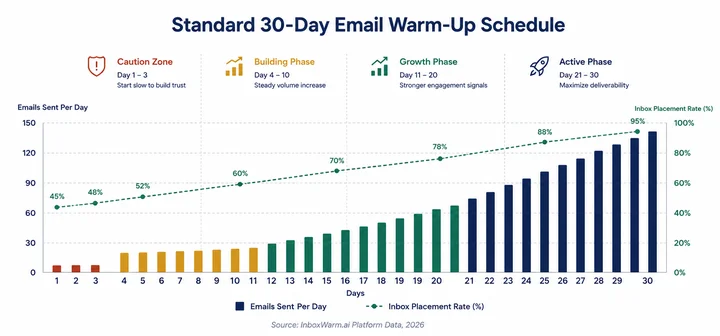
The most common warm-up mistake is scaling volume too fast when early results look good. A 40% open rate on day 5 is not a green light to send 200 emails on day 6. Follow the schedule. Reputation is earned incrementally.
How to Warm Up an Email Domain: Step-by-Step
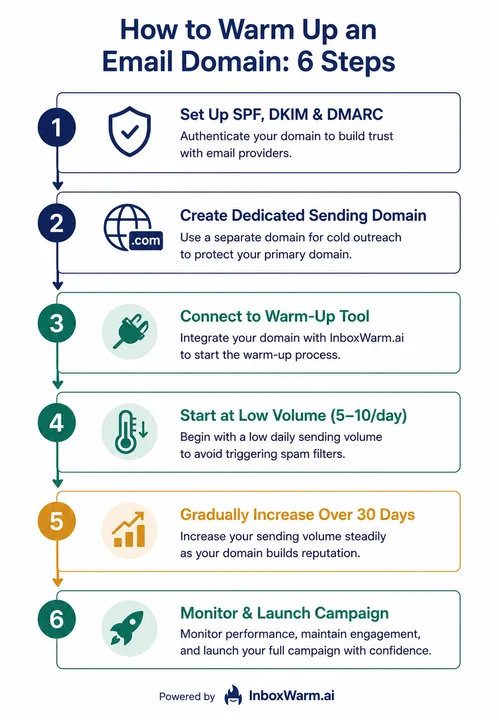
Step 1: Set up SPF, DKIM, and DMARC authentication
Authentication is a prerequisite, not a parallel task. Without it, your emails will fail modern provider checks regardless of your sender reputation. Configure all three records in your domain’s DNS settings before sending a single warm-up email.
- SPF: Authorises which servers can send email on behalf of your domain
- DKIM: Adds a cryptographic signature that verifies the email hasn’t been tampered with
- DMARC: Tells receiving servers what to do with emails that fail SPF or DKIM checks
Step 2: Create a dedicated sending domain
Never use your primary business domain for cold email. Create a secondary domain (e.g., yourbrand-outreach.com or getresponse-yourbrand.com). This protects your primary domain if the secondary domain’s reputation is damaged by an aggressive campaign.
Step 3: Connect your mailbox to a warm-up tool
Manual warm-up, emailing friends and colleagues to create engagement, doesn’t scale and isn’t reliable. An automated warm-up tool manages the volume ramp, engagement simulation, and monitoring automatically. Connect your Google Workspace or Microsoft 365 mailbox via IMAP/SMTP credentials or OAuth.
Step 4: Start at an absolute minimum volume
On day one, send no more than 5–10 warm-up emails. This is not a suggestion; it’s a hard limit. Providers flag domains that jump to high volumes immediately, regardless of authentication status. Your first week should feel almost uncomfortably slow.
Step 5: Increase volume by 20–30% every 3–5 days
The ramp-up schedule should feel like a compound interest curve: small initial numbers that grow meaningfully over time. A good tool will adjust this ramp automatically based on your real-time engagement signals, faster if signals are positive and slower if the provider starts deferring messages.
Step 6: Monitor, then launch
Before launching your campaign, verify three metrics in Google Postmaster Tools:
- Domain reputation: ‘Good’ or ‘High’ (not ‘Low’ or ‘Bad’)
- Spam rate: Below 0.08% (Google’s yellow zone starts at 0.10%)
- Authentication: SPF, DKIM, DMARC all passing at 100%
When all three are green, you’re ready. Keep the warm-up tool running in the background even after your campaign launches; it maintains your reputation between active sends.
Email Warm-Up Best Practices
| Practice | Why It Matters |
|---|---|
| Keep warm-up emails running in parallel with campaigns | Stopping warm-up the moment you start sending is like removing a foundation mid-build. Keep sending 10–20 warm-up emails daily throughout your campaign lifecycle. |
| Never warm up using mass marketing templates | Warm-up email content should look like a natural 1:1 conversation, not newsletters or bulk promotional sends. Providers can pattern-match template-style content. |
| Use a dedicated warm-up subdomain, not a catch-all | A specific subdomain (outreach.yourdomain.com) isolates warm-up traffic from your main domain's reputation. Catch-all addresses create attribution noise. |
| Monitor Google Postmaster Tools weekly | Free, first-party data from Google showing your domain and IP reputation. If your spam rate is creeping up, you'll see it here before it becomes a deliverability crisis. |
| Don't warm up and run a campaign simultaneously on day 1 | Warm-up for at least 14 days before your first campaign send, even if your early metrics look good. The reputation being built is forward-looking insurance. |
| Rotate sending domains for agency-scale outreach | If managing campaigns for multiple clients, give each client a separate sending domain. Never share a warmed domain between unrelated clients. |
| Re-warm after list quality problems | If a campaign generates a high bounce rate or spam complaint spike, pause outreach and run a re-warm cycle before the next campaign. |
Choosing an Email Warm-Up Tool
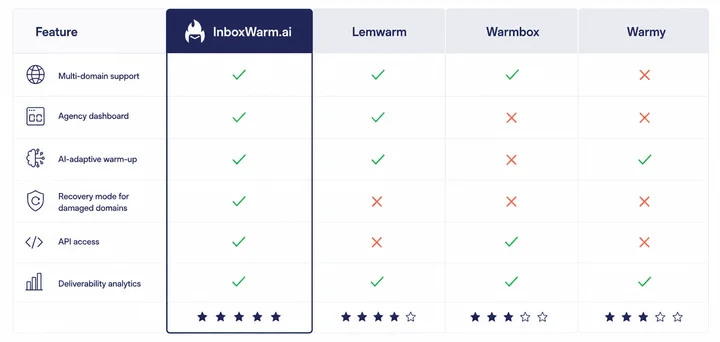
Not all warm-up tools are equal. The key differentiators for buyers managing more than one or two mailboxes are:
- Network size: The number of real inboxes in the warm-up network. Larger = more natural engagement diversity.
- Adaptive algorithms: Does the tool adjust your ramp-up speed based on actual engagement signals, or does it follow a fixed schedule regardless of how providers are responding?
- Recovery mode: Can the tool warm up an already-damaged domain differently from a brand-new one? Most can’t.
- Multi-inbox management: If you manage 10, 20, or 50 mailboxes, you need a dashboard that shows all of them at once, not one login per mailbox.
- Deliverability analytics: Does it show you inbox placement rate, spam rate, and sender score, or just ‘warm-up progress’?
| Tool | Best For | Key Differentiator | Starting Price |
|---|---|---|---|
| InboxWarm.ai | Agencies + multi-mailbox teams | AI-adaptive warm-up, recovery mode, multi-domain dashboard, deliverability analytics | From $25/mo per mailbox |
| Lemwarm | Solo senders new to warm-up | Simple setup, part of Lemlist ecosystem, good if already using Lemlist | From $24/mo |
| Warmbox | Budget-conscious solo users | Affordable entry tier, basic warm-up features | From $15/mo |
| Warmy | Users wanting a simple dashboard | Clean UI, straightforward warm-up for single domains | From $49/mo |
| Instantly (built-in) | Instantly.ai platform users | Convenient if already on Instantly; limited recovery capabilities | Included in Instantly plan |
Start Warming Up in 5 Minutes
InboxWarm.ai is an AI-powered email warm-up tool that improves inbox placement and sender reputation automatically for single mailboxes and agencies managing dozens of domains.
Connect your mailbox in under 5 minutes. No credit card required.
What Email Warm-Up Cannot Fix
Email warm-up builds sender reputation. It does not fix underlying problems that would damage that reputation anyway:
- Poor list quality: If you’re emailing purchased or unverified lists with high bounce rates, warm-up reputation will be eroded as fast as it’s built.
- Spam-triggering copy: Certain phrases, excessive links, or attachment-heavy emails can trigger content filters regardless of sender reputation.
- Missing authentication: Warm-up without complete SPF, DKIM, and DMARC is building on an unstable foundation.
- Excessive sending volume: Even a perfectly warmed domain has a daily sending ceiling. Exceed it and reputation suffers.
- Non-compliance: CAN-SPAM, GDPR, and CASL compliance are legal requirements, not warm-up factors, but violations result in complaint spikes that destroy reputation.
Frequently Asked Questions
How Long Does Email Warm-Up Take?
Email warm-up typically takes 14 to 45 days depending on your target sending volume and whether your domain has any prior history. A new domain targeting 50 emails per day needs approximately 21 days of warm-up. A domain targeting 200 emails per day needs 30 to 45 days. Previously blacklisted domains can take 45 to 60 days. Most email warm-up tools automate this timeline based on real-time engagement signals from your specific email provider.
Can You Warm Up an Email Domain Manually?
Yes, manual warm-up is possible but not practical at scale. Manual warm-up involves emailing colleagues or friends, asking them to open, reply to, and not mark your emails as spam, then gradually increasing volume. This works for a single mailbox with a low target volume, but becomes unmanageable for agencies or teams handling multiple domains. Automated warm-up tools replicate this process with a network of thousands of inboxes, removing the manual dependency.
What Happens If You Skip Email Warm-Up?
Skipping email warm-up on a new domain means your first campaign is very likely to land in spamx, typically 52–68% spam placement rate based on InboxWarm.ai platform data. Beyond the immediate campaign failure, aggressive sending from a cold domain can trigger Spamhaus or Barracuda blacklisting within 3 to 7 days, which requires a formal delisting request and recovery warm-up cycle that can take 4 to 8 weeks.
Does Email Warm-Up Work for Google Workspace and Microsoft 365?
Yes. Email warm-up works for both Google Workspace (Gmail) and Microsoft 365 (Outlook). Each platform has its own sender reputation system, they don't share data, so if you're sending to both Gmail and Outlook recipients, you need to warm up your domain's reputation with both. Quality warm-up tools like InboxWarm.ai include Google Workspace and Microsoft 365 inboxes in their warm-up networks to build cross-platform reputation simultaneously.
How Many Emails Should You Send Per Day During Warm-Up?
Start with 5 to 10 emails per day in week one. Increase by 20 to 30% every 3 to 5 days, following engagement signal feedback from your provider. By day 30, a standard warm-up schedule reaches 100 to 150 emails per day. Never jump volume abruptly, providers notice sudden volume spikes from previously low-activity domains and flag them as suspicious.
Should You Keep Your Warm-Up Tool Running After Your Campaign Launches?
Yes, this is one of the most important warm-up best practices. Running 10 to 20 warm-up emails daily in the background maintains your sender reputation between campaign sends. If you stop warm-up the moment you launch a campaign, any deliverability problems from your campaign (high bounce rate, spam complaints) will damage your reputation with no counterbalancing positive engagement. Keep warm-up running permanently.
Can Email Warm-Up Fix a Blacklisted Domain?
Domain warm-up builds the reputation of your sending domain (yourdomain.com) with email providers like Gmail and Outlook. IP warm-up builds the reputation of a dedicated IP address with email providers and spam filter networks. Most cold email users on Google Workspace or Microsoft 365 need domain warm-up only. Users with dedicated SMTP setups (AWS SES, SendGrid, Postmark on a dedicated IP) need both. InboxWarm.ai handles both automatically based on your sending configuration.
Is Email Warm-Up Against Google’s Terms of Service?
Email warm-up as a practice is not prohibited by Google's Terms of Service. Building sender reputation through genuine engagement is the intended way for domains to establish email sending legitimacy. What Google does restrict is automated sending of bulk unsolicited email, which is what warm-up prevents. Using a reputable warm-up service that simulates genuine engagement between real inboxes is consistent with how email reputation is intended to work.
How Do You Know When Your Email Is Fully Warmed Up
Your email domain is ready for campaign launch when your domain reputation in Google Postmaster Tools shows 'Good' or 'High'; your spam rate is below 0.08%; SPF, DKIM, and DMARC are all passing at 100%; and your warm-up tool shows consistent inbox placement above 90%. These benchmarks should hold stable for at least 7 consecutive days before you launch a campaign, not just on one or two good days.
Ready to Warm Up Your Email Domain?
Email warm-up isn’t a nice-to-have — it’s the infrastructure that determines whether your cold outreach gets read or gets filtered. Get it right once, and every campaign you run benefits from the reputation you’ve built.
InboxWarm.ai connects to your Google Workspace or Microsoft 365 mailbox in under 5 minutes and begins building your sender reputation automatically. No technical configuration. No manual intervention. Real-time deliverability analytics included.
